brake Abarth 124 Spider 2016 Owner handbook (in English)
[x] Cancel search | Manufacturer: ABARTH, Model Year: 2016, Model line: 124 Spider, Model: Abarth 124 Spider 2016Pages: 224, PDF Size: 2.89 MB
Page 113 of 224

PARKING BRAKE
133) 134) 135)
IMPORTANT Driving with the parking
brake on will cause excessive wear of
the brake parts.
Setting the parking brake
Depress the brake pedal and then firmly
pull the parking brake lever fully
upwards with sufficient force to hold the
vehicle in a stationary position.
Releasing the parking brake
Depress the brake pedal and pull the
parking brake lever 1 upwards fig. 84,
then press the release button 2. While
holding the button, lower the parking
brake lever all the way down to the
released position.Brake Assist
During emergency braking situations
when it is necessary to depress the
brake pedal with greater force, the
brake assist system provides braking
assistance, thus enhancing braking
performance.
When the brake pedal is depressed
hard or depressed more quickly, the
brakes apply more firmly.
NOTE When the brake pedal is
depressed hard or depressed more
quickly, the pedal will feel softer but the
brakes will apply more firmly. This is a
normal effect of the brake assist
operation and does not indicate a
malfunction.
NOTE When the brake pedal is
depressed hard or depressed more
quickly, a motor/pump operation noise
may be heard. This is a normal effect of
the brake assist and does not indicate a
malfunction.
NOTE The brake assist equipment does
not supersede the functionality of the
vehicle's main braking system.
WARNING
133)In the case of parking manoeuvres on
roads on a gradient, the front wheels must
be steered towards the pavement (when
parking downhill), or in the opposite
direction if the vehicle is parked uphill. If the
vehicle is parked on a steep slope, it is
advisable to block the wheels with a wedge
or stone.
134)Never leave children unattended in
the vehicle. Keep away the key when
leaving the vehicle and take it with you.
135)Do not drive with worn disc pads.
Driving with worn disc pads is dangerous.
The brakes could fail and cause a serious
accident. As soon as you hear a
screeching noise contact an Abarth
Dealership.
8405050102-12A-001AB
111
Page 114 of 224

MANUAL
TRANSMISSION
136) 137) 138)
25)
To engage the gears, press the clutch
pedal fully and put the gear lever into
the required position. The diagram for
gear engagement is shown on the knob
fig. 85.
Depress the clutch pedal all the way
down while shifting; then release it
slowly.
Your vehicle is equipped with a device
to prevent shifting to R (reverse) by
mistake. Push the shift lever downward
and shift to R.
If shifting to R is difficult, shift back into
neutral, release the clutch pedal, and try
again.With Parking Sensor system
When the shift lever is shifted to the R
position with the ignition switched ON,
the parking sensor system is activated
and a beep sound is heard.IMPORTANT Keep your foot off the
clutch pedal except when shifting
gears. Also, do not use the clutch to
hold the vehicle on an upgrade. Riding
the clutch will cause needless clutch
wear and damage.
IMPORTANT Do not apply any
excessive lateral force to the shift lever
when changing from 5
thto 4thgear.
This could lead to the accidental
selection of 2
ndgear, which could
result in damage to the transmission.
IMPORTANT Make sure the vehicle
comes to a complete stop before
shifting to R. Shifting to R while the
vehicle is still moving may damage the
transmission.
IMPORTANT Reverse can only be
engaged when the vehicle is completely
stationary. With the engine running, wait
at least 2 seconds with the clutch pedal
fully pressed before engaging reverse to
prevent damage to the gears and
grating.
WARNING
136)Depress the clutch pedal fully to
change gear correctly. Therefore, the floor
area underneath the pedal unit must not be
obstructed in any way. Ensure that the floor
mat is always laid flat and does not
interfere with use of the pedals.
137)Do not use sudden engine braking on
slippery road surfaces or at high speeds.
Shifting down while driving on wet, snowy,
or frozen roads, or while driving at high
speeds causes sudden engine braking,
which is dangerous. The sudden change in
tyre speed could cause the tyres to skid.
This could lead to loss of vehicle control
and an accident.
138)Always leave the shift lever in 1 or R
position and set the parking brake when
leaving the vehicle unattended. Otherwise
the vehicle could move and cause an
accident.
IMPORTANT
25)Do not drive with your hand resting on
the gear lever as the force exerted, even if
slight, could lead over time to premature
wear of the gearbox internal components.8505987654-12A-001AB
112
STARTING AND OPERATING
Page 115 of 224

AUTOMATIC
TRANSMISSION
(where provided)
VARIOUS LOCKOUTS
To shift from P to R you must depress
the brake pedal and hold in the
lock-release button to shift (the ignition
must be switched ON).
To shift from R to N, from N to D (or D
to N), from D to M (or M to D) and from
M to + and - the selector lever can be
shifted freely into any position.
To shift from N to R and from R to P
you must hold in the lock-release
button fig. 86 to shift.
Sport mode
The Sport automatic transmission has
an option that is not included in the
traditional automatic transmission that
gives the driver the option of selecting
each gear instead of leaving it to the
transmission to shift gears. Even if you
intend to use the automatic
transmission functions as a traditional
automatic, you should also be aware
that you can inadvertently shift into
manual shift mode and an inappropriate
gear may be retained as the vehiclespeed increases. If you notice the
engine speed going higher or hear the
engine racing, confirm you have not
accidentally slipped into manual shift
mode.
GEAR LEVER POSITIONS
P (Park)
139) 140)
P locks the transmission and prevents
the rear wheels from rotating. The
selector lever must be in P or N to
operate the starter.
IMPORTANT Shifting into P, N or R
while the vehicle is moving can damage
your transmission.
IMPORTANT Shifting into a driving gear
or reverse when the engine is running
faster than idle can damage the
transmission.
R (Reverse)
In position R, the vehicle moves only
backward. You must be at a complete
stop before shifting to or from R, except
under rare circumstances.
With Parking Sensor system: when
the selector lever is shifted to the R
position with the ignition switched ON,
the parking sensor system is activated
and a beep sound is heard.
8605210200-LHD12AT-001AB
113
Page 116 of 224

N (Neutral)
141)
In N, the wheels and transmission are
not locked. The vehicle will roll freely
even on the slightest incline unless the
parking brake or brakes are on.
IMPORTANT Do not shift into N when
driving the vehicle. Doing so can cause
transaxle damage. Apply the parking
brake or depress the brake pedal
before moving the selector lever from N
to prevent the vehicle from moving
unexpectedly.
D (Drive)
D is the normal driving position. From a
stop, the transmission will automatically
shift through a 6-gear sequence.
M (Manual)
M is the manual shift mode position.
Gears can be shifted up or down by
operating the selector lever. Refer to
“Manual shift mode”.
SHIFT-LOCK SYSTEM
The shift-lock system prevents shifting
out of P unless the brake pedal is
depressed.
To shift from P:
depress and hold the brake pedal;
start the engine;
press and hold the lock-release
button;
move the selector lever.
When the ignition is switched to ACC or
the ignition is switched off, the selector
lever cannot be shifted from P.
The ignition cannot be switched to OFF
if the selector lever is not in P.
SHIFT-LOCK OVERRIDE
If the selector lever will not move from P
using the proper shift procedure,
continue to hold down the brake pedal.
Proceed as follows:
remove the shift-lock override cover
using a cloth-wrapped flat head
screwdriver fig. 87;
insert a screwdriver and push it
down;
press and hold the lock-release
button and move the selector lever;
take the vehicle to an Abarth
Dealership.For some versions
Proceed as follows:
press the lock-release button with
the button pressed fig. 88;
move the selector lever;
take the vehicle to an Abarth
Dealership.
MANUAL SHIFT MODE
To change to manual shift mode, shift
the lever from D to M. To return to
automatic shift mode, shift the lever
fromMtoD.
IMPORTANT Changing to manual shift
mode while driving will not damage the
transmission.
IMPORTANT If you change to manual
shift mode when the vehicle is stopped,
the gear may shift to M1.
IMPORTANT If you change to manual
shift mode without depressing the
8705210206-12A-002AB
8805210206-122-001AB
114
STARTING AND OPERATING
Page 117 of 224

accelerator pedal when driving in D
range, 5th gear/6th gear, the gear may
shift to M4/M5.
Manually shifting up / down
Using selector lever
To shift upto a higher gear, tap the
selector lever back+once.To shift
downto a lower gear, tap the selector
lever forward–once.
Using steering shift switch
142)
To shift up to a higher gear with the
steering shift switches, pull the UP
switch+/OFFfig. 89 toward you once
with your fingers. To shift down to a
lower gear with the steering shift
switches, pull the DOWN switch–
toward you once with your fingers.Second gear fixed mode
When the selector lever is moved back
while the vehicle speed is about 2 km/h
or less, the gearbox is set in the second
gear. The gear is set in second while in
this mode for easier acceleration from a
stop and driving on slippery roads such
as snow-covered roads.
SHIFT GEAR (SHIFTING)
SPEED LIMIT
Shift up
The gear does not shift up while the
vehicle speed is lower than the speed
limit.
Shift down
The gear does not shift down while the
vehicle speed exceeds the speed limit.
Kickdown
When the accelerator pedal is
depressed fully while driving, the gear
shifts down.
Auto-shift down
The gear shifts down automatically
depending on the vehicle speed during
deceleration.
DIRECT MODE(where provided)
Direct mode can be used for
temporarily switching gears by
operating the steering shift switch whilethe vehicle is being driven with the
selector lever in the D range.
Direct mode is cancelled (released)
when the vehicle is stopped.
IMPORTANT Shifting up and down
while in direct mode may not be
possible depending on the vehicle
speed.
DRIVING TIPS
143) 144)
Passing
For extra power when passing another
vehicle or climbing steep grades,
depress the accelerator fully. The
transmission will shift to a lower gear,
depending on vehicle speed.
Climbing steep grades from a stop
To climb a steep grade from a stopped
position depress the brake pedal, shift
to D or M1, depending on the load
weight and grade steepness, release
the brake pedal while gradually
accelerating.
Descending steep grades
When descending a steep grade, shift
to lower gears, depending on load
weight and grade steepness.
Descend slowly, using the brakes only
occasionally to prevent them from
overheating.
8907040110-124-007AB
115
Page 118 of 224

WARNING
139)Always set the selector lever to P and
set the parking brake. Only setting the
selector lever to the P position without
using the parking brake to hold the vehicle
is dangerous. If P fails to hold, the vehicle
could move and cause an accident.
140)If the engine is running faster than
idle, do not shift from N or P into a driving
gear. It's dangerous to shift from N or P
into a driving gear when the engine is
running faster than idle. If this is done, the
vehicle could move suddenly, causing an
accident or serious injury.
141)Do not shift into N when driving the
vehicle. Shifting into N while driving is
dangerous. Engine braking cannot be
applied when decelerating which could
lead to an accident or serious injury.
142)Keep your hands on the steering
wheel rim when using fingers on the
steering shift switches. Putting your hands
inside the rim of the steering wheel when
using the steering shift switches is
dangerous. If the driver's air bag were to
deploy in a collision, your hands could be
impacted causing injury.
143)Do not use engine braking on slippery
road surfaces or at high speeds. Shifting
down while driving on wet, snowy, or
frozen roads, or while driving at high
speeds causes sudden engine braking,
which is dangerous. The sudden change in
tire speed could cause the tires to skid.
This could lead to loss of vehicle control
and an accident.144)Do not let the vehicle move in a
direction opposite to the direction selected
by the selector lever. Do not let the vehicle
move backward with the selector lever in a
forward position, or do not let the vehicle
move forward with the selector lever in the
reverse position. Otherwise, the engine
may stop, causing the loss of the power
brake and power steering functions, and
make it difficult to control the vehicle which
could result in an accident.
SPORT MODE
(where provided)
DRIVE SELECTION
Drive selection is a system to switch the
vehicle's drive mode. When theSPORT
mode is selected, vehicle's response
against accelerator operation is
enhanced.
IMPORTANT Do not use theSPORT
mode when driving on slippery roads
such as wet or snow-covered roads. It
may cause tyre slipping.
Drive selection switch
Press the drive selection switch
fig. 90 to theSPORTmode side
(forward) to select the sport mode.
Pull the drive selection switch to the—
side (backward) to cancel the sport
mode.
9005210101-12A-001AB
116
STARTING AND OPERATING
Page 120 of 224

IMPORTANT When the MODE switch is
pressed during cruise control system
operation, the system switches to the
adjustable speed limiter.
Without Speed limiter: press the
OFF/CANCEL switch. The
warning
light (amber) turns off.
When a cruising speed has been set
warning light (green) turns on
Long-press the OFF/CANCEL switch or
press the OFF/CANCEL switch 2 times.
When a cruising speed has not
been set
warning light (amber)
turns on press the OFF/CANCEL
switch.
SETTING A DESIRED
SPEED
Proceed as follows:
With Speed limiter: activate the
cruise control device by pressing the
MODE switch. The cruise warning light
(amber) turns on;
Without Speed limiter: activate the
cruise control device by pressing the
ON switch. The cruise warning light
(amber) turns on;
accelerate to the desired speed,
which must be more than 25 km/h;
set the cruise control by pressing the
SET/- switch at the desired speed. The
cruise control is set at the moment the
SET/- switch is pressed. Release the
accelerator pedal simultaneously. The
warning light (green) turns on.
The cruise control speed setting cannot
be performed under the following
conditions:
Automatic transmission: the
selector lever is in the P or N position;
Manual transmission: the shift
lever is in the neutral position;
The parking brake is applied;
Vehicles with Speed limiter: the
MODE switch for the adjustable speed
limiter is pressed.
Release the SET/- switch at the
desired speed, otherwise the speed will
continue decreasing while the SET/-
switch is pressed and held (except
when the accelerator pedal is
depressed);
On a steep grade, the vehicle may
momentarily slow down while
ascending, or speed up while
descending.
The cruise control will cancel if the
vehicle speed decreases below
21 km/h when climbing a steep grade.
The cruise control may cancel at
about 15 km/h below the preset speed
such as when climbing a long, steep
grade.
The vehicle speed preset using the
cruise control is displayed in the
instrument cluster.
INCREASING SPEED
To increase speed using cruise
control switch
Press the RESUME/+ switch and hold it
your vehicle will accelerate. Release the
switch at the desired speed.
Press the RESUME/+ switch and
release it immediatelyto adjust the
preset speed. Multiple operations will
increase the preset speed according to
the number of times it is operated.
Increasing speed with a single
RESUME/+ switch operation
Meter display for vehicle speed
indicated in km/h: 1 km/h.
To increase speed using
accelerator pedal
Depress the accelerator pedal to
accelerate to the desired speed.
Press the SET/- switch and release it
immediately.
IMPORTANT Accelerate if you want to
speed up temporarily when the cruise
control is on. Greater speed will not
interfere with or change the set speed.
Take your foot off the accelerator to
return to the set speed.
118
STARTING AND OPERATING
Page 121 of 224

DECREASING SPEED
Press the SET/- switch and hold itthe
vehicle will gradually slow. Release the
switch at the desired speed.
Press the SET/- switch and release it
immediatelyto adjust the preset speed.
Multiple operations will decrease the
preset speed according to the number
of times it is operated.
Decreasing speed with a single
SET/- switch operation
Meter display for vehicle speed
indicated in km/h: 1 km/h.
INCREASING /
DECREASING SPEED
To increase speed
With cruise control switch: press the
RESUME/+ switch and hold it your
vehicle will accelerate. Release the
switch at the desired speed. Press the
RESUME/+ switch and release it
immediately to adjust the preset speed.
Multiple operations will increase the
preset speed according to the number
of times it is operated.
Using accelerator pedal: depress the
accelerator pedal to accelerate to the
desired speed. Press the SET/- switch
and release it immediately.
IMPORTANT Accelerate if you want to
speed up temporarily when the cruise
control is on. Greater speed will notinterfere with or change the set speed.
Take your foot off the accelerator to
return to the set speed.
RESUME SPEED
If some other method besides the
OFF/CANCEL switch was used to
cancel cruising speed (such as applying
the brake pedal) and the system is still
activated, the most recent set speed
will automatically resume when the
RESUME/+ switch is pressed.
If vehicle speed is below 25 km/h,
increase the vehicle speed up to
25 km/h or more and press the
RESUME/+ switch.
TEMPORARILY
CANCELLING THE
SYSTEM
To temporarily cancel the system, use
one of these methods: slightly depress
the brake pedal/depress the clutch
pedal (versions with manual
transmission)/press the OFF/CANCEL
switch.
If the RESUME/+ switch is pressed
when the vehicle speed is 25 km/h or
higher, the system reverts to the
previously set speed.
Note
If any of the following conditions occur,
the cruise control system is temporarily
canceled:
the parking brake is applied;
Versions with Speed limiter: the
MODE switch for the adjustable speed
limiter is pressed;
Automatic transmission: the
selector lever is in the P or N position or
on versions withmanual
transmission: the shift lever is in the
neutral position;
Automatic transmission: the cruise
control cannot be cancelled while
driving in manual mode (selector lever
shifted from D to M position). Therefore,
engine braking will not be applied even
if the transaxle is shifted down to a
lower gear. If deceleration is required,
lower the set speed or depress the
brake pedal;
When the cruise control system is
temporarily canceled by even one of the
applicable cancel conditions, the speed
cannot be reset.
WARNING
145)Always turn off the cruise control
system when it is not in use: leaving the
cruise control system in an activation-ready
state while the cruise control is not in use is
dangerous as the cruise control could
unexpectedly activate if the activation
button is accidentally pressed, and result in
loss of vehicle control and an accident.
119
Page 123 of 224
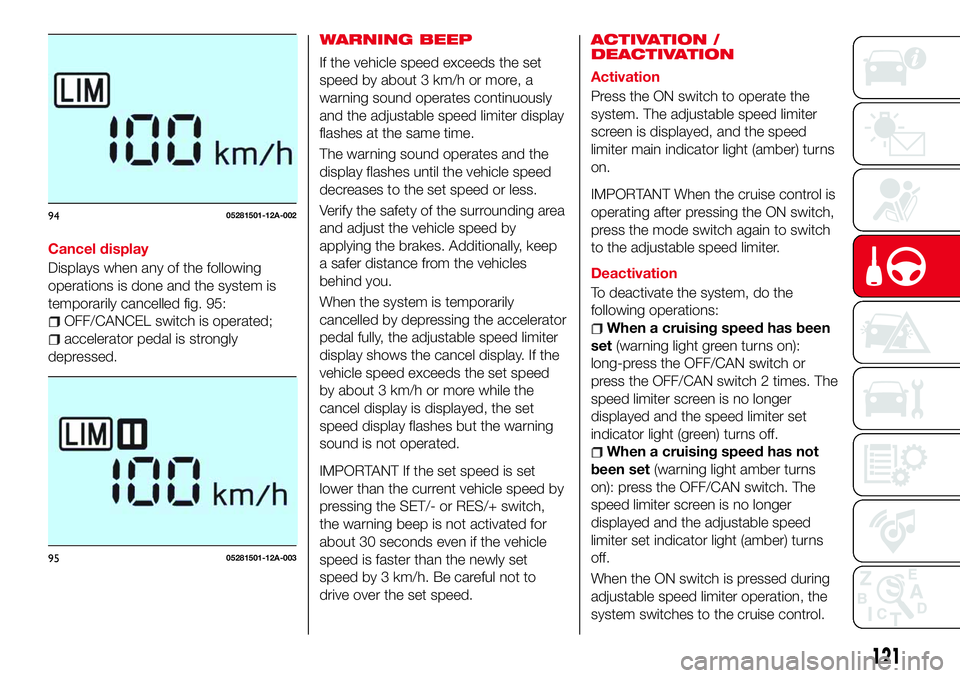
Cancel display
Displays when any of the following
operations is done and the system is
temporarily cancelled fig. 95:
OFF/CANCEL switch is operated;
accelerator pedal is strongly
depressed.
WARNING BEEP
If the vehicle speed exceeds the set
speed by about 3 km/h or more, a
warning sound operates continuously
and the adjustable speed limiter display
flashes at the same time.
The warning sound operates and the
display flashes until the vehicle speed
decreases to the set speed or less.
Verify the safety of the surrounding area
and adjust the vehicle speed by
applying the brakes. Additionally, keep
a safer distance from the vehicles
behind you.
When the system is temporarily
cancelled by depressing the accelerator
pedal fully, the adjustable speed limiter
display shows the cancel display. If the
vehicle speed exceeds the set speed
by about 3 km/h or more while the
cancel display is displayed, the set
speed display flashes but the warning
sound is not operated.
IMPORTANT If the set speed is set
lower than the current vehicle speed by
pressing the SET/- or RES/+ switch,
the warning beep is not activated for
about 30 seconds even if the vehicle
speed is faster than the newly set
speed by 3 km/h. Be careful not to
drive over the set speed.ACTIVATION /
DEACTIVATION
Activation
Press the ON switch to operate the
system. The adjustable speed limiter
screen is displayed, and the speed
limiter main indicator light (amber) turns
on.
IMPORTANT When the cruise control is
operating after pressing the ON switch,
press the mode switch again to switch
to the adjustable speed limiter.
Deactivation
To deactivate the system, do the
following operations:
When a cruising speed has been
set(warning light green turns on):
long-press the OFF/CAN switch or
press the OFF/CAN switch 2 times. The
speed limiter screen is no longer
displayed and the speed limiter set
indicator light (green) turns off.
When a cruising speed has not
been set(warning light amber turns
on): press the OFF/CAN switch. The
speed limiter screen is no longer
displayed and the adjustable speed
limiter set indicator light (amber) turns
off.
When the ON switch is pressed during
adjustable speed limiter operation, the
system switches to the cruise control.
9405281501-12A-002
9505281501-12A-003
121
Page 131 of 224
between the displayed image, such as
indicated below, and the actual
conditions when parking, always verify
the safety at the rear of the vehicle and
the surrounding area directly with your
eyes:
in the image of the parking space (or
garage) displayed on the screen, the
back end and distance guide lines may
appear aligned in the monitor, but they
may not actually be aligned on the
ground;
when parking in a space with a
division line on only one side of the
parking space, the division line and the
vehicle width guide line appear aligned
in the monitor, but they may not actually
be aligned on the ground.
PICTURE QUALITY
ADJUSTMENT
160)
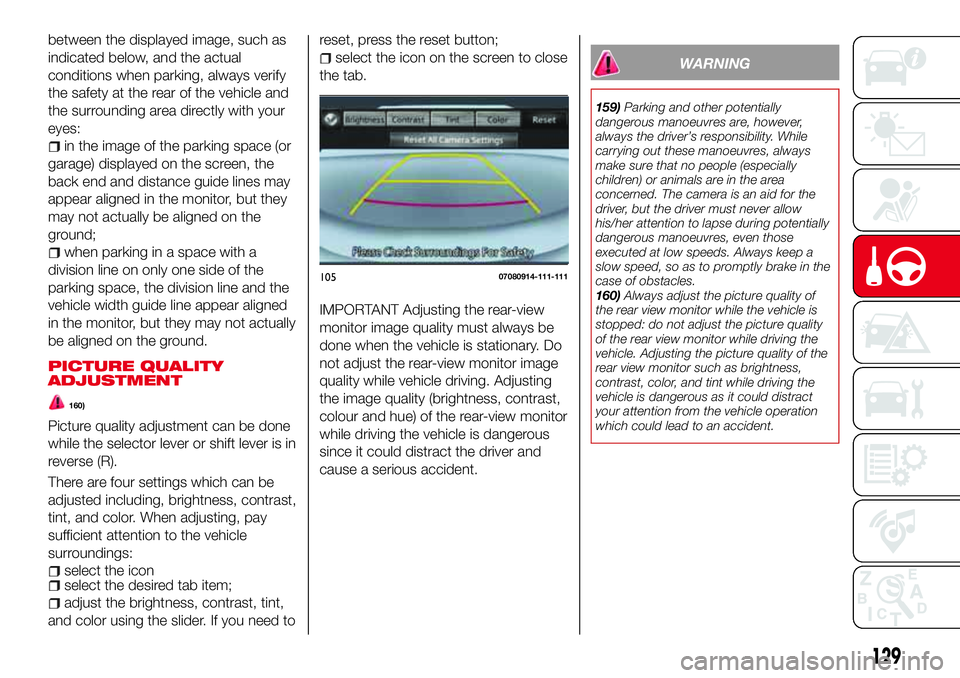
Picture quality adjustment can be done
while the selector lever or shift lever is in
reverse (R).
There are four settings which can be
adjusted including, brightness, contrast,
tint, and color. When adjusting, pay
sufficient attention to the vehicle
surroundings:
select the iconselect the desired tab item;
adjust the brightness, contrast, tint,
and color using the slider. If you need toreset, press the reset button;
select the icon on the screen to close
the tab.
IMPORTANT Adjusting the rear-view
monitor image quality must always be
done when the vehicle is stationary. Do
not adjust the rear-view monitor image
quality while vehicle driving. Adjusting
the image quality (brightness, contrast,
colour and hue) of the rear-view monitor
while driving the vehicle is dangerous
since it could distract the driver and
cause a serious accident.
WARNING
159)Parking and other potentially
dangerous manoeuvres are, however,
always the driver’s responsibility. While
carrying out these manoeuvres, always
make sure that no people (especially
children) or animals are in the area
concerned. The camera is an aid for the
driver, but the driver must never allow
his/her attention to lapse during potentially
dangerous manoeuvres, even those
executed at low speeds. Always keep a
slow speed, so as to promptly brake in the
case of obstacles.
160)Always adjust the picture quality of
the rear view monitor while the vehicle is
stopped: do not adjust the picture quality
of the rear view monitor while driving the
vehicle. Adjusting the picture quality of the
rear view monitor such as brightness,
contrast, color, and tint while driving the
vehicle is dangerous as it could distract
your attention from the vehicle operation
which could lead to an accident.
10507080914-111-111
129