lights Abarth 500 2015 Owner handbook (in English)
[x] Cancel search | Manufacturer: ABARTH, Model Year: 2015, Model line: 500, Model: Abarth 500 2015Pages: 215, PDF Size: 19.08 MB
Page 9 of 215
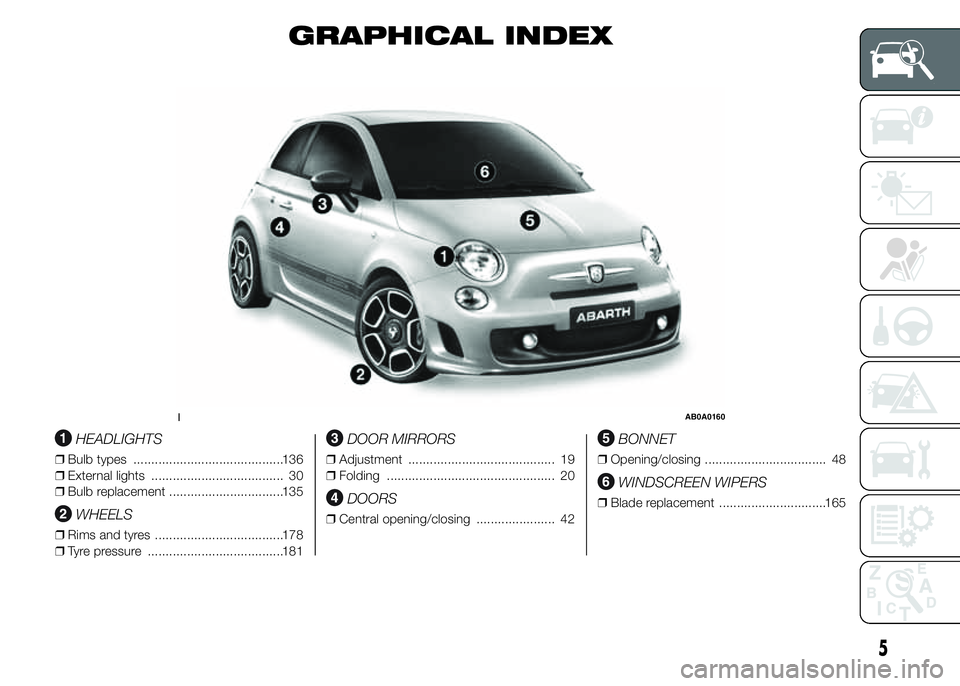
GRAPHICAL INDEX
.
HEADLIGHTS
❒Bulb types ..........................................136
❒External lights ..................................... 30
❒Bulb replacement ................................135
WHEELS
❒Rims and tyres ....................................178
❒Tyre pressure ......................................181
DOOR MIRRORS
❒Adjustment ......................................... 19
❒Folding ............................................... 20
DOORS
❒Central opening/closing ...................... 42
BONNET
❒Opening/closing .................................. 48
WINDSCREEN WIPERS
❒Blade replacement ..............................165
1AB0A0160
5
Page 10 of 215
.
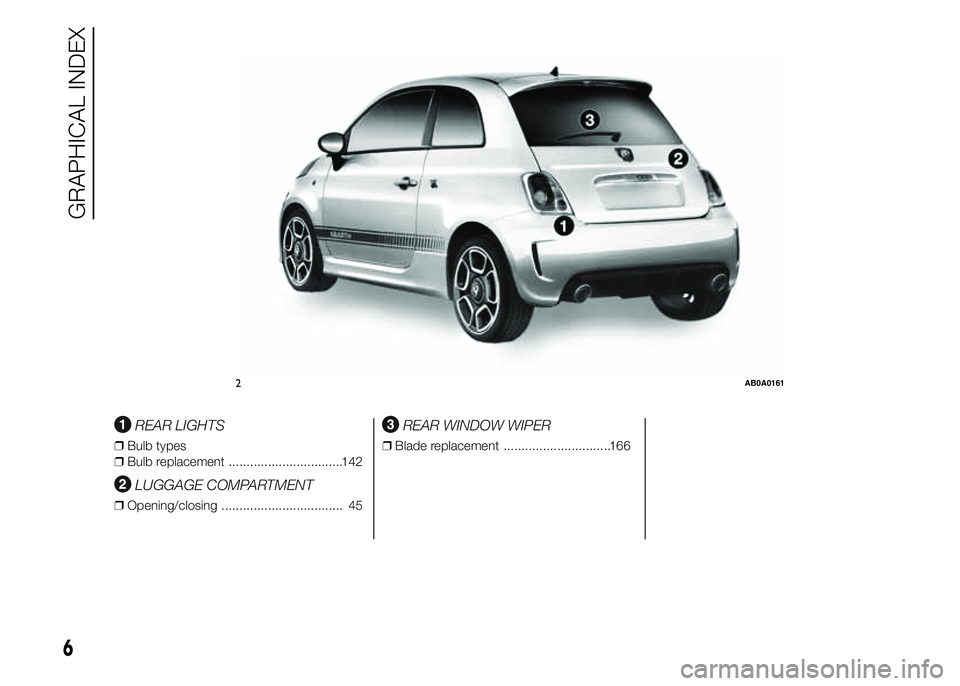
REAR LIGHTS
❒Bulb types
❒Bulb replacement ................................142
LUGGAGE COMPARTMENT
❒Opening/closing .................................. 45
REAR WINDOW WIPER
❒Blade replacement ..............................166
.
2AB0A0161
6
GRAPHICAL INDEX
Page 11 of 215
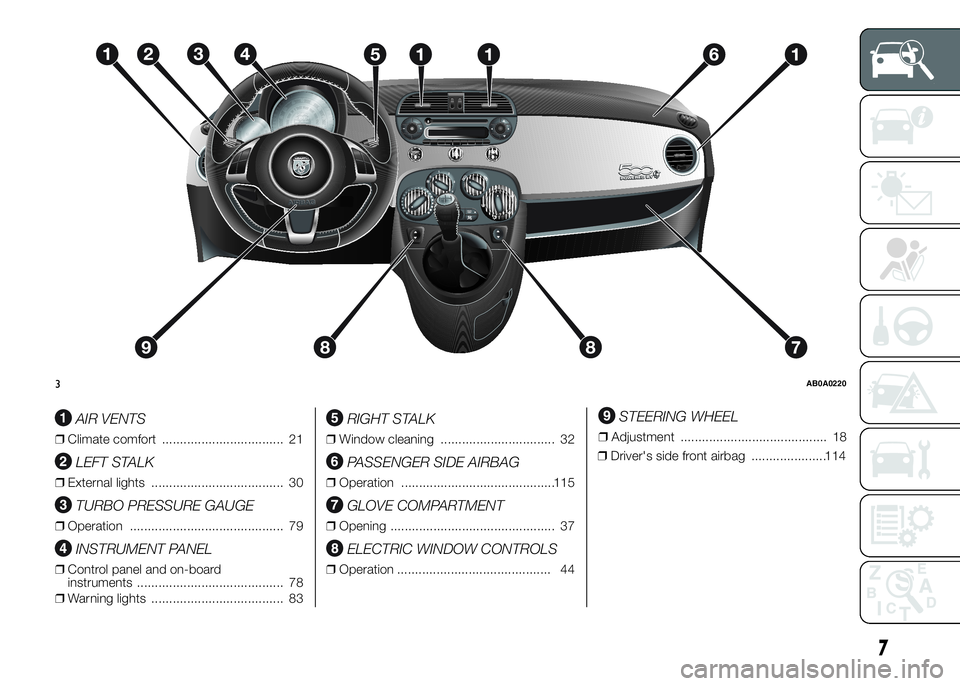
AIR VENTS
❒Climate comfort .................................. 21
LEFT STALK
❒External lights ..................................... 30
TURBO PRESSURE GAUGE
❒Operation ........................................... 79
INSTRUMENT PANEL
❒Control panel and on-board
instruments ......................................... 78
❒Warning lights ..................................... 83
RIGHT STALK
❒Window cleaning ................................ 32
PASSENGER SIDE AIRBAG
❒Operation ...........................................115
GLOVE COMPARTMENT
❒Opening .............................................. 37
ELECTRIC WINDOW CONTROLS
❒Operation ........................................... 44
STEERING WHEEL
❒Adjustment ......................................... 18
❒Driver's side front airbag .....................114
3AB0A0220
7
Page 12 of 215

.
RADIO
❒System ............................................... 60
HAZARD WARNING LIGHTS
❒Operation ........................................... 35
HEATER/CLIMATE CONTROL
SYSTEM
❒Manual climate control ........................ 24
❒Automatic climate control .................... 26
MANUAL GEARBOX
❒Using the gearbox ..............................124
4AB0A0221
8
GRAPHICAL INDEX
Page 13 of 215
GETTING TO KNOW YOUR CAR
In-depth knowledge of your new vehicle
starts here.
The handbook that you are reading
simply and directly explains how it
is made and how it works.
That’s why we advise you to read it
seated comfortably on board, so that
you can see what is described here for
yourself.SYMBOLS ...................................... 10
FIAT CODE SYSTEM ....................... 10
THE KEYS....................................... 11
IGNITION SWITCH .......................... 14
SEATS ............................................ 15
HEAD RESTRAINTS ........................ 17
STEERING WHEEL ......................... 18
REAR VIEW MIRRORS .................... 19
CLIMATIC COMFORT ..................... 21
HEATING AND VENTILATION.......... 22
MANUAL CLIMATE CONTROL
SYSTEM ......................................... 24
AUTOMATIC CLIMATE CONTROL
SYSTEM ......................................... 26
EXTERNAL LIGHTS......................... 30
WINDOW CLEANING ...................... 32
ROOF LIGHTS ................................ 33
CONTROLS .................................... 34
INTERIOR FITTINGS ....................... 36
FIXED GLASS ROOF ....................... 40
ELECTRIC SUN ROOF .................... 40
DOORS ........................................... 42
ELECTRIC WINDOWS .................... 44
LUGGAGE COMPARTMENT ........... 45
BONNET ......................................... 48
ROOF RACK/SKI RACK .................. 50
HEADLIGHTS.................................. 51ESC SYSTEM ................................. 52
ITPMS (INDIRECT TYRE
PRESSURE MONITORING
SYSTEM) ........................................ 56
EOBD SYSTEM............................... 59
DUALDRIVE ELECTRIC POWER
STEERING ...................................... 59
RADIO SYSTEM .............................. 60
ACCESSORIES PURCHASED BY
THE OWNER................................... 60
PARKING SENSORS....................... 62
REFUELLING THE CAR .................. 64
PROTECTING THE
ENVIRONMENT .............................. 65
9
Page 16 of 215
KEY WITH REMOTE
CONTROL
Operation
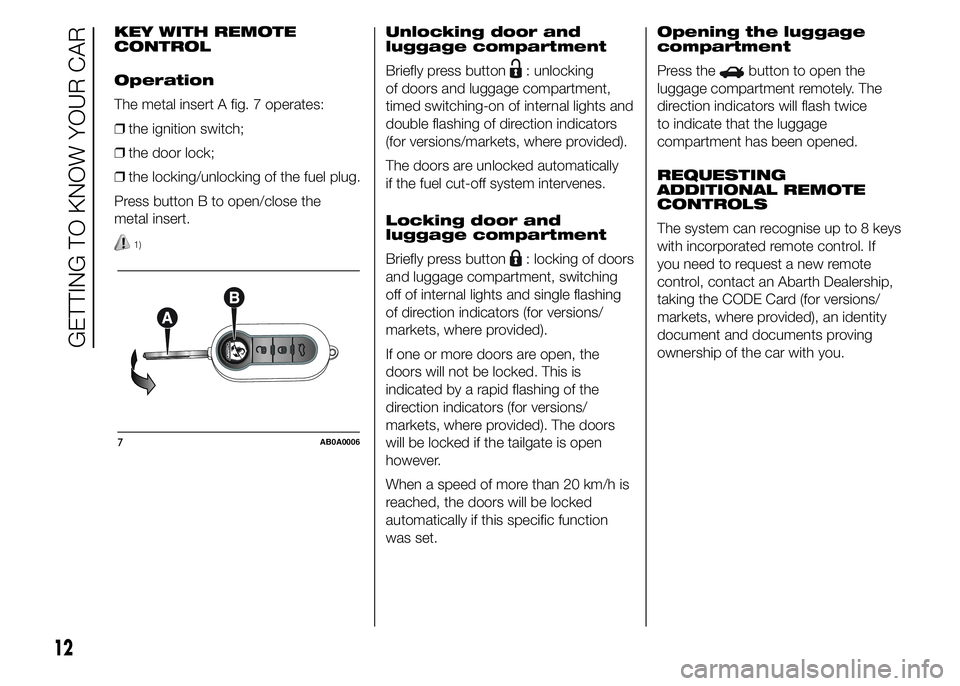
The metal insert A fig. 7 operates:
❒the ignition switch;
❒the door lock;
❒the locking/unlocking of the fuel plug.
Press button B to open/close the
metal insert.
1)
Unlocking door and
luggage compartment
Briefly press button
: unlocking
of doors and luggage compartment,
timed switching-on of internal lights and
double flashing of direction indicators
(for versions/markets, where provided).
The doors are unlocked automatically
if the fuel cut-off system intervenes.
Locking door and
luggage compartment
Briefly press button
: locking of doors
and luggage compartment, switching
off of internal lights and single flashing
of direction indicators (for versions/
markets, where provided).
If one or more doors are open, the
doors will not be locked. This is
indicated by a rapid flashing of the
direction indicators (for versions/
markets, where provided). The doors
will be locked if the tailgate is open
however.
When a speed of more than 20 km/h is
reached, the doors will be locked
automatically if this specific function
was set.Opening the luggage
compartment
Press the
button to open the
luggage compartment remotely. The
direction indicators will flash twice
to indicate that the luggage
compartment has been opened.
REQUESTING
ADDITIONAL REMOTE
CONTROLS
The system can recognise up to 8 keys
with incorporated remote control. If
you need to request a new remote
control, contact an Abarth Dealership,
taking the CODE Card (for versions/
markets, where provided), an identity
document and documents proving
ownership of the car with you.
7AB0A0006
12
GETTING TO KNOW YOUR CAR
Page 34 of 215
EXTERNAL LIGHTS
IN BRIEF
The left-hand stalk operates most of
the external lights. The external
lights can only be switched on when
the ignition key is at MAR-ON.
The instrument panel and the
dashboard and central tunnel
controls will light up together with the
external lights.
DAYTIME RUNNING
LIGHTS (DRL)
"Daytime Running Lights"
(for versions/markets, where provided)
With the ignition key at MAR-ON and
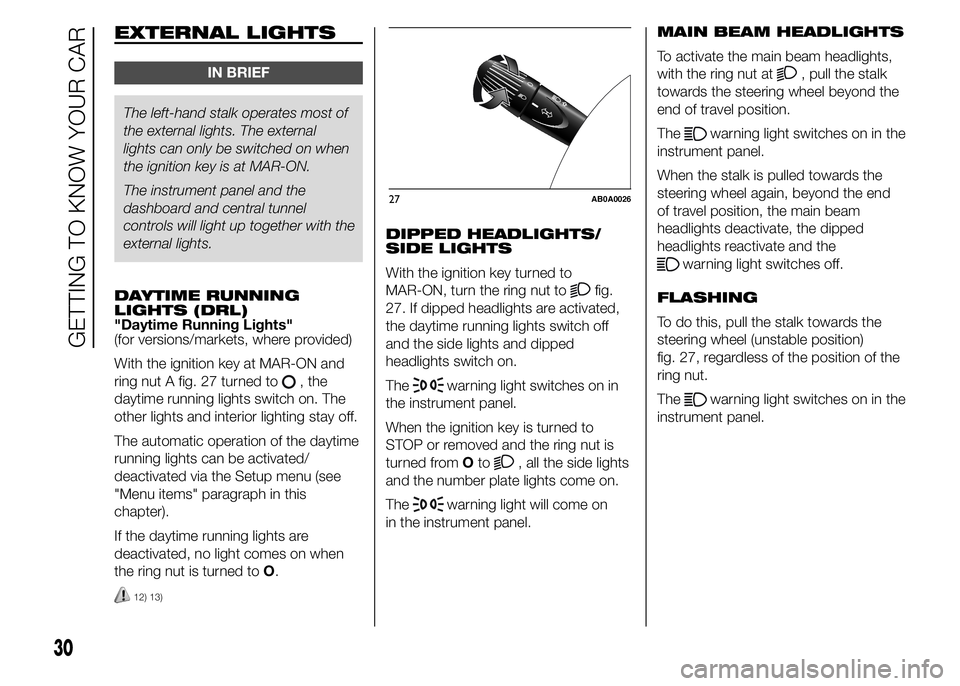
ring nut A fig. 27 turned to
, the
daytime running lights switch on. The
other lights and interior lighting stay off.
The automatic operation of the daytime
running lights can be activated/
deactivated via the Setup menu (see
"Menu items" paragraph in this
chapter).
If the daytime running lights are
deactivated, no light comes on when
the ring nut is turned toO.
12) 13)
DIPPED HEADLIGHTS/
SIDE LIGHTS
With the ignition key turned to
MAR-ON, turn the ring nut to
fig.
27. If dipped headlights are activated,
the daytime running lights switch off
and the side lights and dipped
headlights switch on.
The
warning light switches on in
the instrument panel.
When the ignition key is turned to
STOP or removed and the ring nut is
turned fromOto
, all the side lights
and the number plate lights come on.
The
warning light will come on
in the instrument panel.MAIN BEAM HEADLIGHTS
To activate the main beam headlights,
with the ring nut at
, pull the stalk
towards the steering wheel beyond the
end of travel position.
The
warning light switches on in the
instrument panel.
When the stalk is pulled towards the
steering wheel again, beyond the end
of travel position, the main beam
headlights deactivate, the dipped
headlights reactivate and the
warning light switches off.
FLASHING
To do this, pull the stalk towards the
steering wheel (unstable position)
fig. 27, regardless of the position of the
ring nut.
The
warning light switches on in the
instrument panel.
27AB0A0026
30
GETTING TO KNOW YOUR CAR
Page 35 of 215
DIRECTION INDICATORS
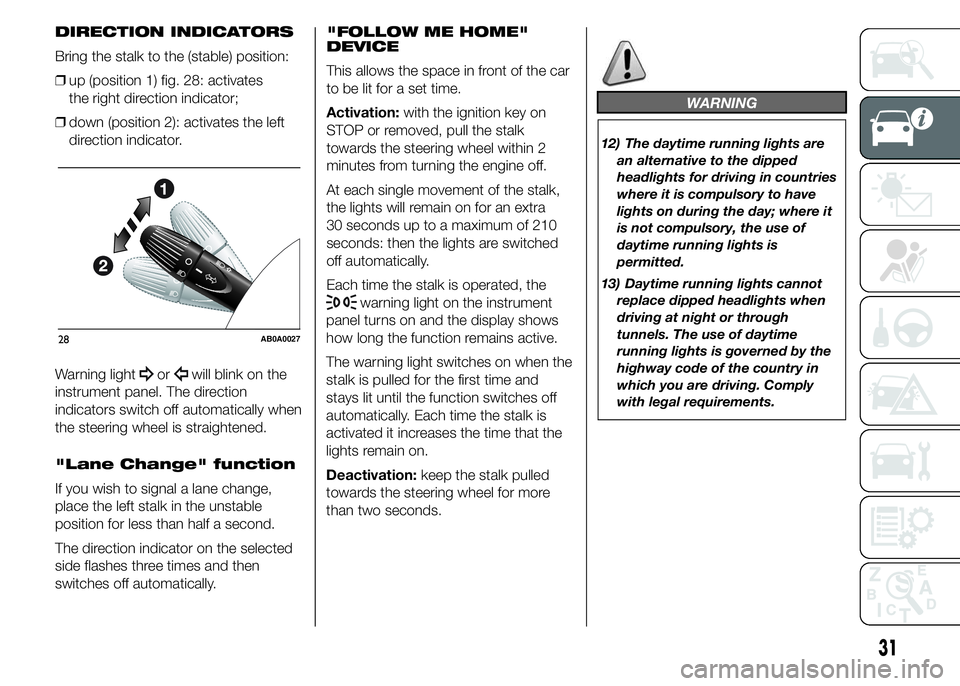
Bring the stalk to the (stable) position:
❒up (position 1) fig. 28: activates
the right direction indicator;
❒down (position 2): activates the left
direction indicator.
Warning light
orwill blink on the
instrument panel. The direction
indicators switch off automatically when
the steering wheel is straightened.
"Lane Change" function
If you wish to signal a lane change,
place the left stalk in the unstable
position for less than half a second.
The direction indicator on the selected
side flashes three times and then
switches off automatically."FOLLOW ME HOME"
DEVICE
This allows the space in front of the car
to be lit for a set time.
Activation:with the ignition key on
STOP or removed, pull the stalk
towards the steering wheel within 2
minutes from turning the engine off.
At each single movement of the stalk,
the lights will remain on for an extra
30 seconds up to a maximum of 210
seconds: then the lights are switched
off automatically.
Each time the stalk is operated, the
warning light on the instrument
panel turns on and the display shows
how long the function remains active.
The warning light switches on when the
stalk is pulled for the first time and
stays lit until the function switches off
automatically. Each time the stalk is
activated it increases the time that the
lights remain on.
Deactivation:keep the stalk pulled
towards the steering wheel for more
than two seconds.
WARNING
12) The daytime running lights are
an alternative to the dipped
headlights for driving in countries
where it is compulsory to have
lights on during the day; where it
is not compulsory, the use of
daytime running lights is
permitted.
13) Daytime running lights cannot
replace dipped headlights when
driving at night or through
tunnels. The use of daytime
running lights is governed by the
highway code of the country in
which you are driving. Comply
with legal requirements.
28AB0A0027
31
Page 37 of 215
"Smart washing"
function
Pushing the stalk towards the
dashboard (unstable position) will
activate the rear window washer.
Keep the stalk pressed, with just one
movement, to operate the rear window
washer jet and the rear window wiper
itself; the latter automatically turns on if
you keep the stalk pressed for more
than half a second.
The rear window wiper stops operating
a few strokes after releasing the stalk;
a further "cleaning stroke", after a
few seconds, completes the wiping
operation.
IMPORTANT
3) Do not use the screen wiper to
remove layers of snow or ice
from the windscreen. In such
conditions, the wiper may
be subjected to excessive stress
and the motor protection, which
prevents operation for a few
seconds, may intervene. If
operation is not subsequently
restored, contact an Abarth
Dealership.
4) Do not operate the windscreen
wiper with the blades lifted from
the windscreen.
5) Do not use the rear window wiper
to remove layers of snow or ice. In
these conditions, the rear
window wiper may be subjected
to excessive stress and the motor
protection, which prevents
operation for a few seconds, may
intervene. If operation is not
subsequently restored, contact an
Abarth Dealership.
ROOF LIGHTS
FRONT ROOF LIGHT
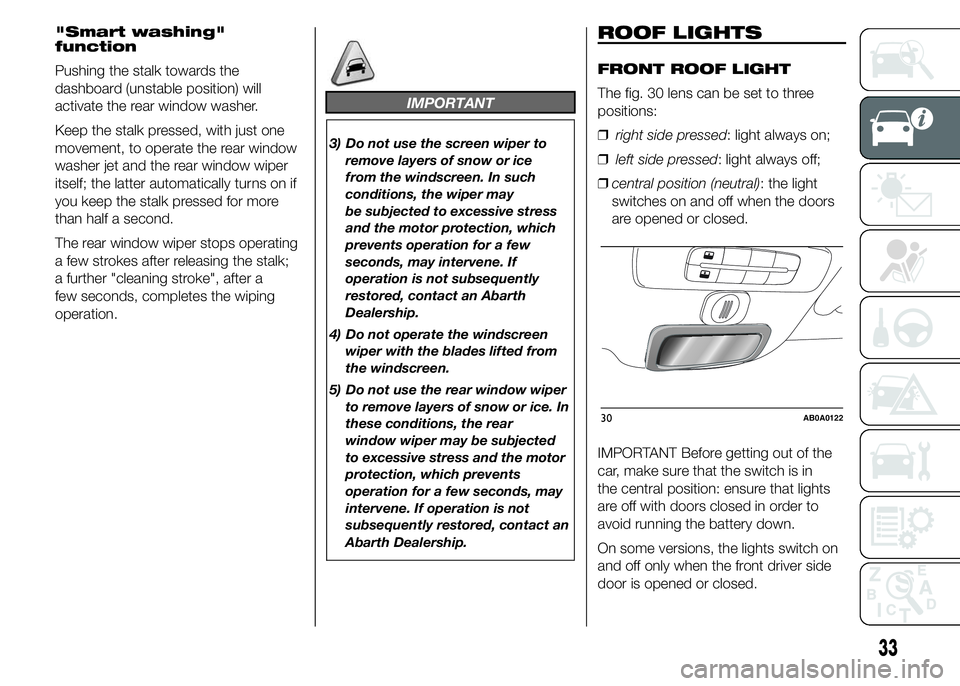
The fig. 30 lens can be set to three
positions:
❒right side pressed: light always on;
❒left side pressed: light always off;
❒central position (neutral): the light
switches on and off when the doors
are opened or closed.
IMPORTANT Before getting out of the
car, make sure that the switch is in
the central position: ensure that lights
are off with doors closed in order to
avoid running the battery down.
On some versions, the lights switch on
and off only when the front driver side
door is opened or closed.
30AB0A0122
33
Page 38 of 215
When the doors are released using the
key with remote control, a timer will
be activated for about 10 seconds.
When the doors are locked using the
key with remote control, the roof light
switches off.
Roof light timing (lens
central position)
Switching on
Three different switching-on modes are
provided:
❒when opening one door a three-
minute timer will start, which restarts
each time a door is opened;
❒a timer of about 10 seconds will start
when the ignition key is removed
within two minutes from turning the
engine off;
❒a timer of about 10 seconds will start
when the doors are opened (either by
remote control or key in driver’s
door).Switching off
Three modes are provided for switching
off:
❒when all doors are closed, the
three-minute timer will stop and
a ten-second one will start. This timer
will stop when the key is turned to
MAR-ON;
❒when doors are locked (either with
remote control or with key on driver
side door), the roof light switches off.
❒the interior lights are switched off
in any case after 15 minutes to
preserve battery charge
LUGGAGE
COMPARTMENT LIGHT
For versions fitted with luggage
compartment light, the light comes on
automatically when the tailgate is
opened and it will switch off when it is
closed.CONTROLS
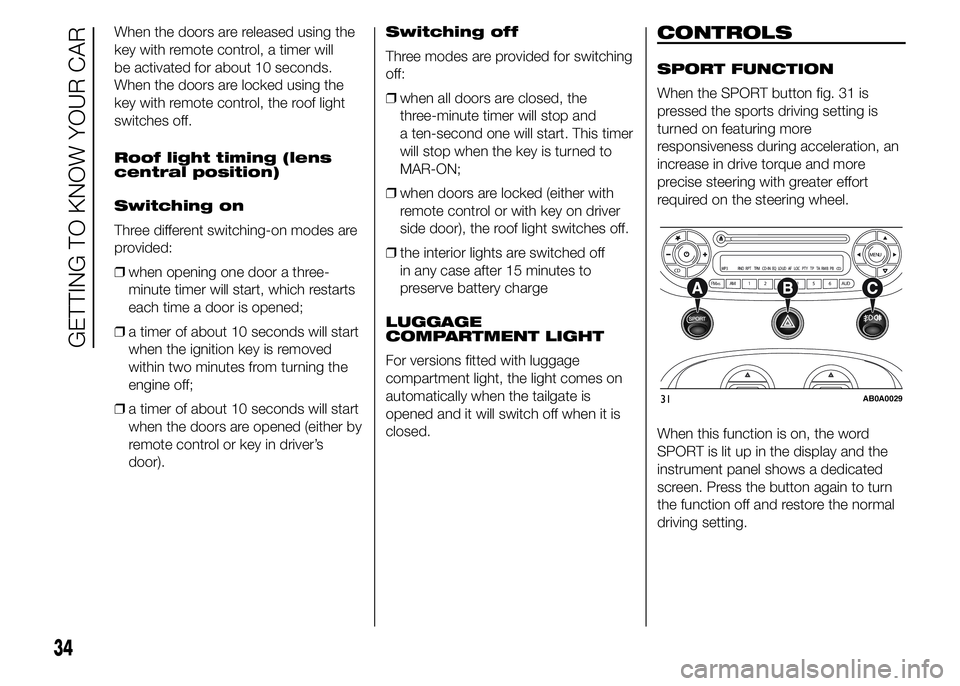
SPORT FUNCTION
When the SPORT button fig. 31 is
pressed the sports driving setting is
turned on featuring more
responsiveness during acceleration, an
increase in drive torque and more
precise steering with greater effort
required on the steering wheel.
When this function is on, the word
SPORT is lit up in the display and the
instrument panel shows a dedicated
screen. Press the button again to turn
the function off and restore the normal
driving setting.
CDMENU
FM ASAM 1 2 3 4 5 6 AUDMP3 RND RPT TPM CD-IN EQ
LOUD AF LOC PTY TP TA RMB PBCD
31AB0A0029
34
GETTING TO KNOW YOUR CAR