battery Acura ILX 2013 Owner's Guide
[x] Cancel search | Manufacturer: ACURA, Model Year: 2013, Model line: ILX, Model: Acura ILX 2013Pages: 351, PDF Size: 8.21 MB
Page 218 of 351
Continued
217
uuWhen DrivinguStarting the Engine
Driving
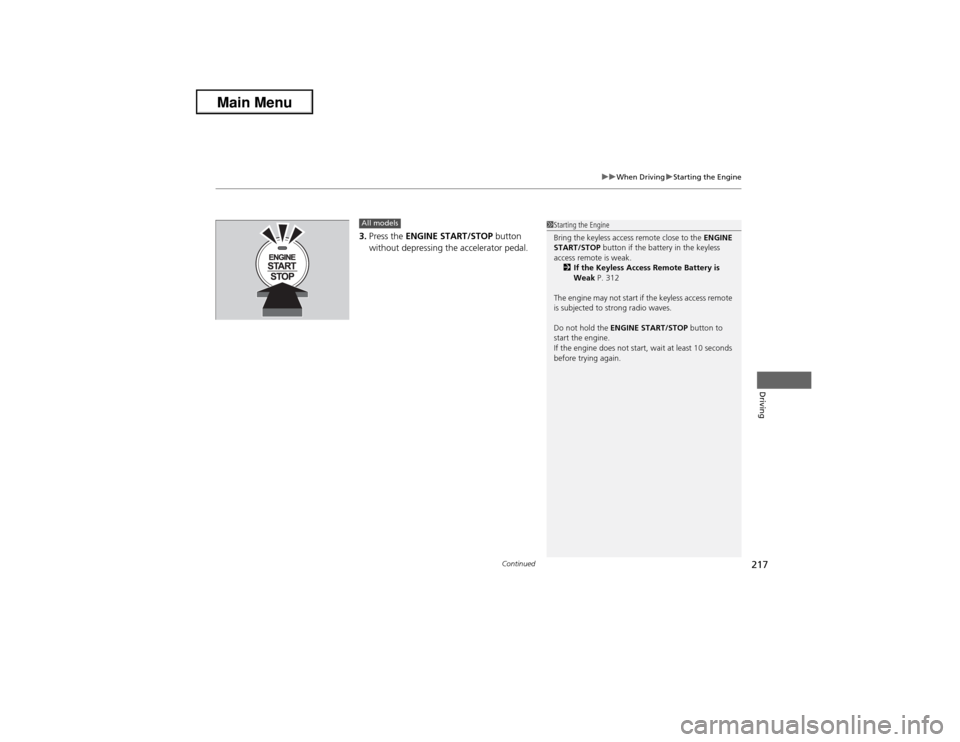
3.Press the ENGINE START/STOP button
without depressing the accelerator pedal.All models
1Starting the Engine
Bring the keyless access remote close to the ENGINE
START/STOP button if the battery in the keyless
access remote is weak.
2If the Keyless Access Remote Battery is
Weak P. 312
The engine may not start if the keyless access remote
is subjected to strong radio waves.
Do not hold the ENGINE START/STOP button to
start the engine.
If the engine does not start, wait at least 10 seconds
before trying again.
Page 248 of 351
247
Maintenance
This chapter discusses basic maintenance.
Before Performing Maintenance
Inspection and Maintenance ............ 248Safety When Performing Maintenance..... 249Parts and Fluids Used in Maintenance
Service ........................................... 250
Maintenance Minder
TM..................... 251
Maintenance Under the Hood
Maintenance Items Under the Hood ..... 256Opening the Hood ........................... 258
Engine Compartment Cover ............. 259
Recommended Engine Oil ................ 261
Oil Check ......................................... 262
Adding Engine Oil ............................ 264
Changing the Engine Oil and Oil Filter ..... 265Engine Coolant ................................ 268
Transmission Fluid ............................ 270
Brake/Clutch Fluid ............................ 272
Refilling Window Washer Fluid......... 273
Replacing Light Bulbs....................... 274Checking and Maintaining Wiper
Blades.......................................... 284Checking and Maintaining Tires
Checking Tires ................................. 286Tire and Loading Information Label ...... 287Tire Labeling .................................... 287DOT Tire Quality Grading (U.S. Vehicles)....... 289
Wear Indicators ............................... 291
Tire Service Life ................................ 291
Tire and Wheel Replacement ........... 292
Tire Rotation .................................... 293
Winter Tires ..................................... 294
Battery............................................... 295
Remote Transmitter Care
Replacing the Button Battery ........... 296Climate Control System Maintenance
.... 297
Cleaning
Interior Care .................................... 298
Exterior Care.................................... 300
Page 250 of 351
249
uuBefore Performing MaintenanceuSafety When Performing Maintenance
Maintenance
Safety When Performing MaintenanceSome of the most important safety precautions are given here.
However, we cannot warn you of every conceivable hazard that can arise in
performing maintenance. Only you can decide whether or not you should perform
a given task.
•To reduce the possibility of fire or explosion, keep cigarettes, sparks, and flames
away from the battery and all fuel related parts.
•Never leave rags, towels, or other flammable objects under the hood.
uHeat from the engine and exhaust can ignite them causing a fire.
•To clean parts, use a commercially available degreaser or parts cleaner, not
gasoline.
•Wear eye protection and protective clothing when working with the battery or
compressed air.
•Engine exhaust contains carbon monoxide, which is poisonous and can kill you.
uOnly operate the engine if there is sufficient ventilation.
•The vehicle must be in a stationary condition.
uMake sure your vehicle is parked on level ground, the parking brake is set, and
the engine is off.
•Be aware that hot parts can burn you.
uMake sure to let the engine and exhaust system cool thoroughly before
touching vehicle parts.
•Be aware that moving parts can injure you.
uDo not start the engine unless instructed, and keep your hands and limbs away
from moving parts.■Maintenance Safety■Vehicle Safety
1Safety When Performing Maintenance
3
WARNING
Improperly maintaining this vehicle or
failing to correct a problem before driving
can cause a crash in which you can be
seriously hurt or killed.
Always follow the inspection and
maintenance recommendations according
to the schedules in this owner's manual.
3
WARNING
Failure to properly follow maintenance
instructions and precautions can cause you
to be seriously hurt or killed.
Always follow the procedures and
precautions in this owner's manual.
Page 257 of 351
256Maintenance
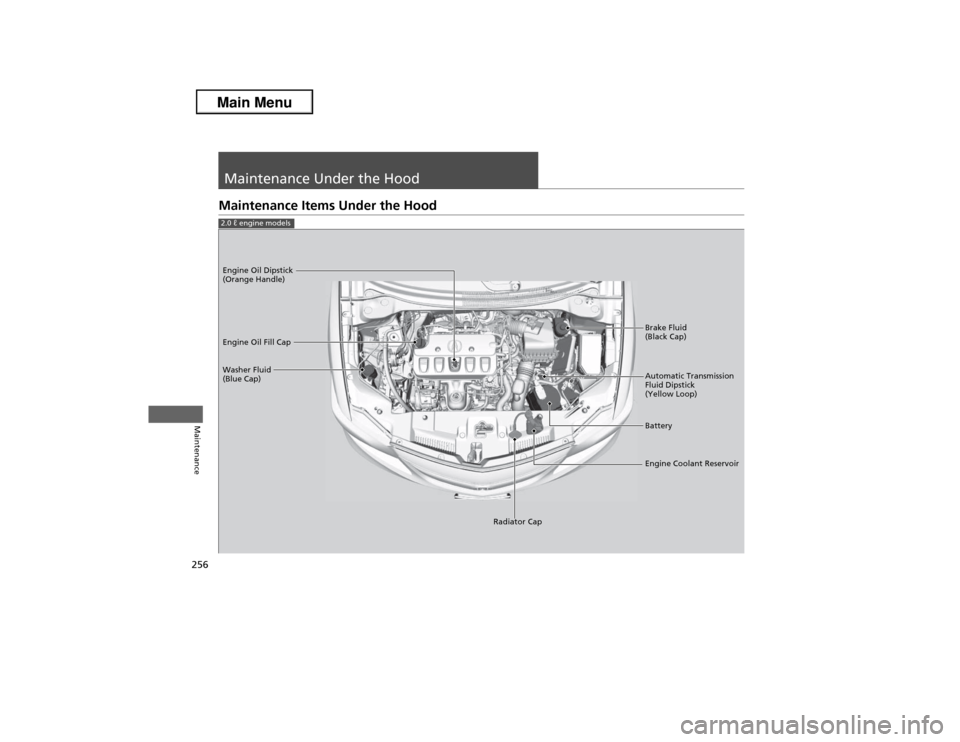
Maintenance Under the HoodMaintenance Items Under the Hood2.0 ℓ engine models
Brake Fluid
(Black Cap)
Washer Fluid
(Blue Cap) Engine Oil Dipstick
(Orange Handle)
Engine Oil Fill Cap
Automatic Transmission
Fluid Dipstick
(Yellow Loop)
Battery
Engine Coolant Reservoir
Radiator Cap
Page 258 of 351
257
uuMaintenance Under the HooduMaintenance Items Under the Hood
Maintenance
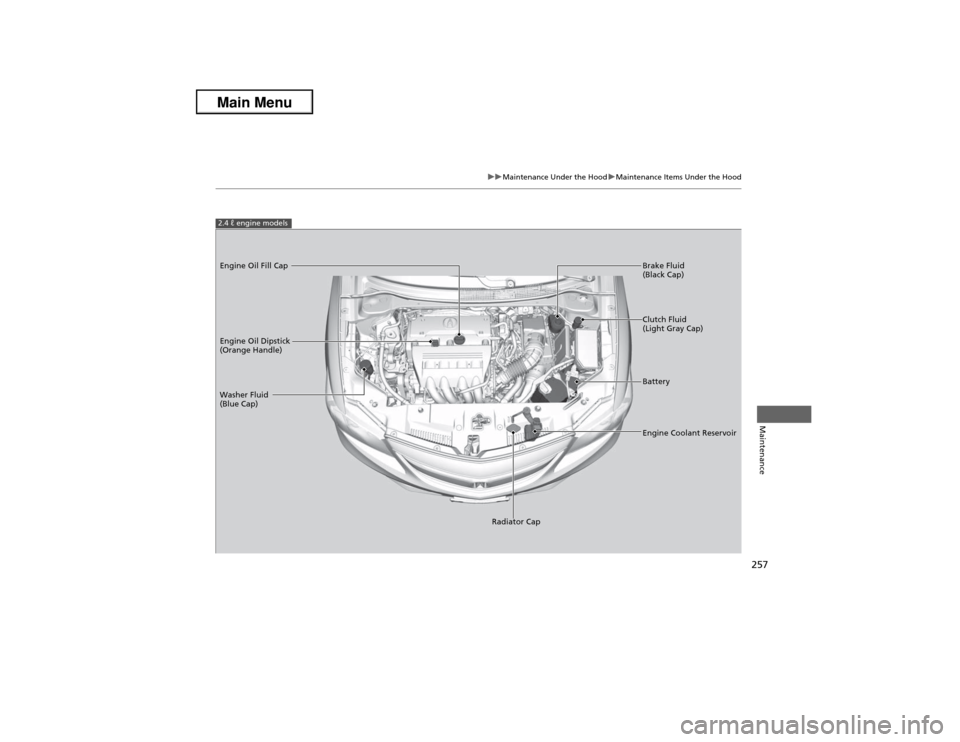
2.4 ℓ engine modelsEngine Oil Dipstick
(Orange Handle)
Washer Fluid
(Blue Cap)
Engine Coolant Reservoir Brake Fluid
(Black Cap) Engine Oil Fill Cap
Clutch Fluid
(Light Gray Cap)
Battery
Radiator Cap
Page 296 of 351
295Maintenance
BatteryChecking the Battery
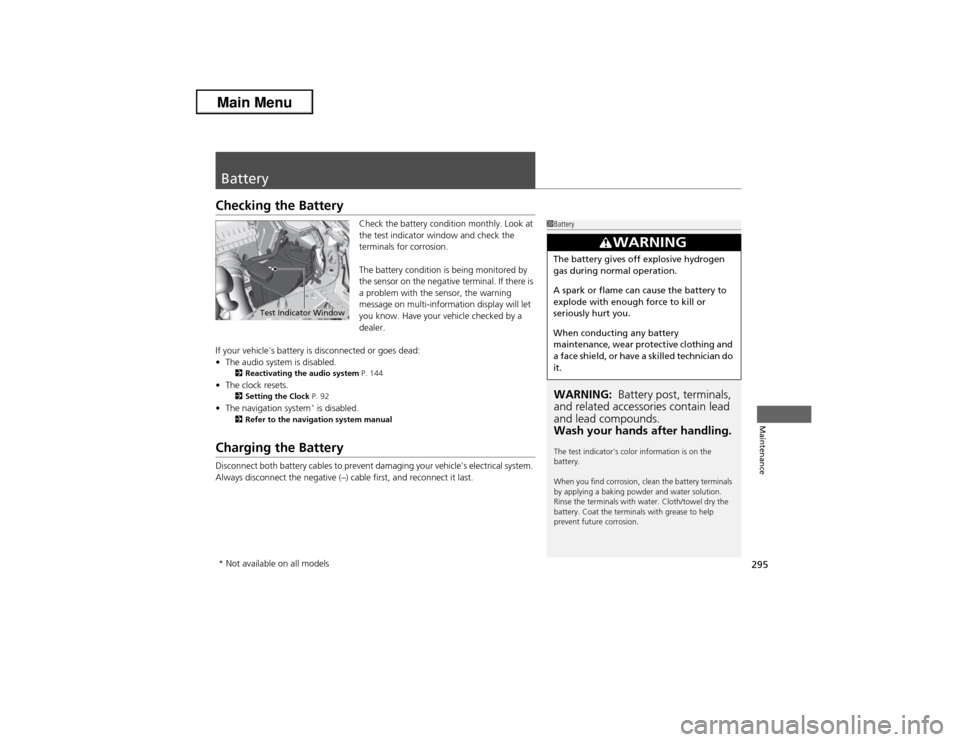
Check the battery condition monthly. Look at
the test indicator window and check the
terminals for corrosion.
The battery condition is being monitored by
the sensor on the negative terminal. If there is
a problem with the sensor, the warning
message on multi-information display will let
you know. Have your vehicle checked by a
dealer.
If your vehicle's battery is disconnected or goes dead:
•The audio system is disabled.
2Reactivating the audio system P. 144
•The clock resets.
2Setting the Clock P. 92
•The navigation system
* is disabled.
2Refer to the navigation system manual
Charging the BatteryDisconnect both battery cables to prevent damaging your vehicle's electrical system.
Always disconnect the negative (–) cable first, and reconnect it last.
1BatteryWARNING: Battery post, terminals,
and related accessories contain lead
and lead compounds.
Wash your hands after handling.The test indicator's color information is on the
battery.
When you find corrosion, clean the battery terminals
by applying a baking powder and water solution.
Rinse the terminals with water. Cloth/towel dry the
battery. Coat the terminals with grease to help
prevent future corrosion.
3
WARNING
The battery gives off explosive hydrogen
gas during normal operation.
A spark or flame can cause the battery to
explode with enough force to kill or
seriously hurt you.
When conducting any battery
maintenance, wear protective clothing and
a face shield, or have a skilled technician do
it.
Test Indicator Window
* Not available on all models
Page 297 of 351
296Maintenance
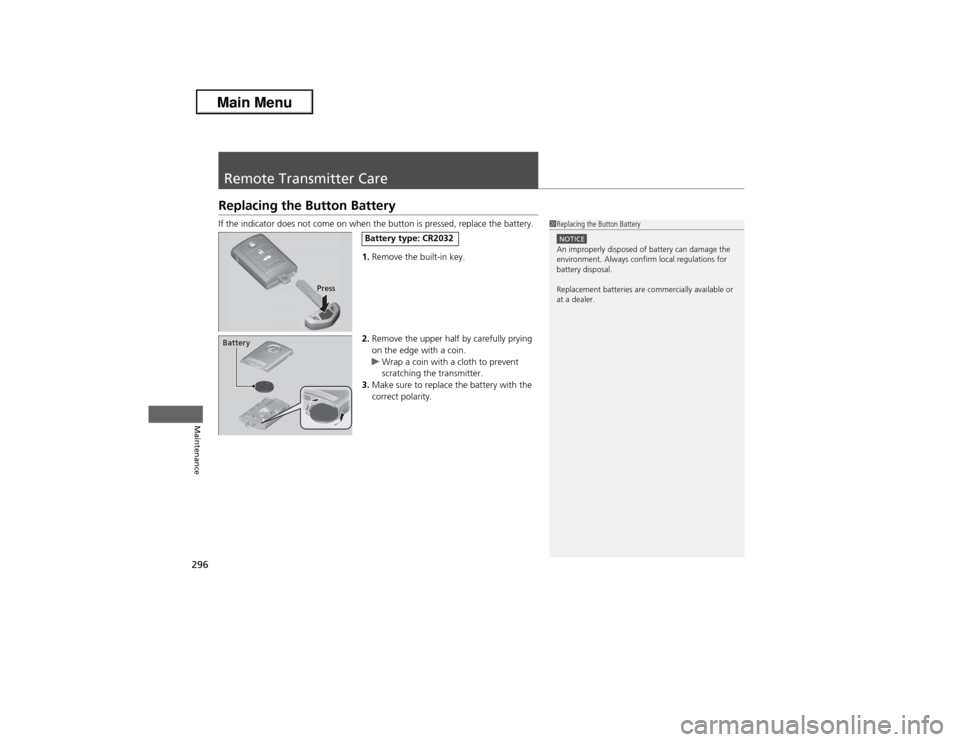
Remote Transmitter CareReplacing the Button BatteryIf the indicator does not come on when the button is pressed, replace the battery.
1.Remove the built-in key.
2.Remove the upper half by carefully prying
on the edge with a coin.
uWrap a coin with a cloth to prevent
scratching the transmitter.
3.Make sure to replace the battery with the
correct polarity.
1Replacing the Button BatteryNOTICEAn improperly disposed of battery can damage the
environment. Always confirm local regulations for
battery disposal.
Replacement batteries are commercially available or
at a dealer.
Press
Battery type: CR2032
Battery
Page 302 of 351
301
uuCleaninguExterior Care
Maintenance
A good coat of automotive body wax helps protect your vehicle’s paint from the
elements. Wax will wear off over time and expose your vehicle’s paint to the
elements, so reapply as necessary.
If you get gasoline, oil, engine coolant, or battery fluid on resin coated parts, they
may be stained or the coating may peel. Promptly wipe it away using a soft cloth and
clean water.
Wipe using a glass cleaner.
Aluminum is susceptible to deterioration caused by salt and other road
contaminants. Use a sponge and mild detergent to wipe away promptly.
Be careful not to use harsh chemicals (including some commercial wheel cleaners) or
a stiff brush. They can damage the clear coat of the aluminum alloy wheels that
helps keep the aluminum from corroding and tarnishing.■Applying Wax■Maintaining the Bumpers and Other Resin Coated Parts■Cleaning the Window■Maintaining Aluminum Wheels
1Applying WaxNOTICEChemical solvents and strong cleaners can damage
the paint, metal, and plastic on your vehicle. Wipe up
spills immediately.1Maintaining the Bumpers and Other Resin Coated Parts
Ask a dealer about the correct coating material when
you want to repair the painted surface of the parts
made of resin.1Cleaning the Window
Wires are mounted to the inside of the rear window.
Wipe along the same direction as the wires with a
soft cloth so as not to damage them.
Page 304 of 351
303
Handling the Unexpected
This chapter explains how to handle unexpected troubles.
Tools
Types of Tools .................................. 304
If a Tire Goes Flat
Changing a Flat Tire ......................... 305
Engine Does Not Start
Checking the Engine ........................ 311
If the Keyless Access Remote Battery is
Weak ............................................. 312
Emergency Engine Stop ................... 313
Jump Starting.................................... 314
Shift Lever Does Not Move.............. 317Overheating
How to Handle Overheating............. 318
Indicator, Coming On/Blinking
If the Low Oil Pressure Indicator Comes
On ............................................. 320If the Charging System Indicator Comes
On ................................................. 320
If the Malfunction Indicator Lamp Comes
On or Blinks ................................... 321If the Brake System Indicator Comes On ....... 322If the EPS System Indicator Comes On ..... 322
If the Low Tire Pressure/TPMS Indicator
Comes On or Blinks ....................... 323
Fuses
Fuse Locations ................................. 324
Inspecting and Changing Fuses ........ 326
Emergency Towing........................... 327
Page 312 of 351
311Handling the Unexpected
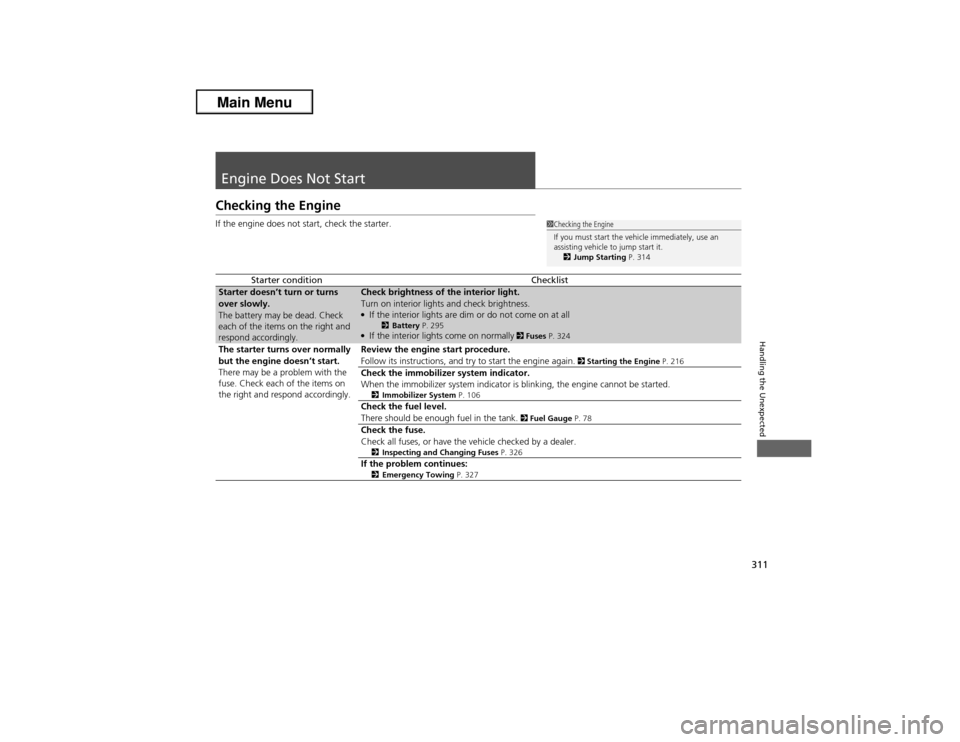
Engine Does Not StartChecking the EngineIf the engine does not start, check the starter.
Starter condition
Checklist
Starter doesn’t turn or turns
over slowly.
The battery may be dead. Check
each of the items on the right and
respond accordingly.
Check brightness of the interior light.
Turn on interior lights and check brightness.●If the interior lights are dim or do not come on at all
2Battery P. 295
●If the interior lights come on normally
2 Fuses P. 324
The starter turns over normally
but the engine doesn’t start.
There may be a problem with the
fuse. Check each of the items on
the right and respond accordingly.
Review the engine start procedure.
Follow its instructions, and try to start the engine again.
2 Starting the Engine P. 216
Check the immobilizer system indicator.
When the immobilizer system indicator is blinking, the engine cannot be started.2Immobilizer System P. 106Check the fuel level.
There should be enough fuel in the tank.
2 Fuel Gauge P. 78
Check the fuse.
Check all fuses, or have the vehicle checked by a dealer.2Inspecting and Changing Fuses P. 326If the problem continues:2Emergency Towing P. 327
1Checking the Engine
If you must start the vehicle immediately, use an
assisting vehicle to jump start it.
2Jump Starting P. 314