instrument panel Acura ILX 2013 Owner's Guide
[x] Cancel search | Manufacturer: ACURA, Model Year: 2013, Model line: ILX, Model: Acura ILX 2013Pages: 351, PDF Size: 8.21 MB
Page 79 of 351
78Instrument Panel
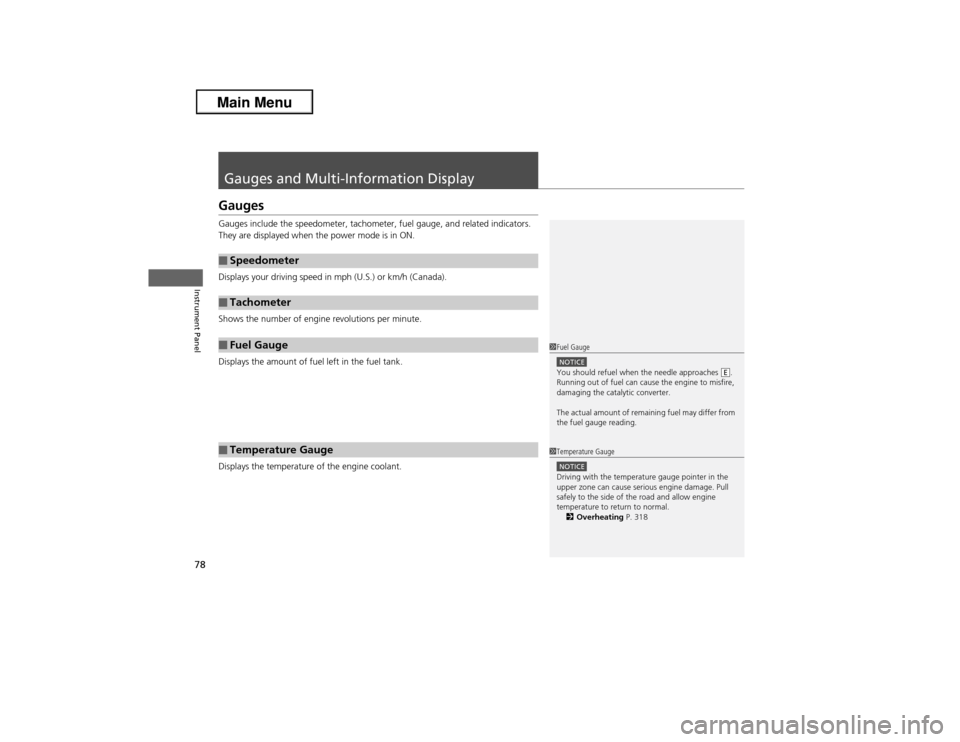
Gauges and Multi-Information Display GaugesGauges include the speedometer, tachometer, fuel gauge, and related indicators.
They are displayed when the power mode is in ON.
Displays your driving speed in mph (U.S.) or km/h (Canada).
Shows the number of engine revolutions per minute.
Displays the amount of fuel left in the fuel tank.
Displays the temperature of the engine coolant.■Speedometer■Tachometer■Fuel Gauge■Temperature Gauge
1Fuel GaugeNOTICEYou should refuel when the needle approaches .
Running out of fuel can cause the engine to misfire,
damaging the catalytic converter.
The actual amount of remaining fuel may differ from
the fuel gauge reading.
E
1Temperature GaugeNOTICEDriving with the temperature gauge pointer in the
upper zone can cause serious engine damage. Pull
safely to the side of the road and allow engine
temperature to return to normal.
2Overheating P. 318
Page 80 of 351
79
uuGauges and Multi-Information DisplayuMulti-Information Display
Continued
Instrument Panel
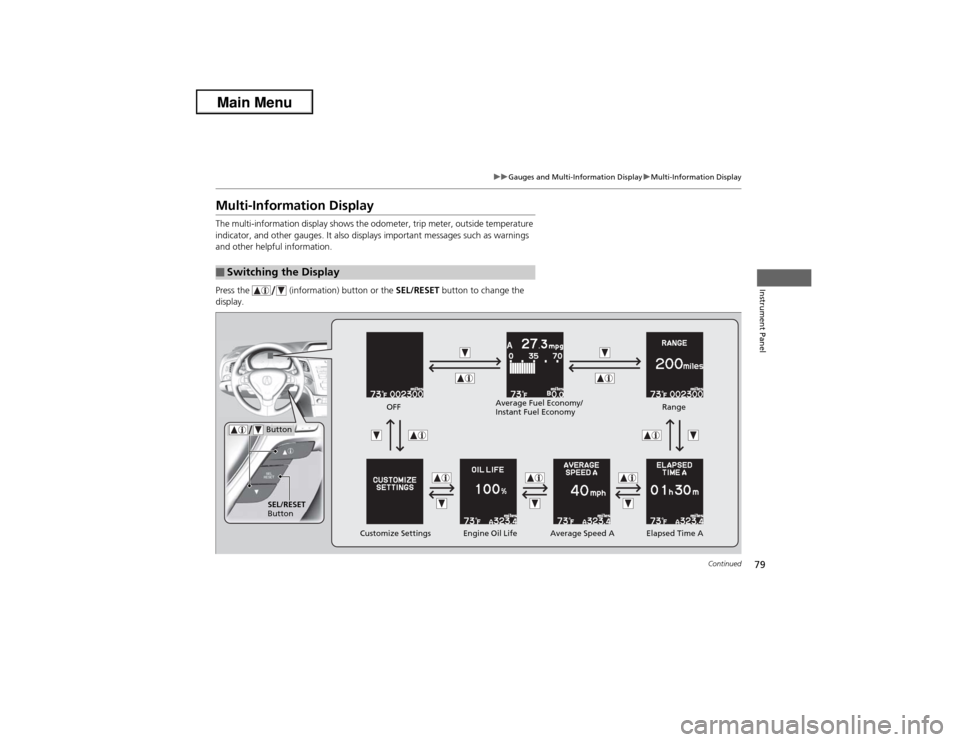
Multi-Information DisplayThe multi-information display shows the odometer, trip meter, outside temperature
indicator, and other gauges. It also displays important messages such as warnings
and other helpful information.
Press the (information) button or the SEL/RESET button to change the
display.■Switching the Display
SEL/RESET
Button
Engine Oil Life Customize Settings Elapsed Time A Button
OFF
Average Speed ARange Average Fuel Economy/
Instant Fuel Economy
Page 81 of 351
uuGauges and Multi-Information DisplayuMulti-Information Display
80Instrument Panel
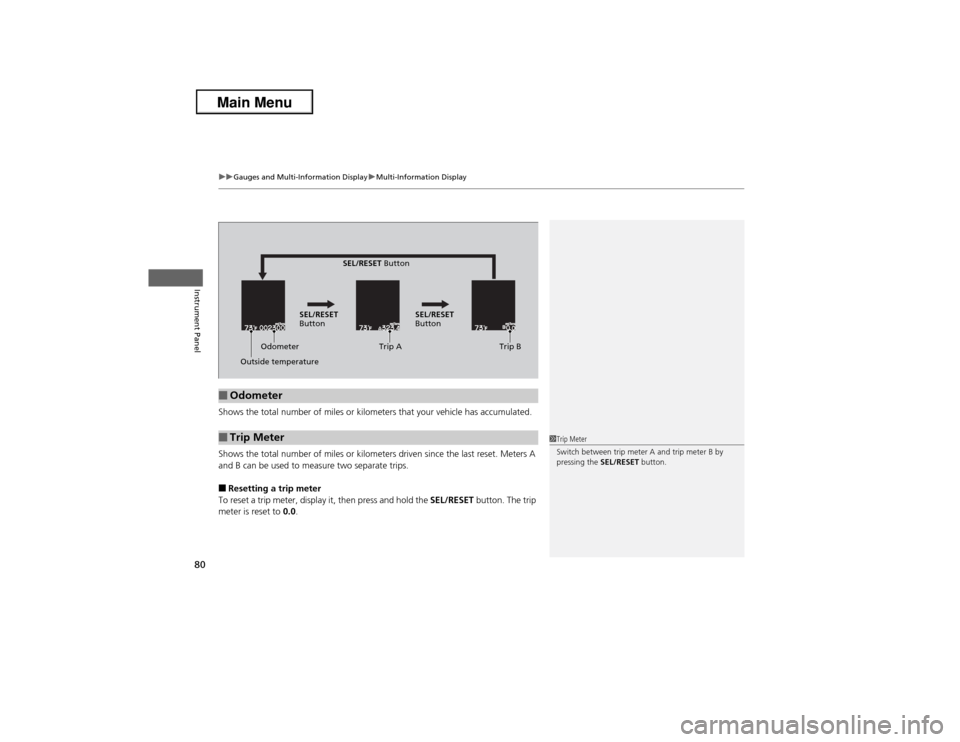
Shows the total number of miles or kilometers that your vehicle has accumulated.
Shows the total number of miles or kilometers driven since the last reset. Meters A
and B can be used to measure two separate trips.■Resetting a trip meter
To reset a trip meter, display it, then press and hold the SEL/RESET button. The trip
meter is reset to 0.0.■Odometer■Trip Meter
Odometer
Outside temperatureTrip A Trip B SEL/RESET
Button
SEL/RESET Button
SEL/RESET
Button
1Trip Meter
Switch between trip meter A and trip meter B by
pressing the SEL/RESET button.
Page 82 of 351
Continued
81
uuGauges and Multi-Information DisplayuMulti-Information Display
Instrument Panel
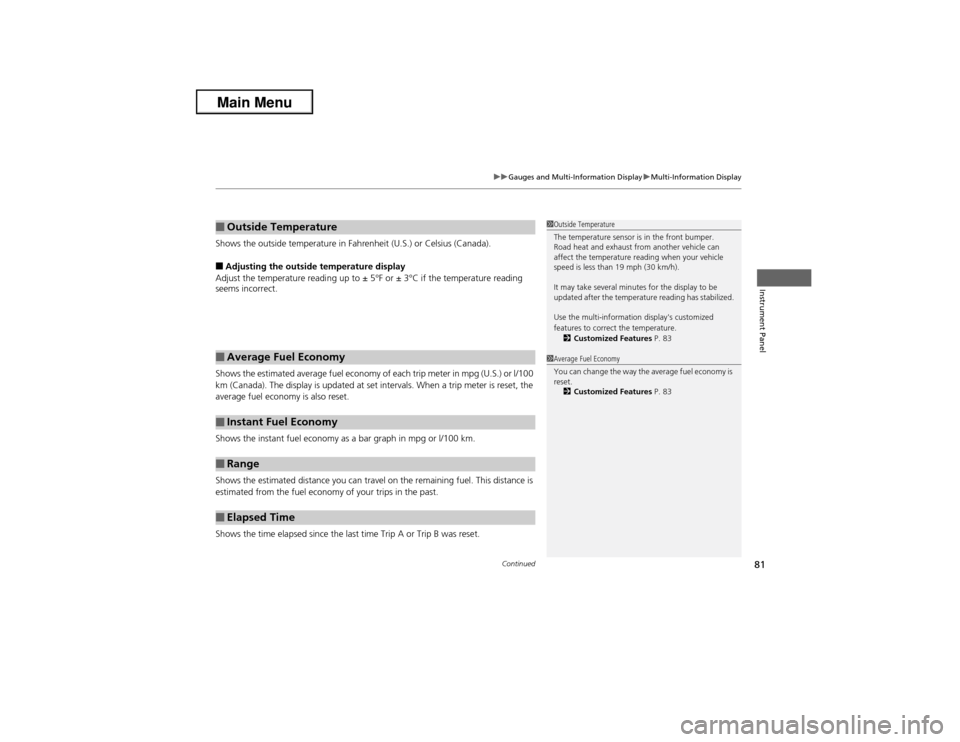
Shows the outside temperature in Fahrenheit (U.S.) or Celsius (Canada).■Adjusting the outside temperature display
Adjust the temperature reading up to ± 5°F or ± 3°C if the temperature reading
seems incorrect.
Shows the estimated average fuel economy of each trip meter in mpg (U.S.) or l/100
km (Canada). The display is updated at set intervals. When a trip meter is reset, the
average fuel economy is also reset.
Shows the instant fuel economy as a bar graph in mpg or l/100 km.
Shows the estimated distance you can travel on the remaining fuel. This distance is
estimated from the fuel economy of your trips in the past.
Shows the time elapsed since the last time Trip A or Trip B was reset.■Outside Temperature■Average Fuel Economy■Instant Fuel Economy■Range■Elapsed Time
1Outside Temperature
The temperature sensor is in the front bumper.
Road heat and exhaust from another vehicle can
affect the temperature reading when your vehicle
speed is less than 19 mph (30 km/h).
It may take several minutes for the display to be
updated after the temperature reading has stabilized.
Use the multi-information display's customized
features to correct the temperature.
2Customized Features P. 831Average Fuel Economy
You can change the way the average fuel economy is
reset.
2Customized Features P. 83
Page 83 of 351
82
uuGauges and Multi-Information DisplayuMulti-Information Display
Instrument Panel
Shows the average speed in mph or km/h since the last time Trip A or Trip B was
reset.
Shows the remaining oil life and Maintenance Minder
TM.
2Maintenance Minder
TM P. 251
■Average Speed■Engine Oil Life
Page 84 of 351
Continued
83
uuGauges and Multi-Information DisplayuMulti-Information Display
Instrument Panel
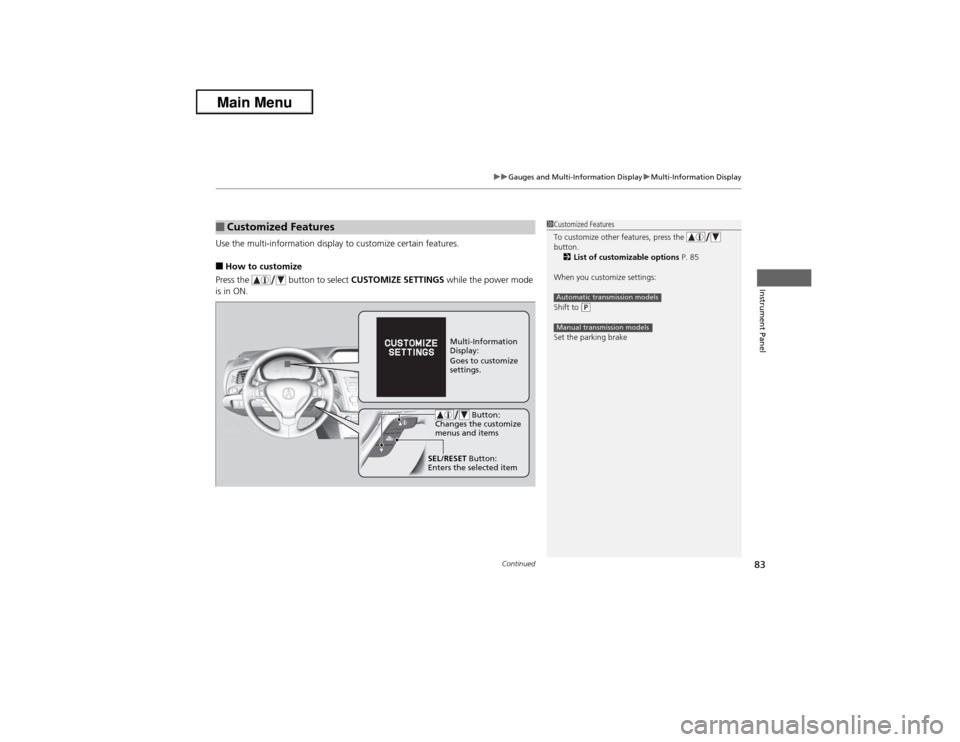
Use the multi-information display to customize certain features.■How to customize
Press the button to select CUSTOMIZE SETTINGS while the power mode
is in ON.■Customized Features
1Customized Features
To customize other features, press the
button.
2List of customizable options P. 85
When you customize settings:
Shift to
(P
Set the parking brakeAutomatic transmission modelsManual transmission models
Multi-Information
Display:
Goes to customize
settings.
SEL/RESET Button:
Enters the selected item Button:
Changes the customize
menus and items
Page 85 of 351
84
uuGauges and Multi-Information DisplayuMulti-Information Display
Instrument Panel
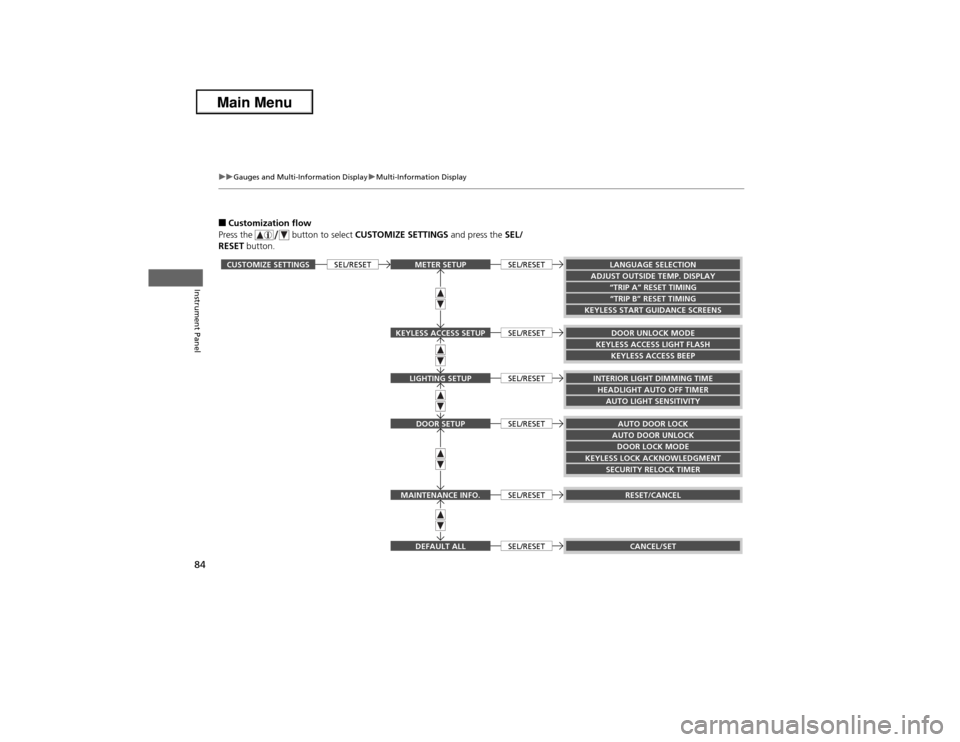
■Customization flow
Press the button to select CUSTOMIZE SETTINGS and press the SEL/
RESET button.CUSTOMIZE SETTINGS
LANGUAGE SELECTION
ADJUST OUTSIDE TEMP. DISPLAY
“TRIP B” RESET TIMING
KEYLESS START GUIDANCE SCREENS
KEYLESS ACCESS BEEP
INTERIOR LIGHT DIMMING TIMEHEADLIGHT AUTO OFF TIMER
AUTO DOOR LOCKAUTO DOOR UNLOCK
KEYLESS LOCK ACKNOWLEDGMENT
DOOR LOCK MODESECURITY RELOCK TIMER“TRIP A” RESET TIMINGDOOR UNLOCK MODE
KEYLESS ACCESS LIGHT FLASHAUTO LIGHT SENSITIVITY
RESET/CANCELCANCEL/SET
SEL/RESET
METER SETUPDOOR SETUPDEFAULT ALLLIGHTING SETUP
KEYLESS ACCESS SETUPMAINTENANCE INFO.
SEL/RESETSEL/RESETSEL/RESETSEL/RESETSEL/RESETSEL/RESET
Page 86 of 351
85
uuGauges and Multi-Information DisplayuMulti-Information Display
Continued
Instrument Panel
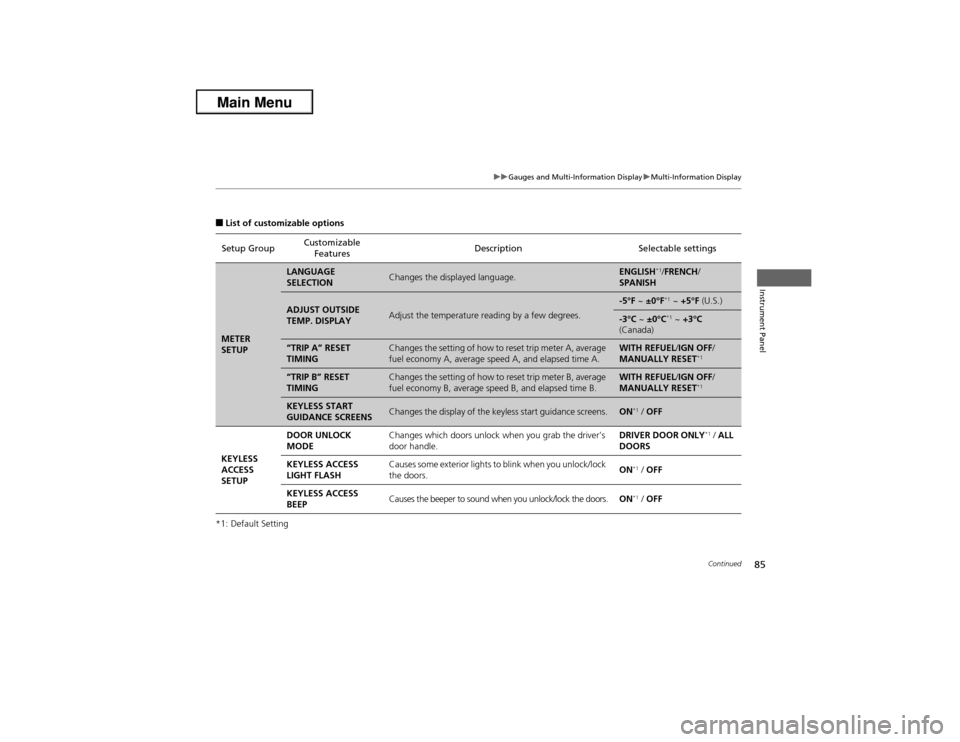
■List of customizable options
*1: Default SettingSetup GroupCustomizable
FeaturesDescription Selectable settingsMETER
SETUP
LANGUAGE
SELECTION
Changes the displayed language.
ENGLISH
*1/FRENCH/
SPANISH
ADJUST OUTSIDE
TEMP. DISPLAY
Adjust the temperature reading by a few degrees.
-5°F ~ ±0°F
*1 ~ +5°F (U.S.)
-3°C ~ ±0°C
*1 ~ +3°C
(Canada)
“TRIP A” RESET
TIMING
Changes the setting of how to reset trip meter A, average
fuel economy A, average speed A, and elapsed time A.
WITH REFUEL/IGN OFF/
MANUALLY RESET
*1
“TRIP B” RESET
TIMING
Changes the setting of how to reset trip meter B, average
fuel economy B, average speed B, and elapsed time B.
WITH REFUEL/IGN OFF/
MANUALLY RESET
*1
KEYLESS START
GUIDANCE SCREENS
Changes the display of the keyless start guidance screens.
ON
*1 / OFF
KEYLESS
ACCESS
SETUPDOOR UNLOCK
MODEChanges which doors unlock when you grab the driver’s
door handle.DRIVER DOOR ONLY
*1 / ALL
DOORS
KEYLESS ACCESS
LIGHT FLASHCauses some exterior lights to blink when you unlock/lock
the doors.ON
*1 / OFF
KEYLESS ACCESS
BEEPCauses the beeper to sound when you unlock/lock the doors.ON*1 / OFF
Page 87 of 351
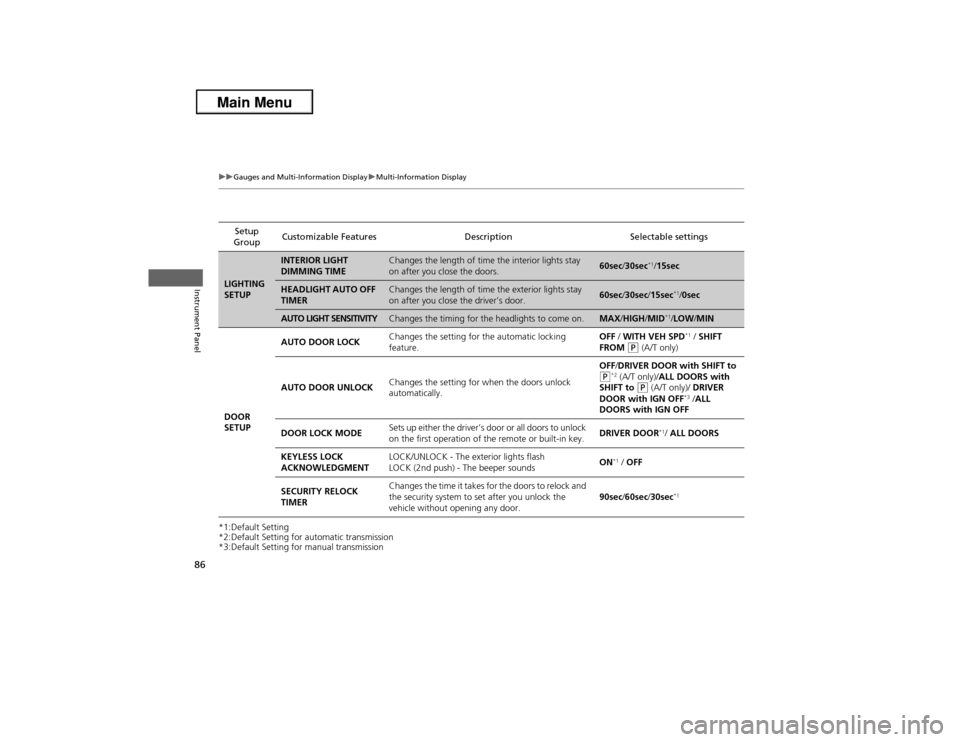
86
uuGauges and Multi-Information DisplayuMulti-Information Display
Instrument Panel
*1:Default Setting
*2:Default Setting for automatic transmission
*3:Default Setting for manual transmissionSetup
GroupCustomizable Features Description Selectable settingsLIGHTING
SETUP
INTERIOR LIGHT
DIMMING TIME
Changes the length of time the interior lights stay
on after you close the doors.
60sec/30sec
*1/15sec
HEADLIGHT AUTO OFF
TIMER
Changes the length of time the exterior lights stay
on after you close the driver’s door.
60sec/30sec/15sec
*1/0sec
AUTO LIGHT SENSITIVITY
Changes the timing for the headlights to come on.
MAX/HIGH/MID
*1/LOW/MIN
DOOR
SETUPAUTO DOOR LOCKChanges the setting for the automatic locking
feature.OFF / WITH VEH SPD
*1 / SHIFT
FROM
(P (A/T only)
AUTO DOOR UNLOCKChanges the setting for when the doors unlock
automatically.OFF/DRIVER DOOR with SHIFT to
(P*2 (A/T only)/ALL DOORS with
SHIFT to
(P (A/T only)/ DRIVER
DOOR with IGN OFF
*3 /ALL
DOORS with IGN OFF
DOOR LOCK MODESets up either the driver’s door or all doors to unlock
on the first operation of the remote or built-in key.DRIVER DOOR
*1/ ALL DOORS
KEYLESS LOCK
ACKNOWLEDGMENTLOCK/UNLOCK - The exterior lights flash
LOCK (2nd push) - The beeper soundsON
*1 / OFF
SECURITY RELOCK
TIMERChanges the time it takes for the doors to relock and
the security system to set after you unlock the
vehicle without opening any door.90sec/60sec/30sec
*1
Page 88 of 351
87
uuGauges and Multi-Information DisplayuMulti-Information Display
Continued
Instrument Panel
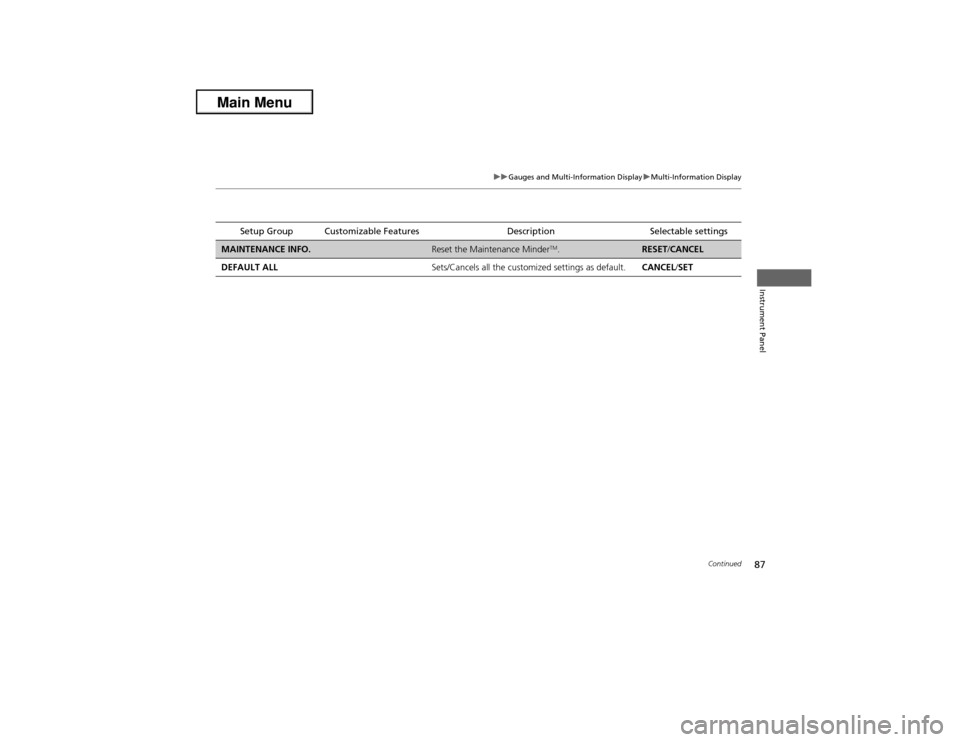
Setup Group Customizable Features Description Selectable settings
MAINTENANCE INFO.
Reset the Maintenance Minder
TM.
RESET/CANCEL
DEFAULT ALLSets/Cancels all the customized settings as default.CANCEL/SET