App Acura ILX 2016 Owner's Guide
[x] Cancel search | Manufacturer: ACURA, Model Year: 2016, Model line: ILX, Model: Acura ILX 2016Pages: 521, PDF Size: 24.09 MB
Page 78 of 521
77
uuIndicators u
Continued
Instrument Panel
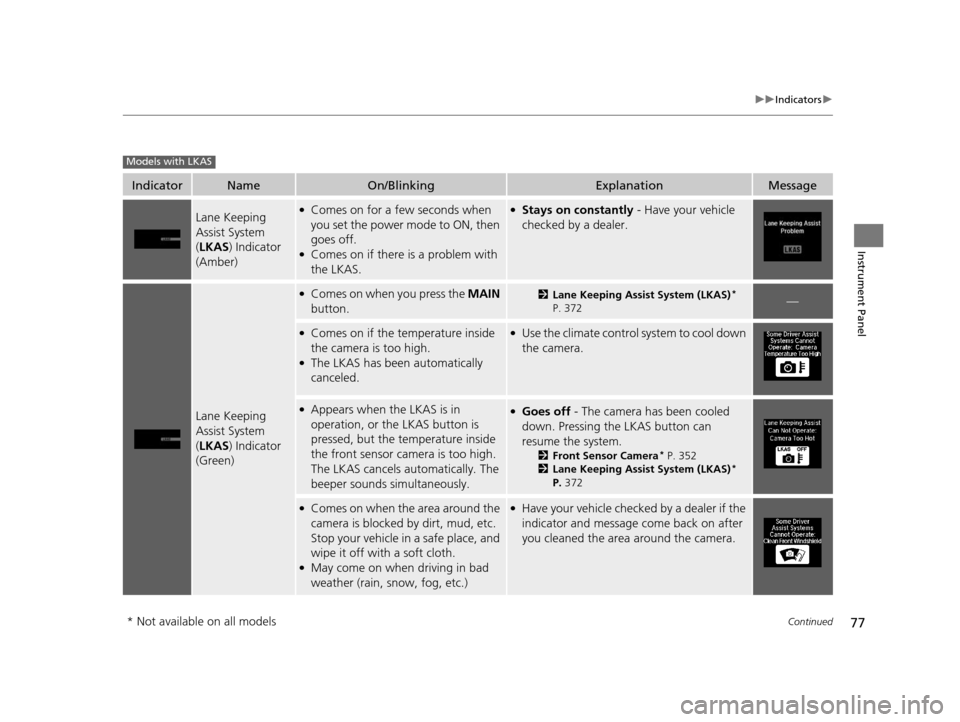
IndicatorNameOn/BlinkingExplanationMessage
Lane Keeping
Assist System
(LKAS ) Indicator
(Amber)●Comes on for a few seconds when
you set the power mode to ON, then
goes off.
●Comes on if there is a problem with
the LKAS.
●Stays on constantly - Have your vehicle
checked by a dealer.
Lane Keeping
Assist System
( LKAS ) Indicator
(Green)
●Comes on when you press the MAIN
button.2 Lane Keeping Assist System (LKAS)*
P. 372—
●Comes on if the temperature inside
the camera is too high.
●The LKAS has been automatically
canceled.
●Use the climate control system to cool down
the camera.
●Appears when the LKAS is in
operation, or the LKAS button is
pressed, but the temperature inside
the front sensor camera is too high.
The LKAS cancels automatically. The
beeper sounds simultaneously.●Goes off - The camera has been cooled
down. Pressing the LKAS button can
resume the system.
2 Front Sensor Camera* P. 352
2 Lane Keeping Assist System (LKAS)*
P. 372
●Comes on when the area around the
camera is blocked by dirt, mud, etc.
Stop your vehicle in a safe place, and
wipe it off with a soft cloth.
●May come on when driving in bad
weather (rain, snow, fog, etc.)
●Have your vehicle checked by a dealer if the
indicator and message come back on after
you cleaned the area around the camera.
Models with LKAS
* Not available on all models
16 ACURA ILX-31TX66300.book 77 ページ 2014年12月22日 月曜日 午後10時15分
Page 80 of 521
79
uuIndicators u
Continued
Instrument Panel
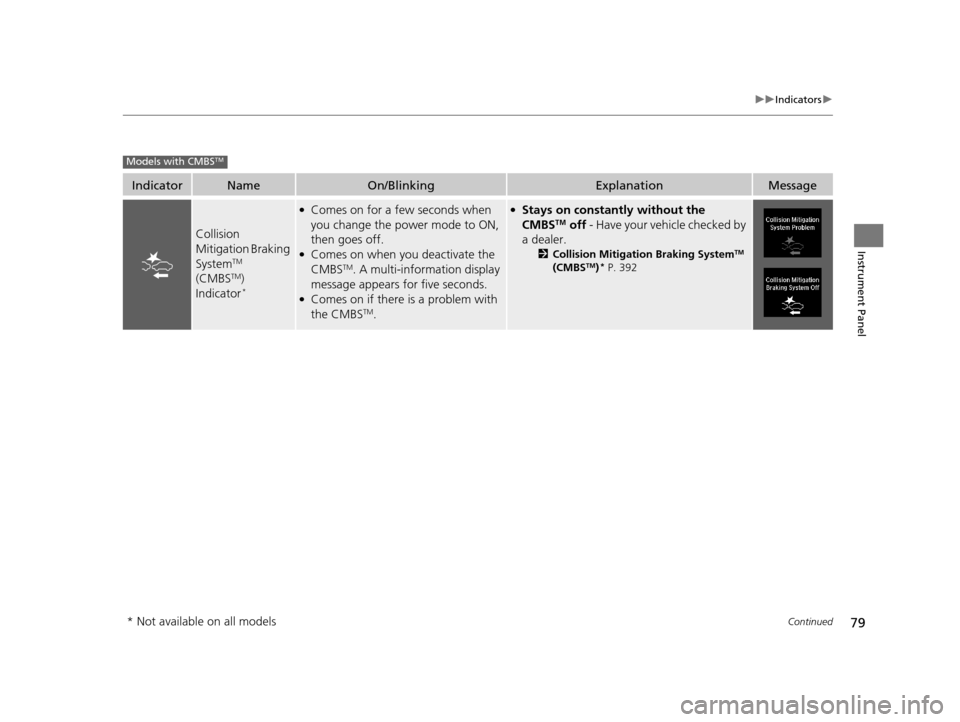
IndicatorNameOn/BlinkingExplanationMessage
Collision
Mitigation Braking
System
TM
(CMBSTM)
Indicator*
●Comes on for a few seconds when
you change the power mode to ON,
then goes off.
●Comes on when you deactivate the
CMBSTM. A multi-information display
message appears for five seconds.
●Comes on if there is a problem with
the CMBSTM.
●Stays on constantly without the
CMBSTM off - Have your vehicle checked by
a dealer.
2 Collision Mitigation Braking SystemTM
(CMBSTM)* P. 392
Models with CMBSTM
* Not available on all models
16 ACURA ILX-31TX66300.book 79 ページ 2014年12月22日 月曜日 午後10時15分
Page 81 of 521
80
uuIndicators u
Instrument Panel
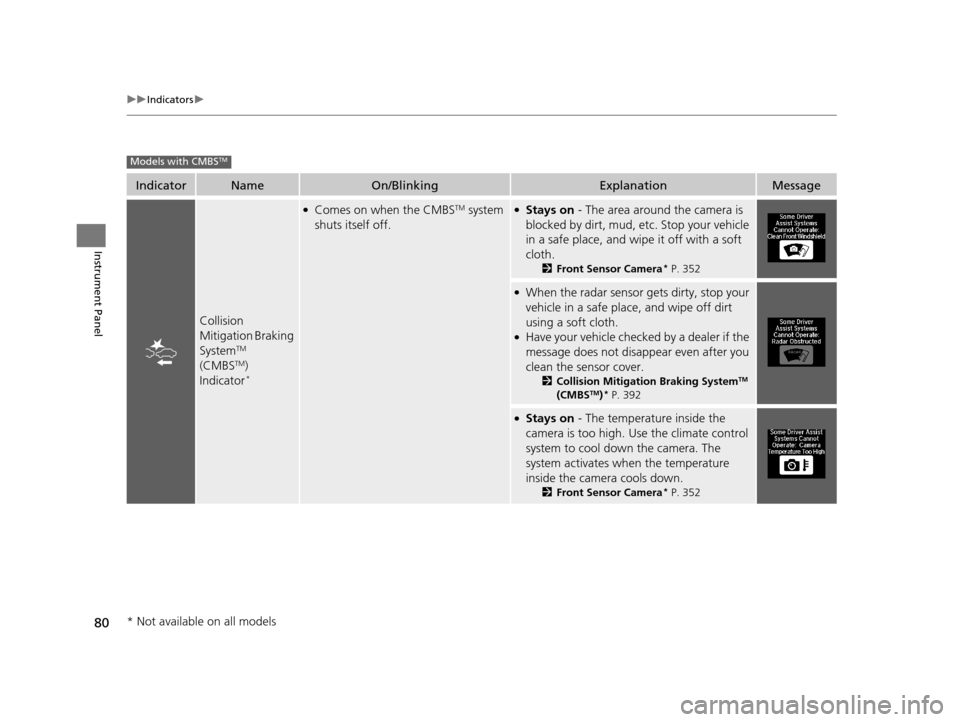
IndicatorNameOn/BlinkingExplanationMessage
Collision
Mitigation Braking
System
TM
(CMBSTM)
Indicator*
●Comes on when the CMBSTM system
shuts itself off.●Stays on - The area around the camera is
blocked by dirt, mud, etc. Stop your vehicle
in a safe place, and wipe it off with a soft
cloth.
2 Front Sensor Camera* P. 352
●When the radar sensor gets dirty, stop your
vehicle in a safe place, and wipe off dirt
using a soft cloth.
●Have your vehicle checked by a dealer if the
message does not disappear even after you
clean the sensor cover.
2Collision Mitigation Braking SystemTM
(CMBSTM)* P. 392
●Stays on - The temperature inside the
camera is too high. Use the climate control
system to cool down the camera. The
system activates when the temperature
inside the camera cools down.
2 Front Sensor Camera* P. 352
Models with CMBSTM
* Not available on all models
16 ACURA ILX-31TX66300.book 80 ページ 2014年12月22日 月曜日 午後10時15分
Page 82 of 521
81
uuIndicators uMulti-Information Display Warning and Information Messages
Continued
Instrument Panel
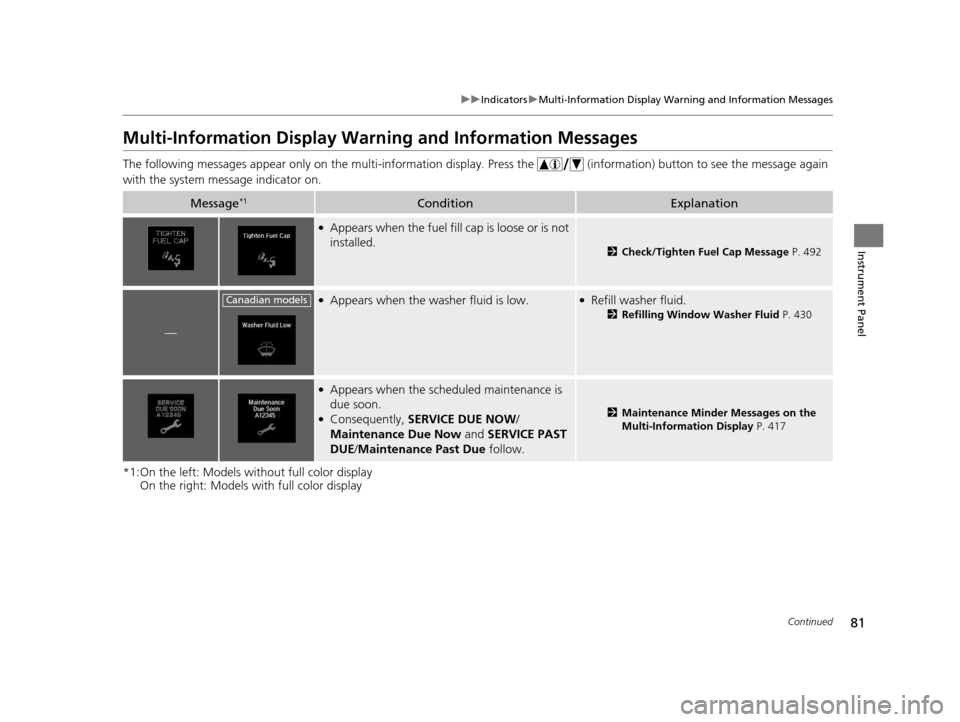
Multi-Information Display Warn ing and Information Messages
The following messages appear only on the multi-information display. Press the (information) button to see the message again
with the system message indicator on.
*1:On the left: Models wi thout full color display
On the right: Models with full color display
Message*1ConditionExplanation
●Appears when the fuel fill cap is loose or is not
installed.
2 Check/Tighten Fuel Cap Message P. 492
—
●Appears when the washer fluid is low.●Refill washer fluid.
2Refilling Window Washer Fluid P. 430
●Appears when the scheduled maintenance is
due soon.
●Consequently, SERVICE DUE NOW /
Maintenance Due Now and SERVICE PAST
DUE /Maintenance Past Due follow.2Maintenance Minder Messages on the
Multi-Information Display P. 417
Canadian models
16 ACURA ILX-31TX66300.book 81 ページ 2014年12月22日 月曜日 午後10時15分
Page 83 of 521
82
uuIndicators uMulti-Information Display Warn ing and Information Messages
Instrument Panel
*1:On the left: Models without full color display
On the right: Models with full color display
Message*1ConditionExplanation
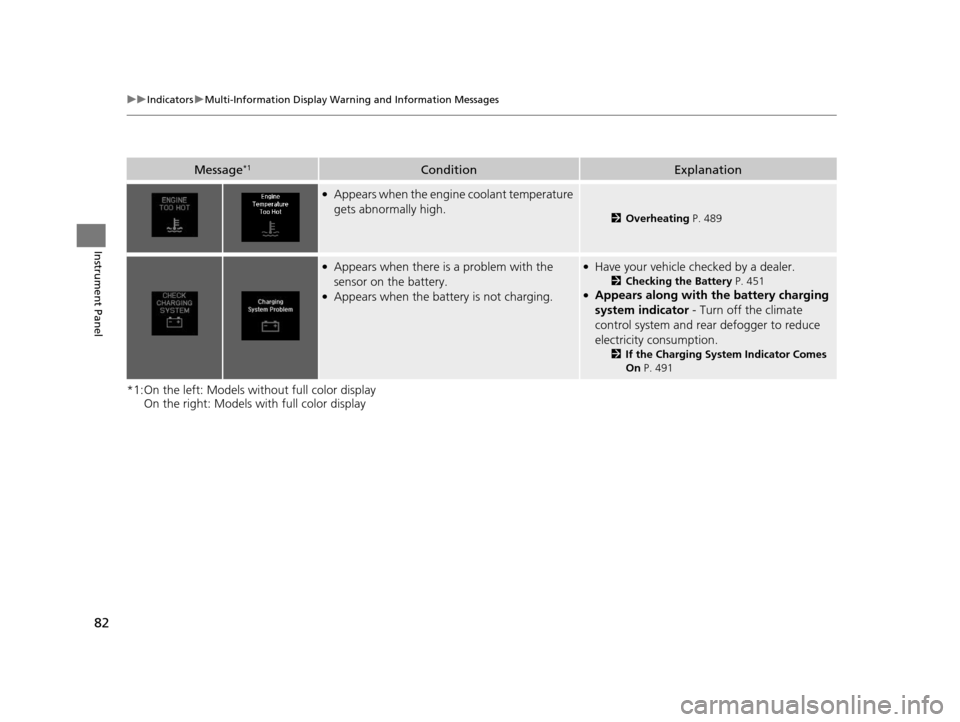
●Appears when the engine coolant temperature
gets abnormally high.
2Overheating P. 489
●Appears when there is a problem with the
sensor on the battery.
●Appears when the battery is not charging.
●Have your vehicle checked by a dealer.
2 Checking the Battery P. 451●Appears along with the battery charging
system indicator - Turn off the climate
control system and rear defogger to reduce
electricity consumption.
2 If the Charging System Indicator Comes
On P. 491
16 ACURA ILX-31TX66300.book 82 ページ 2014年12月22日 月曜日 午後10時15分
Page 84 of 521
83
uuIndicators uMulti-Information Display Warning and Information Messages
Continued
Instrument Panel
*1:On the left: Models wi thout full color display
On the right: Models with full color display
Message*1ConditionExplanation
—
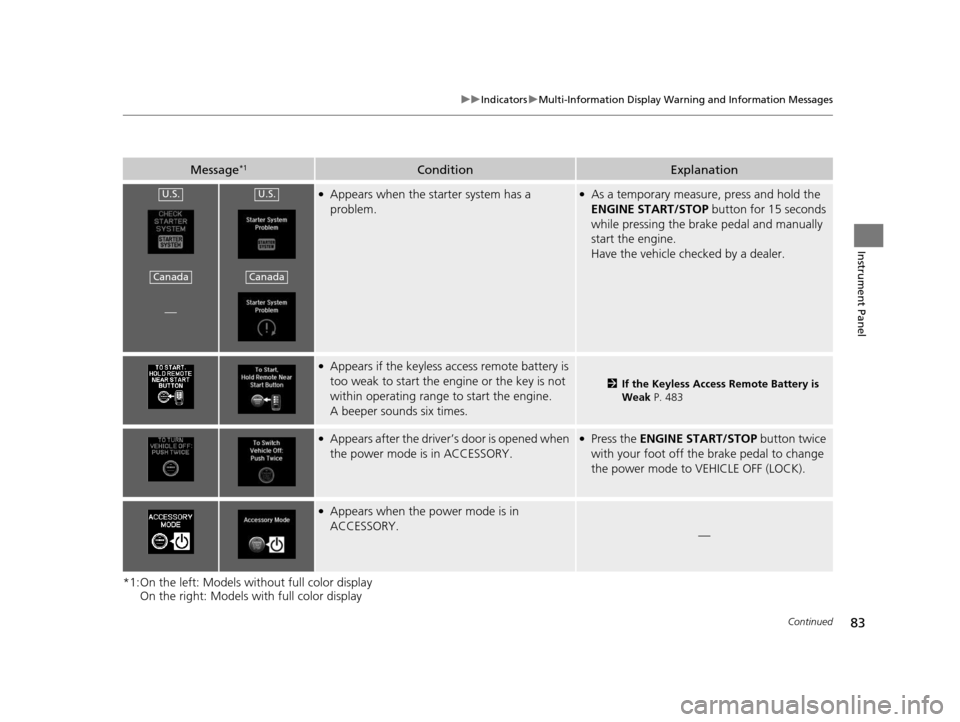
●Appears when the starter system has a
problem.●As a temporary measure, press and hold the
ENGINE START/STOP button for 15 seconds
while pressing the brake pedal and manually
start the engine.
Have the vehicle checked by a dealer.
●Appears if the keyless access remote battery is
too weak to start the engine or the key is not
within operating range to start the engine.
A beeper sounds six times.
2 If the Keyless Access Remote Battery is
Weak P. 483
●Appears after the driver’s door is opened when
the power mode is in ACCESSORY.●Press the ENGINE START/STOP button twice
with your foot off the brake pedal to change
the power mode to VEHICLE OFF (LOCK).
●Appears when the power mode is in
ACCESSORY.
—
U.S.
Canada
U.S.
Canada
16 ACURA ILX-31TX66300.book 83 ページ 2014年12月22日 月曜日 午後10時15分
Page 85 of 521
84
uuIndicators uMulti-Information Display Warn ing and Information Messages
Instrument Panel
*1:On the left: Models without full color display
On the right: Models with full color display
Message*1ConditionExplanation
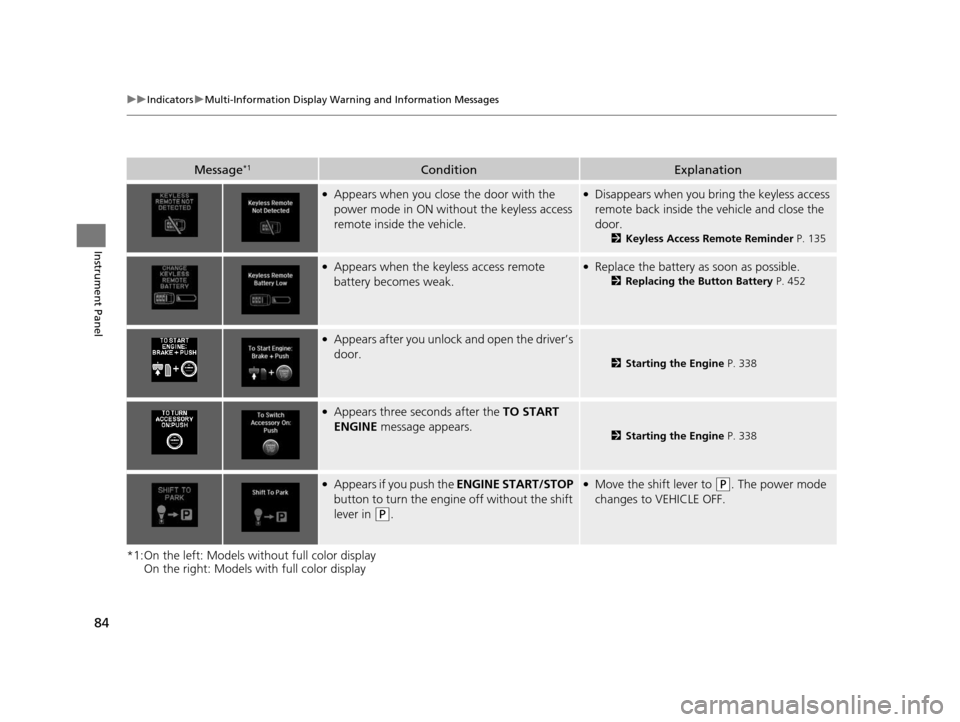
●Appears when you close the door with the
power mode in ON without the keyless access
remote inside the vehicle.●Disappears when you bring the keyless access
remote back inside the vehicle and close the
door.
2Keyless Access Remote Reminder P. 135
●Appears when the keyless access remote
battery becomes weak.●Replace the battery as soon as possible.
2Replacing the Button Battery P. 452
●Appears after you unlock and open the driver’s
door.
2Starting the Engine P. 338
●Appears three seconds after the TO START
ENGINE message appears.
2Starting the Engine P. 338
●Appears if you push the ENGINE START/STOP
button to turn the engine off without the shift
lever in
(P.
●Move the shift lever to (P. The power mode
changes to VEHICLE OFF.
16 ACURA ILX-31TX66300.book 84 ページ 2014年12月22日 月曜日 午後10時15分
Page 86 of 521
85
uuIndicators uMulti-Information Display Warning and Information Messages
Continued
Instrument Panel
*1:On the left: Models wi thout full color display
On the right: Models with full color display
Message*1ConditionExplanation
—
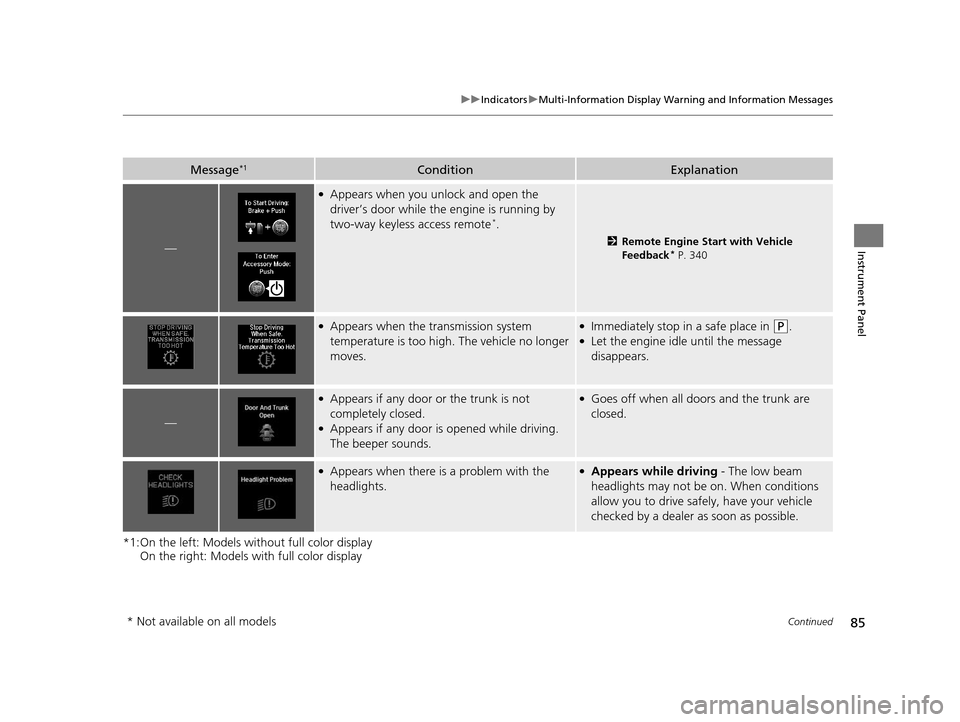
●Appears when you unlock and open the
driver’s door while the engine is running by
two-way keyless access remote
*.
2 Remote Engine Start with Vehicle
Feedback* P. 340
●Appears when the transmission system
temperature is too high. The vehicle no longer
moves.●Immediately stop in a safe place in (P.●Let the engine idle until the message
disappears.
—
●Appears if any door or the trunk is not
completely closed.
●Appears if any door is opened while driving.
The beeper sounds.
●Goes off when all doors and the trunk are
closed.
●Appears when there is a problem with the
headlights.●Appears while driving - The low beam
headlights may not be on. When conditions
allow you to drive safely, have your vehicle
checked by a dealer as soon as possible.
* Not available on all models
16 ACURA ILX-31TX66300.book 85 ページ 2014年12月22日 月曜日 午後10時15分
Page 87 of 521
86
uuIndicators uMulti-Information Display Warn ing and Information Messages
Instrument Panel
MessageConditionExplanation
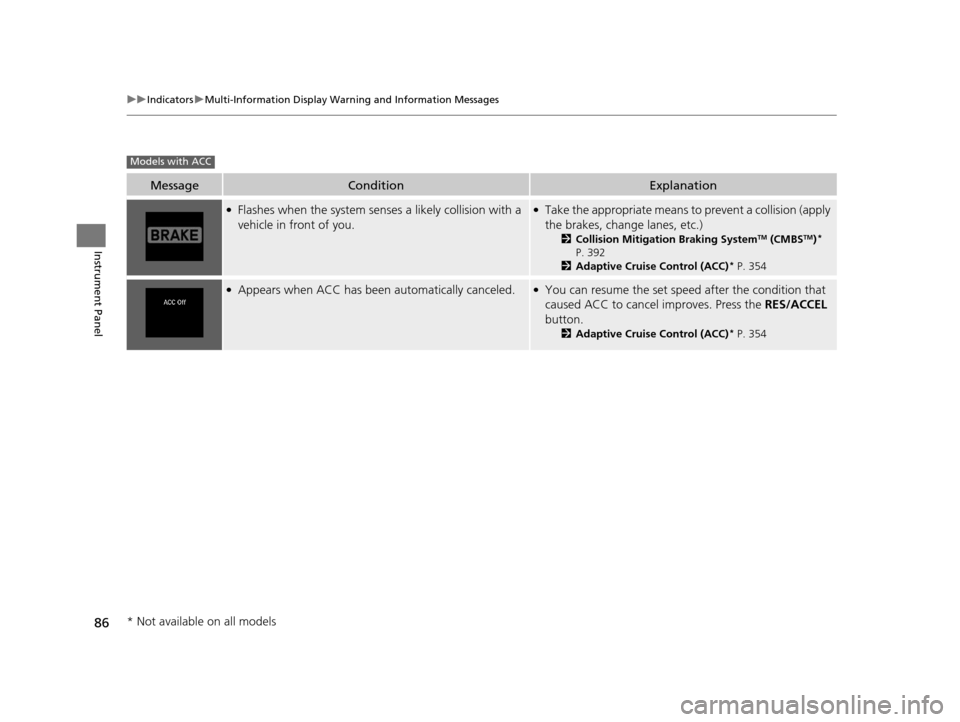
●Flashes when the system senses a likely collision with a
vehicle in front of you.●Take the appropriate means to prevent a collision (apply
the brakes, change lanes, etc.)
2 Collision Mitigation Braking SystemTM (CMBSTM)*
P. 392
2 Adaptive Cruise Control (ACC)
* P. 354
●Appears when ACC has been automatically canceled.●You can resume the set speed after the condition that
caused ACC to cancel improves. Press the RES/ACCEL
button.
2 Adaptive Cruise Control (ACC)* P. 354
Models with ACC
* Not available on all models
16 ACURA ILX-31TX66300.book 86 ページ 2014年12月22日 月曜日 午後10時15分
Page 88 of 521
87
uuIndicators uMulti-Information Display Warning and Information Messages
Instrument Panel
MessageConditionExplanation
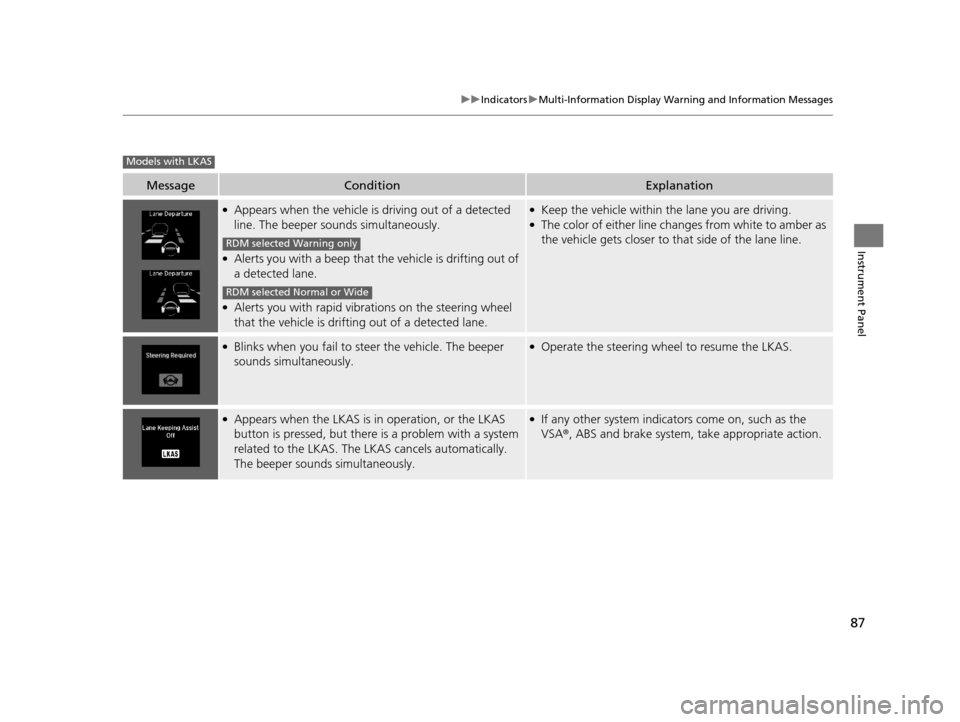
●Appears when the vehicle is driving out of a detected
line. The beeper sounds simultaneously.
●Alerts you with a beep that th e vehicle is drifting out of
a detected lane.
●Alerts you with rapid vibrat ions on the steering wheel
that the vehicle is drifting out of a detected lane.
●Keep the vehicle within the lane you are driving.●The color of either line changes from white to amber as
the vehicle gets closer to that side of the lane line.
●Blinks when you fail to steer the vehicle. The beeper
sounds simultaneously.●Operate the steering wheel to resume the LKAS.
●Appears when the LKAS is in operation, or the LKAS
button is pressed, but there is a problem with a system
related to the LKAS. The LKAS cancels automatically.
The beeper sounds simultaneously.●If any other system indicators come on, such as the
VSA ®, ABS and brake system, take appropriate action.
Models with LKAS
RDM selected Warning only
RDM selected Normal or Wide
16 ACURA ILX-31TX66300.book 87 ページ 2014年12月22日 月曜日 午後10時15分