Turn off Acura ILX 2017 User Guide
[x] Cancel search | Manufacturer: ACURA, Model Year: 2017, Model line: ILX, Model: Acura ILX 2017Pages: 521, PDF Size: 29.65 MB
Page 79 of 521
78
uuIndicators u
Instrument Panel
*1:On the left: Models without full color display
On the right: Models with full color display
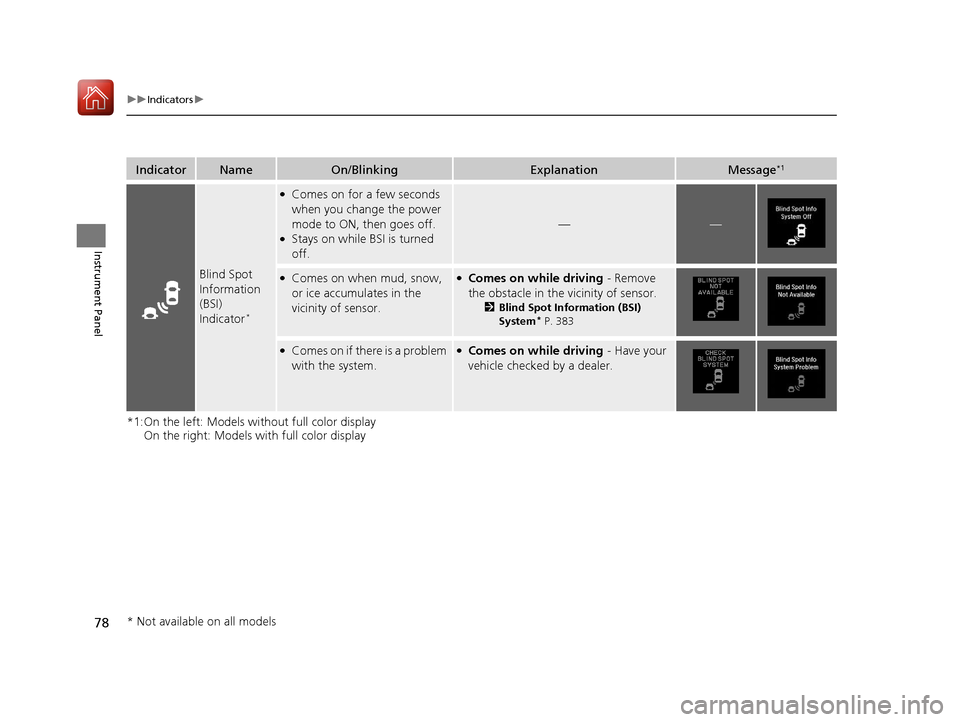
IndicatorNameOn/BlinkingExplanationMessage*1
Blind Spot
Information
(BSI)
Indicator
*
●Comes on for a few seconds
when you change the power
mode to ON, then goes off.
●Stays on while BSI is turned
off.
——
●Comes on when mud, snow,
or ice accumulates in the
vicinity of sensor.●Comes on while driving - Remove
the obstacle in the vicinity of sensor.
2Blind Spot Information (BSI)
System* P. 383
●Comes on if there is a problem
with the system.●Comes on while driving - Have your
vehicle checked by a dealer.
* Not available on all models
17 ACURA ILX-31TX66400.book 78 ページ 2016年3月15日 火曜日 午後5時0分
Page 83 of 521
82
uuIndicators uMulti-Information Display Warn ing and Information Messages
Instrument Panel
*1:On the left: Models without full color display
On the right: Models with full color display
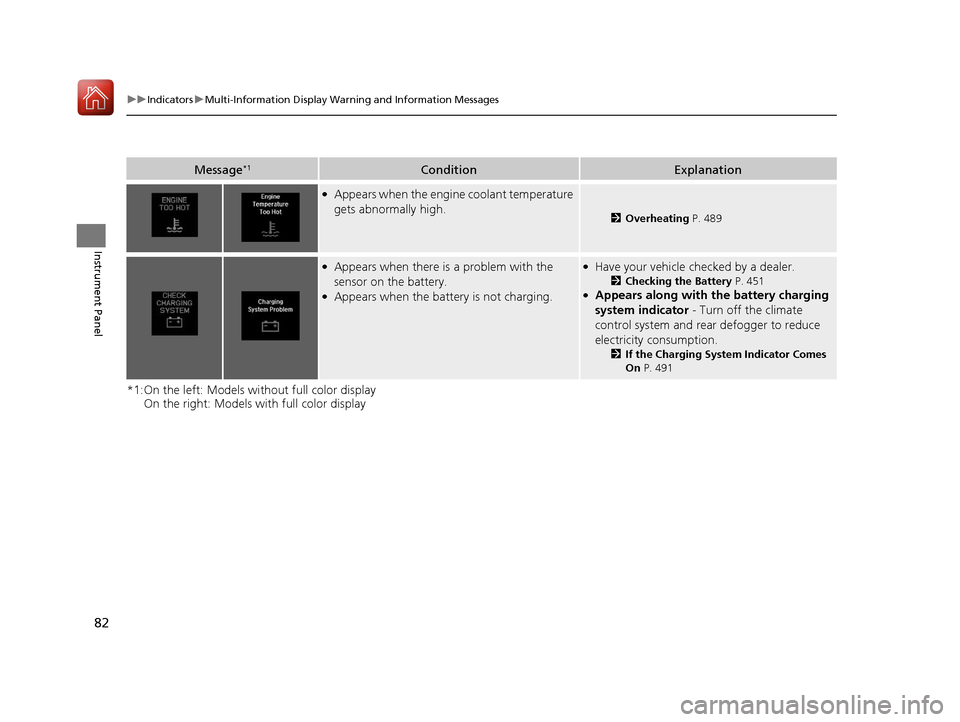
Message*1ConditionExplanation
●Appears when the engine coolant temperature
gets abnormally high.
2Overheating P. 489
●Appears when there is a problem with the
sensor on the battery.
●Appears when the battery is not charging.
●Have your vehicle ch ecked by a dealer.
2Checking the Battery P. 451●Appears along with the battery charging
system indicator - Turn off the climate
control system and rear defogger to reduce
electricity consumption.
2 If the Charging System Indicator Comes
On P. 491
17 ACURA ILX-31TX66400.book 82 ページ 2016年3月15日 火曜日 午後5時0分
Page 85 of 521
84
uuIndicators uMulti-Information Display Warn ing and Information Messages
Instrument Panel
*1:On the left: Models without full color display
On the right: Models with full color display
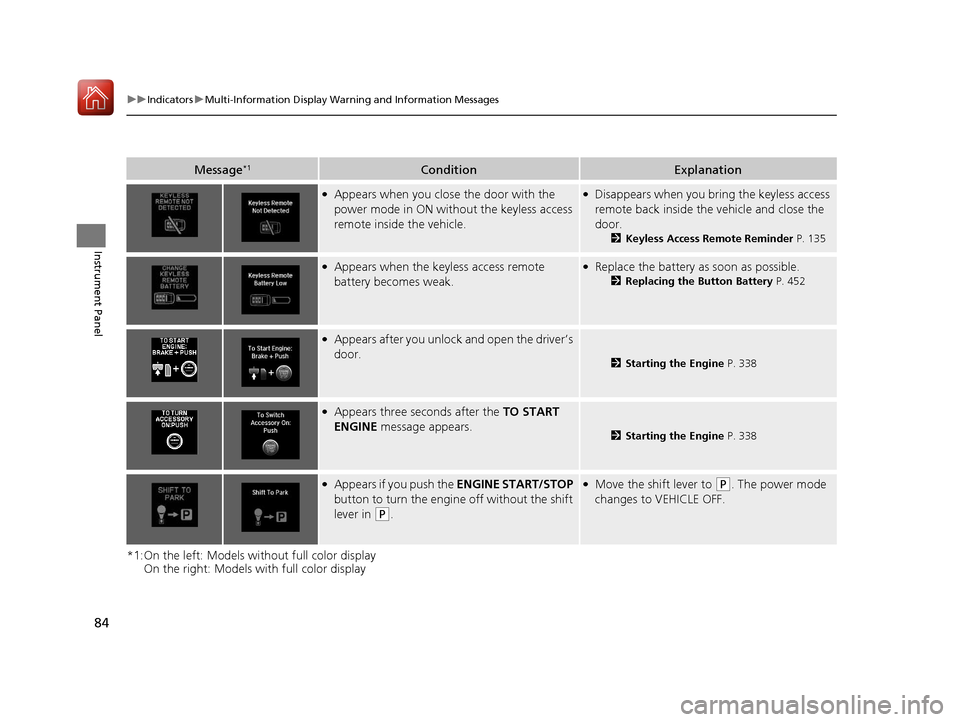
Message*1ConditionExplanation
●Appears when you close the door with the
power mode in ON with out the keyless access
remote inside the vehicle.●Disappears when you bring the keyless access
remote back inside the vehicle and close the
door.
2 Keyless Access Remote Reminder P. 135
●Appears when the keyless access remote
battery becomes weak.●Replace the battery as soon as possible.
2Replacing the Button Battery P. 452
●Appears after you unlock and open the driver’s
door.
2Starting the Engine P. 338
●Appears three seconds after the TO START
ENGINE message appears.
2Starting the Engine P. 338
●Appears if you push the ENGINE START/STOP
button to turn the engine off without the shift
lever in
(P.
●Move the shift lever to ( P. The power mode
changes to VEHICLE OFF.
17 ACURA ILX-31TX66400.book 84 ページ 2016年3月15日 火曜日 午後5時0分
Page 99 of 521
98
uuGauges and Multi-Information Display uMulti-Information Display
Instrument Panel
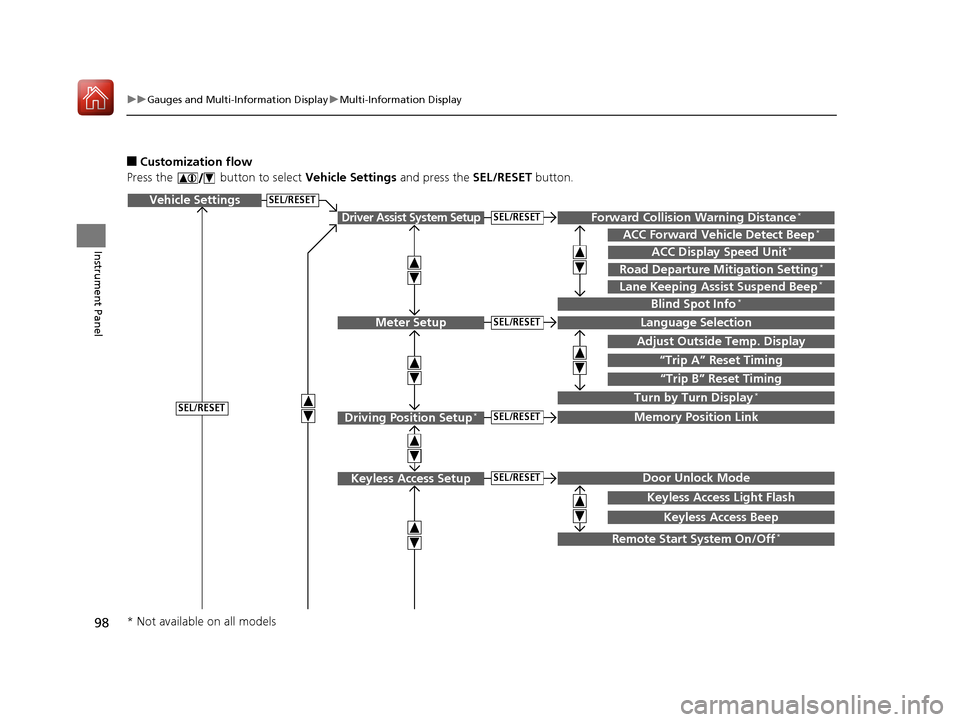
■Customization flow
Press the button to select Vehicle Settings and press the SEL/RESET button.
Vehicle Settings
“Trip A” Reset Timing
Language Selection
Adjust Outside Temp. Display
Memory Position Link
Door Unlock Mode
Keyless Access Light Flash
Driver Assist System Setup
Meter Setup
Driving Position Setup*
Keyless Access Setup
“Trip B” Reset Timing
Turn by Turn Display*
Forward Collision Warning Distance*
ACC Forward Vehicle Detect Beep*
Lane Keeping Assist Suspend Beep*
Blind Spot Info*
Keyless Access Beep
ACC Display Speed Unit*
Road Departure Mitigation Setting*
SEL/RESET
SEL/RESET
SEL/RESET
SEL/RESET
SEL/RESET
SEL/RESET
Remote Start System On/Off*
* Not available on all models
17 ACURA ILX-31TX66400.book 98 ページ 2016年3月15日 火曜日 午後5時0分
Page 102 of 521
101
uuGauges and Multi-Information Display uMulti-Information Display
Continued
Instrument Panel
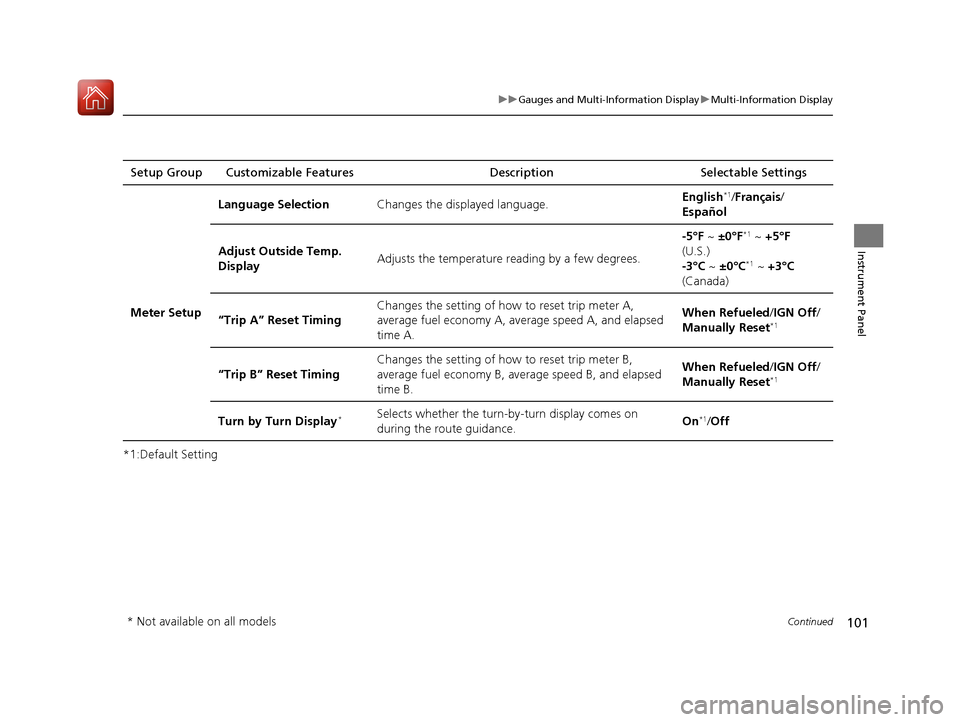
*1:Default SettingSetup Group Customizable Features
Description Selectable Settings
Meter Setup Language Selection
Changes the displayed language. English
*1/
Français /
Español
Adjust Outside Temp.
Display Adjusts the temperature r
eading by a few degrees. -5°F ~
±0°F
*1 ~ +5°F
(U.S.)
-3°C ~ ±0°C
*1 ~ +3°C
(Canada)
“Trip A” Reset Timing Changes the setting of how to reset trip meter A,
average fuel economy A, av
erage speed A, and elapsed
time A. When Refueled
/IGN Off /
Manually Reset
*1
“Trip B” Reset Timing Changes the setting of ho
w to reset trip meter B,
average fuel economy B, av erage speed B, and elapsed
time B. When Refueled
/IGN Off /
Manually Reset*1
Turn by Turn Display*Selects whether the turn-b y-turn display comes on
during the route guidance. On*1/
Off
* Not available on all models
17 ACURA ILX-31TX66400.book 101 ページ 2016年3月15日 火曜日 午後5時0分
Page 103 of 521
102
uuGauges and Multi-Information Display uMulti-Information Display
Instrument Panel
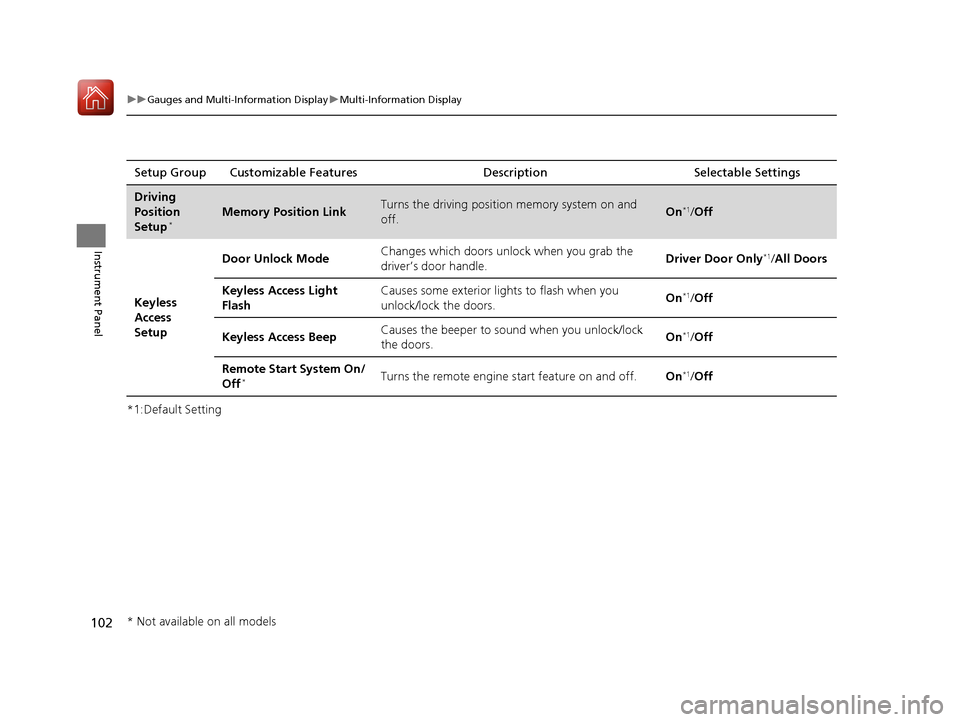
*1:Default SettingSetup Group Customizable Features Description Selectable Settings
Driving
Position
Setup
*Memory Position LinkTurns the driving position memory system on and
off.On*1/
Off
Keyless
Access
Setup Door Unlock Mode
Changes which doors unlock when you grab the
driver’s door handle.
Driver Door Only
*1/
All Doors
Keyless Access Light
Flash Causes some exterior lights to flash when you
unlock/lock the doors.
On
*1/
Off
Keyless Access Beep Causes the beeper to sound when you unlock/lock
the doors. On
*1/
Off
Remote Start System On/
Off
*Turns the remote engine start feature on and off. On*1/Off
* Not available on all models
17 ACURA ILX-31TX66400.book 102 ページ 2016年3月15日 火曜日 午後5時0分
Page 107 of 521
106
uuGauges and Multi-Information Display uMulti-Information Display
Instrument Panel
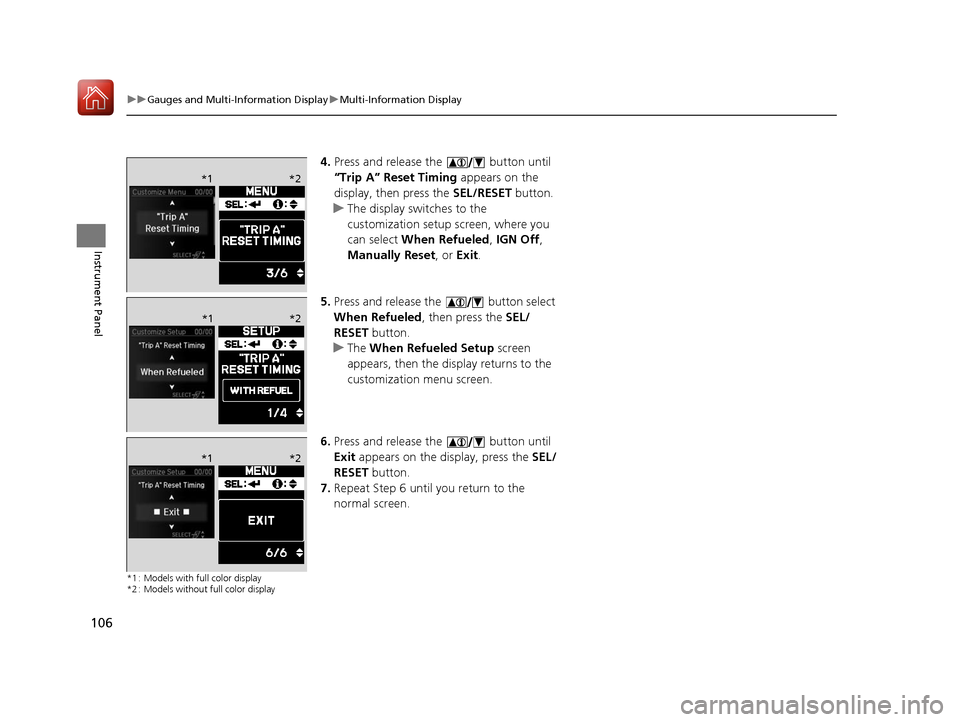
4. Press and release the button until
“Trip A” Reset Timing appears on the
display, then press the SEL/RESET button.
u The display switches to the
customization setup screen, where you
can select When Refueled , IGN Off,
Manually Reset , or Exit .
5. Press and release the button select
When Refueled , then press the SEL/
RESET button.
u The When Refueled Setup screen
appears, then the di splay returns to the
customization menu screen.
6. Press and release the button until
Exit appears on the display, press the SEL/
RESET button.
7. Repeat Step 6 until you return to the
normal screen.
*1 : Models with full color display
*2 : Models without full color display
*1 *2
*1*2
*1 *2
17 ACURA ILX-31TX66400.book 106 ページ 2016年3月15日 火曜日 午後5時0分
Page 117 of 521
uuLocking and Unlocking the Doors uLocking/Unlocking the Doors from the Outside
116
Controls
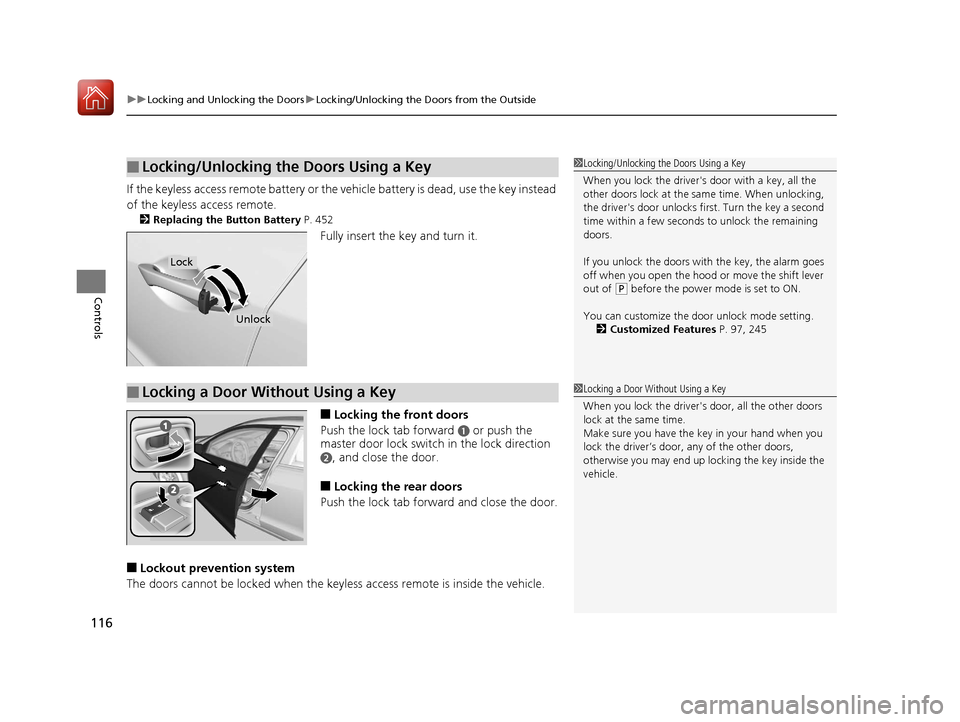
If the keyless access remote battery or the ve hicle battery is dead, use the key instead
of the keyless access remote.
2 Replacing the Button Battery P. 452
Fully insert the key and turn it.
■Locking the front doors
Push the lock tab forward
a or push the
master door lock switch in the lock direction
b, and close the door.
■Locking the rear doors
Push the lock tab forward and close the door.
■Lockout prevention system
The doors cannot be locked when the key less access remote is inside the vehicle.
■Locking/Unlocking the Doors Using a Key1Locking/Unlocking the Doors Using a Key
When you lock the driver's door with a key, all the
other doors lock at the sa me time. When unlocking,
the driver's door unlocks first. Turn the key a second
time within a few seconds to unlock the remaining
doors.
If you unlock the doors with the key, the alarm goes
off when you open the hood or move the shift lever
out of
( P before the power mode is set to ON.
You can customize the door unlock mode setting. 2 Customized Features P. 97, 245
Lock
Unlock
■Locking a Door Without Using a Key1Locking a Door Without Using a Key
When you lock the driver's door, all the other doors
lock at the same time.
Make sure you have the key in your hand when you
lock the driver’s door, any of the other doors,
otherwise you may end up lo cking the key inside the
vehicle.
17 ACURA ILX-31TX66400.book 116 ページ 2016年3月15日 火曜日 午後5時0分
Page 122 of 521
121
uuLocking and Unlocking the Doors uAuto Door Locking/Unlocking
Controls
Auto Door Locking/Unlocking
Your vehicle locks all doors and unlocks the driver’s door automatically when a
certain condition is met.
■Drive lock mode
All doors lock when the vehicle’s speed reaches about 10 mph (15 km/h).
■Driver’s door open mode
All doors unlock when the driver’s door is opened.
■Auto Door Locking
■Auto Door Unlocking
1 Auto Door Locking/Unlocking
You can turn off or cha nge to another auto door
locking/unlocking sett ing using the audio/
information screen or mu lti-information display.
2 Customized Features P. 97, 245
17 ACURA ILX-31TX66400.book 121 ページ 2016年3月15日 火曜日 午後5時0分
Page 125 of 521
124
uuOpening and Closing the Trunk uUsing the Remote Transmitter
Controls
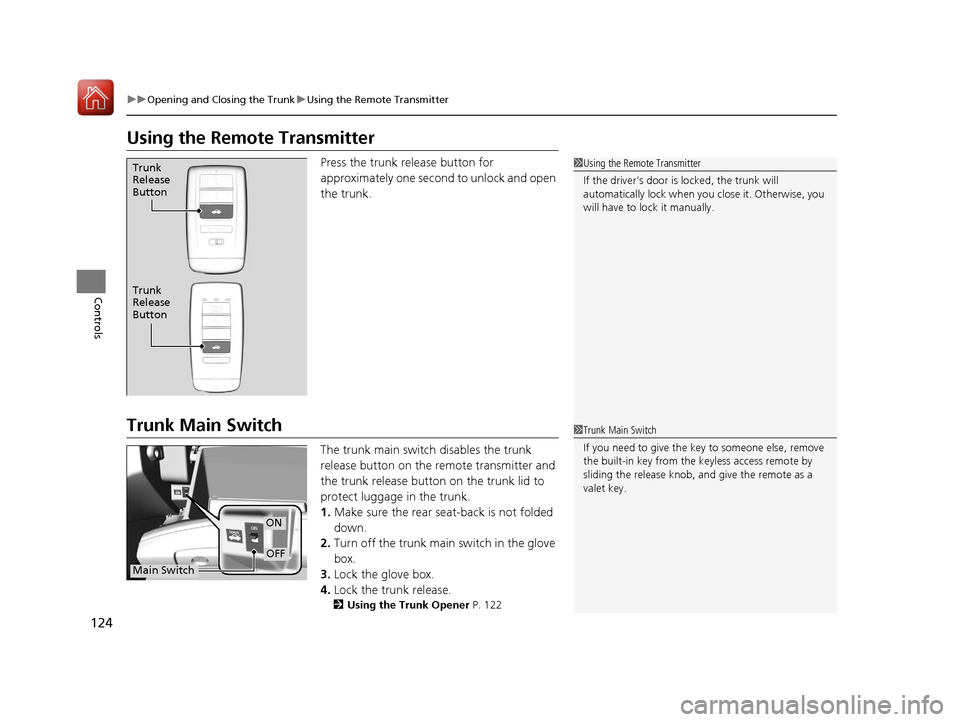
Using the Remote Transmitter
Press the trunk release button for
approximately one second to unlock and open
the trunk.
Trunk Main Switch
The trunk main switch disables the trunk
release button on the remote transmitter and
the trunk release button on the trunk lid to
protect luggage in the trunk.
1. Make sure the rear seat-back is not folded
down.
2. Turn off the trunk main switch in the glove
box.
3. Lock the glove box.
4. Lock the trunk release.
2 Using the Trunk Opener P. 122
1Using the Remote Transmitter
If the driver’s door is locked, the trunk will
automatically lock when yo u close it. Otherwise, you
will have to lock it manually.Trunk
Release
Button
Trunk
Release
Button
1 Trunk Main Switch
If you need to give the ke y to someone else, remove
the built-in key from the keyless access remote by
sliding the release knob, and give the remote as a
valet key.
ON
OFF
Main Switch
17 ACURA ILX-31TX66400.book 124 ページ 2016年3月15日 火曜日 午後5時0分