Turn off Acura ILX 2017 Owner's Guide
[x] Cancel search | Manufacturer: ACURA, Model Year: 2017, Model line: ILX, Model: Acura ILX 2017Pages: 521, PDF Size: 29.65 MB
Page 154 of 521
153
uuAdjusting the Seats uMaintain a Sitting Proper Position
Controls
Maintain a Sitting Proper Position
After all occupants have adjusted their s eats and head restraints, and put on their
seat belts, it is very important that they continue to sit upright, well back in their
seats, with their feet on the floor, until the vehicle is safe ly parked and the engine is
off.
Sitting improperly can increase the chance of injury during a crash. For example, if
an occupant slouches, lies down, turns sideways, sits forward, leans forward or
sideways, or puts one or both feet up, the chance of injury during a crash is greatly
increased.
In addition, an occupant who is out of posi tion in the front seat can be seriously or
fatally injured in a crash by striking interior parts of the vehicle or being struck by an
inflating front airbag.1 Maintain a Sitting Proper Position
3WARNING
Sitting improperly or out of position can
result in serious injury or death in a crash.
Always sit upright, well back in the seat,
with your feet on the floor.
17 ACURA ILX-31TX66400.book 153 ページ 2016年3月15日 火曜日 午後5時0分
Page 155 of 521
154
uuAdjusting the Seats uRear Seat
Controls
Rear Seat
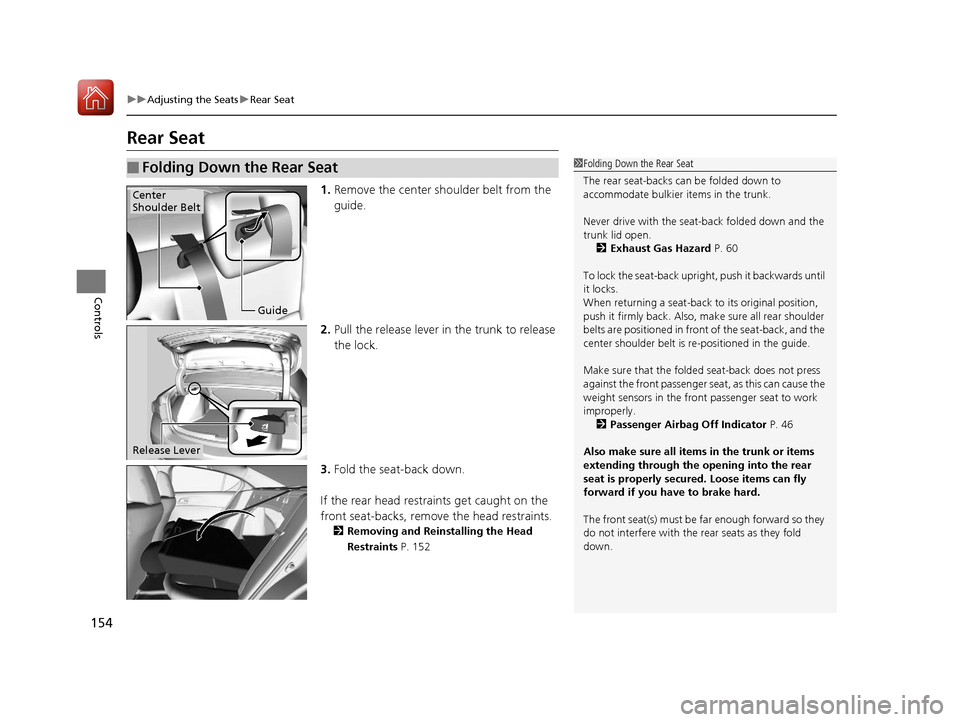
1. Remove the center shoulder belt from the
guide.
2. Pull the release lever in the trunk to release
the lock.
3. Fold the seat-back down.
If the rear head restraints get caught on the
front seat-backs, remove the head restraints.
2 Removing and Reinstalling the Head
Restraints P. 152
■Folding Down the Rear Seat1Folding Down the Rear Seat
The rear seat-backs can be folded down to
accommodate bulkier items in the trunk.
Never drive with the seat-back folded down and the
trunk lid open. 2 Exhaust Gas Hazard P. 60
To lock the seat-back upri ght, push it backwards until
it locks.
When returning a seat-back to its original position,
push it firmly back. Also, m ake sure all rear shoulder
belts are positioned in front of the seat-back, and the
center shoulder belt is re -positioned in the guide.
Make sure that the folded seat-back does not press
against the front passenger seat, as this can cause the
weight sensors in the front passenger seat to work
improperly.
2 Passenger Airbag Off Indicator P. 46
Also make sure all items in the trunk or items
extending through the opening into the rear
seat is properly secured. Loose items can fly
forward if you have to brake hard.
The front seat(s) must be far enough forward so they
do not interfere with the rear seats as they fold
down.
Guide
Center
Shoulder Belt
Release Lever
17 ACURA ILX-31TX66400.book 154 ページ 2016年3月15日 火曜日 午後5時0分
Page 157 of 521
156
Controls
Interior Lights/Interior Convenience Items
Interior Lights
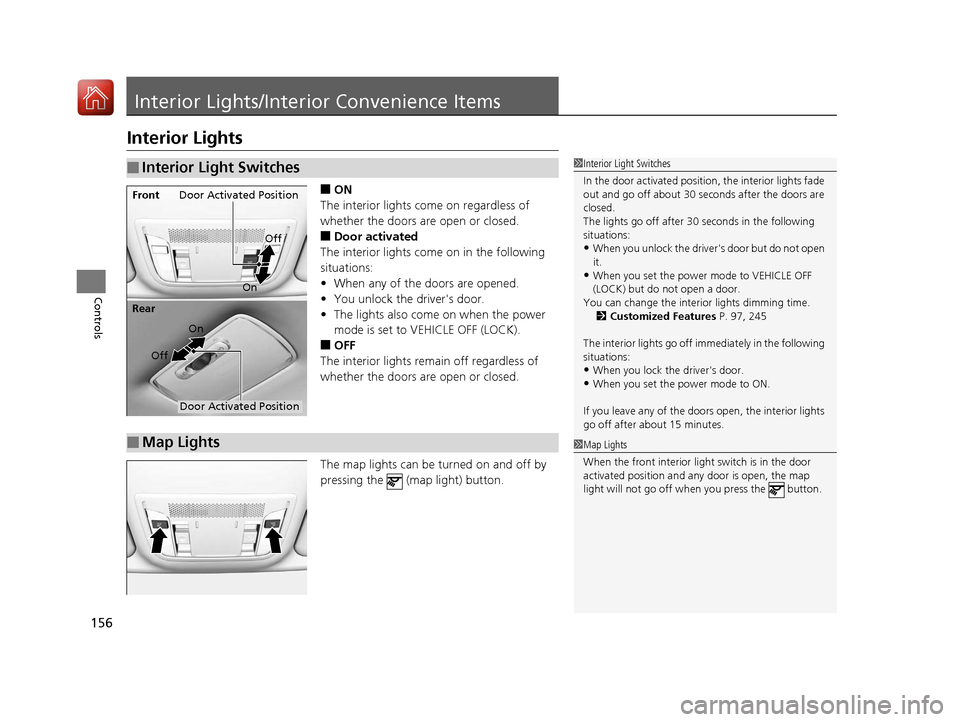
■ON
The interior lights come on regardless of
whether the doors are open or closed.
■Door activated
The interior lights come on in the following
situations:
• When any of the doors are opened.
• You unlock the driver's door.
• The lights also come on when the power
mode is set to VEHICLE OFF (LOCK).
■OFF
The interior lights remain off regardless of
whether the doors are open or closed.
The map lights can be turned on and off by
pressing the (map light) button.
■Interior Light Switches1 Interior Light Switches
In the door activated position, the interior lights fade
out and go off about 30 se conds after the doors are
closed.
The lights go off after 30 seconds in the following
situations:
•When you unlock the driver's door but do not open
it.
•When you set the power mode to VEHICLE OFF
(LOCK) but do not open a door.
You can change the interi or lights dimming time.
2 Customized Features P. 97, 245
The interior lights go off i mmediately in the following
situations:
•When you lock the driver's door.
•When you set the power mode to ON.
If you leave any of the doors open, the interior lights
go off after a bout 15 minutes.
Door Activated Position
Off
Front
On
Off
Rear
On
Door Activated Position
■Map Lights1
Map Lights
When the front interior li ght switch is in the door
activated position and any door is open, the map
light will not go off when you press the button.
17 ACURA ILX-31TX66400.book 156 ページ 2016年3月15日 火曜日 午後5時0分
Page 161 of 521
uuInterior Lights/Interior Convenience Items uInterior Convenience Items
160
Controls
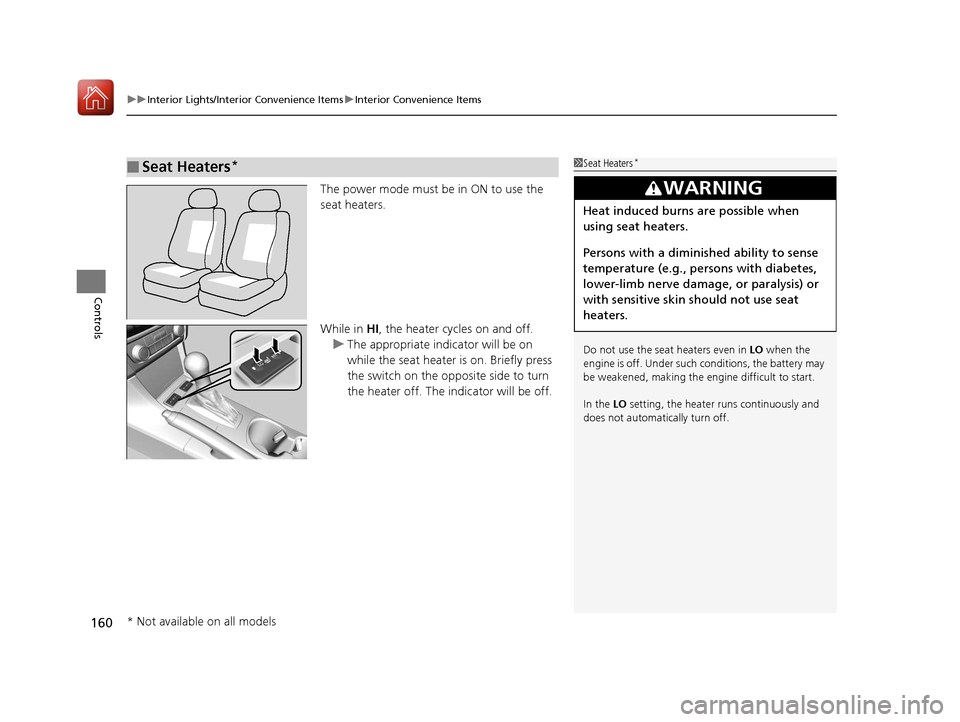
The power mode must be in ON to use the
seat heaters.
While in HI, the heater cycles on and off.
u The appropriate indicator will be on
while the seat heater is on. Briefly press
the switch on the opposite side to turn
the heater off. The indicator will be off.
■Seat Heaters*1Seat Heaters*
Do not use the seat heaters even in LO when the
engine is off. Under such conditions, the battery may
be weakened, making the engine difficult to start.
In the LO setting, the heater runs continuously and
does not automatically turn off.
3WARNING
Heat induced burns are possible when
using seat heaters.
Persons with a diminished ability to sense
temperature (e.g., persons with diabetes,
lower-limb nerve damage, or paralysis) or
with sensitive skin should not use seat
heaters.
* Not available on all models
17 ACURA ILX-31TX66400.book 160 ページ 2016年3月15日 火曜日 午後5時0分
Page 162 of 521
161Continued
Controls
Climate Control System
Using Automatic Climate Control
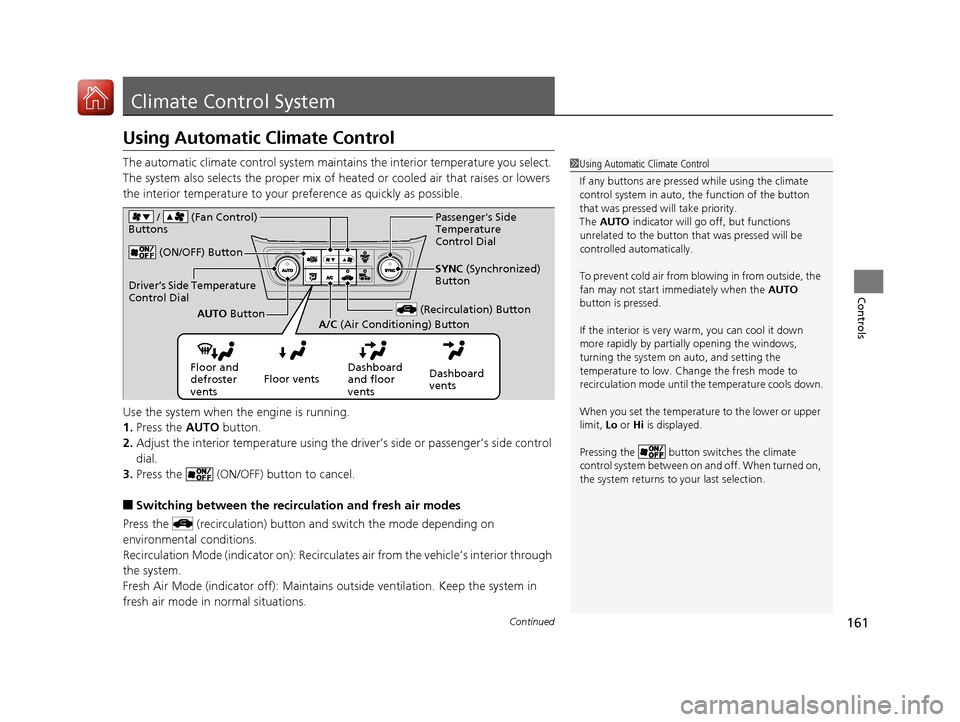
The automatic climate control system maintains the interior temperature you select.
The system also selects the proper mix of heat ed or cooled air that raises or lowers
the interior temperature to your pr eference as quickly as possible.
Use the system when the engine is running.
1. Press the AUTO button.
2. Adjust the interior temperature using the dr iver’s side or passenger’s side control
dial.
3. Press the (ON/OFF) button to cancel.
■Switching between the recirc ulation and fresh air modes
Press the (recirculation) button and switch the mode depending on
environmental conditions.
Recirculation Mode (indicator on): Recirculates air from the vehicle’s interior through
the system.
Fresh Air Mode (indicator off): Maintains outside ventilation. Keep the system in
fresh air mode in normal situations.
1 Using Automatic Climate Control
If any buttons are presse d while using the climate
control system in auto, the function of the button
that was pressed will take priority.
The AUTO indicator will go off, but functions
unrelated to the button th at was pressed will be
controlled automatically.
To prevent cold air from bl owing in from outside, the
fan may not start i mmediately when the AUTO
button is pressed.
If the interior is very warm, you can cool it down
more rapidly by partial ly opening the windows,
turning the system on auto, and setting the
temperature to low. Change the fresh mode to
recirculation mode until the temperature cools down.
When you set the temperature to the lower or upper
limit, Lo or Hi is displayed.
Pressing the button switches the climate
control system between on and off. When turned on,
the system returns to your last selection.
Floor and
defroster
vents Floor vents
Dashboard
and floor
ventsDashboard
vents
(ON/OFF) Button
(Recirculation) ButtonAUTO
Button
A/C (Air Conditioning) Button SYNC
(Synchronized)
Button
/ (Fan Control)
Buttons
Driver’s Side Temperature
Control Dial
Passenger's Side
Temperature
Control Dial
17 ACURA ILX-31TX66400.book 161 ページ 2016年3月15日 火曜日 午後5時0分
Page 163 of 521
uuClimate Control System uUsing Automatic Climate Control
162
Controls
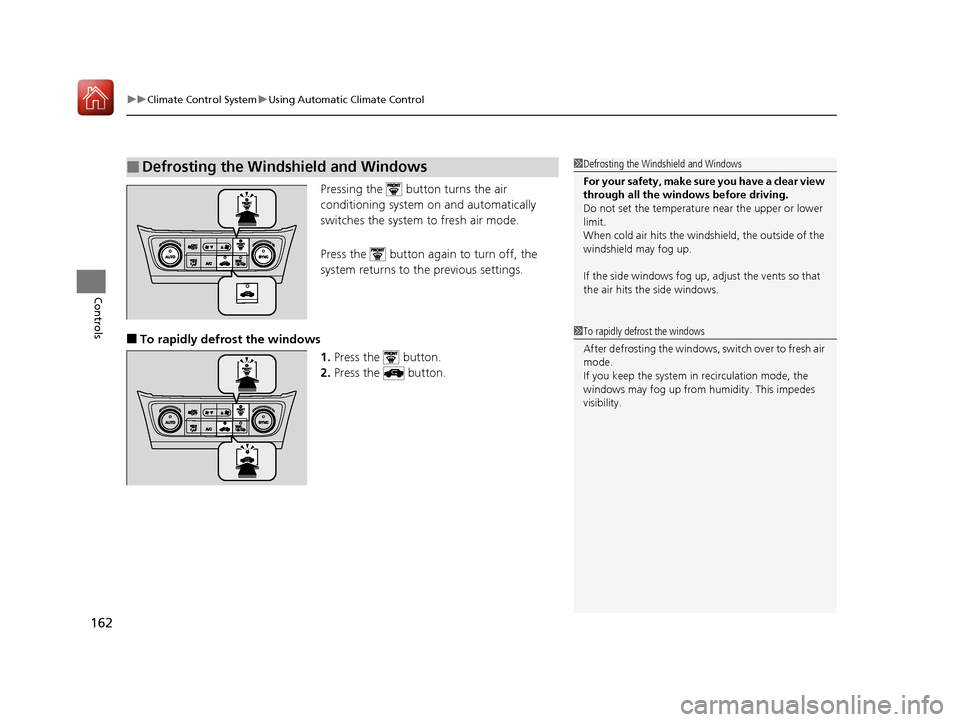
Pressing the button turns the air
conditioning system on and automatically
switches the system to fresh air mode.
Press the button again to turn off, the
system returns to the previous settings.
■To rapidly defrost the windows 1.Press the button.
2. Press the button.
■Defrosting the Windshield and Windows1Defrosting the Windshield and Windows
For your safety, make sure you have a clear view
through all the windows before driving.
Do not set the temperatur e near the upper or lower
limit.
When cold air hits the windshield, the outside of the
windshield may fog up.
If the side windows fog up, adjust the vents so that
the air hits th e side windows.
1To rapidly defrost the windows
After defrosting the windows, switch over to fresh air
mode.
If you keep the system in recirculation mode, the
windows may fog up from humidity. This impedes
visibility.
17 ACURA ILX-31TX66400.book 162 ページ 2016年3月15日 火曜日 午後5時0分
Page 179 of 521
178
uuAudio System Basic Operation uPlaying AM/FM Radio
Features
Playing AM/FM Radio
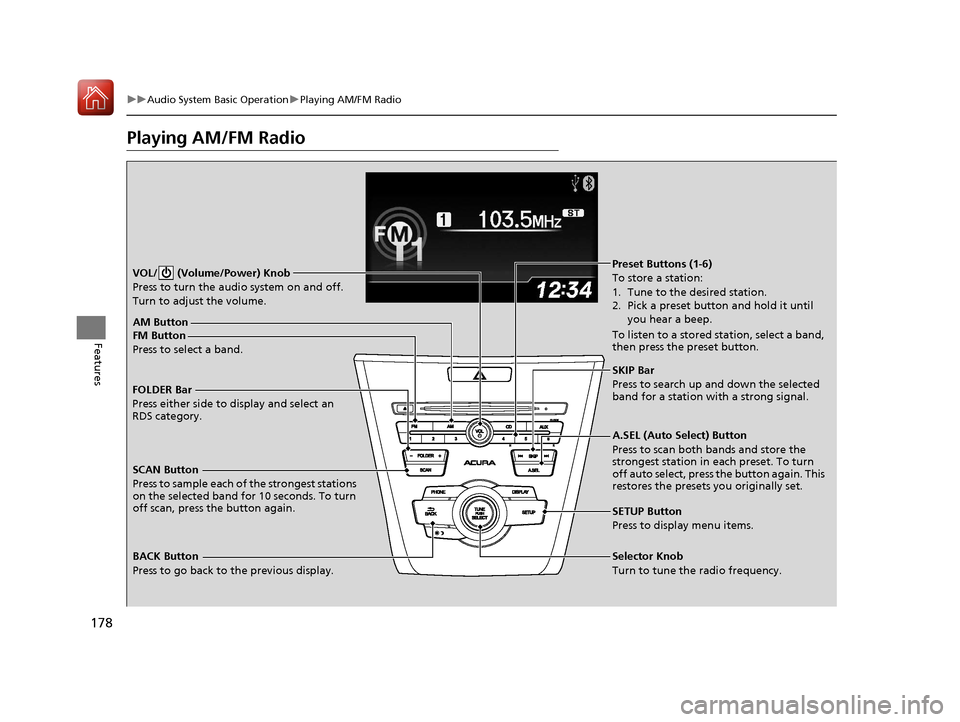
SCAN Button
Press to sample each of the strongest stations
on the selected band for 10 seconds. To turn
off scan, press the button again. VOL/ (Volume/Power) Knob
Press to turn the audi o system on and off.
Turn to adjust the volume.
A.SEL (Auto Select) Button
Press to scan both bands and store the
strongest station in each preset. To turn
off auto select, press the button again. This
restores the presets you originally set.
SETUP Button
Press to display menu items.
Selector Knob
Turn to tune the radio frequency.
FM Button
Press to select a band.AM Button
BACK Button
Press to go back to the previous display.
SKIP Bar
Press to search up and down the selected
band for a station with a strong signal.
Preset Buttons (1-6)
To store a station:
1. Tune to the desired station.
2. Pick a preset button and hold it until
you hear a beep.
To listen to a stored station, select a band,
then press the preset button.
FOLDER Bar
Press either side to display and select an
RDS category.
17 ACURA ILX-31TX66400.book 178 ページ 2016年3月15日 火曜日 午後5時0分
Page 181 of 521
180
uuAudio System Basic Operation uPlaying a CD
Features
Playing a CD
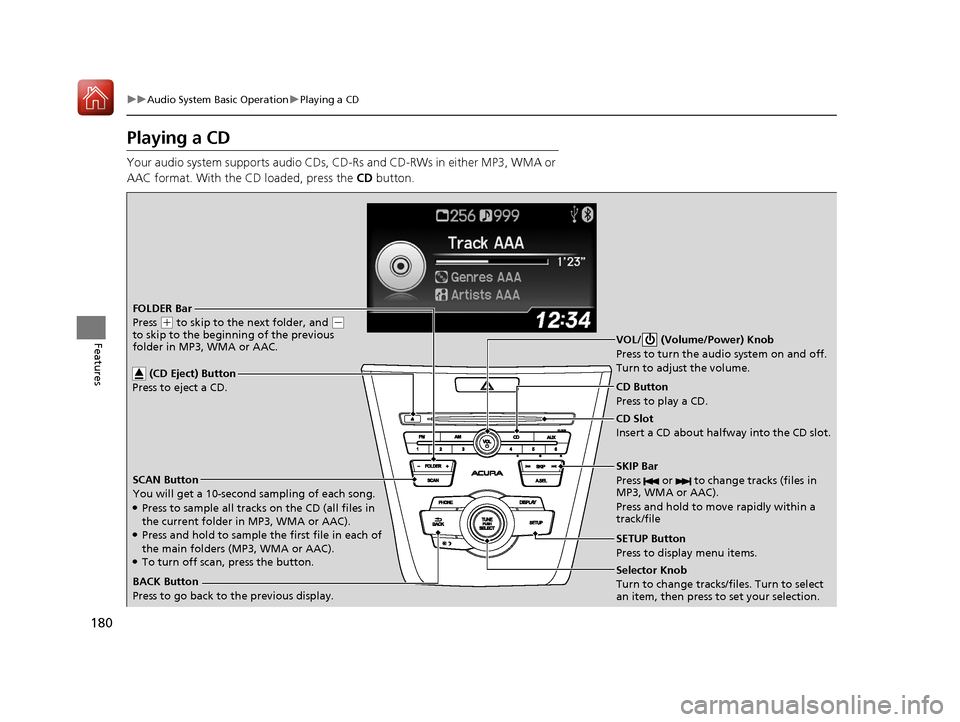
Your audio system supports audio CDs, CD- Rs and CD-RWs in either MP3, WMA or
AAC format. With the CD loaded, press the CD button.
SCAN Button
You will get a 10-second sampling of each song.
●Press to sample all tracks on the CD (all files in
the current folder in MP3, WMA or AAC).
●Press and hold to sample the first file in each of
the main folders (MP3, WMA or AAC).
●To turn off scan, press the button. CD Slot
Insert a CD about halfway into the CD slot.
SKIP Bar
Press or to change tracks (files in
MP3, WMA or AAC).
Press and hold to move rapidly within a
track/fileSelector Knob
Turn to change tracks/files. Turn to select
an item, then press to set your selection. CD Button
Press to play a CD.
(CD Eject) Button
Press to eject a CD.BACK Button
Press to go back to the previous display.
FOLDER Bar
Press
(+ to skip to the next folder, and (-
to skip to the beginning of the previous
folder in MP3, WMA or AAC. VOL/ (Volume/Power) Knob
Press to turn the audi
o system on and off.
Turn to adjust the volume.
SETUP Button
Press to display menu items.
17 ACURA ILX-31TX66400.book 180 ページ 2016年3月15日 火曜日 午後5時0分
Page 183 of 521
uuAudio System Basic Operation uPlaying a CD
182
Features
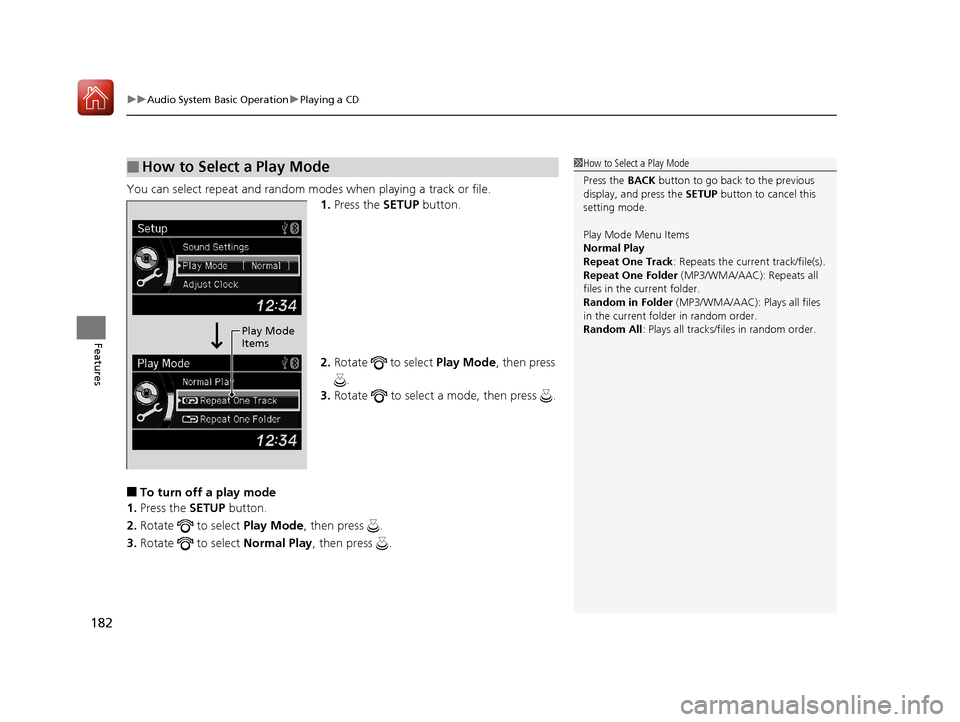
You can select repeat and random modes when playing a track or file.
1.Press the SETUP button.
2. Rotate to select Play Mode, then press
.
3. Rotate to select a mode, then press .
■To turn off a play mode
1. Press the SETUP button.
2. Rotate to select Play Mode, then press .
3. Rotate to select Normal Play, then press .
■How to Select a Play Mode1How to Select a Play Mode
Press the BACK button to go back to the previous
display, and press the SETUP button to cancel this
setting mode.
Play Mode Menu Items
Normal Play
Repeat One Track : Repeats the current track/file(s).
Repeat One Folder (MP3/WMA/AAC): Repeats all
files in the current folder.
Random in Folder (MP3/WMA/AAC): Plays all files
in the current folder in random order.
Random All : Plays all tracks/files in random order.
Play Mode
Items
17 ACURA ILX-31TX66400.book 182 ページ 2016年3月15日 火曜日 午後5時0分
Page 184 of 521
183
uuAudio System Basic Operation uPlaying an iPod
Continued
Features
Playing an iPod
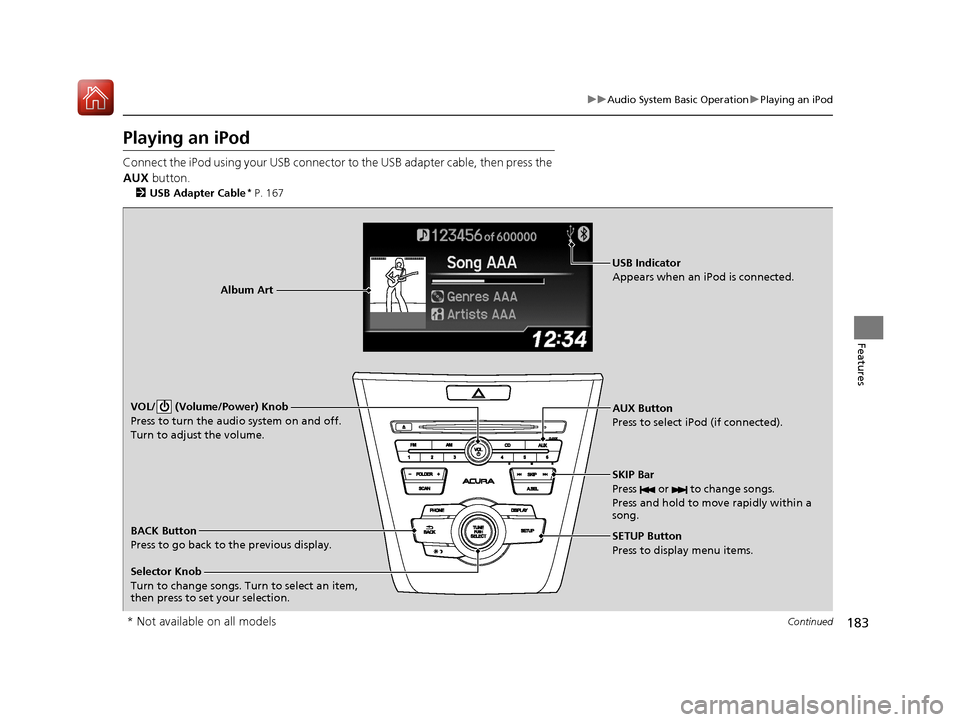
Connect the iPod using your USB connector to the USB adapter cable, then press the
AUX button.
2USB Adapter Cable* P. 167
AUX Button
Press to select iP od (if connected).
Album Art
USB Indicator
Appears when an iPod is connected.
Selector Knob
Turn to change songs. Turn to select an item,
then press to set your selection. BACK Button
Press to go back to the previous display. VOL/ (Volume/Power) Knob
Press to turn the audio system on and off.
Turn to adjust the volume.
SKIP Bar
Press or to change songs.
Press and hold to move rapidly within a
song.
SETUP Button
Press to display menu items.
* Not available on all models
17 ACURA ILX-31TX66400.book 183 ページ 2016年3月15日 火曜日 午後5時0分