Acc Acura ILX 2019 Repair Manual
[x] Cancel search | Manufacturer: ACURA, Model Year: 2019, Model line: ILX, Model: Acura ILX 2019Pages: 621, PDF Size: 34.8 MB
Page 249 of 621
248
uuAudio System Basic Operation uPlaying Hard Disk Drive (HDD) Audio
Features
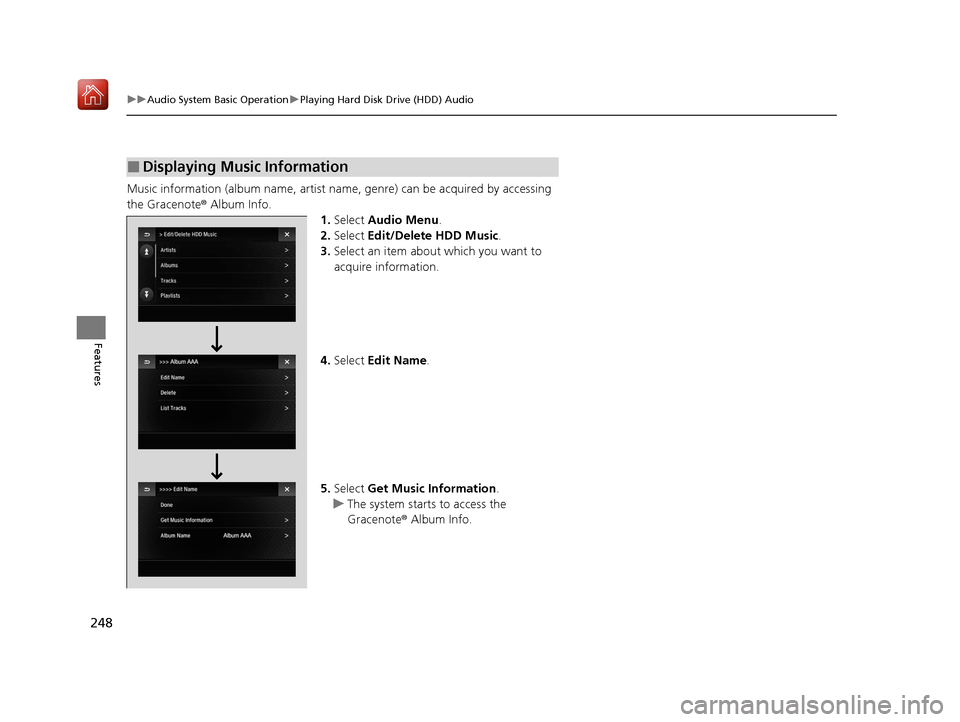
Music information (album name, artist name, genre) can be acquired by accessing
the Gracenote ® Album Info.
1.Select Audio Menu .
2. Select Edit/Delete HDD Music.
3. Select an item about which you want to
acquire information.
4. Select Edit Name .
5. Select Get Music Information .
u The system starts to access the
Gracenote ® Album Info.
■Displaying Music Information
19 ACURA ILX-31TX66610.book 248 ページ 2020年4月17日 金曜日 午前8時52分
Page 267 of 621
266
uuAudio System Basic Operation uApple CarPlay
Features
Apple CarPlay
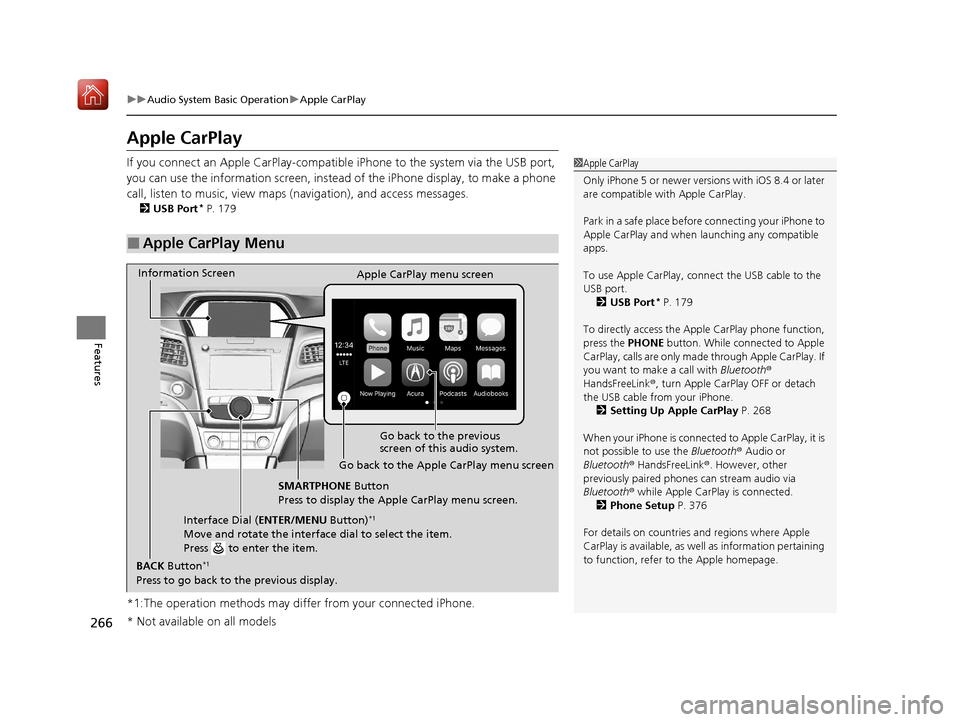
If you connect an Apple CarPlay-compatible iPhone to the system via the USB port,
you can use the information screen, instead of the iPhone display, to make a phone
call, listen to music, view maps (navigation), and access messages.
2USB Port* P. 179
*1:The operation methods may differ from your connected iPhone.
■Apple CarPlay Menu
1Apple CarPlay
Only iPhone 5 or newer versi ons with iOS 8.4 or later
are compatible with Apple CarPlay.
Park in a safe place before connecting your iPhone to
Apple CarPlay and when launching any compatible
apps.
To use Apple CarPlay, connect the USB cable to the
USB port. 2 USB Port
* P. 179
To directly access the Appl e CarPlay phone function,
press the PHONE button. While connected to Apple
CarPlay, calls are only made through Apple CarPlay. If
you want to make a call with Bluetooth®
HandsFreeLink ®, turn Apple CarPlay OFF or detach
the USB cable from your iPhone.
2 Setting Up Apple CarPlay P. 268
When your iPhone is connected to Apple CarPlay, it is
not possible to use the Bluetooth® Audio or
Bluetooth ® HandsFreeLink ®. However, other
previously paired phones can stream audio via
Bluetooth ® while Apple CarPlay is connected.
2 Phone Setup P. 376
For details on c ountries and regions where Apple
CarPlay is available, as well as information pertaining
to function, refer to the Apple homepage.
Go back to the previous
screen of this audio system.
Information Screen
Apple CarPlay menu screen
Go back to the Apple CarPlay menu screen
SMARTPHONE Button
Press to display the Apple CarPlay menu screen.
Interface Dial ( ENTER/MENU Button)
*1
Move and rotate the interface dial to select the item.
Press to enter the item.
BACK Button*1
Press to go back to the previous display.
* Not available on all models
19 ACURA ILX-31TX66610.book 266 ページ 2020年4月17日 金曜日 午前8時52分
Page 268 of 621
Continued267
uuAudio System Basic Operation uApple CarPlay
Features
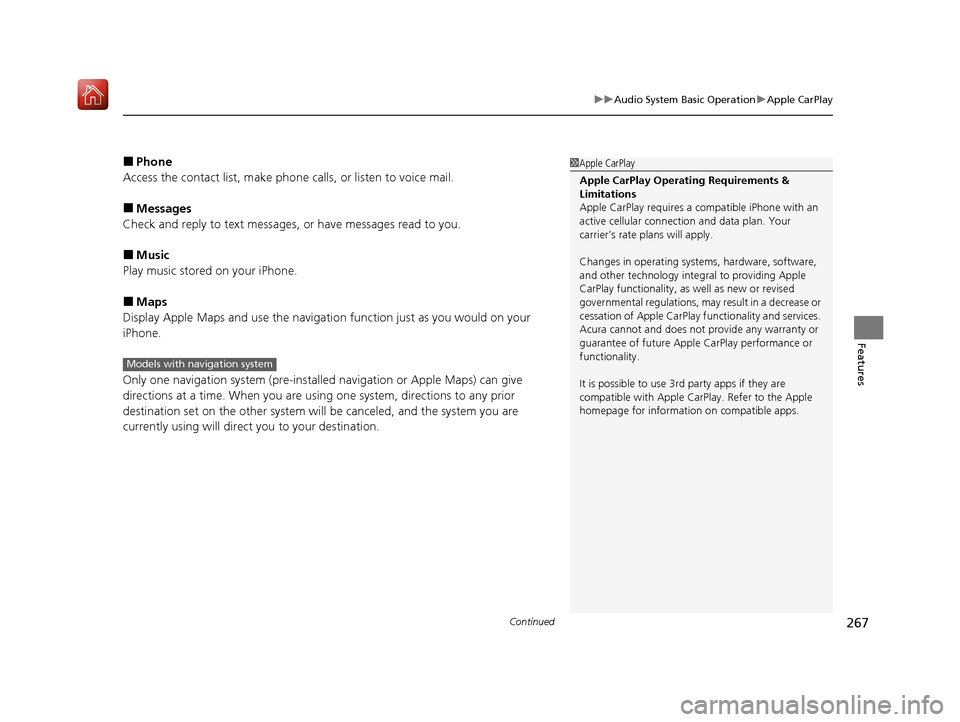
■Phone
Access the contact list, make phone ca lls, or listen to voice mail.
■Messages
Check and reply to text messages, or have messages read to you.
■Music
Play music stored on your iPhone.
■Maps
Display Apple Maps and use the navigation function just as you would on your
iPhone.
Only one navigation system (pre-installed navigation or Apple Maps) can give
directions at a time. When you are using one system, directions to any prior
destination set on the other system will be canceled, and the system you are
currently using will direct you to your destination.
1 Apple CarPlay
Apple CarPlay Operating Requirements &
Limitations
Apple CarPlay requi res a compatible iPhone with an
active cellular connecti on and data plan. Your
carrier’s rate plans will apply.
Changes in operating systems, hardware, software,
and other technology integral to providing Apple
CarPlay functionality, as well as new or revised
governmental regulations, may result in a decrease or
cessation of Apple CarPlay functionality and services.
Acura cannot and does not provide any warranty or
guarantee of future Appl e CarPlay performance or
functionality.
It is possible to use 3r d party apps if they are
compatible with Apple CarPlay. Refer to the Apple
homepage for information on compatible apps.
Models with navigation system
19 ACURA ILX-31TX66610.book 267 ページ 2020年4月17日 金曜日 午前8時52分
Page 271 of 621
270
uuAudio System Basic Operation uAndroid Auto
Features
Android Auto
When you connect an Android phone to the audio system via the USB port, Android
Auto is automatically initia ted. When connected via Android Auto, you can use the
information screen to access the Phone, Google Maps (Navigation), Google Play
Music, and Google Now functions. When yo u first use Android Auto, a tutorial will
appear on the screen.
We recommend that you complete this tuto rial while safely parked before using
Android Auto.
2 USB Port* P. 179
2 Auto Pairing Connection P. 273
1Android Auto
To use Android Auto, you need to download the
Android Auto app from Google Play to your
smartphone.
Only Android 5.0 (Lollipop) or later versions are
compatible with Android Auto.
Bluetooth A2DP cannot be used with Android Auto
phone.
Park in a safe place befo re connecting your Android
phone to Android Auto and when launching any
compatible apps.
To use Android Auto, connect the USB cable to the
USB port.
2 USB Port
* P. 179
When your Android phone is connected to Android
Auto, it is not possible to use the Bluetooth® Audio.
However, other previously paired phones can stream
audio via Bluetooth ® while Android Auto is
connected. 2 Phone Setup P. 376
* Not available on all models
19 ACURA ILX-31TX66610.book 270 ページ 2020年4月17日 金曜日 午前8時52分
Page 278 of 621
277
uuAudio Error Messages uHard Disk Drive (HDD) Audio
Features
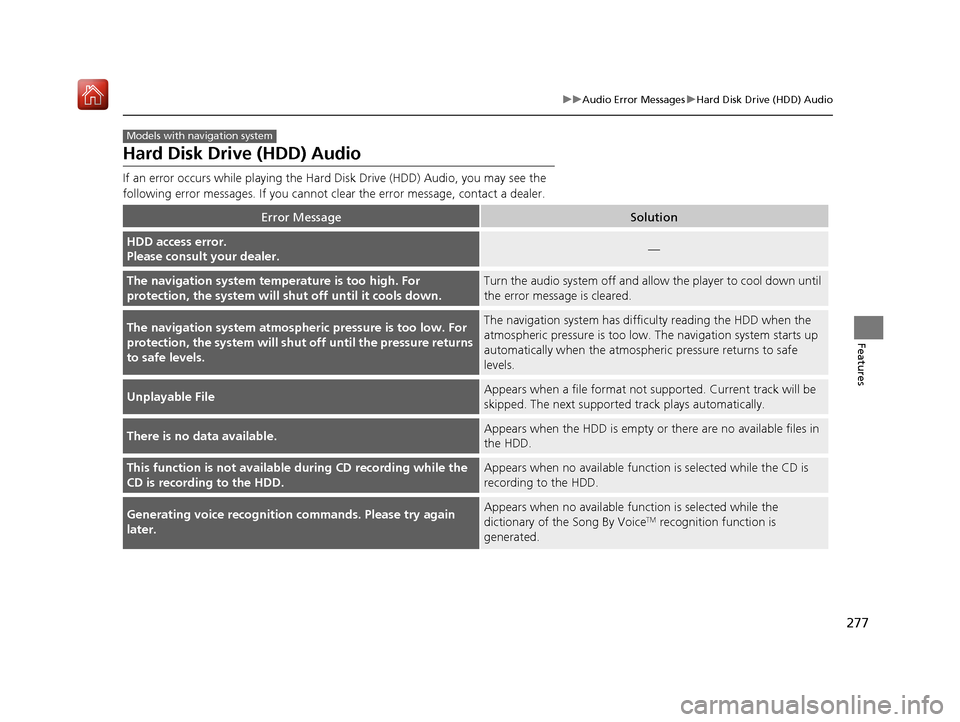
Hard Disk Drive (HDD) Audio
If an error occurs while playing the Hard Disk Driv e (HDD) Audio, you may see the
following error messages. If you cannot cl ear the error message, contact a dealer.
Error MessageSolution
HDD access error.
Please consult your dealer.—
The navigation system temperature is too high. For
protection, the system will shut off until it cools down.Turn the audio system off and allow the player to cool down until
the error message is cleared.
The navigation system atmospheric pressure is too low. For
protection, the system will shut off until the pressure returns
to safe levels.The navigation system has diffi culty reading the HDD when the
atmospheric pressure is too low. The navigation system starts up
automatically when the atmosphe ric pressure returns to safe
levels.
Unplayable FileAppears when a file format not su pported. Current track will be
skipped. The next supporte d track plays automatically.
There is no data available.Appears when the HDD is empty or there are no available files in
the HDD.
This function is not available during CD recording while the
CD is recording to the HDD.Appears when no available function is selected while the CD is
recording to the HDD.
Generating voice recognition commands. Please try again
later.Appears when no available function is selected while the
dictionary of the Song By VoiceTM recognition function is
generated.
Models with navigation system
19 ACURA ILX-31TX66610.book 277 ページ 2020年4月17日 金曜日 午前8時52分
Page 291 of 621
290
uuGeneral Information on the Audio System uHonda App License Agreement
Features
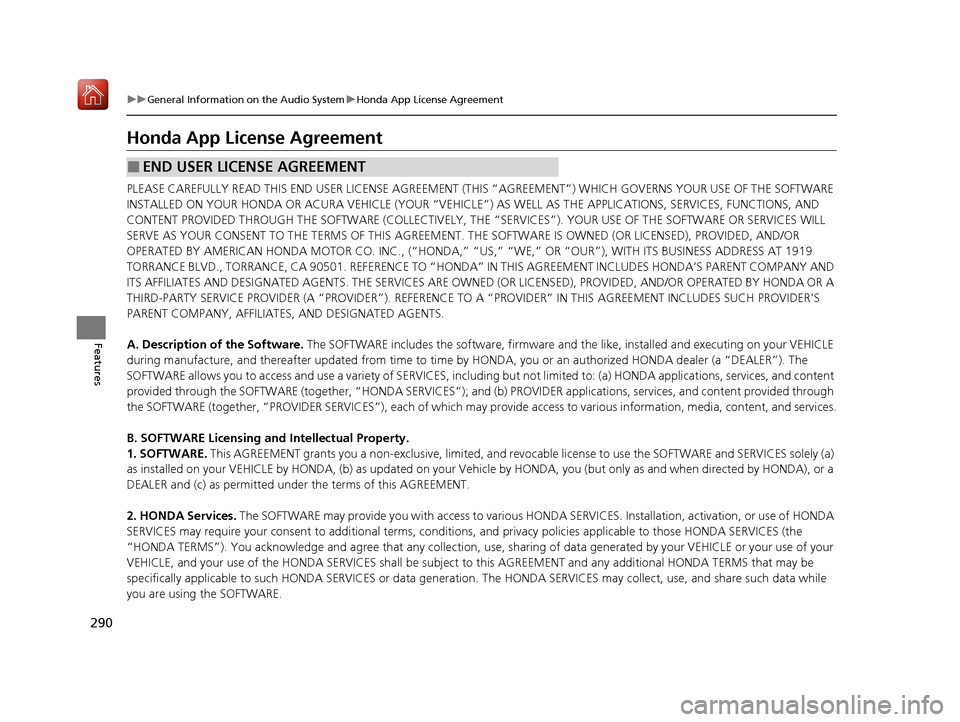
Honda App License Agreement
PLEASE CAREFULLY READ THIS END USER LICENSE AGREEMENT (T HIS “AGREEMENT”) WHICH GOVERNS YOUR USE OF THE SOFTWARE
INSTALLED ON YOUR HONDA OR ACURA VEHICLE (YOUR “VEHICLE”) AS WELL AS THE APPLICATIONS, SERVICES, FUNCTIONS, AND
CONTENT PROVIDED THROUGH THE SOFTWARE (COLLECTIVELY, THE “SERVICES”). YOUR USE OF THE SOFTWARE OR SERVICES WILL
SERVE AS YOUR CONSENT TO THE TERMS OF THIS AGREEMENT. THE SOFTWARE IS OWNED (OR LICENSED), PROVIDED, AND/OR
OPERATED BY AMERICAN HONDA MOTOR CO. INC., (“HONDA,” “US,” “WE,” OR “OUR”), WITH ITS BUSINESS ADDRESS AT 1919
TORRANCE BLVD., TORRANCE, CA 90501. REFERENCE TO “HO NDA” IN THIS AGREEMENT INCLUDES HONDA’S PARENT COMPANY AND
ITS AFFILIATES AND DESIGNATED AGENTS. TH E SERVICES ARE OWNED (OR LICENSED), PROV IDED, AND/OR OPERATED BY HONDA OR A
THIRD-PARTY SERVICE PROVIDER (A “PROVIDER”). REFERENCE TO A “PROVIDER” IN THIS AGREEMENT INCLUDES SUCH PROVIDER’S
PARENT COMPANY, AFFILIATES, AND DESIGNATED AGENTS.
A. Description of the Software. The SOFTWARE includes the softwar e, firmware and the like, installed and executing on your VEHICLE
during manufacture, and thereafter updated from time to time by HONDA, you or an authorized HONDA dealer (a “DEALER”). The
SOFTWARE allows you to access and use a va riety of SERVICES, including but not limited to: (a) HONDA applications, services, and content
provided through the SOFTWARE (together, “H ONDA SERVICES”); and (b) PROVIDER applications, services, and content provided throu gh
the SOFTWARE (together, “PROVIDER SERVICES” ), each of which may provide access to various information, media, content, and services.
B. SOFTWARE Licensing and Intellectual Property.
1. SOFTWARE. This AGREEMENT grants you a non-exclusi ve, limited, and revocable license to use the SOFTWARE and SERVICES solely (a)
as installed on your VEHICLE by HONDA, (b) as updated on your Vehicle by HONDA, you (but only as and when directed by HONDA), or a
DEALER and (c) as permitted under the terms of this AGREEMENT.
2. HONDA Services. The SOFTWARE may provide you with access to various HONDA SERVICES. Installation, activation, or use of HONDA
SERVICES may require your consent to additi onal terms, conditions, and privacy policies applicable to those HONDA SERVICES (the
“HONDA TERMS”). You acknowledge a nd agree that any collection, use, sharing of data generated by your VEHICLE or your use of your
VEHICLE, and your use of the HONDA SERVI CES shall be subject to this AGREEMENT and any additional HONDA TERMS that may be
specifically applicable to such HONDA SERVI CES or data generation. The HONDA SERVICES may collect, use, and share such data whi le
you are using the SOFTWARE.
■END USER LICENSE AGREEMENT
19 ACURA ILX-31TX66610.book 290 ページ 2020年4月17日 金曜日 午前8時52分
Page 292 of 621
291
uuGeneral Information on the Audio System uHonda App License Agreement
Continued
Features
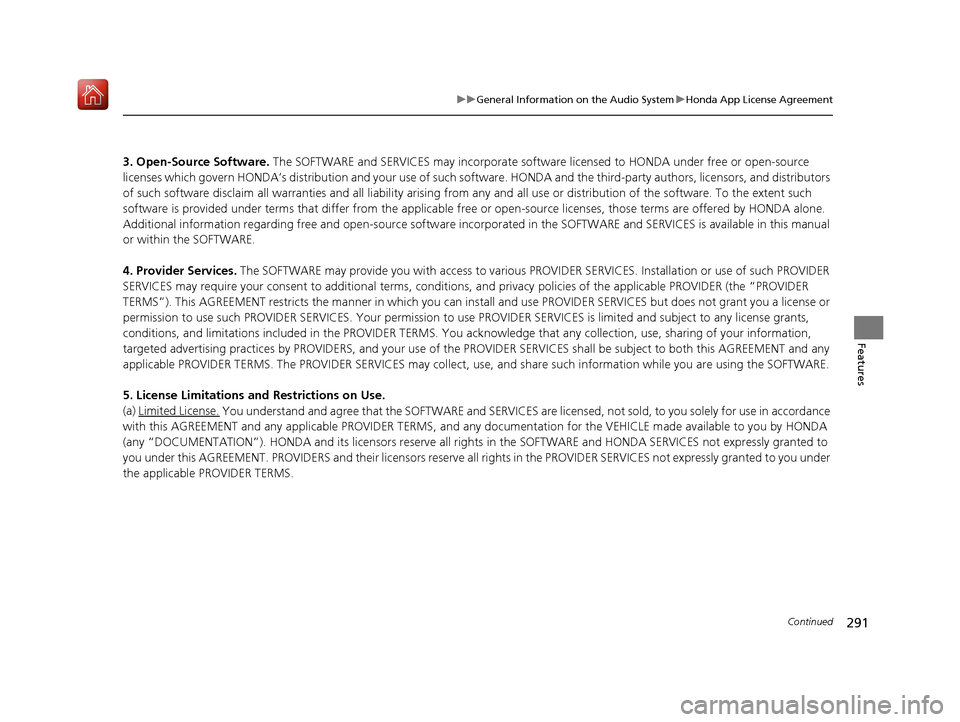
3. Open-Source Software. The SOFTWARE and SERVICES may incorporate softwar e licensed to HONDA under free or open-source
licenses which govern HONDA’s distribution and your use of such software. HONDA and the third-party authors, licensors, and distributors
of such software disclaim all warranties and all liability arising from any and all use or distribution of the software. To the extent such
software is provided under terms that diffe r from the applicable free or open-source licenses, those terms are offered by HONDA alone.
Additional information regarding free and open-source software incorporated in the SOFTWARE and SERVICES is available in this manual
or within the SOFTWARE.
4. Provider Services. The SOFTWARE may provide you with access to various PR OVIDER SERVICES. Installation or use of such PROVIDER
SERVICES may require your consent to addition al terms, conditions, and privacy policies of the applicable PROVIDER (the “PROVID ER
TERMS”). This AGREEMENT restricts the manner in which you can install and us e PROVIDER SERVICES but does not grant you a licens e or
permission to use such PROVIDER SERVICES. Your permission to us e PROVIDER SERVICES is limited and subject to any license grants,
conditions, and limitations included in the PROVIDER TERMS. You ac knowledge that any collection, use, sharing of your information,
targeted advertising practice s by PROVIDERS, and your use of the PROVIDER SERVICES shall be subject to both this AGREEMENT and any
applicable PROVIDER TERMS. The PR OVIDER SERVICES may collect, use, and share such information while you are using the SOFTWARE.
5. License Limitations an d Restrictions on Use.
(a) Limited License.
You understand and agree that the SOFTWARE and SERVICES are licensed, not sold, to you solely for use in accordance
with this AGREEMENT and any a pplicable PROVIDER TERMS, and an y documentation for the VEHICLE made available to you by HONDA
(any “DOCUMENTATION”). HONDA and its licensors reserve all rights in the SOFTWARE and HONDA SERVICES not expressly granted to
you under this AGREEMENT. PROVIDERS and th eir licensors reserve all rights in the PROVIDER SERVICES not expressly granted to yo u under
the applicable PROVIDER TERMS.
19 ACURA ILX-31TX66610.book 291 ページ 2020年4月17日 金曜日 午前8時52分
Page 293 of 621
292
uuGeneral Information on the Audio System uHonda App License Agreement
Features
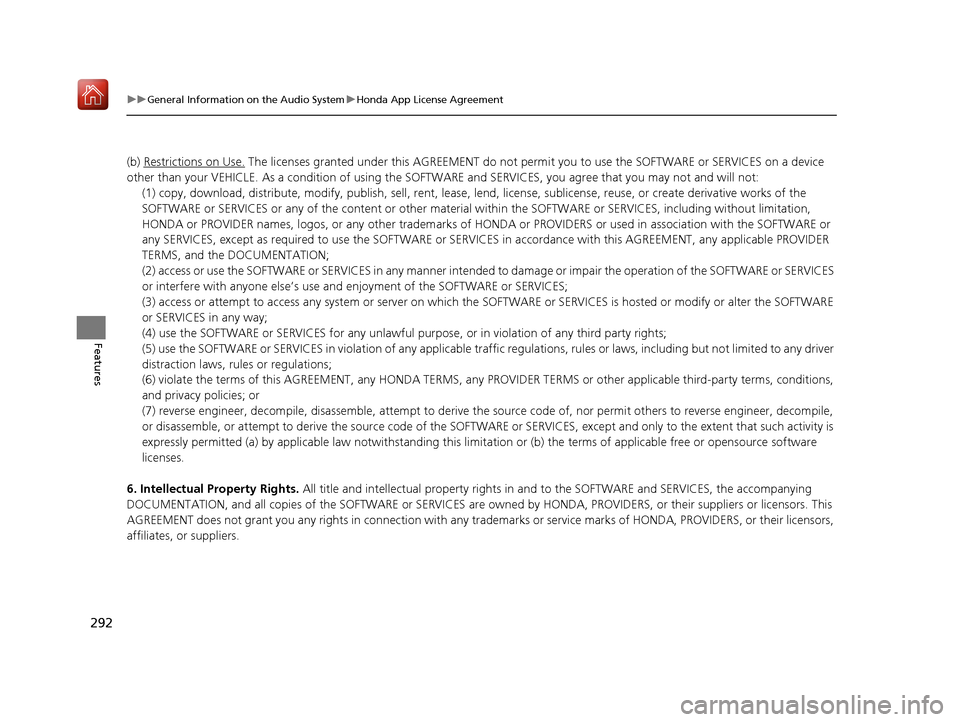
(b) Restrictions on Use. The licenses granted under this AGREEMENT do not perm it you to use the SOFTWARE or SERVICES on a device
other than your VEHICLE. As a condition of using the SOFT WARE and SERVICES, you agree that you may not and will not:
6. Intellectual Property Rights. All title and intellectual property rights in and to the SOFTWARE and SERVICES, the accompanying
DOCUMENTATION, and all copies of the SOFTWARE or SERVICES are ow ned by HONDA, PROVIDERS, or their suppliers or licensors. This
AGREEMENT does not grant you any rights in connection with any trademarks or service marks of HONDA, PROVIDERS, or their licensors,
affiliates, or suppliers. (1) copy, download, distribute, modify, publish, sell, rent, leas
e, lend, license, sublicense, reuse, or create derivative works of the
SOFTWARE or SERVICES or any of the content or other material within the SOFTWARE or SERVICES, including without limitation,
HONDA or PROVIDER names, logos, or any othe r trademarks of HONDA or PROVIDERS or used in association with the SOFTWARE or
any SERVICES, except as required to use th e SOFTWARE or SERVICES in accordance with this AGREEMENT, any applicable PROVIDER
TERMS, and the DOCUMENTATION;
(2) access or use the SOFTWARE or SERVICES in any manner intended to damage or impair the operation of the SOFTWARE or SERVICES
or interfere with anyone else’s use and enjoyment of the SOFTWARE or SERVICES;
(3) access or attempt to access any system or server on which the SOFTWARE or SERVICES is hosted or modify or alter the SOFTWAR E
or SERVICES in any way;
(4) use the SOFTWARE or SERVICES for any unlawful pu rpose, or in violation of any third party rights;
(5) use the SOFTWARE or SERVICES in violatio n of any applicable traffic regulations, rules or laws, including but not limited t o any driver
distraction laws, rules or regulations;
(6) violate the terms of this AGREEMENT, any HONDA TERMS, any PROV IDER TERMS or other applicable third-party terms, conditions,
and privacy policies; or
(7) reverse engineer, decompile, disassemble, attempt to derive the source code of, nor permit others to reverse engineer, deco mpile,
or disassemble, or attempt to derive the so urce code of the SOFTWARE or SERVICES, except and only to the extent that such activ ity is
expressly permitted (a) by applicable law notwithstanding this li mitation or (b) the terms of applicable free or opensource software
licenses.
19 ACURA ILX-31TX66610.book 292 ページ 2020年4月17日 金曜日 午前8時52分
Page 294 of 621
293
uuGeneral Information on the Audio System uHonda App License Agreement
Continued
Features
7. Export Restrictions: You acknowledge that the SOFTWARE and SERVICES are subject to U.S., European Union, and other export
jurisdictions. You agree to comply with all applicable internat ional and national laws that apply to the SOFTWARE and SERVICES, including
the U.S. Export Administration Regulations, as well as end-user, end-use, and destination restrictions issued by the U.S. and other
governments.
C. SOFTWARE Operation
1. HONDA reserves the right to suspend or terminate your access to and use of the SOFTWARE or SERVICES if you are found to be in
violation of this AGREEMENT or as reasonably deemed necessary by HONDA.
2. Eligibility/Registration/Activation.
The SOFTWARE is intended for and available to individuals who (a) are of legal age of majority in their
jurisdiction of residence (and at least 18 years of age), or are younger than 18 years of age and possess a valid driver’s license issued by
their jurisdiction of residence, and (b) own or have permissive access to a compatible VEHICLE. We do not knowingly collect any
information, including personal information, from children under 13. If we learn or are notified that we have collected persona l
information of a child under 13, we will immediately take steps to delete such information.
3. Use of PROVIDER SERVICES through the SOFTWARE.
Certain PROVIDER SERVICES made availa ble through the SOFTWARE may require
that you register or otherwise have an ac count with the PROVIDER and agree to PROVIDER TERMS. Any us e of any of such PROVIDER
SERVICES within the SOFTWARE is subject to this AGREEMENT and the applicable PROVIDER TERMS. HONDA does not exercise control
over such PROVIDER SERVICES and is not resp onsible or liable for the availability, security, or content of such PROVIDER SERVIC ES, and the
inclusion of any PROVIDER SERVIC ES does not imply a referral from, the approval of, or the endorsement by HONDA of such PROVIDE R
SERVICES. HONDA is not responsible or liable, directly or indirectly, for any damage relating to or result ing from your use of the PROVIDER
SERVICES.
4. Links to Third Party Sites:
The SOFTWARE may provide you with th e ability to access third-party sites and content through the use of the
SOFTWARE or SERVICES. The third-party sites and content are not under the control of HONDA. HONDA is not responsible or liable,
directly or indirectly, for such third-party websites and their content or for any damage relating to or resulting from your ac cess or use of
such websites and content.
19 ACURA ILX-31TX66610.book 293 ページ 2020年4月17日 金曜日 午前8時52分
Page 296 of 621

295
uuGeneral Information on the Audio System uHonda App License Agreement
Continued
Features
2. Potential Map Inaccuracy and Route Safety. Maps used by this system may be inaccurate because of changes in roads, traffic controls,
routing, or driving conditions. Always use good judgment and co mmon sense when following suggested routes. Do not follow the ro ute
suggestions if doing so would result in an unsafe or illegal driving maneuver, if you would be placed in an unsafe situation, o r if you would
be directed into an area that you consider unsafe. Do not rely on any navigation features included in the system to route you t o emergency
services. Not all emergency services such as police, fire stations, hospitals, or clinics are likely to be contained in the map database for such
navigation features. Ask local authorities or an emergency services operator for such locations and routes. The driver is ultimately
responsible for the safe operation of the vehicle and therefore, must evaluate whether it is safe to follow the suggested directions. Any
navigation features are pr ovided only as an aid. Make your driving decisions based on your obse rvations of local conditions and existing
traffic regulations. Navigation features are not a substitute for your personal judgment. Any route suggestions made by the SOFTWARE or
SERVICES should never replace any local traffic regulations or your personal judgment or knowledge of safe driving practices.
3. Speech Recognition:
You acknowledge and understand that HONDA and PROV IDERS may record, retain, and use voices commands
when you use the speech recognition componen ts of the SOFTWARE or SERVICES. You and all VEHICLE operators and passengers (a)
consent to the recording and retention of vo ice commands in support of providing speech recognition components and (b) release HONDA
and PROVIDERS from all claims, liabilities, and losses that may result from any use of such recorded voice commands. Recognition errors
are inherent in speech recognition. It is your responsibility to monitor any speech recognition f unctions included in the system and address
any errors. Neither HONDA nor PROVIDERS will be liable for any damages arising out of errors in the speech recognition process.
4. Distraction Hazards.
Navigation features may require manual (non-verbal) input or setup. Attempting to perform such set-up or insert
data while driving can seriously distract your attention and co uld cause a crash or other serious consequences; the ability to undertake such
interactions may also be limited by state or local law, which laws you are responsible to know and follow. Even occasional shor t scans of
the screen may be hazardous if your attention has been diverted away from your driving at a critical time. Pull over and stop the vehicle in
a safe and legal manner before attempting to access a function of the system requiring prolonged attention. Do not raise the vo lume
excessively. Keep the volume at a level where you can still hear outside traffic and emergency signals while driving. Driving while unable
to hear these sounds could result in a crash.
19 ACURA ILX-31TX66610.book 295 ページ 2020年4月17日 金曜日 午前8時52分