Acc Acura ILX 2019 Workshop Manual
[x] Cancel search | Manufacturer: ACURA, Model Year: 2019, Model line: ILX, Model: Acura ILX 2019Pages: 621, PDF Size: 34.8 MB
Page 136 of 621
135Continued
Controls
Operating the Switches Around the Steering Wheel
ENGINE START/STOP Button
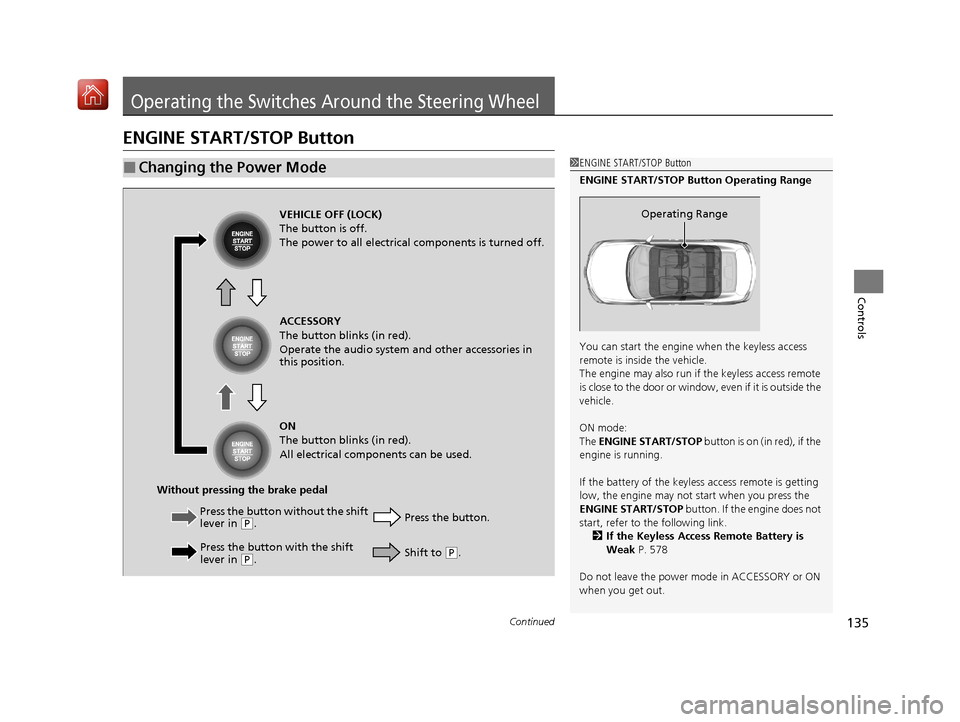
■Changing the Power Mode1ENGINE START/STOP Button
ENGINE START/STOP Button Operating Range
You can start the engine when the keyless access
remote is inside the vehicle.
The engine may also run if the keyless access remote
is close to the door or window, even if it is outside the
vehicle.
ON mode:
The ENGINE START/STOP button is on (in red), if the
engine is running.
If the battery of the keyless access remote is getting
low, the engine may not start when you press the
ENGINE START/STOP button. If the engine does not
start, refer to the following link.
2 If the Keyless Access Remote Battery is
Weak P. 578
Do not leave the power mode in ACCESSORY or ON
when you get out.
Operating RangeVEHICLE OFF (LOCK)
The button is off.
The power to all electrical components is turned off.
Press the button without the shift
lever in
( P.
Press the button with the shift
lever in
( P. Press the button.
Without pressing the brake pedal ACCESSORY
The button blinks (in red).
Operate the audio system and other accessories in
this position.
ON
The button blinks (in red).
All electrical components can be used.
Shift to (P.
19 ACURA ILX-31TX66610.book 135 ページ 2020年4月17日 金曜日 午前8時52分
Page 137 of 621
136
uuOperating the Switches Around the Steering Wheel uENGINE START/STOP Button
Controls
If you leave the vehicle for 30 to 60 minutes with the transmission in (P and the
power mode in ACCESSORY, the vehicle au tomatically goes into the mode to
VEHICLE OFF (LOCK) to avoid draining the battery.
If you open the driver’s door when the powe r mode is set to ACCESSORY, a warning
beep sounds.
■Automatic Power Off
■Power Mode Reminder
19 ACURA ILX-31TX66610.book 136 ページ 2020年4月17日 金曜日 午前8時52分
Page 138 of 621
137
uuOperating the Switches Around the Steering Wheel uENGINE START/STOP Button
Controls
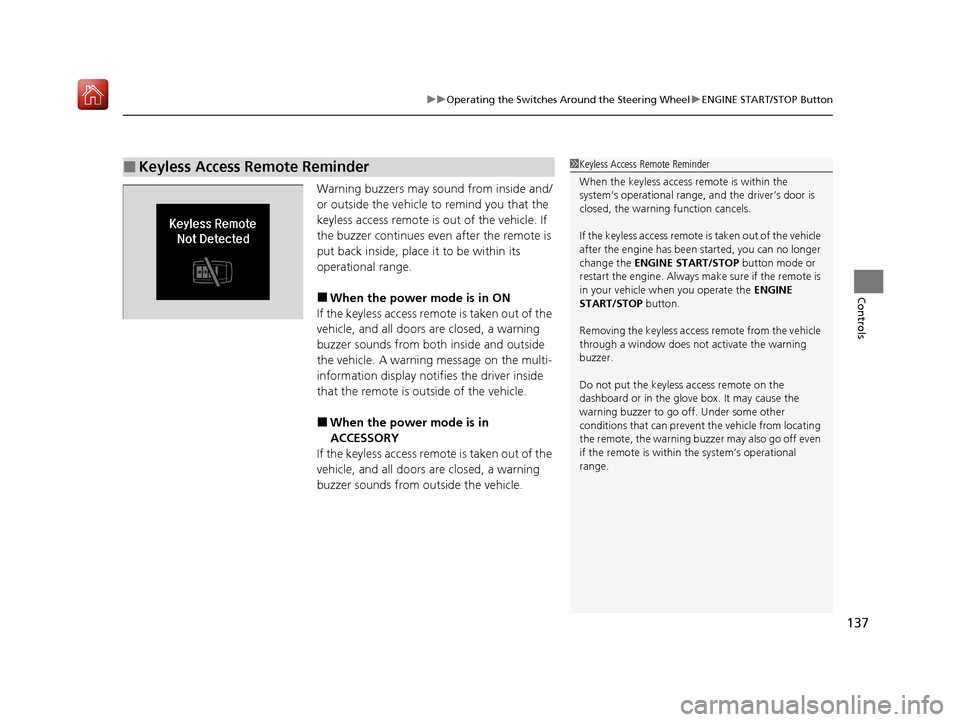
Warning buzzers may sound from inside and/
or outside the vehicle to remind you that the
keyless access remote is out of the vehicle. If
the buzzer continues even after the remote is
put back inside, place it to be within its
operational range.
■When the power mode is in ON
If the keyless access remote is taken out of the
vehicle, and all doors are closed, a warning
buzzer sounds from both inside and outside
the vehicle. A warning message on the multi-
information display notifies the driver inside
that the remote is outside of the vehicle.
■When the power mode is in
ACCESSORY
If the keyless access remote is taken out of the
vehicle, and all doors are closed, a warning
buzzer sounds from outside the vehicle.
■Keyless Access Remote Reminder1 Keyless Access Remote Reminder
When the keyless access remote is within the
system’s operational range, and the driver’s door is
closed, the warni ng function cancels.
If the keyless access remote is taken out of the vehicle
after the engine has been started, you can no longer
change the ENGINE START/STOP button mode or
restart the engine. Always make sure if the remote is
in your vehicle when you operate the ENGINE
START/STOP button.
Removing the keyless access remote from the vehicle
through a window does not activate the warning
buzzer.
Do not put the keyless access remote on the
dashboard or in the glove box. It may cause the
warning buzzer to go of f. Under some other
conditions that can prevent the vehicle from locating
the remote, the warning buzzer may also go off even
if the remote is within the system’s operational
range.
19 ACURA ILX-31TX66610.book 137 ページ 2020年4月17日 金曜日 午前8時52分
Page 148 of 621
147
uuOperating the Switches Around the Steering Wheel uWipers and Washers
Controls
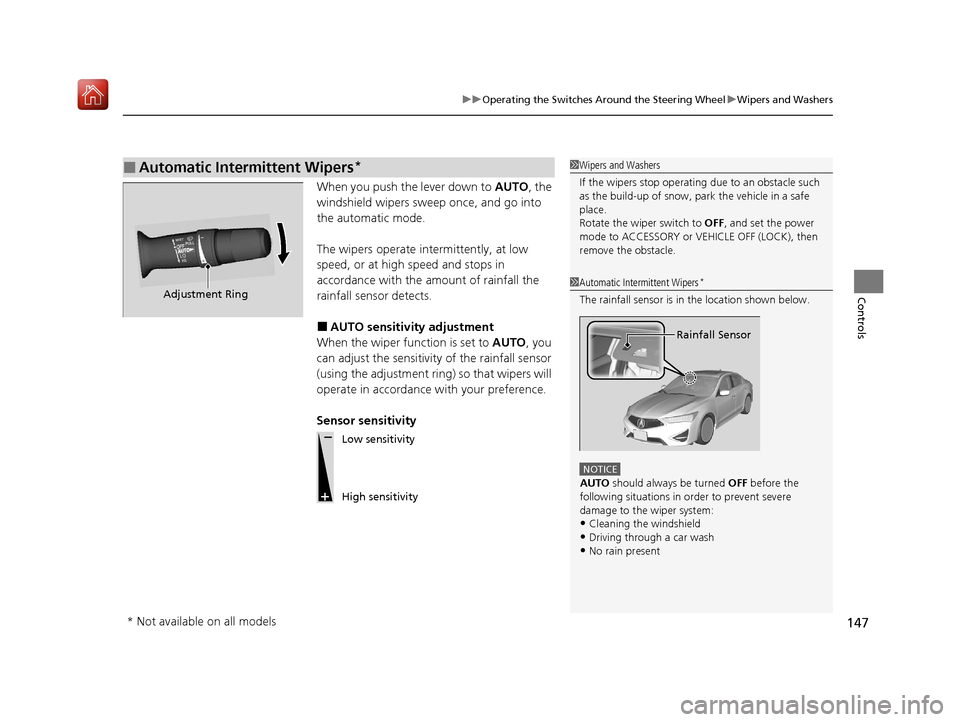
When you push the lever down to AUTO, the
windshield wipers sweep once, and go into
the automatic mode.
The wipers operate intermittently, at low
speed, or at high speed and stops in
accordance with the amount of rainfall the
rainfall sensor detects.
■AUTO sensitivity adjustment
When the wiper function is set to AUTO, you
can adjust the sensitivity of the rainfall sensor
(using the adjustment ring) so that wipers will
operate in accordance with your preference.
Sensor sensitivity
■Automatic Intermittent Wipers*1 Wipers and Washers
If the wipers st op operating due to an obstacle such
as the build-up of snow, pa rk the vehicle in a safe
place.
Rotate the wiper switch to OFF, and set the power
mode to ACCESSORY or VEHICLE OFF (LOCK), then
remove the obstacle.
1 Automatic Intermittent Wipers*
The rainfall sensor is in the location shown below.
NOTICE
AUTO should always be turned OFF before the
following situations in order to prevent severe
damage to the wiper system:
•Cleaning the windshield•Driving through a car wash
•No rain present
Rainfall Sensor
Adjustment Ring
Low sensitivity
High sensitivity
* Not available on all models
19 ACURA ILX-31TX66610.book 147 ページ 2020年4月17日 金曜日 午前8時52分
Page 151 of 621
150
uuOperating the Switches Around the Steering Wheel uDriving Position Memory System*
Controls
Driving Position Memory System*
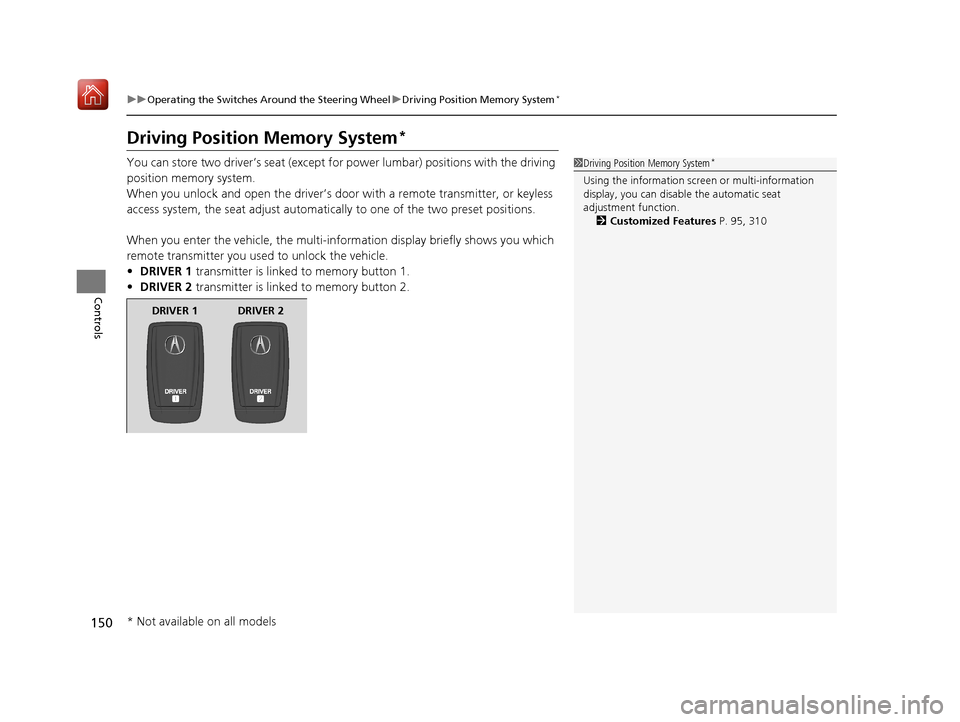
You can store two driver’s seat (except fo r power lumbar) positions with the driving
position memory system.
When you unlock and open th e driver’s door with a remote transmitter, or keyless
access system, the seat adjust automatica lly to one of the two preset positions.
When you enter the vehicle, the multi-in formation display briefly shows you which
remote transmitter you used to unlock the vehicle.
• DRIVER 1 transmitter is linked to memory button 1.
• DRIVER 2 transmitter is linked to memory button 2.1Driving Position Memory System*
Using the information scr een or multi-information
display, you can disable the automatic seat
adjustment function. 2 Customized Features P. 95, 310
DRIVER 1 DRIVER 2
* Not available on all models
19 ACURA ILX-31TX66610.book 150 ページ 2020年4月17日 金曜日 午前8時52分
Page 163 of 621
162
uuAdjusting the Seats uRear Seat
Controls
Rear Seat
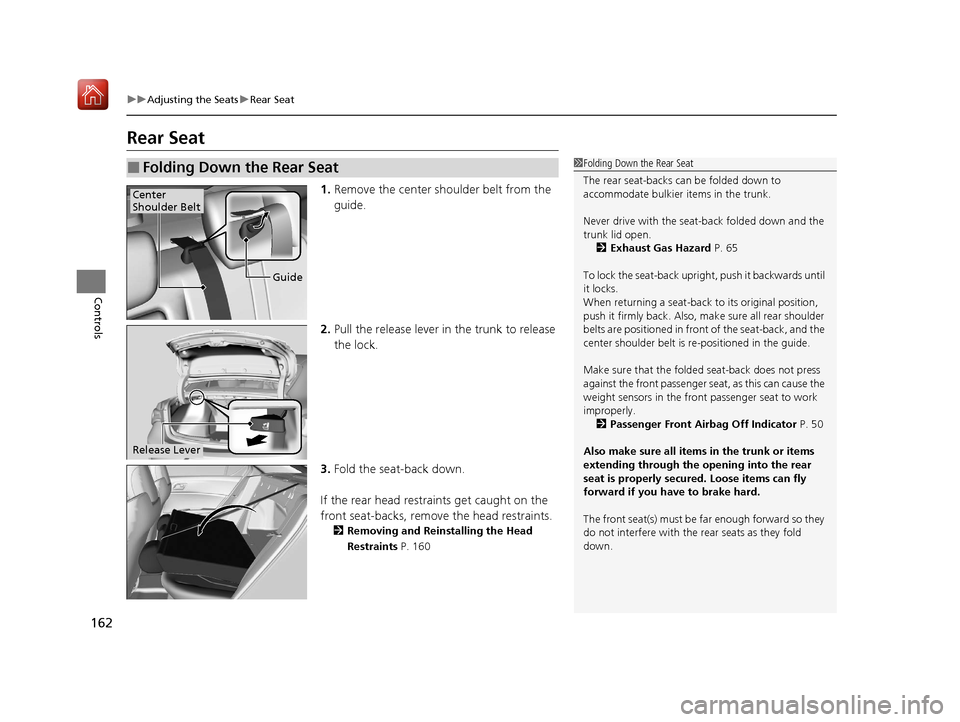
1. Remove the center shoulder belt from the
guide.
2. Pull the release lever in the trunk to release
the lock.
3. Fold the seat-back down.
If the rear head restraints get caught on the
front seat-backs, remove the head restraints.
2 Removing and Reinstalling the Head
Restraints P. 160
■Folding Down the Rear Seat1Folding Down the Rear Seat
The rear seat-backs can be folded down to
accommodate bulkier items in the trunk.
Never drive with the seat-back folded down and the
trunk lid open. 2 Exhaust Gas Hazard P. 65
To lock the seat-back upri ght, push it backwards until
it locks.
When returning a seat-back to its original position,
push it firmly back. Also, m ake sure all rear shoulder
belts are positioned in front of the seat-back, and the
center shoulder belt is re -positioned in the guide.
Make sure that the folded seat-back does not press
against the front passenger seat, as this can cause the
weight sensors in the front passenger seat to work
improperly. 2 Passenger Front Airbag Off Indicator P. 50
Also make sure all items in the trunk or items
extending through the opening into the rear
seat is properly secured. Loose items can fly
forward if you have to brake hard.
The front seat(s) must be far enough forward so they
do not interfere with the rear seats as they fold
down.
Guide
Center
Shoulder Belt
Release Lever
19 ACURA ILX-31TX66610.book 162 ページ 2020年4月17日 金曜日 午前8時52分
Page 165 of 621
164
Controls
Interior Lights/Interior Convenience Items
Interior Lights
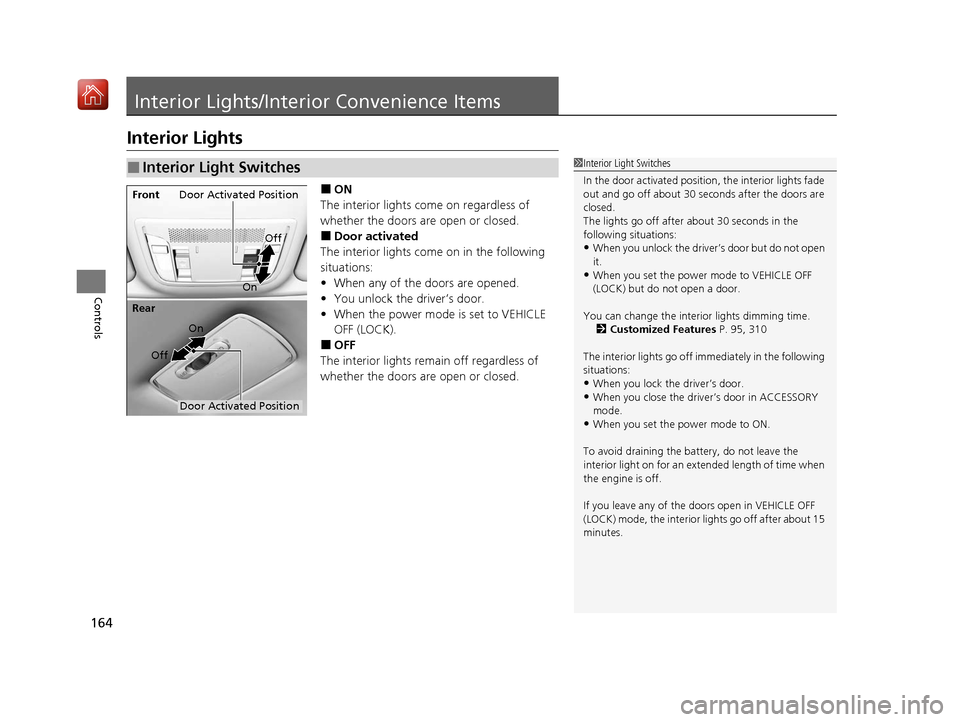
■ON
The interior lights come on regardless of
whether the doors are open or closed.
■Door activated
The interior lights come on in the following
situations:
• When any of the doors are opened.
• You unlock the driver’s door.
• When the power mode is set to VEHICLE
OFF (LOCK).
■OFF
The interior lights remain off regardless of
whether the doors are open or closed.
■Interior Light Switches1 Interior Light Switches
In the door activated position, the interior lights fade
out and go off about 30 se conds after the doors are
closed.
The lights go off after about 30 seconds in the
following situations:
•When you unlock the driver’s door but do not open
it.
•When you set the power mode to VEHICLE OFF
(LOCK) but do not open a door.
You can change the interi or lights dimming time.
2 Customized Features P. 95, 310
The interior lights go off im mediately in the following
situations:
•When you lock the driver’s door.•When you close the driver’s door in ACCESSORY
mode.
•When you set the power mode to ON.
To avoid draining the ba ttery, do not leave the
interior light on for an extended length of time when
the engine is off.
If you leave any of the doors open in VEHICLE OFF
(LOCK) mode, the interior lights go off after about 15
minutes.
Door Activated Position
Off
Front
On
Off
Rear
On
Door Activated Position
19 ACURA ILX-31TX66610.book 164 ページ 2020年4月17日 金曜日 午前8時52分
Page 170 of 621
Continued169
uuInterior Lights/Interior Convenience Items uInterior Convenience Items
Controls
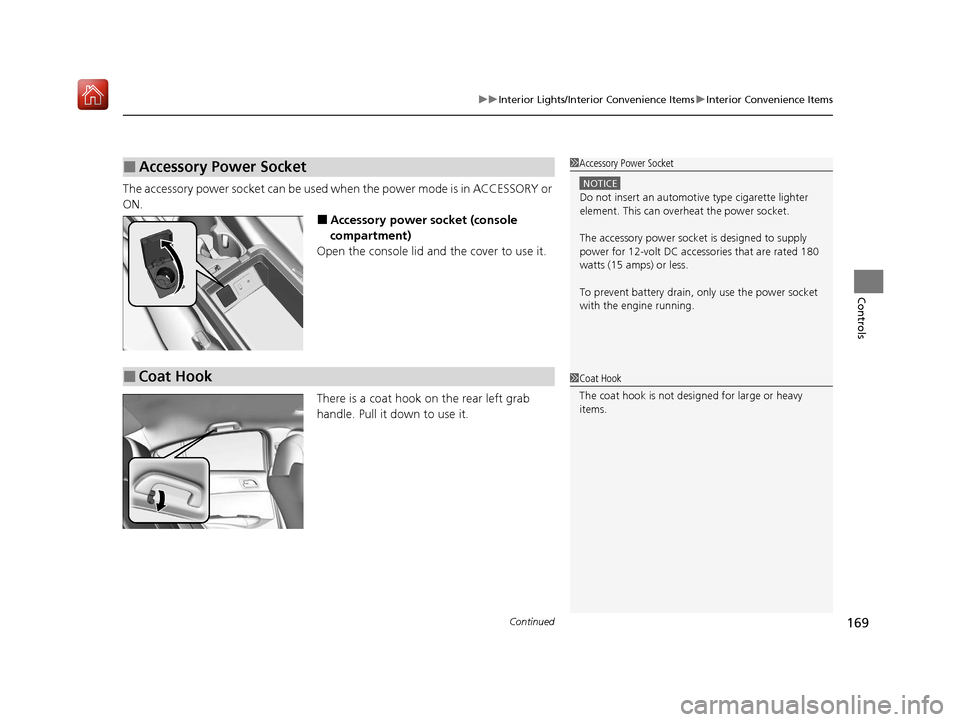
The accessory power socket can be used when the power mode is in ACCESSORY or
ON.
■Accessory power socket (console
compartment)
Open the console lid and the cover to use it.
There is a coat hook on the rear left grab
handle. Pull it down to use it.
■Accessory Power Socket1 Accessory Power Socket
NOTICE
Do not insert an automotive type cigarette lighter
element. This can overheat the power socket.
The accessory power socket is designed to supply
power for 12-volt DC accessories that are rated 180
watts (15 amps) or less.
To prevent battery drain, only use the power socket
with the engine running.
■Coat Hook1 Coat Hook
The coat hook is not desi gned for large or heavy
items.
19 ACURA ILX-31TX66610.book 169 ページ 2020年4月17日 金曜日 午前8時52分
Page 184 of 621
183
Features
Audio System Basic Operation
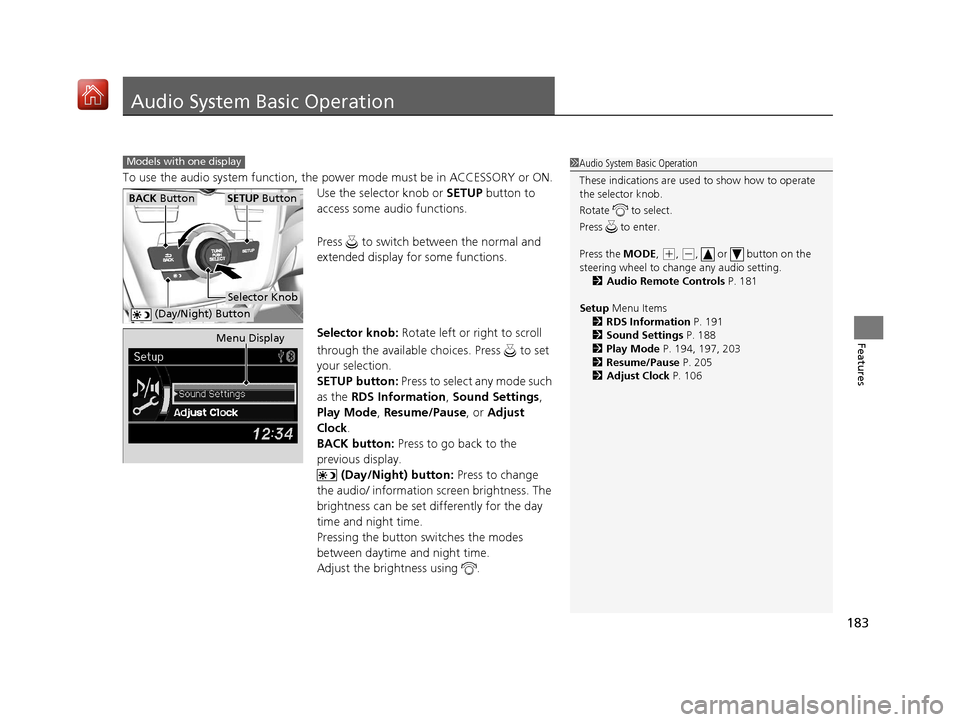
To use the audio system function, the power mode must be in ACCESSORY or ON.
Use the selector knob or SETUP button to
access some audio functions.
Press to switch between the normal and
extended display fo r some functions.
Selector knob: Rotate left or right to scroll
through the available ch oices. Press to set
your selection.
SETUP button: Press to select any mode such
as the RDS Information , Sound Settings,
Play Mode , Resume/Pause , or Adjust
Clock .
BACK button: Press to go back to the
previous display.
(Day/Night) button: Press to change
the audio/ information screen brightness. The
brightness can be set differently for the day
time and night time.
Pressing the button switches the modes
between daytime and night time.
Adjust the brightness using .
Models with one display1 Audio System Basic Operation
These indications are used to show how to operate
the selector knob.
Rotate to select.
Press to enter.
Press the MODE,
( +, (-, or button on the
steering wheel to cha nge any audio setting.
2 Audio Remote Controls P. 181
Setup Menu Items
2 RDS Information P. 191
2 Sound Settings P. 188
2 Play Mode P. 194, 197, 203
2 Resume/Pause P. 205
2 Adjust Clock P. 106
BACK ButtonSETUP Button
Selector Knob
(Day/Night) Button
Menu Display
19 ACURA ILX-31TX66610.book 183 ページ 2020年4月17日 金曜日 午前8時52分
Page 207 of 621
206
Features
Audio System Basic Operation
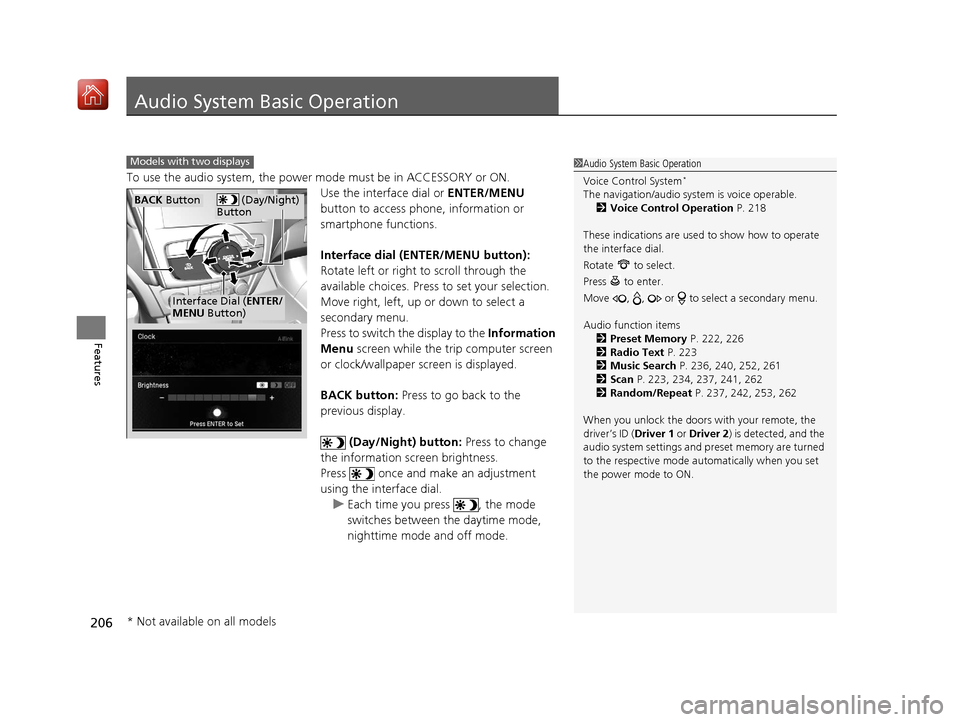
To use the audio system, the power mode must be in ACCESSORY or ON.
Use the interface dial or ENTER/MENU
button to access phone, information or
smartphone functions.
Interface dial (ENTER/MENU button):
Rotate left or right to scroll through the
available choices. Press to set your selection.
Move right, left, up or down to select a
secondary menu.
Press to switch the display to the Information
Menu screen while the trip computer screen
or clock/wallpaper screen is displayed.
BACK button: Press to go back to the
previous display.
(Day/Night) button: Press to change
the information screen brightness.
Press once and make an adjustment
using the interface dial. u Each time you press , the mode
switches between the daytime mode,
nighttime mode and off mode.
1Audio System Basic Operation
Voice Control System
*
The navigation/audio system is voice operable.
2 Voice Control Operation P. 218
These indications are used to show how to operate
the interface dial.
Rotate to select.
Press to enter.
Move , , or to se lect a secondary menu.
Audio function items 2 Preset Memory P. 222, 226
2 Radio Text P. 223
2 Music Search P. 236, 240, 252, 261
2 Scan P. 223, 234, 237, 241, 262
2 Random/Repeat P. 237, 242, 253, 262
When you unlock the doors with your remote, the
driver’s ID ( Driver 1 or Driver 2) is detected, and the
audio system settings and pr eset memory are turned
to the respective mode automatically when you set
the power mode to ON.
Models with two displays
(Day/Night)
ButtonBACK Button
Interface Dial ( ENTER/
MENU Button)
* Not available on all models
19 ACURA ILX-31TX66610.book 206 ページ 2020年4月17日 金曜日 午前8時52分