lock Acura ILX 2019 Manual Online
[x] Cancel search | Manufacturer: ACURA, Model Year: 2019, Model line: ILX, Model: Acura ILX 2019Pages: 621, PDF Size: 34.8 MB
Page 216 of 621
215
uuAudio System Basic Operation uInformation Screen
Features
■Select wallpaper
1. Press the SETTINGS button.
2. Rotate to select Clock Settings, then press .
u Repeat the procedure to select Clock/Wallpaper Type .
3. Move to select Wallpaper.
u The screen changes to the wallpaper list.
4. Rotate to select a desired wallpaper, then press .
u The preview is displayed on the left side on the screen.
u The pop-up menu appears on the screen.
5. Rotate to select Set, then press .
u The display will return to the Clock Settings screen.
■Delete wallpaper
1. Press the SETTINGS button.
2. Rotate to select Clock Settings, then press .
u Repeat the procedure to select Clock/Wallpaper Type .
3. Move to select Wallpaper.
u The screen changes to the wallpaper list.
4. Rotate to select a wallpaper that you want to delete, then press .
u The preview is displayed on the left side on the screen.
u The pop-up menu appears on the screen.
5. Rotate to select Delete, then press .
u The confirmation me ssage will appear.
6. Rotate to select Yes, then press to delete completely.
u The display will return to the wallpaper list.
19 ACURA ILX-31TX66610.book 215 ページ 2020年4月17日 金曜日 午前8時52分
Page 287 of 621
286
Features
General Information on the Audio System
SiriusXM® Radio Service*
1. You need your radio ID ready before regist ering for subscription. To see the ID in
the On Demand Multi-Use DisplayTM, select channel up/down icons until CH 000
and the radio ID appears.
2. Have your radio ID and credit card num ber ready, and either call or visit the
SiriusXM ® website to subscribe.
Switch to the SiriusXM ® mode by pressing the MODE button on the steering wheel,
or through the On Demand Multi-Use Display
TM, and stay in this mode for about 30
minutes until the service is activated. Make sure your vehicle is in an open area with
good reception.
Loading...:
SiriusXM ® is loading the audio or program information.
No Signal:
The signal is too weak in the current location.
Unsubscribed channel:
You are not subscribed to the channel selected.
Unavailable channel:
No such channel exists, the channel is not pa rt of your subscription, or the artist or
title information is unavailable.
Check the antenna, Disconnect ed antenna, Shorted antenna:
There is a problem with the SiriusXM ® antenna. Contact a dealer.
■Subscribing to SiriusXM® Radio
■Receiving SiriusXM ® Radio
■SiriusXM ® Radio Display Messages
1 Subscribing to SiriusXM ® Radio
Contact Information for SiriusXM ® Radio:
•U.S.: SiriusXM ® Radio at www.siriusxm.com/
subscribenow , or 1-866-635-2349.
•Canada: SiriusXM ® Canada at www.siriusxm.ca/
subscribe-now , or 1-877-209-0079.
1Receiving SiriusXM ® Radio
The SiriusXM ® satellites are in orbit over the equator;
therefore, objects south of the vehicle may cause
satellite rece ption interruptions. Sa tellite signals are
more likely to be blocked by tall buildings and
mountains the farther north you travel from the
equator.
You may experience rece ption problems under the
following circumstances:
•In a location with an obstruction to the south of
your vehicle.
•In tunnels
•On the lower level of a multi-tiered road
•Large items carried on the roof rack
* Not available on all models
19 ACURA ILX-31TX66610.book 286 ページ 2020年4月17日 金曜日 午前8時52分
Page 290 of 621
289
uuGeneral Information on the Audio System uCompatible iPod, iPhone, and USB Flash Drives
Features
Compatible iPod, iPhone , and USB Flash Drives
*1:Models with two displays
•A USB flash drive of 256 MB or higher is recommended.
• Some digital audio players may not be compatible.
• Some USB flash drives (e.g., a device with security lockout) may not work.
• Some software files may not allow for audio play or text data display.
• Some versions of MP3, WMA, or AAC formats may be unsupported.
■iPod and iPhone Model Compatibility
Model
iPod (5th generation)
iPod classic 80/160GB (launched in 2007)
iPod classic 120GB (launched in 2008)
iPod classic 160GB (launched in 2009)
iPod nano (1st to 7th generation) released between 2005 and 2012
iPod touch (1st to 6th generation) released between 2007 and 2015
iPhone 3G/iPhone 3GS/iPhone 4/iPhone 4s/iPhone 5/iPhone 5c/iPhone 5s/iPhone 6/
iPhone 6 Plus/iPhone 6s/iPhone 6s Plus/iPhone SE*1/iPhone 7/iPhone 7 Plus/
iPhone 8*1/iPhone 8 Plus*1/iPhone X*1
■USB Flash Drives
1 iPod and iPhone Model Compatibility
This system may not work with all software versions
of these devices.
1USB Flash Drives
Files on the USB flash drive are played in their stored
order. This order may be different from the order
displayed on your PC or device.
19 ACURA ILX-31TX66610.book 289 ページ 2020年4月17日 金曜日 午前8時52分
Page 306 of 621
305
uuCustomized Features u
Continued
Features
■Customization Flow
Sound SettingsBAr
RDS Information*1
Adjust Clock
TRE
FAD
BAL
SVC
Display Setup
Select
Brightness
Wallpaper
Import
Delete
Blue Color Theme
Red
Gray
Language Selection
Press the SETUP button.
*1 : Appears only when you select the FM mode.
19 ACURA ILX-31TX66610.book 305 ページ 2020年4月17日 金曜日 午前8時52分
Page 308 of 621
307
uuCustomized Features u
Continued
Features
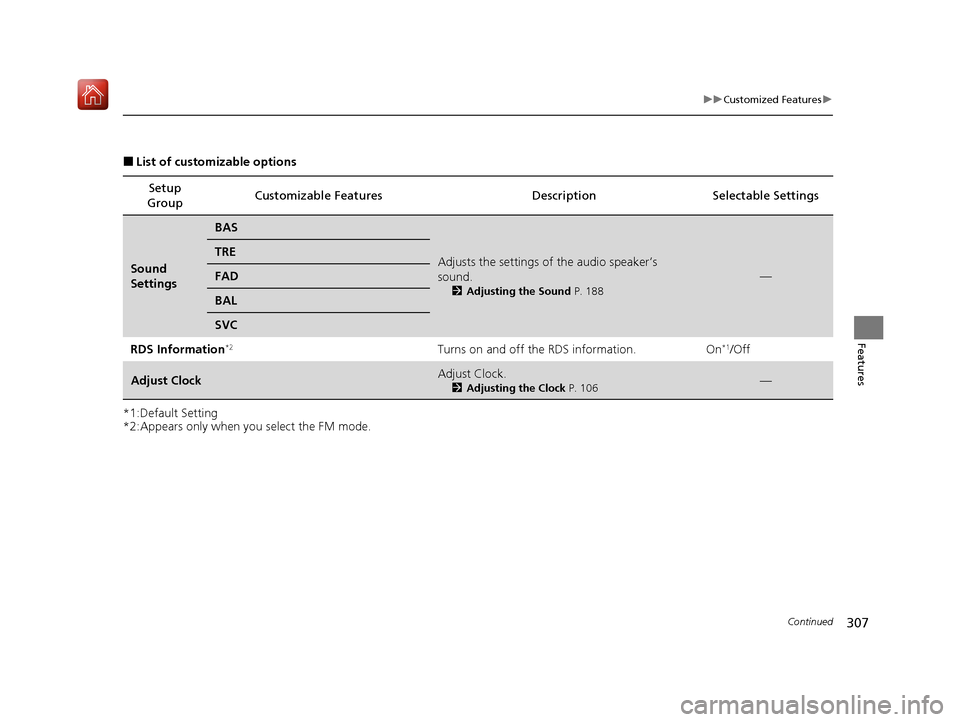
■List of customizable options
*1:Default Setting
*2:Appears only when you select the FM mode. Setup
Group Customizable Features
Description Selectable Settings
Sound
Settings
BAS
Adjusts the settings of the audio speaker’s
sound.
2Adjusting the Sound P. 188
—
TRE
FAD
BAL
SVC
RDS Information
*2Turns on and off the RDS information. On*1/Off
Adjust ClockAdjust Clock.
2Adjusting the Clock P. 106—
19 ACURA ILX-31TX66610.book 307 ページ 2020年4月17日 金曜日 午前8時52分
Page 309 of 621
308
uuCustomized Features u
Features
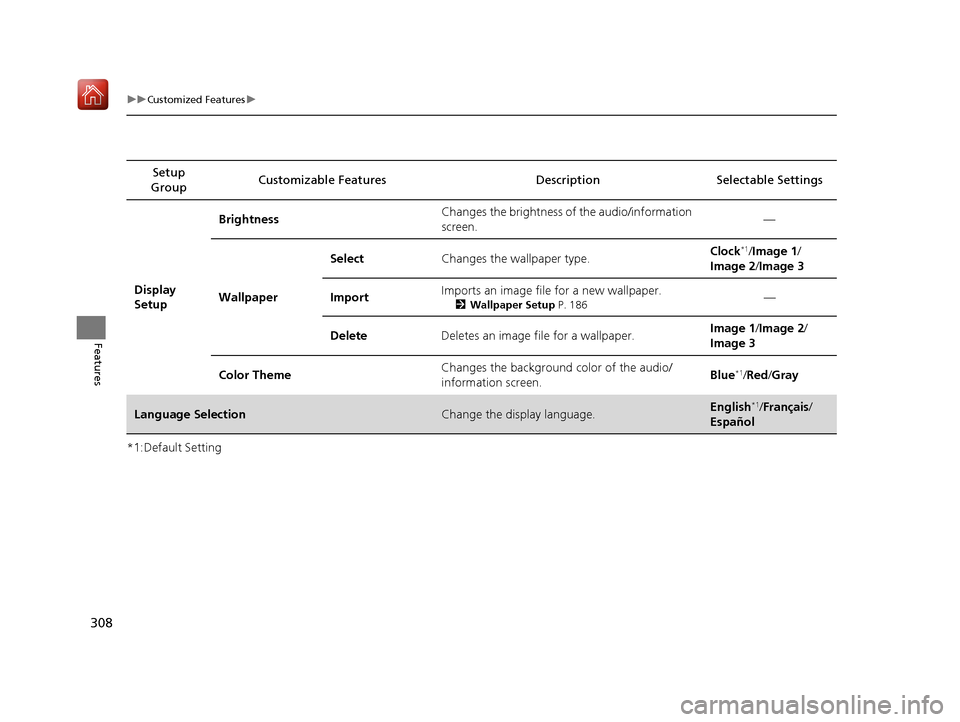
*1:Default SettingSetup
Group Customizable Features Description Selectable Settings
Display
Setup Brightness
Changes the brightness of the audio/information
screen. —
Wallpaper Select
Changes the wallpaper type. Clock
*1/
Image 1 /
Image 2 /Image 3
Import Imports an image file for a new wallpaper.
2
Wallpaper Setup P. 186—
Delete Deletes an image file for a wallpaper. Image 1
/Image 2 /
Image 3
Color Theme Changes the background color of the audio/
information screen. Blue
*1/
Red /Gray
Language SelectionChange the display language.English*1/ Français /
Español
19 ACURA ILX-31TX66610.book 308 ページ 2020年4月17日 金曜日 午前8時52分
Page 314 of 621
313
uuCustomized Features u
Continued
Features
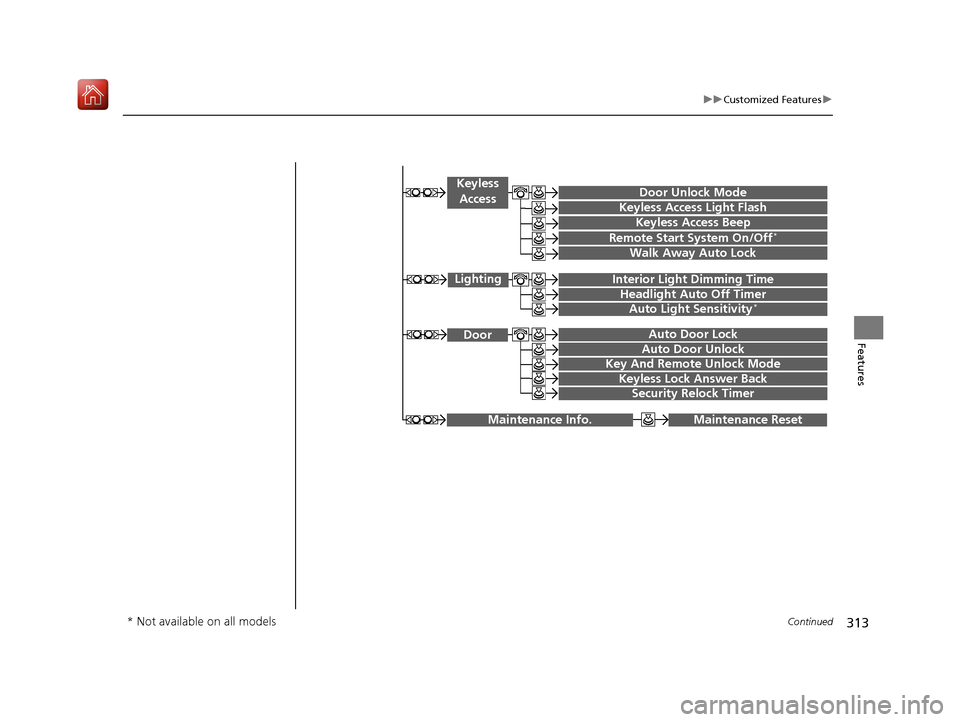
Maintenance ResetMaintenance Info.
Key And Remote Unlock Mode
Keyless Lock Answer Back
Security Relock Timer
Auto Door Lock
Auto Door Unlock Door
Door Unlock Mode
Keyless Access Beep
Interior Light Dimming Time
Headlight Auto Off Timer
Auto Light Sensitivity*
Remote Start System On/Off*
Walk Away Auto Lock
Lighting
Keyless
Access
Keyless Access Light Flash
* Not available on all models
19 ACURA ILX-31TX66610.book 313 ページ 2020年4月17日 金曜日 午前8時52分
Page 315 of 621
314
uuCustomized Features u
Features
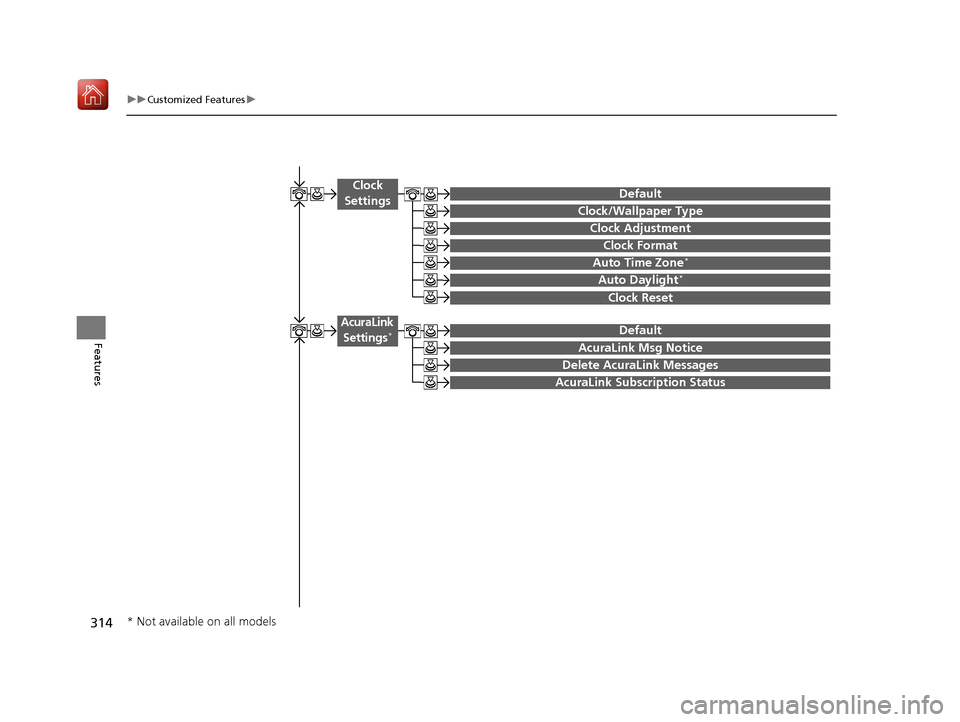
Auto Time Zone*
Clock/Wallpaper Type
Clock Adjustment
Clock
Settings
Clock Format
Default
Auto Daylight*
Clock Reset
AcuraLink Msg Notice
Delete AcuraLink Messages
AcuraLink Settings*
AcuraLink Subscription Status
Default
* Not available on all models
19 ACURA ILX-31TX66610.book 314 ページ 2020年4月17日 金曜日 午前8時52分
Page 316 of 621
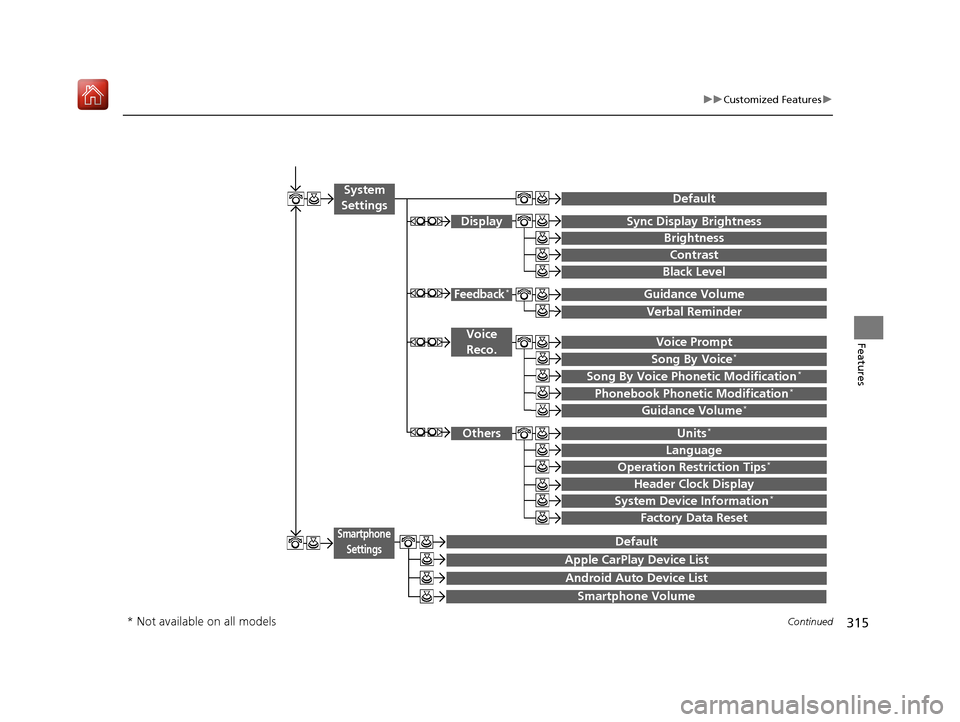
315
uuCustomized Features u
Continued
Features
Voice Prompt
Brightness
Contrast
Black Level
Default
Display
System
Settings
Voice Reco.
Sync Display Brightness
System Device Information*Header Clock Display
Language
Operation Restriction Tips*
Others
Default
Apple CarPlay Device List
Android Auto Device List
Smartphone
Settings
Smartphone Volume
Factory Data Reset
Units*
Song By Voice*
Song By Voice Phonetic Modification*
Phonebook Phonet ic Modification*
Guidance Volume*
Feedback*Guidance Volume
Verbal Reminder
* Not available on all models
19 ACURA ILX-31TX66610.book 315 ページ 2020年4月17日 金曜日 午前8時52分
Page 322 of 621

321
uuCustomized Features u
Continued
Features
*1:Default SettingSetup
Group Customizable Features Desc
ription Selectable Settings
Vehicle
Settings
Driving
Position Memory Position LinkTurns the driving position memory system on and
off.On*1/Off
Keyless
Access
Door Unlock ModeChanges which doors unloc k when you grab the
driver’s door handle.Driver Door Only*1/
All Doors
Keyless Access Light
FlashCauses some exterior li ghts to flash when you
unlock/lock the doors.On*1/ Off
Keyless Access BeepCauses the beeper to sound when you unlock/
lock the doors.On*1/Off
Remote Start System
On/Off*Turns the remote engine start feature on and off.On*1/Off
Walk Away Auto Lock
Changes the settings for the automatic locking
the doors when you walk away from the vehicle
while carrying the keyless access remote.
On /Off*1
* Not available on all models
19 ACURA ILX-31TX66610.book 321 ページ 2020年4月17日 金曜日 午前8時52分