lock Acura ILX 2019 Owner's Manual
[x] Cancel search | Manufacturer: ACURA, Model Year: 2019, Model line: ILX, Model: Acura ILX 2019Pages: 621, PDF Size: 34.8 MB
Page 433 of 621
432
uuWhen Driving uDual Clutch Transmission
Driving
Dual Clutch Transmission
The engine runs at a higher id le speed and creeping increases.
Keep the brake pedal firmly depressed when stopped.
Quickly depressing the accelerator pedal while driving uphill may cause the
transmission to drop to a lower gear, unexpectedly increasing vehicle speed. Depress
the accelerator pedal carefully, especi ally on slippery roads and curves.
■Creeping
■Kickdown
1Precautions While Driving
NOTICE
The following can dama ge the under spoiler:•Parking the vehicle by a parking block
•Parallel parking along the road shoulder
•Driving towards the bottom of a hill•Driving up or down to a different surface level
(such as a road shoulder)
•Driving on a rutted or bumpy road•Driving on a road with potholes.
19 ACURA ILX-31TX66610.book 432 ページ 2020年4月17日 金曜日 午前8時52分
Page 434 of 621
433
uuWhen Driving uShifting
Continued
Driving
Shifting
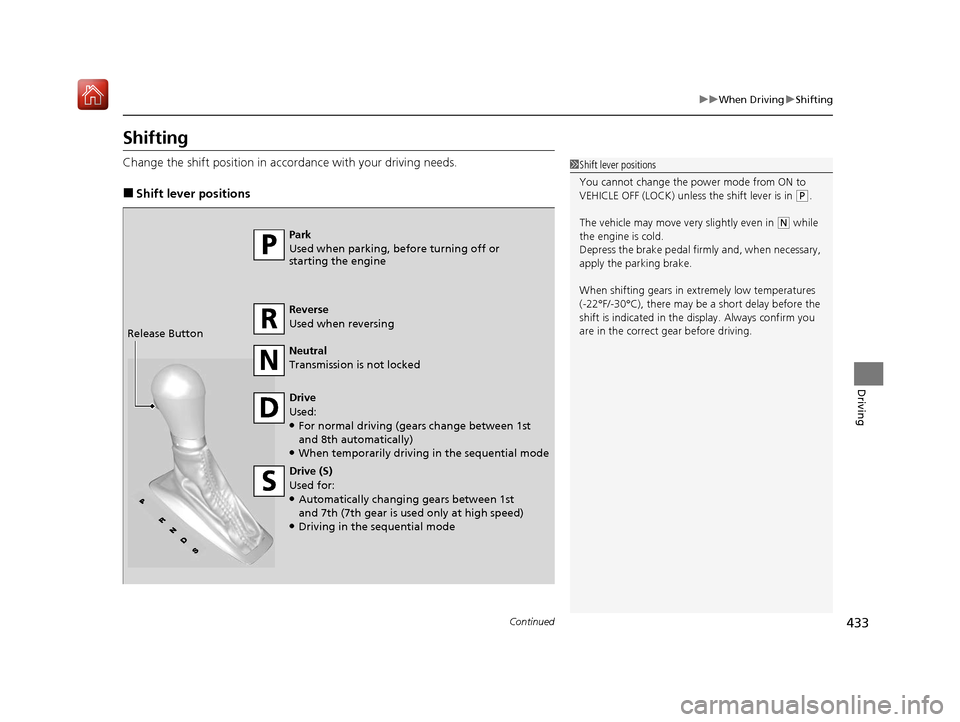
Change the shift position in accordance with your driving needs.
■Shift lever positions
1Shift lever positions
You cannot change the pow er mode from ON to
VEHICLE OFF (LOCK) unless the shift lever is in
( P.
The vehicle may move ve ry slightly even in
(N while
the engine is cold.
Depress the brake pe dal firmly and, when necessary,
apply the parking brake.
When shifting gears in extremely low temperatures
(-22°F/-30°C), there may be a short delay before the
shift is indicated in the di splay. Always confirm you
are in the correct gear before driving.Park
Used when parking, before turning off or
starting the engine
Reverse
Used when reversing
Neutral
Transmission is not locked
Drive
Used:
●For normal driving (gears change between 1st
and 8th automatically)
●When temporarily driving in the sequential mode
Drive (S)
Used for:
●Automatically changing gears between 1st
and 7th (7th gear is used only at high speed)
●Driving in the sequential mode
Release Button
19 ACURA ILX-31TX66610.book 433 ページ 2020年4月17日 金曜日 午前8時52分
Page 437 of 621
uuWhen Driving uShifting
436
Driving
■Second gear lock mode
If you pull the
(+ paddle shifter while stopped or dr iving at 6 mph (10 km/h) or less,
the gear position will be locked in 2nd g ear. This makes it easier to pull away on
slippery surfaces such as snow covered roads.
To cancel the 2nd gear lock mode, pull the
(- paddle shifter, or move the shift lever
from
(S to (D.
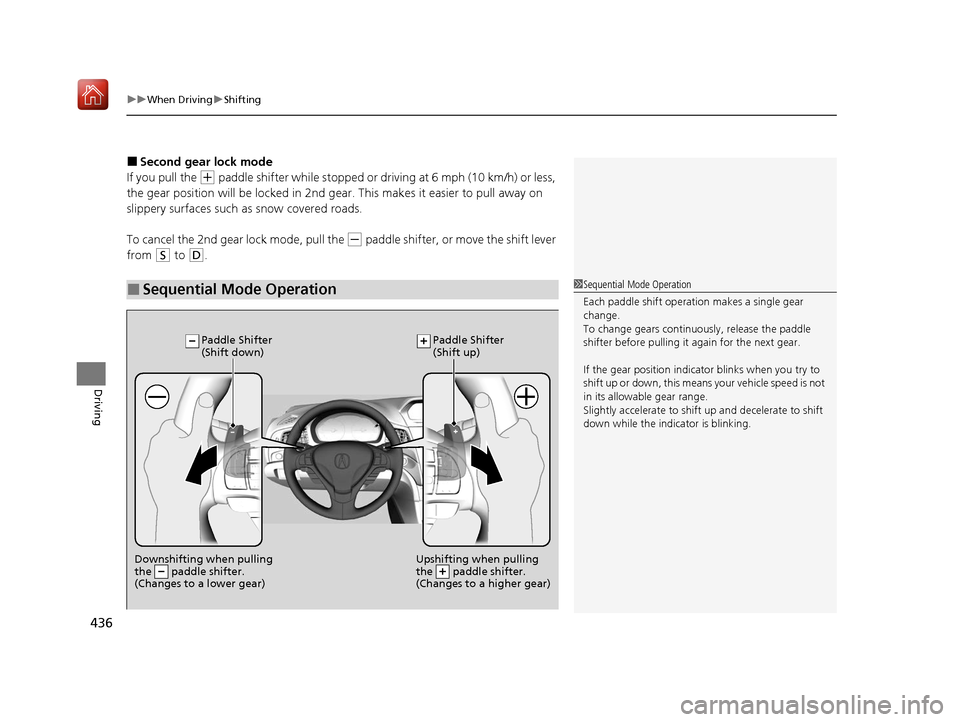
■Sequential Mode Operation1 Sequential Mode Operation
Each paddle shift operation makes a single gear
change.
To change gears continuously, release the paddle
shifter before pulling it again for the next gear.
If the gear positio n indicator blinks when you try to
shift up or down, this means your vehicle speed is not
in its allowabl e gear range.
Slightly accelerate to shift up and decelerate to shift
down while the indi cator is blinking.
Downshifting when pulling
the paddle shifter.
(Changes to a lower gear)Upshifting when pulling
the paddle shifter.
(Changes to a higher gear)
Paddle Shifter
(Shift down) Paddle Shifter
(Shift up)
19 ACURA ILX-31TX66610.book 436 ページ 2020年4月17日 金曜日 午前8時52分
Page 455 of 621
454
uuAcuraWatchTMuCollision Mitigation Braking SystemTM (CMBSTM)
Driving
■Vehicle conditions
• Headlight lenses are dirty or the headlights are not properly adjusted.
• The outside of the windshie ld is blocked by dirt, mud, leaves, wet snow, etc.
• The inside of the windshield is fogged.
• An abnormal tire or wheel condition (wrong sized, varied size or construction,
improperly inflated, compact spare tire
*, etc.).
• When tire chains are installed.
• The vehicle is tilted due to a heav y load or suspension modifications.
• The camera temperature gets too high.
• Driving with the parking brake applied.
• When the radar sensor behind the emblem gets dirty.
* Not available on all models
19 ACURA ILX-31TX66610.book 454 ページ 2020年4月17日 金曜日 午前8時52分
Page 465 of 621
uuAcuraWatchTMuAdaptive Cruise Control (ACC)
464
Driving
The system may automatically shut off and the ACC indicator will come on under
certain conditions. Some examples of th ese conditions are listed below. Other
conditions may reduce some of the ACC functions.
2 Front Sensor Camera P. 488
■Environmental conditions
Driving in bad weather (r ain, fog, snow, etc.).
■Roadway conditions
Driving on a snowy or wet roadway (obscure d lane marking, vehicle tracks, reflected
lights, road spray, high contrast).
■Vehicle conditions
• The outside of the windshie ld is blocked by dirt, mud, leaves, wet snow, etc.
• An abnormal tire or wheel condition (wrong sized, varied size or construction,
improperly inflated, compact spare tire
*, etc.).
• The camera temperature gets too high.
• The parking brake is applied.
• When the front grille is dirty.
• The vehicle is tilted due to a heav y load or suspension modifications.
• When tire chains are installed.
■ACC Conditions and Limitations1ACC Conditions and Limitations
Have your vehicle checked by a dealer if you find any
unusual behavior of the system (e.g., the warning
message appears too frequently).
* Not available on all models
19 ACURA ILX-31TX66610.book 464 ページ 2020年4月17日 金曜日 午前8時52分
Page 483 of 621
482
uuAcuraWatchTMuLane Keeping Assist System (LKAS)
Driving
• When objects on the road (c urb, guard rail, pylons, etc.) are recognized as white
lines (or yellow lines).
• Driving on roads with double lines.
■Vehicle conditions
• Headlight lenses are dirty or the headlights are not properly adjusted.
• The outside of the windshield is streake d or blocked by dirt, mud, leaves, wet
snow, etc.
• The inside of the windshield is fogged.
• The camera temperature gets too high.
• An abnormal tire or wheel condition (wrong sized, varied size or construction,
improperly inflated, compact spare tire
*, etc.).
• The vehicle is tilted due to a heav y load or suspension modifications.
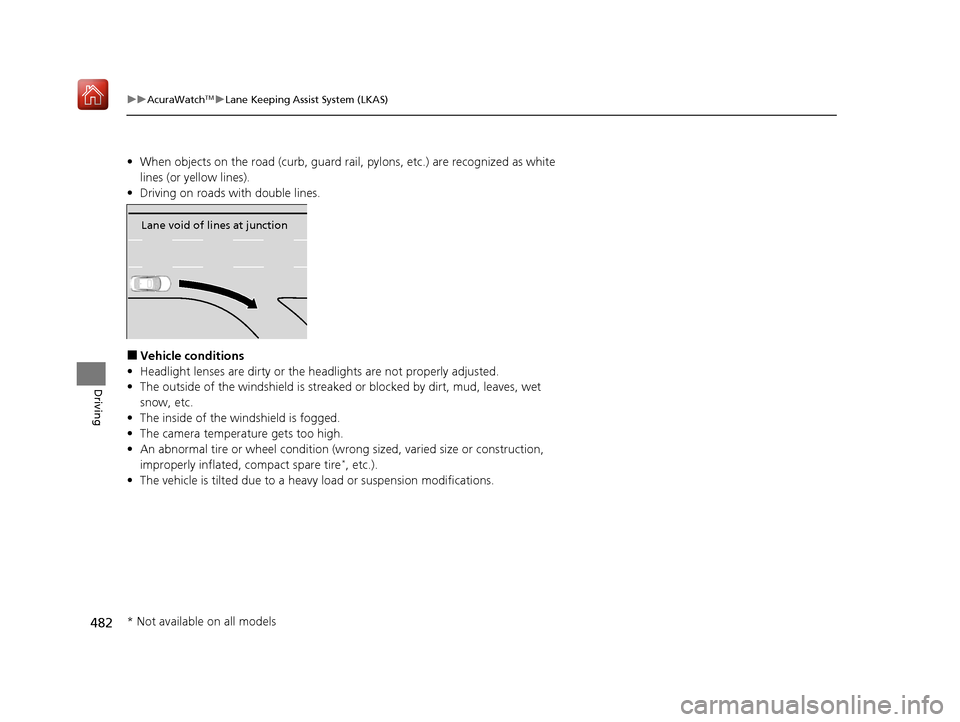
Lane void of lines at junction
* Not available on all models
19 ACURA ILX-31TX66610.book 482 ページ 2020年4月17日 金曜日 午前8時52分
Page 488 of 621
487
uuAcuraWatchTMuRoad Departure Mitigation (RDM) System
Driving
■Roadway conditions
• Driving on a snowy or wet roadway (obs cured lane marking, vehicle tracks,
reflected lights, road spray, high contrast).
• Driving on a road with temporary lane markings.
• Faint, multiple, or varied lane markings are visible on the roadway due to road
repairs or old lane markings.
• The roadway has merging, split, or crossing lines (e.g., such as at an intersection
or crosswalk).
• The lane markings are extremel y narrow, wide, or changing.
• The vehicle in front of you is driving near the lane lines.
• The road is hilly or the vehicle is approaching the crest of a hill.
• Driving on rough or unpaved roads, or over bumpy surfaces.
• When objects on the road (curb, guard rail, pylons, etc.) are recognized as white
lines (or yellow lines).
• Driving on roads with double lines.
■Vehicle conditions
• Headlight lenses are dirty or the h eadlights are not properly adjusted.
• The outside of the windshield is streaked or blocked by dirt, mud, leaves, wet
snow, etc.
• The inside of the windshield is fogged.
• The camera temperature gets too high.
• An abnormal tire or wheel condition (wro ng sized, varied size or construction,
improperly inflated, compact spare tire
*, etc.).
• The vehicle is tilted due to a heavy load or suspension modifications.
• When tire chains are installed.
* Not available on all models
19 ACURA ILX-31TX66610.book 487 ページ 2020年4月17日 金曜日 午前8時52分
Page 493 of 621
uuBraking uBrake System
492
Driving
Your vehicle is equipped with disc brakes at all four wheels. A vacuum power assist
helps reduce the effort needed on the brake pedal. The brake assist system increases
the stopping force when you depress th e brake pedal hard in an emergency
situation. The anti-lock brake system (ABS ) helps you retain steering control when
braking very hard.
2 Brake Assist System P. 494
2 Anti-lock Brake System (ABS) P. 493
■Foot Brake1Foot Brake
Check the brakes after driving through deep water,
or if there is a buildup of road surface water. If
necessary, dry the brakes by lightly depressing the
pedal several times.
If you hear a continuous me tallic friction sound when
applying the brakes, this is caused by the brake wear
indicator rubbing on the brake rotor and indicates
that the brake pads need to be replaced. Have the
vehicle checked by a deal er. If you hear only an
occasional squeak or squeal when you initially apply
the brake pedal, this may be normal and caused by
high frequency vibration of the brake pads against
the rotating brake disc.
Constantly using the brake pedal while going down a
long hill builds up heat, which reduces the brake
effectiveness. Apply engine braking by taking your
foot off the accelerator pe dal and downshifting to a
lower gear.
Do not rest your foot on the brake pedal while
driving, as it will lightly apply the brakes and cause
them to lose effectiveness over time and reduce pad
life. It will also conf use drivers behind you.
19 ACURA ILX-31TX66610.book 492 ページ 2020年4月17日 金曜日 午前8時52分
Page 494 of 621
493
uuBraking uAnti-lock Brake System (ABS)
Driving
Anti-lock Brake System (ABS)
Helps prevent the wheels from locking up, and helps you retain steering control by
pumping the brakes rapidly, much faster than you.
The electronic brake distribu tion (EBD) system, which is part of the ABS, also
balances the front-to-rear braking distribution according to vehicle loading.
You should never pu mp the brake pedal. Let the ABS work for you by always
keeping firm, steady pressure on the brake pe dal. This is sometimes referred to as
“stomp and steer.”
■ABS operation
The brake pedal may pulsate slightly when the ABS is working. Depress the brake
pedal and keep holding the pedal firmly do wn. On dry pavement, you will need to
press on the brake pedal very hard before th e ABS activates. However, you may feel
the ABS activate immediately if you are trying to stop on snow or ice.
ABS may activate when you depres s the brake pedal when driving on:
• Wet or snow covered roads.
• Roads paved with stone.
• Roads with uneven surf aces, such as potholes, cracks, manholes, etc.
When the vehicle speed goes unde r 6 mph (10 km/h), the ABS stops.
■ABS1Anti-lock Brake System (ABS)
NOTICE
The ABS may not function correctly if you use a tire of
the wrong size or type.
If the ABS indicator comes on while driving, there
may be a problem with the system.
While normal braking will not be affected, there is a
possibility that the ABS wi ll not be operating. Have
your vehicle checked by a dealer immediately.
The ABS is not designed for the purpose of reducing
the time or distance it takes for a vehicle to stop: It is
designed to limit brake lockup which can lead to
skidding and loss of steering control.
In the following cases, yo ur vehicle may need more
distance to stop than a vehicle without the ABS:
•You are driving on rough or uneven road surfaces,
such as gravel or snow.
•The tires are equipped with tire chains.
The following may be observed with the ABS system:
•Motor sounds coming from the engine
compartment when the brakes are applied, or
when system checks are being performed after the
engine has been started and while the vehicle
accelerates.
•Brake pedal and/or the vehicle body vibration when
ABS activates.
These vibrations and sou nds are normal to ABS
systems and are no cause for concern.
19 ACURA ILX-31TX66610.book 493 ページ 2020年4月17日 金曜日 午前8時52分
Page 497 of 621
uuParking Your Vehicle uWhen Stopped
496
Driving
Always set the parking brake firmly, in part icular if you are parked on an incline.1When Stopped
In extremely cold temper atures, the parking brake
may freeze up if applied. If such temperatures are
expected, do not apply the parking brake but, if
parking on a slope, either turn the front wheels so
they will contact the curb if the vehicle rolls down the
slope or block the wheels to keep the vehicle from
moving. If you do not take either precaution, the
vehicle may roll unexpected ly, leading to a crash.
19 ACURA ILX-31TX66610.book 496 ページ 2020年4月17日 金曜日 午前8時52分