reset Acura ILX 2020 Owner's Guide
[x] Cancel search | Manufacturer: ACURA, Model Year: 2020, Model line: ILX, Model: Acura ILX 2020Pages: 621, PDF Size: 34.94 MB
Page 230 of 621
Continued229
uuAudio System Basic Operation uPlaying SiriusXM ® Radio
Features
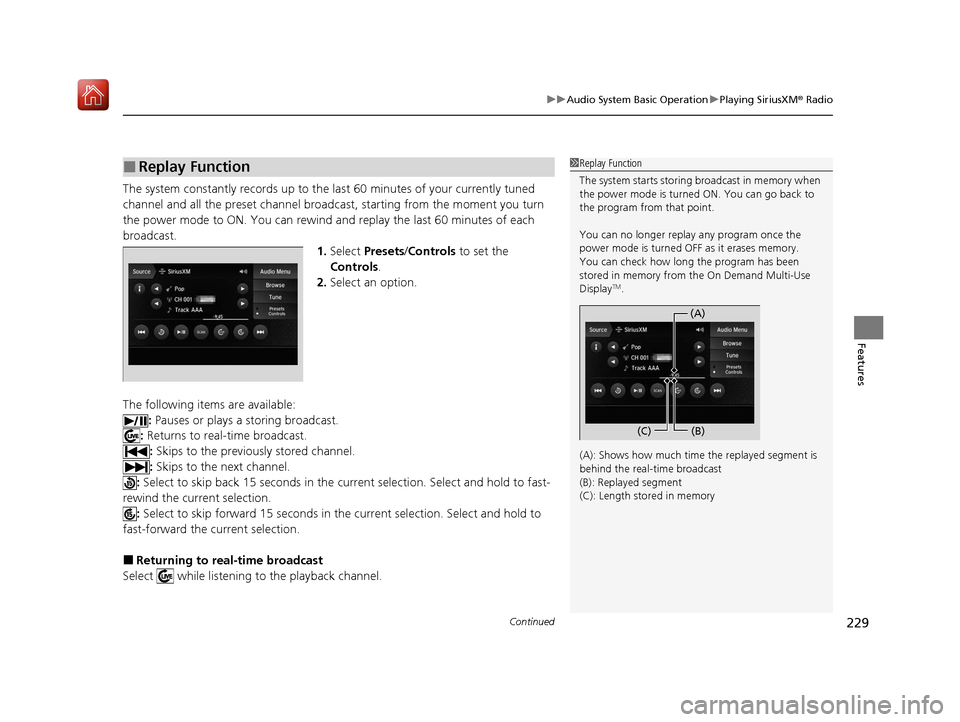
The system constantly records up to the last 60 minutes of your currently tuned
channel and all the preset channel broadc ast, starting from the moment you turn
the power mode to ON. You can rewind and replay the last 60 minutes of each
broadcast. 1.Select Presets /Controls to set the
Controls.
2. Select an option.
The following items are available: : Pauses or plays a storing broadcast.
: Returns to real-time broadcast.
: Skips to the previously stored channel.
: Skips to the next channel.
: Select to skip back 15 seconds in the cu rrent selection. Select and hold to fast-
rewind the current selection. : Select to skip forward 15 seconds in the current sele ction. Select and hold to
fast-forward the current selection.
■Returning to real-time broadcast
Select while listening to the playback channel.
■Replay Function1 Replay Function
The system starts storing broadcast in memory when
the power mode is turned ON. You can go back to
the program from that point.
You can no longer repl ay any program once the
power mode is turned OFF as it erases memory.
You can check how long the program has been
stored in memory from the On Demand Multi-Use
Display
TM.
(A): Shows how much time the replayed segment is
behind the real-time broadcast
(B): Replayed segment
(C): Length stored in memory
(A) (B)
(C)
20 ACURA ILX-31TX66710.book 229 ページ 2020年4月16日 木曜日 午後8時46分
Page 235 of 621
uuAudio System Basic Operation uPlaying SiriusXM ® Radio
234
Features
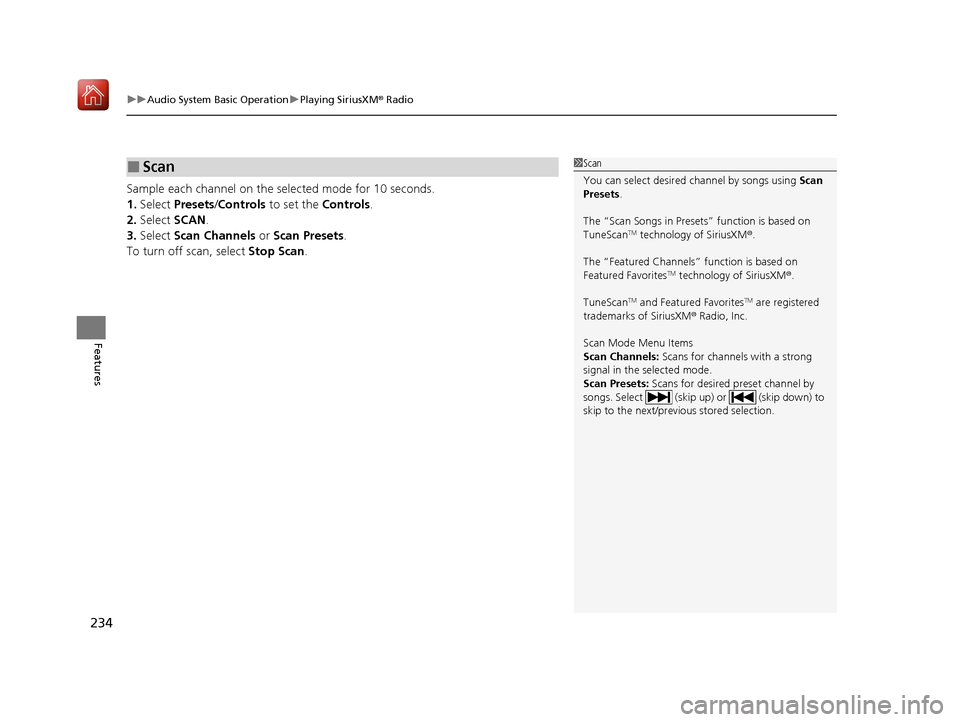
Sample each channel on the sele cted mode for 10 seconds.
1. Select Presets /Controls to set the Controls.
2. Select SCAN.
3. Select Scan Channels or Scan Presets .
To turn off scan, select Stop Scan.
■Scan1Scan
You can select desired channel by songs using Scan
Presets .
The “Scan Songs in Preset s” function is based on
TuneScan
TM technology of SiriusXM ®.
The “Featured Channels ” function is based on
Featured Favorites
TM technology of SiriusXM ®.
TuneScan
TM and Featured FavoritesTM are registered
trademarks of SiriusXM ® Radio, Inc.
Scan Mode Menu Items
Scan Channels: Scans for channels with a strong
signal in the selected mode.
Scan Presets: Scans for desired preset channel by
songs. Select (skip up) or (skip down) to
skip to the next/previ ous stored selection.
20 ACURA ILX-31TX66710.book 234 ページ 2020年4月16日 木曜日 午後8時46分
Page 313 of 621
312
uuCustomized Features u
Features
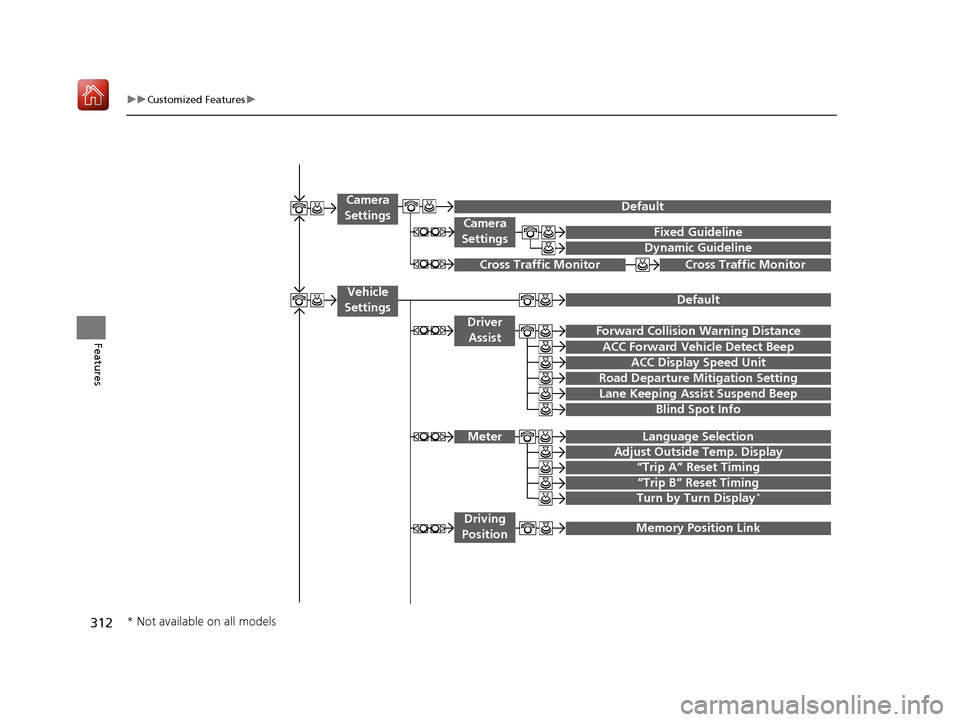
Fixed Guideline
Dynamic Guideline
Camera
Settings
Cross Traffic MonitorCross Traffic Monitor
“Trip A” Reset Timing
“Trip B” Reset Timing
Language Selection
Adjust Outside Temp. Display
Forward Collision Warning Distance
ACC Forward Vehicle Detect Beep
Turn by Turn Display*
Default
Meter
Driver Assist
Lane Keeping Assist Suspend Beep
Blind Spot Info
Driving
Position
Road Departure Mi tigation Setting
ACC Display Speed Unit
Memory Position Link
Vehicle
Settings
Camera
Settings
Default
* Not available on all models
20 ACURA ILX-31TX66710.book 312 ページ 2020年4月16日 木曜日 午後8時46分
Page 314 of 621
313
uuCustomized Features u
Continued
Features
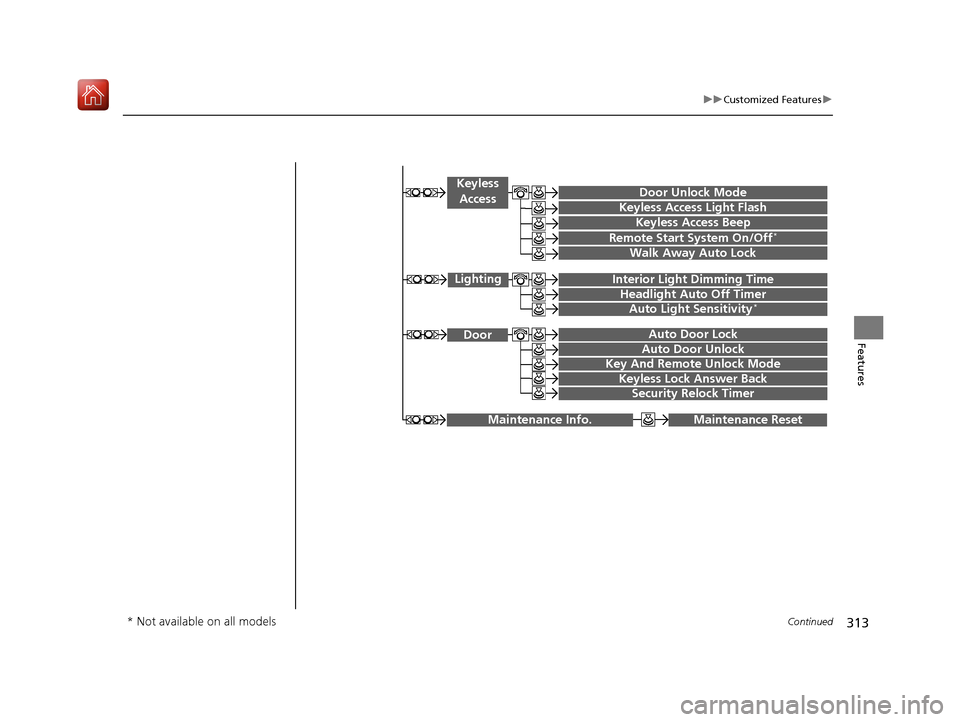
Maintenance ResetMaintenance Info.
Key And Remote Unlock Mode
Keyless Lock Answer Back
Security Relock Timer
Auto Door Lock
Auto Door Unlock Door
Door Unlock Mode
Keyless Access Beep
Interior Light Dimming Time
Headlight Auto Off Timer
Auto Light Sensitivity*
Remote Start System On/Off*
Walk Away Auto Lock
Lighting
Keyless
Access
Keyless Access Light Flash
* Not available on all models
20 ACURA ILX-31TX66710.book 313 ページ 2020年4月16日 木曜日 午後8時46分
Page 315 of 621

314
uuCustomized Features u
Features
Auto Time Zone*
Clock/Wallpaper Type
Clock Adjustment
Clock
Settings
Clock Format
Default
Auto Daylight*
Clock Reset
AcuraLink Msg Notice
Delete AcuraLink Messages
AcuraLink Settings*
AcuraLink Subscription Status
Default
* Not available on all models
20 ACURA ILX-31TX66710.book 314 ページ 2020年4月16日 木曜日 午後8時46分
Page 316 of 621

315
uuCustomized Features u
Continued
Features
Voice Prompt
Brightness
Contrast
Black Level
Default
Display
System
Settings
Voice Reco.
Sync Display Brightness
System Device Information*Header Clock Display
Language
Operation Restriction Tips*
Others
Default
Apple CarPlay Device List
Android Auto Device List
Smartphone
Settings
Smartphone Volume
Factory Data Reset
Units*
Song By Voice*
Song By Voice Phonetic Modification*
Phonebook Phonet ic Modification*
Guidance Volume*
Feedback*Guidance Volume
Verbal Reminder
* Not available on all models
20 ACURA ILX-31TX66710.book 315 ページ 2020年4月16日 木曜日 午後8時46分
Page 317 of 621
316
uuCustomized Features u
Features
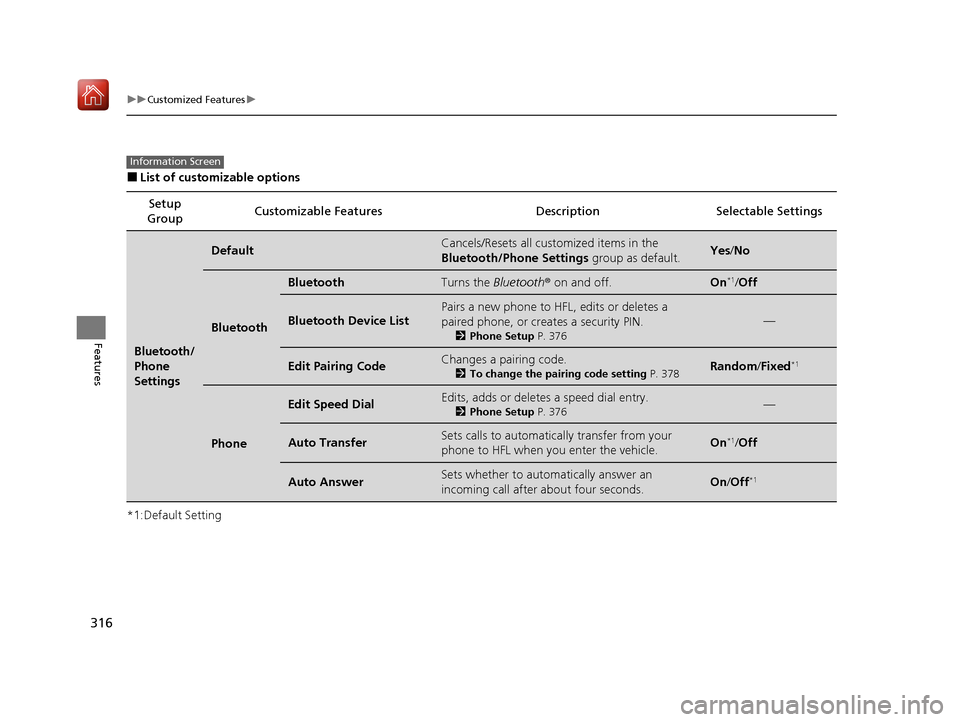
■List of customizable options
*1:Default Setting Setup
Group Customizable Features Desc
ription Selectable Settings
Bluetooth/
Phone
Settings
DefaultCancels/Resets all customized items in the
Bluetooth/Phone Settings group as default.Yes/No
Bluetooth
BluetoothTurns the Bluetooth® on and off.On*1/Off
Bluetooth Device List
Pairs a new phone to HFL, edits or deletes a
paired phone, or creates a security PIN.
2 Phone Setup P. 376
—
Edit Pairing CodeChanges a pairing code.
2To change the pairing code setting P. 378Random/Fixed*1
Phone
Edit Speed DialEdits, adds or deletes a speed dial entry.
2 Phone Setup P. 376—
Auto TransferSets calls to automatica lly transfer from your
phone to HFL when you enter the vehicle.On*1/ Off
Auto AnswerSets whether to automatically answer an
incoming call after about four seconds.On /Off*1
Information Screen
20 ACURA ILX-31TX66710.book 316 ページ 2020年4月16日 木曜日 午後8時46分
Page 319 of 621
318
uuCustomized Features u
Features
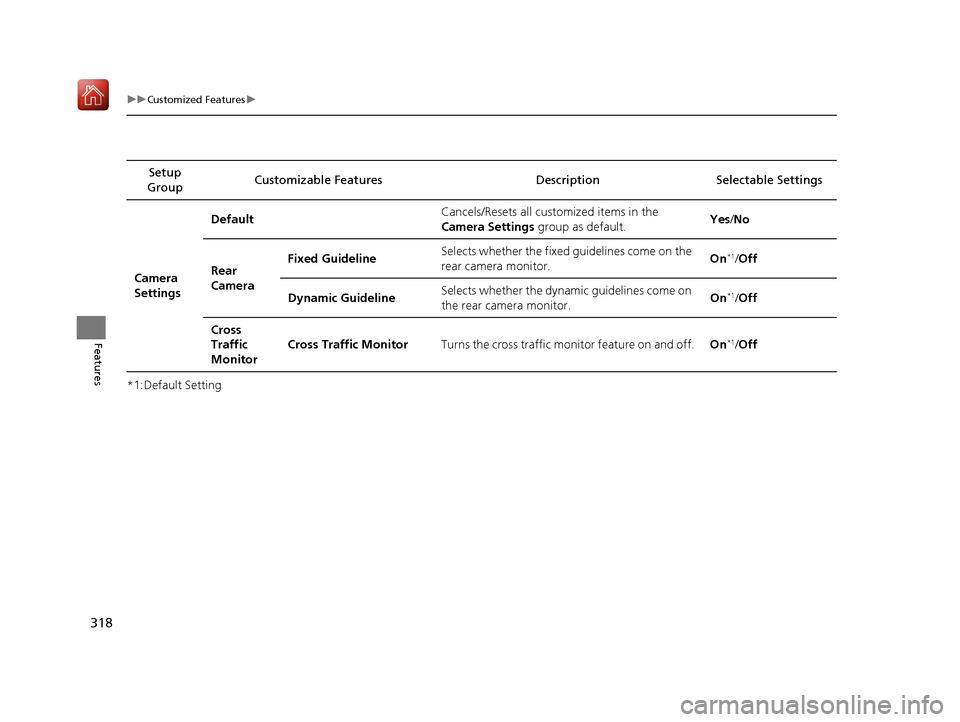
*1:Default SettingSetup
Group Customizable Features Desc
ription Selectable Settings
Camera
Settings Default
Cancels/Resets all customized items in the
Camera Settings group as default. Yes
/No
Rear
Camera Fixed Guideline
Selects whether the fixed
guidelines come on the
rear camera monitor. On
*1/
Off
Dynamic Guideline Selects whether the dynami
c guidelines come on
the rear camera monitor. On
*1/
Off
Cross
Traffic
Monitor Cross Traffic Monitor
Turns the cross traffic monitor feature on and off. On
*1/Off
20 ACURA ILX-31TX66710.book 318 ページ 2020年4月16日 木曜日 午後8時46分
Page 320 of 621
319
uuCustomized Features u
Continued
Features
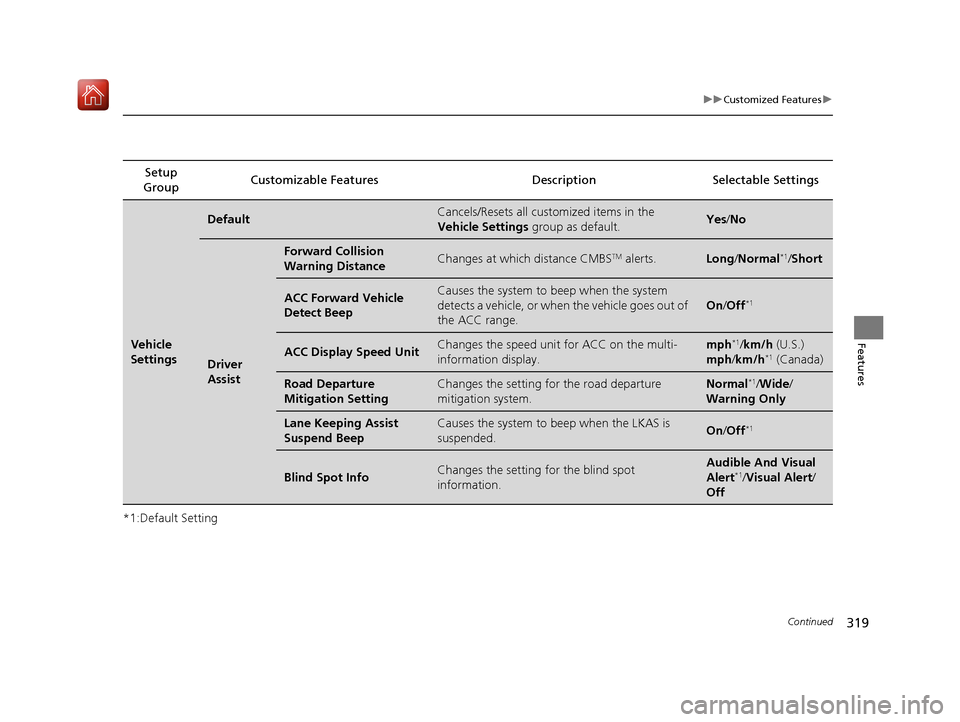
*1:Default SettingSetup
Group Customizable Features Desc
ription Selectable Settings
Vehicle
Settings
DefaultCancels/Resets all customized items in the
Vehicle Settings group as default.Yes/No
Driver
Assist
Forward Collision
Warning DistanceChanges at which distance CMBSTM alerts.Long /Normal*1/ Short
ACC Forward Vehicle
Detect BeepCauses the system to beep when the system
detects a vehicle, or when the vehicle goes out of
the ACC range.
On /Off*1
ACC Display Speed UnitChanges the speed unit for ACC on the multi-
information display.mph*1/km/h (U.S.)
mph /km/h*1 (Canada)
Road Departure
Mitigation SettingChanges the setting fo r the road departure
mitigation system.Normal*1/ Wide /
Warning Only
Lane Keeping Assist
Suspend BeepCauses the system to b eep when the LKAS is
suspended.On /Off*1
Blind Spot InfoChanges the setting for the blind spot
information.Audible And Visual
Alert*1/Visual Alert /
Off
20 ACURA ILX-31TX66710.book 319 ページ 2020年4月16日 木曜日 午後8時46分
Page 321 of 621
320
uuCustomized Features u
Features
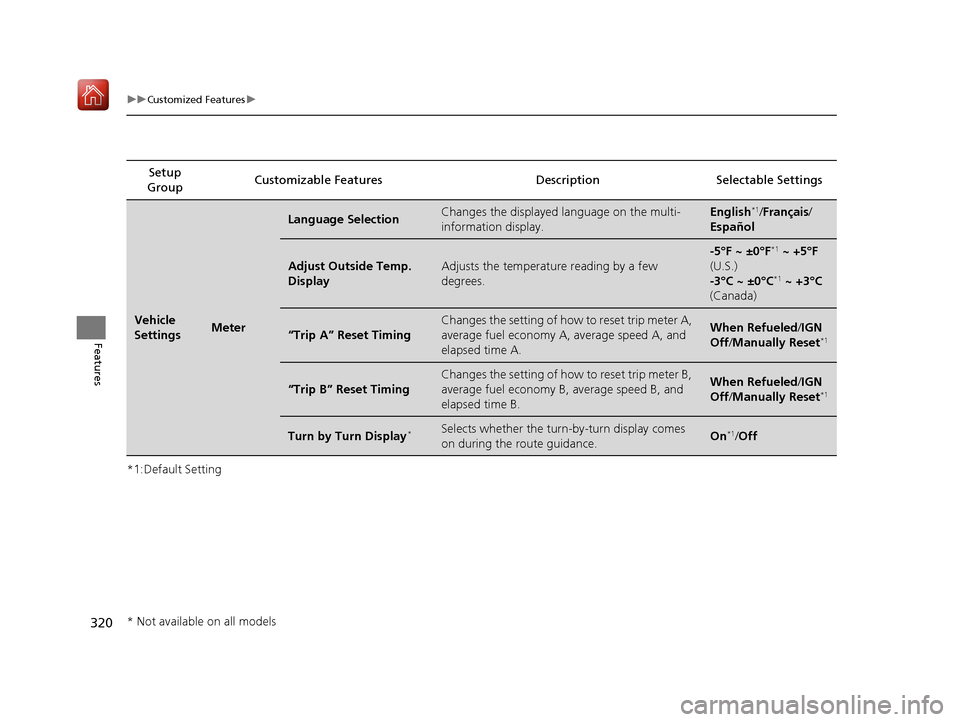
*1:Default SettingSetup
Group Customizable Features Desc
ription Selectable Settings
Vehicle
SettingsMeter
Language SelectionChanges the displayed language on the multi-
information display.English*1/Français /
Español
Adjust Outside Temp.
DisplayAdjusts the temperature reading by a few
degrees.
-5°F ~ ±0°F*1 ~ +5°F
(U.S.)
-3°C ~ ±0°C
*1 ~ +3°C
(Canada)
“Trip A” Reset Timing
Changes the setting of how to reset trip meter A,
average fuel economy A, average speed A, and
elapsed time A.When Refueled /IGN
Off /Manually Reset*1
“Trip B” Reset Timing
Changes the setting of how to reset trip meter B,
average fuel economy B, average speed B, and
elapsed time B.When Refueled /IGN
Off /Manually Reset*1
Turn by Turn Display*Selects whether the turn-by-turn display comes
on during the route guidance.On*1/Off
* Not available on all models
20 ACURA ILX-31TX66710.book 320 ページ 2020年4月16日 木曜日 午後8時46分