door lock Acura ILX 2020 Owner's Manual
[x] Cancel search | Manufacturer: ACURA, Model Year: 2020, Model line: ILX, Model: Acura ILX 2020Pages: 621, PDF Size: 34.94 MB
Page 3 of 621
Contents
This owner’s manual should be considered a permanent part of the
vehicle and should remain with the vehicle when it is sold.
This owner’s manual covers all models of your vehicle. You may find
descriptions of equipment and features that are not on your
particular model.
Images throughout this owner’s manu al (including the front cover)
represent features and equipment that are available on some, but
not all, models. Your particular mo del may not have some of these
features.
This owner’s manual is for vehicles sold in the United States and
Canada.
The information and specifications in cluded in this publication were
in effect at the time of approval for printing. Honda Motor Co., Ltd.
reserves the right, however, to discontinue or change specifications
or design at any time without notice and without incurring any
obligation.2 Safe Driving P. 27
For Safe Driving P. 28 Seat Belts P. 32 Airbags P. 39
2Instrument Panel P. 67
Indicators P. 68 Gauges and Multi-Information Display P. 88
2Controls P. 105
Clock P. 106 Locking and Unlocking the Doors P. 108
Moonroof P. 134
Adjusting the Seats P. 154
2 Features P. 175
Audio System P. 176 Audio System Basic Operation P. 183, 206
Customized Features P. 304, 310 HomeLink ® Universal Transceiver* P. 336
2 Driving P. 419
Before Driving P. 420 Towing a Trailer P. 425
Parking Your Vehicle P. 496 Multi-View Rear Camera P. 501
2Maintenance P. 507
Before Performing Maintenance P. 508 Maintenance MinderTM P. 511
Checking and Maintaining Wiper Blades P. 532
Climate Control System Main tenance P. 546 Cleaning P. 547
2Handling the Unexpected P. 555
Tools P. 556 If a Tire Goes Flat P. 557
Overheating P. 586 Indicator, Coming On/Blinking P. 588
2Information P. 597
Specifications P. 598 Identification Numbers P. 600
Warranty Coverages P. 605 Authorized Manuals P. 607
20 ACURA ILX-31TX66710.book 2 ページ 2020年4月16日 木曜日 午後8時46分
Page 7 of 621
Visual Index
6
Quick Reference Guide
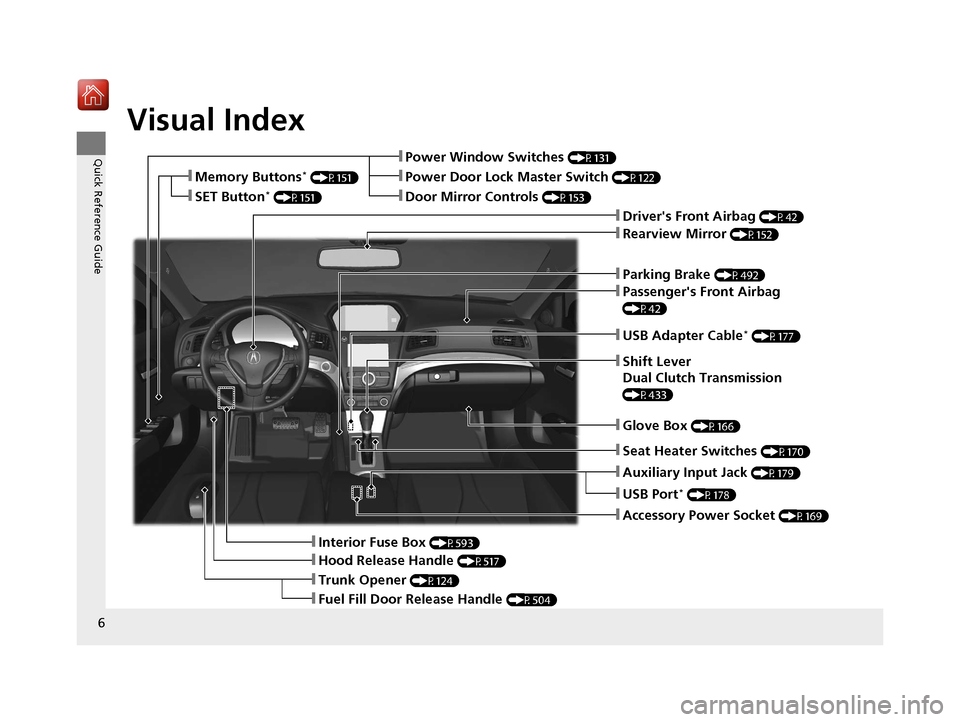
❚Parking Brake (P492)
❚Power Window Switches (P131)
❚Driver's Front Airbag (P42)
❚Trunk Opener (P124)
❚Hood Release Handle (P517)
❚Interior Fuse Box (P593)
❚Passenger's Front Airbag
(P42)
❚USB Adapter Cable* (P177)
❚Shift Lever
Dual Clutch Transmission
(P433)
❚Glove Box (P166)
❚Accessory Power Socket (P169)
❚Rearview Mirror (P152)
❚Auxiliary Input Jack (P179)
❚Door Mirror Controls (P153)
❚Power Door Lock Master Switch (P122)❚Memory Buttons* (P151)
❚SET Button* (P151)
❚Fuel Fill Door Release Handle (P504)
❚USB Port* (P178)
❚Seat Heater Switches (P170)
20 ACURA ILX-31TX66710.book 6 ページ 2020年4月16日 木曜日 午後8時46分
Page 9 of 621
Visual Index
8
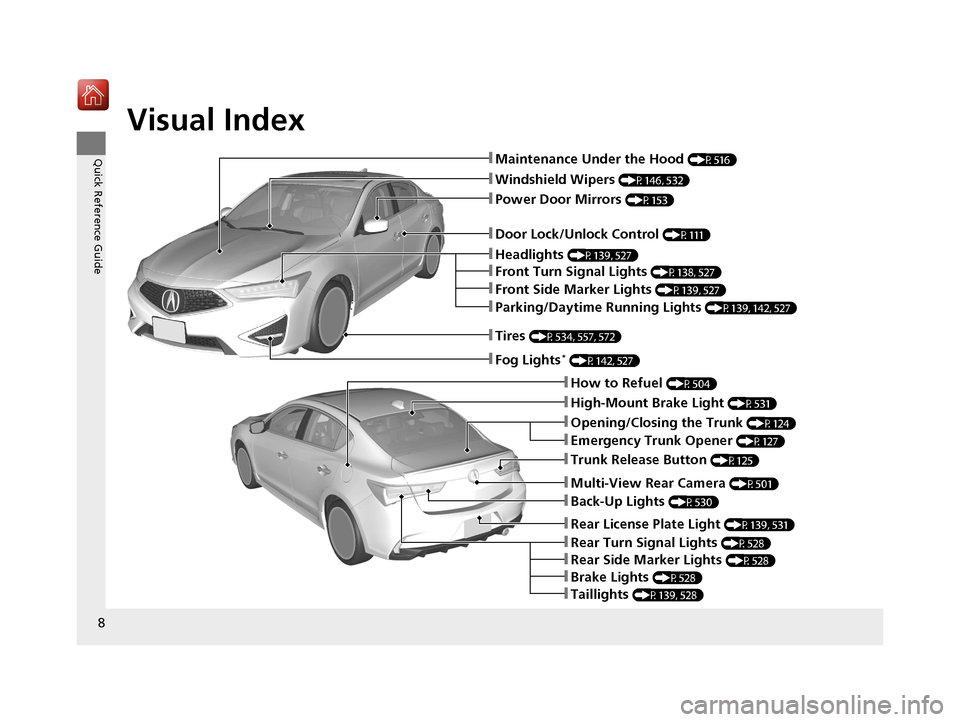
Quick Reference Guide❚Maintenance Under the Hood (P516)
❚Windshield Wipers (P146, 532)
❚Tires (P534, 557, 572)
❚Door Lock/Unlock Control (P111)
❚Power Door Mirrors (P153)
❚Headlights (P139, 527)
❚Parking/Daytime Running Lights (P139, 142, 527)
❚Front Turn Signal Lights (P138, 527)
❚Front Side Marker Lights (P139, 527)
❚Fog Lights* (P142, 527)
❚How to Refuel (P504)
❚High-Mount Brake Light (P531)
❚Emergency Trunk Opener (P127)
❚Opening/Closing the Trunk (P124)
❚Back-Up Lights (P530)
❚Multi-View Rear Camera (P501)
❚Trunk Release Button (P125)
❚Taillights (P139, 528)
❚Rear Turn Signal Lights (P528)
❚Rear License Plate Light (P139, 531)
❚Brake Lights (P528)
❚Rear Side Marker Lights (P528)
20 ACURA ILX-31TX66710.book 8 ページ 2020年4月16日 木曜日 午後8時46分
Page 13 of 621
12
Quick Reference Guide
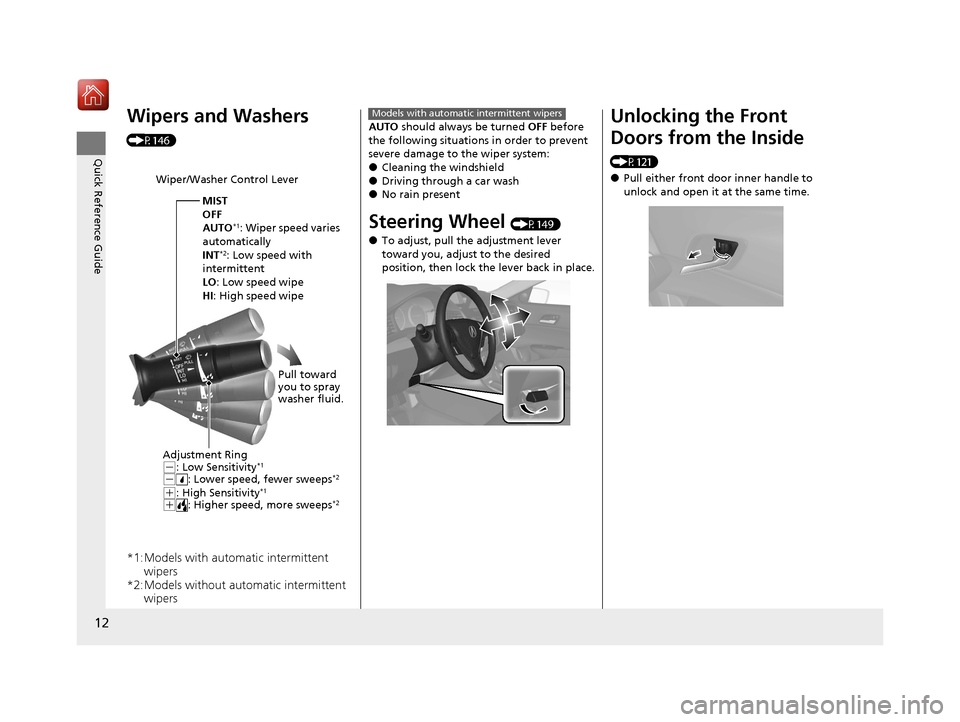
Wipers and Washers
(P146)
*1:Models with automatic intermittent wipers
*2:Models without automatic intermittent wipers
Wiper/Washer Control Lever
Adjustment Ring
(-: Low Sensitivity*1
(-: Lower speed, fewer sweeps*2
(+: High Sensitivity*1
(+: Higher speed, more sweeps*2
MIST
OFF
AUTO
*1: Wiper speed varies
automatically
INT
*2: Low speed with
intermittent
LO : Low speed wipe
HI: High speed wipe
Pull toward
you to spray
washer fluid.
AUTO should always be turned OFF before
the following situations in order to prevent
severe damage to the wiper system:
●Cleaning the windshield●Driving through a car wash●No rain present
Steering Wheel (P149)
●To adjust, pull the adjustment lever
toward you, adjust to the desired
position, then lock the lever back in place.
Models with automatic intermittent wipersUnlocking the Front
Doors from the Inside
(P121)
●Pull either front door inner handle to
unlock and open it at the same time.
20 ACURA ILX-31TX66710.book 12 ページ 2020年4月16日 木曜日 午後8時46分
Page 14 of 621
13
Quick Reference Guide
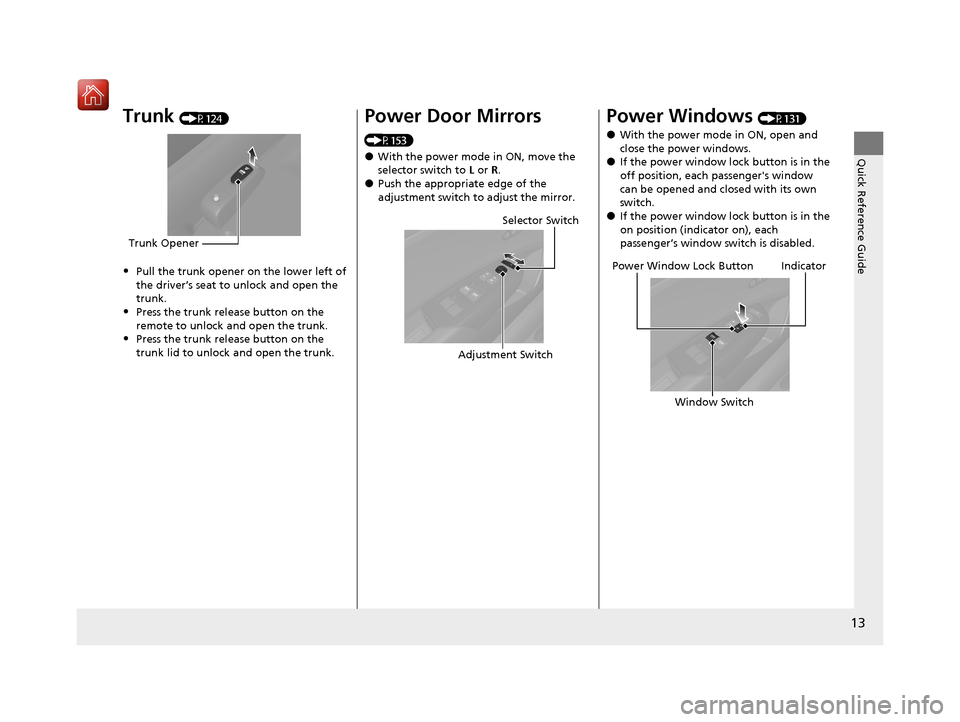
Trunk (P124)
•Pull the trunk opener on the lower left of
the driver’s seat to unlock and open the
trunk.
•Press the trunk release button on the
remote to unlock and open the trunk.
•Press the trunk release button on the
trunk lid to unlock and open the trunk.
Trunk Opener
Power Door Mirrors
(P153)
●With the power mode in ON, move the
selector switch to L or R.
●Push the appropriate edge of the
adjustment switch to adjust the mirror.
Selector Switch
Adjustment Switch
Power Windows (P131)
●With the power mode in ON, open and
close the power windows.
●If the power window lock button is in the
off position, each passenger's window
can be opened and closed with its own
switch.
●If the power window lock button is in the
on position (indicator on), each
passenger’s window switch is disabled.
Power Window Lock Button
Window SwitchIndicator
20 ACURA ILX-31TX66710.book 13 ページ 2020年4月16日 木曜日 午後8時46分
Page 24 of 621
23
Quick Reference Guide
What to Do If
The power mode does not
change from ACCESSORY
to VEHICLE OFF (LOCK).
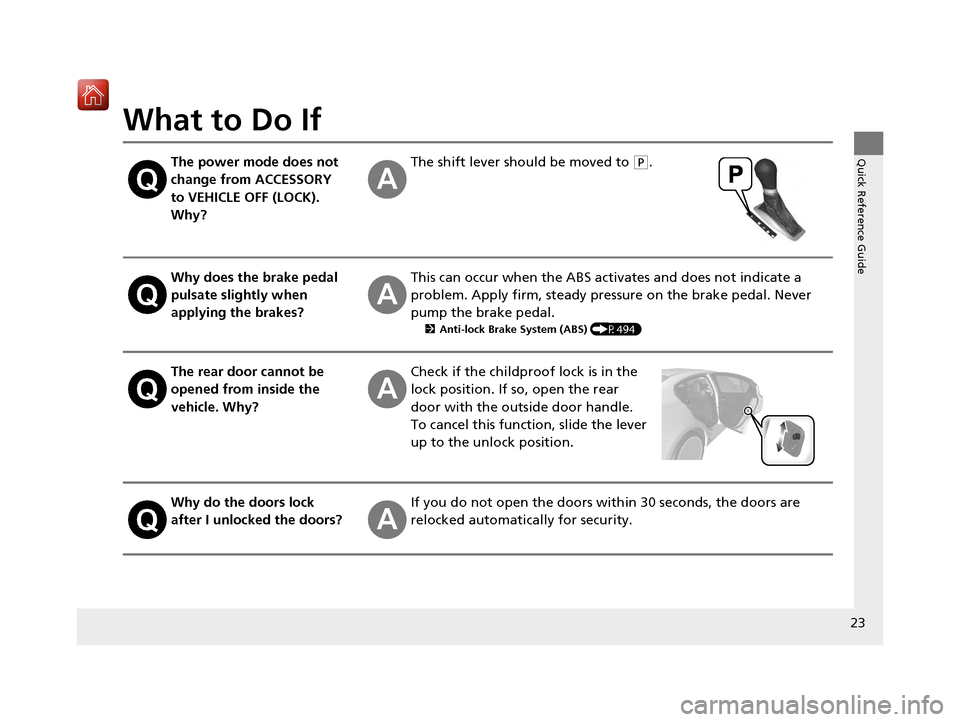
Why?The shift lever should be moved to (P.
Why does the brake pedal
pulsate slightly when
applying the brakes?This can occur when the ABS activates and does not indicate a
problem. Apply firm, steady pressure on the brake pedal. Never
pump the brake pedal.
2Anti-lock Brake System (ABS) (P494)
The rear door cannot be
opened from inside the
vehicle. Why?Check if the childproof lock is in the
lock position. If so, open the rear
door with the outside door handle.
To cancel this function, slide the lever
up to the unlock position.
Why do the doors lock
after I unlocked the doors?If you do not open the doors within 30 seconds, the doors are
relocked automatically for security.
20 ACURA ILX-31TX66710.book 23 ページ 2020年4月16日 木曜日 午後8時46分
Page 25 of 621
24
Quick Reference Guide
Why does the beeper
sound when I open the
driver's door?The beeper sounds when:
●The power mode is in ACCESSORY.
●The exterior lights are left on.
Why does a beeper sound
when I walk away from the
vehicle after I close the
door?The beeper sounds if you move outside the walk away auto lock
operating range before the door completely closes.
2Locking the doors (Walk away auto lock ®) (P113)
Why does the beeper
sound when I start driving?The beeper sounds when:
●Driver and/or front passenger are not wearing their seat belts.
●The parking brake lever is not fully released.
I’m seeing an amber
indicator of a tire with an
exclamation point. What is
that?The Tire Pressure Monitoring Sy stem (TPMS) needs attention.
Check tire pressure.
2 If the Low Tire Pressure/TPMS Indicator Comes On or Blinks (P591)
Why do I hear a screeching
sound when I apply the
brake pedal?The brake pads may need to be replaced. Have your vehicle
inspected by a dealer.
20 ACURA ILX-31TX66710.book 24 ページ 2020年4月16日 木曜日 午後8時46分
Page 31 of 621
30
uuFor Safe Driving uYour Vehicle's Safety Features
Safe Driving
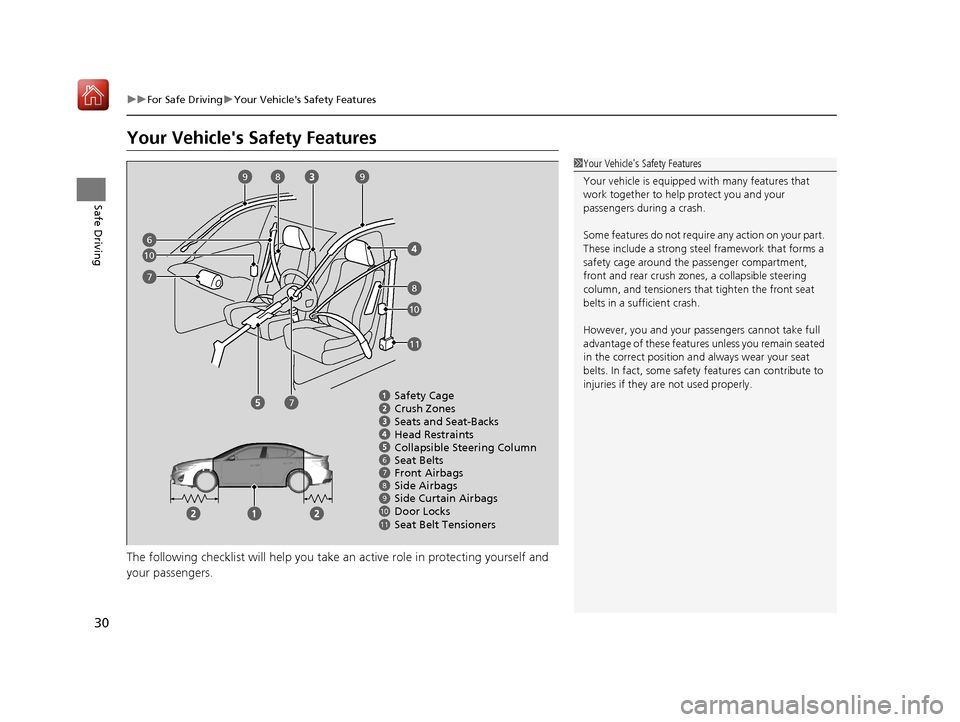
Your Vehicle's Safety Features
The following checklist will help you take an active role in protecting yourself and
your passengers.
1 Your Vehicle's Safety Features
Your vehicle is equipped wi th many features that
work together to help protect you and your
passengers during a crash.
Some features do not require any action on your part.
These include a strong steel framework that forms a
safety cage around the passenger compartment,
front and rear crush zones, a collapsi ble steering
column, and tensioners that tighten the front seat
belts in a sufficient crash.
However, you and your passe ngers cannot take full
advantage of these features unless you remain seated
in the correct position and always wear your seat
belts. In fact, some safety features can contribute to
injuries if they are not used properly.
678910
Safety Cage
Crush Zones
Seats and Seat-Backs
Head Restraints
Collapsible Steering Column
Seat Belts
Front Airbags
Side Curtain Airbags
Door Locks Side Airbags
11Seat Belt Tensioners
6
7
7
8
8
99
10
10
11
20 ACURA ILX-31TX66710.book 30 ページ 2020年4月16日 木曜日 午後8時46分
Page 32 of 621
31
uuFor Safe Driving uSafety Checklist
Safe Driving
Safety Checklist
For the safety of you and your passengers, make a habit of checking these items
each time before you drive.
• After everyone has entered the vehicle, be sure all doors are closed and locked.
Locking the doors helps prevent an occupant from being ejected and an outsider
from unexpectedly opening a door.
2 Locking/Unlocking the Doors from the Inside P. 120
•Adjust your seat to a position suitable for driving. Be sure the front seats are
adjusted as far to the rear as possible while allowing the driver to control the
vehicle. Sitting too close to a front airbag can result in serious or fatal injury in a
crash.
2 Adjusting the Seats P. 154
•Adjust head restraints to the proper position. Head restraints are most effective
when the center of the head restraint alig ns with the center of your head. Taller
persons should adjust their head restraint to the highest position.
2 Adjusting the Front and Rear Ou ter Head Restraint Positions P. 158
•Always wear your seat belt, and make sure you wear it properly. Confirm that any
passengers are properly belted as well.
2 Fastening a Seat Belt P. 35
•Protect children by using seat belts or child seats according to a child's age, height
and weight.
2 Child Safety P. 52
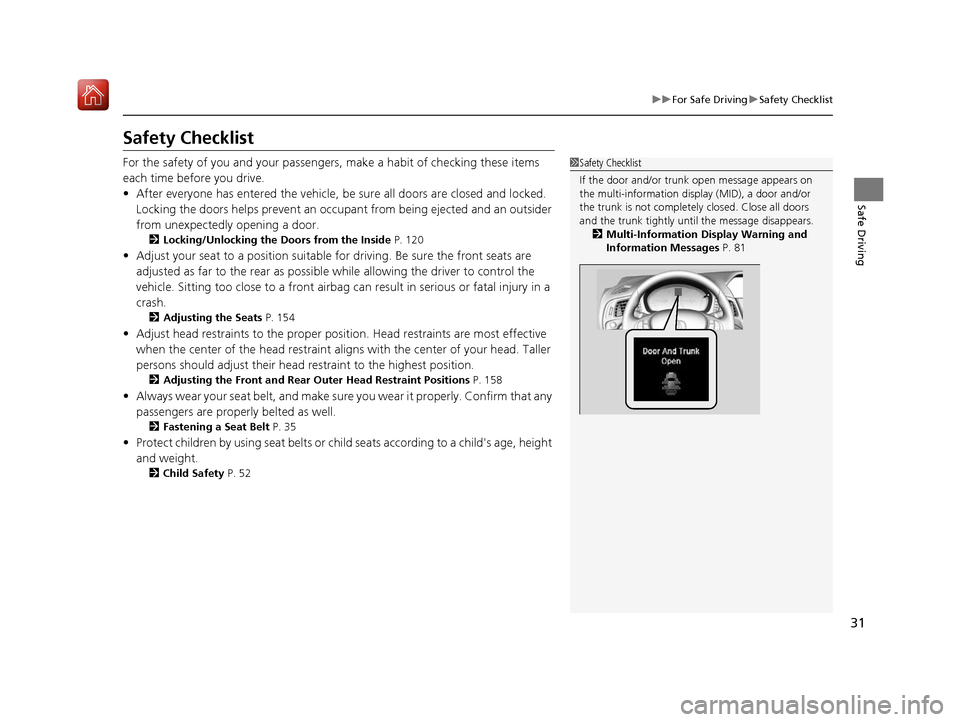
1Safety Checklist
If the door and/or trunk open message appears on
the multi-information display (MID), a door and/or
the trunk is not complete ly closed. Close all doors
and the trunk tightly unt il the message disappears.
2 Multi-Information Display Warning and
Information Messages P. 81
20 ACURA ILX-31TX66710.book 31 ページ 2020年4月16日 木曜日 午後8時46分
Page 54 of 621
53
uuChild Safety uProtecting Child Passengers
Safe Driving
• Any child who is too small to wear a seat belt correctly must be restrained in an
approved child seat that is properly secu red to the vehicle using either the seat
belt or the lower anchors of the LATCH system.
• Never hold a child on your lap because it is impossible to protect them in the
event of a collision.
• Never put a seat belt over yourself and a child. During a crash, the belt would
likely press deep into the child and cause serious or fatal injuries.
• Never let two children use the same seat belt. Both children could be very
seriously injured in a crash.
• Do not allow children to operate the doors, windows or seat adjustments.
• Do not leave children in the vehicle unatte nded, especially in hot weather when
the inside of the vehicle can get hot enough to kill them. They could also activate
vehicle controls causing it to move unexpectedly.1 Protecting Child Passengers
To deactivate a lockable retractor, release the buckle
and allow the seat belt to wind up all the way.
To remind you of the pa ssenger's front airbag
hazards and child safety, your vehicle has warning
labels on the dashboard (U.S. models) and on the
front visors. Please read and follow the instructions
on these labels. 2 Safety Labels P. 66
3WARNING
Allowing a child to play with a seat belt or
wrap one around their neck can result in
serious injury or death.
Instruct children not to play with any seat
belt and make sure any unused seat belt a
child can reach is buckled, fully retracted,
and locked.
20 ACURA ILX-31TX66710.book 53 ページ 2020年4月16日 木曜日 午後8時46分