display ACURA ILX 2022 Owners Manual
[x] Cancel search | Manufacturer: ACURA, Model Year: 2022, Model line: ILX, Model: ACURA ILX 2022Pages: 632, PDF Size: 20.56 MB
Page 254 of 632
252
uuAudio System Basic Operation uPlaying Hard Disk Drive (HDD) Audio
Features
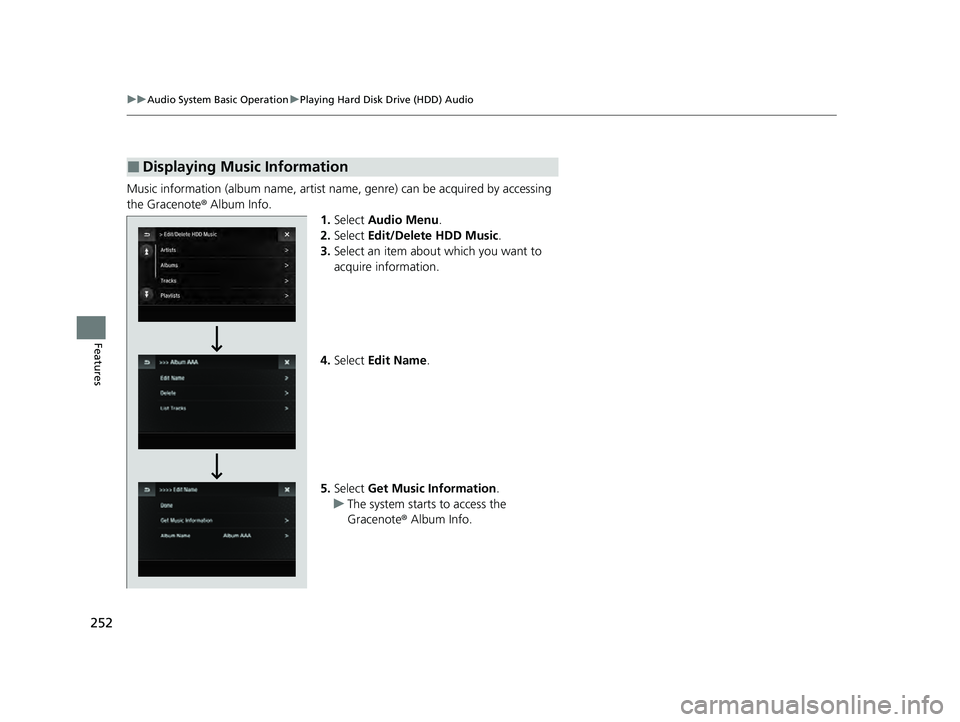
Music information (album name, artist name, genre) can be acquired by accessing
the Gracenote ® Album Info.
1.Select Audio Menu .
2. Select Edit/Delete HDD Music.
3. Select an item about which you want to
acquire information.
4. Select Edit Name .
5. Select Get Music Information .
u The system starts to access the
Gracenote ® Album Info.
■Displaying Music Information
22 ACURA ILX-31TX66900.book 252 ページ 2021年4月26日 月曜日 午前11時27分
Page 257 of 632
255
uuAudio System Basic Operation uPlaying an iPod
Continued
Features
Playing an iPod
Using your USB connector, connect the iPod to the USB port, then select the USB
mode.
2 USB Port* P. 182
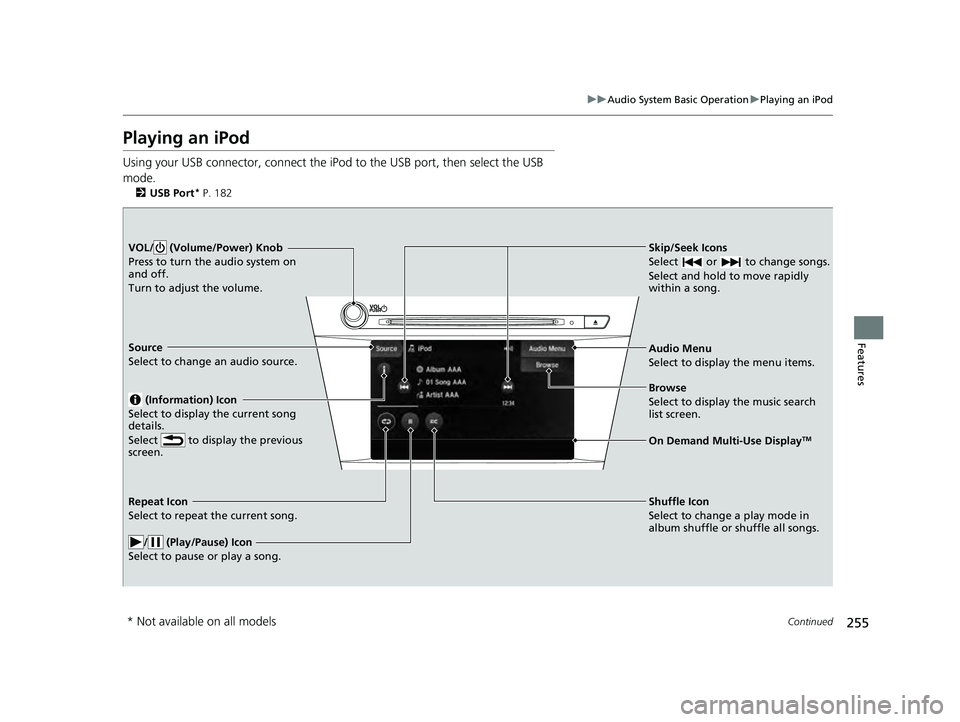
Skip/Seek Icons
Select or to change songs.
Select and hold to move rapidly
within a song.VOL/ (Volume/Power) Knob
Press to turn the audio system on
and off.
Turn to adjust the volume.
Audio Menu
Select to display the menu items.
Source
Select to change an audio source.
(Information) Icon
Select to display the current song
details.
Select to display the previous
screen.
Browse
Select to display the music search
list screen.
On Demand Multi-Use DisplayTM
Repeat Icon
Select to repeat the current song.
/ (Play/Pause) Icon
Select to pause or play a song.Shuffle Icon
Select to change a play mode in
album shuffle or shuffle all songs.
* Not available on all models
22 ACURA ILX-31TX66900.book 255 ページ 2021年4月26日 月曜日 午前11時27分
Page 258 of 632
uuAudio System Basic Operation uPlaying an iPod
256
Features
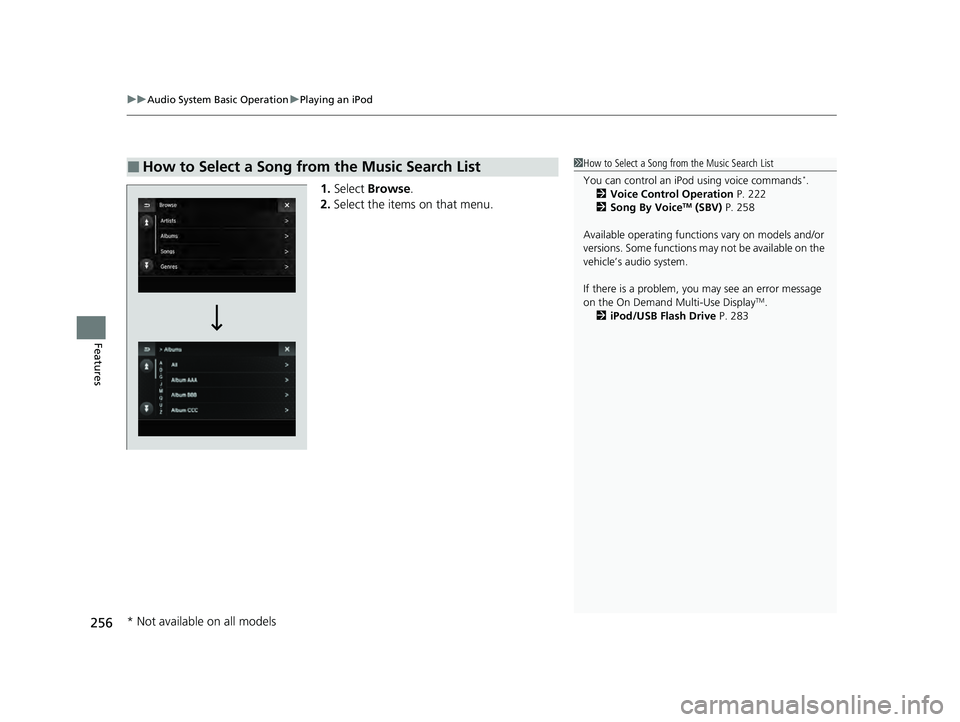
1. Select Browse .
2. Select the items on that menu.
■How to Select a Song from the Music Search List1How to Select a Song from the Music Search List
You can control an iPod using voice commands
*.
2 Voice Control Operation P. 222
2 Song By Voice
TM (SBV) P. 258
Available operating function s vary on models and/or
versions. Some functions ma y not be available on the
vehicle’s audio system.
If there is a problem, you may see an error message
on the On Demand Multi-Use Display
TM.
2 iPod/USB Flash Drive P. 283
* Not available on all models
22 ACURA ILX-31TX66900.book 256 ページ 2021年4月26日 月曜日 午前11時27分
Page 263 of 632
261
uuAudio System Basic Operation uSong By VoiceTM (SBV)
Features
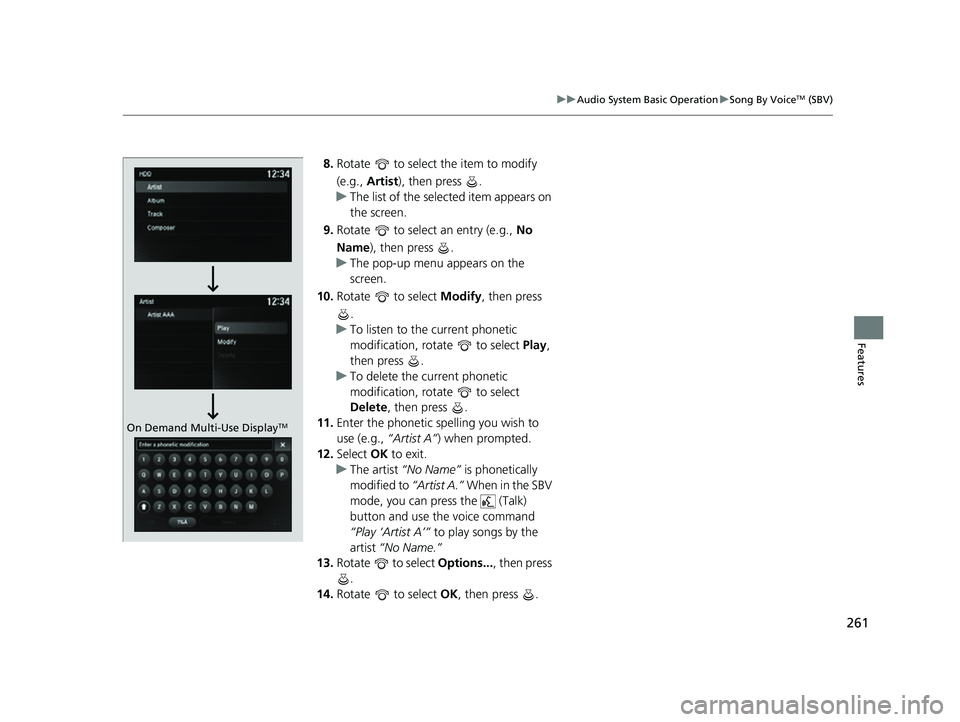
8. Rotate to select the item to modify
(e.g., Artist ), then press .
u The list of the selected item appears on
the screen.
9. Rotate to select an entry (e.g., No
Name), then press .
u The pop-up menu appears on the
screen.
10. Rotate to select Modify, then press
.
u To listen to the current phonetic
modification, rotate to select Play,
then press .
u To delete the current phonetic
modification, rotate to select
Delete , then press .
11. Enter the phonetic spelling you wish to
use (e.g., “Artist A”) when prompted.
12. Select OK to exit.
u The artist “No Name” is phonetically
modified to “Artist A.” When in the SBV
mode, you can press the (Talk)
button and use th e voice command
“Play ‘Artist A’” to play songs by the
artist “No Name.”
13. Rotate to select Options..., then press
.
14. Rotate to select OK, then press .
On Demand Multi-Use DisplayTM
22 ACURA ILX-31TX66900.book 261 ページ 2021年4月26日 月曜日 午前11時27分
Page 264 of 632

262
uuAudio System Basic Operation uPlaying Pandora ®*1
Features
Playing Pandora ®*1
Your audio system allows you to listen to music from the Pandora ® app on a
compatible smartphone.
This function is available when the phone is paired and connected to the vehicle’s
Bluetooth ® HandsFreeLink ® (HFL) system, or with an iPhone, you can connect using
your USB cable to the USB port.
2 Phone Setup P. 382
2 USB Port* P. 182
*1:Available only on U.S. models.
1Playing Pandora ®*1
Pandora®, the Pandora logo, and the Pandora trade
dress are trademarks or registered trademarks of
Pandora Media, Inc., used with permission. Pandora
is currently available exclusively in the United States.
To find out if your phone is compatible with this
feature, visit www.handsfreelink.com/Acura , or call
1-888-528-7876.
VOL/ (Volume/Power) Knob
Press to turn the audio system on
and off.
Turn to adjust the volume.
Audio Menu
Select to display the menu items.
Source
Select to change an audio source.
(Information) Icon
Select to display the current track
details.
Select to display the previous
screen.
Stations
Select to display the station list
screen.
On Demand Multi-Use DisplayTMLike/Dislike Icons
Select to evaluate a track.
Skip Icon
Select to skip a track.
Play/Pause Icon
Select to pause or play a track.Station Up/Down Icons
Select to change a station.
Bookmark Track Icon
Bookmarks the current track.
Bookmark Artist Icon
Bookmarks the current artist.
* Not available on all models
22 ACURA ILX-31TX66900.book 262 ページ 2021年4月26日 月曜日 午前11時27分
Page 265 of 632
263
uuAudio System Basic Operation uPlaying Pandora ®*1
Features
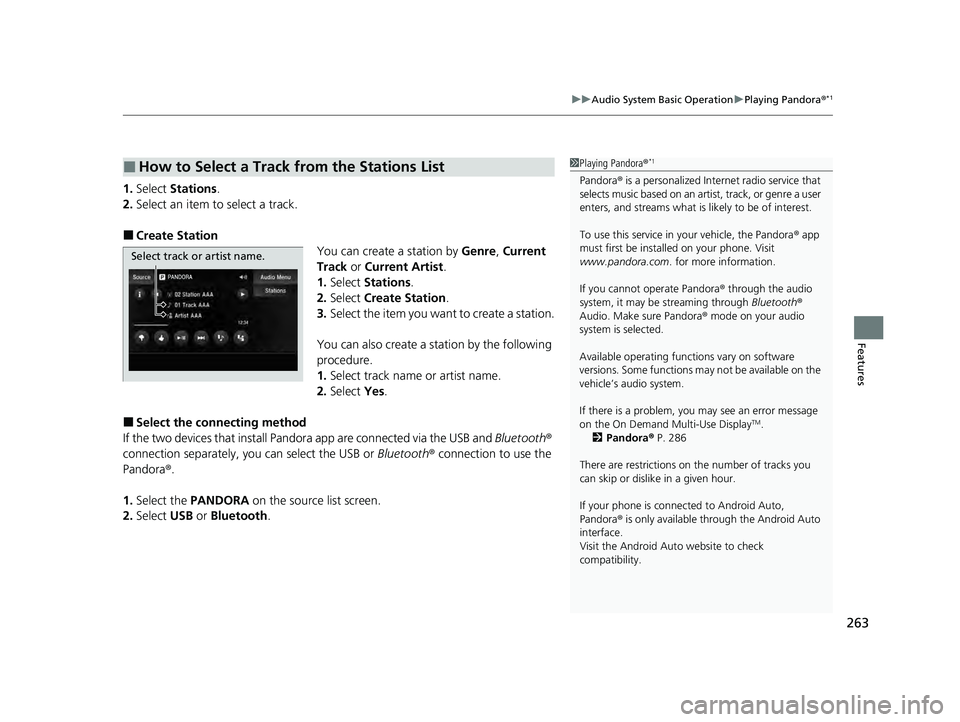
1.Select Stations .
2. Select an item to select a track.
■Create Station
You can create a station by Genre, Current
Track or Current Artist .
1. Select Stations .
2. Select Create Station.
3. Select the item you want to create a station.
You can also create a station by the following
procedure.
1. Select track name or artist name.
2. Select Yes.
■Select the conn ecting method
If the two devices that install Pandora app are connected via the USB and Bluetooth®
connection separately, you can select the USB or Bluetooth® connection to use the
Pandora ®.
1. Select the PANDORA on the source list screen.
2. Select USB or Bluetooth .
■How to Select a Track from the Stations List1Playing Pandora ®*1
Pandora® is a personalized Intern et radio service that
selects music based on an artist, track, or genre a user
enters, and streams what is likely to be of interest.
To use this service in your vehicle, the Pandora ® app
must first be installed on your phone. Visit
www.pandora.com . for more information.
If you cannot operate Pandora ® through the audio
system, it may be streaming through Bluetooth®
Audio. Make sure Pandora ® mode on your audio
system is selected.
Available operating functi ons vary on software
versions. Some functions ma y not be available on the
vehicle’s audio system.
If there is a problem, you may see an error message
on the On Demand Multi-Use Display
TM.
2 Pandora ® P. 286
There are restrictions on the number of tracks you
can skip or dislike in a given hour.
If your phone is connec ted to Android Auto,
Pandora ® is only available through the Android Auto
interface.
Visit the Android Auto website to check
compatibility.
Select track or artist name.
22 ACURA ILX-31TX66900.book 263 ページ 2021年4月26日 月曜日 午前11時27分
Page 266 of 632
264
uuAudio System Basic Operation uPlaying a USB Flash Drive
Features
Playing a USB Flash Drive
Your audio system reads and plays sound files on a USB flash drive in either MP3,
WMA, or AAC*1 format.
Connect your USB flash drive to the USB port, then select the USB mode.
2USB Port* P. 182
*1:Only AAC format files recorded with iTunes are playable on this unit.
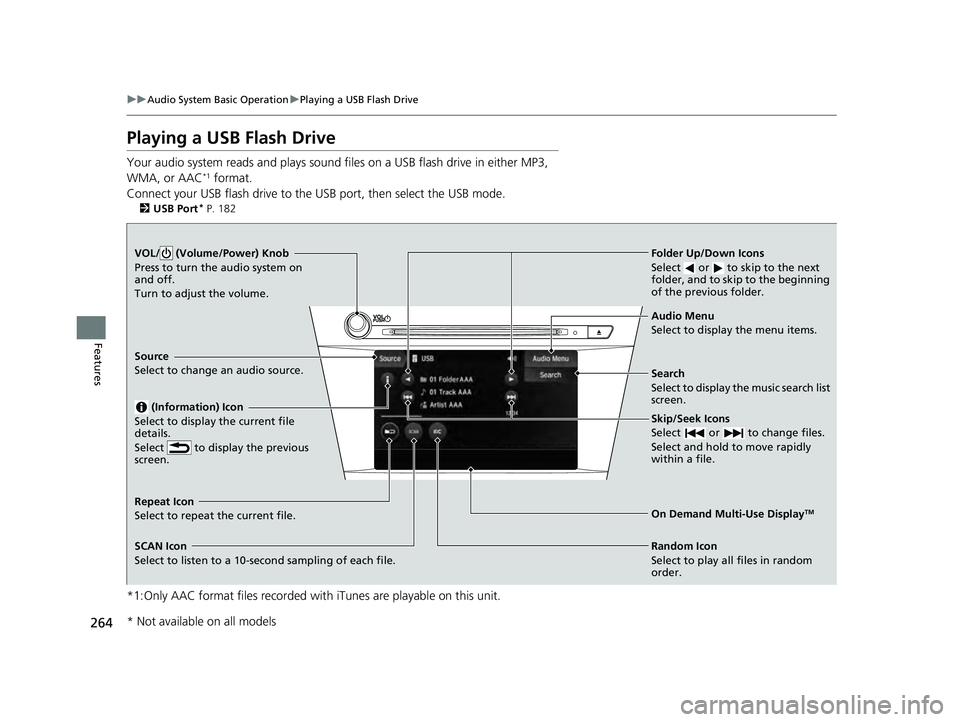
VOL/ (Volume/Power) Knob
Press to turn the audio system on
and off.
Turn to adjust the volume.
Skip/Seek Icons
Select or to change files.
Select and hold to move rapidly
within a file.
Audio Menu
Select to display the menu items.
Source
Select to change an audio source.
(Information) Icon
Select to display the current file
details.
Select to display the previous
screen.
Search
Select to display the music search list
screen.
Folder Up/Down Icons
Select or to skip to the next
folder, and to skip to the beginning
of the previous folder.
On Demand Multi-Use DisplayTMRepeat Icon
Select to repeat the current file.
SCAN Icon
Select to listen to a 10-second sampling of each file. Random Icon
Select to play all files in random
order.
* Not available on all models
22 ACURA ILX-31TX66900.book 264 ページ 2021年4月26日 月曜日 午前11時27分
Page 267 of 632
Continued265
uuAudio System Basic Operation uPlaying a USB Flash Drive
Features
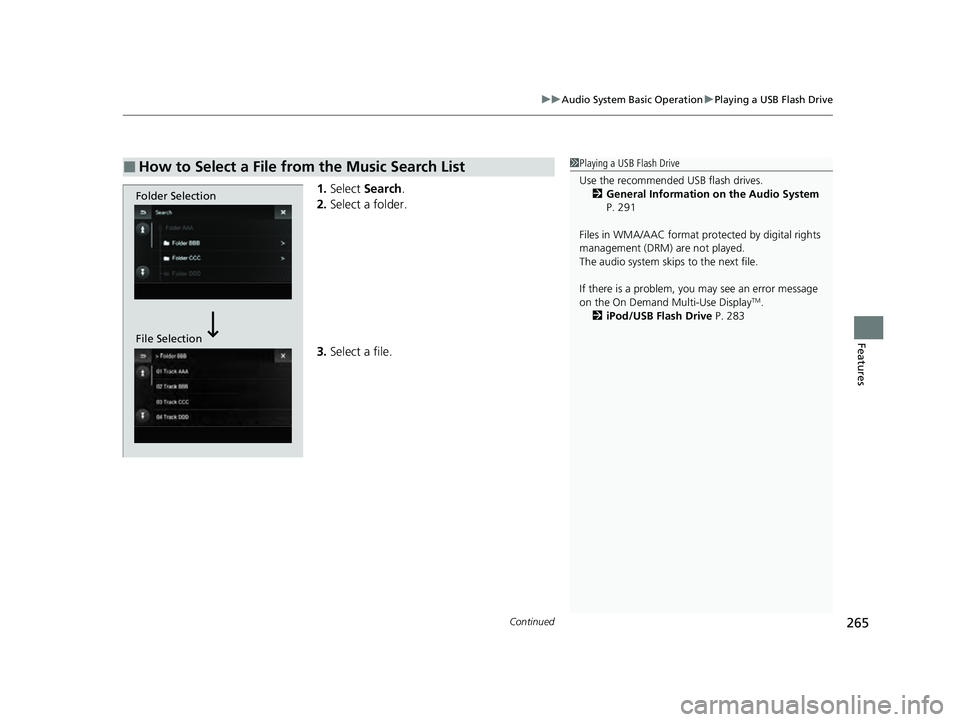
1. Select Search .
2. Select a folder.
3. Select a file.
■How to Select a File from the Music Search List1Playing a USB Flash Drive
Use the recommended USB flash drives.
2 General Information on the Audio System
P. 291
Files in WMA/AAC format protected by digital rights
management (DRM) are not played.
The audio system skips to the next file.
If there is a problem, you may see an error message
on the On Demand Multi-Use Display
TM.
2 iPod/USB Flash Drive P. 283
Folder Selection
File Selection
22 ACURA ILX-31TX66900.book 265 ページ 2021年4月26日 月曜日 午前11時27分
Page 269 of 632
267
uuAudio System Basic Operation uPlaying Bluetooth ® Audio
Continued
Features
Playing Bluetooth ® Audio
Your audio system allows you to listen to music from your Bluetooth-compatible
phone.
This function is available when the phone is paired and connected to the vehicle’s
Bluetooth ® HandsFreeLink ® (HFL) system.
2Phone Setup P. 382
1Playing Bluetooth ® Audio
Not all Bluetooth -enabled phones with streaming
audio capabilities are compatible with the system.
For a list of compatible phones:
•U.S.: Visit www.handsfreeli nk.com/Acura, or call 1-
888-528-7876.
•Canada: For more info rmation on smartphone
compatibility, call 1-855-490-7351.
In some states, it may be il legal to perform some data
device functions while driving.
If more than one phone is paired to the HFL system,
there will be a delay before the system begins to play.
Some functions may not be available on some
devices.
If a phone is currently conne cted via Apple CarPlay or
Android Auto, Bluetooth® Audio from that phone is
unavailable. However, a se cond previously paired
phone can stream Bluetooth® Audio by selecting
Connect to Audio from the Edit Bluetooth
Device .
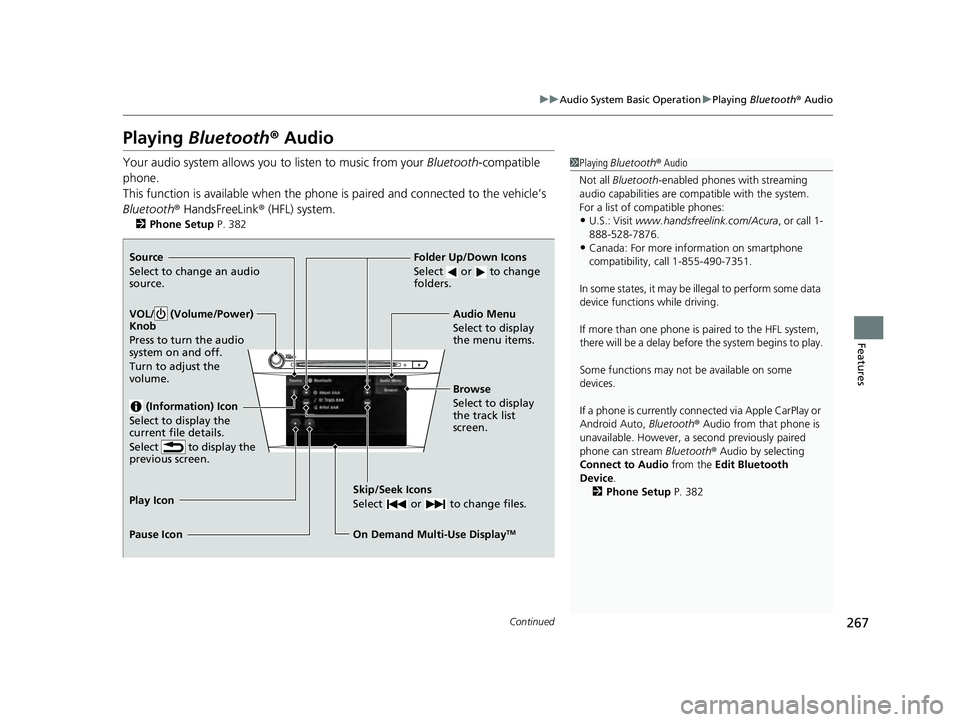
2 Phone Setup P. 382Source
Select to change an audio
source.
VOL/ (Volume/Power)
Knob
Press to turn the audio
system on and off.
Turn to adjust the
volume.
(Information) Icon
Select to display the
current file details.
Select to display the
previous screen.
Skip/Seek Icons
Select or to change files.
On Demand Multi-Use DisplayTM
Play Icon
Pause Icon Browse
Select to display
the track list
screen. Audio Menu
Select to display
the menu items.
Folder Up/Down Icons
Select or to change
folders.
22 ACURA ILX-31TX66900.book 267 ページ 2021年4月26日 月曜日 午前11時27分
Page 270 of 632

uuAudio System Basic Operation uPlaying Bluetooth ® Audio
268
Features
1. Make sure that your phone is paired and
connected to HFL.
2. Select the Bluetooth® Audio mode.
If the phone is not recognized, another HFL-
compatible phone, which is not compatible
for Bluetooth ® Audio, may already be
connected.
■To play or pause a file
Select the play icon or pause icon.
1.Select Browse .
2. Select a search category (e.g., Albums).
3. Select an item.
u The selection begins playing.
■To Play Bluetooth ® Audio Files1 To Play Bluetooth ® Audio Files
To play the audio files, y ou may need to operate your
phone. If so, follow the phone maker’s operating
instructions.
The pause function may no t be available on some
phones.
Switching to another mode pauses the music playing
from your phone. This functi on may not be available
on some phones.
Play Icon Pause Icon
■Searching for Music1 Searching for Music
Depending on the Bluetooth® device you connect,
some or all of the list s may not be displayed.
22 ACURA ILX-31TX66900.book 268 ページ 2021年4月26日 月曜日 午前11時27分