display ACURA ILX 2022 Manual PDF
[x] Cancel search | Manufacturer: ACURA, Model Year: 2022, Model line: ILX, Model: ACURA ILX 2022Pages: 632, PDF Size: 20.56 MB
Page 213 of 632
211
uuAudio System Basic Operation uOn Demand Multi-Use DisplayTM
Continued
Features
On Demand Multi-Use DisplayTM
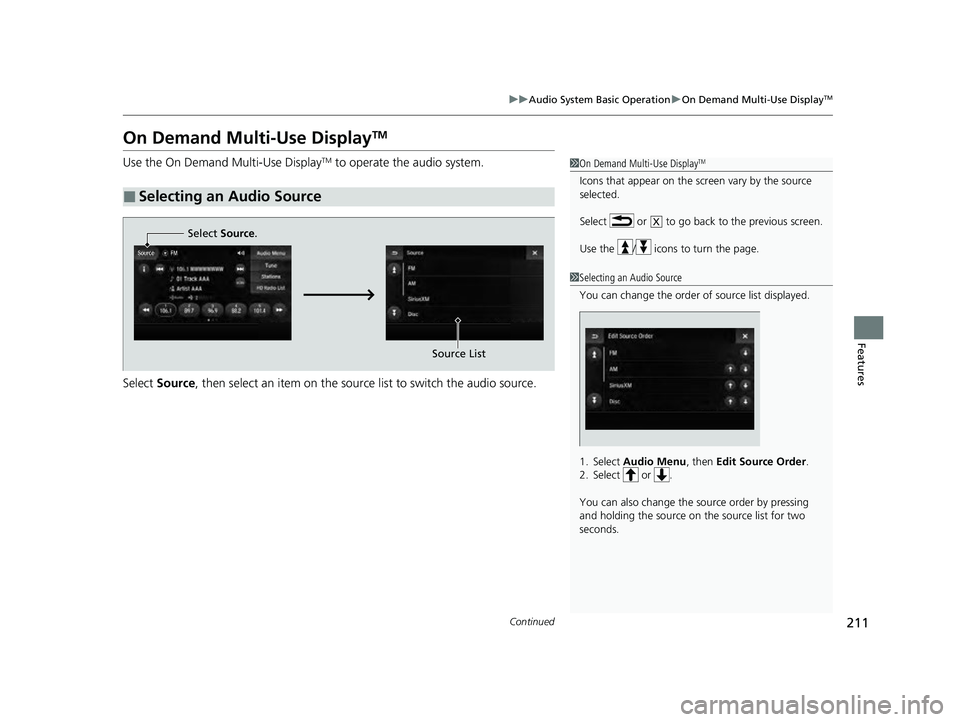
Use the On Demand Multi-Use DisplayTM to operate the audio system.
Select Source , then select an item on the source list to switch the audio source.
■Selecting an Audio Source
1On Demand Multi-Use DisplayTM
Icons that appear on the screen vary by the source
selected.
Select or to go back to the previous screen.
Use the / icons to turn the page.
X
1Selecting an Audio Source
You can change the order of source list displayed.
1. Select Audio Menu , then Edit Source Order .
2. Select or .
You can also change the source order by pressing
and holding the source on the source list for two
seconds.
Select Source.
Source List
22 ACURA ILX-31TX66900.book 211 ページ 2021年4月26日 月曜日 午前11時27分
Page 214 of 632
212
uuAudio System Basic Operation uOn Demand Multi-Use DisplayTM
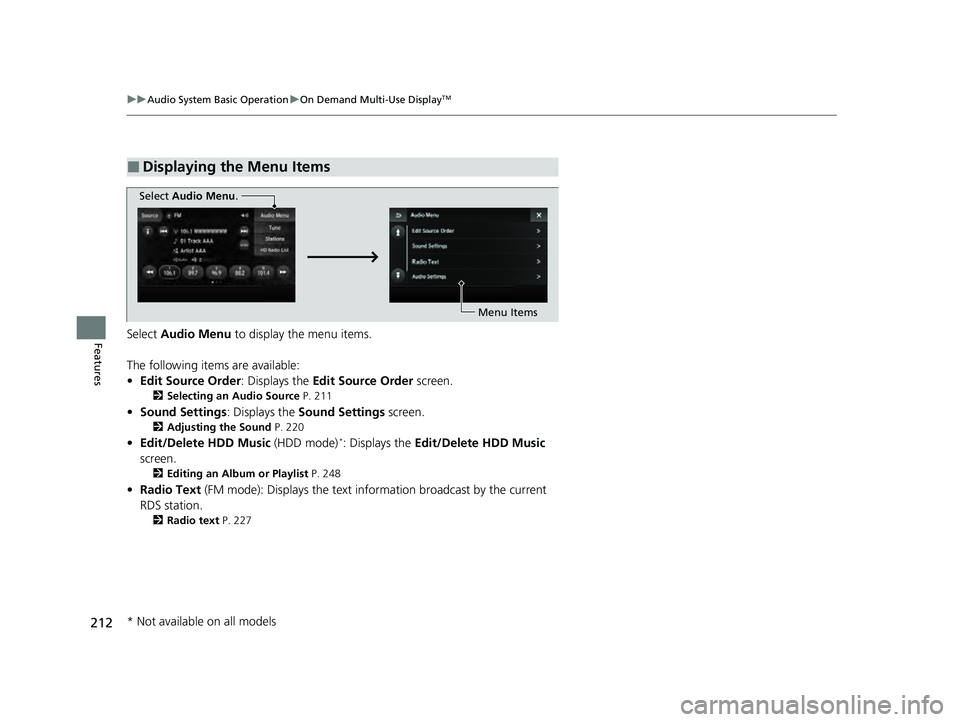
FeaturesSelect Audio Menu to display the menu items.
The following items are available:
• Edit Source Order: Displays the Edit Source Order screen.
2Selecting an Audio Source P. 211
•Sound Settings : Displays the Sound Settings screen.
2Adjusting the Sound P. 220
•Edit/Delete HDD Music (HDD mode)*: Displays the Edit/Delete HDD Music
screen.
2 Editing an Album or Playlist P. 248
•Radio Text (FM mode): Displays the text in formation broadcast by the current
RDS station.
2 Radio text P. 227
■Displaying the Menu Items
Select Audio Menu .
Menu Items
* Not available on all models
22 ACURA ILX-31TX66900.book 212 ページ 2021年4月26日 月曜日 午前11時27分
Page 215 of 632
213
uuAudio System Basic Operation uOn Demand Multi-Use DisplayTM
Continued
Features
• SportsFlash (SiriusXM® mode): Displays the SportsFlashTM list. If the favorite sport
team is not registered, the setup screen of SportsFlashTM is displayed.
2Live Sports Alert P. 234
2 Customized Features P. 316
•Traffic & Weather Now (SiriusXM® mode): Displays the Traffic & Weather Now
screen.
2 Traffic and Weather Information P. 236
•View Channel Schedule (SiriusXM® mode): Displays the SiriusXM ® channel
schedule.
• Audio Settings : Displays the Audio Settings screen.
2Customized Features P. 316
•Screen Settings : Displays the Screen Settings screen.
2Changing the Screen Settings P. 214
22 ACURA ILX-31TX66900.book 213 ページ 2021年4月26日 月曜日 午前11時27分
Page 216 of 632
uuAudio System Basic Operation uOn Demand Multi-Use DisplayTM
214
Features
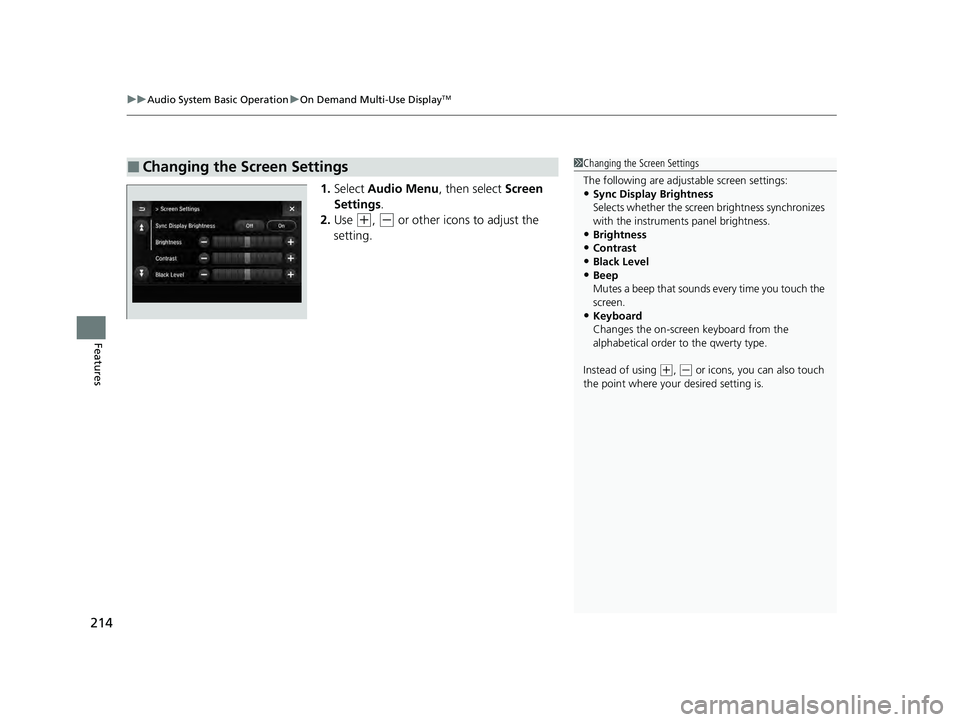
1. Select Audio Menu , then select Screen
Settings .
2. Use
(+, (- or other icons to adjust the
setting.
■Changing the Screen Settings1 Changing the Screen Settings
The following are adjustable screen settings:
•Sync Display Brightness
Selects whether the screen brightness synchronizes
with the instruments panel brightness.
•Brightness
•Contrast
•Black Level•Beep
Mutes a beep that sounds every time you touch the
screen.
•Keyboard
Changes the on-screen keyboard from the
alphabetical order to the qwerty type.
Instead of using
( +, (- or icons, you can also touch
the point where your desired setting is.
22 ACURA ILX-31TX66900.book 214 ページ 2021年4月26日 月曜日 午前11時27分
Page 217 of 632
215
uuAudio System Basic Operation uInformation Screen
Continued
Features
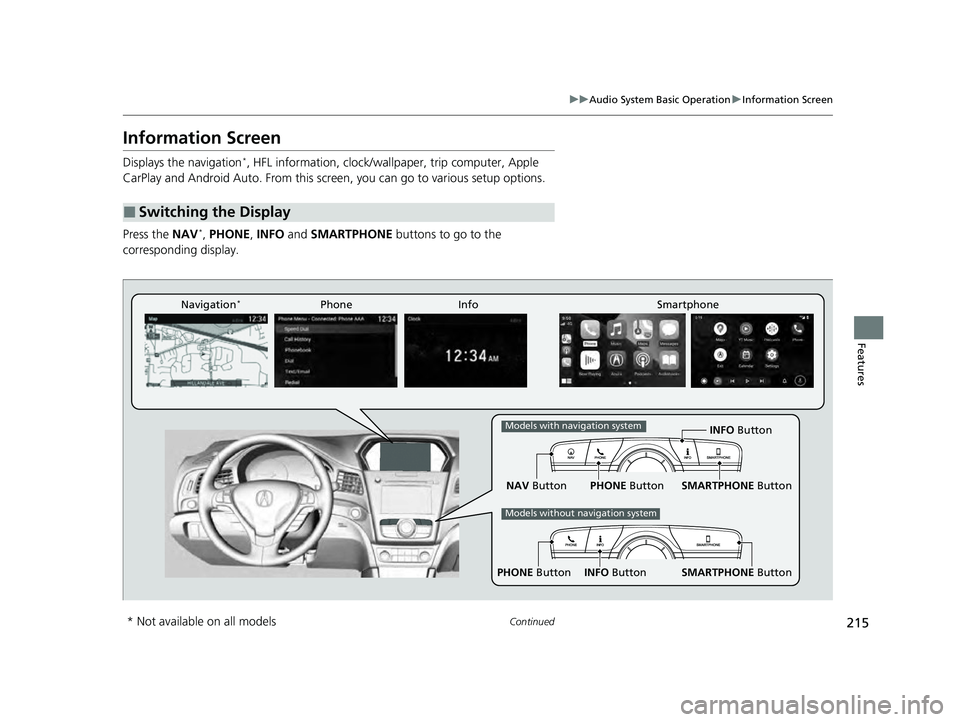
Information Screen
Displays the navigation*, HFL information, clock/wallp aper, trip computer, Apple
CarPlay and Android Auto. From this screen, you can go to various setup options.
Press the NAV
*, PHONE, INFO and SMARTPHONE buttons to go to the
corresponding display.
■Switching the Display
SMARTPHONE Button
PHONE Button INFO Button
Phone Info Smartphone
SMARTPHONE Button
PHONE Button
NAV Button INFO Button
Models with navigation system
Models without navigation system
Navigation*
* Not available on all models
22 ACURA ILX-31TX66900.book 215 ページ 2021年4月26日 月曜日 午前11時27分
Page 218 of 632
216
uuAudio System Basic Operation uInformation Screen
Features
■Navigation*
Shows the navigation screen.
2 Refer to the Navigation System Manual
■Phone
Shows the HFL information.
2 Bluetooth ® HandsFreeLink ® P. 374
■Info
Shows the AcuraLink/Messages*, Trip Computer , Clock, Traffic Incidents* or
Voice Recognition Guide*. Press or INFO button to display the Information
Menu screen.
AcuraLink/Messages
*:
Shows a AcuraLink ® message menu list.
2AcuraLink®* P. 416
Trip Computer :
Current Drive
Shows the range and instant and average fuel economy of the current trip, as well
as the average fuel economy from your last trip.
History of Trip A
Shows the range, average fuel economy an d distances traveled for the current trip,
as well as the average fuel economy and distances traveled during the last three
driving cycles.
Each time you reset the trip meter A, th e information on the display updates. The
history of the previous th ree driving cycles is kept.
* Not available on all models
22 ACURA ILX-31TX66900.book 216 ページ 2021年4月26日 月曜日 午前11時27分
Page 219 of 632
217
uuAudio System Basic Operation uInformation Screen
Continued
Features
Deleting the history manually
1. Press on the History of Trip A screen to select Delete History.
2. A confirmation message appears on the screen. Rotate to select Yes, then
press .
Clock :
Shows a clock screen and an image you import.
Traffic Incidents
*:
Shows a traffic incidents list.
2 Refer to the Navigation System Manual
Voice Recognition Guide*:
Shows a voice recognition guide screen.
■Smartphone
Displays the Apple CarPlay or Android Auto.
2 Apple CarPlay P. 270
2 Android Auto P. 275
* Not available on all models
22 ACURA ILX-31TX66900.book 217 ページ 2021年4月26日 月曜日 午前11時27分
Page 220 of 632
uuAudio System Basic Operation uInformation Screen
218
Features
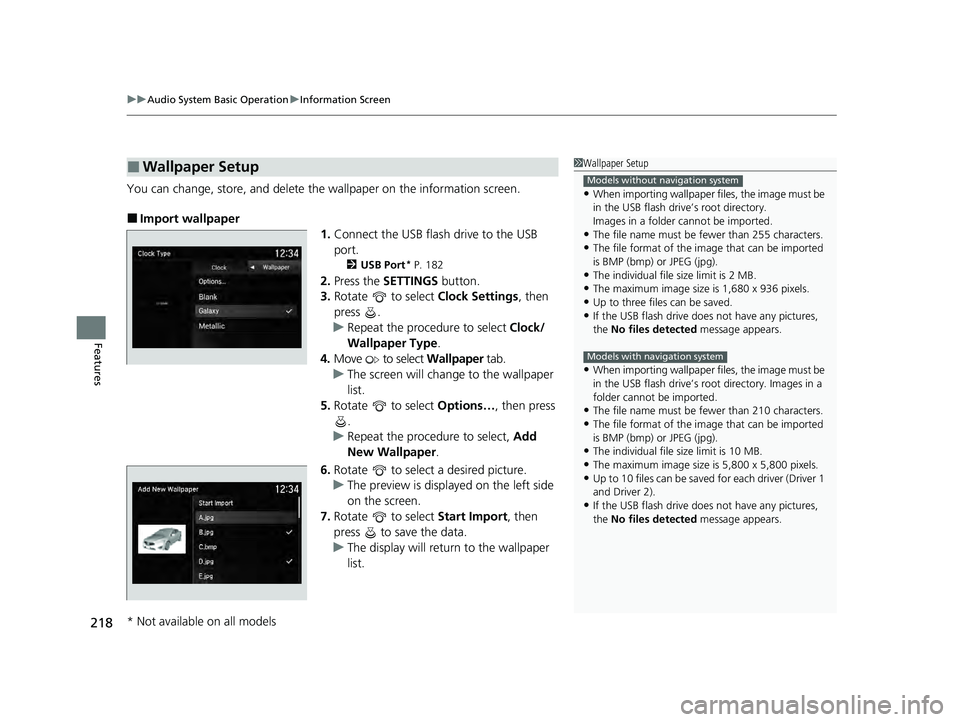
You can change, store, and delete the wallpaper on the information screen.
■Import wallpaper
1.Connect the USB flash drive to the USB
port.
2 USB Port* P. 182
2.Press the SETTINGS button.
3. Rotate to select Clock Settings, then
press .
u Repeat the procedure to select Clock/
Wallpaper Type .
4. Move to select Wallpaper tab.
u The screen will change to the wallpaper
list.
5. Rotate to select Options…, then press
.
u Repeat the procedure to select, Add
New Wallpaper .
6. Rotate to select a desired picture.
u The preview is displayed on the left side
on the screen.
7. Rotate to select Start Import, then
press to save the data.
u The display will return to the wallpaper
list.
■Wallpaper Setup1Wallpaper Setup
•When importing wallpaper f iles, the image must be
in the USB flash drive’s root directory.
Images in a folder cannot be imported.
•The file name must be fewer than 255 characters.
•The file format of the im age that can be imported
is BMP (bmp) or JPEG (jpg).
•The individual file size limit is 2 MB.
•The maximum image size is 1,680 x 936 pixels.
•Up to three files can be saved.•If the USB flash drive doe s not have any pictures,
the No files detected message appears.
•When importing wallpaper f iles, the image must be
in the USB flash drive’s root directory. Images in a
folder cannot be imported.
•The file name must be fewer than 210 characters.
•The file format of the im age that can be imported
is BMP (bmp) or JPEG (jpg).
•The individual file size limit is 10 MB.
•The maximum image size is 5,800 x 5,800 pixels.
•Up to 10 files can be saved for each driver (Driver 1
and Driver 2).
•If the USB flash drive doe s not have any pictures,
the No files detected message appears.
Models without navigation system
Models with navigation system
* Not available on all models
22 ACURA ILX-31TX66900.book 218 ページ 2021年4月26日 月曜日 午前11時27分
Page 221 of 632
219
uuAudio System Basic Operation uInformation Screen
Features
■Select wallpaper
1. Press the SETTINGS button.
2. Rotate to select Clock Settings, then press .
u Repeat the procedure to select Clock/Wallpaper Type .
3. Move to select Wallpaper.
u The screen changes to the wallpaper list.
4. Rotate to select a desired wallpaper, then press .
u The preview is displayed on the left side on the screen.
u The pop-up menu appears on the screen.
5. Rotate to select Set, then press .
u The display will return to the Clock Settings screen.
■Delete wallpaper
1. Press the SETTINGS button.
2. Rotate to select Clock Settings, then press .
u Repeat the procedure to select Clock/Wallpaper Type .
3. Move to select Wallpaper.
u The screen changes to the wallpaper list.
4. Rotate to select a wallpaper that you want to delete, then press .
u The preview is displayed on the left side on the screen.
u The pop-up menu appears on the screen.
5. Rotate to select Delete, then press .
u The confirmation me ssage will appear.
6. Rotate to select Yes, then press to delete completely.
u The display will return to the wallpaper list.
22 ACURA ILX-31TX66900.book 219 ページ 2021年4月26日 月曜日 午前11時27分
Page 223 of 632
221
uuAudio System Basic Operation uDisplay Setup
Features
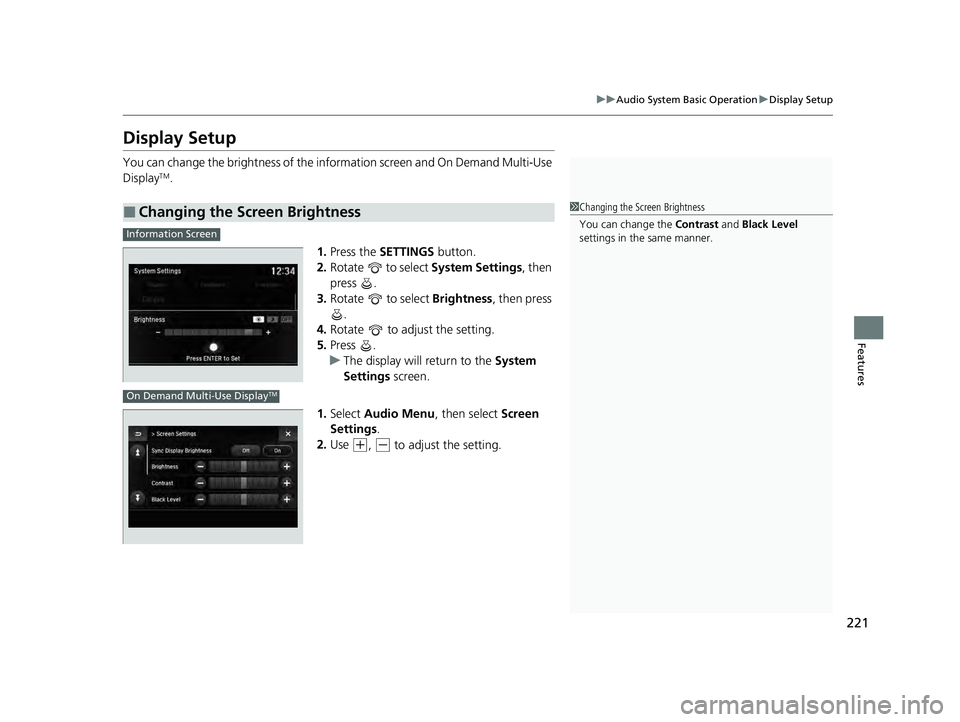
Display Setup
You can change the brightness of the info rmation screen and On Demand Multi-Use
DisplayTM.
1.Press the SETTINGS button.
2. Rotate to select System Settings, then
press .
3. Rotate to select Brightness, then press
.
4. Rotate to adjust the setting.
5. Press .
u The display will return to the System
Settings screen.
1. Select Audio Menu , then select Screen
Settings .
2. Use
(+, (- to adjust the setting.
■Changing the Screen Brightness1Changing the Screen Brightness
You can change the Contrast and Black Level
settings in the same manner.
Information Screen
On Demand Multi-Use DisplayTM
22 ACURA ILX-31TX66900.book 221 ページ 2021年4月26日 月曜日 午前11時27分