radio controls ACURA ILX 2022 User Guide
[x] Cancel search | Manufacturer: ACURA, Model Year: 2022, Model line: ILX, Model: ACURA ILX 2022Pages: 632, PDF Size: 20.56 MB
Page 231 of 632
Continued229
uuAudio System Basic Operation uPlaying SiriusXM ® Radio
Features
1. Select the SiriusXM® mode.
2 Audio Remote Controls P. 185
2 On Demand Multi-Use DisplayTM P. 211
2.Select a channel using the , icons or the preset numbers ( 1-12) on the preset
mode screen.
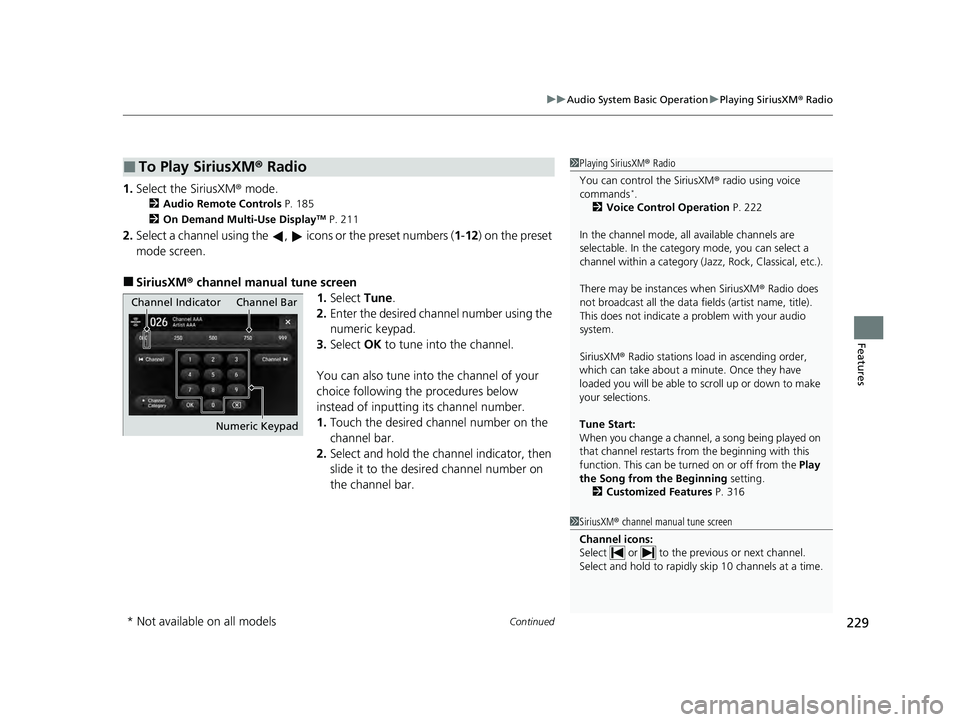
■SiriusXM ® channel manual tune screen
1.Select Tune.
2. Enter the desired channel number using the
numeric keypad.
3. Select OK to tune into the channel.
You can also tune into the channel of your
choice following the procedures below
instead of inputting its channel number.
1. Touch the desired channel number on the
channel bar.
2. Select and hold the channel indicator, then
slide it to the desire d channel number on
the channel bar.
■To Play SiriusXM® Radio1Playing SiriusXM ® Radio
You can control the SiriusXM ® radio using voice
commands
*.
2 Voice Control Operation P. 222
In the channel mode, all available channels are
selectable. In the categor y mode, you can select a
channel within a ca tegory (Jazz, Rock, Classical, etc.).
There may be instances when SiriusXM ® Radio does
not broadcast all the data fi elds (artist name, title).
This does not indicate a problem with your audio
system.
SiriusXM ® Radio stations load in ascending order,
which can take about a minute. Once they have
loaded you will be able to scroll up or down to make
your selections.
Tune Start:
When you change a channel, a song being played on
that channel restarts from the beginning with this
function. This can be turned on or off from the Play
the Song from the Beginning setting.
2 Customized Features P. 316
1SiriusXM ® channel manual tune screen
Channel icons:
Select or to the prev ious or next channel.
Select and hold to rapidly sk ip 10 channels at a time.
Channel Indicator Channel Bar
Numeric Keypad
* Not available on all models
22 ACURA ILX-31TX66900.book 229 ページ 2021年4月26日 月曜日 午前11時27分
Page 232 of 632
uuAudio System Basic Operation uPlaying SiriusXM ® Radio
230
Features
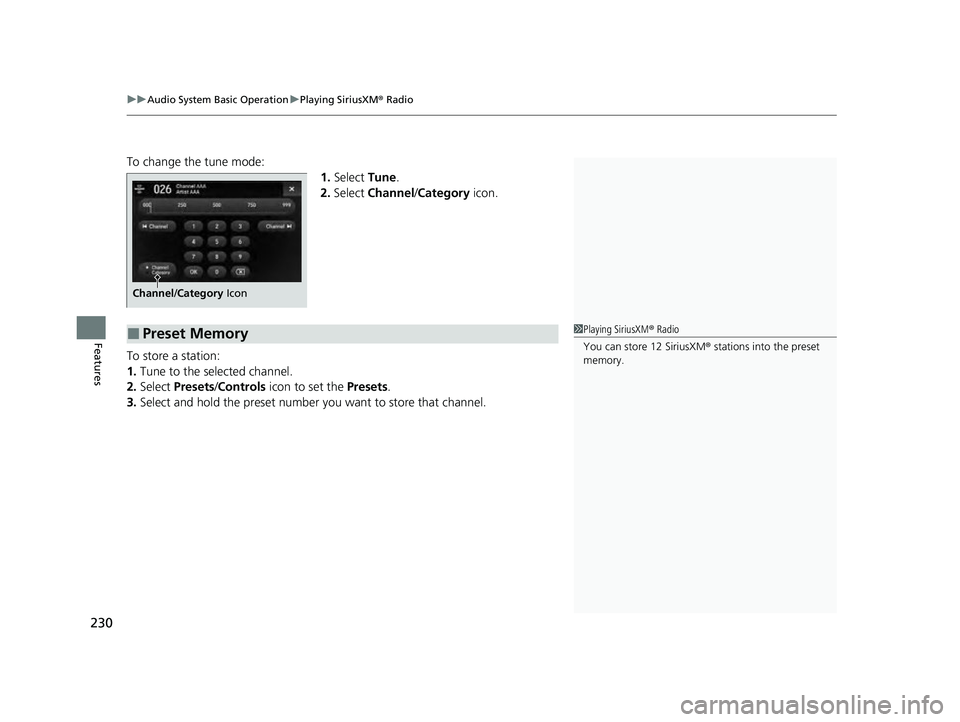
To change the tune mode:
1.Select Tune.
2. Select Channel /Category icon.
To store a station:
1. Tune to the selected channel.
2. Select Presets /Controls icon to set the Presets.
3. Select and hold the preset number you want to store that channel.
Channel/Category Icon
■Preset Memory1Playing SiriusXM ® Radio
You can store 12 SiriusXM ® stations into the preset
memory.
22 ACURA ILX-31TX66900.book 230 ページ 2021年4月26日 月曜日 午前11時27分
Page 235 of 632

Continued233
uuAudio System Basic Operation uPlaying SiriusXM ® Radio
Features
The system constantly records up to the last 60 minutes of your currently tuned
channel and all the preset channel broadc ast, starting from the moment you turn
the power mode to ON. You can rewind and replay the last 60 minutes of each
broadcast. 1.Select Presets /Controls to set the
Controls.
2. Select an option.
The following items are available: : Pauses or plays a storing broadcast.
: Returns to real-time broadcast.
: Skips to the previously stored channel.
: Skips to the next channel.
: Select to skip back 15 seconds in the cu rrent selection. Select and hold to fast-
rewind the current selection. : Select to skip forward 15 seconds in th e current selection. Select and hold to
fast-forward the current selection.
■Returning to real-time broadcast
Select while listening to the playback channel.
■Replay Function1 Replay Function
The system starts storing broadcast in memory when
the power mode is turned ON. You can go back to
the program from that point.
You can no longer repl ay any program once the
power mode is turned OFF as it erases memory.
You can check how long the program has been
stored in memory from the On Demand Multi-Use
Display
TM.
(A): Shows how much time the replayed segment is
behind the real-time broadcast
(B): Replayed segment
(C): Length stored in memory
(A) (B)
(C)
22 ACURA ILX-31TX66900.book 233 ページ 2021年4月26日 月曜日 午前11時27分
Page 240 of 632
uuAudio System Basic Operation uPlaying SiriusXM ® Radio
238
Features
Sample each channel on the selected mode for 10 seconds.
1. Select Presets /Controls to set the Controls.
2. Select SCAN.
3. Select Scan Channels or Scan Presets .
To turn off scan, select Stop Scan.
■Scan1Scan
You can select desired channel by songs using Scan
Presets .
The “Scan Songs in Preset s” function is based on
TuneScan
TM technology of SiriusXM ®.
The “Featured Channels ” function is based on
Featured Favorites
TM technology of SiriusXM ®.
TuneScan
TM and Featured FavoritesTM are registered
trademarks of SiriusXM ® Radio, Inc.
Scan Mode Menu Items
Scan Channels: Scans for channels with a strong
signal in the selected mode.
Scan Presets: Scans for desired preset channel by
songs. Select (skip up) or (skip down) to
skip to the next/previ ous stored selection.
22 ACURA ILX-31TX66900.book 238 ページ 2021年4月26日 月曜日 午前11時27分
Page 623 of 632

Index
621
Index
Index
A
AAC................................................... 239, 264
ABS (Anti-lock Brake System) .................. 501
Accessories and Modifications ................ 561
Accessory Power Sockets ......................... 173
AcuraLink ................................................. 416
AcuraWatch
TM.................................... 22, 452
Adaptive Cruise Control (ACC) .......... 80, 466
Additives Coolant .................................................. 531
Engine Oil ............................................... 526
Washer ................................................... 534
Additives, Engine Oil ............................... 526
Adjusting
Armrest .................................................. 167
Front Seats.............................................. 158
Head Restraints ....................................... 162
Mirrors.................................................... 156
Rear Seat ................................................ 166
Steering Wheel ....................................... 153
Temperature ............................................. 96
Air Conditioning System (Climate Control
System) .................................................... 175
Changing the Mode................................ 175
Defrosting the Windshield and
Windows .............................................. 176
Maintenance........................................... 554
Recirculation/Fresh Air Mode................... 175
Sensors ................................................... 178
Synchronization Mode ............................ 177
Using Automatic Climate Control............ 175 Air Pressure
....................................... 543, 607
Airbags ........................................................ 41
Advanced Airbags ..................................... 47
After a Collision ......................................... 44
Airbag Care ............................................... 55
Event Data Recorder .................................... 0
Front Airbags (SRS) .................................... 44
Indicator .............................................. 52, 76
Passenger Airbag Off Indicator .................. 53
Sensors ...................................................... 41
Side Airbags .............................................. 49
Side Curtain Airbags .................................. 51
AM/FM Radio .................................... 194, 225
Android Auto ............................................ 275
Anti-lock Brake System (ABS) .................. 501
Indicator .................................................... 75
Apple CarPlay ........................................... 270
Armrest ..................................................... 167
Audio Remote Controls ............................ 185
Audio System ............................................ 180
Adjusting the Sound ........................ 192, 220
Auxiliary Input Jack .................................. 183
Bluetooth ® Audio ............................ 208, 267
CD .................................................. 196, 239
Display Setup ................................... 193, 221
Error Messages ........................................ 280
General Information ................................ 291
HDD ........................................................ 242
iPhone ............................................. 262, 294
iPod ................................................. 199, 255
MP3/WMA/AAC ...................... 205, 239, 264 Pandora
®....................................... 202, 262
Reactivating ............................................ 184
Recommended CDs ................................. 292
Recommended Devices............................ 294
Security Code .......................................... 184
Siri Eyes Free ........................................... 269
SiriusXM ® Radio ...................................... 228
Song By VoiceTM (SBV) ............................. 258
Theft Protection ...................................... 184
USB Adapter Cable.................................. 181
USB Flash Drives ...................... 205, 264, 295
USB Port.................................................. 182
Audio/Information Screen ....................... 188
Authorized Manuals ................................ 616
Auto Door Locking/Unlocking ................. 127
Customize ....................................... 105, 329
Auto High-Beam ....................................... 147
Automatic Lighting .................................. 144
Auxiliary Input Jack .................................. 183
Average Fuel Economy .............................. 96
Average Speed ........................................... 97
B
Battery...................................................... 551
Charging System Indicator................. 74, 596
If the Battery Is Dead ............................... 590
Maintenance (Checki ng the Battery) ........ 551
Maintenance (Replacing) ......................... 552
Belts (Seat) .................................................. 34
Beverage Holders ..................................... 172
22 ACURA ILX-31TX66900.book 621 ページ 2021年4月26日 月曜日 午前11時27分
Page 624 of 632
622
Index
Blind spot information System................ 445
Bluetooth ® Audio ............................. 208, 267
Bluetooth ® HandsFreeLink ®........... 345, 374
Booster Seats (For Children) ....................... 68
Brake System ............................................. 499
Anti-lock Brake System (ABS) ................... 501
Brake Assist System ................................. 502
Fluid ........................................................ 534
Foot Brake ............................................... 500
Indicator ............................................ 72, 598
Parking Brake .......................................... 499
Brake System (Amber) Indicator .................................................... 72
Brightness Control (Instrument Panel) .... 152
Built-in Key ................................................ 113
Bulb Replacement ..................................... 535
Back-Up Light .......................................... 538
Fog Lights ................................................ 535
Front Turn Signal, Parking/Daytime
Running and Front Side Marker Lights.... 535
Headlights ............................................... 535
High-Mount Brake Light .......................... 539
Rear License Plate Light............................ 539
Rear Turn Signal Light .............................. 536
Taillights, Brake and Rear Side Marker
Lights..................................................... 536
Bulb Specifications .................................... 606
C
Carbon Monoxide Gas ................................ 69 Carrying Cargo
................................. 427, 429
CD Player ........................................... 196, 239
Center Pocket ........................................... 171
Certification Label .................................... 608
Changing Bulbs ........................................ 535
Charging System Indicator ................. 74, 596
Child Safety ................................................. 56
Childproof Door Locks............................. 126
Child Seat .................................................... 56
Booster Seats ............................................ 68
Child Seat for Infants................................. 58
Child Seat for Small Children ..................... 59
Installing a Child Seat with a Lap/Shoulder Seat Belt .................................................. 63
Larger Children ......................................... 67
Rear-facing Child Seat ............................... 58
Selecting a Child Seat ................................ 60
Using a Tether ........................................... 65
Childproof Door Locks ............................. 126
Cleaning the Exterior ............................... 558
Cleaning the Interior ................................ 555
Client Service Information ....................... 617
Climate Control System ............................ 175
Changing the Mode ................................ 175
Defrosting the Windshield and
Windows ............................................... 176
Maintenance ........................................... 554
Recirculation/Fresh Air Mode ................... 175
Sensors ................................................... 178
Using Automatic Climate Control ............ 175
Clock .......................................................... 110 CMBS
TM (Collision Mitigation Braking
SystemTM) ................................................ 455
Coat Hook ................................................ 173
Collision Mitigation Braking System
TM
(CMBSTM) ................................................. 455
Compact Spare Tire .......................... 580, 607
Compass ...................................................... 97
Console Compartment ............................. 170
Controls .................................................... 109
Coolant (Engine) ...................................... 531
Adding to the Radiator ........................... 532
Adding to the Reserve Tank .................... 531
Overheating ............................................ 594
Creeping ................................................... 438
Cross Traffic Monitor ............................... 505
Cup Holders .............................................. 172
Customized Features ................. 99, 310, 316
D
Daytime Running Lights .......................... 146
Dead Battery ............................................ 590
Defrosting the Windshield and Windows ................................................. 176
Devices that Emit Radio Waves ............... 609
Dimming Headlights .............................................. 143
Rearview Mirror ...................................... 156
Dipstick (Engine Oil) ................................ 527
Directional Signals (Turn Signal) ............. 142
Door Mirrors ............................................. 157
22 ACURA ILX-31TX66900.book 622 ページ 2021年4月26日 月曜日 午前11時27分