cla ACURA INTEGRA 1998 Service Service Manual
[x] Cancel search | Manufacturer: ACURA, Model Year: 1998, Model line: INTEGRA, Model: ACURA INTEGRA 1998Pages: 1680, PDF Size: 53.14 MB
Page 786 of 1680
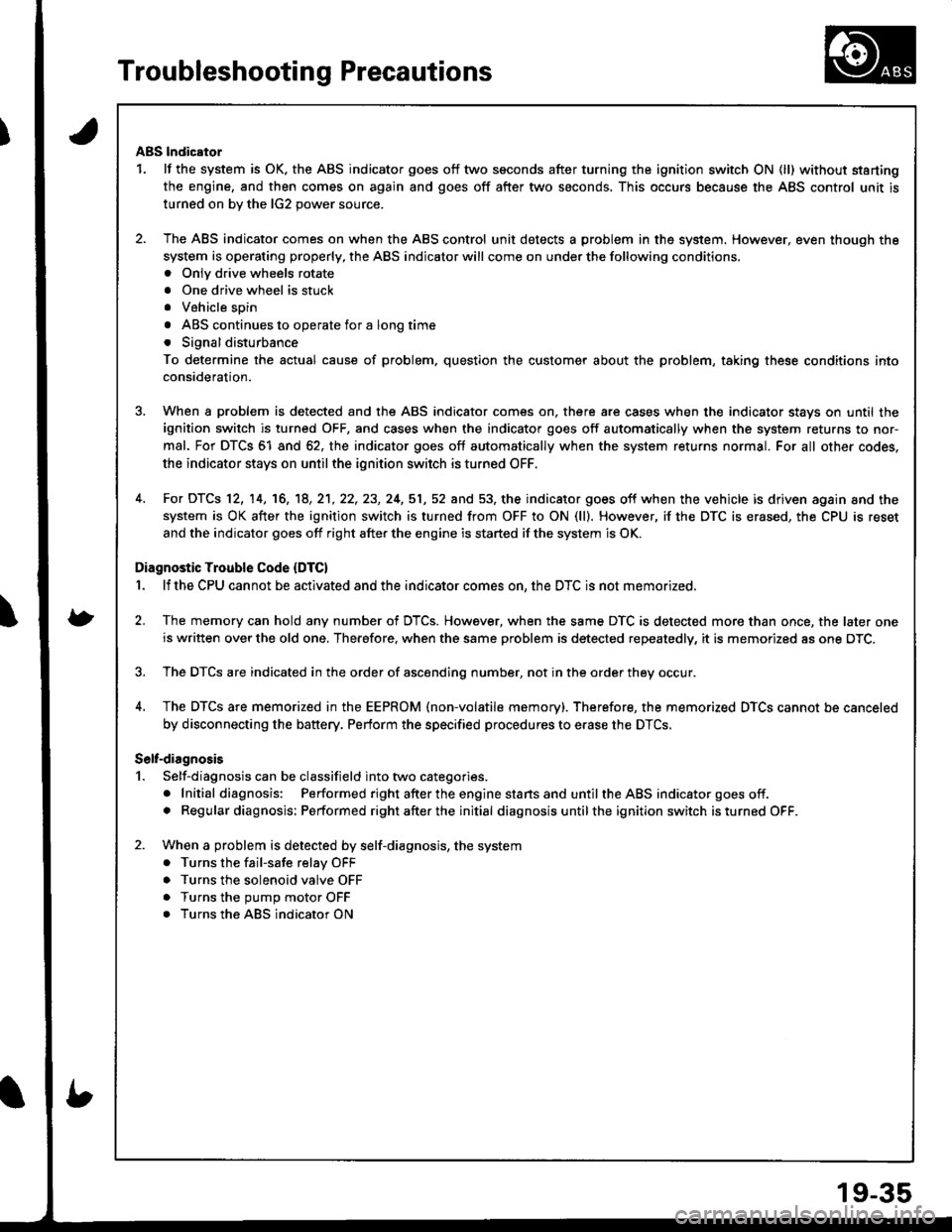
Troubleshooting Precautions
ABS lndicator
1. lf the system is OK. the ABS indicator goes off two seconds after turning the ignition switch ON (ll) without starting
the engine, and then comes on again and goes off after two seconds. This occurs because the ABS control unit is
turned on bv the lG2 oower source.
2. The ABS indicator comes on when the ABS control unit detects a problem in the system. However, even though the
system is operating properly, the ABS indicator will come on under the following conditions.. Onlv drive wheels rotate
. One drive wheel is stuck
. Vehicle spin
. ABS continues to operate for a long time
. Signal disturbance
To determine the actual cause of problem. question the customer about the problem, taking these conditions into
consideration.
3. When a problem is detected and the ABS indicator comes on, there are cases when the indicator stays on until the
ignition switch is turned OFF, and cases when the indicator goes off automatically when the system returns to nor-
mal. For DTCS 61 and 62, the indicator goes off automatically when the system returns normal. For all other codes.
the indicator stays on until the ignition switch is turned OFF.
4. For DTCS 12, 14, 16, '18, 2'1,22, 23, 24,51,52 and 53, the indicator goes off when the vehicle is driven again and the
system is OK after the ignition switch is turned from OFF to ON (ll). However, if the DTC is erased, the CPU is reset
and the indicator goes off right after the engine is started if the system is OK.
Diagnostic Trouble Code (DTC)
1. lf the CPU cannot be actlvated and the indicator comes on, the DTC is not memorized.
2. The memory can hold any number of DTCS. However, when the same DTC is detected more than once, the later one
is written over the old one. Therefore, when the same problem is detected repeatedly, it is memorized as one DTC.
3. The DTCs are indicated in the order of ascending number, not in the order they occur.
4, The DTCS are memorized in the EEPROM (non-volatile memory). Therefore, the memorized DTCS cannot be canceled
by disconnecting the battery. Perform the specified procedures to erase the DTCS,
S6lt-dirgnosis
1. Self-diagnosis can be classifield into two categories.
. Initial diagnosis: Performed right afterthe enginestansand untiltheABS indicator goes off.. Regular diagnosis: Performed rightafterthe initial diagnosis untilthe ignition switch isturned OFF.
2. When a problem is detected by self-diagnosis, the system
. Turns the fail-safe relay OFF
. Turns the solenoid valve OFF
. Turns the oumo motor OFF
. Turns the ABS indicator ON
Page 802 of 1680
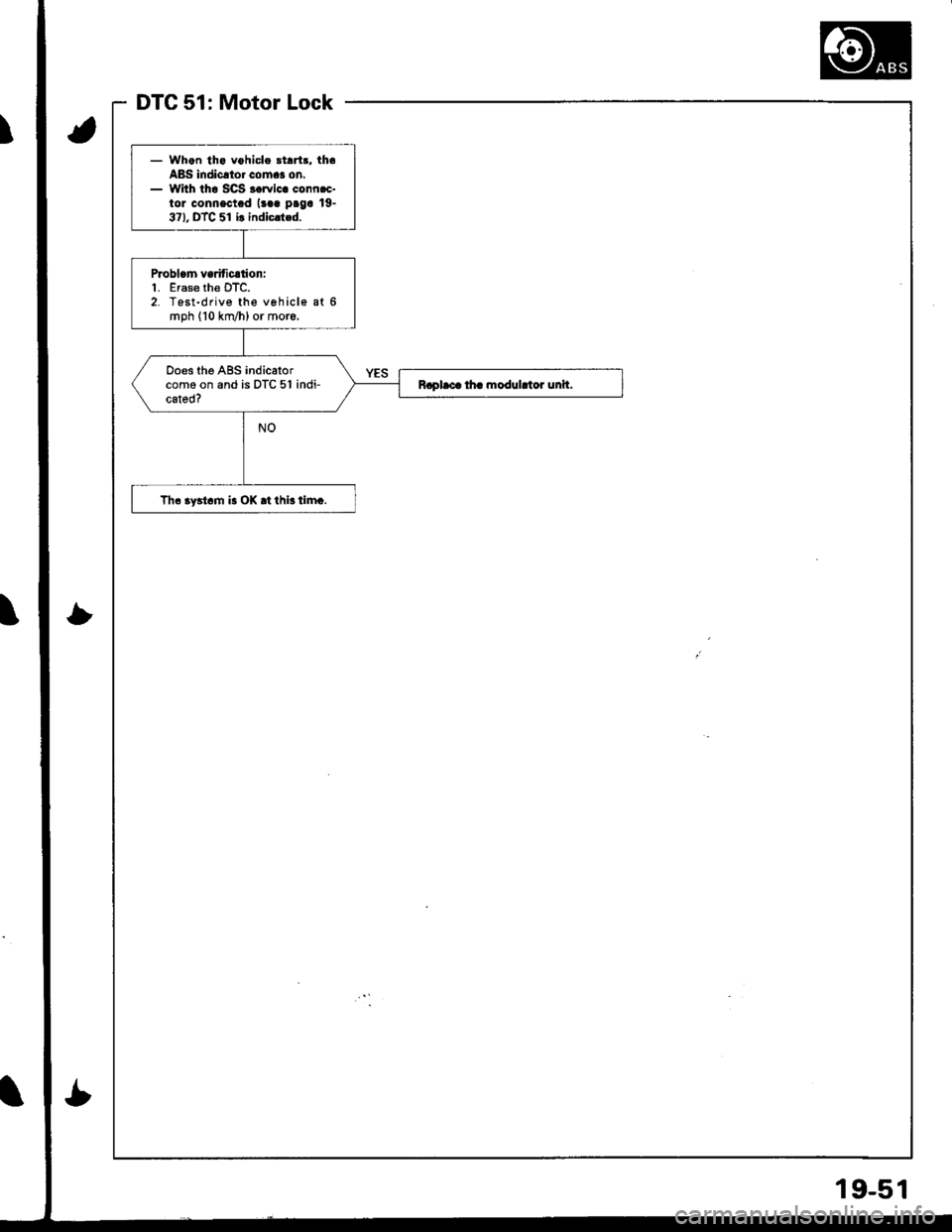
DTC 51: Motor Lock
- Whgn tha vohicla 3tart!. thaA8S lndicrtor comas on.- With tho SCS rorvic. conn.c-tor connectad (!aa paga 19.37), DTC 51 ir indicrt.d.
Problcm va ficltioni1. Eras€ th€ DTC.2. Test-drive the vehicle at 6mph (10 km/h) or moro,
ooes the ABS indicatorcom6 on and is DTC 51 indi-cated?
Th6 3ystcm i. O|( .t thir timc.
19-51
Page 820 of 1680
Doors
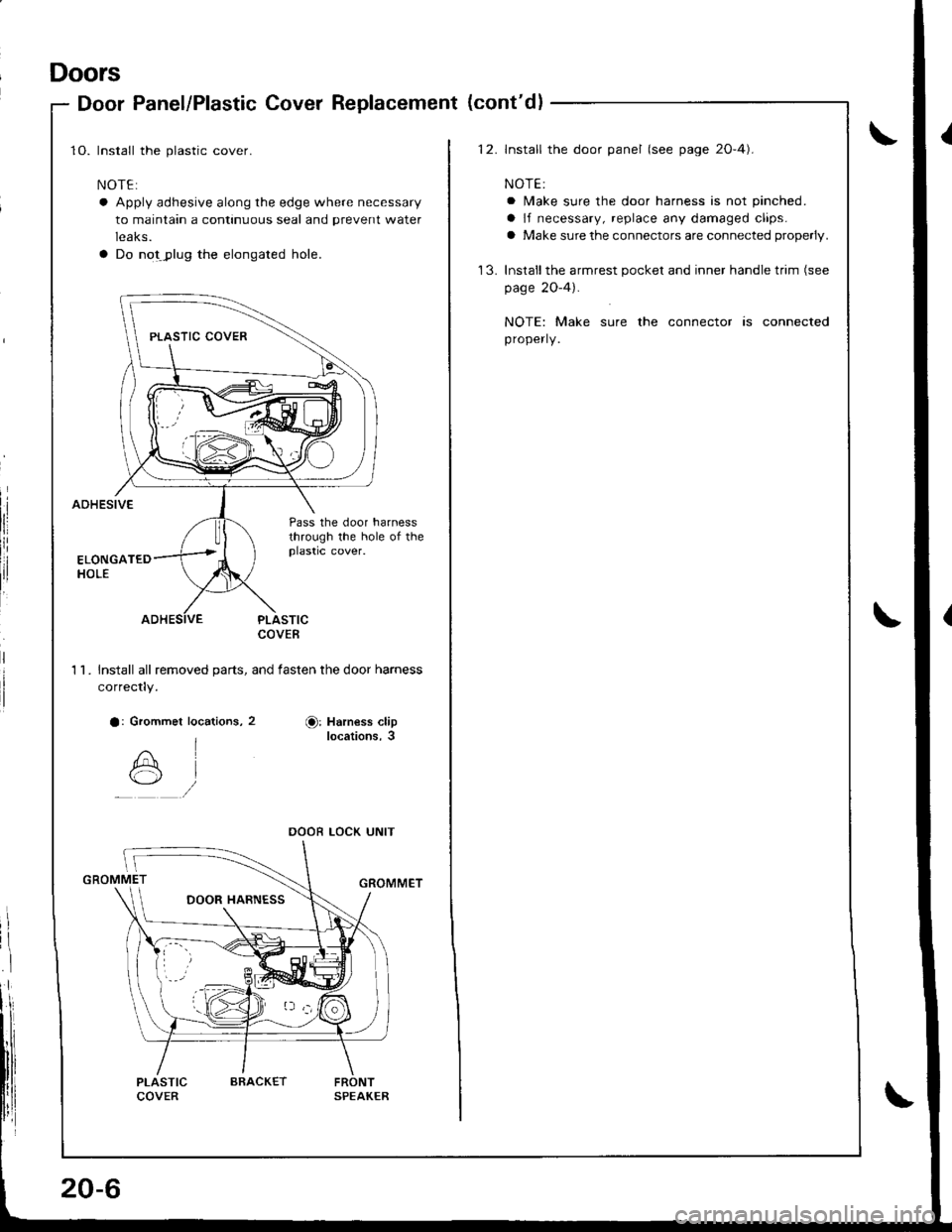
Door Panel/Plastic Cover Replacement (cont'dl
1O. Install the plastic cover.
NOTE:
a Apply adhesive along the edge where necessary
to maintain a continuous seal and prevent water
leaks.
a Do notJ)lug the elongated hole.
AOHESIVE
:
Pass the door harnessthrough the hole of theplastic cover.
PLASTICCOVEB
1 l Install all removed oarts, and fasten the door harness
correctly.
a: Grommet locations, 2Or Harness cliplocations,3
GROMMET
PLASTICCOVERFRONTSPEAKER
DOOR LOCK UNIT
20-6
ARACKET
12. lnstall the door panel (see page 2O-4).
NOTE:
a lMake sure the door harness is not pinched.
a lf necessary, replace any damaged claps.
a Make sure the connectors are connected properly.
'13. Inslallthe armrest pocket and inner handle trim (see
page 2O-4).
NOTE: Make sure the connector is connected
properly.
Page 821 of 1680
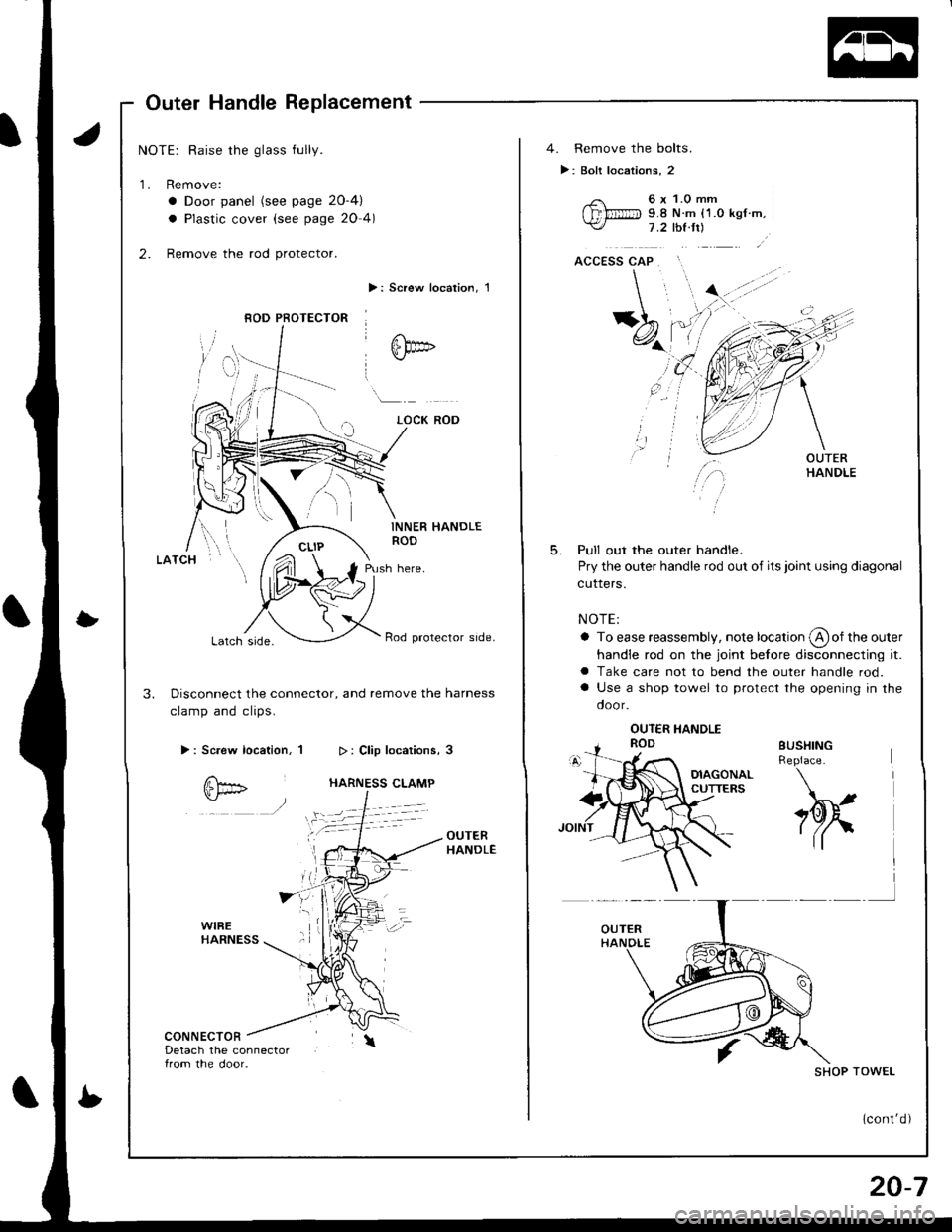
Outer Handle Replacement
NOTE: Raise the glass fully.
1. Remove:
a Door panel (see page 2O-4)
a Plastic cover (see page 20 4)
2. Remove the rod protector.
>: Screw localion, 1
INNER HANDLEROD
Push here.
Lalch srde.Rod protector side.
3. Disconnect the connector, and remove the harness
clamp and clips.
>: Screw location, 1
CONNECTORDetach the connector{rom the door.
8OD PFOTECTOR
4. Remove the bolts.
>: Bolt locations, 2
6 x 1.0 mm9.8 N.m {1.0 ksf m.1 .2 thl.tt)
5.Pull out the outer handle.
Pry the outer handle rod out of its joint using diagonal
cuners.
NOTE:
a To ease reassembly, note location @of the outer
handle rod on the joint before disconnecting it.a Take care not to bend the outer handle rod.
a Use a shop towel to protect the opening in the
door.
BUSHINGReplace.
h
SHOP TOWEL
(cont'd)
20-7
Page 1006 of 1680
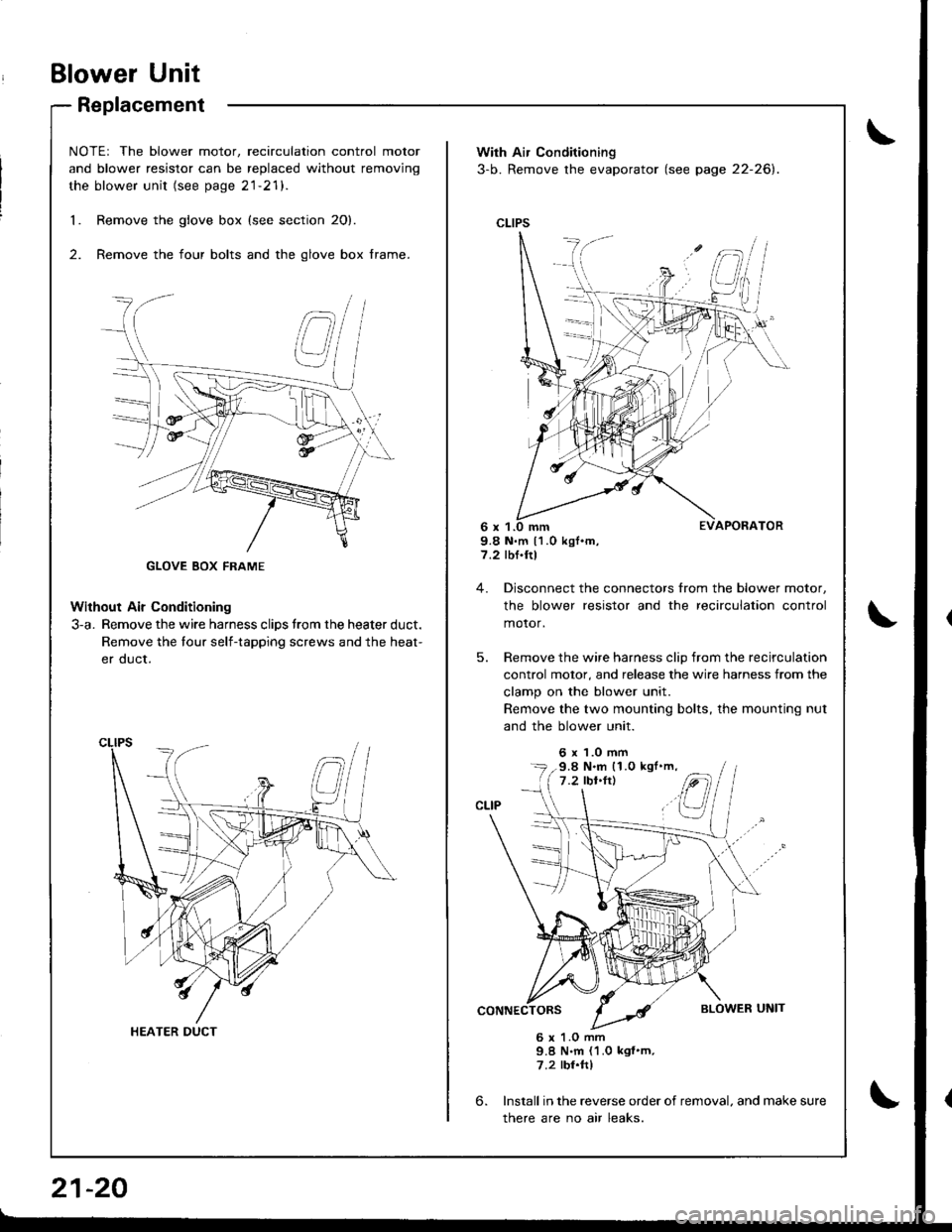
Blower Unit
Replacement
NOTEr The blower motor, recirculation control motor
and blower resistor can be replaced without removjng
the blower unit (see page 21-21).
Remove the glove box {see section 20}.
Remove the four bolts and the glove box frame.
Without Air Conditioning
3-a. Remove the wire harness clips trom the heater duct.
Remove the tour self-tapping screws and the heat-
er duct.
1.
2.
HEATER DUCT
21-20
With Air Conditioning
3-b. Remove the evaporator (see page 22-26).
CLIPS
9.8 N.m 11.0 kgf.m,7.2 rbf.ftl
4. Disconnect the connectors from the blower motor,
the blower resistor and the recirculation control
motor,
5. Remove the wire harness clip from the recirculation
control motor, and release the wire harness from the
clamp on the blower unit.
Remove the two mounting bolts, the mounting nut
and the blower unit.
6 x 1.0 mm
6.
6 x 1.O mm9.8 N.m (1.0 kgf'm,7.2 rbr.ftl
Install in the reverse order of removal. and make sure
there are no air leaks.
9.8 N.m (1.0 kgl'm,
Page 1008 of 1680
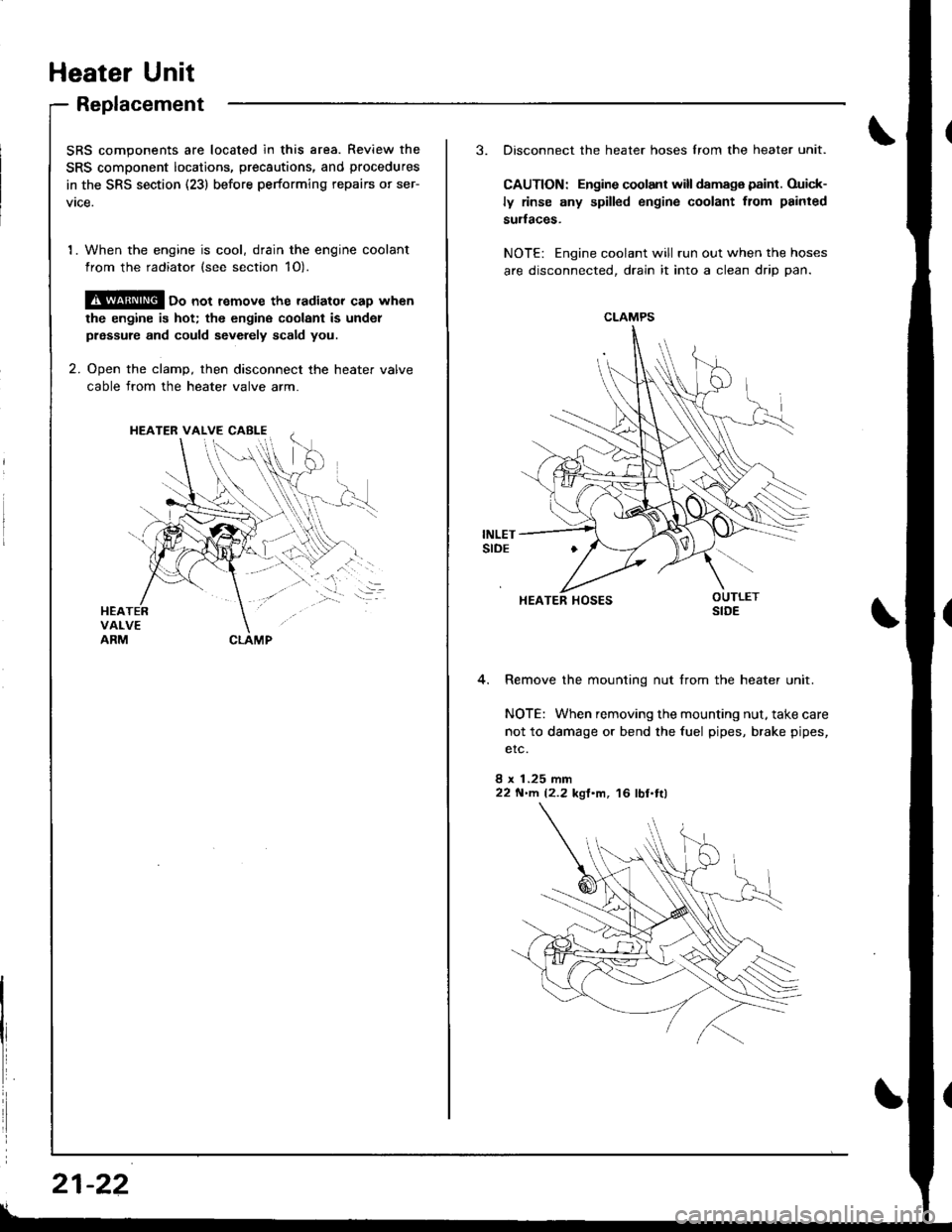
Heater Unit
Replacement
SRS components are located in this area. Review the
SRS component locatio.s, precautions, and procedures
in the SRS section (23) before performing repairs or ser-
vtce.
1. When the engine is cool, drain the engine coolant
from the radiator (see section 1O).
@ oo not remove the radiator cap when
the engine is hot; the engine coolant is undol
prsssure and could sevdely scald you.
2. Ooen the clamD, then disconnect the heater valve
cable from the heater valve arm.
HEATER VALVE CABI-E
I
i
21-22
3. Disconnect the heater hoses lrom the heater unit.
CAUTION: Engine coolant will damaga paint. Ouick-
ly rinse any spilled engine coolant from painted
sudaces.
NOTE: Engine coolant will run out when the hoses
are disconnected, drain it into a clean drip pan.
4. Remove the mounting nut from the heater unit.
NOTE: When removing the mounting nut, take care
not to damage or bend the fuel pipes, brake pipes,
etc.
8 x 1.25 mm22 N'llt. 12.2 kgl'm, 16 lbl.tl)
CLAMPS
HEATER HOSES
Page 1009 of 1680
.J
5.
6.
7.
8.
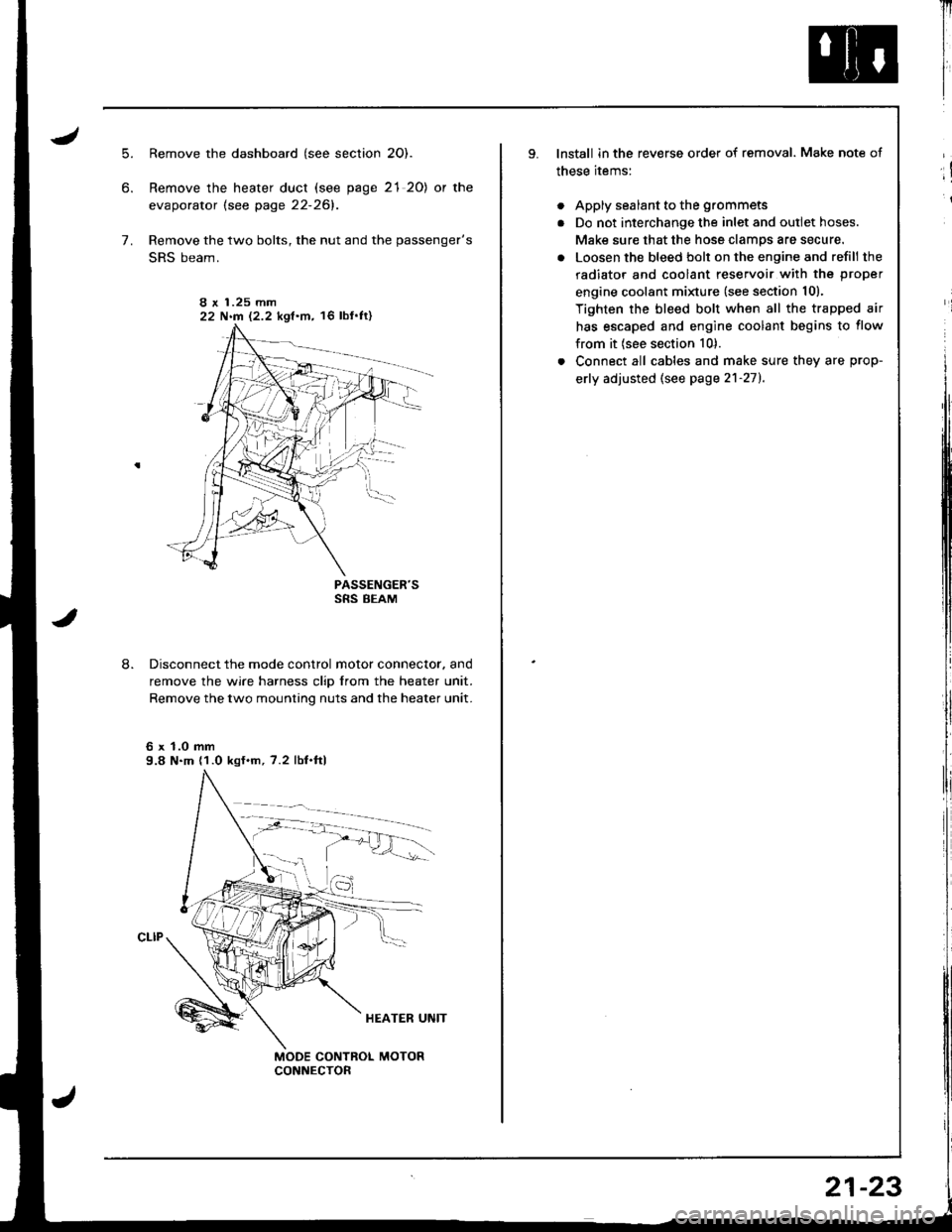
Remove the dashboard (see section 2O).
Remove the heater duct (see page 21 20) or the
evaporator lsee page 22-261.
Remove the two bolts, the nut and the passenger's
SRS beam.
PASSENGER'SSRS BEAM
Disconnect the mode control motor connector. and
remove the wire harness clip from the heater unit.
Remove the two mounting nuts and the heater unit.
6 x 1.0 mm9.8 N.m (1.0 kgf.m, 7.2 lbf.ftl
I r 1.25 mm22 N.m 12.2 kgf.m, 16 lbf'ft)
Il
I
I
lnstall in the reverse order of removal. Make note of
these items:
. Apply sealant to the grommets
. Do not interchange the inlet and outlet hoses.
Make sure that the hose clamps are secure.
. Loosen the bleed bolt on the engine and refill the
radiator and coolant reservoir with the proper
engine coolant minure (see section 10).
Tighten the bleed bolt when all the trapped air
has escaped and engine coolant begins to flow
from it (see section 10).
. Connect all cables and make sure they are prop-
erly adjusted (see page 2'l-271.
;!
i
21-23
Page 1010 of 1680
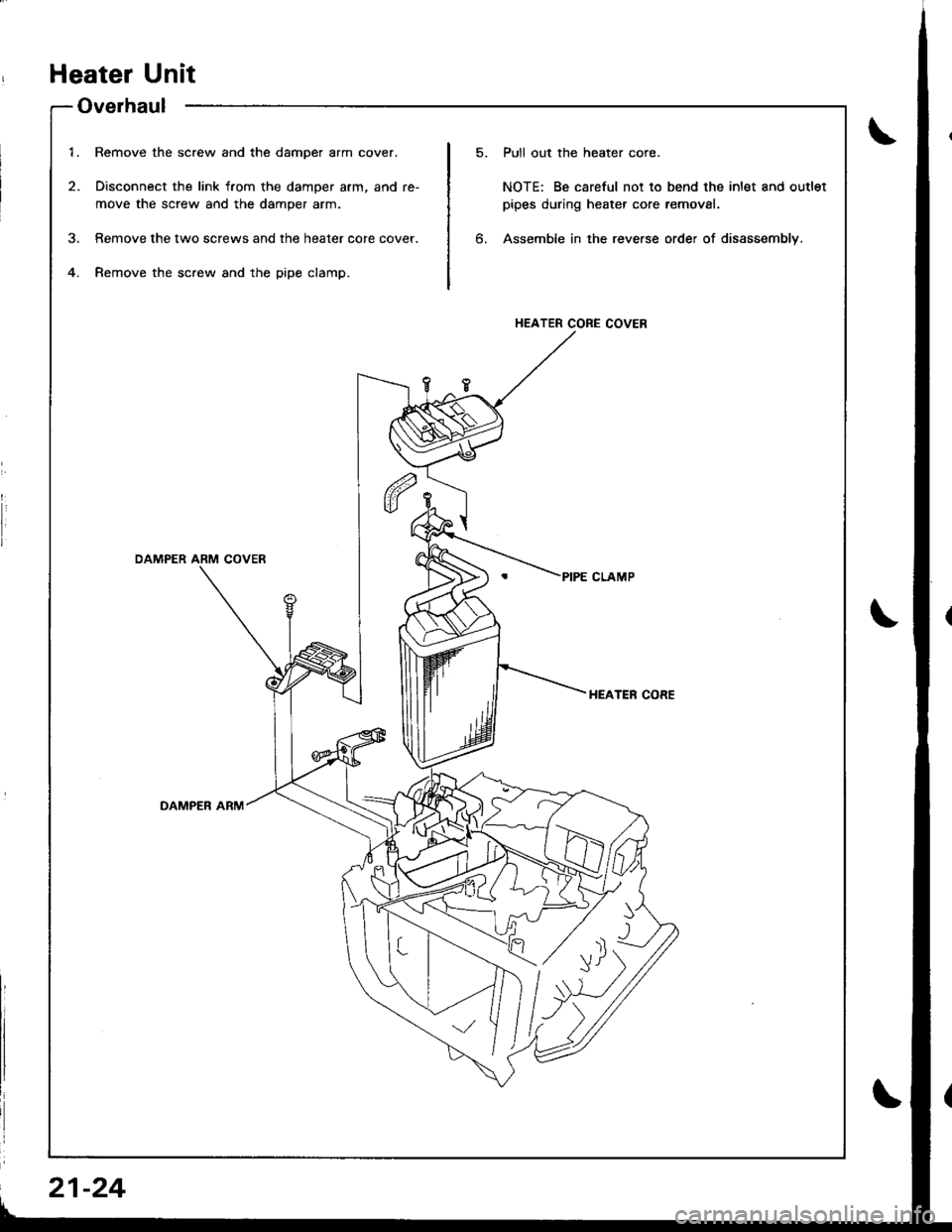
1.
2.
Remove the screw and the damper arm cover.
Disconnect the link from the damper arm, and re-
move the screw and the damper arm.
Remove the two screws and the heater core cover.
Remove the screw and the pipe clamp.
Pull out the heater core.
NOTE: Be careful not to bend the inlet and outlet
pipes during heater core removal.
Assemble in the reve.se order of disassembly.6.
HEATER CORE COVER
OAMPER ARM COVER
HEATEF CORE
DAMPER ARM
'r/ rll
I)Y
Heater Unit
Overhaul
\
21-24
Page 1013 of 1680
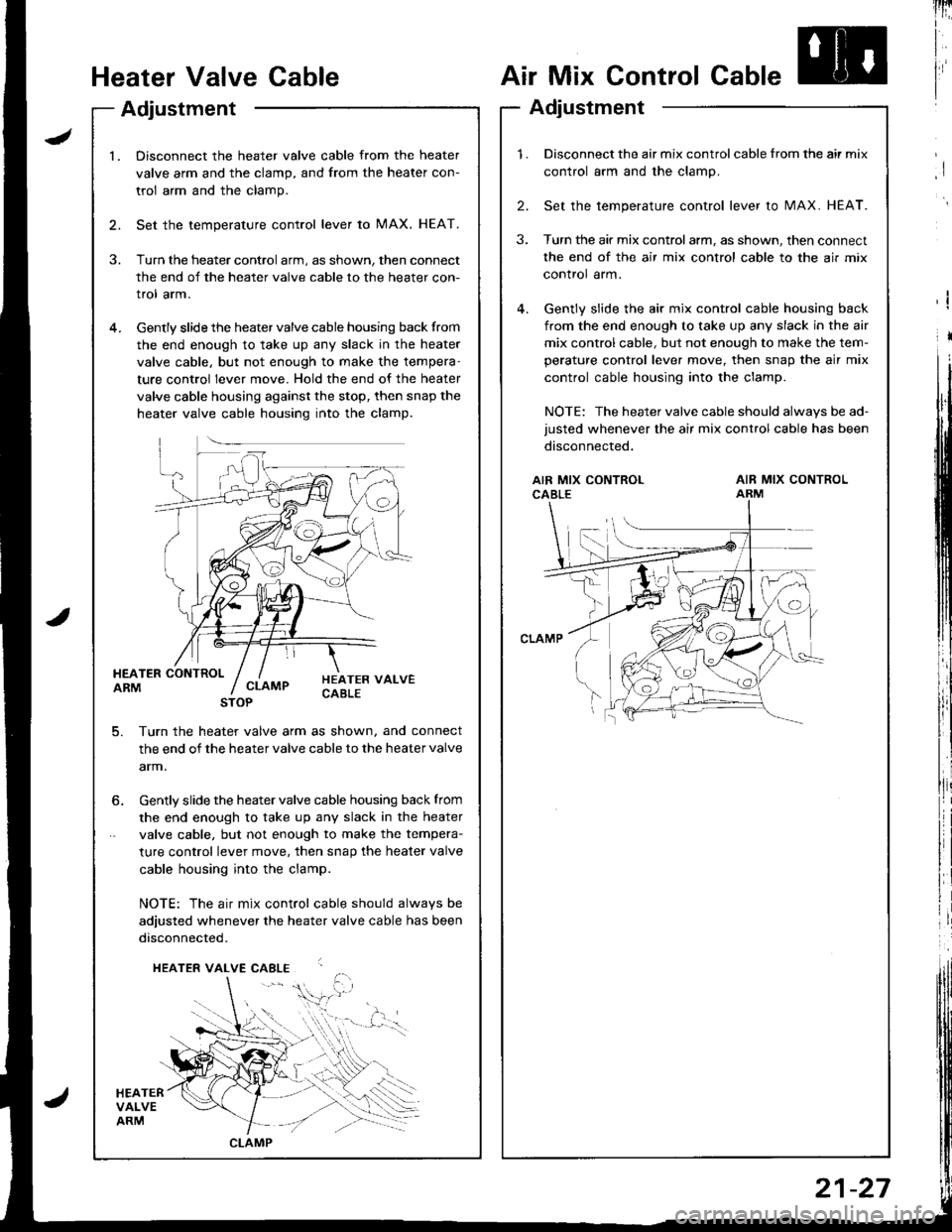
Heater Valve Cable
Adjustment
Air Mix Control Cable
Adjustment
lnri
I
I
I
I
l.Disconnect the heater valve cable from the heater
valve arm and the clamp, and from the heater con-
trol arm and the clamp.
Set the temperature control lever to MAX. HEAT.
Turn the heater control arm, as shown, then connect
the end of the heater valve cable to the heater con-
trol arm.
Gently slide the heater valve cable housing back from
the end enough to take up any slack in the heater
valve cable, but not enough to make the tempera-
ture control lever move. Hold the end of the heater
valve cable housing against the stop, then snap the
heater valve cable housing into the clamp.
HEATER CONTROLARM
HEATERVALVEARM
HEATER VALVECABLECLAMP
5. Turn th€ heater valve arm as shown, and connect
the end of the heater valve cable to the heater valve
arm.
STOP
6. Gently slide the heater valve cable housing back from
the end enough to take up any slack in the heater
valve cable, but not enough to make the tempera-
ture control lever move. then snap the heater valve
cable housing into the clamp.
NOTE: The air mix control cable should alwavs be
adjusted whenever the heater valve cable has been
disconnected.
HEATER VALVE CABLE
,i$.
CLAMP
1.Disconnect the air mix control cable from the air mix
control arm and the clamp.
Set the temperature control lever to MAX. HEAT.
Turn the air mix controlarm, as shown, then connect
the end of the air mix control cable to the air mix
control arm.
Gently slide the air mix control cable housing back
from the end enough to take up any slack in the air
mix control cable, but not enough to make the tem-
perature control lever move, then snap the air mix
control cable housing into the clamp.
NOTE: The heater valve cable should always be ad-
justed whenever the air mix control cable has been
disconnected.
2.
3.
AIR MIX CONTROLCABLEAIR MIX CONTROLARM
21-27
Page 1028 of 1680
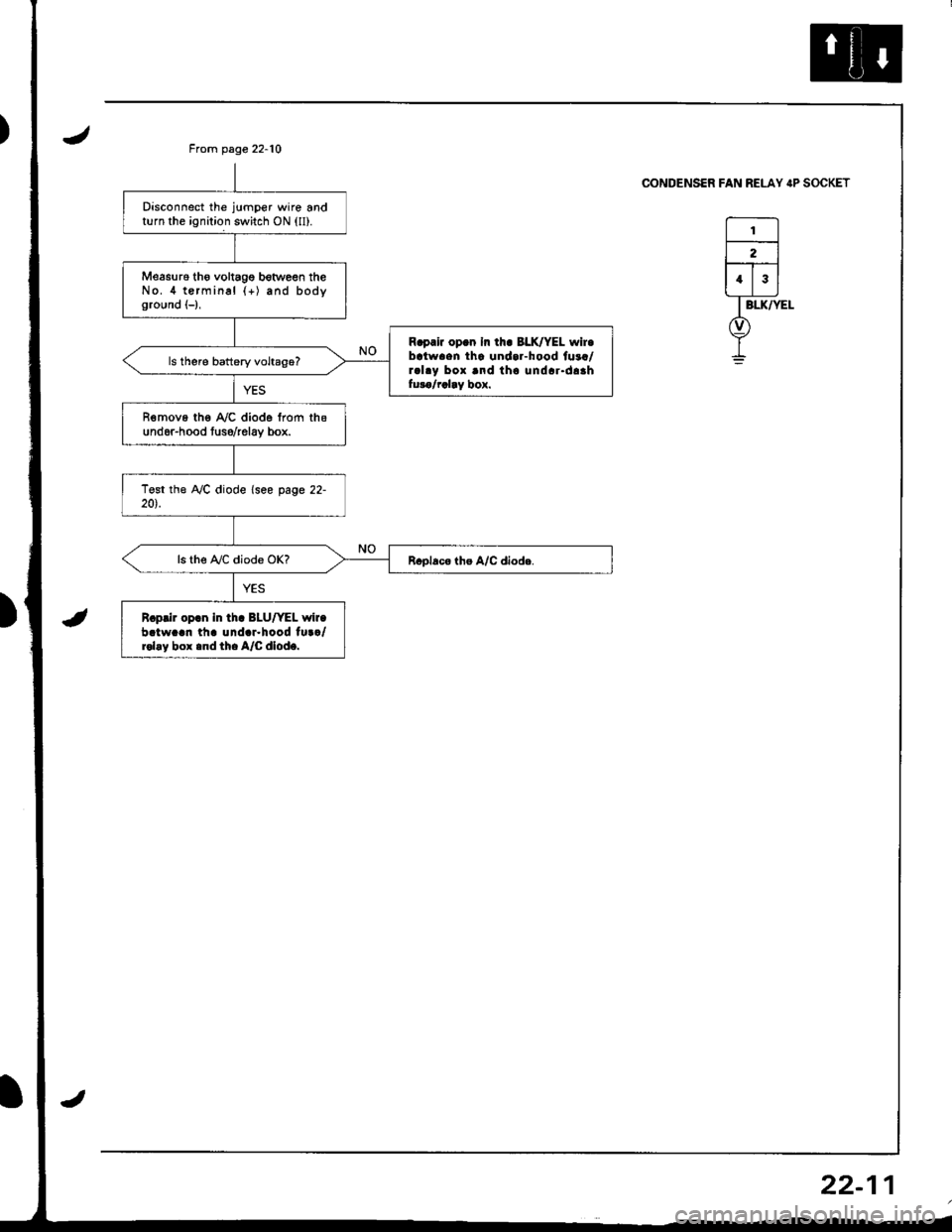
Disconnect the jumper wire andturn the ignition switch ON (ll).
Measu16 tho voltagg botween theNo.4 terminal {+) and bodyground (-),
R.prir op.n In th. BLK/YEL wir.batwaen tha undar-hood fuaa/ral.y box and tho undar.daahfuro/rclay box.
R€move the A,/C diode from thsund6r-hood tuso/relav box.
ls the A,/C diode OK?
R.prir op.n in tha BLU/YEL wir.batw..n th. und.r.hood tu../rol.y box .nd th. A/C dlod..
From page 22-10
CONDENSER FAN RELAY IP SOCKET
I
22-1