brake Acura Integra 2001 Owner's Guide
[x] Cancel search | Manufacturer: ACURA, Model Year: 2001, Model line: Integra, Model: Acura Integra 2001Pages: 285, PDF Size: 3.79 MB
Page 165 of 285

Maintenanc
e Schedul e
The Maintenance Schedule specifies how often you should have your carserviced and what things need
attention. It is essential that you have
your car serviced as scheduled to retain its high level of safety,dependability, and emissions control
performance.
The services and time or distance
intervals shown in the maintenanceschedule assume you will use your
car as normal transportation for
passengers and their possessions.
You should also follow these
recommendations:
Avoid exceeding your car's load
limit. This puts excess stress onthe engine, brakes, and manyother parts of your car. The load
limit is shown on the label on the driver's doorjamb. Operate your car on reasonable
roads within the legal speed limit. Drive your car regularly over a
distance of several miles
(kilometers).
Always use unleaded gasoline with
the proper octane rating (see page
123). Whic
h Schedul e t o Follow :
Service your car according to the
time and mileage periods on one of
the Maintenance Schedules on the
following pages. Select the schedule
for "Severe Conditions" if most of
your driving is done under one or more of the conditions listed on that
page. Otherwise, follow the schedule
for "Normal Conditions."
Maintenanc e
Page 174 of 285
Owne
r Maintenanc e Check s
You should check the following items at the specified intervals. If
you are unsure of how to perform any check, turn to the page given. Engine oil level — Check every
time you fill the fuel tank. See page 127. Engine coolant level — Check the
radiator reserve tank every time
you fill the fuel tank. See page 128. Windshield washer fluid — Check
the level in the reservoir monthly.If weather conditions cause you to
use the washers frequently, check
the reservoir each time you stop
for fuel. See page 182. Automatic transmission — Check
the fluid level monthly. See page
183.
Brakes — Check the fluid level
monthly. See page 185. Tires — Check the tire pressure
monthly. Examine the tread for
wear and foreign objects. See page
198.
Lights — Check the operation of
the headlights, parking lights,
taillights, high-mount brake light,
turn signals, brake lights, and
license plate lights monthly. See
page 205.
Maintenance
Page 188 of 285
Transmissio
n Fluid , Brak e an d Clutc h Flui d
5-spee d Manua l Transmissio n
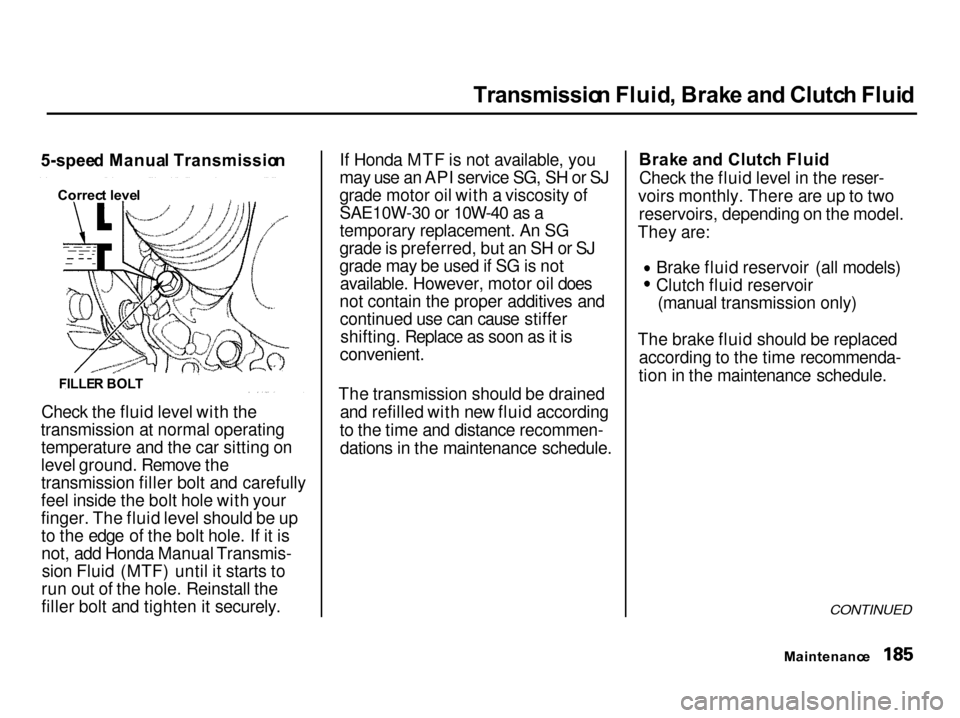
Check the fluid level with the
transmission at normal operating temperature and the car sitting on
level ground. Remove the
transmission filler bolt and carefully
feel inside the bolt hole with your
finger. The fluid level should be up
to the edge of the bolt hole. If it isnot, add Honda Manual Transmis-sion Fluid (MTF) until it starts to
run out of the hole. Reinstall the
filler bolt and tighten it securely. If Honda MTF is not available, you
may use an API service SG, SH or SJ
grade motor oil with a viscosity of
SAE10W-30 or 10W-40 as a
temporary replacement. An SG
grade is preferred, but an SH or SJ
grade may be used if SG is not
available. However, motor oil does
not contain the proper additives and continued use can cause stiffershifting. Replace as soon as it is
convenient.
The transmission should be drained and refilled with new fluid according
to the time and distance recommen- dations in the maintenance schedule. Brak
e an d Clutc h Flui d
Check the fluid level in the reser-
voirs monthly. There are up to two reservoirs, depending on the model.
They are: Brake fluid reservoir (all models)
Clutch fluid reservoir
(manual transmission only)
The brake fluid should be replaced according to the time recommenda-
tion in the maintenance schedule.
CONTINUED
Maintenanc e
FILLE
R BOL T
Correc
t leve l
Page 189 of 285

Brak
e an d Clutc h Flui d
Always use Honda Heavy Duty Brake Fluid DOT 3. If it is not
available, you should use only DOT 3
or DOT 4 fluid, from a sealed
container, as a temporary
replacement. However, the use of
any non-Honda brake fluid can cause
corrosion and decrease the life of thesystem. Have the brake system
flushed and refilled with Honda Heavy Duty Brake Fluid DOT 3 assoon as possible.
Brake fluid marked DOT 5 is not compatible with your car's brakingsystem and can cause extensive
damage.
Brak
e Syste m
The fluid level should be between the MIN and MAX marks on the sideof the reservoir. If the level is at or
below the MIN mark, your brake system needs attention. Have the
brake system inspected for leaks or
worn brake pads. Clutc
h Syste m
The fluid should be between the MIN and MAX marks on the side of
the reservoir. If it is not, add brake
fluid to bring it up to that level. Use
the same fluid specified for the
brake system.
Low fluid level can indicate a leak in
the clutch system. Have this system
inspected as soon as possible.
Maintenanc e
MA
X
MI N
MI N
MA
X
Page 207 of 285

Tire
s
Snow Tires
SE, LS, GS and GS-R models
If you mount snow tires on your
Acura, make sure they are radial tires of the same size and load range
as the original tires. Mount snow
tires on all four wheels to balance
your car's handling in all weather conditions. Keep in mind the traction
provided by snow tires on dry roads
may not be as high as your car's original equipment tires. You shoulddrive cautiously even when the roads
are clear. Check with the tire dealer
for maximum speed recommen-
dations.
Type-R model
Mount winter tires on all four wheels.
The performance capabilities of the winter tires may not be the same as
your vehicle's original-equipmenttires. Check with the tire dealer formaximum speed recommendations.
Tire Chains
Mount traction devices (link-type or
cable-type) only when required by
driving conditions or local laws.
Make sure they are the correct size
for your tires. Install them only on the front tires.
SE model
If link-type traction devices are used,
they must be SAE class "S". Cable-
type traction devices can also be
used.
LS, GS, GS-R, and Type-R models
Because your Acura has limited tire
clearance, mount only SAE class "S"
cable-type traction devices.
Link-type "chains" should not be
used. No matter how tight they seem
to be installed, they can come into contact with the body andsuspension, causing serious damage.
All Models
When installing traction devices,
follow the manufacturer's
instructions and mount them as
tightly as you can. Drive slowly with
them installed. If you hear them coming in contact with the body or
chassis, stop and investigate. Make
sure the traction devices are
installed tightly, and that they are
not contacting the brakes or
suspension.
Remove them as soon as you start driving on cleared roads.
Traction devices that are the wrong
size or improperly installed can
damage your car's brake lines,
suspension, body, and wheels. Stop
driving if they are hitting any part of
the car.
Maintenanc e
NOTIC
E
Page 209 of 285
Light
s
BACK-U P LIGH T TURN SIGNA L
SIDE MARKE R LIGH T
LICENS E PLAT E LIGH T TAILLIGHT/BRAK
E LIGH T
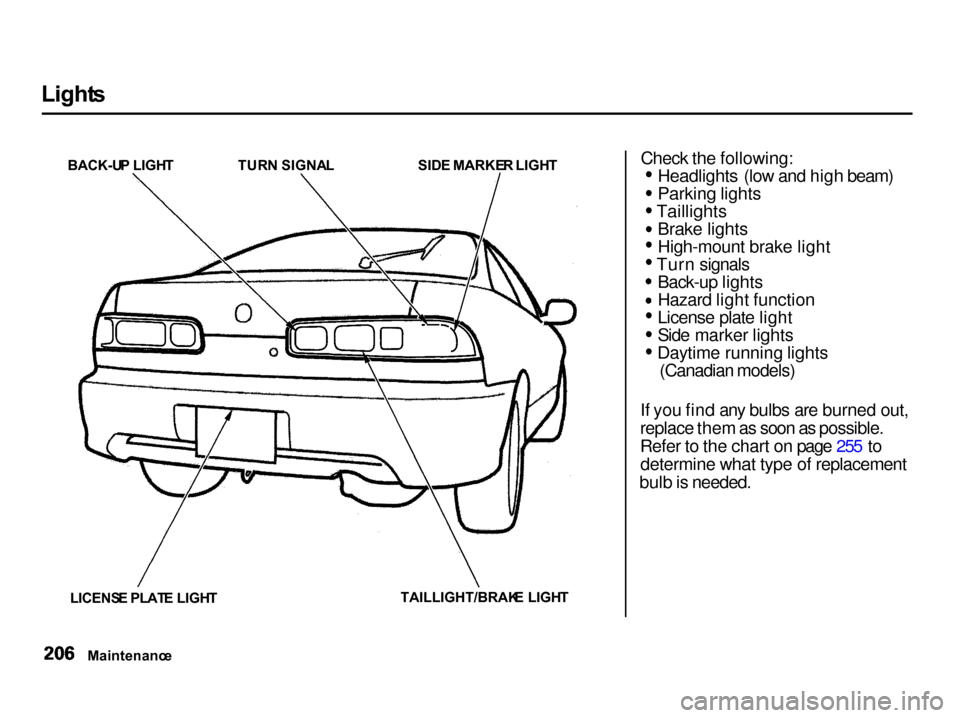
Check the following:
Headlights (low and high beam) Parking lights
Taillights
Brake lights
High-mount brake light
Turn signals
Back-up lights
Hazard light function
License plate light
Side marker lights
Daytime running lights
(Canadian models)
If you find any bulbs are burned out,
replace them as soon as possible.
Refer to the chart on page 255 to determine what type of replacement
bulb is needed.
Maintenanc e
Page 219 of 285

Storin
g You r Ca r
If you need to park your car for an
extended period (more than one
month), there are several things you should do to prepare it for storage.
Proper preparation helps prevent
deterioration and makes it easier to
get your car back on the road. If
possible, store your car indoors. Fill the fuel tank.
Change the engine oil and filter
(see page 175). Wash and dry the exterior
completely.
Clean the interior. Make sure the
carpeting, floor mats, etc. are
completely dry.
Leave the parking brake off. Put
the transmission in Reverse
(5-speed manual) or Park
(automatic).
Block the rear wheels.
If the car is to be stored for a
longer period, it should be
supported on jackstands so the
tires are off the ground. Leave one window open slightly (if
the car is being stored indoors). Disconnect the battery.
Support the front and rear wiper
blade arms with a folded towel or
rag so they do not touch the
windshield.
To minimize sticking, apply a
silicone spray lubricant to all door
and hatch seals. Also, apply a body
wax to the painted surfaces that mate with the door and hatch seals. Cover the car with a "breathable"
cover, one made from a porous
material such as cotton. Nonporous materials, such as
plastic sheeting, trap moisture,
which can damage the paint. If possible, run the engine for a
while periodically (preferably once a month).
If you store your car for 12 months or longer, have your Acura dealer
perform the inspections called for in
the 24 months/30,000 miles (48,000
km) maintenance schedule (Normal Conditions) as soon as you take it
out of storage (see page 164). The
replacements called for in the
maintenance schedule are not
needed unless the car has actually
reached that time or mileage.
Maintenanc e
Page 228 of 285

Takin
g Car e o f th e Unexpecte d
This section covers the more- common problems that motoristsexperience with their vehicles. It
gives you information about how to safely evaluate the problem and what
to do to correct it. If the problem has stranded you on the side of the road,
you may be able to get going again. If not, you will also find instructionson getting your car towed. Compact Spare Tire....................... 226
Changing a Flat Tire..................... 227
If Your Engine Won't Start........... 231 Nothing Happens or theStarter Motor OperatesVery Slowly............................. 232
The Starter Operates Normally................................. 233
Jump Starting................................. 233 If Your Engine Overheats............. 236
Low Oil Pressure Indicator.......... 238Charging System Indicator........... 239
Malfunction Indicator Lamp........ 240
Brake System Indicator................ 241 Closing the Moonroof................... 242
Fuses............................................... 243 Checking and Replacing........... 244
Emergency Towing....................... 248
Takin g Care o f th e Unexpecte d
Page 230 of 285

Changin
g a Fla t Tir e
If you have a flat tire while driving, stop in a safe place to change it.
Stopping in traffic or on the shoulder
of a busy road is dangerous. Driveslowly along the shoulder until you
get to an exit or an area to stop that is far away from the traffic lanes.
JAC
K
SPAR E TIR E
TOOL KI T
1. Park the car on firm, level and non-slippery ground away from
traffic. Put the transmission in Park (automatic) or Reverse (manual). Apply the parking brake.
If you are towing a trailer, unhitch
the trailer. 2. Turn on the hazard warning lights
and turn the ignition switch to
LOCK (0). Have all the
passengers get out of the car while
you change the tire.
3. Open the hatch. Pull up the floor mat and remove the spare tire
cover.
4. Take the tool kit out of the spare tire well.
5. Unscrew the wing bolt and take the spare tire out of its well.
CONTINUED
Takin g Car e o f th e Unexpecte d
The car can easily roll off the
jack, seriously injuring anyone
underneath.
Follow the directions for
changing a tire exactly, and never get under the car when it
is supported only by the jack.
Page 232 of 285

Changin
g a Fla t Tir e
9. Use the extension and wheel wrench as shown to raise the
vehicle until the flat tire is off the
ground.
10. Remove the wheel nuts and flat
tire. Temporarily place the flat tire
on the ground with the outside
surface of the wheel facing up.
You could scratch the wheel if you
put it face down.
11. Before mounting the spare tire,wipe any dirt off the mounting
surface of the wheel and hub with
a clean cloth. Wipe the hub
carefully, it may be hot from
driving.
CONTINUED
Takin g Car e o f th e Unexpecte d
EXTENSIO
N
WHEE L WRENC H
BRAKE HU B