light ACURA INTEGRA 2023 Owner's Manual
[x] Cancel search | Manufacturer: ACURA, Model Year: 2023, Model line: INTEGRA, Model: ACURA INTEGRA 2023Pages: 740, PDF Size: 22.94 MB
Page 137 of 740

135
uuGauges and Displays uHead-Up Display*
Continued
Instrument Panel
Head-Up Display*
Shows the current mode for ACC with Low Speed Follow*, LKAS, and Traffic Jam
Assist*, traffic sign recognition system, or tu rn-by-turn directions along with the
vehicle speed. You can choose which item to be displayed using the driver
information interface. They are displayed when the power mode is in ON.
The display also shows the following
warnings.
•Lane Departure Warning: When your
vehicle is too close to the traffic lane lines,
the lane departure warning appears.
2 Lane Keeping Assist System (LKAS)
P. 545
• Head-up Warning Lights:
Flash when the BRAKE message appears
on the driver information interface.
2 Collision Mitigation Braking SystemTM
(CMBSTM) P. 481
2 Low Speed Braking Control
P. 493, 499
2 Adaptive Cruise Control (ACC) with
Low Speed Follow
* P. 504
2 Adaptive Cruise Control (ACC)* P. 525
Lane Departure Warning
* Not available on all models
23 ACURA INTEGRA-313S56000_03.book 135 ページ 2022年3月18日 金曜日 午前11時47分
Page 143 of 740
141
Controls
This chapter explains how to operate the various controls necessary for driving.
Clock.................................................. 142
Locking and Unlocking the Doors Key .................................................. 144
Low Keyless Remote Signal Strength 146
Locking/Unlocking the Doors from the Outside .......................................... 147
Locking/Unlocking the Doors from the Inside ............................................. 158
Childproof Door Locks ..................... 160
Auto Door Locking/Unlocking .......... 161
Hatch ................................................. 162
Security System
Immobilizer System .......................... 165 Security System Alarm...................... 165
Windows ........................................... 168
Moonroof .......................................... 171
Operating the Switches Around the Steering Wheel ENGINE START/STOP Button............. 172
Turn Signals ..................................... 175
Light Switches.................................. 176
Fog Lights
*...................................... 179
ChicaneTM Daytime Running Lights ... 179
Auto High-Beam .............................. 180
Wipers and Washers ........................ 183
Rear Defogger/Heated Door Mirror Button ........................................ 185
Driving Position Memory System*..... 186
Adjusting the Steering Wheel .......... 188
Mirrors Interior Rearview Mirror ................... 189
Power Door Mirrors ......................... 190
Seats .................................................. 191
Interior Convenience Items .............. 201
Climate Control System Using Automatic Climate Control .... 218
Automatic Climate Control Sensors......223
* Not available on all models
23 ACURA INTEGRA-313S56000_03.book 141 ページ 2022年3月18日 金曜日 午前11時47分
Page 146 of 740

144
Controls
Locking and Unlocking the Doors
Key
This vehicle comes with the following keys:Use the keys to start and stop the engine, and
lock and unlock all the doors, hatch, and fuel
fill door.1Key
All the keys have an immobilizer system. The
immobilizer system helps to protect against vehicle
theft. 2 Immobilizer System P. 165
Follow the advice below to prevent damage to the
keys:
•Do not leave the keys in direct sunlight, or in
locations with high temperature or high humidity.
•Do not drop the keys or set heavy objects on them.•Keep the keys away from liquids, dust and sand.
•Do not take the keys apart except for replacing the
battery.
If the circuits in the keys are damaged, the engine
may not start, and the remote transmitter may not
work.
If the keys do not work properly, have them
inspected by a dealer.
You can remotely start the engine using the remote
engine start.
2 Remote Engine Start
* P. 432
Models with remote engine starter
Models without remo te engine starter
Models with remote engine starter
* Not available on all models
23 ACURA INTEGRA-313S56000_03.book 144 ページ 2022年3月18日 金曜日 午前11時47分
Page 149 of 740

147
uuLocking and Unlocking the Doors uLocking/Unlocking the Doors from the Outside
Continued
Controls
Locking/Unlocking the Doors from the Outside
When you carry the keyless remote, you can
lock/unlock the doors, fuel fill door and hatch.
You can lock/unlock the doors, fuel fill door
and hatch within a radius of about 32 inches
(80 cm) of the outside door handle or hatch
release button.
■Using the Keyless Access System1Locking/Unlocking the Doors from the Outside
If the interior light switch is in the door activated
position, the interior light s come on when you unlock
the doors and hatch.
No doors opened: The lights fade out after 30 seconds.
Doors and hatch reloc ked: The lights go off
immediately.
2 Interior Lights P. 201
1Using the Keyless Access System
If you do not open a door or the hatch within 30
seconds of unlocking the vehicle with the keyless
access system, the doors and hatch will automatically
relock.
You can lock or unlock doors using the keyless access
system only when the power mode is in VEHICLE OFF.
The keyless access system will not lock the vehicle
when a door is open.
23 ACURA INTEGRA-313S56000_03.book 147 ページ 2022年3月18日 金曜日 午前11時47分
Page 150 of 740

148
uuLocking and Unlocking the Doors uLocking/Unlocking the Doors from the Outside
Controls
■Locking the doors and hatch
Touch the door lock sensor on the front door
or press the lock button on the hatch.u All the doors and hatch lock and the
security system sets.
u Some exterior lights flash once and the
beeper sounds once.
Door Lock Sensor
Lock Button
23 ACURA INTEGRA-313S56000_03.book 148 ページ 2022年3月18日 金曜日 午前11時47分
Page 151 of 740
Continued149
uuLocking and Unlocking the Doors uLocking/Unlocking the Doors from the Outside
Controls
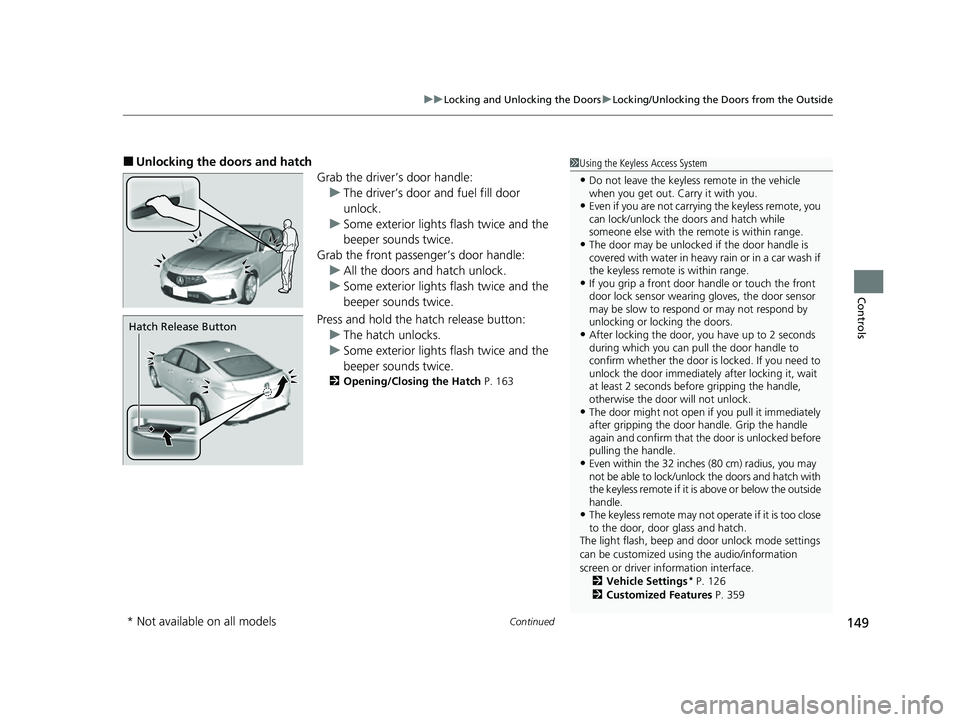
■Unlocking the doors and hatch
Grab the driver’s door handle:u The driver’s door and fuel fill door
unlock.
u Some exterior lights flash twice and the
beeper sounds twice.
Grab the front passenger’s door handle: u All the doors and hatch unlock.
u Some exterior lights flash twice and the
beeper sounds twice.
Press and hold the hatch release button:
u The hatch unlocks.
u Some exterior lights flash twice and the
beeper sounds twice.
2 Opening/Closing the Hatch P. 163
1Using the Keyless Access System
•Do not leave the keyless remote in the vehicle
when you get out. Carry it with you.
•Even if you are not carrying the keyless remote, you
can lock/unlock the do ors and hatch while
someone else with the remote is within range.
•The door may be unlocked if the door handle is
covered with water in heavy rain or in a car wash if
the keyless remote is within range.
•If you grip a front door handle or touch the front
door lock sensor wearing gloves, the door sensor
may be slow to respon d or may not respond by
unlocking or locking the doors.
•After locking the door, you have up to 2 seconds
during which you can pull the door handle to
confirm whether the door is locked. If you need to
unlock the door immediately after locking it, wait
at least 2 seconds befo re gripping the handle,
otherwise the door will not unlock.
•The door might not open if you pull it immediately
after gripping the door handle. Grip the handle
again and confirm that th e door is unlocked before
pulling the handle.
•Even within the 32 inches (80 cm) radius, you may
not be able to lock/unlock the doors and hatch with
the keyless remote if it is above or below the outside
handle.
•The keyless remote may not operate if it is too close
to the door, door glass and hatch.
The light flash, beep and door unlock mode settings
can be customized using the audio/information
screen or driver information interface. 2 Vehicle Settings
* P. 126
2 Customized Features P. 359
Hatch Release Button
* Not available on all models
23 ACURA INTEGRA-313S56000_03.book 149 ページ 2022年3月18日 金曜日 午前11時47分
Page 152 of 740
uuLocking and Unlocking the Doors uLocking/Unlocking the Doors from the Outside
150
Controls
■Locking the doors and hatch (Walk
away auto lock ®)
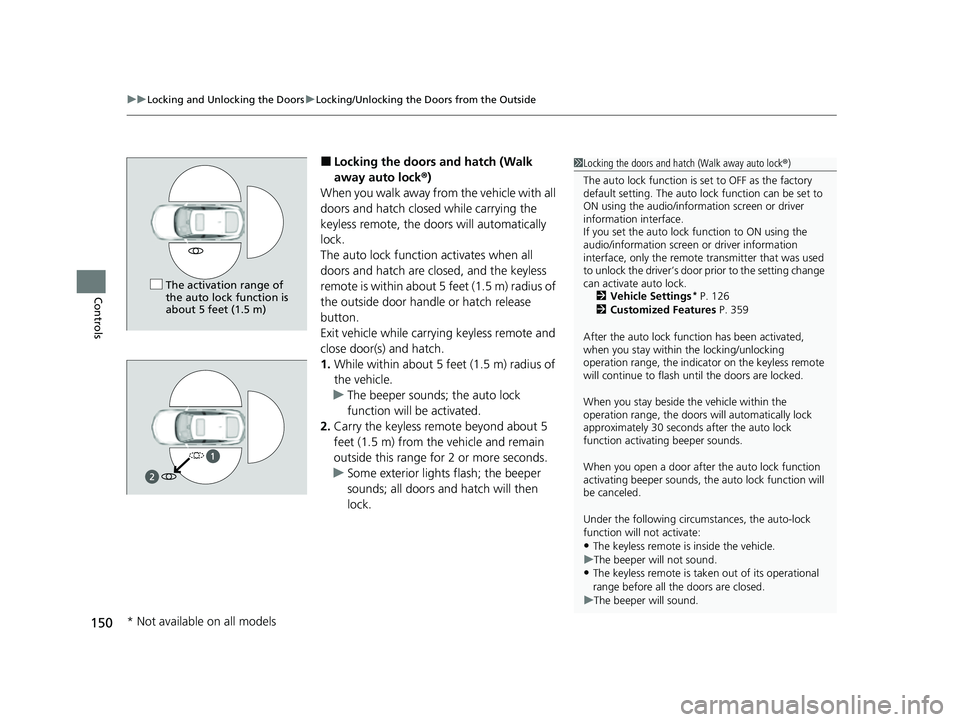
When you walk away from the vehicle with all
doors and hatch closed while carrying the
keyless remote, the doors will automatically
lock.
The auto lock function activates when all
doors and hatch are cl osed, and the keyless
remote is within about 5 feet (1.5 m) radius of
the outside door handle or hatch release
button.
Exit vehicle while carry ing keyless remote and
close door(s) and hatch.
1. While within about 5 feet (1.5 m) radius of
the vehicle.
u The beeper sounds; the auto lock
function will be activated.
2. Carry the keyless remote beyond about 5
feet (1.5 m) from the vehicle and remain
outside this range fo r 2 or more seconds.
u Some exterior lights flash; the beeper
sounds; all doors and hatch will then
lock.1Locking the doors and hatch (Walk away auto lock ®)
The auto lock function is set to OFF as the factory
default setting. The auto lo ck function can be set to
ON using the audio/inform ation screen or driver
information interface.
If you set the auto lock function to ON using the
audio/information screen or driver information
interface, only the remote transmitter that was used
to unlock the driver’s door prior to the setting change
can activate auto lock.
2 Vehicle Settings
* P. 126
2 Customized Features P. 359
After the auto lock function has been activated,
when you stay within the locking/unlocking
operation range, the indicato r on the keyless remote
will continue to flash until the doors are locked.
When you stay beside the vehicle within the
operation range, the doors wi ll automatically lock
approximately 30 seconds after the auto lock
function activating beeper sounds.
When you open a door after the auto lock function
activating beeper sounds, the auto lock function will
be canceled.
Under the following circumstances, the auto-lock
function will not activate:
•The keyless remote is inside the vehicle.
u The beeper will not sound.
•The keyless remote is taken out of its operational
range before all the doors are closed.
u The beeper will sound.
The activation range of
the auto lock function is
about 5 feet (1.5 m)
* Not available on all models
23 ACURA INTEGRA-313S56000_03.book 150 ページ 2022年3月18日 金曜日 午前11時47分
Page 154 of 740

uuLocking and Unlocking the Doors uLocking/Unlocking the Doors from the Outside
152
Controls
■Locking the doors (lock presetting)
The vehicle will automatically lock after you
lock the doors in advance then close the
doors.
Activate lock presetting after closing the
driver’s door.
1. Touch the door lock sensor.
u Alert sounds and lock presetting is
activated.
2. Close all the doors.
u Some exterior lights flash and a beeper
sounds when vehicle locks.
Make sure the doors are locked before
moving away from the vehicle.1 Locking the doors (lock presetting)
You can also activate lock presetting by pressing the
lock button on the keyless remote.
Lock presetting will be re set if a door is opened
before the vehicle ha s locked completely.
Before locking a door, make sure that the key is not
inside the vehicle.
You can turn this function on and off. 2 Vehicle Settings
* P. 126
2 Customized Features P. 359
Door Lock
Sensor
* Not available on all models
23 ACURA INTEGRA-313S56000_03.book 152 ページ 2022年3月18日 金曜日 午前11時47分
Page 155 of 740

Continued153
uuLocking and Unlocking the Doors uLocking/Unlocking the Doors from the Outside
Controls
■Locking the doors and hatch
Press the lock button.
Once: u Some exterior lights flash, all the doors,
hatch, and fuel fill door lock, and the
security system sets.
Twice (within five se conds after the first
push): u Some exterior lights flash, the beeper
sounds, and verifies th e security system is
set.
■Unlocking the doors and hatch
Press the unlock button.
Once: u Some exterior lights flash twice, and the
driver’s door and fuel fill door unlock.
Twice: u The remaining doors and hatch unlock.
*1 : Checking Door Lock Status* P. 154
■Using the Remote Transmitter1Using the Remote Transmitter
If you do not open a door or the hatch within 30
seconds of unlocking the vehicle with the remote
transmitter, the doors and hatch will automatically
relock.
You can lock or unlock doors using the remote
transmitter only when the power mode is in VEHICLE
OFF.
The remote transmitter us es low-power signals, so
the operating range may vary depending on the
surroundings.
The remote will not lock th e vehicle when a door is
open.
If the distance at which the remote transmitter works
varies, the batter y is probably low.
If the LED does not come on when you press a
button, the battery is dead. 2 Replacing the Remote Battery P. 653
LED
Unlock
Button
Lock
Button
Lock
Button
Unlock
Button
LED*1
* Not available on all models
23 ACURA INTEGRA-313S56000_03.book 153 ページ 2022年3月18日 金曜日 午前11時47分
Page 159 of 740

157
uuLocking and Unlocking the Doors uLocking/Unlocking the Doors from the Outside
Controls
■Lockout protection function
If the vehicle cannot detect the keyless
remote, lockout prot ection activates.
u A beeper sounds, some exterior lights
flash, the doors unlock, and a message
appears on the dr iver information
interface.
u This allows you to open a door in case
the keyless remote is still inside the
vehicle.
If you do not open a door, all doors relock
after 15 seconds.
To avoid non-detection, make sure to keep
the keyless remote away from cell phones and
other devices that may cause signal
interference.1 Locking a Door Without Using a Key
You can change the lockout protection operation
setting.
2 Vehicle Settings
* P. 126
2 Customized Features P. 359
* Not available on all models
23 ACURA INTEGRA-313S56000_03.book 157 ページ 2022年3月18日 金曜日 午前11時47分