light ACURA INTEGRA 2023 User Guide
[x] Cancel search | Manufacturer: ACURA, Model Year: 2023, Model line: INTEGRA, Model: ACURA INTEGRA 2023Pages: 740, PDF Size: 22.94 MB
Page 87 of 740
85
uuIndicators u
Continued
Instrument Panel
*1 : When you set the power mode to ON, these indicators come on to indicate that system checks are being perf ormed. They go off a few seconds later or after the engine
has started. If an indicator does not come on or turn off, th ere may be a malfunction in the corresponding system. To resolve the issue, follow the instructions in the
owner's manual.
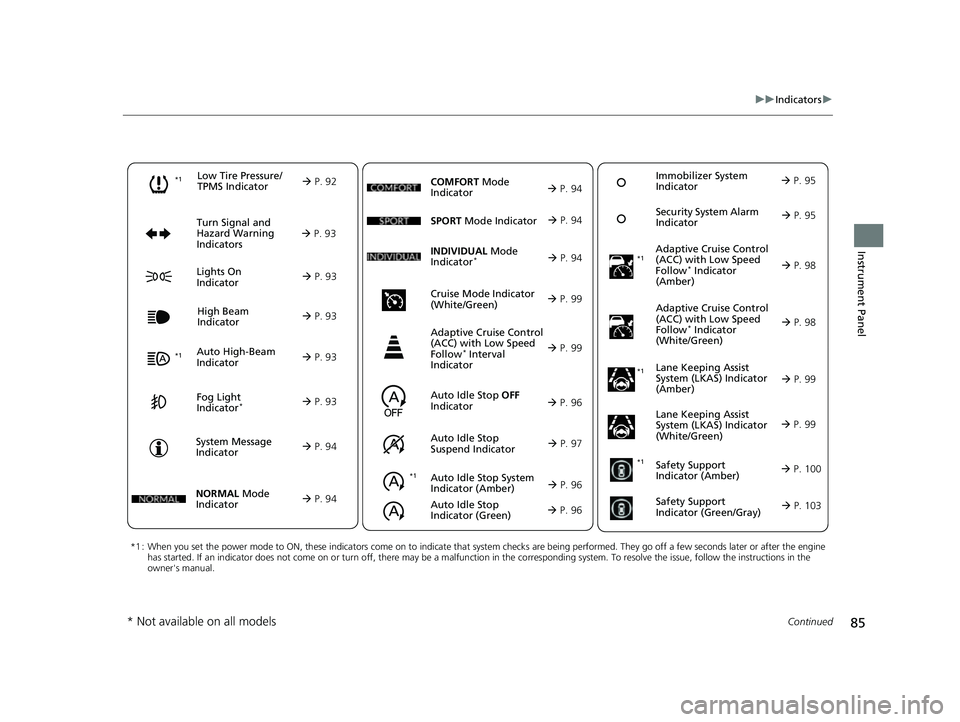
Auto High-Beam
Indicator
Low Tire Pressure/
TPMS Indicator
Turn Signal and
Hazard Warning
Indicators
Lights On
Indicator High Beam
Indicator
Fog Light
Indicator*
System Message
Indicator Adaptive Cruise Control
(ACC) with Low Speed
Follow
* Indicator
(Amber)
Lane Keeping Assist
System (LKAS) Indicator
(Amber)
Safety Support
Indicator (Green/Gray)
P. 92
Aut
o Idle Stop System
Indicato
r (Amber)
P. 96
P. 93
P. 93
P. 98
*1
P. 93
P. 93
P. 93 Immobilizer System
Indicator
P. 95
S
ec
urity System Alarm
Indicator
P. 95
P. 94
P. 99
P. 103
*1
Adaptive Cruise Control
(ACC) with Low Speed
Follow
* Indicator
(White/Green) P. 98
*1
Lane Keeping Assist
System (LKAS) Indicator
(White/Green)
P. 99
*1 *1Safety Support
Indicator (Amber)
P. 100
*1
NORMAL Mode
Indicator
P. 94
Auto Idle Stop OFF
Indicator
P. 96
Auto
Idle Stop
Suspend
Indicator P. 97
SPORT
Mode Indi
cator
P. 94
Cruise Mode Indicator
(White/Green)
P. 99
Adaptive Cruise Control
(ACC) with Low Speed
Follow
* Interval
Indicator
P. 99
Auto Idle Stop
Indicator (Green)
P. 96
COMFORT Mode
Indicator
P. 94
INDIVIDUAL Mode
Indica
tor* P. 94
* Not available on all models
23 ACURA INTEGRA-313S56000_03.book 85 ページ 2022年3月18日 金曜日 午前11 時47分
Page 95 of 740
93
uuIndicators u
Continued
Instrument Panel
IndicatorNameOn/BlinkingExplanation
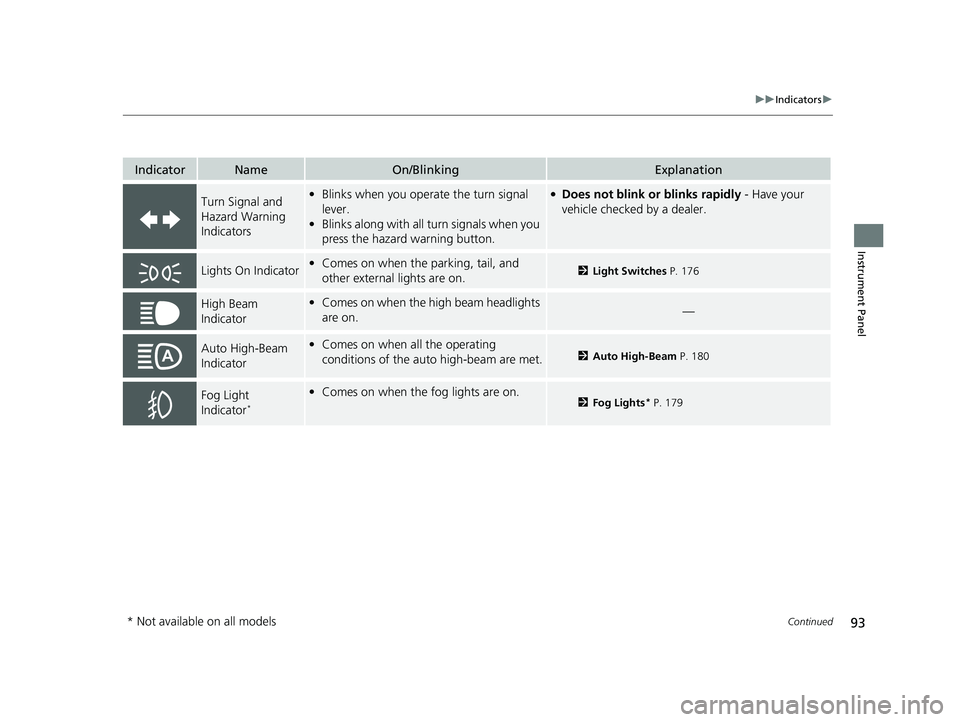
Turn Signal and
Hazard Warning
Indicators•Blinks when you operate the turn signal
lever.
• Blinks along with all turn signals when you
press the hazard warning button.●Does not blink or blinks rapidly - Have your
vehicle checked by a dealer.
Lights On Indicator• Comes on when the parking, tail, and
other external lights are on.2 Light Switches P. 176
High Beam
Indicator•Comes on when the high beam headlights
are on.—
Auto High-Beam
Indicator•Comes on when all the operating
conditions of the auto high-beam are met.2 Auto High-Beam P. 180
Fog Light
Indicator*
•Comes on when the fog lights are on.2 Fog Lights* P. 179
* Not available on all models
23 ACURA INTEGRA-313S56000_03.book 93 ページ 2022年3月18日 金曜日 午前11 時47分
Page 100 of 740

98
uuIndicators u
Instrument Panel
IndicatorNameOn/BlinkingExplanation
Adaptive Cruise
Control (ACC) with
Low Speed Follow
*
Indicator (Amber)
●Comes on if there is a problem with ACC
with Low Speed Follow*.
●Comes on while driving - Have your vehicle
checked by a dealer.
●Comes on if the ACC with Low Speed
Follow* is deactivated temporarily after the
battery has been disconnected, then re-
connected.
●Drive a short distance at more than 12 mph (20 km/h).
The indicator should go off. If it does not, have your
vehicle checked by a dealer.
●Indicator may come on temporarily when
the Maximum Load Limit is exceeded.
●ACC with Low Speed Follow* has been
automatically canceled.
●Make sure the total load is within the Maximum
Load Limit.
2 Maximum Load Limit P. 427●Stays on constantly - Have your vehicle checked
by a dealer.
Adaptive Cruise
Control (ACC) with
Low Speed Follow
*
Indicator
(White/Green)
●Lights up in white when you press the
button.
●Lights up in green when you press the up
or down the RES/+/SET/− switch.
2Adaptive Cruise Control (ACC) with Low
Speed Follow* P. 504
2 Adaptive Cruise Control (ACC)* P. 525
* Not available on all models
23 ACURA INTEGRA-313S56000_03.book 98 ページ 2022年3月18日 金曜日 午前11 時47分
Page 101 of 740
99
uuIndicators u
Continued
Instrument Panel
IndicatorNameOn/BlinkingExplanation
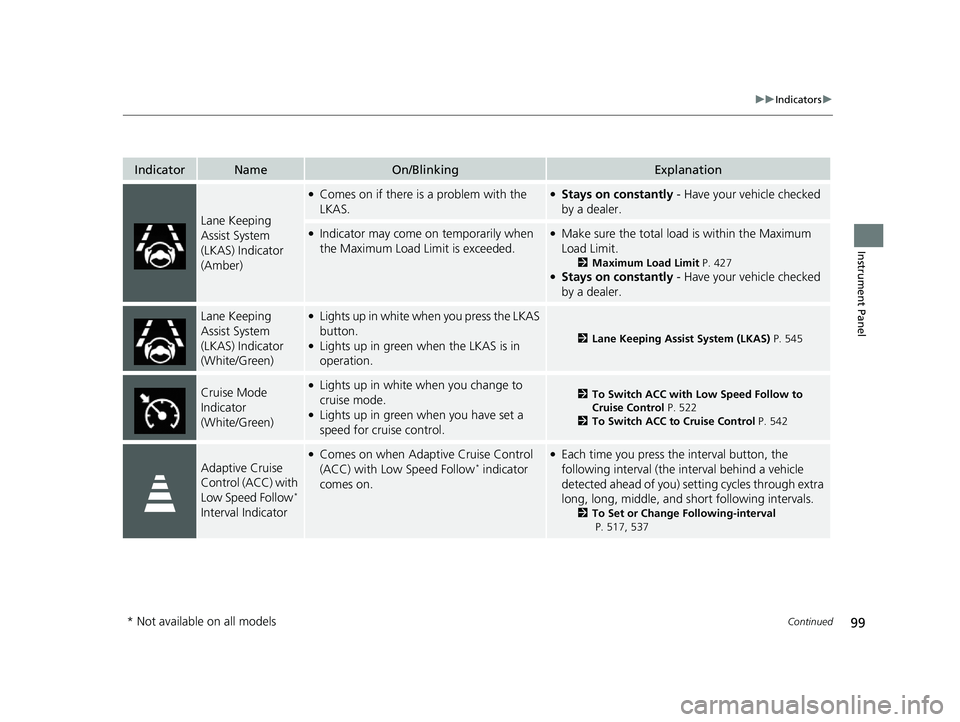
Lane Keeping
Assist System
(LKAS) Indicator
(Amber)
●Comes on if there is a problem with the
LKAS.●Stays on constantly - Have your vehicle checked
by a dealer.
●Indicator may come on temporarily when
the Maximum Load Limit is exceeded.●Make sure the total load is within the Maximum
Load Limit.
2 Maximum Load Limit P. 427●Stays on constantly - Have your vehicle checked
by a dealer.
Lane Keeping
Assist System
(LKAS) Indicator
(White/Green)●Lights up in white wh en you press the LKAS
button.
●Lights up in green when the LKAS is in
operation.2 Lane Keeping Assist System (LKAS) P. 545
Cruise Mode
Indicator
(White/Green)●Lights up in white when you change to
cruise mode.
●Lights up in green when you have set a
speed for cruise control.
2To Switch ACC with Low Speed Follow to
Cruise Control P. 522
2 To Switch ACC to Cruise Control P. 542
Adaptive Cruise
Control (ACC) with
Low Speed Follow
*
Interval Indicator
●Comes on when Adaptive Cruise Control
(ACC) with Low Speed Follow* indicator
comes on.
●Each time you press the interval button, the
following interval (the interval behind a vehicle
detected ahead of you) se tting cycles through extra
long, long, middle, and short following intervals.
2 To Set or Change Following-interval
P. 517, 537
* Not available on all models
23 ACURA INTEGRA-313S56000_03.book 99 ページ 2022年3月18日 金曜日 午前11 時47分
Page 105 of 740
103
uuIndicators u
Instrument Panel
IndicatorNameOn/BlinkingExplanation
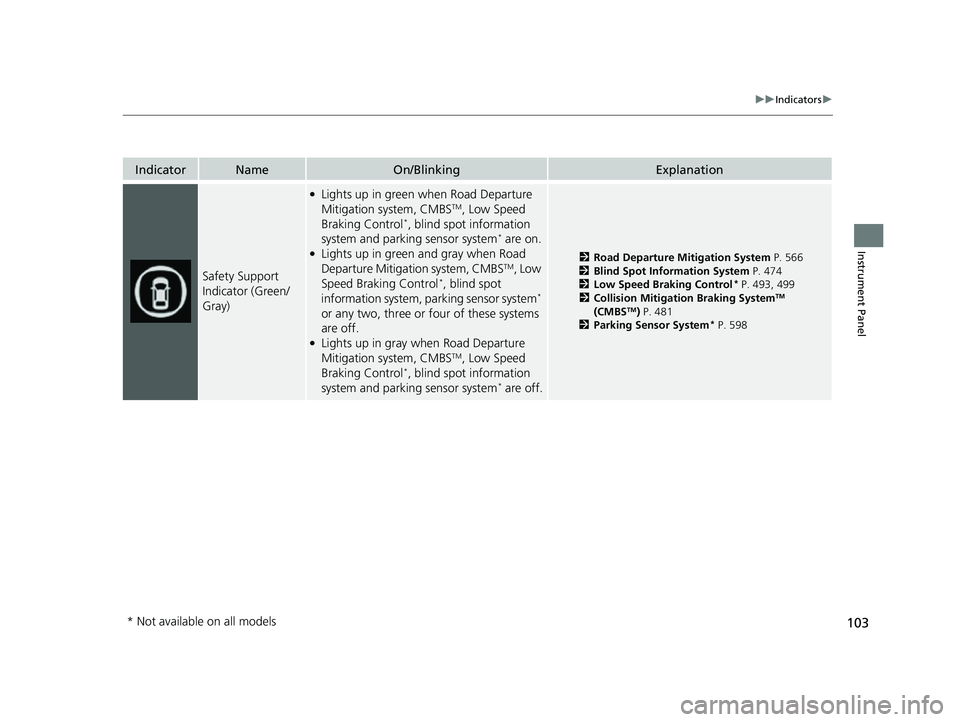
Safety Support
Indicator (Green/
Gray)
●Lights up in green when Road Departure
Mitigation system, CMBSTM, Low Speed
Braking Control*, blind spot information
system and parking sensor system* are on.●Lights up in green and gray when Road
Departure Mitigation system, CMBSTM, Low
Speed Braking Control*, blind spot
information system, parking sensor system*
or any two, three or four of these systems
are off.
●Lights up in gray when Road Departure
Mitigation system, CMBSTM, Low Speed
Braking Control*, blind spot information
system and parking sensor system* are off.
2 Road Departure Mitigation System P. 566
2 Blind Spot Information System P. 474
2 Low Speed Braking Control
* P. 493, 499
2 Collision Mitigation Braking SystemTM
(CMBSTM) P. 481
2 Parking Sensor System* P. 598
* Not available on all models
23 ACURA INTEGRA-313S56000_03.book 103 ページ 2022年3月18日 金曜日 午前11時47分
Page 119 of 740
Continued117
uuGauges and Displays uDriver Information Interface (Right Side Area)
Instrument Panel
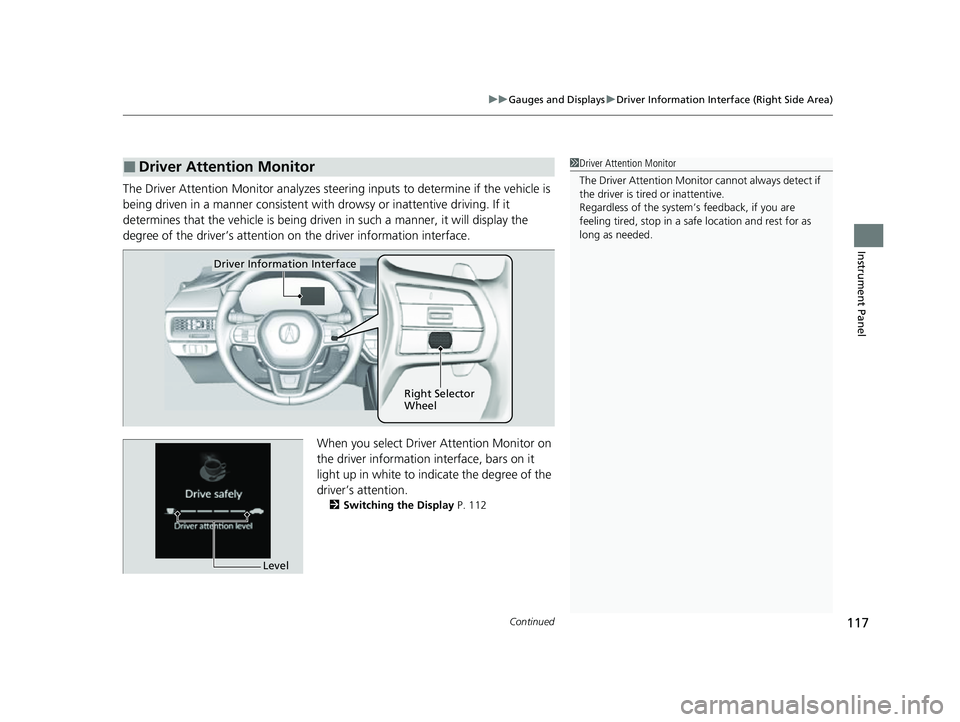
The Driver Attention Monitor an alyzes steering inputs to determine if the vehicle is
being driven in a manner consistent with drowsy or inattentive driving. If it
determines that the vehicle is being driven in such a manner, it will display the
degree of the driver’s attention on the driver information interface.
When you select Driver Attention Monitor on
the driver information in terface, bars on it
light up in white to indicate the degree of the
driver’s attention.
2 Switching the Display P. 112
■Driver Attention Monitor1Driver Attention Monitor
The Driver Attenti on Monitor cannot always detect if
the driver is tired or inattentive.
Regardless of the system’s feedback, if you are
feeling tired, stop in a safe location and rest for as
long as needed.
Driver Information Interface
Right Selector
Wheel
Level
23 ACURA INTEGRA-313S56000_03.book 117 ページ 2022年3月18日 金曜日 午前11時47分
Page 120 of 740
118
uuGauges and Displays uDriver Information Interface (Right Side Area)
Instrument Panel
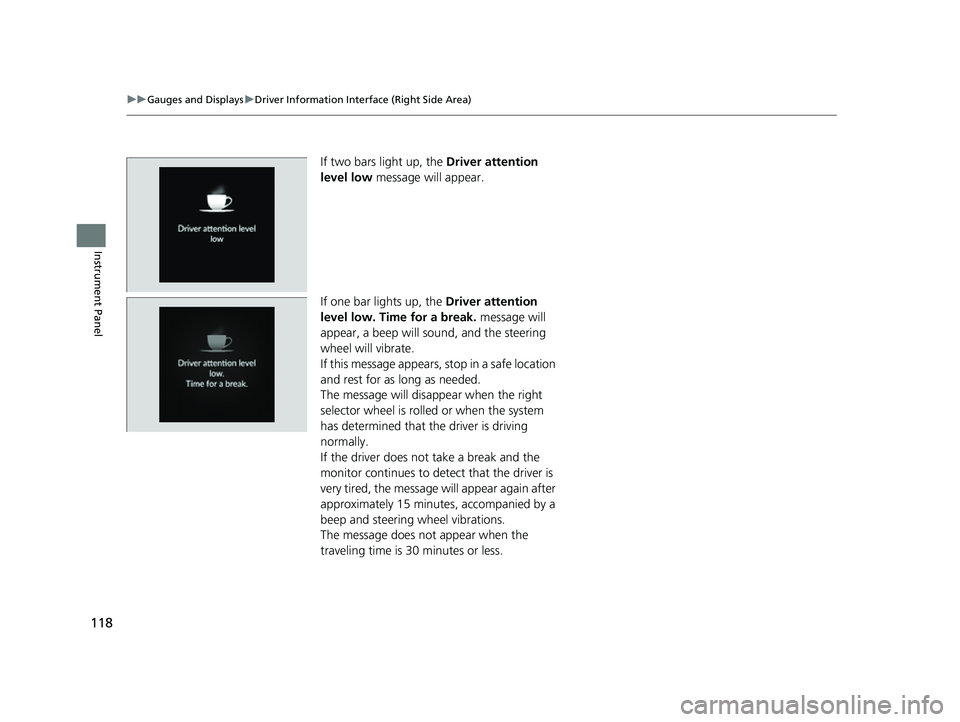
If two bars light up, the Driver attention
level low message will appear.
If one bar lights up, the Driver attention
level low. Time for a break. message will
appear, a beep will sound, and the steering
wheel will vibrate.
If this message appears, stop in a safe location
and rest for as long as needed.
The message will disa ppear when the right
selector wheel is rolled or when the system
has determined that the driver is driving
normally.
If the driver does not take a break and the
monitor continues to dete ct that the driver is
very tired, the message will appear again after
approximately 15 minutes, accompanied by a
beep and steering wheel vibrations.
The message does not appear when the
traveling time is 30 minutes or less.
23 ACURA INTEGRA-313S56000_03.book 118 ページ 2022年3月18日 金曜日 午前11時47分
Page 126 of 740
uuGauges and Displays uDriver Information Interface (Right Side Area)
124
Instrument Panel
Display the adjustment for instrument panel brightness.
When the power mode is in ON, you can use the right selector wheel to adjust
instrument panel brightness.
Brighten: Roll the right selector wheel up.
Dim: Roll the right selector wheel down.
Press the right selector wheel to exit.
■Brightness1 Brightness
The brightness of the gauge is automatically adjusted
depending on the ambient brightness.
•The brightness dims when the ambient light is
dark.
•The brightness brightens when the ambient light is
bright.
You can change the setting even when the ambient
lighting is bright, but the brightness of the gauge
won’t change.
23 ACURA INTEGRA-313S56000_03.book 124 ページ 2022年3月18日 金曜日 午前11時47分
Page 132 of 740
130
uuGauges and Displays uDriver Information Interface (Right Side Area)
Instrument Panel
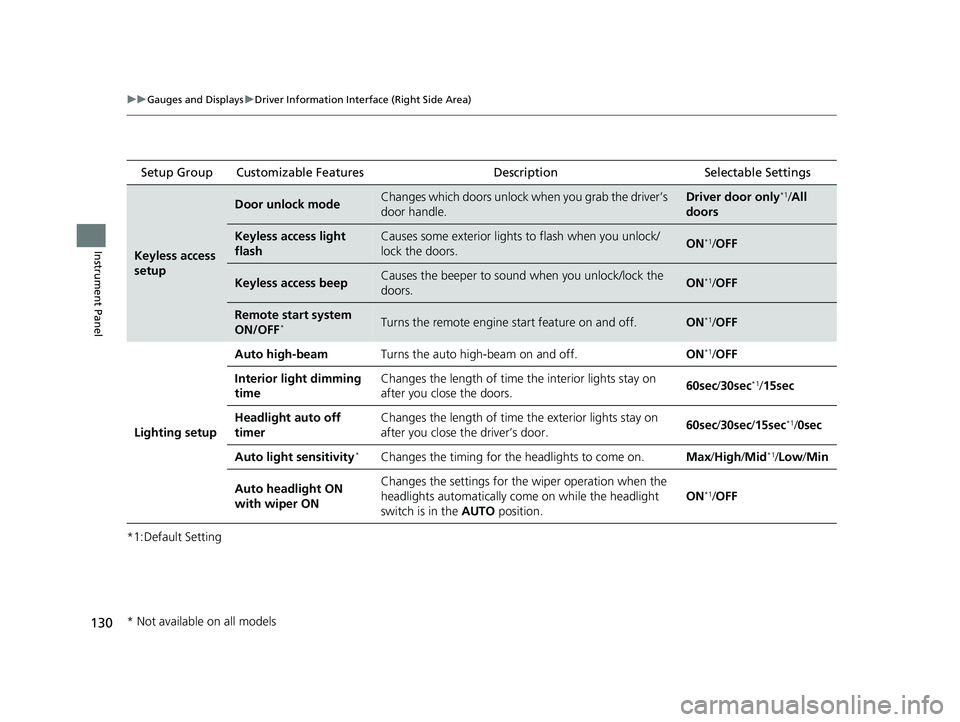
*1:Default Setting Setup Group Customizable Features
Description Selectable Settings
Keyless access
setup
Door unlock modeChanges which doors unlock when you grab the driver’s
door handle.Driver door only*1/All
doors
Keyless access light
flashCauses some exterior lights to flash when you unlock/
lock the doors.ON*1/ OFF
Keyless access beepCauses the beeper to soun d when you unlock/lock the
doors.ON*1/ OFF
Remote start system
ON/OFF*Turns the remote engine start feature on and off.ON*1/OFF
Lighting setup
Auto high-beamTurns the auto high-beam on and off.ON*1/OFF
Interior light dimming
timeChanges the length of time the interior lights stay on
after you close the doors.60sec /30sec*1/15sec
Headlight auto off
timerChanges the length of time the exterior lights stay on
after you close the driver’s door.60sec /30sec /15sec*1/0sec
Auto light sensitivity*Changes the timing for the headlights to come on.Max/High/ Mid*1/Low /Min
Auto headlight ON
with wiper ONChanges the settings for th e wiper operation when the
headlights automatically come on while the headlight
switch is in the AUTO position.
ON*1/OFF
* Not available on all models
23 ACURA INTEGRA-313S56000_03.book 130 ページ 2022年3月18日 金曜日 午前11時47分
Page 133 of 740
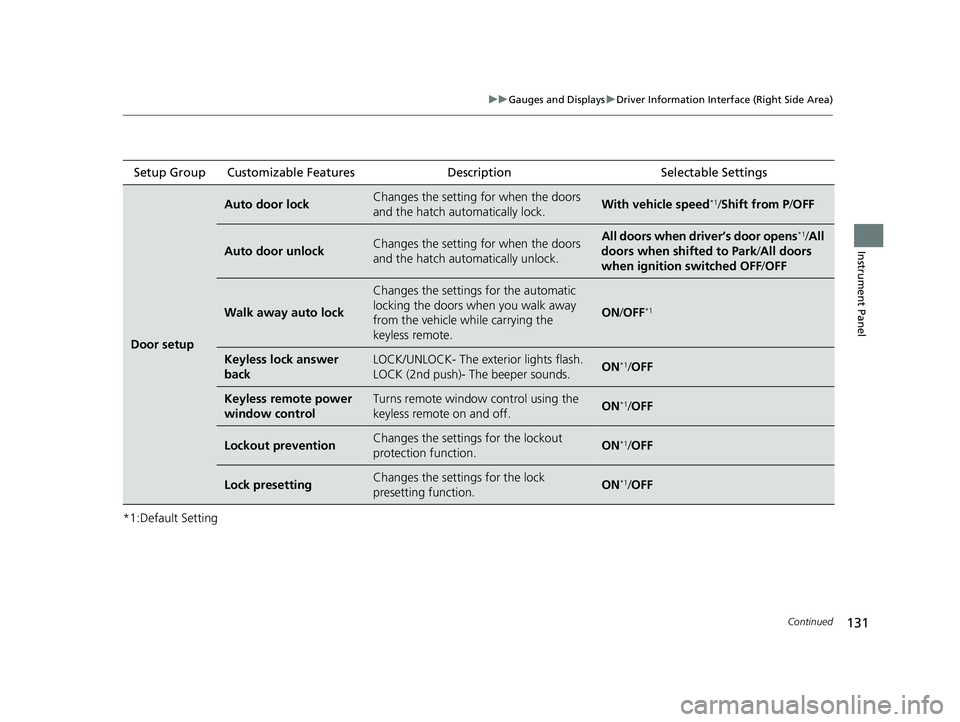
131
uuGauges and Displays uDriver Information Interface (Right Side Area)
Continued
Instrument Panel
*1:Default SettingSetup Group Customizable Features
Description Selectable Settings
Door setup
Auto door lockChanges the setting for when the doors
and the hatch automatically lock.With vehicle speed*1/Shift from P/ OFF
Auto door unlockChanges the setting for when the doors
and the hatch automatically unlock.All doors when driver’s door opens*1/All
doors when shifted to Park /All doors
when ignition switched OFF /OFF
Walk away auto lock
Changes the settings for the automatic
locking the doors when you walk away
from the vehicle while carrying the
keyless remote.
ON /OFF*1
Keyless lock answer
backLOCK/UNLOCK- The exte rior lights flash.
LOCK (2nd push)- The beeper sounds.ON*1/ OFF
Keyless remote power
window controlTurns remote window control using the
keyless remote on and off.ON*1/ OFF
Lockout preventionChanges the settings for the lockout
protection function.ON*1/OFF
Lock presettingChanges the settings for the lock
presetting function.ON*1/OFF
23 ACURA INTEGRA-313S56000_03.book 131 ページ 2022年3月18日 金曜日 午前11時47分