brake ACURA INTEGRA 2023 Owner's Guide
[x] Cancel search | Manufacturer: ACURA, Model Year: 2023, Model line: INTEGRA, Model: ACURA INTEGRA 2023Pages: 740, PDF Size: 22.94 MB
Page 209 of 740

Continued207
uuInterior Convenience Items uStorage Items
Controls
The tie-down anchors on the cargo area floor
can be used to install a net for securing items.
■Tie-down Anchors1Tie-down Anchors
Do not let anyone access items in the cargo area
while driving. Loose items can cause injury if you have
to brake hard.
Anchor
Anchor
23 ACURA INTEGRA-313S56000_03.book 207 ページ 2022年3月18日 金曜日 午前11時47分
Page 211 of 740

209
uuInterior Convenience Items uStorage Items
Controls
The cargo area cover can be used to cover the cargo space.
■To remove the cargo area cover
1.Open the hatch.
2. Release the cargo area cover from the hook
of each side.
3. Remove the cargo area cover by carefully
pulling out the pins on the lower edge of
cargo area cover.
Reverse this procedure to install the cargo
area cover.
■Cargo Area Cover1 Cargo Area Cover
Do not access parcels in the cargo area while driving.
This may cause injury if you have to brake hard.
Do not stack objects higher than the top of the seat
in the cargo area. They could block your view and be
thrown about the vehicle during a sudden stop.
To prevent cargo area cover damage:
•Do not place items on the cargo area cover.
•Do not put weight on the cargo area cover.
Cargo Area Cover
Pin
Hook
23 ACURA INTEGRA-313S56000_03.book 209 ページ 2022年3月18日 金曜日 午前11時47分
Page 361 of 740
359Continued
Features
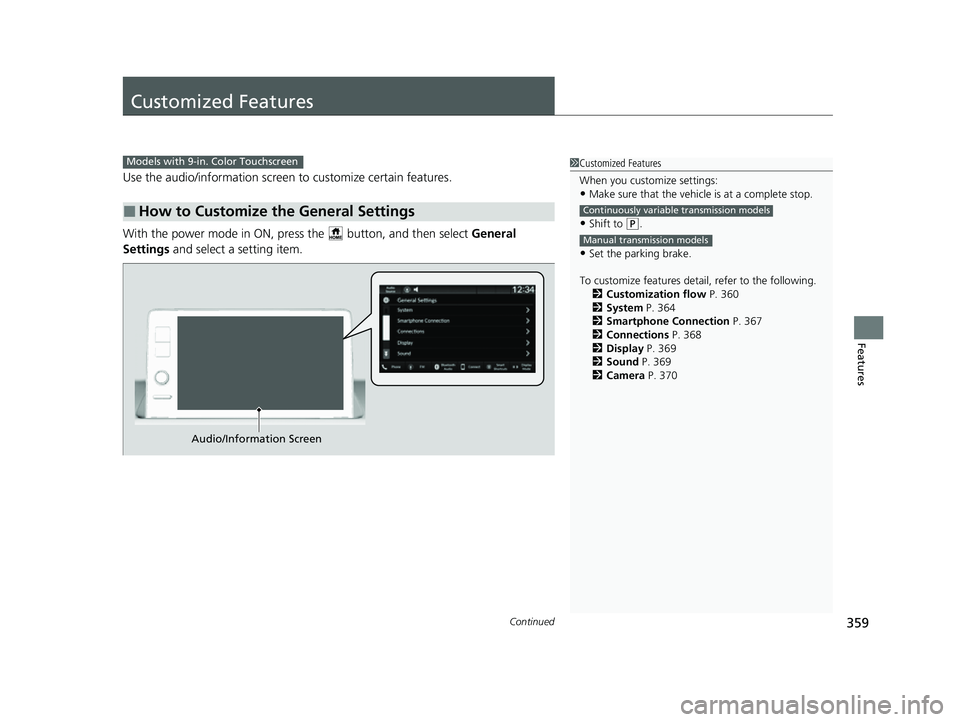
Customized Features
Use the audio/information screen to customize certain features.
With the power mode in ON, pre ss the button, and then select General
Settings and select a setting item.
■How to Customize the General Settings
1Customized Features
When you customize settings:
•Make sure that the vehicle is at a complete stop.
•Shift to (P.
•Set the parking brake.
To customize features detail, refer to the following. 2 Customization flow P. 360
2 System P. 364
2 Smartphone Connection P. 367
2 Connections P. 368
2 Display P. 369
2 Sound P. 369
2 Camera P. 370
Continuously variable transmission models
Manual transmission models
Models with 9-in. Color Touchscreen
Audio/Information Screen
23 ACURA INTEGRA-313S56000_03.book 359 ページ 2022年3月18日 金曜日 午前11時47分
Page 427 of 740

Continued425
uuBefore Driving uDriving Preparation
Driving
• Store or secure all items on board properly.
u Carrying too much cargo, or improperly storing it, can affect your vehicle’s
handling, stability, sto pping distance, and tires, and make it unsafe.
2Maximum Load Limit P. 427
•Do not pile items higher than the seat height.
u They can block your view and may be thrown forward in the event of sudden
braking.
• Do not place anything in the front seat footwells. Make sure to secure the floor
mat.
u An object or unsecured floor mat can in terfere with your brake and accelerator
pedal operation while driving.
• If you have any animals on board, do not let them move around in the vehicle.
u They may interfere with driv ing and a crash could occur.
• Securely close and lock all doors and the hatch.
2 Locking/Unlocking the Doors from the Inside P. 158
•Adjust your seating position properly.
u Adjust the front h ead restraint, too.
2Seats P. 191
2 Adjusting the Front Head Restraint Positions P. 198
•Adjust the mirrors and steering wheel properly.
u Adjust them while sitting in the proper driving position.
2 Mirrors P. 189
2 Adjusting the Steering Wheel P. 188
■Interior Checks1Interior Checks
The headlight aim is set by the factory, and does not
need to be adjusted. Howeve r, if you regularly carry
heavy items in the cargo area, have the aiming
readjusted at a dealer or by a qualified technician.
23 ACURA INTEGRA-313S56000_03.book 425 ページ 2022年3月18日 金曜日 午前11時47分
Page 432 of 740

430
Driving
When Driving
Starting the Engine
1.Make sure the parking brake is applied.
u The parking brake and brake system
indicator (red) comes on for 30 seconds
when you pull up the electric parking
brake switch.
2. Check that the tr ansmission is in
(P, then
depress the brake pedal.
u Although it is possible to start the vehicle
in
(N, it is safer to start it in (P.
2. Check that the shift lever is in
(N. Then
depress the brake pedal with your right
foot, and the clutch pedal with your left
foot.
u The clutch pedal must be fully depressed
to start the engine.
1Starting the Engine
Keep your foot firmly on the brake pedal when
starting the engine.
The engine is harder to st art in cold weather and in
thinner air found at altit udes above 8,000 feet (2,400
meters).
When starting the engine in cold weather, turn off all
electrical accessories such as the lights, climate
control system, and rear de fogger in order to reduce
battery drain.
If you live in a region where winter is extremely cold,
an engine block heater will improve starting and
warming of the engine. Cons ult a dealer for details.
If the exhaust system sounds abnormal or you can
smell exhaust gas inside the vehicle, have your vehicle
checked by a dealer. There may be a problem with
the engine or exhaust system.
Bring the keyless remote close to the ENGINE
START/STOP button if the batte ry in the keyless
remote is weak.
2 If the Keyless Remote Battery is Weak P. 691
The engine may not start if the keyless remote is
subjected to strong radio waves.
Do not hold the ENGINE START/STOP button to
start the engine.
If the engine does not start, wait at least 30 seconds
before starting the engine again.
Electric Parking Brake Switch
Brake Pedal
Continuously variable transmission models
Brake Pedal
Clutch Pedal
Manual transmission models
23 ACURA INTEGRA-313S56000_03.book 430 ページ 2022年3月18日 金曜日 午前11時47分
Page 437 of 740

Continued435
uuWhen Driving uStarting the Engine
Driving
1. Depress and hold the brake pedal, then press the ENGINE START/STOP button.
2. Keeping your right foot on the br ake pedal, put the transmission into
(D. Select
(R when reversing.
3. With the parking brake applied, release the brake pedal and gently depress the
accelerator pedal.
u Make sure the parking brake and brake system indicator (red) goes off.
2 Parking Brake P. 584
■Starting to Drive1Starting to Drive
Engine Restart Function
If the engine stalls, full y depress the clutch pedal
within three seconds. The engine may automatically
restart under certain conditi ons. Otherwise, follow
the standard procedure. 2 Starting the Engine P. 430
The engine stops when th e transmission is taken out
of
( P before the ENGINE START/STOP button is
pressed. Follow step 1 when starting to drive.
You can also release the parking brake by pressing
the electric parking brake sw itch while depressing the
brake pedal.
When facing downhill, you can start your vehicle
more smoothly by manually releasing it with the
electric parking brake switch than by releasing it with
the accelerator pedal.
Manual transmission models
Continuously variable transmission models
When the engine was started using the button on
the keyless remote
All models
Continuously variable transmission models
When the engine was started using the button on the keyless remote
When the engine was started in any case
23 ACURA INTEGRA-313S56000_03.book 435 ページ 2022年3月18日 金曜日 午前11時47分
Page 438 of 740

uuWhen Driving uStarting the Engine
436
Driving
■Hill start assist system
Hill start assist keeps the brake engaged br iefly to help prevent the vehicle from
rolling on inclines as you move your fo ot from the brake pedal to the accelerator.
Put the transmission into
(D or (S when facing uphill, or (R when facing downhill,
then release the brake pedal.
Depress the clutch pedal, and shift to on e of the forward gears when facing uphill,
or
(R when facing downhill, then release the brake pedal.
1 Hill start assist system
Hill start assist may not prevent the vehicle from
rolling downhill on a very steep or slippe ry slope, and
will not operate on small inclines.
Hill start assist is not a replacement for the parking
brake.
Hill start assist will operate even when VSA ® is
switched off.
Continuously variable transmission models
Manual transmission models
23 ACURA INTEGRA-313S56000_03.book 436 ページ 2022年3月18日 金曜日 午前11時47分
Page 440 of 740

438
uuWhen Driving uPrecautions While Driving
Driving
Precautions While Driving
Avoid driving in deep water and on flooded roads. This can damage the engine or
driveline, or cause elec trical component failure.
If there is a strong impact with something under the vehicle, stop in a safe location.
Check the underside of the vehicle for damage or any fluid leaks.
■In Rain
■Other Precautions
1 Precautions While Driving
NOTICE
Do not operate the shift lever while pressing the
accelerator pedal. You could damage the
transmission.
NOTICE
If you repeatedly turn the steering wheel at an
extremely low speed, or hold the steering wheel in
the full left or right position for a while, the electric
power steering (EPS) system heats up. The system
goes into a protective mode, and limits its
performance. The steering wheel becomes harder
and harder to operate. Once the system cools down,
the EPS system is restored.
Repeated operation under these conditions can
eventually damage the system.
If the power mode is set to ACCESSORY while
driving, the engine will shut down and all steering
and brake power assist functi ons will stop, making it
difficult to control the vehicle.
Do not select
( N while driving as you will lose engine
braking (and accelera tion) performance.
During the first 600 miles (1,000 km) of operation,
avoid sudden acceleration or full throttle operation so
as not to damage the engine or powertrain.
Continuously variable transmission models
23 ACURA INTEGRA-313S56000_03.book 438 ページ 2022年3月18日 金曜日 午前11時47分
Page 441 of 740

439
uuWhen Driving uContinuously Variable Transmission*
DrivingContinuously Variable Transmission*
When the engine runs at higher idle speeds, the creeping force increases.
Keep the brake pedal firmly depressed when stopped.
Quickly depressing the accelerator peda l while driving uphill may cause the
transmission to drop to a lower ratio, unexpectedly increasing vehicle speed.
Depress the accelerator pedal carefully, es pecially on slippery roads and curves.
1Precautions While Driving
Avoid hard braking for the first 200 miles (300 km)
after purchasing your new vehicle or replacing the
brake pads or rotors, to allow for proper break-in.
NOTICE
The following can damage the under spoilerY
•Parking the vehicle by a parking block•Parallel parking along the road shoulder
•Driving towards the bottom of a hill
•Driving up or down to a different surface level
(such as a road shoulder)
•Driving on a rutted or bumpy road
•Driving on a road with potholes
■Creeping
■Kickdown
* Not available on all models
23 ACURA INTEGRA-313S56000_03.book 439 ページ 2022年3月18日 金曜日 午前11時47分
Page 442 of 740

440
uuWhen Driving uShifting
Driving
Shifting
Change the shift position in accordance with your driving needs.
■Shift positions
Continuously variable transmission models
1Shifting
You cannot change the pow er mode from ON to
VEHICLE OFF unless the shift position is in
( P.
The vehicle may move ve ry slightly even in
(N while
the engine is cold.
Depress the brake pe dal firmly and, when necessary,
apply the parking brake.
Reverse
Used when reversing
Drive
Used:
●For normal driving●When temporarily driving in the
7-speed manual shift mode
Park
Used when parking or starting the
engine
Neutral
Transmission is not locked
Release Button
Drive (SH
Used:
●For better acceleration●To increase engine braking●When going up or down hills●When driving in the 7-speed
manual shift mode
23 ACURA INTEGRA-313S56000_03.book 440 ページ 2022年3月18日 金曜日 午前11時47分