brake ACURA INTEGRA 2023 Owner's Manual
[x] Cancel search | Manufacturer: ACURA, Model Year: 2023, Model line: INTEGRA, Model: ACURA INTEGRA 2023Pages: 740, PDF Size: 22.94 MB
Page 111 of 740
Continued109
uuGauges and Displays uDriver Information Interface (Left Side Area)
Instrument Panel
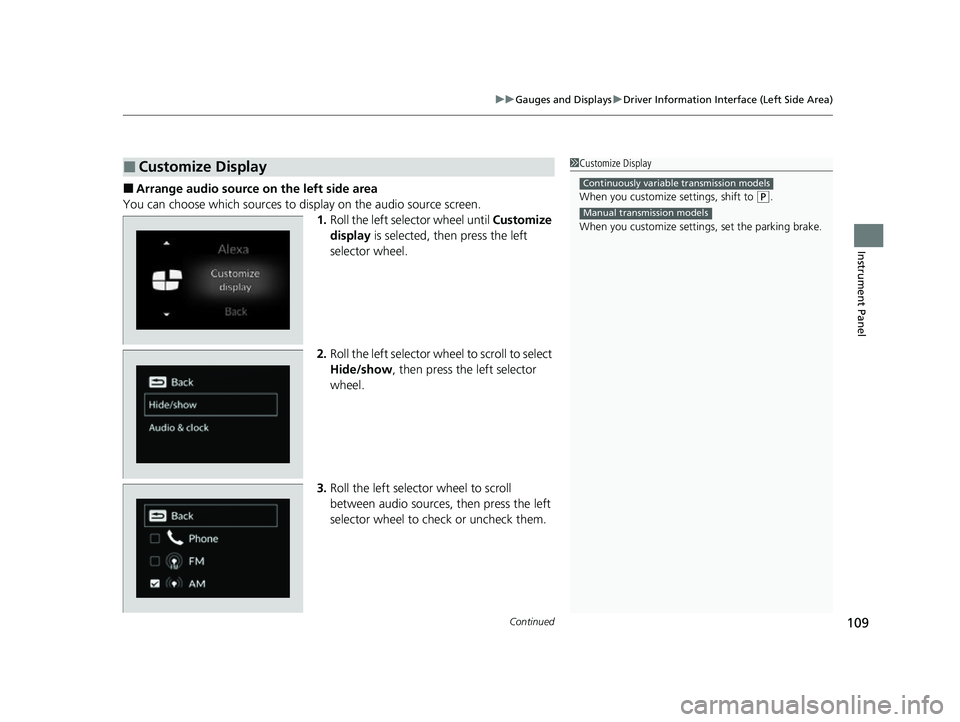
■Arrange audio source on the left side area
You can choose which sources to display on the audio source screen. 1.Roll the left selector wheel until Customize
display is selected, then press the left
selector wheel.
2. Roll the left selector wheel to scroll to select
Hide/show , then press the left selector
wheel.
3. Roll the left selector wheel to scroll
between audio sources, then press the left
selector wheel to check or uncheck them.
■Customize Display1Customize Display
When you customize settings, shift to
(P.
When you customize setti ngs, set the parking brake.
Continuously variable transmission models
Manual transmission models
23 ACURA INTEGRA-313S56000_03.book 109 ページ 2022年3月18日 金曜日 午前11時47分
Page 123 of 740
Continued121
uuGauges and Displays uDriver Information Interface (Right Side Area)
Instrument Panel
Indicates the status of the Road Departure Mitigation system, CMBSTM, Low Speed
Braking Control*, blind spot information system and parking sensor system* such as
On, Off, or Failure, by color and letters.
The following colors indicate the status of any of the above mentioned systems:
• Green: The system is on.
• Gray: The system is off.
• Amber: There is a problem with the system.
■Safety Support1Safety Support
If a system is indicated by the color amber, have your
vehicle checked by a dealer immediately.
To turn on or off each system, first press the right
selector wheel to switch displays. From the next
display you can select which system to turn on or off. 2 Road Departure Mitigation System P. 566
2 Blind Spot Information System P. 474
2 Low Speed Braking Control
* P. 493, 499
2 Collision Mitigation Braking SystemTM
(CMBSTM) P. 481
2 Parking Sensor System* P. 598
You can also confirm the st atus of each function by
the color of the safe ty support indicator.
2 Safety Support Indicator (Amber) P. 100
2 Safety Support Indicator (Green/Gray)
P. 103
Even when the Low Speed Braking Control icon is
green, if the Rear Sensor Setting is turned off, the
brake assist will not operate when reversing.
2 Customized Features P. 359
Even when the Parking Sensor System icon is green,
if the Rear Sensor Setting is turned off, the rear
parking sensor will not operate when reversing.
2 Customized Features P. 359
Models with Low Speed Braking Control
* Not available on all models
23 ACURA INTEGRA-313S56000_03.book 121 ページ 2022年3月18日 金曜日 午前11時47分
Page 127 of 740
Continued125
uuGauges and Displays uDriver Information Interface (Right Side Area)
Instrument Panel
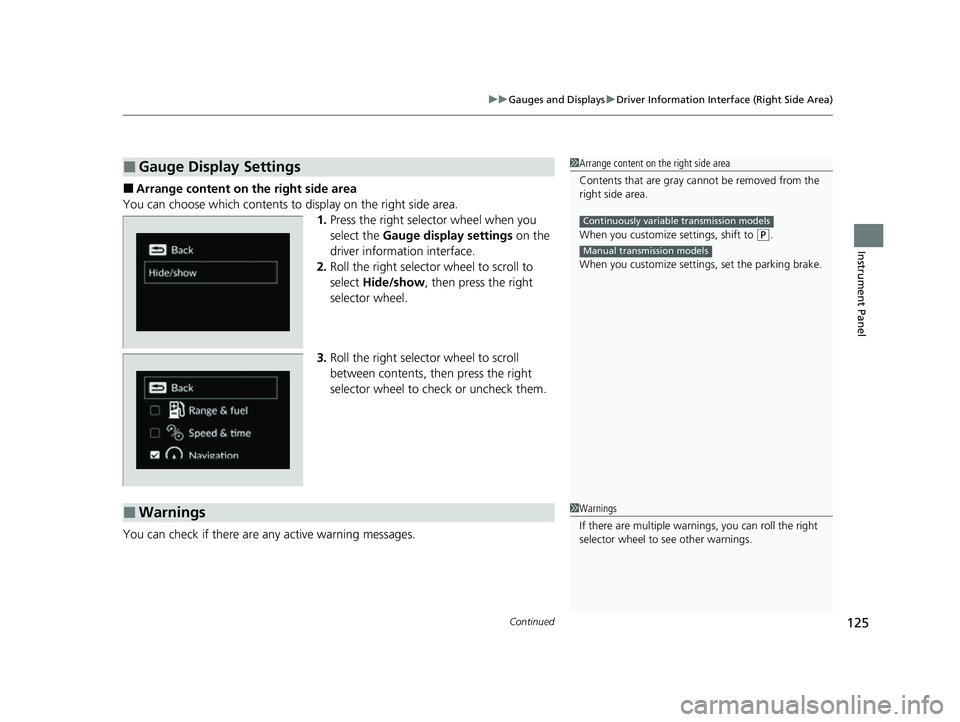
■Arrange content on the right side area
You can choose which contents to display on the right side area. 1.Press the right selector wheel when you
select the Gauge display settings on the
driver information interface.
2. Roll the right selector wheel to scroll to
select Hide/show , then press the right
selector wheel.
3. Roll the right selector wheel to scroll
between contents, then press the right
selector wheel to check or uncheck them.
You can check if there are any active warning messages.
■Gauge Display Settings1 Arrange content on the right side area
Contents that are gray ca nnot be removed from the
right side area.
When you customize settings, shift to
( P.
When you customize setti ngs, set the parking brake.
Continuously variable transmission models
Manual transmission models
■Warnings1Warnings
If there are multiple warnings, you can roll the right
selector wheel to see other warnings.
23 ACURA INTEGRA-313S56000_03.book 125 ページ 2022年3月18日 金曜日 午前11時47分
Page 137 of 740

135
uuGauges and Displays uHead-Up Display*
Continued
Instrument Panel
Head-Up Display*
Shows the current mode for ACC with Low Speed Follow*, LKAS, and Traffic Jam
Assist*, traffic sign recognition system, or tu rn-by-turn directions along with the
vehicle speed. You can choose which item to be displayed using the driver
information interface. They are displayed when the power mode is in ON.
The display also shows the following
warnings.
•Lane Departure Warning: When your
vehicle is too close to the traffic lane lines,
the lane departure warning appears.
2 Lane Keeping Assist System (LKAS)
P. 545
• Head-up Warning Lights:
Flash when the BRAKE message appears
on the driver information interface.
2 Collision Mitigation Braking SystemTM
(CMBSTM) P. 481
2 Low Speed Braking Control
P. 493, 499
2 Adaptive Cruise Control (ACC) with
Low Speed Follow
* P. 504
2 Adaptive Cruise Control (ACC)* P. 525
Lane Departure Warning
* Not available on all models
23 ACURA INTEGRA-313S56000_03.book 135 ページ 2022年3月18日 金曜日 午前11時47分
Page 167 of 740
165Continued
Controls
Security System
Immobilizer System
This system prevents a key that has not been pre-registered from starting the
engine.
Pay attention to the follo wing when pressing the ENGINE START/STOP button:
• Do not allow objects that emit strong radio waves near the ENGINE START/
STOP button.
• Make sure the key is not covered by or touching a metal object.
• Do not bring a key from another vehicle’s immobilizer system near the ENGINE
START/STOP button.
• Do not put the key near magnetic items. Electronic devices, such as televisions
and audio systems emit strong magnetic fields. Note that even a key chain can
become magnetic.
Security System Alarm
The security system alarm activates when the hatch, hood or doors are forcibly
opened. The alarm does not activate if th e hatch or doors are opened with the key,
remote transmitter or keyless access system.
However, the alarm activates if a door is opened with the key and then the
transmission is taken out of
(P (continuously variable transmission models) or the
hood is opened before the power mode is set to ON.
1 Immobilizer System
NOTICE
Leaving the key in the vehicl e can result in theft or
accidental movement of the vehicle.
Always take the key with you whenever you leave the
vehicle unattendedM
Do not alter the system or add other devices to itM
Doing so may damage the system and make your
vehicle inoperableM
Apply and hold the brake pedal before turning the
vehicle on the first time after the battery has been
disconnectedM
Canadian models
1 Security System Alarm
Do not alter the system or add other devices to it.
Doing so may damage the system and make your
vehicle inoperable.
The security system alarm continues for a maximum
of two minutes until the security system alarm
deactivates.
23 ACURA INTEGRA-313S56000_03.book 165 ページ 2022年3月18日 金曜日 午前11時47分
Page 174 of 740

172
Controls
Operating the Switches Around the Steering Wheel
ENGINE START/STOP Button
*1:Manual transmission models
■Changing the Power Mode1ENGINE START/STOP Button
ENGINE START/STOP Button Operating Range
You can start the engine when the keyless remote is
inside the vehicle.
The engine may also start if the keyless remote is
close to the door or window, ev en if it is outside the
vehicle.
ON mode:
The ENGINE START/STOP button is on (in red), if the
engine is running.
If the battery of the keyless remote is getting low, the
engine may not start when you push the ENGINE
START/STOP button. If the engi ne does not start,
refer to the following link.
2 If the Keyless Remote Battery is Weak
P. 691
Operating Range
Continuously Variable Transmission Manual Transmission
VEHICLE OFF (LOCK)
The button is off.
The steering wheel is locked
*1.
The power to all electrical
components is turned off.
Press the button without the
transmission in
( P.
Press the button with the
transmission in
( P. Press the button.
Without pressing
the clutch pedal
Without pressing
the brake pedal ACCESSORY
The button blinks (in red).
Operate the audio system and
other accessories in this position.
ON
The button blinks (in red).
All electrical components can be
used.
Put the transmission into (P.
23 ACURA INTEGRA-313S56000_03.book 172 ページ 2022年3月18日 金曜日 午前11時47分
Page 178 of 740

176
uuOperating the Switches Around the Steering Wheel uLight Switches
Controls
Light Switches
Rotating the light switch turns the lights on
and off, regardless of the power mode
setting.
■High beams
Push the lever forward until you hear a click.
■Low beams
When in high beams, pull the lever back to
return to low beams.
■Flashing the high beams
Pull the lever back, and release it.
■Lights off
Turn the lever to OFF either when:
• The shift lever is in
(P (continuously
variable transmission).
• The parking brake is applied.
To turn the lights on ag ain, turn the lever to
OFF to cancel the lights off mode. Even if you
do not cancel the lights off mode, the lights
come on automatically when:
• The transmission is taken out of
(P
(continuously variable transmission) and the
parking brake is released.
• The vehicle starts to move.
■Manual Operation1Light Switches
If you leave the power mode in VEHICLE OFF while
the lights are on, a chime sounds when the driver’s
door is opened.
When the lights are on, the lights on indicator in the
instrument pane l will be on.
2 Lights On Indicator P. 93
Do not leave the lights on when the engine is off
because it will cause the battery to discharge.
If you sense that the le vel of the headlights is
abnormal, have the vehicl e inspected by a dealer.
Turns on parking lights, side
marker, tail, and rear license
plate lights
Turns on headlights, side
marker, parking lights, tail, and
rear license plate lights
High Beams
Flashing the high beams
Low Beams
23 ACURA INTEGRA-313S56000_03.book 176 ページ 2022年3月18日 金曜日 午前11時47分
Page 181 of 740
179
uuOperating the Switches Around the Steering Wheel uFog Lights*
Controls
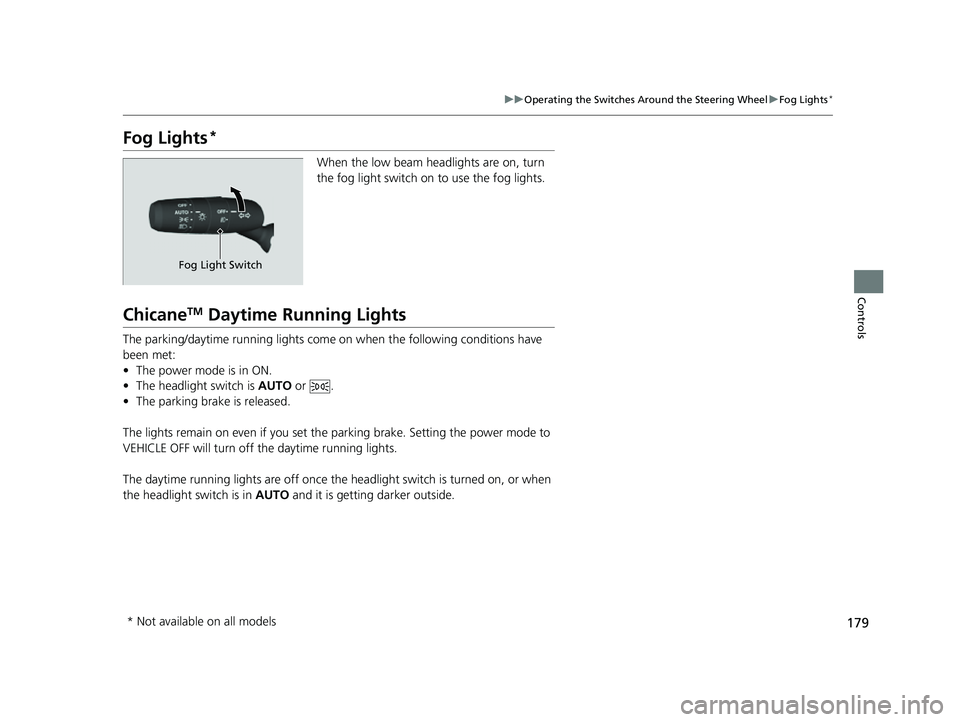
Fog Lights*
When the low beam headlights are on, turn
the fog light switch on to use the fog lights.
ChicaneTM Daytime Running Lights
The parking/daytime running lights come on when the following conditions have
been met:
• The power mode is in ON.
• The headlight switch is AUTO or .
• The parking brake is released.
The lights remain on even if you set th e parking brake. Setting the power mode to
VEHICLE OFF will turn off the daytime running lights.
The daytime running lights are off once the h eadlight switch is turned on, or when
the headlight switch is in AUTO and it is getting darker outside.
Fog Light Switch
* Not available on all models
23 ACURA INTEGRA-313S56000_03.book 179 ページ 2022年3月18日 金曜日 午前11時47分
Page 189 of 740

187
uuOperating the Switches Around the Steering Wheel uDriving Position Memory System*
Controls
1. Set the power mode to ON. Adjust the
driver’s seat to the desired position.
2. Press the SET button.
u The memory button i ndicator lights will
come on.
3. Press the memory button
(1 or (2 within
five seconds of pressing the SET button.
u Once the seat position has been
memorized, you will hear the double-
beep.
1. Put the transmission into
(P.
2. Press a memory button (
(1 or (2).
1. Apply the parking brake.
2. Press a memory button (
(1 or (2).
The seat will automatically move to the
memorized position.
■Storing a Position in Memory1 Storing a Position in Memory
After you press the SET button, the storing operation
will be canceled when:
•You do not press the memory button within five
seconds.
•You readjust the seat position before the double-
beep.
•You set the power mode to any position except
ON.
SET Button
Memory Button 1
Memory Button 2
■Recalling the Stored Position1 Recalling the Stored Position
The seat will st op moving if you:
•Press the SET button or memory button (1 or (2.
•Adjust the seat position.
•Put the transmission into a position other than (P
(continuously variable transmission).
•Release the parking brake (manual transmission).
Memory ButtonsContinuously variable transmission models
Manual transmission models
23 ACURA INTEGRA-313S56000_03.book 187 ページ 2022年3月18日 金曜日 午前11時47分
Page 197 of 740
195
uuSeats uRear Seats
Continued
Controls
Rear Seats
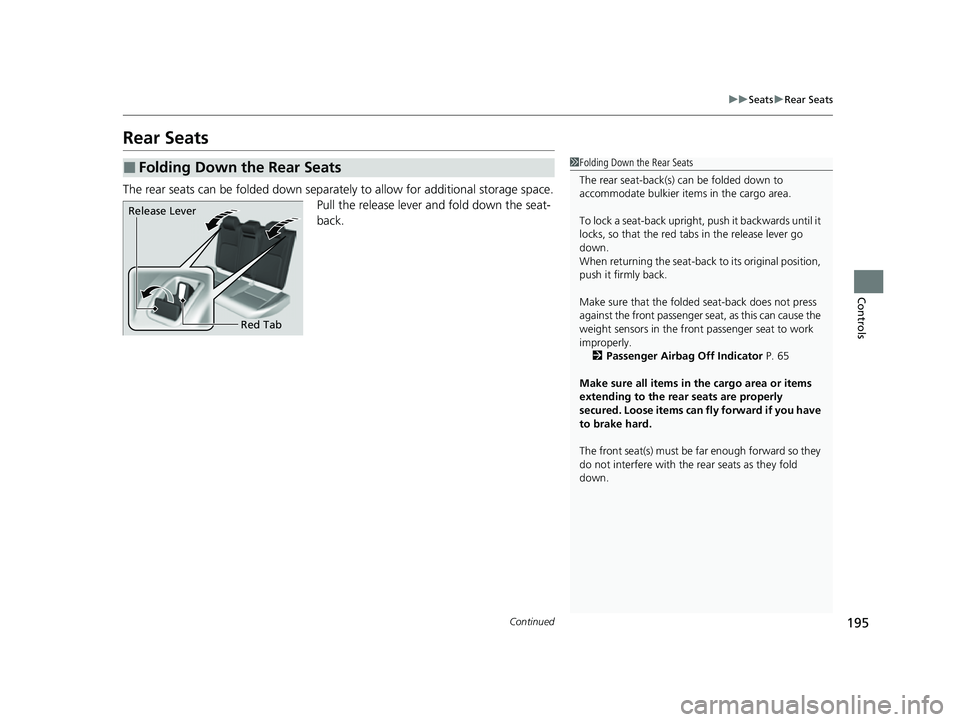
The rear seats can be folded down separa tely to allow for additional storage space.
Pull the release lever and fold down the seat-
back.
■Folding Down the Rear Seats1 Folding Down the Rear Seats
The rear seat-back(s) can be folded down to
accommodate bulkier items in the cargo area.
To lock a seat-back upright, push it backwards until it
locks, so that the red tabs in the release lever go
down.
When returning the seat-back to its original position,
push it firmly back.
Make sure that the folded seat-back does not press
against the front passenger seat, as this can cause the
weight sensors in the front passenger seat to work
improperly. 2 Passenger Airbag Off Indicator P. 65
Make sure all items in the cargo area or items
extending to the rear seats are properly
secured. Loose items can fly forward if you have
to brake hard.
The front seat(s) must be far enough forward so they
do not interfere with the rear seats as they fold
down.
Release Lever
Red Tab
23 ACURA INTEGRA-313S56000_03.book 195 ページ 2022年3月18日 金曜日 午前11時47分