lock ACURA INTEGRA 2023 Service Manual
[x] Cancel search | Manufacturer: ACURA, Model Year: 2023, Model line: INTEGRA, Model: ACURA INTEGRA 2023Pages: 740, PDF Size: 22.94 MB
Page 154 of 740

uuLocking and Unlocking the Doors uLocking/Unlocking the Doors from the Outside
152
Controls
■Locking the doors (lock presetting)
The vehicle will automatically lock after you
lock the doors in advance then close the
doors.
Activate lock presetting after closing the
driver’s door.
1. Touch the door lock sensor.
u Alert sounds and lock presetting is
activated.
2. Close all the doors.
u Some exterior lights flash and a beeper
sounds when vehicle locks.
Make sure the doors are locked before
moving away from the vehicle.1 Locking the doors (lock presetting)
You can also activate lock presetting by pressing the
lock button on the keyless remote.
Lock presetting will be re set if a door is opened
before the vehicle ha s locked completely.
Before locking a door, make sure that the key is not
inside the vehicle.
You can turn this function on and off. 2 Vehicle Settings
* P. 126
2 Customized Features P. 359
Door Lock
Sensor
* Not available on all models
23 ACURA INTEGRA-313S56000_03.book 152 ページ 2022年3月18日 金曜日 午前11時47分
Page 155 of 740

Continued153
uuLocking and Unlocking the Doors uLocking/Unlocking the Doors from the Outside
Controls
■Locking the doors and hatch
Press the lock button.
Once: u Some exterior lights flash, all the doors,
hatch, and fuel fill door lock, and the
security system sets.
Twice (within five se conds after the first
push): u Some exterior lights flash, the beeper
sounds, and verifies th e security system is
set.
■Unlocking the doors and hatch
Press the unlock button.
Once: u Some exterior lights flash twice, and the
driver’s door and fuel fill door unlock.
Twice: u The remaining doors and hatch unlock.
*1 : Checking Door Lock Status* P. 154
■Using the Remote Transmitter1Using the Remote Transmitter
If you do not open a door or the hatch within 30
seconds of unlocking the vehicle with the remote
transmitter, the doors and hatch will automatically
relock.
You can lock or unlock doors using the remote
transmitter only when the power mode is in VEHICLE
OFF.
The remote transmitter us es low-power signals, so
the operating range may vary depending on the
surroundings.
The remote will not lock th e vehicle when a door is
open.
If the distance at which the remote transmitter works
varies, the batter y is probably low.
If the LED does not come on when you press a
button, the battery is dead. 2 Replacing the Remote Battery P. 653
LED
Unlock
Button
Lock
Button
Lock
Button
Unlock
Button
LED*1
* Not available on all models
23 ACURA INTEGRA-313S56000_03.book 153 ページ 2022年3月18日 金曜日 午前11時47分
Page 156 of 740

uuLocking and Unlocking the Doors uLocking/Unlocking the Doors from the Outside
154
Controls
You can remotely check if your vehicle’s doors
are all locked or any are unlocked using the
keyless remote from extended distances.
Press the lock button, the Amber (LEFT) LED blinks once. After three seconds, one of
the following feedback will come:
• Green (center) comes on: Acknowle dges that the doors are locked.
• Red (right) comes on: Acknowledges that doors are not locked, or any door is not
completely closed.
• Red (right) blinks three times: The remote does not receive the door lock status
from the vehicle.
■Checking Door Lock Status*1 Checking Door Lock Status*
Operate the remote in an open space. If there are
buildings or other obstacl es between your vehicle
and the remote, the remote may not work even
within the operable range. However, the range
required for unlocking the ha tch and all the doors as
well as activating the pani c function is the same as
that required for operating the standard keyless
remote.
When checking the door lock status, you can also
start or stop the engine.
2 Remote Engine Start
* P. 432
Red
Green
Amber
Lock Button
* Not available on all models
23 ACURA INTEGRA-313S56000_03.book 154 ページ 2022年3月18日 金曜日 午前11時47分
Page 157 of 740

Continued155
uuLocking and Unlocking the Doors uLocking/Unlocking the Doors from the Outside
Controls
If the unlock button of the keyless remo te does not work, use the built-in key
instead. The keyhole is on the back of the door handle. Insert the built-in key into the key cylinder
from below the handle and then turn it.
■Unlocking the Doors Using a Key1 Unlocking the Doors Using a Key
When unlocking, the driver’s door and fuel fill door
unlock first. Turn the key a second time within a few
seconds to unlock the remaining doors and the
hatch.
If the lock button of th e keyless remote does not
work, refer to the following. 2 Locking a Door Without Using a Key P. 156
23 ACURA INTEGRA-313S56000_03.book 155 ページ 2022年3月18日 金曜日 午前11時47分
Page 158 of 740

uuLocking and Unlocking the Doors uLocking/Unlocking the Doors from the Outside
156
Controls
If you do not have the key on you, or if fo r some reason you cannot lock a door using
the key, you can lock the door without it.
■Locking the front door
Push the lock tab forward
a or push the
master door lock switch in the lock direction
b, and close the door.
■Locking the rear doors
Push the lock tab forward and close the door.
■Locking a Door Without Using a Key1 Locking a Door Without Using a Key
When you lock the driver’s door, all the other doors,
hatch and fuel fill door lock at the same time.
Before locking a door, make sure that the key is not
inside the vehicle.
23 ACURA INTEGRA-313S56000_03.book 156 ページ 2022年3月18日 金曜日 午前11時47分
Page 159 of 740

157
uuLocking and Unlocking the Doors uLocking/Unlocking the Doors from the Outside
Controls
■Lockout protection function
If the vehicle cannot detect the keyless
remote, lockout prot ection activates.
u A beeper sounds, some exterior lights
flash, the doors unlock, and a message
appears on the dr iver information
interface.
u This allows you to open a door in case
the keyless remote is still inside the
vehicle.
If you do not open a door, all doors relock
after 15 seconds.
To avoid non-detection, make sure to keep
the keyless remote away from cell phones and
other devices that may cause signal
interference.1 Locking a Door Without Using a Key
You can change the lockout protection operation
setting.
2 Vehicle Settings
* P. 126
2 Customized Features P. 359
* Not available on all models
23 ACURA INTEGRA-313S56000_03.book 157 ページ 2022年3月18日 金曜日 午前11時47分
Page 160 of 740

158
uuLocking and Unlocking the Doors uLocking/Unlocking the Doors from the Inside
Controls
Locking/Unlocking the Doors from the Inside
■Locking a door
Push the lock tab forward.
■Unlocking a door
Pull the lock tab rearward.
■Using the Lock Tab1 Using the Lock Tab
When you lock the door using the lock tab on the
driver’s door, all of the othe r doors, hatch and fuel fill
door lock at the same time.
When you unlock the door using the lock tab on the
driver’s door, only the driver ’s door and fuel fill door
will unlock.
To unlock
Lock TabTo lock
23 ACURA INTEGRA-313S56000_03.book 158 ページ 2022年3月18日 金曜日 午前11時47分
Page 161 of 740
Continued159
uuLocking and Unlocking the Doors uLocking/Unlocking the Doors from the Inside
Controls
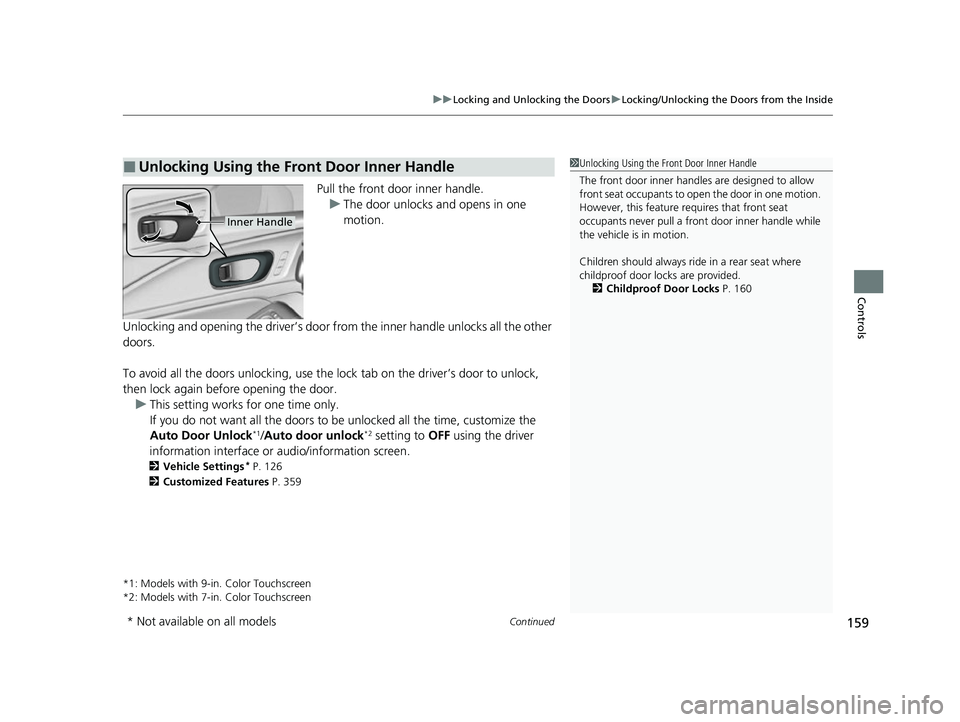
Pull the front door inner handle.
u The door unlocks and opens in one
motion.
Unlocking and opening the driver’s door from the inner handle unlocks all the other
doors.
To avoid all the doors unlocking, use the lock tab on the driver’s door to unlock,
then lock again before opening the door. u This setting works for one time only.
If you do not want all the doors to be unlocked all the time, customize the
Auto Door Unlock
*1/Auto door unlock*2 setting to OFF using the driver
information interface or audio/information screen.
2 Vehicle Settings* P. 126
2 Customized Features P. 359
*1: Models with 9-in. Color Touchscreen
*2: Models with 7-in. Color Touchscreen
■Unlocking Using the Front Door Inner Handle1 Unlocking Using the Front Door Inner Handle
The front door inne r handles are designed to allow
front seat occupants to ope n the door in one motion.
However, this feature requires that front seat
occupants never pull a front door inner handle while
the vehicle is in motion.
Children should always ride in a rear seat where
childproof door locks are provided.
2 Childproof Door Locks P. 160
Inner Handle
* Not available on all models
23 ACURA INTEGRA-313S56000_03.book 159 ページ 2022年3月18日 金曜日 午前11時47分
Page 162 of 740

uuLocking and Unlocking the Doors uChildproof Door Locks
160
Controls
Press the master door lock switch in as shown
to lock or unlock all doors, hatch and fuel fill
door.
Childproof Door Locks
The childproof door locks prevent the rear doors from being opened from the inside
regardless of the position of the lock tab.
Slide the lever in the rear door to the lock
position, and close the door.
■When opening the door
Open the door using the outside door handle.
■Using the Master Door Lock Switch1 Using the Master Door Lock Switch
When you lock/unlock either of the front doors using
the master lock switch, al l the other doors, hatch and
fuel fill door lock/unl ock at the same time.
To unlock
Master Door Lock Switch
To lock
■Setting the Childproof Door Locks
1Childproof Door Locks
To open the door from the inside when the
childproof door lock is on, put the lock tab in the
unlock position, lower the rear window, put your
hand out of the window, and pull the outside door
handle.
Lock
Unlock
23 ACURA INTEGRA-313S56000_03.book 160 ページ 2022年3月18日 金曜日 午前11時47分
Page 163 of 740
161
uuLocking and Unlocking the Doors uAuto Door Locking/Unlocking
Controls
Auto Door Locking/Unlocking
Your vehicle locks or unlocks all doors automatically when a certain condition is met.
■Drive lock mode
All doors and the hatch lock when the vehicle’s speed reaches about 10 mph (15
km/h).
■Driver’s door open mode
All doors and the hatch unlock when the driver’s door is opened.
■Auto Door Locking
■Auto Door Unlocking
1 Auto Door Locking/Unlocking
You can turn off or cha nge to another auto door
locking/unlocking sett ing using the driver
information interface or audio/information screen. 2 Vehicle Settings
* P. 126
2 Customized Features P. 359
* Not available on all models
23 ACURA INTEGRA-313S56000_03.book 161 ページ 2022年3月18日 金曜日 午前11時47分