wheel ACURA INTEGRA 2023 Workshop Manual
[x] Cancel search | Manufacturer: ACURA, Model Year: 2023, Model line: INTEGRA, Model: ACURA INTEGRA 2023Pages: 740, PDF Size: 22.94 MB
Page 196 of 740

uuSeats uFront Seats
194
Controls
Adjust the driver’s seat-back to a comfortable,
upright position, leaving ample space
between your chest and the airbag cover in
the center of the steering wheel.
The front seat passenger should also adjust
their seat-back to a comfortable, upright
position.
Reclining a seat-back so that the shoulder part of the belt no longer rests against the
occupant’s chest reduces the protective capa bility of the belt. It also increases the
chance of sliding under the belt in a crash and being seriously injured. The farther a
seat-back is reclined, the greater the risk of injury.
■Adjusting the Seat-Backs1 Adjusting the Seat-Backs
Do not put a cushion, or other object, between the
seat-back and your back.
Doing so may interfere with proper seat belt or airbag
operation.
If you cannot get far e nough away from the steering
wheel and still reach th e controls, we recommend
that you investigate whether some type of adaptive
equipment may help.
3WARNING
Reclining the seat-back too far can result in
serious injury or death in a crash.
Adjust the seat-back to an upright position,
and sit well back in the seat.
23 ACURA INTEGRA-313S56000_03.book 194 ページ 2022年3月18日 金曜日 午前11時47分
Page 217 of 740

Continued215
uuInterior Convenience Items uOther Interior Convenience Items
Controls
The power mode must be in ON to use the
heated steering wheel.
Press the button on th e lower side of the
steering wheel.
When a comfortable temperature is reached,
press the button again to turn it off.
The heated steering wheel is turned off every
time you start the engine, even if you turned it
on the last time yo u drove the vehicle.
■Heated Steering Wheel
Canadian models
1Heated Steering Wheel
Do not use the heated st eering wheel continuously
when the engine is off. Under such conditions, the
battery may be weaken ed, making the engine
difficult to start.
23 ACURA INTEGRA-313S56000_03.book 215 ページ 2022年3月18日 金曜日 午前11時47分
Page 228 of 740

226
Features
Audio System
About Your Audio System
The audio system features AM/FM radio and SiriusXM ® Radio service*. It can also
play USB flash drives, iPod, iPhone and Bluetooth® devices.
You can operate the audio system from the buttons and switches on the panel, the
remote controls on the steering wheel, or the icons on the touchscreen interface.1About Your Audio System
SiriusXM ® Radio
* is available on a subscription basis
only. For more information on SiriusXM ® Radio*,
contact a dealer. 2 General Information on the Audio System
P. 330
SiriusXM ® Radio
* is available in the United States and
Canada, except Ha waii, Alaska, and Puerto Rico.
SiriusXM ®
* is a registered tra demark of SiriusXM
Radio, Inc.
State or local laws may prohibit the operation of
handheld electronic devi ces while operating a
vehicle.
Remote Controls iPod
USB Flash Drive
* Not available on all models
23 ACURA INTEGRA-313S56000_03.book 226 ページ 2022年3月18日 金曜日 午前11時47分
Page 232 of 740

230
uuAudio System uAudio Remote Controls
Features
Audio Remote Controls
Allow you to operate the audio system while driving. The information is shown on
the driver information interface.
VOL
(+/VOL(- (Volume) Switch
Press Up: To increase the volume.
Press Down: To decrease the volume.
/ (Seek/Skip) Buttons
• When listening to the radio
Press : To select the next preset radio station.
Press : To select the previous preset radio station.
Press and hold : To select the next strong station.
Press and hold : To select the previous strong station.
• When listening to an iPod, USB flash drive, Bluetooth® Audio, or Smartphone
Connection
Press : To skip to the next song.
Press : To go back to the beginning of the current or previous song.
• When listening to a USB flash drive or Bluetooth® Audio
Press and hold : To skip to the next folder/group.
Press and hold : To go back to the previous folder/group.
1Audio Remote Controls
Some modes appear only when an appropriate
device or medium is used.
Depending on the Bluetooth® device you connect,
some functions may not be available.Models with 7-in. Color Touchscreen
/ (Seek/Skip) Buttons
Left
Selector
Wheel
VOL(+/VOL(- (Volume) Switch
23 ACURA INTEGRA-313S56000_03.book 230 ページ 2022年3月18日 金曜日 午前11時47分
Page 233 of 740
231
uuAudio System uAudio Remote Controls
Continued
Features
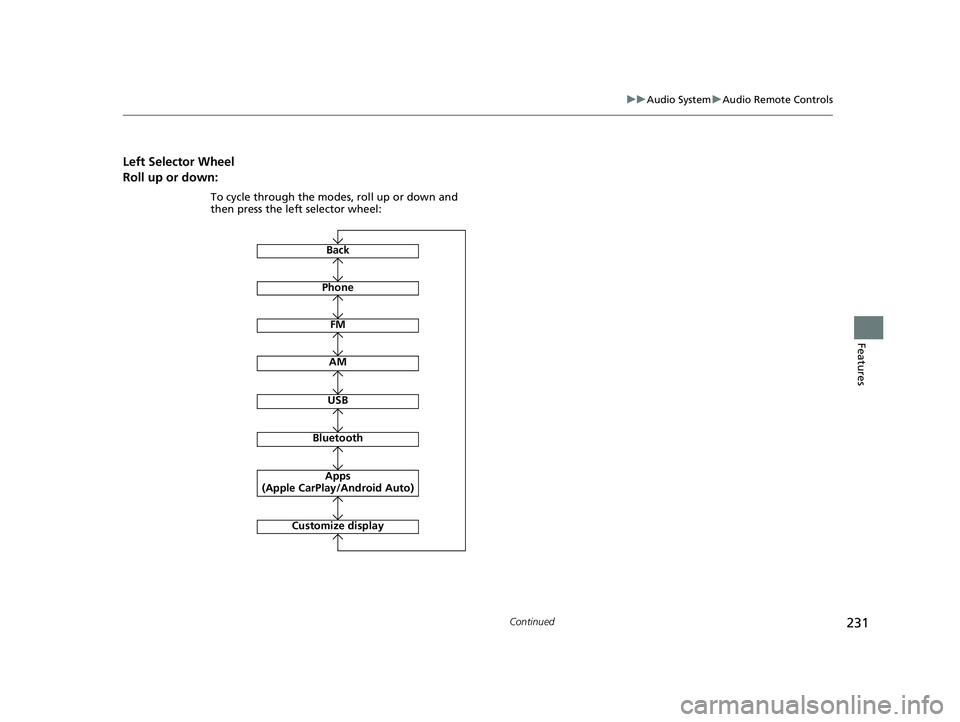
Left Selector Wheel
Roll up or down:
FM
AM
To cycle through the modes, roll up or down and
then press the left selector wheel:
Bluetooth
USB
Apps
(Apple CarPlay/Android Auto)
Phone
Back
Customize display
23 ACURA INTEGRA-313S56000_03.book 231 ページ 2022年3月18日 金曜日 午前11時47分
Page 234 of 740

232
uuAudio System uAudio Remote Controls
Features
Allow you to operate the audio system while driving. The information is shown on
the driver information interface.
VOL
(+/VOL(- (Volume) Switch
Press Up: To increase the volume.
Press Down: To decrease the volume.
/ (Seek/Skip) Buttons
• When listening to the radio
Press : To select the next preset radio station.
Press : To select the previous preset radio station.
Press and hold : To select the next strong station.
Press and hold : To select the previous strong station.
• When listening to an iPod, USB flash drive, Bluetooth® Audio, or Smartphone
Connection
Press : To skip to the next song.
Press : To go back to the beginning of the current or previous song.
• When listening to a USB flash drive
Press and hold : To skip to the next folder.
Press and hold : To go back to the previous folder.
Models with 9-in. Color Touchscreen
/ (Seek/Skip) Buttons
Left Selector
WheelVOL(+/VOL(-
(Volume) Switch
23 ACURA INTEGRA-313S56000_03.book 232 ページ 2022年3月18日 金曜日 午前11時47分
Page 235 of 740
233
uuAudio System uAudio Remote Controls
Features
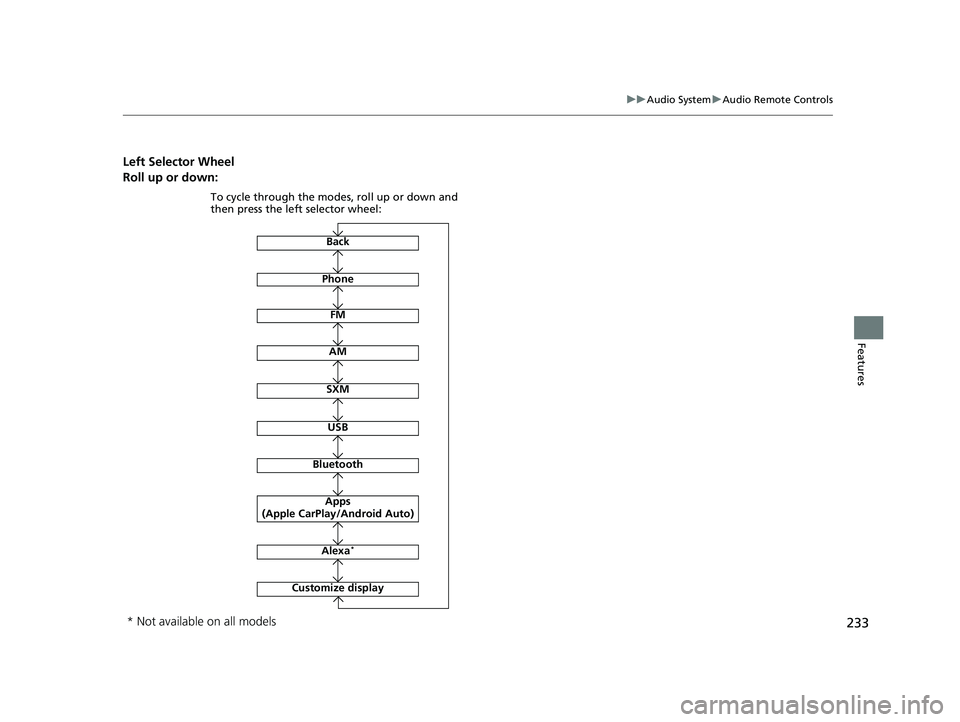
Left Selector Wheel
Roll up or down:
Back
Phone
FM
AM
SXM
To cycle through the modes, roll up or down and
then press the left selector wheel:
Customize display
Bluetooth
USB
Apps
(Apple CarPlay/Android Auto)
Alexa*
* Not available on all models
23 ACURA INTEGRA-313S56000_03.book 233 ページ 2022年3月18日 金曜日 午前11時47分
Page 236 of 740

234
Features
Audio System Basic Operation
To use the audio system, the power mode must be in ACCESSORY or ON.
Use the selector knob or MENU button to
access some audio functions.
Press to switch between the normal and
extended display fo r some functions.
Selector knob: Rotate left or right to scroll
through the available choices. Press to set
your selection.
MENU button: Press to display the menu
screen. (Back) button: Press to go back to the
previous display.
Models with 7-in. Color Touchscreen1 Audio System Basic Operation
These indications are used to show how to operate
the selector knob.
Rotate to select.
Press to enter.
Menu Items 2 Adjust Clock P. 142
2 Adjusting the Sound P. 235
2 Display Setup P. 236
2 Customized Features P. 351
Press the buttons on the steering wheel to change
any audio setting. 2 Audio Remote Controls P. 230
Touchscreen operation
•Use simple gestures - in cluding touching, swiping
and scrolling - to operate certain audio functions.
•Some items may be grayed out during driving to
reduce the potential for distraction.
•You can select them when the vehicle is stopped.•Wearing gloves may limit or prevent touchscreen
response.
You can change the touchs creen sensitivity setting.
2 Customized Features P. 351
(Back)
Button
Selector Knob
MENU Button
Menu Display
23 ACURA INTEGRA-313S56000_03.book 234 ページ 2022年3月18日 金曜日 午前11時47分
Page 240 of 740

uuAudio System Basic Operation uPlaying AM/FM Radio
238
Features
Provides text data information related to your selected RDS capable FM station.
■To find an RDS station from Station List
1. Press while listening to an FM station.
2. Select the station.
■Update List
Updates your available station list at any time.
1. Press while listening to an FM station.
2. Select Refresh .
■Radio text
Displays the radio text informat ion of the selected RDS station.
1. Select Text.
■Scan
Samples each of the strongest stations on the selected band for 10 seconds.
1. Select Scan.
To turn off scan, select Stop or press the button.
■Radio Data System (RDS)1Playing AM/FM Radio
Stereo reproduction in AM is not available.
You can store 12 AM stations and 12 FM stations into
the preset memory.
Switching the Audio Mode
Roll the left selector wheel.
2 Audio Remote Controls P. 230
1Radio Data System (RDS)
When you select an RDS-capable FM station, the RDS
automatically turns on, and the station name is
displayed under the frequency. However, when the
signals of that station become weak, the station
name disappears.
23 ACURA INTEGRA-313S56000_03.book 238 ページ 2022年3月18日 金曜日 午前11時47分
Page 251 of 740
249
uuAudio System Basic Operation uSiri Eyes Free
Features
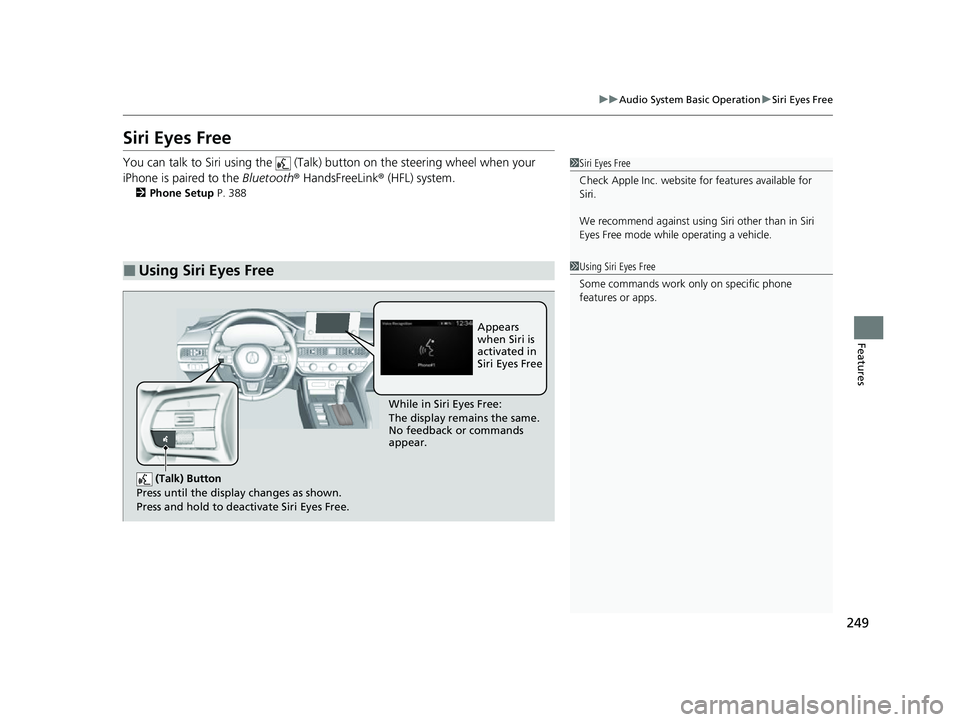
Siri Eyes Free
You can talk to Siri using the (Talk) button on the steering wheel when your
iPhone is paired to the Bluetooth® HandsFreeLink ® (HFL) system.
2Phone Setup P. 388
■Using Siri Eyes Free
1Siri Eyes Free
Check Apple Inc. website for features available for
Siri.
We recommend against using Si ri other than in Siri
Eyes Free mode whil e operating a vehicle.
1Using Siri Eyes Free
Some commands work only on specific phone
features or apps.
(Talk) Button
Press until the display changes as shown.
Press and hold to deactivate Siri Eyes Free.
While in Siri Eyes Free:
The display remains the same.
No feedback or commands
appear. Appears
when Siri is
activated in
Siri Eyes Free
23 ACURA INTEGRA-313S56000_03.book 249 ページ 2022年3月18日 金曜日 午前11時47分