cruise control ACURA INTEGRA 2024 User Guide
[x] Cancel search | Manufacturer: ACURA, Model Year: 2024, Model line: INTEGRA, Model: ACURA INTEGRA 2024Pages: 766, PDF Size: 28.39 MB
Page 427 of 766

425
Driving
This chapter discusses driving and refueling.
Before Driving................................... 426
Towing a Trailer ................................ 432
When Driving
Starting the Engine .......................... 433
Precautions While Driving................. 441
Continuously Variable Transmission*... 443Shifting .................................... 444 , 448Acura Integrated Dynamics System .. 452, 454Auto Idle Stop*........................ 463, 469Vehicle Stability AssistTM (VSA®), aka
Electronic Stability Control (ESC),
System ........................................ 474
Agile Handling Assist ....................... 476 Limited Slip Differential (LSD) ........... 477
Tire Pressure Monitoring System (TPMS)
with Tire Fill Assist .......................... 478
Tire Pressure Monitoring System (TPMS) - Required Federal Explanation ......... 480
Blind Spot Information System ......... 482
AcuraWatch
TM................................... 486
Collision Mitigati on Braking SystemTM
(CMBSTM) ....................................... 489
Low Speed Braking Control*.... 501, 507
Adaptive Cruise Control (ACC) with Low Speed Follow
*............................... 512
Adaptive Cruise Control (ACC)*....... 533 Lane Keeping Assist System (LKAS).... 553
Traffic Jam Assist
*........................... 565
Road Departure Miti gation System... 574
Traffic Sign Recognition System ....... 583
Front Wide View Camera ................. 590
Sonar Sensors
*................................ 592
Braking .............................................. 594
Parking Your Vehicle ........................ 607
Multi-View Rear Camera .................. 617
Refueling ........................................... 619
Fuel Economy and CO
2 Emissions .... 623
Turbo Engine Vehicle ....................... 624
* Not available on all models
24 ACURA INTEGRA-313S56100.book 425 ページ 2023年2月13日 月曜日 午後2時41分
Page 467 of 766

Continued465
uuWhen Driving uAuto Idle Stop
Driving
The vehicle stops with the transmission in (D and the brake pedal depressed.
When you put the transmission into
(P quickly with depressing the brake pedal, the
Auto Idle Stop continues to operate, even if the brake pedal is released.
u If you depress the brake pedal, the engine may automatically restart.
■Auto Idle Stop does not activate when:
• The Auto Idle Stop OFF button is pressed.
• The driver’s seat belt is not fastened.
• The engine is not adequately warmed up or coolant temperature is high.
• The transmission fluid temperature is low or high.
• The vehicle comes to a stop again befo re the vehicle speed reaches 3 mph (5
km/h) after the engine starts.
• The vehicle is stopped on a steep incline.
• The transmission is in a position other than
(D.
• The engine is started with the hood open.
u Turn off the engine. Close the hood before you restart the engine to activate
Auto Idle Stop.
• The battery charge is low.
• The internal temperature of the battery is 41°F (5°C) or less.
• The climate control system is in use, and the outside temperature is below −4°F
(−20°C) or over 104°F (40°C).
• The climate control system is in use, and the temperature is set to Hi or Lo .
• is ON (indicator on).
• The Integrated Dynamics Sy stem mode is changed to SPORT mode.
• The Auto Idle Stop is set to off on INDIVIDUAL Setting screen.
2Customizing the INDIVIDUAL Settings P. 460
■Auto Idle Stop Activates When:1Auto Idle Stop Activates When:
Do not open the hood while the Auto Idle Stop
function is activated. If the hood is opened, the
engine will not re start automatically.
In this case, restart the engine with the ENGINE
START/STOP button.
2 Starting the Engine P. 433
Pressing the ENGINE START/STOP button causes
the engine to no longer restar ts automatically. Follow
the standard procedure to start the engine.
2 Starting the Engine P. 433
When Adaptive Cruise Control (ACC) with Low
Speed Follow is in oper ation, the vehicle stops
without depressing the br ake pedal and Auto Idle
Stop may activate. In such cases, the engine may
restart if you change the shift position other than
(D.
Models with INDIVIDUAL mode
24 ACURA INTEGRA-313S56100.book 465 ページ 2023年2月13日 月曜日 午後2時41分
Page 470 of 766

uuWhen Driving uAuto Idle Stop
468
Driving
■The engine restarts even if the brake pedal is depressed*1 when:
• The Auto Idle Stop OFF button is pressed.
• The steering wheel is operated.
• The transmission is put into
(R or (S, or when it is set from (N to (D.
u If you put the transmission into
(P after the Auto Idle Stop activates, the Auto
Idle Stop continues to operate. In this case, the engine restarts when you
depress the brake pedal.
• The pressure on the brake pedal is redu ced and the vehicle starts moving while
stopped on an incline.
• The pressure on the brake pedal is repeated ly applied and released slightly during
a stop.
• The battery charge becomes low.
• The accelerator pedal is depressed.
• The driver’s seat belt is unlatched.
• is ON (indicator on).
• The climate control system is in us e, and the difference between the set
temperature and actual interior temperature becomes significant.
• The climate control system is bein g used to dehumidify the interior.
• The vehicle ahead of you starts again when your vehicle stops automatically with
Adaptive Cruise Control ( ACC) with Low Speed Follow.
• The Integrated Dynamics Sy stem mode is changed to SPORT mode.
• The Auto Idle Stop is set to off on INDIVIDUAL Setting screen.
2Customizing the INDIVIDUAL Settings P. 460
Briefly keeps the brake applied after releasi ng the brake pedal to restart the engine.
This can keep your vehicle from unexpectedly moving while on an incline.
■Starting Assist Brake Function
1 The engine restarts even if the brake pedal is depressed*1 when:
*1: With the automatic brake hold system activated,
you can release the brake pe dal while Auto Idle Stop
is in operation.
If the automatic brake hold system has been turned
off, or if there is a problem with the system, the
engine will restart automatically when you release
the brake pedal. 2 Automatic Brake Hold P. 600
Models with INDIVIDUAL mode
24 ACURA INTEGRA-313S56100.book 468 ページ 2023年2月13日 月曜日 午後2時41分
Page 476 of 766
474
uuWhen Driving uVehicle Stability AssistTM (VSA ®), aka Electronic Stability Control (ESC), System
Driving
Vehicle Stability AssistTM (VSA ®), aka Electronic
Stability Control (ESC), System
VSA ® helps stabilize the vehicle during cornering if the vehicle turns more or less
than what was intended. It also assists in maintaining traction on slippery surfaces.
It does so by regulating engine output and selectively applying the brakes.
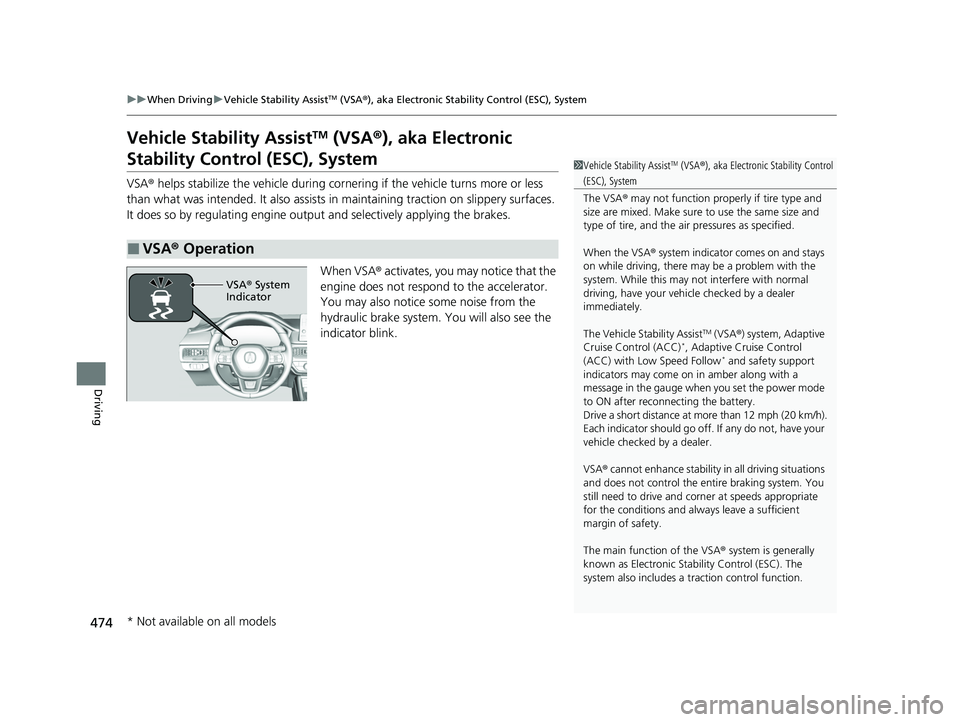
When VSA® activates, you may notice that the
engine does not respond to the accelerator.
You may also notice some noise from the
hydraulic brake system. You will also see the
indicator blink.
■VSA ® Operation
1 Vehicle Stability AssistTM (VSA ®), aka Electronic Stability Control
(ESC), System
The VSA ® may not function properl y if tire type and
size are mixed. Make sure to use the same size and
type of tire, and the air pressures as specified.
When the VSA ® system indicator comes on and stays
on while driving, there may be a problem with the
system. While this may not interfere with normal
driving, have your vehi cle checked by a dealer
immediately.
The Vehicle Stability Assist
TM (VSA ®) system, Adaptive
Cruise Control (ACC)*, Adaptive Cruise Control
(ACC) with Low Speed Follow* and safety support
indicators may come on in amber along with a
message in the gauge when you set the power mode
to ON after reconnecting the battery.
Drive a short distance at more than 12 mph (20 km/h).
Each indicator should go off. If any do not, have your
vehicle checked by a dealer.
VSA ® cannot enhance stability in all driving situations
and does not control the entire braking system. You
still need to drive and corner at speeds appropriate
for the conditions and always leave a sufficient
margin of safety.
The main function of the VSA ® system is generally
known as Electronic Stab ility Control (ESC). The
system also includes a traction control function.
VSA® System
Indicator
* Not available on all models
24 ACURA INTEGRA-313S56100.book 474 ページ 2023年2月13日 月曜日 午後2時41分
Page 488 of 766
486
Driving
AcuraWatchTM
AcuraWatchTM is a driver support system which employs the use of two distinctly
different kinds of sensors: the sonar sensors located in the front and rear bumpers
and the front grille, and a front wide view camera mounted to the interior side of
the windshield behind the rearview mirror.
AcuraWatch
TM is a driver support system which employs the use of a front wide view
camera mounted to the interior side of the windshield behind the rearview mirror.
AcuraWatch
TM has the following functions.
■The functions whic h do not require switch operations to activate
• Collision Mitigation Braking SystemTM (CMBSTM) 2 P. 489
• Low Speed Braking Control* 2 P. 501
• Low Speed Braking Control* 2 P. 507
• Road Departure Mitigation System 2 P. 574
• Traffic Sign Recognition System 2 P. 583
■The functions wh ich require switch op erations to activate
• Adaptive Cruise Control ( ACC) with Low Speed Follow* 2 P. 512
• Adaptive Cruise Control (ACC)* 2 P. 533
• Lane Keeping Assist System (LKAS) 2 P. 553
• Traffic Jam Assist* 2 P. 565
Models with Low Speed Braking Control
Models without Low Speed Braking Control
* Not available on all models
24 ACURA INTEGRA-313S56100.book 486 ページ 2023年2月13日 月曜日 午後2時41分
Page 489 of 766
487
uuAcuraWatchTMu
Continued
Driving
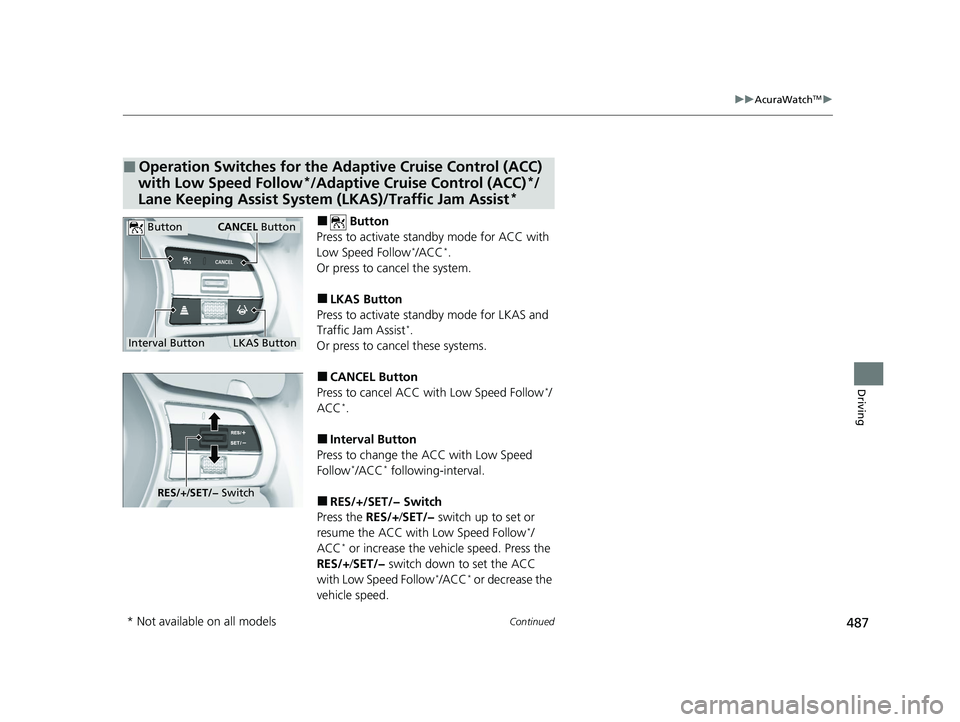
■ Button
Press to activate sta ndby mode for ACC with
Low Speed Follow
*/ACC*.
Or press to cancel the system.
■LKAS Button
Press to activate sta ndby mode for LKAS and
Traffic Jam Assist
*.
Or press to cancel these systems.
■CANCEL Button
Press to cancel ACC wi th Low Speed Follow*/
ACC*.
■Interval Button
Press to change the ACC with Low Speed
Follow
*/ACC* following-interval.
■RES/+/SET/− Switch
Press the RES/+/SET/− switch up to set or
resume the ACC with Low Speed Follow
*/
ACC* or increase the vehicle speed. Press the
RES/+ /SET/− switch down to set the ACC
with Low Speed Follow
*/ACC* or decrease the
vehicle speed.
■Operation Switches for the Adaptive Cruise Control (ACC)
with Low Speed Follow*/Adaptive Cruise Control (ACC)*/
Lane Keeping Assist System (LKAS)/Traffic Jam Assist*
Interval Button
Button
LKAS Button
CANCEL Button
RES/J/SET/− Switch
* Not available on all models
24 ACURA INTEGRA-313S56100.book 487 ページ 2023年2月13日 月曜日 午後2時41分
Page 490 of 766

uuAcuraWatchTMu
488
Driving
You can see the current state of Adaptive
Cruise Control (ACC) with Low Speed Follow*/
Adaptive Cruise Control (ACC)*, Lane Keeping
Assist System (LKAS) and Traffic Jam Assist*.
aIndicates that ACC with Low Speed
Follow*/ACC* is ready to be activated.
• Green: The system is on.
• White: The system is standby.
• Amber: There is a problem with the system.
bIndicates that LKAS or Traffic Jam Assist* is
ready to be activated.
• Green: The system is on.
• White: The system is standby.
• Amber: There is a problem with the system.
cIndicates that LKAS or Traffic Jam Assist* is
activated and whether or not traffic lane
lines are detected.
• Green lines: The system is on.
• White lines: Traffic lane lines are detected.
• Amber line: Lane departure is detected.
dIndicates whether or not a vehicle is
detected ahead.
• Control target vehicle: White and outlined
in green
• Outside of control target vehicle: Gray
eIndicates that ACC with Low Speed
Follow*/ACC* shows the set vehicle speed.
fIndicates that ACC with Low Speed
Follow*/ACC* shows the set vehicle
interval.
■Gauge Content1 Gauge Content
You can have the head-up display show you the
current state of each function.
2 Head-Up Display
* P. 143
Models with Head-up display
* Not available on all models
24 ACURA INTEGRA-313S56100.book 488 ページ 2023年2月13日 月曜日 午後2時41分
Page 495 of 766

Continued493
uuAcuraWatchTMuCollision Mitigation Braking SystemTM (CMBSTM)
Driving
You can turn the system on and off using the driver information interface.
2 Switching the Display P. 117
2 Safety Support P. 129
The CMBSTM is turned on every time you start th e engine, even if you turned it off
the last time you drove the vehicle.
■CMBSTM On and Off1 Collision Mitigation Braking SystemTM (CMBSTM)
You cannot turn the CMBS
TM off while driving.
The CMBS
TM may automatically shut off, and the
safety support indicator (amb er) will come and stay
on under certain conditions: 2 CMBS
TM Conditions and Limitations P. 494
The CMBS
TM is not activated for about 15 seconds
after the engine starts.
The Vehicle Stability Assist
TM (VSA ®) system, Adaptive
Cruise Control (ACC)*, Adaptive Cruise Control
(ACC) with Low Speed Follow* and safety support
indicators may come on in amber along with a
message in the gauge when you set the power mode
to ON after reconnecting the battery.
Drive a short distance at more than 12 mph (20 km/h).
Each indicator should go off. If any do not, have your
vehicle checked by a dealer.
* Not available on all models
24 ACURA INTEGRA-313S56100.book 493 ページ 2023年2月13日 月曜日 午後2時41分
Page 514 of 766
512
uuAcuraWatchTMuAdaptive Cruise Control (ACC) with Low Speed Follow*
Driving
Adaptive Cruise Control (ACC) with Low Speed
Follow*
Helps maintain a constant vehicle speed a nd a set following-interval behind a vehicle
detected ahead of yours and, if the detect ed vehicle comes to a stop, can decelerate
and stop your vehicle, without you having to keep your foot on the brake or the
accelerator.
When ACC with Low Speed Follow slows y our vehicle by applying the brakes, your
vehicle’s brake lights will illuminate.
1 Adaptive Cruise Control (ACC) with Low Speed Follow*
Important Reminder
As with any system, there are limits to ACC with Low
Speed Follow. Use the brake pedal whenever
necessary, and always keep a safe interval between
your vehicle and other vehicles.
3WARNING
Improper use of ACC with Low Speed
Follow can lead to a crash.
Use ACC with Low Speed Follow only when
driving on expressways or freeways and in
good road and weather conditions.
3WARNING
ACC with Low Speed Follow has limited
braking capability and may not stop your
vehicle in time to avoid a collision with a
vehicle that quickly stops in front of you.
Always be prepared to apply the brake
pedal if the conditions require.
When to use
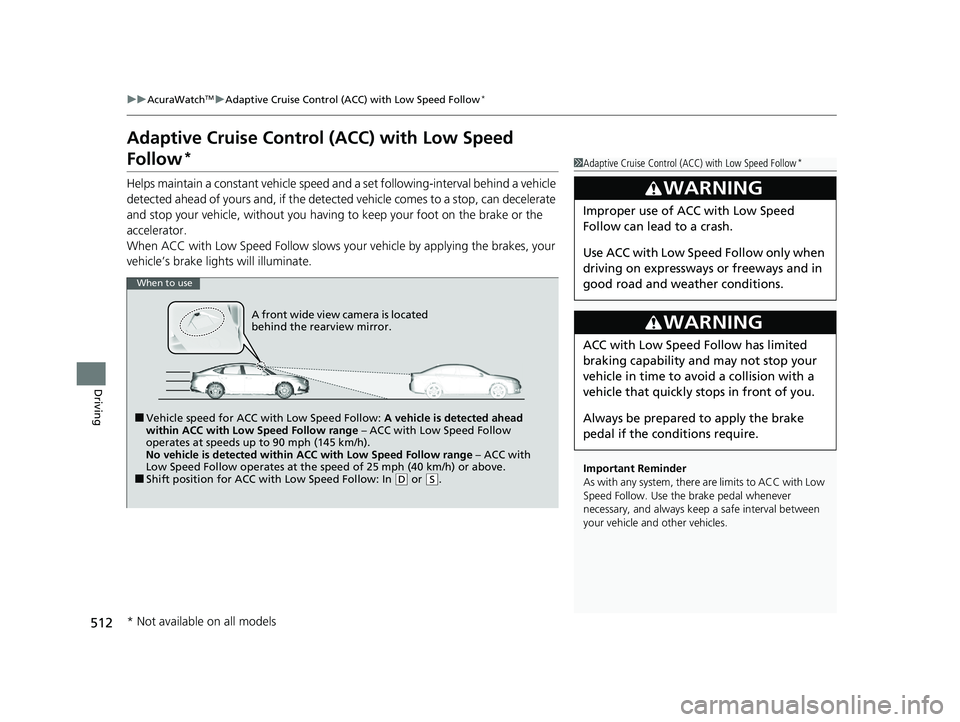
■Vehicle speed for ACC wi th Low Speed Follow: A vehicle is detected ahead
within ACC with Low Speed Follow range – ACC with Low Speed Follow
operates at speeds up to 90 mph (145 km/h).
No vehicle is detected within ACC with Low Speed Follow range – ACC with
Low Speed Follow operates at the speed of 25 mph (40 km/h) or above.
■Shift position for ACC with Low Speed Follow: In ( D or (S.
A front wide view camera is located
behind the rearview mirror.
* Not available on all models
24 ACURA INTEGRA-313S56100.book 512 ページ 2023年2月13日 月曜日 午後2時41分
Page 515 of 766
Continued513
uuAcuraWatchTMuAdaptive Cruise Control (ACC) with Low Speed Follow*
Driving
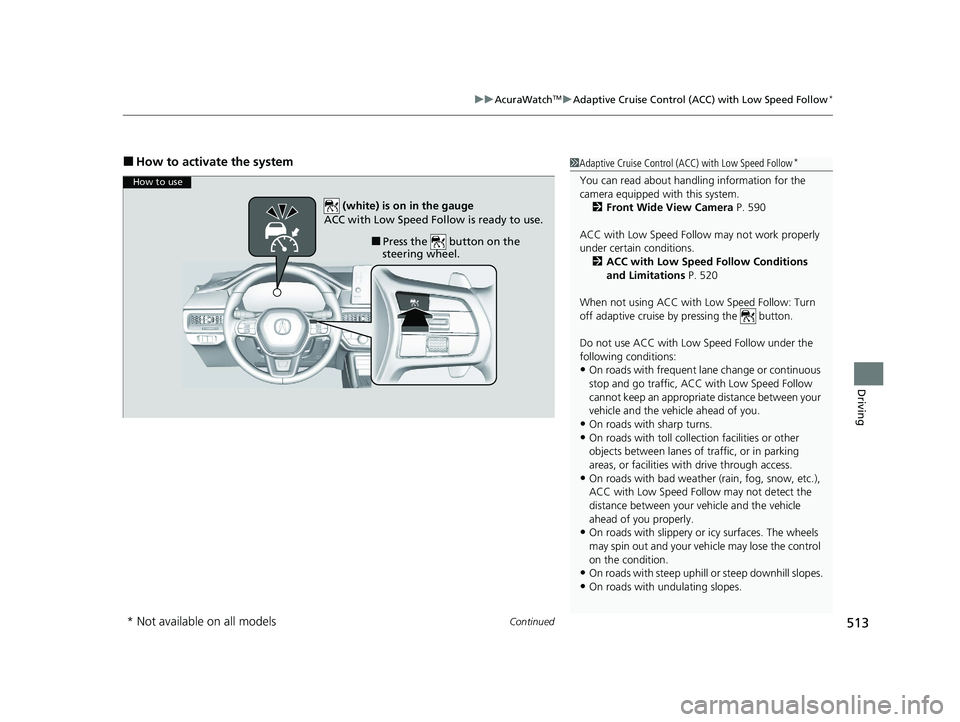
■How to activate the system1Adaptive Cruise Control (ACC) with Low Speed Follow*
You can read about handling information for the
camera equipped with this system.
2 Front Wide View Camera P. 590
ACC with Low Speed Follow may not work properly
under certain conditions.
2 ACC with Low Speed Follow Conditions
and Limitations P. 520
When not using ACC with Low Speed Follow: Turn
off adaptive cruise by pressing the button.
Do not use ACC with Low Speed Follow under the
following conditions:
•On roads with frequent la ne change or continuous
stop and go traffic, ACC with Low Speed Follow
cannot keep an appropriate distance between your
vehicle and the vehicle ahead of you.
•On roads with sharp turns.
•On roads with toll collection facilities or other
objects between lanes of traffic, or in parking
areas, or faci lities with driv e through access.
•On roads with bad weather (rain, fog, snow, etc.),
ACC with Low Speed Follow may not detect the
distance between your vehicle and the vehicle
ahead of you properly.
•On roads with slippery or icy surfaces. The wheels
may spin out and your vehi cle may lose the control
on the condition.
•On roads with steep uphill or steep downhill slopes.
•On roads with undulating slopes.
How to use
■Press the button on the
steering wheel.
(white) is on in the gauge
ACC with Low Speed Follow is ready to use.
* Not available on all models
24 ACURA INTEGRA-313S56100.book 513 ページ 2023年2月13日 月曜日 午後2時41分