instrument panel ACURA INTEGRA 2024 Owner's Manual
[x] Cancel search | Manufacturer: ACURA, Model Year: 2024, Model line: INTEGRA, Model: ACURA INTEGRA 2024Pages: 766, PDF Size: 28.39 MB
Page 102 of 766

100
uuIndicators u
Instrument Panel
IndicatorNameOn/BlinkingExplanation
Auto Idle Stop
Suspend Indicator*
●Comes on while Auto Idle Stop is
temporarily suspended in the following
situations.
—
-Brake pedal is not fully pressed
●Depress the brake pedal firmly.
2 Auto Idle Stop P. 463
-The transmission is in a position other than
(D
2Auto Idle Stop P. 463
-System charging is prioritized
2 Auto Idle Stop P. 463, 469
-Climate control system is prioritized
- is ON (indicator on).
-Engine coolant temperature is not in
operating range
-The Integrated Dynamics System mode is in
SPORT or INDIVIDUAL* mode (when the
Auto Idle Stop setting is set to Disable).2Auto Idle Stop P. 463, 469
2 Customizing the INDIVIDUAL Settings P. 460
-The battery temperature is too low.
- Auto Idle Stop does not activate for some
reason.
2 Auto Idle Stop P. 463, 469
Continuously variable transmission models
Continuously variable transmission models
* Not available on all models
24 ACURA INTEGRA-313S56100.book 100 ページ 2023年2月13日 月曜日 午後2時41分
Page 103 of 766

101
uuIndicators u
Continued
Instrument Panel
IndicatorNameOn/BlinkingExplanation
Adaptive Cruise
Control (ACC) with
Low Speed Follow
*
Indicator (Amber)
●Comes on if there is a problem with ACC
with Low Speed Follow*.
●Comes on while driving - Have your vehicle
checked by a dealer.
●Comes on if the ACC with Low Speed
Follow* is deactivated temporarily after the
battery has been disconnected, then re-
connected.
●Drive a short distance at more than 12 mph (20 km/h).
The indicator should go off. If it does not, have your
vehicle checked by a dealer.
●Indicator may come on temporarily when
the Maximum Load Limit is exceeded.
●ACC with Low Speed Follow* has been
automatically canceled.
●Make sure the total load is within the Maximum
Load Limit.
2 Maximum Load Limit P. 429●Stays on constantly - Have your vehicle checked
by a dealer.
Adaptive Cruise
Control (ACC) with
Low Speed Follow
*
Indicator
(White/Green)
●Lights up in white wh en you press the
button.
●Lights up in green when you press the RES/+/
SET/− switch up or down.
2Adaptive Cruise Control (ACC) with Low
Speed Follow* P. 512
2 Adaptive Cruise Control (ACC)* P. 533
* Not available on all models
24 ACURA INTEGRA-313S56100.book 101 ページ 2023年2月13日 月曜日 午後2時41分
Page 104 of 766

102
uuIndicators u
Instrument Panel
IndicatorNameOn/BlinkingExplanation
Lane Keeping
Assist System
(LKAS) Indicator
(Amber)
●Comes on if there is a problem with the
LKAS.●Stays on constantly - Have your vehicle checked
by a dealer.
●Indicator may come on temporarily when
the Maximum Load Limit is exceeded.●Make sure the total load is within the Maximum
Load Limit.
2 Maximum Load Limit P. 429●Stays on constantly - Have your vehicle checked
by a dealer.
Lane Keeping
Assist System
(LKAS) Indicator
(White/Green)●Lights up in white wh en you press the LKAS
button.
●Lights up in green when the LKAS is in
operation.2 Lane Keeping Assist System (LKAS) P. 553
Cruise Mode
Indicator
(White/Green)●Lights up in white when you change to
cruise mode.
●Lights up in green when you have set a
speed for cruise control.
2To Switch ACC with Low Speed Follow to
Cruise Control P. 530
2 To Switch ACC to Cruise Control P. 550
Adaptive Cruise
Control (ACC) with
Low Speed Follow
*
Interval Indicator
●Comes on when Adaptive Cruise Control
(ACC) with Low Speed Follow* indicator
comes on.2 To Set or Change Following-interval
P. 525, 545
* Not available on all models
24 ACURA INTEGRA-313S56100.book 102 ページ 2023年2月13日 月曜日 午後2時41分
Page 105 of 766

103
uuIndicators u
Continued
Instrument Panel
IndicatorNameOn/BlinkingExplanation
Safety Support
Indicator (Amber)
●Comes on if there is a problem with the
Road Departure Mitigation system,
CMBS
TM, Low Speed Braking Control*, or
blind spot information system.
●Stays on constantly - Have your vehicle checked
by a dealer.
●Comes on if there is a problem with the
parking sensor.
●Check if the area around the sensor(s) is covered
with mud, ice, snow, etc. If the indicator stays on
even after you clean the area, have the system
checked by a dealer.
●Indicator may come on temporarily when
the Maximum Load Limit is exceeded.●Make sure the total load is within the Maximum
Load Limit.
2 Maximum Load Limit P. 429●Stays on constantly - Have your vehicle checked
by a dealer.
●Comes on if the Road Departure Mitigation
system, CMBSTM, and Low Speed Braking
Control* are deactivated temporarily after
the battery has been disconnected and
then re-connected.
●Drive a short distance at more than 12 mph (20
km/h). The indicator should go off. If it does not,
have your vehicle checked by a dealer.
Models with parking sensor system
* Not available on all models
24 ACURA INTEGRA-313S56100.book 103 ページ 2023年2月13日 月曜日 午後2時41分
Page 106 of 766

104
uuIndicators u
Instrument Panel
IndicatorNameOn/BlinkingExplanation
Safety Support
Indicator (Amber)
●Comes on when the Road Departure
Mitigation system and/or CMBSTM shuts
itself off.
●Stays on - The temperature inside the camera is
too high.
Use the climate control sy stem to cool down the
camera.
The system activates when the temperature inside
the camera cools down.
2 Front Wide View Camera P. 590
●Stays on - The area around the camera is blocked
by dirt, mud, etc. Stop your vehicle in a safe place
and wipe the debris off with a soft cloth.
●Have your vehicle checked by a dealer if the
indicator and message are still displayed even after
you have cleaned the area around the camera.
2 Front Wide View Camera P. 590●It may come on when the ambient conditions are
dark, such as when driving in a tunnel, or at night,
dawn, or dusk.
24 ACURA INTEGRA-313S56100.book 104 ページ 2023年2月13日 月曜日 午後2時41分
Page 107 of 766

105
uuIndicators u
Continued
Instrument Panel
IndicatorNameOn/BlinkingExplanation
Safety Support
Indicator (Amber)
●Comes on when mud, snow, or ice
accumulates in the vicinity of the sonar
sensor.
●Remove the obstacle in the vicinity of the sonar
sensor.
2Low Speed Braking Control* P. 501, 507
●Comes on when mud, snow, or ice
accumulates in the vicinity of the blind spot
information system sensor.
●Comes on when the temperature of the
blind spot information system sensor is
high.
●Comes on while driving - Something may be
interfering with th e blind spot information system
sensor. Check the vicinity of the blind spot
information system sensor and remove any
obstacles.
●The system will return to normal when the
temperature cools down.
2 Blind Spot Information System P. 482
Models with Low Speed Braking Control
* Not available on all models
24 ACURA INTEGRA-313S56100.book 105 ページ 2023年2月13日 月曜日 午後2時41分
Page 108 of 766

106
uuIndicators u
Instrument Panel
IndicatorNameOn/BlinkingExplanation
Safety Support
Indicator (Green/
Gray)
●Lights up in green when the Road
Departure Mitiga tion system, CMBSTM, Low
Speed Braking Control*, blind spot
information system, and parking sensor
system
* are on.●Lights up in green an d gray when the Road
Departure Mitiga tion system, CMBSTM, Low
Speed Braking Control*, blind spot
information system, parking sensor
system
*, or any two, three, or four of these
systems are off.
●Lights up in gray when the Road Departure
Mitigation system, CMBSTM, Low Speed
Braking Control*, blind spot information
system, and parking sensor system* are off.
2 Road Departure Mitigation System P. 574
2 Blind Spot Information System P. 482
2 Low Speed Braking Control
* P. 501, 507
2 Collision Mitigation Braking SystemTM
(CMBSTM) P. 489
2 Parking Sensor System* P. 609
* Not available on all models
24 ACURA INTEGRA-313S56100.book 106 ページ 2023年2月13日 月曜日 午後2時41分
Page 109 of 766
107Continued
Instrument Panel
Gauges and Displays
Gauges
Gauges include the speedometer, fuel gauge, and other related indicators.
They are displayed when the power mode is in ON.
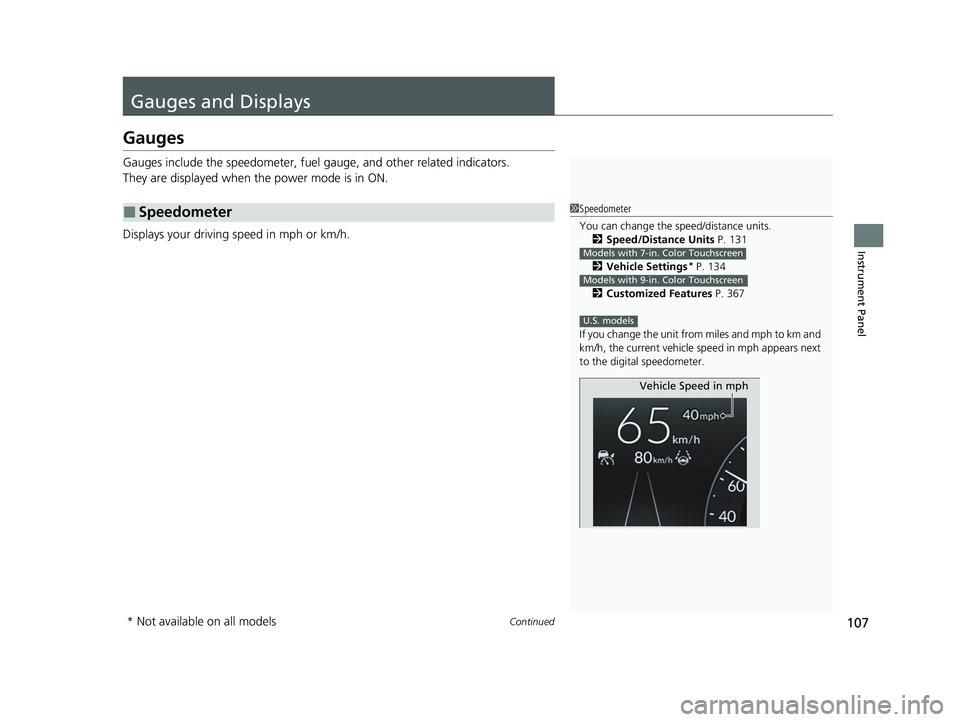
Displays your driving speed in mph or km/h.
■Speedometer1 Speedometer
You can change the speed/distance units.
2 Speed/Distance Units P. 131
2 Vehicle Settings
* P. 134
2 Customized Features P. 367
If you change the unit from miles and mph to km and
km/h, the current vehicle speed in mph appears next
to the digital speedometer.
Models with 7-in. Color Touchscreen
Models with 9-in. Color Touchscreen
U.S. models
Vehicle Speed in mph
* Not available on all models
24 ACURA INTEGRA-313S56100.book 107 ページ 2023年2月13日 月曜日 午後2時41分
Page 110 of 766
uuGauges and Displays uGauges
108
Instrument Panel
Shows the number of engine revolutions per minute.
Displays the amount of fuel left in the fuel tank.
Displays the temperature of the engine coolant.
Shows the total number of miles or kilome ters that your vehicle has accumulated.
■Tachometer
■Fuel Gauge
■Temperature Gauge
■Odometer
1Fuel Gauge
NOTICE
You should refuel when the reading approaches .
Running out of fuel can cause the engine to misfire,
damaging the cata lytic converter.
The actual amount of remain ing fuel may differ from
the fuel gauge reading.E
1 Temperature Gauge
NOTICE
Driving with the temperat ure gauge reading in the
upper zone can cause serious engine damage. Pull
safely to the side of th e road and allow engine
temperature to return to normal.
2 Overheating P. 719
24 ACURA INTEGRA-313S56100.book 108 ページ 2023年2月13日 月曜日 午後2時41分
Page 111 of 766

Continued109
uuGauges and Displays uGauges
Instrument Panel
Shows the outside temperature in Fahr enheit (U.S.) or Celsius (Canada).
■Adjusting the outside temperature display
Adjust the temperature reading by up to ±5°F or ±3°C if the temperature reading
seems incorrect.
Shows certain detected traffic signs while driving.
If speed limit warning is activated, the si gn icon blinks when the maximum speed of
the traffic sign detected is exceeded by a threshold, when compared with the vehicle
speed.
2 Traffic Sign Recognition System P. 583
■Outside Temperature
■Traffic Sign Recognition System
1Outside Temperature
The temperature sensor is in the front bumper.
Road heat and exhaust fr om another vehicle can
affect the temperature reading when your vehicle
speed is less than 19 mph (30 km/h).
It may take several minutes for the display to be
updated after the temperature reading has stabilized.
1 Adjusting the outside temperature display
You can adjust the temperature reading.
2 Vehicle Settings
* P. 134
2 Customized Features P. 367
Models with 7-in. Color Touchscreen
Models with 9-in. Color Touchscreen
1Traffic Sign Recognition System
The default speed limit wa rning threshold is the
maximum speed of the traffic sign detected.
You can adjust the threshol d for speed limit warning.
2 Vehicle Settings
* P. 134
2 Customized Features P. 367
Models with 7-in. Color Touchscreen
Models with 9-in. Color Touchscreen
* Not available on all models
24 ACURA INTEGRA-313S56100.book 109 ページ 2023年2月13日 月曜日 午後2時41分