wheel Acura MDX 2009 Owner's Guide
[x] Cancel search | Manufacturer: ACURA, Model Year: 2009, Model line: MDX, Model: Acura MDX 2009Pages: 489, PDF Size: 11.91 MB
Page 161 of 489
Your vehicle has a memory feature
for the steering wheel, driver's seat,
and outside mirror positions.
Seat, except for power lumbar,
steering wheel and outside mirror
positions can be stored in separate
memories. You select a memorized
position by pushing the appropriate
button or using the appropriate
remote transmitter (Driver 1 or
Driver 2). For more information see
page139.Storing a Driving Position in
Memory
Store a driving position only when
the vehicle is parked.
1. Turn the ignition switch to the ON
(II) position. You cannot add a new
driving position to the memory
unless the ignition switch is in the
ON (II) position. You can recall a
memorized position with the
ignition switch in any position.
2. Adjust the seat to a comfortable position (see page140).
Adjust the steering wheel to a
comfortable position (see page
124).
Adjust the outside mirrors for best
visibility (see page155).
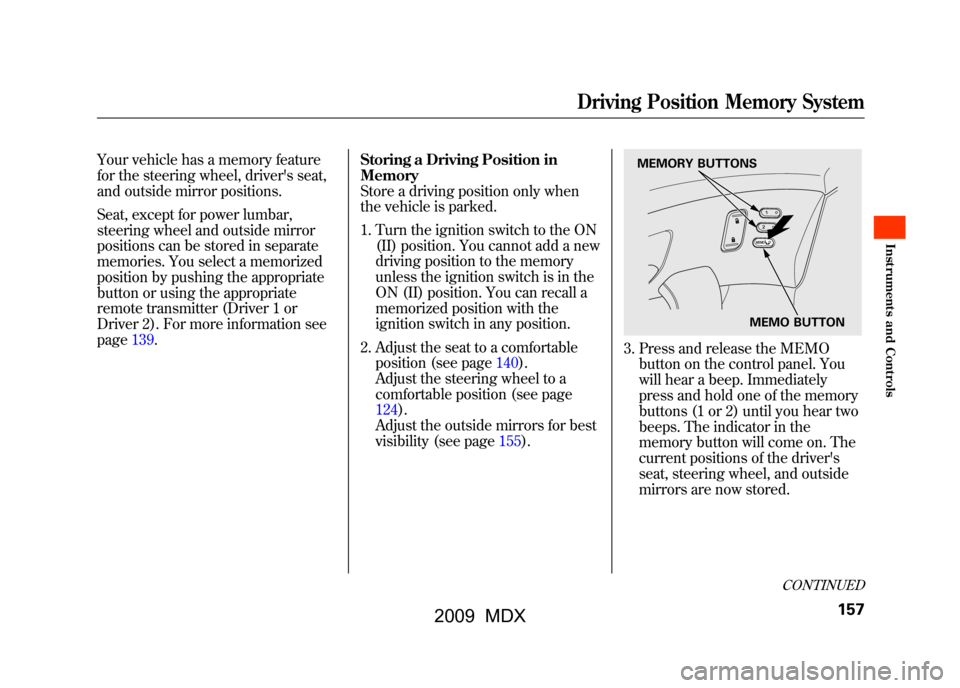
3. Press and release the MEMObutton on the control panel. You
will hear a beep. Immediately
press and hold one of the memory
buttons (1 or 2) until you hear two
beeps. The indicator in the
memory button will come on. The
current positions of the driver's
seat, steering wheel, and outside
mirrors are now stored.
MEMO BUTTON
MEMORY BUTTONS
CONTINUED
Driving Position Memory System
157
Inst rument s and Cont rols
08/06/06 16:58:07 09 ACURA MDX MMC North America Owner's M 50 31STX620 enu
2009 MDX
Page 162 of 489

Doing any of the following after
pressing the MEMO button will
cancel the storing procedure.●Not pressing a memory button
within 5 seconds.●Readjusting the seat position.●Readjusting the outside mirror
position.
Each memory button stores only one
driving position. Storing a new
position erases the previous setting
stored in that button's memory. If
you want to add a new position while
retaining the current one, use the
other memory button. Selecting a Memorized Position
To select a memorized position, do
this:
1. Make sure the vehicle is parked.
2. Press the desired memory button
(1 or 2) until you hear a beep, then
release the button.
The system will move the seat,
steering wheel, and outside mirrors
to the memorized positions. The
indicator in the selected memory
button will flash during movement.
When the adjustments are complete,
you will hear two beeps, and the
indicator will remain on.
To change the ‘‘MEMORY
POSITION LINK ’’setting, see page
98. To stop the system's automatic
adjustment, do any of these actions:
●Press any button on the control
panel: MEMO, 1, or 2.●Push any of the adjustment
switches for the seat.●Shift out of Park.●Adjust the outside mirrors.
If desired, you can use the
adjustment switches to change the
positions of the seat, steering wheel
or outside mirrors after they are in
their memorized position. If you
change the memorized position, the
indicator in the memory button will
go out. To keep this driving position
for later use, you must store it in the
driving position memory.
Driving Position Memory System15808/06/06 16:58:07 09 ACURA MDX MMC North America Owner's M 50 31STX620 enu
2009 MDX
Page 178 of 489
Switch to recirculation mode when
driving through dusty or smoky
conditions, then return to fresh air
mode.Rear Window Defogger ButtonThis button turns the rear window
defogger off and on (see page122).
Pushing this button also turns the
power mirror heaters on and off.Mode ControlUse the mode control button to
select the vents the air flows from.
Some air will flow from the
dashboard vents in all modes.
Air flows from the center and
corner vents in the dashboard.Airflow is divided between the
vents in the dashboard and the floor
vents.Air flows from the floor vents.
Airflow is divided between the
floor and corner vents and the
defroster vents at the base of the
windshield.
Windshield Defroster ButtonThis button directs the main airflow
to the windshield for faster
defrosting. It also overrides any
mode selection you may have made.
When you select
, the system
automatically switches to fresh air
mode and turns on the A/C. For
faster defrosting, manually set the
fan speed to high. You can also
increase airflow to the windshield by
closing the corner vents on the
dashboard. To close the vents, rotate
the wheel under each corner vent.
When you turn offby pressing
the button again, the system returns
to its former settings. For your safety, make sure you have
a clear view through all the windows
before driving.
When the indicator in the button is
on, the front passenger's and rear
passenger compartment
temperatures cannot be set
separately from the driver's.
Climate Control System17408/06/06 16:58:07 09 ACURA MDX MMC North America Owner's M 50 31STX620 enu
2009 MDX
Page 237 of 489
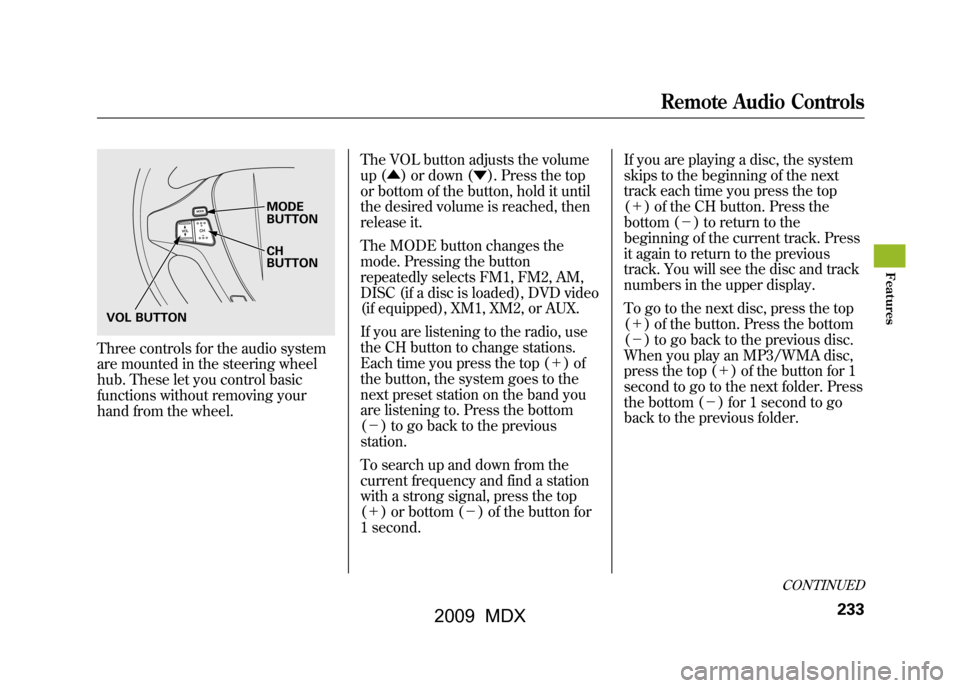
Three controls for the audio system
are mounted in the steering wheel
hub. These let you control basic
functions without removing your
hand from the wheel.The VOL button adjusts the volume
up (▲
) or down (▼). Press the top
or bottom of the button, hold it until
the desired volume is reached, then
release it.
The MODE button changes the
mode. Pressing the button
repeatedly selects FM1, FM2, AM,
DISC (if a disc is loaded), DVD video
(if equipped), XM1, XM2, or AUX.
If you are listening to the radio, use
the CH button to change stations.
Each time you press the top (+ )of
the button, the system goes to the
next preset station on the band you
are listening to. Press the bottom
(- ) to go back to the previous
station.
To search up and down from the
current frequency and find a station
with a strong signal, press the top
(+ ) or bottom (-) of the button for
1 second. If you are playing a disc, the system
skips to the beginning of the next
track each time you press the top
(+
) of the CH button. Press the
bottom (- ) to return to the
beginning of the current track. Press
it again to return to the previous
track. You will see the disc and track
numbers in the upper display.
To go to the next disc, press the top
(+ ) of the button. Press the bottom
(- ) to go back to the previous disc.
When you play an MP3/WMA disc,
press the top (+ ) of the button for 1
second to go to the next folder. Press
the bottom (- ) for 1 second to go
back to the previous folder.
MODE
BUTTON
CH
BUTTON
VOL BUTTON
CONTINUED
Remote Audio Controls
233
Feat ures
08/06/06 16:58:07 09 ACURA MDX MMC North America Owner's M 50 31STX620 enu
2009 MDX
Page 274 of 489

Cruise control allows you to maintain
a set speed above 25 mph (40 km/h)
without keeping your foot on the
accelerator pedal. It should be used
for cruising on straight, open
highways. It is not recommended for
city driving, winding roads, slippery
roads, heavy rain, or bad weather.
Improper use of the cruise
control can lead to a crash.
Use the cruise control only
when traveling on open
highways in good weather.Using Cruise Control
1. Push in the CRUISE button on the
steering wheel. The CRUISE
MAIN indicator on the instrument
panel comes on.
The cruise control system can be
left on, even when it is not in use.
2. Accelerate to the desired cruising speed above 25 mph (40 km/h). 3. Press and release the SET/
DECEL button on the steering
wheel. The CRUISE CONTROL
indicator on the instrument panel
comes on to show the system is
now activated.
CRUISE BUTTON
RES/ACCEL
BUTTON
SET/DECEL
BUTTON
CANCEL BUTTON
Cruise Control27008/06/06 16:58:07 09 ACURA MDX MMC North America Owner's M 50 31STX620 enu
2009 MDX
Page 276 of 489
Even with cruise control turned on,
you can still use the accelerator pedal
to speed up for passing. After
completing the pass, take your foot
off the accelerator pedal. The vehicle
will return to the set cruising speed.
Resting your foot on the brake pedal
causes cruise control to cancel.Cancelling Cruise Control
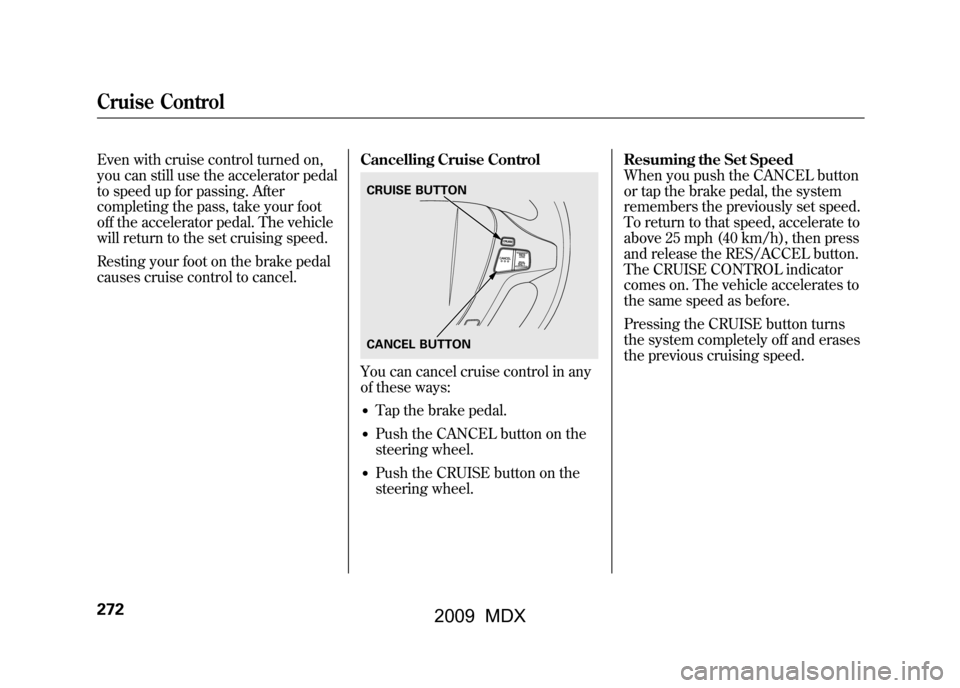
You can cancel cruise control in any
of these ways:●Tap the brake pedal.●Push the CANCEL button on the
steering wheel.●Push the CRUISE button on the
steering wheel.Resuming the Set Speed
When you push the CANCEL button
or tap the brake pedal, the system
remembers the previously set speed.
To return to that speed, accelerate to
above 25 mph (40 km/h), then press
and release the RES/ACCEL button.
The CRUISE CONTROL indicator
comes on. The vehicle accelerates to
the same speed as before.
Pressing the CRUISE button turns
the system completely off and erases
the previous cruising speed.CRUISE BUTTON
CANCEL BUTTON
Cruise Control27208/06/06 16:58:07 09 ACURA MDX MMC North America Owner's M 50 31STX620 enu
2009 MDX
Page 284 of 489
Microphone
The HFL microphone is on the
ceiling, between the front map lights
and the console buttons. On models
with navigation system, the
microphone is shared with the
navigation system.
Audio System
When the HFL is in use, the sound
comes through the vehicle's front
audio system speakers. If the audio
system is in use while operating
either of the HFL buttons or making
a call, the HFL over-rides the audio
system. To change the volume level,
use the audio system volume knob,
or the steering wheel volume
controls.HFL Buttons
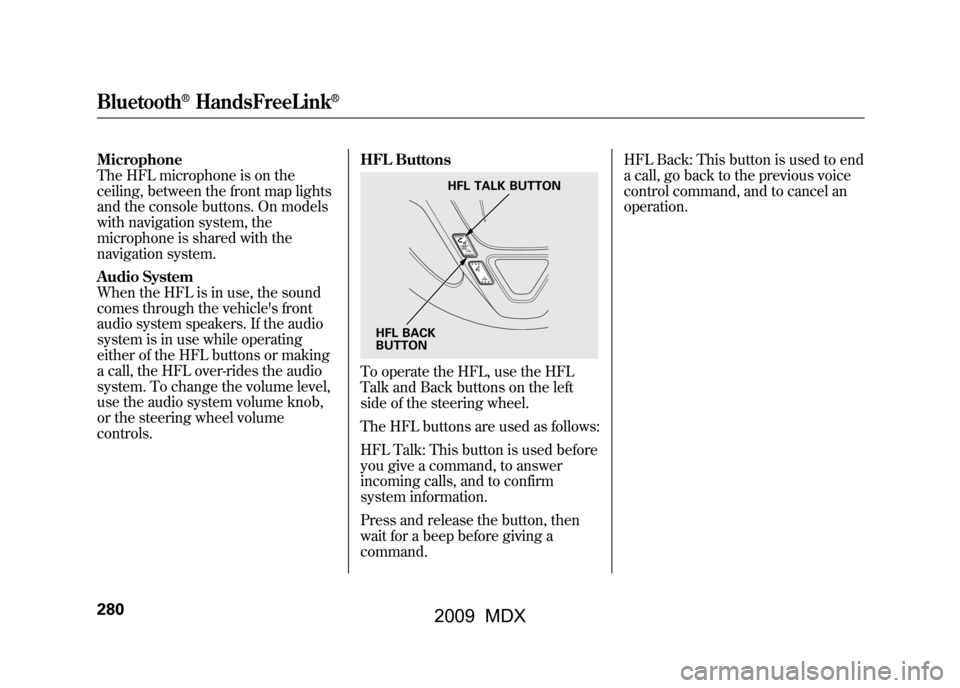
To operate the HFL, use the HFL
Talk and Back buttons on the left
side of the steering wheel.
The HFL buttons are used as follows:
HFL Talk: This button is used before
you give a command, to answer
incoming calls, and to confirm
system information.
Press and release the button, then
wait for a beep before giving a
command.HFL Back: This button is used to end
a call, go back to the previous voice
control command, and to cancel an
operation.
HFL TALK BUTTON
HFL BACK
BUTTON
Bluetooth
®HandsFreeLink
®
28008/06/06 16:58:07 09 ACURA MDX MMC North America Owner's M 50 31STX620 enu
2009 MDX
Page 285 of 489
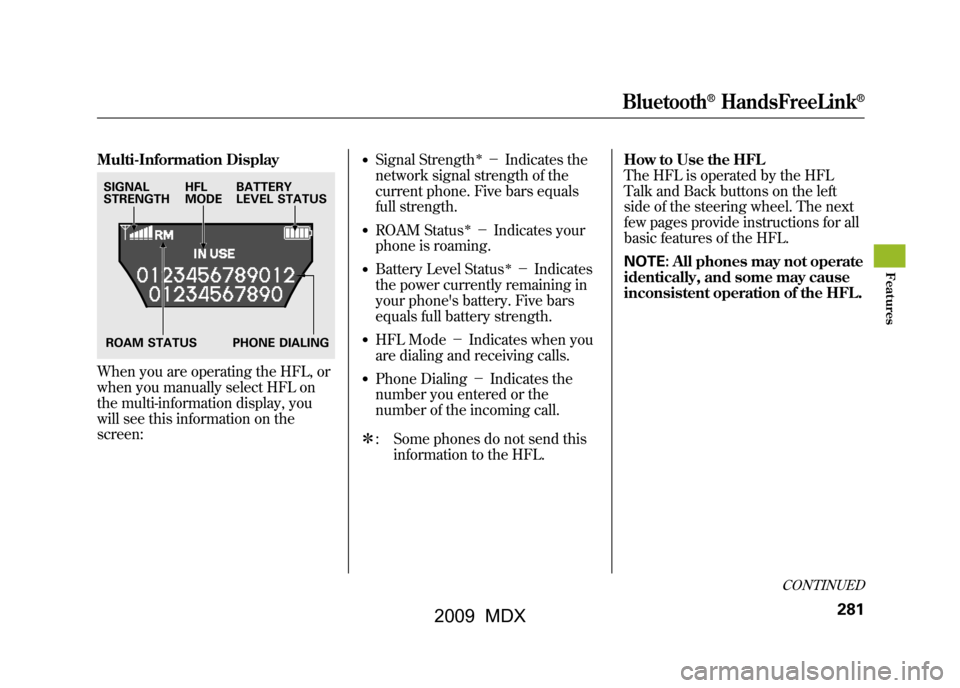
Multi-Information DisplayWhen you are operating the HFL, or
when you manually select HFL on
the multi-information display, you
will see this information on the
screen:
●Signal Strength
ꭧ-Indicates the
network signal strength of the
current phone. Five bars equals
full strength.
●ROAM Status
ꭧ- Indicates your
phone is roaming.
●Battery Level Status
ꭧ- Indicates
the power currently remaining in
your phone's battery. Five bars
equals full battery strength.
●HFL Mode -Indicates when you
are dialing and receiving calls.●Phone Dialing -Indicates the
number you entered or the
number of the incoming call.
ꭧ : Some phones do not send this
information to the HFL. How to Use the HFL
The HFL is operated by the HFL
Talk and Back buttons on the left
side of the steering wheel. The next
few pages provide instructions for all
basic features of the HFL.
NOTE:
All phones may not operate
identically, and some may cause
inconsistent operation of the HFL.
SIGNAL
STRENGTH HFL
MODEBATTERY
LEVEL STATUS
ROAM STATUS PHONE DIALING
CONTINUED
Bluetooth
®HandsFreeLink
®
281
Feat ures
08/06/06 16:58:07 09 ACURA MDX MMC North America Owner's M 50 31STX620 enu
2009 MDX
Page 293 of 489

Making a Call
You can make calls using any phone
number, or by using a name in the
HFL phonebook. You can also redial
the last number called. During a call,
the HFL allows you to talk up to 30
minutes after you remove the key
from the ignition switch. Continuing
a call without running the engine
may discharge and weaken the
vehicle's battery.To make a call using a phone number,do this:1. With your phone on and the ignition in the ACCESSORY (I) or
ON (II) position, press and release
the Talk button. After the beep,
say ‘‘Call’’ or‘‘Dial.’’ The HFL
response is, ‘‘What name or
number would you like to call/
dial? ’’ 2. Press and release the Talk button.
After the beep, say the number
you want to call. For example, say
‘‘123 456 7891.’’ The HFL response
is ‘‘123 456 7891. Say call, dial, or
continue to add numbers.’’
On models with navigation systemYou can also make a call directly
from the list shown on the
navigation display.
3. Press and release the Talk button. After the beep, say ‘‘Call’’ or‘‘Dial.’’
The HFL response is ‘‘Calling ’’or
‘‘ Dialing. ’’Once connected, you
will hear the person you called
through the audio speakers. To
change the volume, use the audio
system volume knob, or the
steering wheel volume controls.
4. To end the call, press the Back button.
To make a call using a name in the HFL
phonebook, do this:1. With your phone on and the ignition in the ACCESSORY (I) or
ON (II) position, press and release
the Talk button. After the beep,
say ‘‘Call’’ or‘‘Dial. ’’The HFL
response is, ‘‘What name or
number would you like to call/
dial? ’’
2. Press and release the Talk button. After the beep, say the name you
want to call. For example, say
‘‘Eric. ’’The HFL response is
‘‘ Would you like to call Eric?’’
3. Press and release the Talk button. After the beep, say ‘‘Yes. ’’The
HFL response is ‘‘Calling ’’or
‘‘ Dialing. ’’Once connected, you
will hear the person you called
through the audio speakers. To
change the volume, use the audio
system volume knob, or the
steering wheel volume controls.
CONTINUED
Bluetooth
®HandsFreeLink
®
289
Feat ures
08/06/06 16:58:07 09 ACURA MDX MMC North America Owner's M 50 31STX620 enu
2009 MDX
Page 294 of 489

4. To end the call, press the Backbutton.
To redial the last number called by
the phone, press and release the Talk
button. After the beep, say ‘‘Redial. ’’
The HFL response is, ‘‘Redialing. ’’
Once connected, you will hear the
person you called through the audio
speakers. To change the volume, use
the audio system volume knob, or
the steering wheel volume controls. Sending Numbers or Names
During a Call
The HFL allows you to send
numbers or names during a call. This
is useful when you call a menu-
driven phone system. You can also
program account numbers into the
HFL phonebook for easy retrieval
during menu-driven calls.
To send a number during a call, do this:1. Press and release the Talk button.
After the beep, say ‘‘Send. ’’The
HFL response is, ‘‘What name or
number would you like to send? ’’
2. Press and release the Talk button. After the beep, say the number
you want to send. For example, say
‘‘1, 2, 3. ’’The HFL response is ‘‘1,
2, 3. Say send, or continue to add
numbers.’’
NOTE: To send a pound (# ), say
‘‘ pound.’’ To send a star (*), say
‘‘ star. ’’ 3. Press and release the Talk button.
After the beep, say ‘‘Send.’’ The
dial tones will be sent, and the call
will continue.
To send a name during a call, do this:1. Press and release the Talk button. After the beep, say ‘‘Send.’’ The
HFL response is, ‘‘What name or
number would you like to send? ’’
2. Press and release the Talk button. After the beep, say the name you
want to send. For example, say
‘‘Account number. ’’The HFL
response is ‘‘Would you like to
send account number? ’’
3. Press and release the Talk button. After the beep, say ‘‘Send.’’ The
dial tones will be sent, and the call
will continue.
Bluetooth
®HandsFreeLink
®
29008/06/06 16:58:07 09 ACURA MDX MMC North America Owner's M 50 31STX620 enu
2009 MDX