Rack Acura MDX 2011 User Guide
[x] Cancel search | Manufacturer: ACURA, Model Year: 2011, Model line: MDX, Model: Acura MDX 2011Pages: 609, PDF Size: 12.7 MB
Page 213 of 609
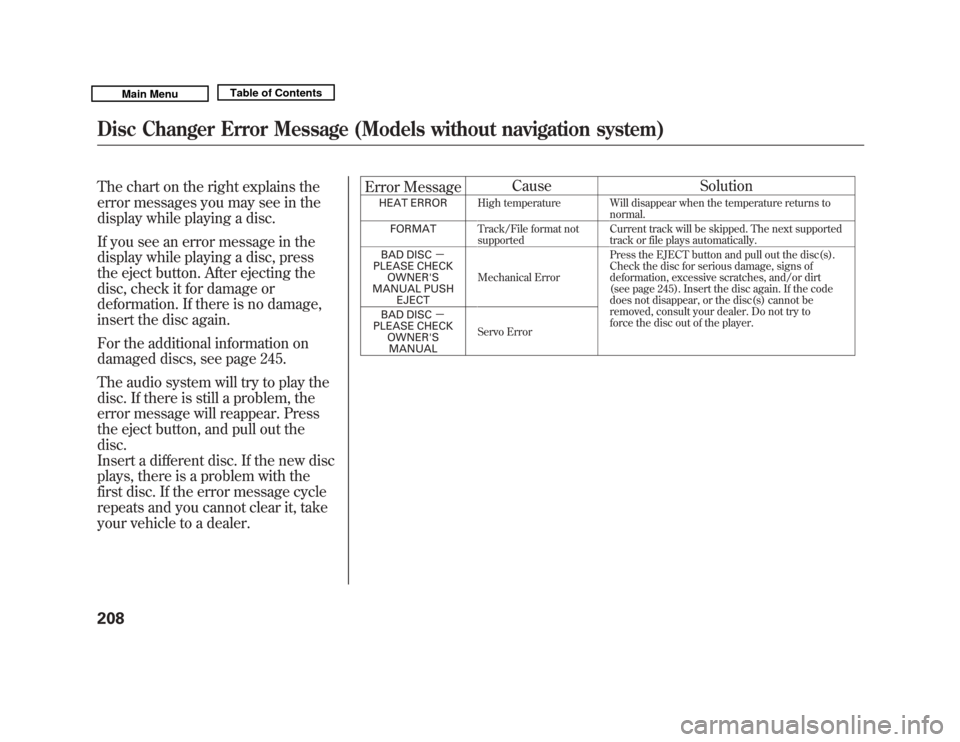
The chart on the right explains the
error messages you may see in the
display while playing a disc.
If you see an error message in the
display while playing a disc, press
the eject button. After ejecting the
disc, check it for damage or
deformation. If there is no damage,
insert the disc again.
For the additional information on
damaged discs, see page 245.
The audio system will try to play the
disc. If there is still a problem, the
error message will reappear. Press
the eject button, and pull out the
disc.
Insert a different disc. If the new disc
plays, there is a problem with the
first disc. If the error message cycle
repeats and you cannot clear it, take
your vehicle to a dealer.Error Message
Cause Solution
HEAT ERROR
High temperature Will disappear when the temperature returns to
normal.
FORMAT Track/File format not
supported Current track will be skipped. The next supported
track or file plays automatically.
BAD DISC -
PLEASE CHECK OWNER'S
MANUAL PUSH EJECT Mechanical Error
Press the EJECT button and pull out the disc(s).
Check the disc for serious damage, signs of
deformation, excessive scratches, and/or dirt
(see page 245). Insert the disc again. If the code
does not disappear, or the disc(s) cannot be
removed, consult your dealer. Do not try to
force the disc out of the player.
BAD DISC
-
PLEASE CHECK
OWNER'SMANUAL Servo Error
Disc Changer Error Message (Models without navigation system)20810/06/29 11:59:04 11 ACURA MDX MMC North America Owner's M 50 31STX640 enu
Page 239 of 609
It is possible to select up to 999 files
for inclusion in CD-Rs and CD-RWs,
and up to 3,500 files for inclusion in
DVD-Rs and DVD-RWs.Do not use discs with adhesive labels.The label can curl up and cause the disc
to jam in the unit.Manufactured under license under
U.S. Patent #'s: 5,451,942; 5,956,674;
5,974,380; 5,978,762; 6,487,535 &
other U.S. and worldwide patents
issued & pending. DTS and DTS
Digital Surround are registered
trademarks and the DTS logos and
Symbol are trademarks of DTS, Inc.
© 1996 -2008 DTS, Inc. All Rights
Reserved. To Load a Disc
Insert a disc about halfway into the
disc slot. The drive will pull the disc
in the rest of the way to play it. You
operate the disc player with the same
controls used for the radio. The
number of the current track is shown
in the display. When playing a disc in
MP3, WMA or AAC, the numbers of
the current folder and file are shown.
The system will continuously play a
disc until you change modes.
For information on how to handle
and protect compact discs, see page
244.
To Play a Disc
Select the disc player by pressing the
DISC button. The system will begin
playing the last selected track in the
disc. You will see the current track
position highlighted.
Title information will be displayed by
a list when the information is found
in the Gracenote
ꭂ
Album Info
(Gracenote
ꭂ
Media Database) on the
built-in hard disk drive. When you
play a CD recorded with text data,
you will see the genre, artist name,
album and track name on the screen.
When you play MP3/WMA/AAC
discs, you will see the genre, artist
name, album name and track name
on the screen. If the disc was not
recorded with this information, it will
not be displayed.
Playing a Disc (Models with navigation system)23410/06/29 11:59:04 11 ACURA MDX MMC North America Owner's M 50 31STX640 enu
Page 240 of 609
Each time you press the TITLE
button, the audio display changes
from artist name to album name, to
track name and then to normal
display that shows the track number
and the elapsed time. When playing a
disc in MP3/WMA/AAC, the display
mode changes from folder name, to
file name, to artist tag, to album tag,
to track tag, and then to normal
display.To Change Tracks
Each time you press and release the
side of the skip button, the
player skips forward to the beginning
of the next track. Press and release
the
side of the skip button to
skip backward to the beginning of
the current track. Press the
side
again to skip to the previous track.
To move rapidly within a track, press
and hold either side of the skip
button.
When you insert a CD for the first
time, the system automatically starts
recording to the hard disc. For
information on recording from music
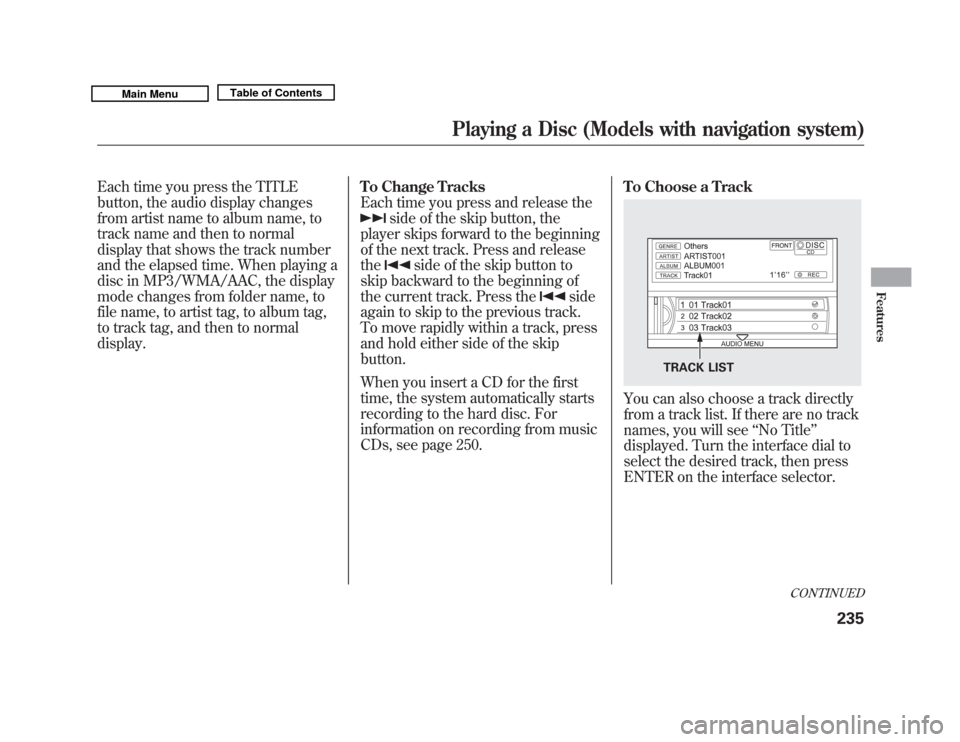
CDs, see page 250. To Choose a Track
You can also choose a track directly
from a track list. If there are no track
names, you will see
‘‘No Title’’
displayed. Turn the interface dial to
select the desired track, then press
ENTER on the interface selector.
TRACK LIST
CONTINUED
Playing a Disc (Models with navigation system)
235
Features
10/06/29 11:59:04 11 ACURA MDX MMC North America Owner's M 50 31STX640 enu
Page 241 of 609
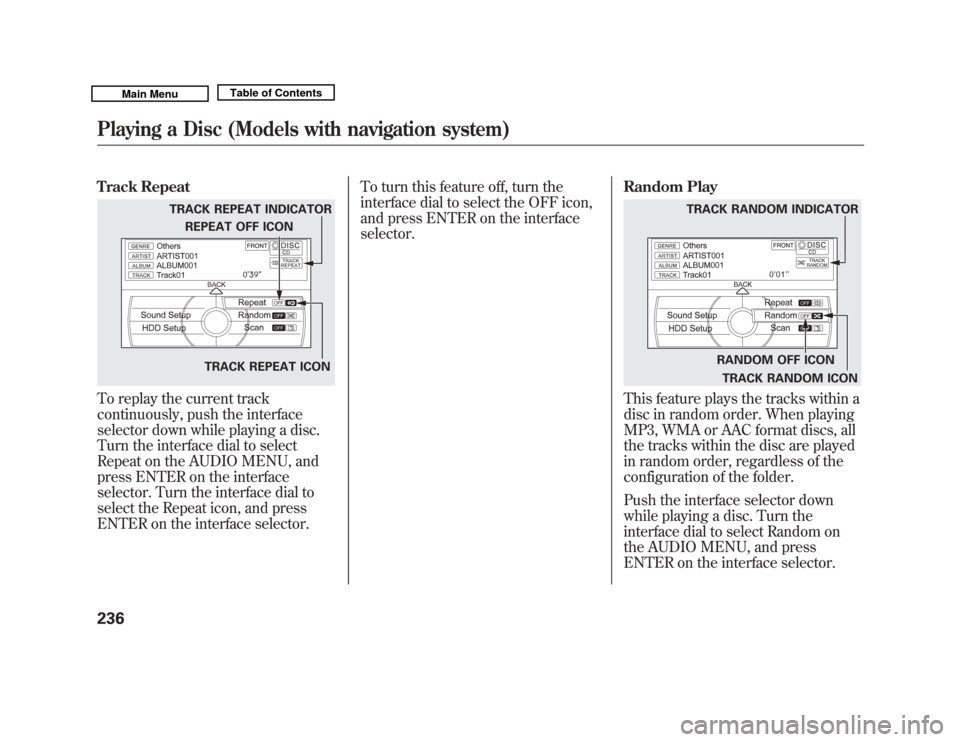
Track RepeatTo replay the current track
continuously, push the interface
selector down while playing a disc.
Turn the interface dial to select
Repeat on the AUDIO MENU, and
press ENTER on the interface
selector. Turn the interface dial to
select the Repeat icon, and press
ENTER on the interface selector.To turn this feature off, turn the
interface dial to select the OFF icon,
and press ENTER on the interface
selector.
Random Play
This feature plays the tracks within a
disc in random order. When playing
MP3, WMA or AAC format discs, all
the tracks within the disc are played
in random order, regardless of the
configuration of the folder.
Push the interface selector down
while playing a disc. Turn the
interface dial to select Random on
the AUDIO MENU, and press
ENTER on the interface selector.
TRACK REPEAT INDICATOR
TRACK REPEAT ICON
REPEAT OFF ICON
RANDOM OFF ICON
TRACK RANDOM ICON
TRACK RANDOM INDICATOR
Playing a Disc (Models with navigation system)23610/06/29 11:59:04 11 ACURA MDX MMC North America Owner's M 50 31STX640 enu
Page 242 of 609
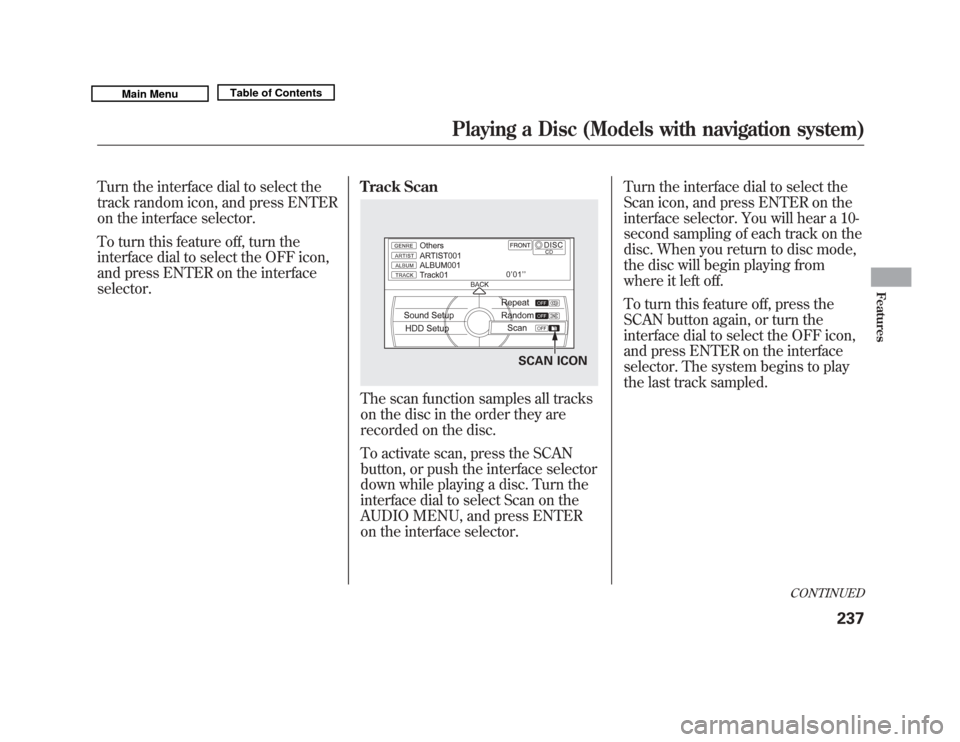
Turn the interface dial to select the
track random icon, and press ENTER
on the interface selector.
To turn this feature off, turn the
interface dial to select the OFF icon,
and press ENTER on the interface
selector.Track Scan
The scan function samples all tracks
on the disc in the order they are
recorded on the disc.
To activate scan, press the SCAN
button, or push the interface selector
down while playing a disc. Turn the
interface dial to select Scan on the
AUDIO MENU, and press ENTER
on the interface selector.Turn the interface dial to select the
Scan icon, and press ENTER on the
interface selector. You will hear a 10-
second sampling of each track on the
disc. When you return to disc mode,
the disc will begin playing from
where it left off.
To turn this feature off, press the
SCAN button again, or turn the
interface dial to select the OFF icon,
and press ENTER on the interface
selector. The system begins to play
the last track sampled.
SCAN ICON
CONTINUED
Playing a Disc (Models with navigation system)
237
Features
10/06/29 11:59:04 11 ACURA MDX MMC North America Owner's M 50 31STX640 enu
Page 243 of 609
To Stop Playing a Disc
To take the system out of disc mode,
press the AM/FM button, thebutton, or the HDD button. To return
to disc mode, press the DISC button.
If you turn the system off while a disc
is playing, either with the VOL/knob or the ignition switch, the disc
will stay in the drive. When you turn
the system back on, the disc will
begin playing where it left off.Playing an MP3/WMA/AAC Disc
This audio system plays CD-ROM,
CD-R/RW, DVD-ROM, and
DVD-R/RW compressed in MP3,
WMA, or AAC formats. You can
select up to 255 folders or tracks.
Disc
Maximum
folders
ꭧ
Maximum
Files
Maximum
layers
ꭧ
CD-ROM
CD-R
CD-RW 255 999 8
DVD-ROM
DVD-R
DVD-RW 255 3500 8ꭧ
Including Root folder
NOTE:
Combining a low sampling frequency
with a low bitrate may result in
extremely degraded sound quality.
To play an MP3/WMA/AAC disc,
use the disc controls previously
described, along with the following
information. Depending on the software the files
were made with, it may not be
possible to play some files, or display
some text data.
Playing a Disc (Models with navigation system)23810/06/29 11:59:04 11 ACURA MDX MMC North America Owner's M 50 31STX640 enu
Page 244 of 609
Changing the Folders
While playing an MP3/WMA/AAC
disc, you can select a folder within
the disc by pressing either side of
the category button. Each time you
press either side of the button, the
folder title and its first file's
information appear on the audio
display and on the navigation screen
in hierarchical order of the folders
which contain files within the disc.
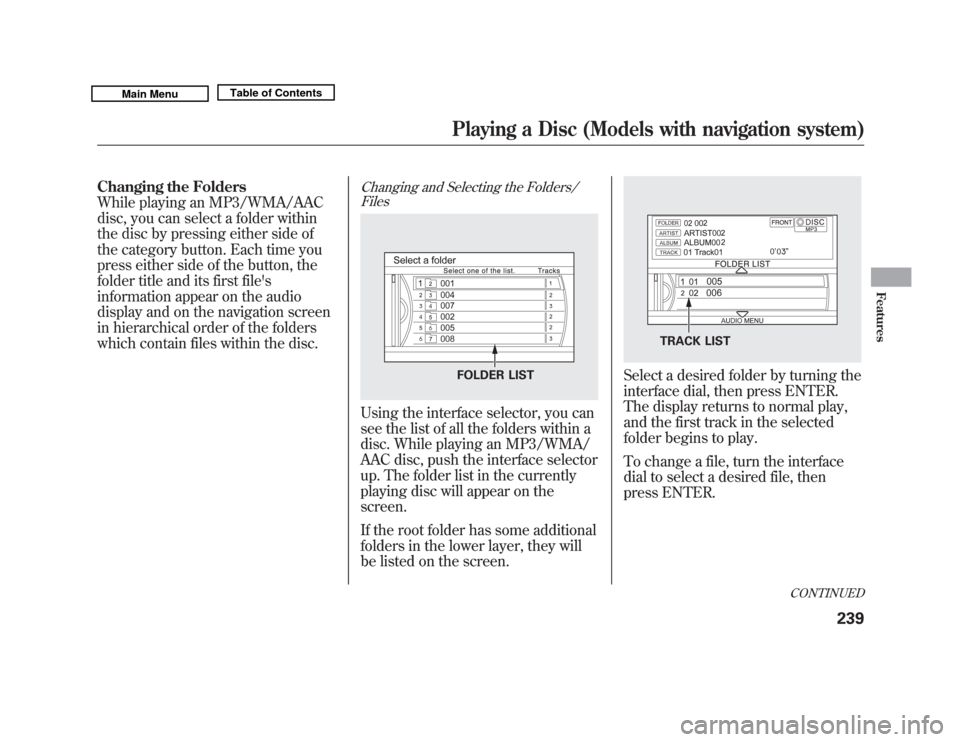
Changing and Selecting the Folders/FilesUsing the interface selector, you can
see the list of all the folders within a
disc. While playing an MP3/WMA/
AAC disc, push the interface selector
up. The folder list in the currently
playing disc will appear on the
screen.
If the root folder has some additional
folders in the lower layer, they will
be listed on the screen.
Select a desired folder by turning the
interface dial, then press ENTER.
The display returns to normal play,
and the first track in the selected
folder begins to play.
To change a file, turn the interface
dial to select a desired file, then
press ENTER.
FOLDER LIST
TRACK LIST
CONTINUED
Playing a Disc (Models with navigation system)
239
Features
10/06/29 11:59:04 11 ACURA MDX MMC North America Owner's M 50 31STX640 enu
Page 247 of 609
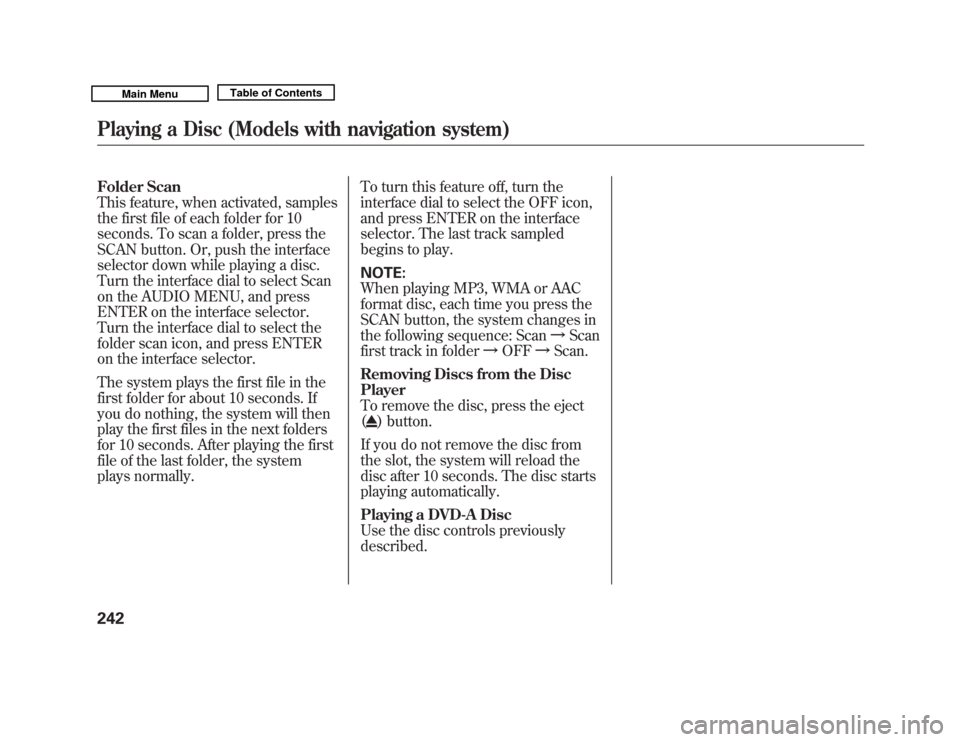
Folder Scan
This feature, when activated, samples
the first file of each folder for 10
seconds. To scan a folder, press the
SCAN button. Or, push the interface
selector down while playing a disc.
Turn the interface dial to select Scan
on the AUDIO MENU, and press
ENTER on the interface selector.
Turn the interface dial to select the
folder scan icon, and press ENTER
on the interface selector.
The system plays the first file in the
first folder for about 10 seconds. If
you do nothing, the system will then
play the first files in the next folders
for 10 seconds. After playing the first
file of the last folder, the system
plays normally.To turn this feature off, turn the
interface dial to select the OFF icon,
and press ENTER on the interface
selector. The last track sampled
begins to play.
NOTE:
When playing MP3, WMA or AAC
format disc, each time you press the
SCAN button, the system changes in
the following sequence: Scan
ꭟScan
first track in folder ꭟOFF ꭟScan.
Removing Discs from the Disc
Player
To remove the disc, press the eject
(
) button.
If you do not remove the disc from
the slot, the system will reload the
disc after 10 seconds. The disc starts
playing automatically.
Playing a DVD-A Disc
Use the disc controls previously
described.
Playing a Disc (Models with navigation system)24210/06/29 11:59:04 11 ACURA MDX MMC North America Owner's M 50 31STX640 enu
Page 250 of 609
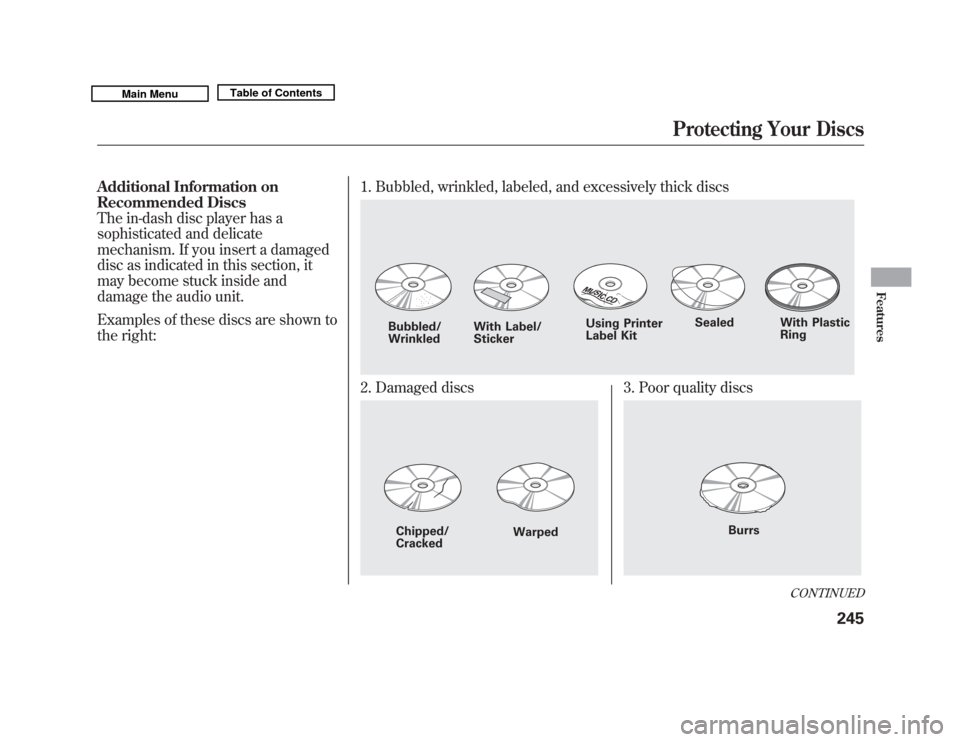
Additional Information on
Recommended Discs
The in-dash disc player has a
sophisticated and delicate
mechanism. If you insert a damaged
disc as indicated in this section, it
may become stuck inside and
damage the audio unit.
Examples of these discs are shown to
the right:1. Bubbled, wrinkled, labeled, and excessively thick discs
2. Damaged discs
3. Poor quality discs
Bubbled/
Wrinkled
With Label/
Sticker Using Printer
Label Kit
Sealed With Plastic
RingChipped/
Cracked Warped
Burrs
CONTINUED
Protecting Your Discs
245
Features
10/06/29 11:59:04 11 ACURA MDX MMC North America Owner's M 50 31STX640 enu
Page 253 of 609
The Hard Disc Drive (HDD) Audio
function can record tracks from
music CDs to the navigation system's
hard disc. This function also allows
for various playing methods, such as
playing recorded tracks on an artist-
by-artist or genre-by-genre basis. For
example, you can play the tracks that
you want to listen to in any order that
you like for each playlist.
NOTE:●
Only recordings from a standard
CD-DA (44.1 kHz, 16 bit stereo
PCM digital sound data) to HDD
are supported.
●
Digital music files, such as MP3,
WMA, AAC etc., in CD-R, DVD-R
and USB flash memory devices
cannot be copied to HDD.
Likewise, digital music files
recorded to HDD cannot be copied
to CD-R, DVD-R and USB devices.
●
Music data recorded on HDD can
only be used for personal
enjoyment.
●
Data is recorded using ultra-
efficient compression technology,
therefore, sound quality may vary
slightly from the original.
●
Title information will be displayed
when the information is found in
the Gracenote
®Album Info
(Gracenote
®Media Database) on
the built-in hard disk drive. See
page 272.
●
Recording function from following
media is not supported.
– CD-DA which prohibits the copy
by SCMS
– CD-DA with copy control
– SACD (Super Audio CD)
– DTS-CD
– DVD-A
– CD-R/RW
– DVD-R/RW
– Copy controlled CDs (Playback
cannot be guaranteed)
– DTS-CDs (Only enabled for
playback)
If the HDD is ever replaced, all data
will be lost and stored music will not
be recovered.
Playing Hard Disc Drive (HDD) Audio (Models with navigation system)24810/06/29 11:59:04 11 ACURA MDX MMC North America Owner's M 50 31STX640 enu