memory Acura MDX 2011 User Guide
[x] Cancel search | Manufacturer: ACURA, Model Year: 2011, Model line: MDX, Model: Acura MDX 2011Pages: 609, PDF Size: 12.7 MB
Page 171 of 609
Your vehicle has a memory feature
for the steering wheel, driver's seat,
and outside mirror positions.
Seat, except for power lumbar,
steering wheel and outside mirror
positions can be stored in separate
memories. You select a memorized
position by pushing the appropriate
button or using the appropriate
remote transmitter (Driver 1 or
Driver 2). For more information see
page 147.Storing a Driving Position in
Memory
Store a driving position only when
the vehicle is parked.
1. Turn the ignition switch to the ON
(II) position. You cannot add a new
driving position to the memory
unless the ignition switch is in the
ON (II) position. You can recall a
memorized position with the
ignition switch in any position.
2. Adjust the seat to a comfortable position (see page 148).
Adjust the steering wheel to a
comfortable position (see page
133).
Adjust the outside mirrors for best
visibility (see page 164).
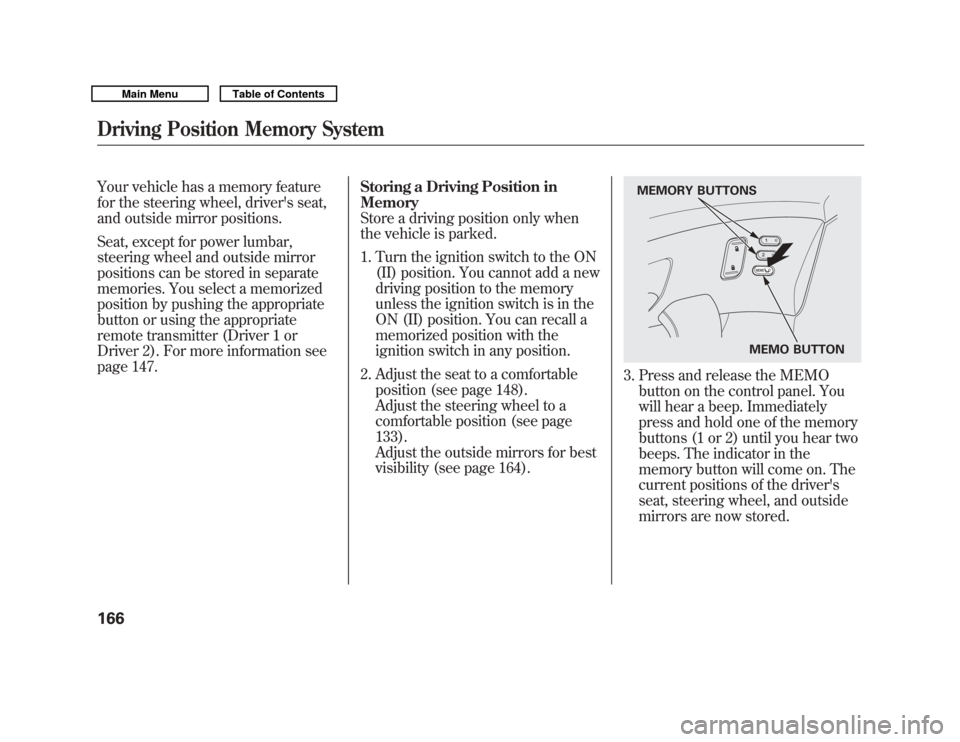
3. Press and release the MEMObutton on the control panel. You
will hear a beep. Immediately
press and hold one of the memory
buttons (1 or 2) until you hear two
beeps. The indicator in the
memory button will come on. The
current positions of the driver's
seat, steering wheel, and outside
mirrors are now stored.
MEMO BUTTON
MEMORY BUTTONS
Driving Position Memory System16610/06/29 11:59:04 11 ACURA MDX MMC North America Owner's M 50 31STX640 enu
Page 172 of 609
Doing any of the following after
pressing the MEMO button will
cancel the storing procedure.●
Not pressing a memory button
within 5 seconds.
●
Readjusting the seat position.
●
Readjusting the outside mirror
position.
Each memory button stores only one
driving position. Storing a new
position erases the previous setting
stored in that button's memory. If
you want to add a new position while
retaining the current one, use the
other memory button. Selecting a Memorized Position
To select a memorized position, do
this:
1. Make sure the vehicle is parked.
2. Press the desired memory button
(1 or 2) until you hear a beep, then
release the button.
The system will move the seat,
steering wheel, and outside mirrors
to the memorized positions. The
indicator in the selected memory
button will flash during movement.
When the adjustments are complete,
you will hear two beeps, and the
indicator will remain on.
To change the ‘‘MEMORY
POSITION LINK ’’setting, see page
107. To stop the system's automatic
adjustment, do any of these actions:
●
Press any button on the control
panel: MEMO, 1, or 2.
●
Push any of the adjustment
switches for the seat.
●
Shift out of Park.
●
Adjust the outside mirrors.
If desired, you can use the
adjustment switches to change the
positions of the seat, steering wheel
or outside mirrors after they are in
their memorized position. If you
change the memorized position, the
indicator in the memory button will
go out. To keep this driving position
for later use, you must store it in the
driving position memory.
Driving Position Memory System
167
Instruments and Controls
10/06/29 11:59:04 11 ACURA MDX MMC North America Owner's M 50 31STX640 enu
Page 184 of 609
The climate control system in your
vehicle provides a comfortable driving
environment in all weather conditions.
The standard audio system has many
features. This section describes those
features and how to use them.
Your vehicle has an anti-theft audio
system that requires a code number to
enable it.
The security system helps do
discourage vandalism and theft to
your vehicle.
Climate Control System
...............
180
Rear Climate Controls
..............
185
Audio System
..............................
190
Playing the AM/FM Radio (Models without navigation
system)
................................
191
Playing the XM
®Radio (Models
without navigation system)
......
195 Playing Discs (Models without
navigation system)
...................
200
Disc Changer Error Message (Models without navigation
system)
................................
208
Audio System (Models with navigation system)
...................
209
Playing the AM/FM Radio (Models with navigationsystem)
................................
210
Playing the XM
®Radio (Models
with navigation system)
...........
223
Playing a Disc (Models with
navigation system)
...................
232
Disc Player Error Messages (Models with navigation
system)
................................
243
Protecting Your Discs
..................
244
Playing Hard Disc Drive (HDD)
Audio (Models with navigationsystem)
................................
247
Playing an iPod
®(Models with
navigation system)
...................
275
iPod
®Error Messages (Models
with navigation system)
...........
283 Playing a USB Flash Memory
Device (Models with navigationsystem)
................................
284
USB Flash Memory Device Error
Messages (Models withnavigation system)
...............
294
Bluetooth
®Audio System (Models
with navigation system)
...........
295
AM/FM Radio Reception
.............
300
Remote Audio Controls
................
302
Auxiliary Input Jack
.....................
304
Radio Theft Protection
.................
305
Setting the Clock and Calendar
....
306
Rear Entertainment System
..........
307
Security System
...........................
337
Compass
......................................
338
Cruise Control
.............................
342
Adaptive Cruise Control (ACC)
....
345
HomeLink
®Universal
Transceiver
.............................
360
Bluetooth
®HandsFreeLink
®.........
362
AcuraLink
®(U.S. models only)
.....
398
Rearview Mirror with Rearview Camera Display
.......................
414
Features
179
Features
10/06/29 11:59:04 11 ACURA MDX MMC North America Owner's M 50 31STX640 enu
Page 218 of 609

Preset-Each preset button or
preset icon can store one frequency
on AM and two frequencies on FM.To store a preset memory location:1. Select the desired band, AM or FM. FM1 and FM2 let you store
two sets of FM frequencies with
the preset buttons (on-screen
icons).
2. Use the tune, skip (seek), scan, or RDS function to tune the radio to a
desired station.
3. Press the preset button, and hold it until you hear a beep. You can also
store frequencies with the
interface dial. Select the preset
icon you want to store the
frequency on, then press ENTER
on the interface selector, and hold
it for more than 2 seconds.
4. Repeat steps 1 through 3 to store a total of six stations on AM and
twelve stations on FM.
AUTO SELECT -If you are
traveling and can no longer receive
your preset stations, you can use the
auto select feature to find stations in
the local area.
Push the interface selector down to
scroll down the navigation screen,
highlight A.SEL, then press ENTER
on the interface selector. You will see
A.SEL on the audio display (if
selected), and the system goes into
auto select mode for several seconds. You can also press the A.SEL button.
You will see A.SEL on the audio
display and the navigation screen,
and the system goes into scan mode
for several seconds. The system
stores the frequencies of six AM and
twelve FM stations in the preset
buttons.
You will see
‘‘0 ’’ displayed if auto
select cannot find a strong station for
every preset button. If you do not like
the stations auto select has stored,
you can store other frequencies on
the preset buttons (icons) as
previously described.
To cancel auto select, select A.SEL
on the audio menu again and turn
the interface dial to select A.SEL
OFF, or press the A.SEL button
again. This restores the presets you
originally set.
A.SEL ICON
A.SEL INDICATOR
CONTINUED
Playing the AM/FM Radio (Models with navigation system)
213
Features
10/06/29 11:59:04 11 ACURA MDX MMC North America Owner's M 50 31STX640 enu
Page 253 of 609
The Hard Disc Drive (HDD) Audio
function can record tracks from
music CDs to the navigation system's
hard disc. This function also allows
for various playing methods, such as
playing recorded tracks on an artist-
by-artist or genre-by-genre basis. For
example, you can play the tracks that
you want to listen to in any order that
you like for each playlist.
NOTE:●
Only recordings from a standard
CD-DA (44.1 kHz, 16 bit stereo
PCM digital sound data) to HDD
are supported.
●
Digital music files, such as MP3,
WMA, AAC etc., in CD-R, DVD-R
and USB flash memory devices
cannot be copied to HDD.
Likewise, digital music files
recorded to HDD cannot be copied
to CD-R, DVD-R and USB devices.
●
Music data recorded on HDD can
only be used for personal
enjoyment.
●
Data is recorded using ultra-
efficient compression technology,
therefore, sound quality may vary
slightly from the original.
●
Title information will be displayed
when the information is found in
the Gracenote
®Album Info
(Gracenote
®Media Database) on
the built-in hard disk drive. See
page 272.
●
Recording function from following
media is not supported.
– CD-DA which prohibits the copy
by SCMS
– CD-DA with copy control
– SACD (Super Audio CD)
– DTS-CD
– DVD-A
– CD-R/RW
– DVD-R/RW
– Copy controlled CDs (Playback
cannot be guaranteed)
– DTS-CDs (Only enabled for
playback)
If the HDD is ever replaced, all data
will be lost and stored music will not
be recovered.
Playing Hard Disc Drive (HDD) Audio (Models with navigation system)24810/06/29 11:59:04 11 ACURA MDX MMC North America Owner's M 50 31STX640 enu
Page 275 of 609
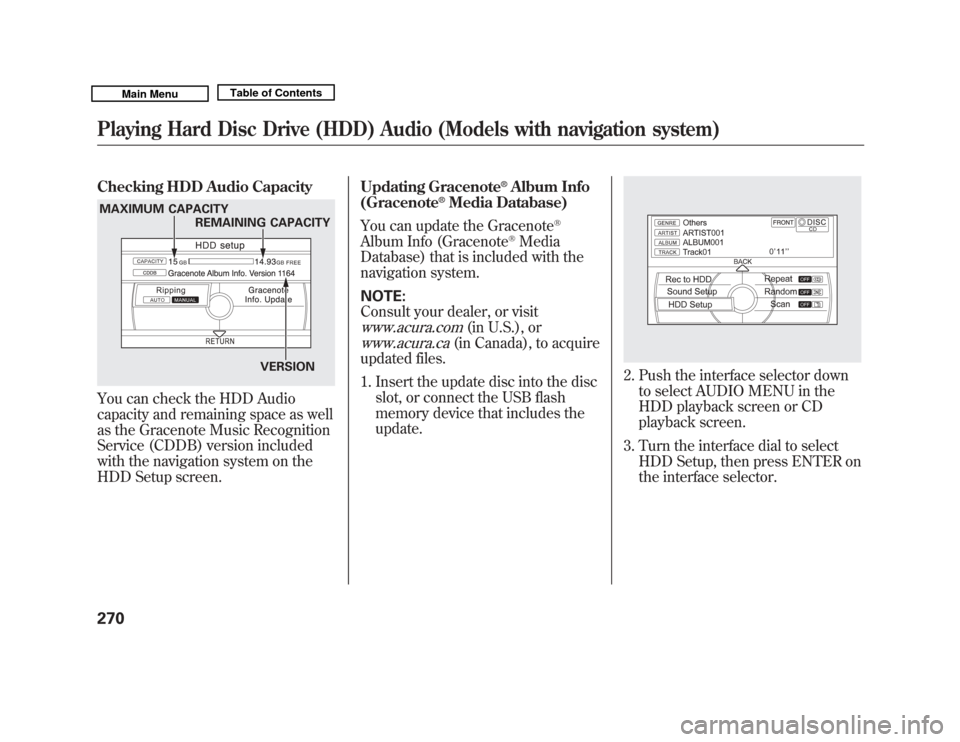
Checking HDD Audio CapacityYou can check the HDD Audio
capacity and remaining space as well
as the Gracenote Music Recognition
Service (CDDB) version included
with the navigation system on the
HDD Setup screen.Updating Gracenote
®Album Info
(Gracenote
®Media Database)
You can update the Gracenote
®
Album Info (Gracenote
®Media
Database) that is included with the
navigation system.
NOTE:
Consult your dealer, or visit
www.acura.com
(in U.S.), or
www.acura.ca
(in Canada), to acquire
updated files.
1. Insert the update disc into the disc slot, or connect the USB flash
memory device that includes the
update.
2. Push the interface selector downto select AUDIO MENU in the
HDD playback screen or CD
playback screen.
3. Turn the interface dial to select HDD Setup, then press ENTER on
the interface selector.
MAXIMUM CAPACITY
REMAINING CAPACITY
VERSIONPlaying Hard Disc Drive (HDD) Audio (Models with navigation system)27010/06/29 11:59:04 11 ACURA MDX MMC North America Owner's M 50 31STX640 enu
Page 289 of 609
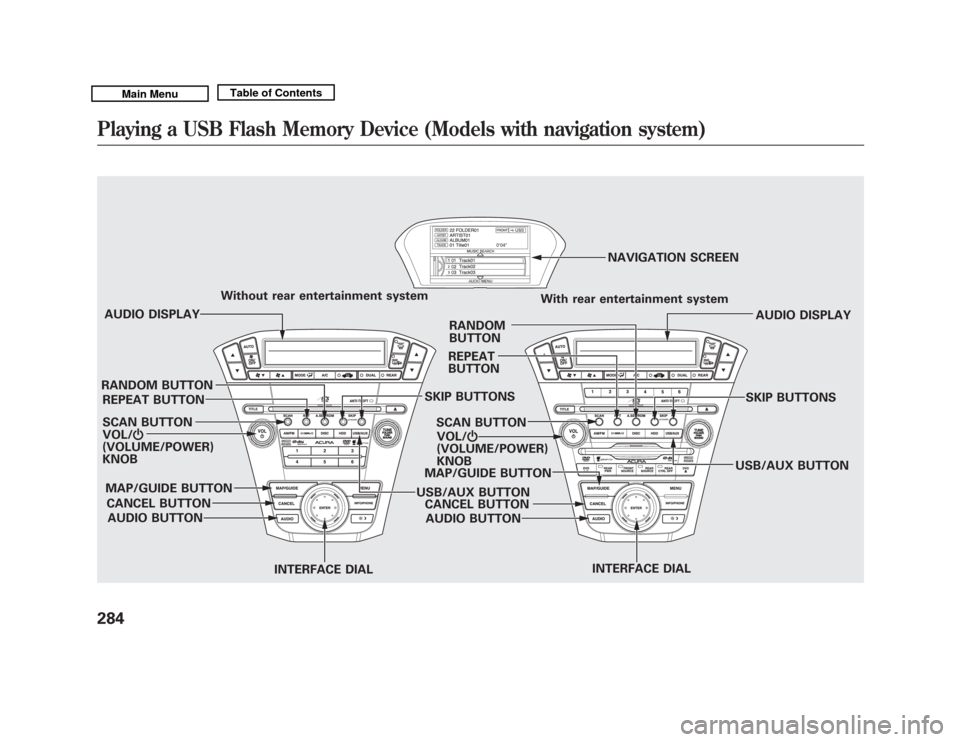
VOL/ꂻ
(VOLUME/POWER)
KNOB SCAN BUTTON AUDIO DISPLAY
Without rear entertainment system
With rear entertainment system
AUDIO DISPLAY
SCAN BUTTON VOL/ ꂻ
(VOLUME/POWER)
KNOB NAVIGATION SCREEN
AUDIO BUTTON
CANCEL BUTTON
MAP/GUIDE BUTTON
INTERFACE DIALUSB/AUX BUTTONSKIP BUTTONS
REPEAT BUTTON
RANDOM BUTTON
INTERFACE DIAL
AUDIO BUTTON
CANCEL BUTTON
MAP/GUIDE BUTTON REPEAT
BUTTON
RANDOM
BUTTON
USB/AUX BUTTONSKIP BUTTONSPlaying a USB Flash Memory Device (Models with navigation system)28410/06/29 11:59:04 11 ACURA MDX MMC North America Owner's M 50 31STX640 enu
Page 290 of 609
To Play a USB Flash Memory
Device
This audio system can select and
play the audio files on a USB flash
memory device with the same
controls used for the disc player. To
play a USB flash memory device,
connect it to the USB adapter cable
in the console compartment, then
press the USB/AUX button until you
see‘‘USB’’ in the display. The
ignition switch must be in
ACCESSORY (I) or ON (II) position. The audio system reads and plays
the audio files on the USB flash
memory device in MP3, WMA or
ACC
ꭧ
formats. The USB flash
memory device limit is up to 700
folders or up to 15000 files.
ꭧ : Only AAC format files recorded
with iTunes are playable on this
audio unit.
The recommended USB flash
memory devices are 256 MB or
higher, and formatted with the FAT
file system. Some digital audio
players may be compatible as well.
Some USB flash memory devices
(such as devices with security
lockout features, etc.) will not work
in this audio unit.
NOTE:
●
Do not use a device such as a card
reader or hard drive as it or your
files may be damaged.
●
Do not connect your USB flash
memory device using a hub.
●
Do not use an extension cable to
the USB adapter cable equipped
with your vehicle.
●
Do not keep a USB flash memory
device in the vehicle. Direct
sunlight and high heat will damage
it.
●
We recommend backing up your
data before playing a USB flash
memory device.
●
Some devices cannot be powered
or charged via the USB adapter, if
this is the case use the accessory
adapter to supply power to your
device.
●
Depending on the type and
number of files, it may take some
time before they begin to play.
CONTINUED
Playing a USB Flash Memory Device (Models with navigation system)
285
Features
10/06/29 11:59:04 11 ACURA MDX MMC North America Owner's M 50 31STX640 enu
Page 291 of 609
●
Depending on the software the
files were made with, it may not be
possible to play some files, or
display some text data.
●
Depending on the type of
encoding and writing software
used, there may be cases where
character information does not
display properly.
●
The order of files in USB playback
may be different from the order of
files displayed in PC or other
devices etc. Files are played in the
order stored in USB flash memory
device.
Voice Control SystemYou can select the AUX mode by
using the voice control buttons, but
cannot operate the play mode
functions.Even if recorded in MP3, WMA or
AAC format, a file with unsupported
version cannot be played. If the
system finds it, the audio unit
displays UNSUPPORTED, and then
skips to the next file.
Combining a low sampling frequency
with a low bitrate may result in
extremely degraded sound quality.
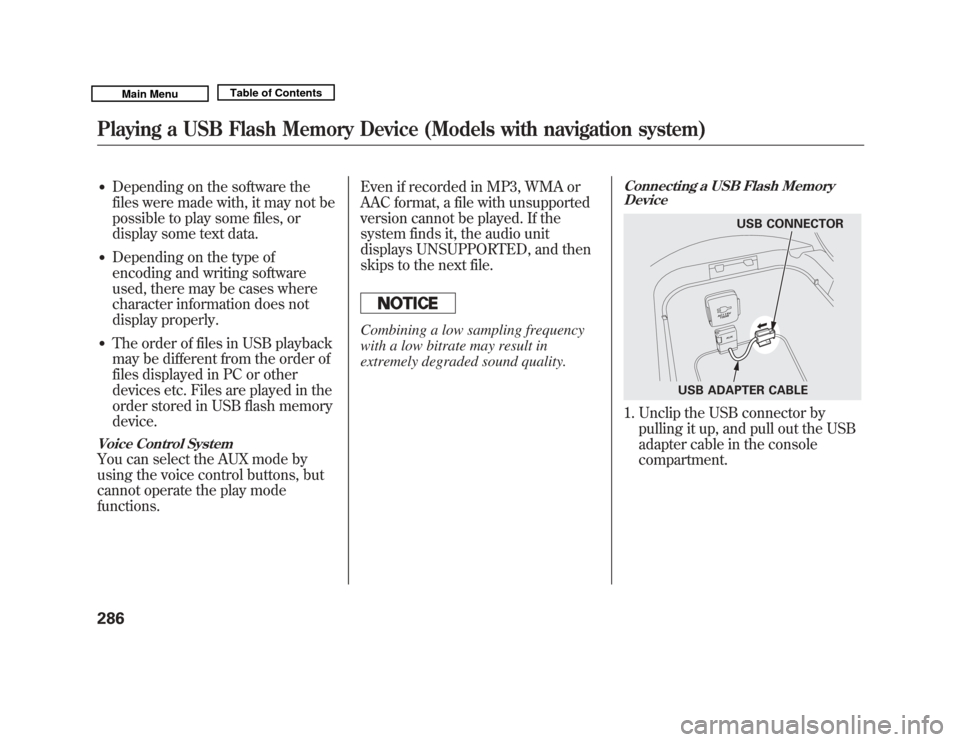
Connecting a USB Flash Memory
Device1. Unclip the USB connector by
pulling it up, and pull out the USB
adapter cable in the console
compartment.
USB CONNECTOR
USB ADAPTER CABLE
Playing a USB Flash Memory Device (Models with navigation system)28610/06/29 11:59:04 11 ACURA MDX MMC North America Owner's M 50 31STX640 enu
Page 292 of 609
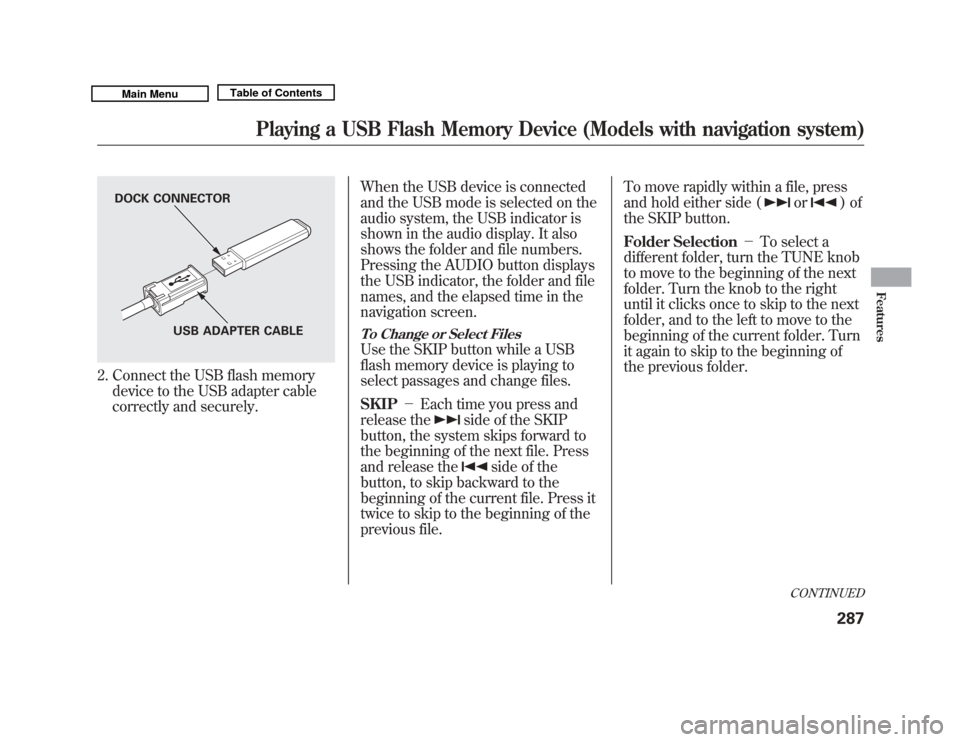
2. Connect the USB flash memorydevice to the USB adapter cable
correctly and securely. When the USB device is connected
and the USB mode is selected on the
audio system, the USB indicator is
shown in the audio display. It also
shows the folder and file numbers.
Pressing the AUDIO button displays
the USB indicator, the folder and file
names, and the elapsed time in the
navigation screen.
To Change or Select FilesUse the SKIP button while a USB
flash memory device is playing to
select passages and change files.
SKIP
-Each time you press and
release the
side of the SKIP
button, the system skips forward to
the beginning of the next file. Press
and release the
side of the
button, to skip backward to the
beginning of the current file. Press it
twice to skip to the beginning of the
previous file. To move rapidly within a file, press
and hold either side (
or
)of
the SKIP button.
Folder Selection -To select a
different folder, turn the TUNE knob
to move to the beginning of the next
folder. Turn the knob to the right
until it clicks once to skip to the next
folder, and to the left to move to the
beginning of the current folder. Turn
it again to skip to the beginning of
the previous folder.
DOCK CONNECTOR
USB ADAPTER CABLE
CONTINUED
Playing a USB Flash Memory Device (Models with navigation system)
287
Features
10/06/29 11:59:04 11 ACURA MDX MMC North America Owner's M 50 31STX640 enu