memory Acura MDX 2011 Owner's Guide
[x] Cancel search | Manufacturer: ACURA, Model Year: 2011, Model line: MDX, Model: Acura MDX 2011Pages: 609, PDF Size: 12.7 MB
Page 293 of 609
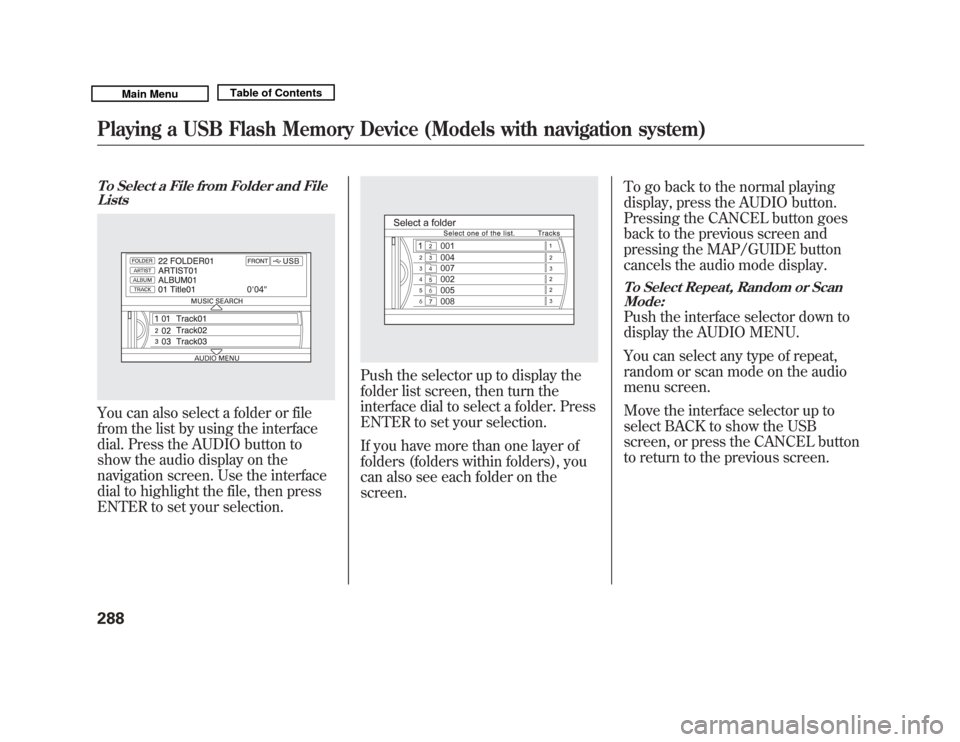
To Select a File from Folder and FileListsYou can also select a folder or file
from the list by using the interface
dial. Press the AUDIO button to
show the audio display on the
navigation screen. Use the interface
dial to highlight the file, then press
ENTER to set your selection.
Push the selector up to display the
folder list screen, then turn the
interface dial to select a folder. Press
ENTER to set your selection.
If you have more than one layer of
folders (folders within folders), you
can also see each folder on the
screen. To go back to the normal playing
display, press the AUDIO button.
Pressing the CANCEL button goes
back to the previous screen and
pressing the MAP/GUIDE button
cancels the audio mode display.
To Select Repeat, Random or Scan
Mode:Push the interface selector down to
display the AUDIO MENU.
You can select any type of repeat,
random or scan mode on the audio
menu screen.
Move the interface selector up to
select BACK to show the USB
screen, or press the CANCEL button
to return to the previous screen.
Playing a USB Flash Memory Device (Models with navigation system)28810/06/29 11:59:04 11 ACURA MDX MMC North America Owner's M 50 31STX640 enu
Page 294 of 609
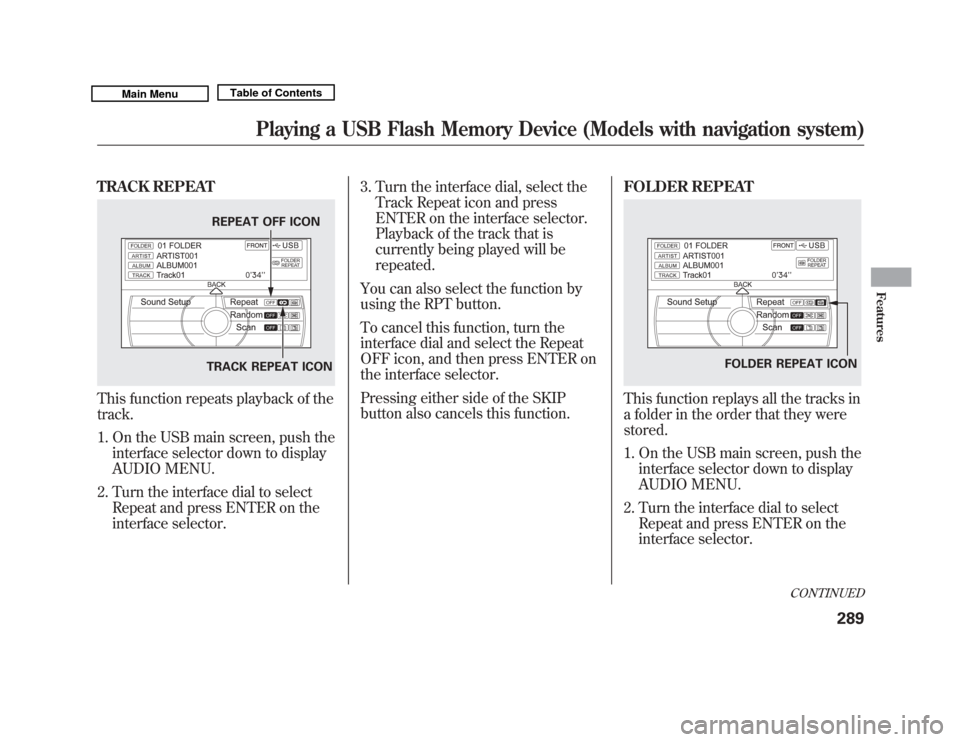
TRACK REPEATThis function repeats playback of the
track.1. On the USB main screen, push the interface selector down to display
AUDIO MENU.
2. Turn the interface dial to select Repeat and press ENTER on the
interface selector. 3. Turn the interface dial, select the
Track Repeat icon and press
ENTER on the interface selector.
Playback of the track that is
currently being played will be
repeated.
You can also select the function by
using the RPT button.
To cancel this function, turn the
interface dial and select the Repeat
OFF icon, and then press ENTER on
the interface selector.
Pressing either side of the SKIP
button also cancels this function. FOLDER REPEAT
This function replays all the tracks in
a folder in the order that they were
stored.
1. On the USB main screen, push the
interface selector down to display
AUDIO MENU.
2. Turn the interface dial to select Repeat and press ENTER on the
interface selector.
REPEAT OFF ICON
TRACK REPEAT ICON
FOLDER REPEAT ICON
CONTINUED
Playing a USB Flash Memory Device (Models with navigation system)
289
Features
10/06/29 11:59:04 11 ACURA MDX MMC North America Owner's M 50 31STX640 enu
Page 295 of 609
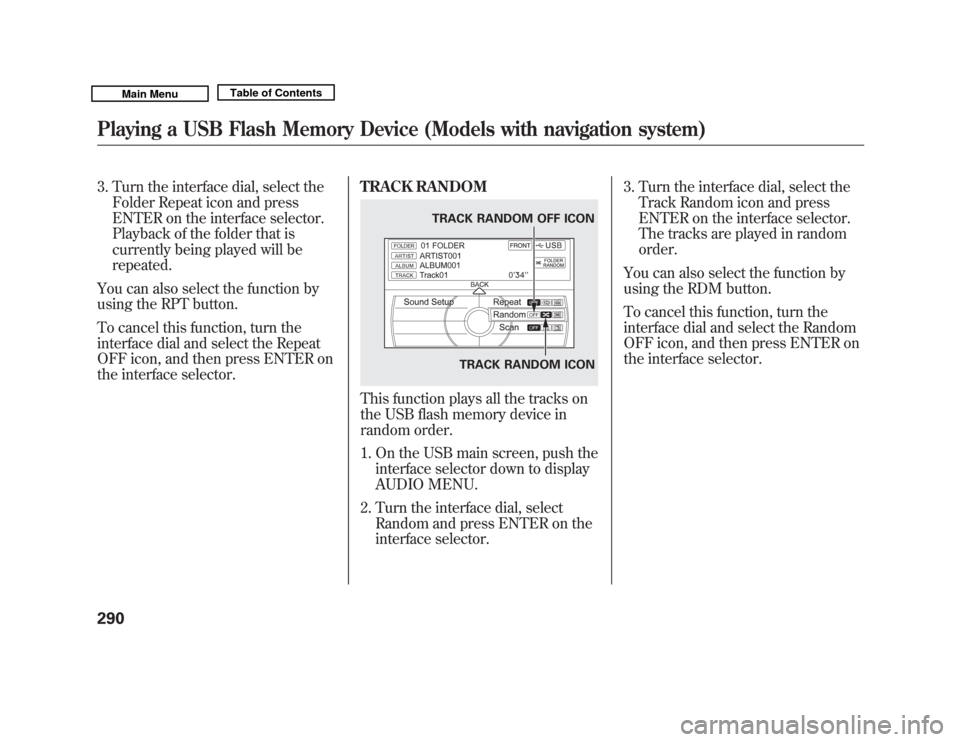
3. Turn the interface dial, select theFolder Repeat icon and press
ENTER on the interface selector.
Playback of the folder that is
currently being played will be
repeated.
You can also select the function by
using the RPT button.
To cancel this function, turn the
interface dial and select the Repeat
OFF icon, and then press ENTER on
the interface selector. TRACK RANDOM
This function plays all the tracks on
the USB flash memory device in
random order.
1. On the USB main screen, push the
interface selector down to display
AUDIO MENU.
2. Turn the interface dial, select Random and press ENTER on the
interface selector. 3. Turn the interface dial, select the
Track Random icon and press
ENTER on the interface selector.
The tracks are played in random
order.
You can also select the function by
using the RDM button.
To cancel this function, turn the
interface dial and select the Random
OFF icon, and then press ENTER on
the interface selector.
TRACK RANDOM ICON
TRACK RANDOM OFF ICON
Playing a USB Flash Memory Device (Models with navigation system)29010/06/29 11:59:04 11 ACURA MDX MMC North America Owner's M 50 31STX640 enu
Page 296 of 609
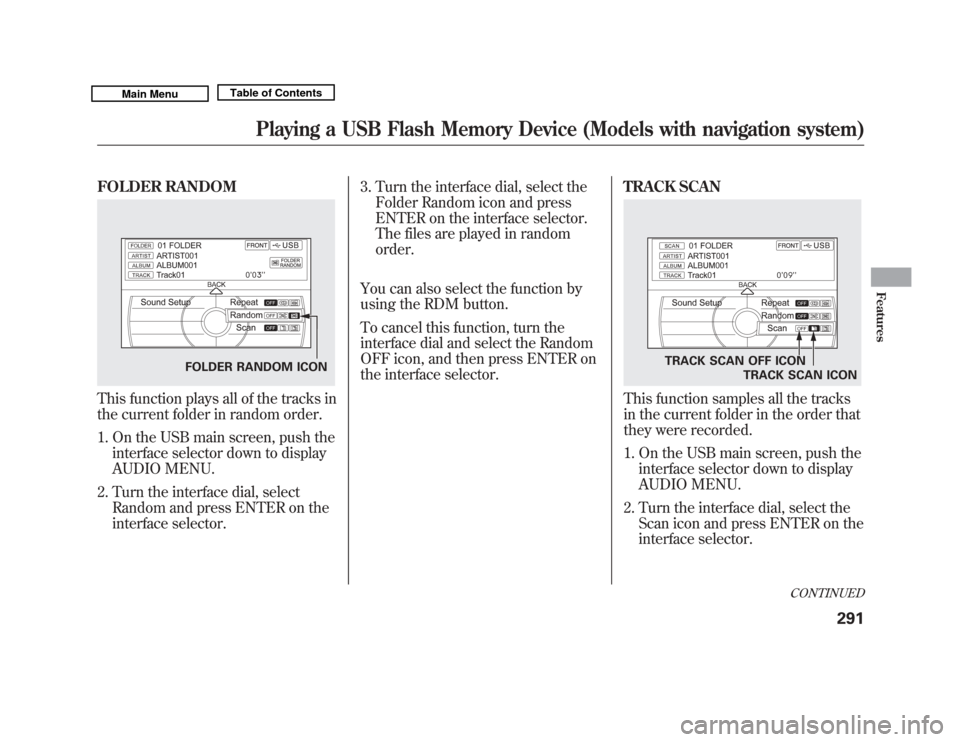
FOLDER RANDOMThis function plays all of the tracks in
the current folder in random order.1. On the USB main screen, push the interface selector down to display
AUDIO MENU.
2. Turn the interface dial, select Random and press ENTER on the
interface selector. 3. Turn the interface dial, select the
Folder Random icon and press
ENTER on the interface selector.
The files are played in random
order.
You can also select the function by
using the RDM button.
To cancel this function, turn the
interface dial and select the Random
OFF icon, and then press ENTER on
the interface selector. TRACK SCAN
This function samples all the tracks
in the current folder in the order that
they were recorded.
1. On the USB main screen, push the
interface selector down to display
AUDIO MENU.
2. Turn the interface dial, select the Scan icon and press ENTER on the
interface selector.
FOLDER RANDOM ICON
TRACK SCAN OFF ICON
TRACK SCAN ICON
CONTINUED
Playing a USB Flash Memory Device (Models with navigation system)
291
Features
10/06/29 11:59:04 11 ACURA MDX MMC North America Owner's M 50 31STX640 enu
Page 297 of 609
3. Turn the interface dial, select theTrack Scan icon and press ENTER
on the interface selector. Each
track or file is sampled for 10
seconds. When all the tracks in the
folder have been scanned, regular
playback is resumed.
You can also select the function by
using the SCAN button.
To cancel this function, turn the
interface dial and select the Scan
OFF icon, and then press ENTER on
the interface selector to play the last
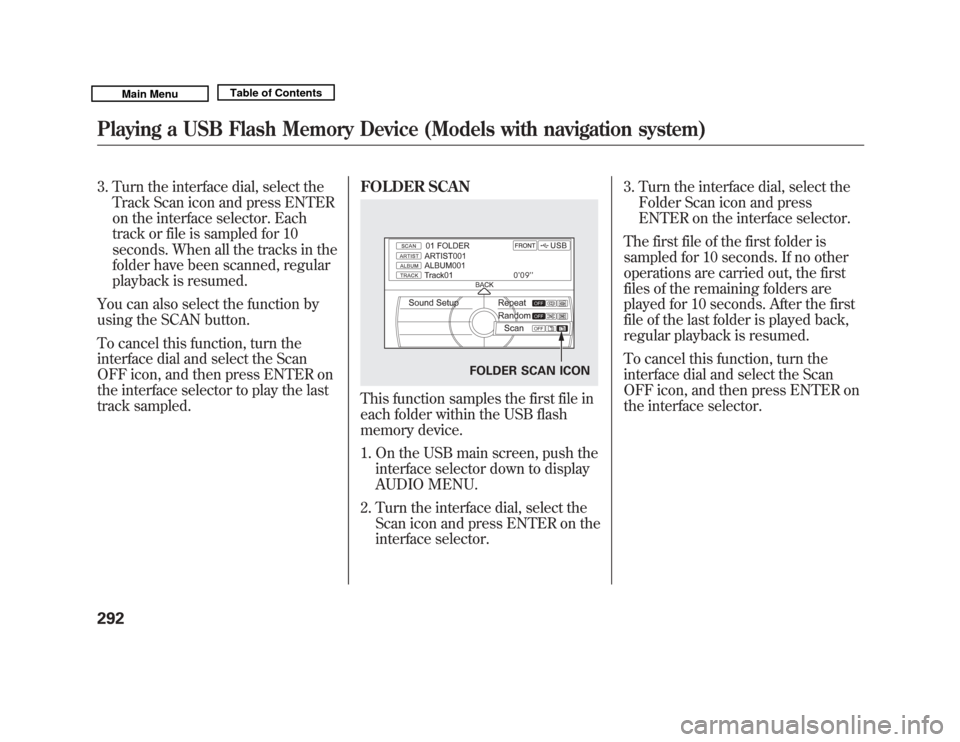
track sampled. FOLDER SCAN
This function samples the first file in
each folder within the USB flash
memory device.
1. On the USB main screen, push the
interface selector down to display
AUDIO MENU.
2. Turn the interface dial, select the Scan icon and press ENTER on the
interface selector. 3. Turn the interface dial, select the
Folder Scan icon and press
ENTER on the interface selector.
The first file of the first folder is
sampled for 10 seconds. If no other
operations are carried out, the first
files of the remaining folders are
played for 10 seconds. After the first
file of the last folder is played back,
regular playback is resumed.
To cancel this function, turn the
interface dial and select the Scan
OFF icon, and then press ENTER on
the interface selector.
FOLDER SCAN ICON
Playing a USB Flash Memory Device (Models with navigation system)29210/06/29 11:59:04 11 ACURA MDX MMC North America Owner's M 50 31STX640 enu
Page 298 of 609
To Stop Playing a USB Flash
Memory Device
To play the radio, press the AM/FM,
or XM button. Press the DISC button
to switch to the disc mode. Press the
HDD button to switch to HDD
Audio.
If you reconnect the same USB flash
memory device, the system will
begin playing where it left off.
Disconnecting a USB Flash MemoryDeviceYou can disconnect the USB flash
memory device at any time even if
the USB mode is selected on the
audio system. Always follow the USB
flash memory device's instructions
when you remove it.
When you disconnect the USB flash
memory device while it is playing,
the audio display and the navigation
screen (if selected) show NO DATA.
Playing a USB Flash Memory Device (Models with navigation system)
293
Features
10/06/29 11:59:04 11 ACURA MDX MMC North America Owner's M 50 31STX640 enu
Page 299 of 609
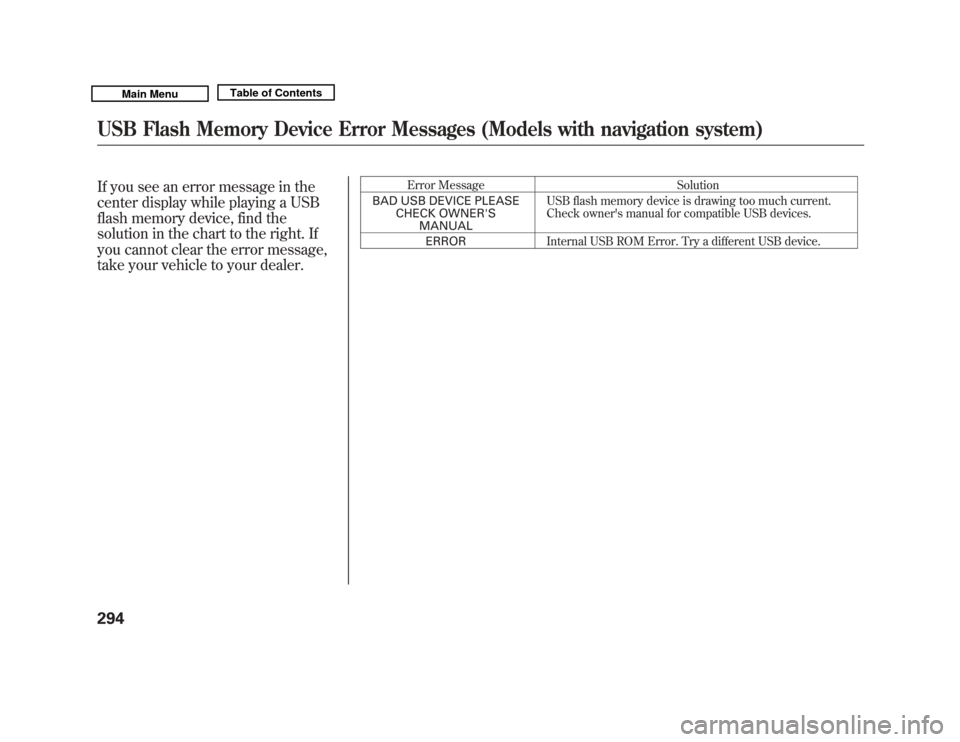
If you see an error message in the
center display while playing a USB
flash memory device, find the
solution in the chart to the right. If
you cannot clear the error message,
take your vehicle to your dealer.
Error MessageSolution
BAD USB DEVICE PLEASE CHECK OWNER'SMANUAL USB flash memory device is drawing too much current.
Check owner's manual for compatible USB devices.
ERROR Internal USB ROM Error. Try a different USB device.
USB Flash Memory Device Error Messages (Models with navigation system)29410/06/29 11:59:04 11 ACURA MDX MMC North America Owner's M 50 31STX640 enu
Page 301 of 609
Your vehicle is equipped with aBluetooth
®audio system, which
allows you to listen to streaming
audio from your
Bluetooth
®audio
compatible phone. This function is
only available on
Bluetooth
®Audio
Compatible phones that are paired
and linked to the vehicle's
Bluetooth
®HandsFreeLink
®(HFL)
system (see page 386).
Not all Bluetooth-enabled phones
with streaming audio capabilities are
compatible with the system. You can
find an approved phone by visiting
www.acura.com/handsfreelink
,orby
calling the HandsFreeLink
®
consumer support at 1-888-528-7876.
In Canada, visit
www.acura.ca
, or call
1-888-9-ACURA-9.
NOTE: In some states, provinces,
and territories it may be illegal to
perform some data device functions
while driving. To Play
Bluetooth
®Audio Files
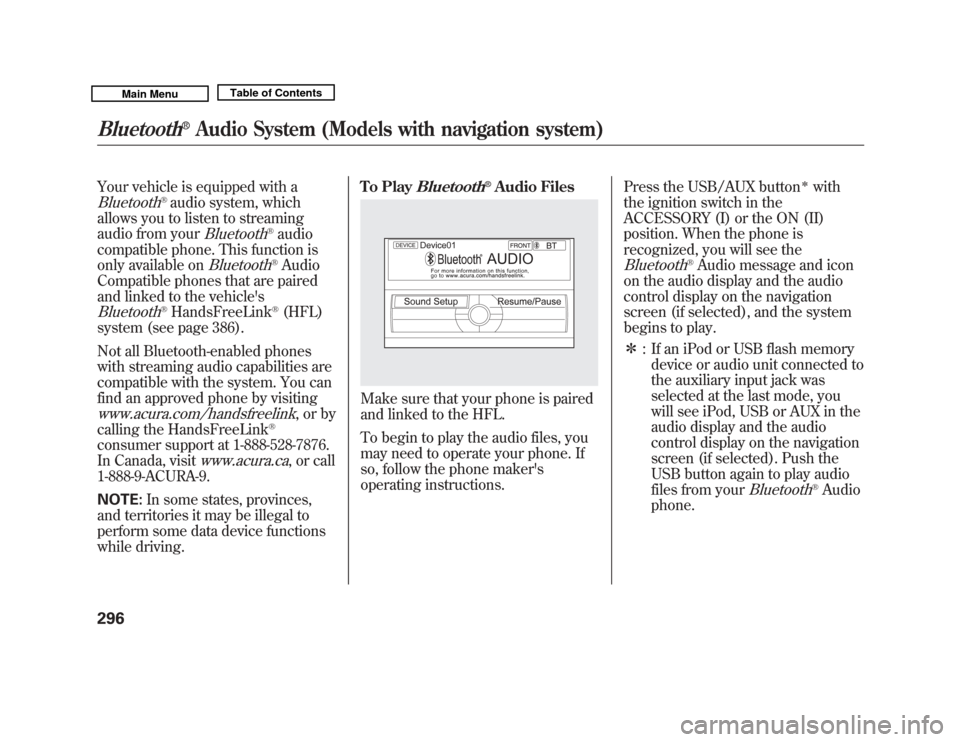
Make sure that your phone is paired
and linked to the HFL.
To begin to play the audio files, you
may need to operate your phone. If
so, follow the phone maker's
operating instructions.
Press the USB/AUX button
ꭧ
with
the ignition switch in the
ACCESSORY (I) or the ON (II)
position. When the phone is
recognized, you will see the
Bluetooth
®Audio message and icon
on the audio display and the audio
control display on the navigation
screen (if selected), and the system
begins to play.
ꭧ : If an iPod or USB flash memory
device or audio unit connected to
the auxiliary input jack was
selected at the last mode, you
will see iPod, USB or AUX in the
audio display and the audio
control display on the navigation
screen (if selected). Push the
USB button again to play audio
files from your
Bluetooth
®Audio
phone.
Bluetooth
®
Audio System (Models with navigation system)
29610/06/29 11:59:04 11 ACURA MDX MMC North America Owner's M 50 31STX640 enu
Page 307 of 609
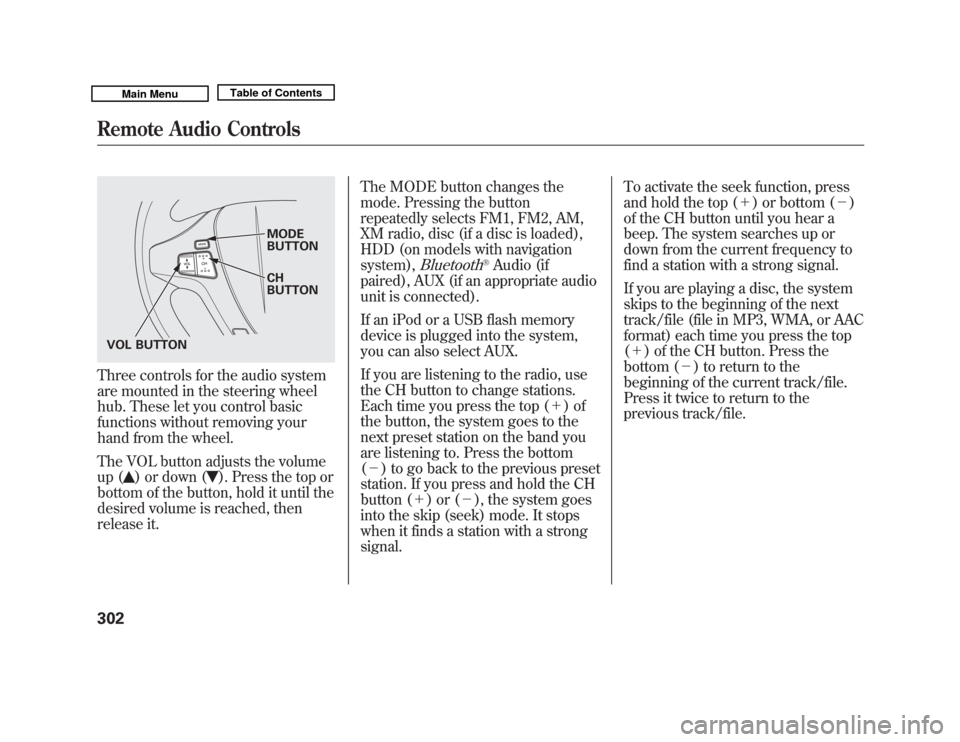
Three controls for the audio system
are mounted in the steering wheel
hub. These let you control basic
functions without removing your
hand from the wheel.
The VOL button adjusts the volume
up (
) or down (
). Press the top or
bottom of the button, hold it until the
desired volume is reached, then
release it. The MODE button changes the
mode. Pressing the button
repeatedly selects FM1, FM2, AM,
XM radio, disc (if a disc is loaded),
HDD (on models with navigation
system),
Bluetooth
®Audio (if
paired), AUX (if an appropriate audio
unit is connected).
If an iPod or a USB flash memory
device is plugged into the system,
you can also select AUX.
If you are listening to the radio, use
the CH button to change stations.
Each time you press the top (+ )of
the button, the system goes to the
next preset station on the band you
are listening to. Press the bottom
(- ) to go back to the previous preset
station. If you press and hold the CH
button (+ )or(-), the system goes
into the skip (seek) mode. It stops
when it finds a station with a strong
signal. To activate the seek function, press
and hold the top (+
) or bottom (-)
of the CH button until you hear a
beep. The system searches up or
down from the current frequency to
find a station with a strong signal.
If you are playing a disc, the system
skips to the beginning of the next
track/file (file in MP3, WMA, or AAC
format) each time you press the top
(+ ) of the CH button. Press the
bottom (- ) to return to the
beginning of the current track/file.
Press it twice to return to the
previous track/file.
MODE
BUTTON
CH
BUTTON
VOL BUTTON
Remote Audio Controls30210/06/29 11:59:04 11 ACURA MDX MMC North America Owner's M 50 31STX640 enu
Page 308 of 609
You will see the track/file number
and the elapsed time. If the disc has
text data or is compressed inMP3 or
WMA, you can also see any other
information (track title, file name,
folder name, etc.).
In MP3 or WMA mode, you can use
the seek function to select folders.
Press and hold the top (+) of the CH
button until you hear a beep, to skip
forward to the first file of the next
folder. Press the bottom (- ) to skip
backward to the previous folder.
If you are playing a USB flash
memory device or iPod with the USB
adapter cable, press and release the
top (+ ) of the CH button to skip
forward to the beginning of the next
file. Press the bottom (- ) to skip
backward to the beginning to the
current file. Press it twice to return to
the previous file. When playing a USB flash memory
device, you can also use the seek
function to skip the folder. To
activate this, press and hold either
side of the CH button until you hear
a beep.
On models without navigation
systemIf you are playing a conventional CD
(without the text data and not
compressed in MP3 or WMA), you
can use the skip function to select
discs. Press and hold the top (+ )of
the CH button until you hear a beep,
to skip forward to the next disc.
Press and hold the bottom (- )to
skip backward to the previous disc.
Remote Audio Controls
303
Features
10/06/29 11:59:04 11 ACURA MDX MMC North America Owner's M 50 31STX640 enu