ECU Acura MDX 2011 Owner's Guide
[x] Cancel search | Manufacturer: ACURA, Model Year: 2011, Model line: MDX, Model: Acura MDX 2011Pages: 609, PDF Size: 12.7 MB
Page 125 of 609
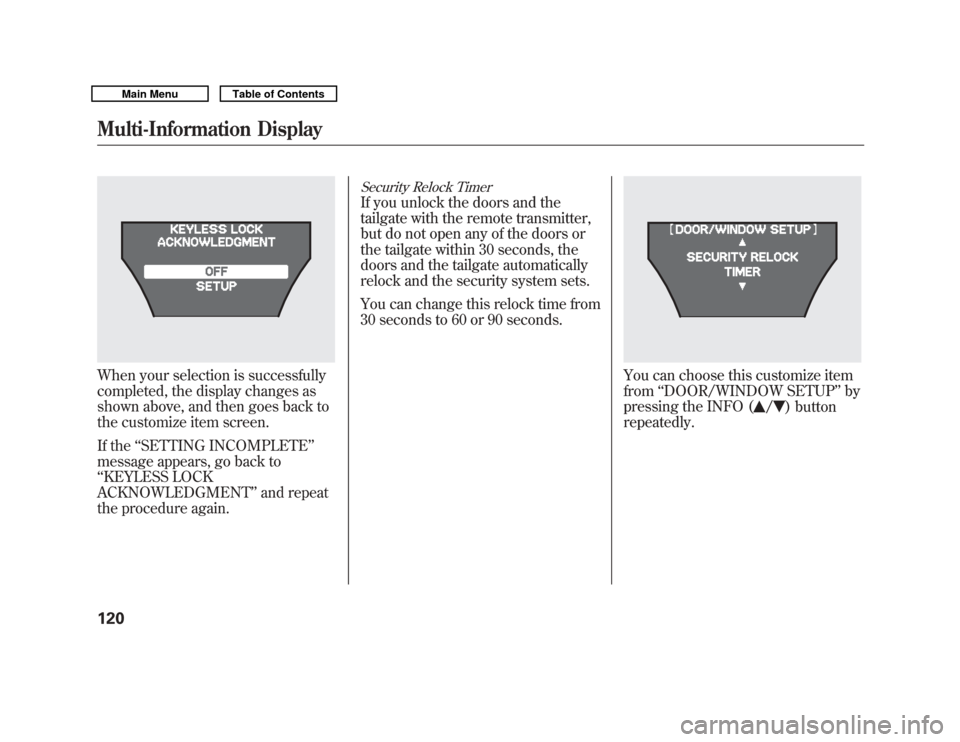
When your selection is successfully
completed, the display changes as
shown above, and then goes back to
the customize item screen.
If the‘‘SETTING INCOMPLETE ’’
message appears, go back to
‘‘ KEYLESS LOCK
ACKNOWLEDGMENT ’’and repeat
the procedure again.
Security Relock TimerIf you unlock the doors and the
tailgate with the remote transmitter,
but do not open any of the doors or
the tailgate within 30 seconds, the
doors and the tailgate automatically
relock and the security system sets.
You can change this relock time from
30 seconds to 60 or 90 seconds.
You can choose this customize item
from ‘‘DOOR/WINDOW SETUP ’’by
pressing the INFO (
/
) button
repeatedly.
Multi-Information Display12010/06/29 11:59:04 11 ACURA MDX MMC North America Owner's M 50 31STX640 enu
Page 126 of 609

Press the SEL/RESET button to see
the selections.
Select the desired setting by
pressing the INFO (
/
) button,
then enter your selection by pressing
the SEL/RESET button.
When your selection is successfully
completed, the display changes as
shown above, and then goes back to
the customize item screen.
If the ‘‘SETTING INCOMPLETE ’’
message appears, go back to
‘‘ SECURITY RELOCK TIMER ’’and
repeat the procedure again.
CONTINUED
Multi-Information Display
121
Instruments and Controls
10/06/29 11:59:04 11 ACURA MDX MMC North America Owner's M 50 31STX640 enu
Page 141 of 609
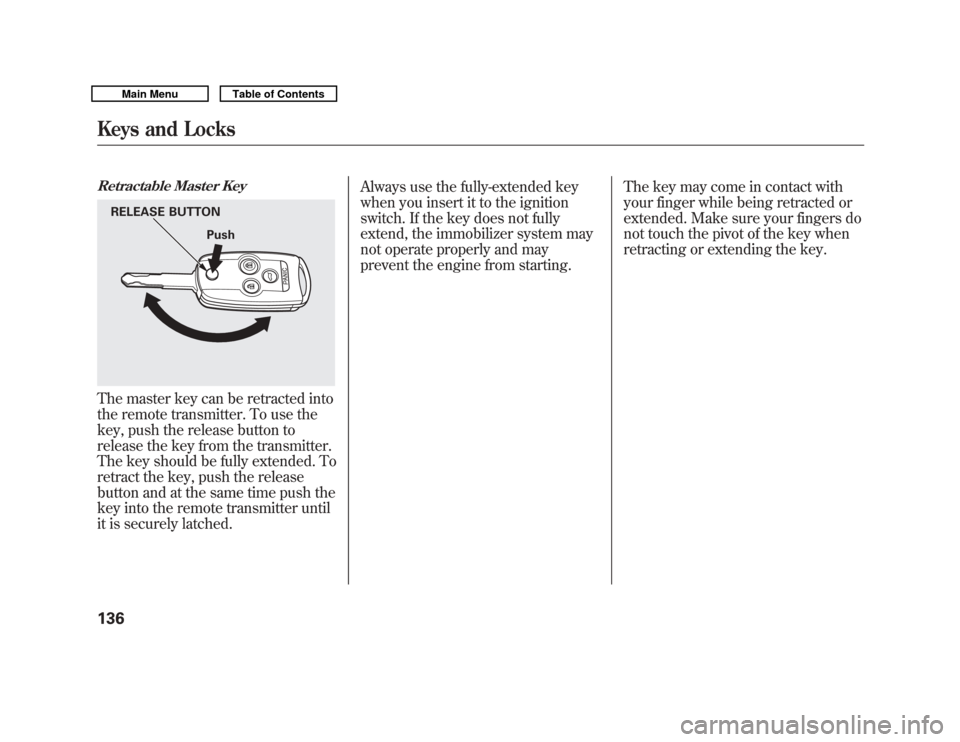
Retractable Master KeyThe master key can be retracted into
the remote transmitter. To use the
key, push the release button to
release the key from the transmitter.
The key should be fully extended. To
retract the key, push the release
button and at the same time push the
key into the remote transmitter until
it is securely latched.Always use the fully-extended key
when you insert it to the ignition
switch. If the key does not fully
extend, the immobilizer system may
not operate properly and may
prevent the engine from starting.
The key may come in contact with
your finger while being retracted or
extended. Make sure your fingers do
not touch the pivot of the key when
retracting or extending the key.
RELEASE BUTTON
Push
Keys and Locks13610/06/29 11:59:04 11 ACURA MDX MMC North America Owner's M 50 31STX640 enu
Page 149 of 609
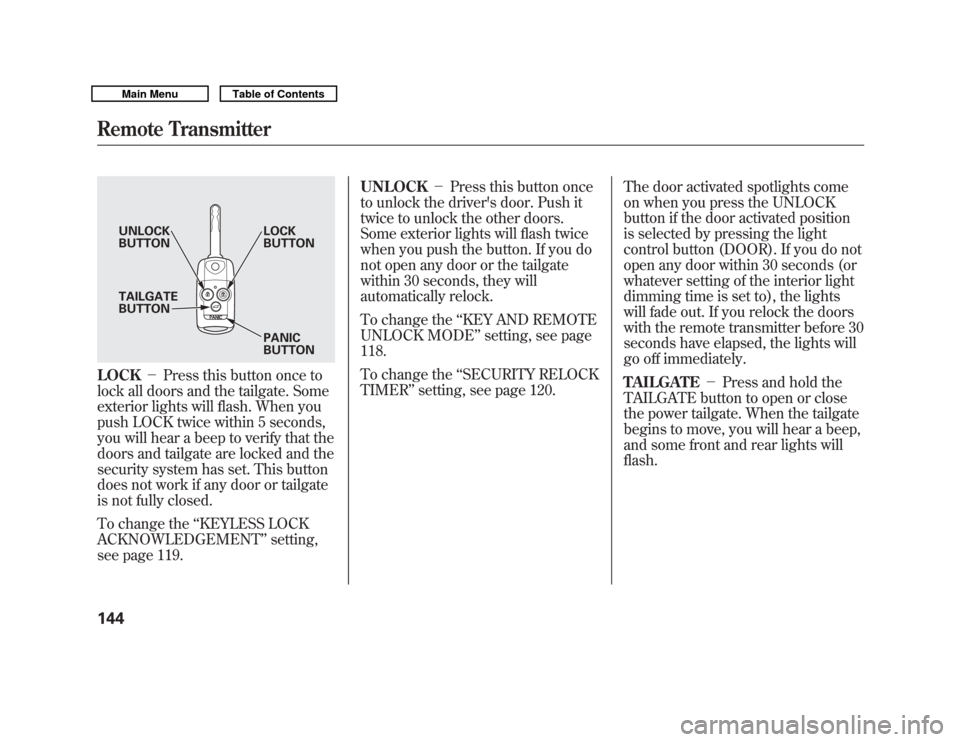
LOCK-Press this button once to
lock all doors and the tailgate. Some
exterior lights will flash. When you
push LOCK twice within 5 seconds,
you will hear a beep to verify that the
doors and tailgate are locked and the
security system has set. This button
does not work if any door or tailgate
is not fully closed.
To change the ‘‘KEYLESS LOCK
ACKNOWLEDGEMENT ’’setting,
see page 119. UNLOCK
-Press this button once
to unlock the driver's door. Push it
twice to unlock the other doors.
Some exterior lights will flash twice
when you push the button. If you do
not open any door or the tailgate
within 30 seconds, they will
automatically relock.
To change the ‘‘KEY AND REMOTE
UNLOCK MODE ’’setting, see page
118.
To change the ‘‘SECURITY RELOCK
TIMER ’’setting, see page 120. The door activated spotlights come
on when you press the UNLOCK
button if the door activated position
is selected by pressing the light
control button (DOOR). If you do not
open any door within 30 seconds (or
whatever setting of the interior light
dimming time is set to), the lights
will fade out. If you relock the doors
with the remote transmitter before 30
seconds have elapsed, the lights will
go off immediately.
TAILGATE
-Press and hold the
TAILGATE button to open or close
the power tailgate. When the tailgate
begins to move, you will hear a beep,
and some front and rear lights will
flash.
UNLOCK
BUTTON LOCK
BUTTON
PANIC
BUTTON
TAILGATE
BUTTON
Remote Transmitter14410/06/29 11:59:04 11 ACURA MDX MMC North America Owner's M 50 31STX640 enu
Page 156 of 609

Active Head RestraintsThe driver's and front passenger's
seats have active head restraints. If
the vehicle is struck severely from
the rear, the occupant properly
secured with the seat belt will be
pushed against the seat-back and the
head restraint will automatically
move forward.This reduces the distance between
the restraint and the occupant's
head. It also helps protect the
occupants against the likelihood of
whiplash and injuries to the neck and
upper spine.
After a collision, the activated
restraint should return to its normal
position.
If the restraints do not return to their
normal position, or in the event of a
severe collision, have the vehicle
inspected by an Acura dealer.
For a head restraint system to work
properly:
●
Do not hang any items on the head
restraints, or from the restraint
legs.
●
Do not place any object between
an occupant and the seat-back.
●
Install each restraint in its proper
location.
●
Only use genuine Acura
replacement head restraints.
CONTINUED
Seats
151
Instruments and Controls
10/06/29 11:59:04 11 ACURA MDX MMC North America Owner's M 50 31STX640 enu
Page 157 of 609

Adjusting the Second Row SeatsTo change the seat-back angle of the
seats in the second row, pull up on
the handle on the outside of the seat-
back, and push the seat-back.
Overall, the seat-back has six
different positions.Folding the Second Row Seats
The left and right halves can be
folded separately.
1. To unlatch the detachable anchor
before folding the seat-back, insert
the latch plate into the slot on the
side of the anchor buckle (see
page 154) and allow the seat belt to
retract. Store the detachable
anchor and seat belt latch plates in
the retractor housing.
2. Lower the head restraints to their lowest positions.
3. Pull up the handle on the outside of the seat-back.
4. Fold the seat-back forward.
Reverse this procedure to return the
seat to the upright position. Make
sure the seat is locked securely
before driving. Make sure that the folded seat-back
does not press against the front
passenger's seat, as this could cause
the weight sensors to work
improperly.
HANDLE
Seats15210/06/29 11:59:04 11 ACURA MDX MMC North America Owner's M 50 31STX640 enu
Page 159 of 609

Reverse this procedure to return the
seat to the upright position. Make
sure the seat is locked securely
before driving. Reconnect the seat
belts to the detachable anchors.
Make sure all items in the cargo area
are secured. Loose items can fly
forward and cause injury if you have
to brake hard (SeeCarrying Cargo
on page 428). Detachable Anchor
The seat belts in the second row
center seat and the third row seats
are equipped with detachable
anchors.
To unlatch the detachable anchor,
insert the latch plate into the slot on
the side of the anchor buckle. Store
the detachable anchor and seat belt
latch plates in the retractor housing.When the seats are returned to the
upright position, these detachable
anchors should be latched back
properly.
Using the seat belt with the
detachable anchor unlatched
increases the chance of serious
injury or death in a crash.
Before using the seat belt,
make sure the detachable
anchor is correctly latched.
LATCH PLATE
Seats15410/06/29 11:59:04 11 ACURA MDX MMC North America Owner's M 50 31STX640 enu
Page 160 of 609

Pull out the small latch plate and the
latch plate from each holding slot in
the ceiling, and pull out the seat belt
to extend it.
Pull out the outer shoulder belts
from the hook. Both of the third-row
hooks should only be used when the
seat belt is detached.
Line up the triangle marks on the
small latch plate and anchor buckle
when reattaching the belt and
buckle.
Tug on the seat belt to verify that the
detachable anchor is securely
latched. Make sure the seat belt is
not twisted.
SECOND ROW CENTER SEATLATCH PLATE
SMALL LATCH PLATE
THIRD ROW SEATS HOOK
SMALL LATCH PLATE
ANCHOR BUCKLE TRIANGLE
MARKS
Seats
155
Instruments and Controls
10/06/29 11:59:04 11 ACURA MDX MMC North America Owner's M 50 31STX640 enu
Page 184 of 609
The climate control system in your
vehicle provides a comfortable driving
environment in all weather conditions.
The standard audio system has many
features. This section describes those
features and how to use them.
Your vehicle has an anti-theft audio
system that requires a code number to
enable it.
The security system helps do
discourage vandalism and theft to
your vehicle.
Climate Control System
...............
180
Rear Climate Controls
..............
185
Audio System
..............................
190
Playing the AM/FM Radio (Models without navigation
system)
................................
191
Playing the XM
®Radio (Models
without navigation system)
......
195 Playing Discs (Models without
navigation system)
...................
200
Disc Changer Error Message (Models without navigation
system)
................................
208
Audio System (Models with navigation system)
...................
209
Playing the AM/FM Radio (Models with navigationsystem)
................................
210
Playing the XM
®Radio (Models
with navigation system)
...........
223
Playing a Disc (Models with
navigation system)
...................
232
Disc Player Error Messages (Models with navigation
system)
................................
243
Protecting Your Discs
..................
244
Playing Hard Disc Drive (HDD)
Audio (Models with navigationsystem)
................................
247
Playing an iPod
®(Models with
navigation system)
...................
275
iPod
®Error Messages (Models
with navigation system)
...........
283 Playing a USB Flash Memory
Device (Models with navigationsystem)
................................
284
USB Flash Memory Device Error
Messages (Models withnavigation system)
...............
294
Bluetooth
®Audio System (Models
with navigation system)
...........
295
AM/FM Radio Reception
.............
300
Remote Audio Controls
................
302
Auxiliary Input Jack
.....................
304
Radio Theft Protection
.................
305
Setting the Clock and Calendar
....
306
Rear Entertainment System
..........
307
Security System
...........................
337
Compass
......................................
338
Cruise Control
.............................
342
Adaptive Cruise Control (ACC)
....
345
HomeLink
®Universal
Transceiver
.............................
360
Bluetooth
®HandsFreeLink
®.........
362
AcuraLink
®(U.S. models only)
.....
398
Rearview Mirror with Rearview Camera Display
.......................
414
Features
179
Features
10/06/29 11:59:04 11 ACURA MDX MMC North America Owner's M 50 31STX640 enu
Page 282 of 609
Use only compatible iPods with the
latest software. iPods that are not
compatible will not work in this audio
unit.
NOTE:●
Do not connect your iPod using a
hub.
●
Do not keep the iPod and dock
connector cable in the vehicle.
Direct sunlight and high heat will
damage it.
●
Do not use an extension cable
between the USB adapter cable
equipped with your vehicle and
your dock connector.
●
We recommend backing up your
data before playing it.
●
Some devices cannot be powered
or charged via the USB adapter, if
this is the case use the accessory
adapter to supply power to your
device.
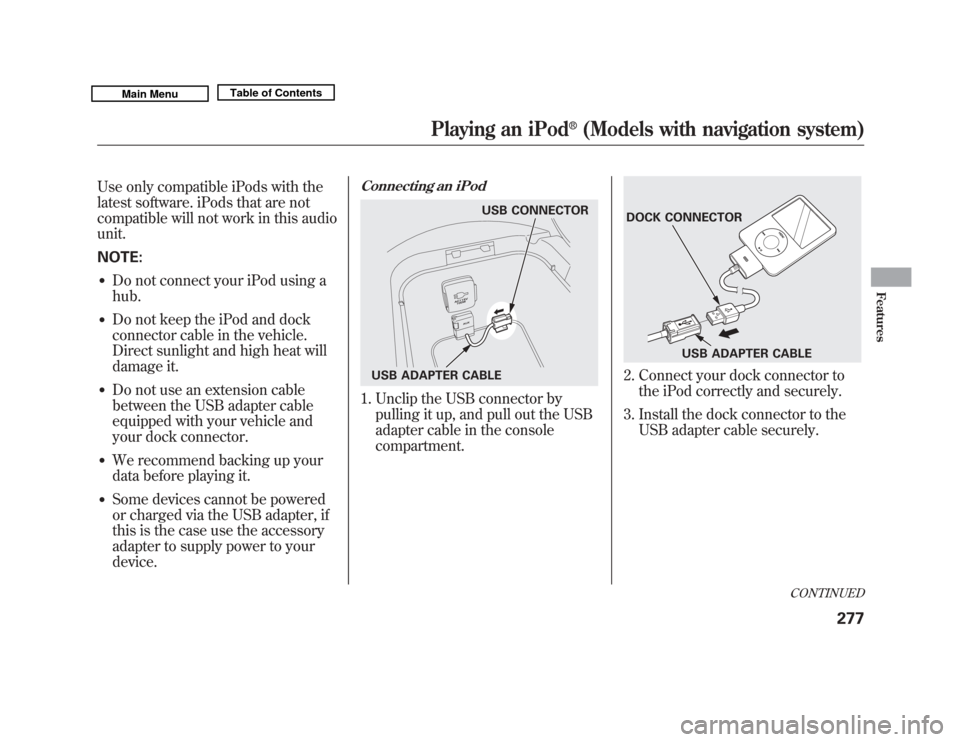
Connecting an iPod1. Unclip the USB connector bypulling it up, and pull out the USB
adapter cable in the console
compartment.
2. Connect your dock connector tothe iPod correctly and securely.
3. Install the dock connector to the USB adapter cable securely.
USB CONNECTOR
USB ADAPTER CABLE
DOCK CONNECTOR USB ADAPTER CABLE
CONTINUED
Playing an iPod
®
(Models with navigation system)
277
Features
10/06/29 11:59:04 11 ACURA MDX MMC North America Owner's M 50 31STX640 enu