battery Acura MDX 2011 Owner's Guide
[x] Cancel search | Manufacturer: ACURA, Model Year: 2011, Model line: MDX, Model: Acura MDX 2011Pages: 609, PDF Size: 12.7 MB
Page 376 of 609
To change from the currently linkedphone to another paired phone:Press and release the HFL Talk
button before a command.
1. Say ‘‘Phone setup .’’
2. Say ‘‘Next phone ’’after the
prompts.
3. HFL disconnects the linked phone and searches for another paired
phone.
4. Once another phone is found, it is linked to the system. HFL will
inform you which phone is now
linked.
If no other phones are found or
paired, HFL will inform you that the
original phone is linked again.
To change the pairing code setting:Press and release the HFL Talk
button before a command.
1. Say ‘‘Phone setup .’’
2. Say ‘‘Set pairing code ’’after the
prompts.
3. If you want HFL to create a random code each time you pair a
phone, say ‘‘Random .’’ If you want
to choose your own 4-digit code to
be used each time, say ‘‘Fixed ’’
and follow the HFL prompts. Making a Call
You can make calls using a name in
the HFL phonebook or any phone
number. You can also redial the last
number called.
HFL uses a Class 2 Bluetooth, which
means the maximum range between
your phone and vehicle is 30 feet (10
meters).
During a call, HFL allows you to talk
up to 30 minutes after you remove
the key from the ignition switch.
However, this may weaken the
vehicle's battery.
CONTINUED
Bluetooth
®
HandsFreeLink
®
371
Features
10/06/29 11:59:04 11 ACURA MDX MMC North America Owner's M 50 31STX640 enu
Page 386 of 609
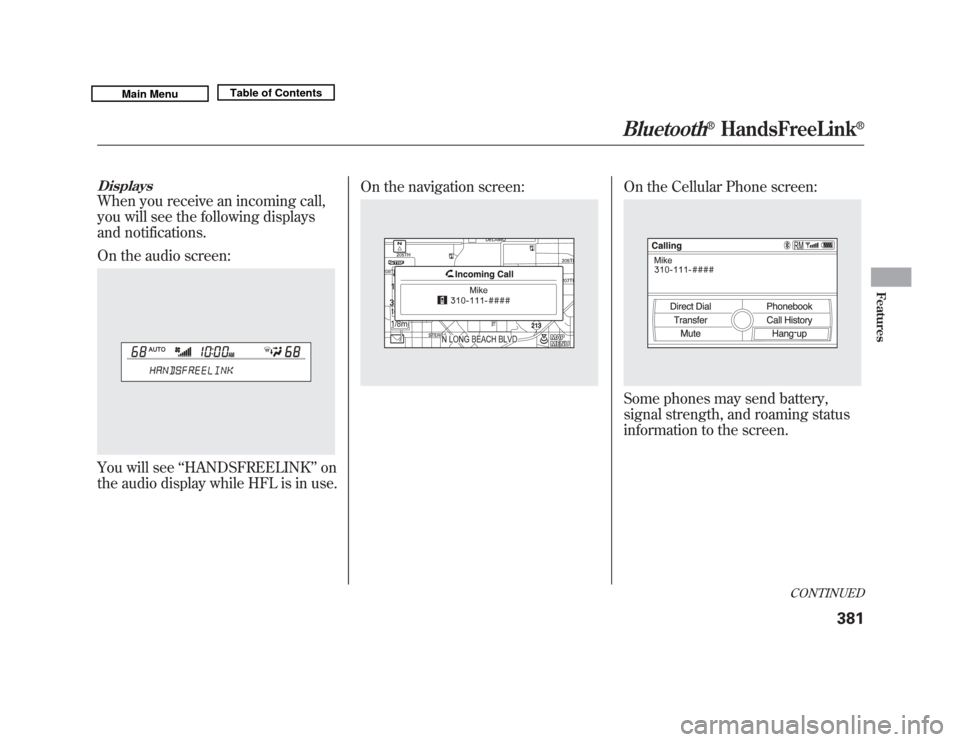
DisplaysWhen you receive an incoming call,
you will see the following displays
and notifications.
On the audio screen:You will see‘‘HANDSFREELINK ’’on
the audio display while HFL is in use. On the navigation screen:
On the Cellular Phone screen:Some phones may send battery,
signal strength, and roaming status
information to the screen.
CONTINUED
Bluetooth
®
HandsFreeLink
®
381
Features
10/06/29 11:59:04 11 ACURA MDX MMC North America Owner's M 50 31STX640 enu
Page 391 of 609
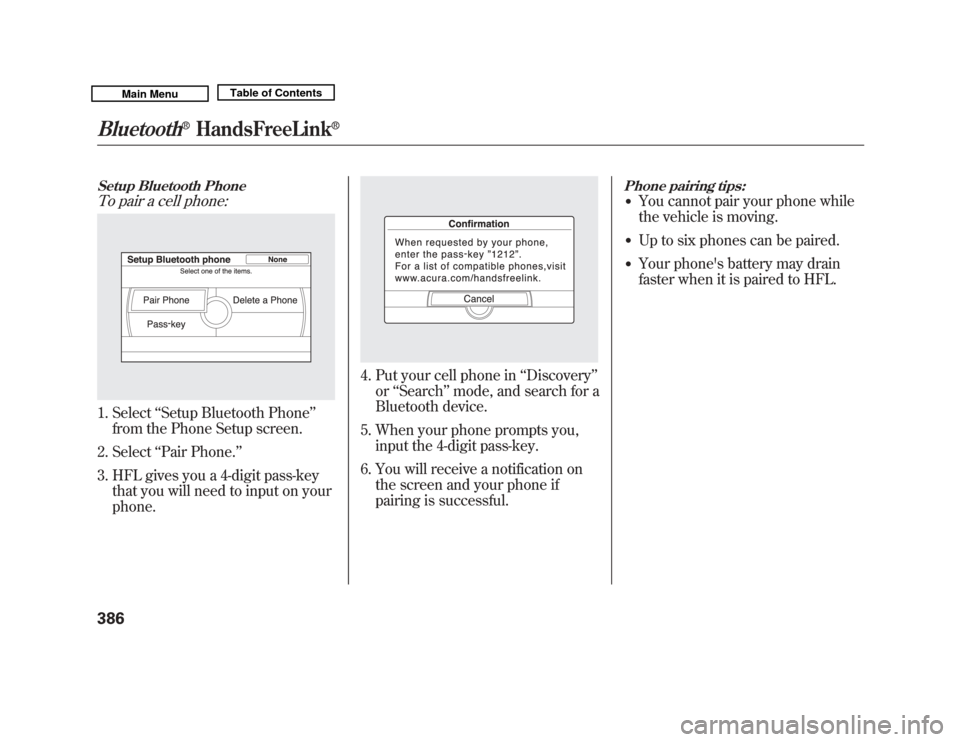
Setup Bluetooth PhoneTo pair a cell phone:1. Select‘‘Setup Bluetooth Phone ’’
from the Phone Setup screen.
2. Select ‘‘Pair Phone. ’’
3. HFL gives you a 4-digit pass-key that you will need to input on your
phone.
4. Put your cell phone in ‘‘Discovery ’’
or ‘‘Search ’’mode, and search for a
Bluetooth device.
5. When your phone prompts you, input the 4-digit pass-key.
6. You will receive a notification on the screen and your phone if
pairing is successful.
Phone pairing tips:●
You cannot pair your phone while
the vehicle is moving.
●
Up to six phones can be paired.
●
Your phone's battery may drain
faster when it is paired to HFL.
Bluetooth
®
HandsFreeLink
®
38610/06/29 11:59:04 11 ACURA MDX MMC North America Owner's M 50 31STX640 enu
Page 399 of 609
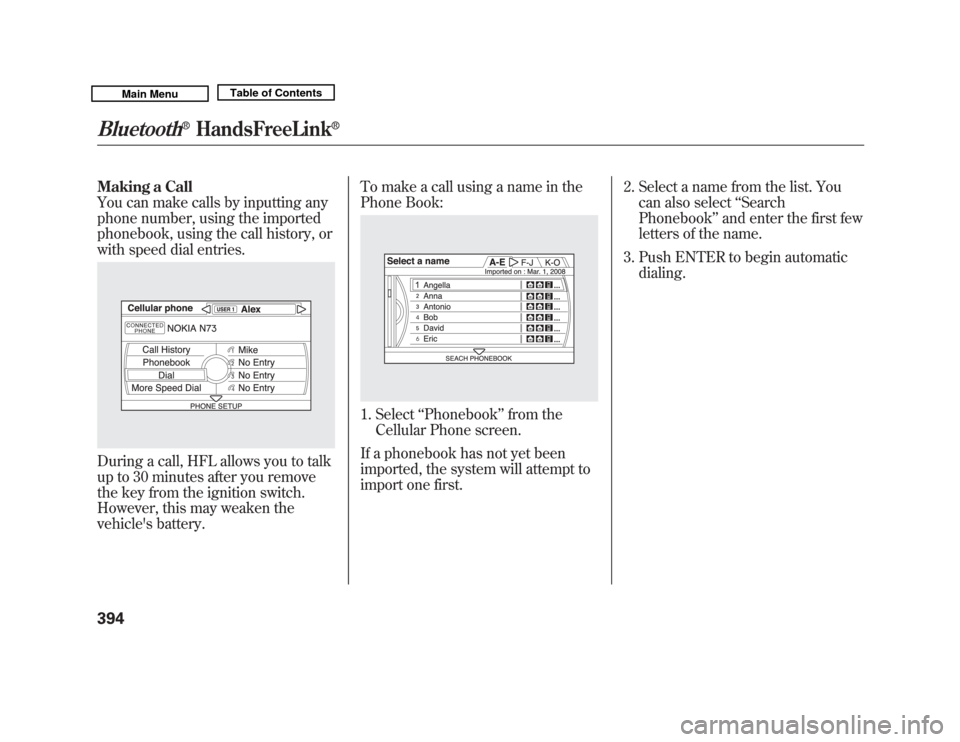
Making a Call
You can make calls by inputting any
phone number, using the imported
phonebook, using the call history, or
with speed dial entries.During a call, HFL allows you to talk
up to 30 minutes after you remove
the key from the ignition switch.
However, this may weaken the
vehicle's battery.To make a call using a name in the
Phone Book:
1. Select
‘‘Phonebook’’ from the
Cellular Phone screen.
If a phonebook has not yet been
imported, the system will attempt to
import one first. 2. Select a name from the list. You
can also select ‘‘Search
Phonebook ’’and enter the first few
letters of the name.
3. Push ENTER to begin automatic dialing.
Bluetooth
®
HandsFreeLink
®
39410/06/29 11:59:04 11 ACURA MDX MMC North America Owner's M 50 31STX640 enu
Page 441 of 609
Your vehicle's starting system has an
auto control mode. When you turn
the ignition switch to the START (III)
position, this feature keeps the
engine's starter motor running until
the engine starts. Follow these
instructions to start the engine:1. Apply the parking brake.
2. In cold weather, turn off all electrical accessories to reduce the
drain on the battery.
3. Make sure the shift lever is in Park. Press on the brake pedal. 4. Without touching the accelerator
pedal, turn the ignition switch to
the START (III) position, then
release the ignition switch. You do
not need to hold the ignition
switch in the START (III) position
to start the engine. Depending on
the outside temperature, the
starter motor runs for about 6 to 9
seconds until the engine starts.
If you hold the ignition switch in
the START (III) position for more
than 7 seconds, the starter motor,
depending on the outside
temperature, runs for about 10 to
25 seconds until the engine starts.
If the engine does not start, wait at
least 10 seconds before trying
again.
The immobilizer system protects your
vehicle from theft. If an improperly-
coded key (or other device) is used, the
engine's fuel system is disabled. For
more information, see page 137.
The engine is harder to start in cold
weather. Also, the thinner air found at
altitudes above 8,000 feet (2,400
meters) adds to this problem.
Starting the Engine43610/06/29 11:59:04 11 ACURA MDX MMC North America Owner's M 50 31STX640 enu
Page 504 of 609
This section explains why it is
important to keep your vehicle well
maintained and how to follow basic
maintenance safety precautions.
This section also includes
instructions on how to read the
Maintenance Minder messages on
the multi-information display, and
instructions for simple maintenance
tasks you may want to take care of
yourself.
If you have the skills and tools to
perform more complex maintenance
tasks on your vehicle, you may want
to purchase the service manual. See
page 589 for information on how to
obtain a copy, or see your dealer.U.S. Vehicles:
Maintenance, replacement, or
repair of emissions control
devices and systems may be done
by any automotive repair
establishment or individual using
parts that are
‘‘certified’’to EPA
standards. Maintenance Safety
.....................
500
Maintenance Minder
TM
...............
501
Fluid Locations
...........................
509
Engine Compartment Cover
........
510
Adding Engine Oil
......................
511
Changing the Engine Oil and
Filter
.......................................
512
Engine Coolant
...........................
514
Windshield Washers
...................
516
Automatic Transmission Fluid
....
517
Brake Fluid
.................................
519
Power Steering Fluid
..................
520
Timing Belt
.................................
520
Lights
..........................................
521
Dust and Pollen Filter
.................
528
Cleaning the Seat Belts
...............
528
Floor Mats
..................................
529
Wiper Blades
..............................
530
Tires
...........................................
534
Checking the Battery
..................
541
Vehicle Storage
...........................
542
Maintenance
499
Maintenance
10/06/29 11:59:04 11 ACURA MDX MMC North America Owner's M 50 31STX640 enu
Page 505 of 609
All service items not detailed in this
section should be performed by a
certified technician or other qualified
mechanic.
Important Safety Precautions
To eliminate potential hazards, read
the instructions before you begin,
and make sure you have the tools
and skills required.●
Make sure your vehicle is parked
on level ground, the parking brake
is set, and the engine is off.
●
To clean parts, use a commercially
available degreaser or parts
cleaner, not gasoline.
●
To reduce the possibility of fire or
explosion, keep cigarettes, sparks,
and flames away from the battery
and all fuel-related parts.
●
Wear eye protection and protective
clothing when working with the
battery or compressed air.Improperly maintaining this
vehicle, or failing to correct a
problem before driving can
cause a crash in which you can
be seriously hurt or killed.
Always follow the inspection
and maintenance
recommendations and
schedules in this owner's
manual.
Potential Vehicle Hazards
●
Carbon Monoxide poison from
engine exhaust. Be sure there is
adequate ventilation whenever you
operate the engine.
●
Burns from hot parts. Let the
engine and exhaust system cool
down before touching any parts.
●
Injury from moving parts. Do
not run the engine unless
instructed to do so.Failure to properly follow
maintenance instructions and
precautions can cause you to
be seriously hurt or killed.
Always follow the procedures
and precautions in this owner's
manual.
Some of the most important safety
precautions are given here. However,
we cannot warn you of every
conceivable hazard that can arise in
performing maintenance. Only you
can decide whether or not you
should perform a given task.
Maintenance Safety50010/06/29 11:59:04 11 ACURA MDX MMC North America Owner's M 50 31STX640 enu
Page 546 of 609
The sensor on the negative terminal
monitors your vehicles battery
condition.
If there is a problem with the sensor,
you will see a‘‘CHECK BATTERY
SENSOR’’ message on the multi-
information display. Have the vehicle
checked by your dealer. Check the terminals for corrosion (a
white or yellowish powder). To
remove it, cover the terminals with a
solution of baking soda and water. It
will bubble up and turn brown. When
this stops, wash it off with plain
water. Dry off the battery with a cloth
or paper towel. Coat the terminals
with grease to help prevent further
corrosion.
If additional battery maintenance is
needed, see your dealer or a
qualified technician.
WARNING:
Battery posts,
terminals, and related accessories
contain lead and lead compounds.
Wash your hands after handling.
If you need to connect the battery to
a charger, disconnect both cables to
prevent damaging your vehicle's
electrical system. Always disconnect
the negative (- ) cable first, and
reconnect it last.
The battery gives off explosive
hydrogen gas during normal
operation.
A spark or flame can cause the
battery to explode with enough
force to kill or seriously hurt
you.
Wear protective clothing and a
face shield, or have a skilled
technician do the battery
maintenance.
If the radio fuse is removed, the
audio system will disable itself. The
next time you turn on the radio you
will see ‘‘ENTER CODE ’’in the
frequency display. Use the preset
buttons to enter the digit code (see
page 305).
Checking the Battery
541
Maintenance
10/06/29 11:59:04 11 ACURA MDX MMC North America Owner's M 50 31STX640 enu
Page 547 of 609

If you need to park your vehicle for
an extended period (more than 1
month), there are several things you
should do to prepare it for storage.
Proper preparation helps prevent
deterioration and makes it easier to
get your vehicle back on the road. If
possible, store your vehicle indoors.●
Fill the fuel tank.
●
Wash and dry the exterior
completely.
●
Clean the interior. Make sure the
carpeting, floor mats, etc., are
completely dry.
●
Leave the parking brake off. Put
the transmission in Park.
●
Block the rear wheels.
●
If the vehicle is to be stored for a
longer period, it should be
supported on jackstands so the
tires are off the ground.
●
Leave one window open slightly (if
the vehicle is being stored
indoors).
●
Disconnect the battery.
●
Support the front and rear wiper
blade arms with a folded towel or
rag so they do not touch the
windshield.
●
To minimize sticking, apply a
silicone spray lubricant to all door
and tailgate seals. Also, apply a
vehicle body wax to the painted
surfaces that mate with the door
and tailgate seals.
●
Cover the vehicle with a
‘‘breathable’’ cover, one made from
a porous material such as cotton.
Non-porous materials, such as
plastic sheeting, trap moisture,
which can damage the paint.
●
If possible, periodically run the
engine until it reaches full
operating temperature (the cooling
fans cycle on and off twice).
Preferably, do this once a month.
Vehicle Storage54210/06/29 11:59:04 11 ACURA MDX MMC North America Owner's M 50 31STX640 enu
Page 556 of 609
Diagnosing why the engine won't
start falls into two areas, depending
on what you hear when you turn the
ignition switch to the START (III)
position:●
You hear nothing, or almost
nothing. The engine's starter
motor does not operate at all, or
operates very slowly.
●
You can hear the starter motor
operating normally, or the starter
motor sounds like it is spinning
faster than normal, but the engine
does not start up and run.
Nothing Happens or the Starter
Motor Operates Very Slowly
When you turn the ignition switch to
the START (III) position, you do not
hear the normal noise of the engine
trying to start. You may hear a
clicking sound, a series of clicks, or
nothing at all. Check these things:
●
Check the transmission interlock.
The transmission must be in Park
or neutral or the starter will not
operate.
●
Turn the ignition switch to the ON
(II) position. Turn on the
headlights, and check their
brightness. If the headlights are
very dim or do not come on at all,
the battery is discharged. See
Jump Starting
on page 552.
●
Turn the ignition switch to the
START (III) position. If the
headlights do not dim, check the
condition of the fuses. If the fuses
are OK, there is probably
something wrong with the
electrical circuit for the ignition
switch or starter motor. You will
need a qualified technician to
determine the problem. See
Emergency Towing on page 566.If the headlights dim noticeably or
go out when you try to start the
engine, either the battery is
discharged or the connections are
corroded. Check the condition of
the battery and terminal
connections (see page 541). You
can then try jump starting the
vehicle from a booster battery (see
page 552).
The Starter Operates Normally
In this case, the starter motor's speed
sounds normal, or even faster than
normal, when you turn the ignition
switch to the START (III) position,
but the engine does not run.
●
Are you using a properly coded
key? An improperly coded key will
cause the immobilizer system
indicator in the instrument panel
to blink rapidly (see page 72).
CONTINUED
If the Engine Won't Start
551
Taking Care of the Unexpected
10/06/29 11:59:04 11 ACURA MDX MMC North America Owner's M 50 31STX640 enu