wheel Acura MDX 2011 Workshop Manual
[x] Cancel search | Manufacturer: ACURA, Model Year: 2011, Model line: MDX, Model: Acura MDX 2011Pages: 609, PDF Size: 12.7 MB
Page 461 of 609
ABS Indicator
If this indicator comes on, the anti-
lock function of the braking system
has shut down. The brakes still work
like a conventional system, but
without anti-lock. You should have
your dealer inspect your vehicle as
soon as possible.
You will also see a ‘‘CHECK ABS
SYSTEM ’’message on the multi-
information display (see page 87).
If the indicator comes on while
driving, test the brakes as instructed
on page 558. If the ABS indicator and the brake
system indicator come on together,
and the parking brake is fully
released, the EBD system may also
be shut down.
Test your brakes as instructed on
page 558. If the brakes feel normal,
drive slowly and have your vehicle
repaired by your dealer as soon as
possible. Avoid sudden hard braking
which could cause the rear wheels to
lock up and possibly lead to a loss of
control.
Important Safety Reminders
ABS does not reduce the time or
distance it takes to stop the
vehicle.
It only helps with steering
control during braking.
ABS will not prevent a skid that
results from changing direction
abruptly, such as trying to take a
corner too fast or making a sudden
lane change. Always drive at a safe
speed for the road and weather
conditions.
ABS cannot prevent a loss of
stability. Always steer moderately
when you are braking hard. Severe
or sharp steering wheel movement
can still cause your vehicle to veer
into oncoming traffic or off the road.
A vehicle with ABS may require a
longer distance to stop on loose or
uneven surfaces, such as gravel or
snow, than a vehicle without anti-
lock.
Anti-lock Brakes (ABS)45610/06/29 11:59:04 11 ACURA MDX MMC North America Owner's M 50 31STX640 enu
Page 471 of 609

Because of the road condition
(curved, winding, etc.) or the state of
your vehicle (turning angle, lane
position, etc.), CMBS can sometimes
mistake a stationary object (light
pole, traffic sign, guard rail, etc.) as a
vehicle ahead of you and temporarily
operate. This is normal.Important Safety Reminder
The main purpose of the CMBS is to
reduce the severity of injuries caused
by an unavoidable collision. While
the CMBS may help to alert you and
minimize the severity of a collision, it
may not activate in every dangerous
situation.
Even with the CMBS, it is still your
responsibility to operate the brake
pedal and steering wheel
appropriately, according to the
driving conditions.
As required by the FCC:
This device complies with Part 15 of theFCC rules. Operation is subject to the
following two conditions: (1) This devicemay not cause harmful interference, and(2) this device must accept any
interference received, includinginterference that may cause undesiredoperation.
Changes or modifications not expresslyapproved by the party responsible for
compliance could void the user'sauthority to operate the equipment.
This device complies with IndustryCanada Standard RSS-210.
Operation is subject to the following twoconditions: (1) this device may not causeinterference, and (2) this device must
accept any interference that may causeundesired operation of the device.
YOUR VEHICLE
SIGN, POLE, etc.
Collision Mitigation Braking System ™(CMBS™ )46610/06/29 11:59:04 11 ACURA MDX MMC North America Owner's M 50 31STX640 enu
Page 474 of 609
VSA and Tire Sizes
Driving with varying tire or wheel
sizes may cause the VSA to
malfunction. When replacing tires,
make sure they are of the same size
and type as your original tires (see
page 539).
If you install winter tires, make sure
they are the same size as those that
were originally supplied with your
vehicle. Exercise the same caution
during winter driving as you would if
your vehicle was not equipped with
VSA.Hill Start Assist
Your vehicle is equipped with a hill
start assist feature to help prevent
the vehicle from rolling on steep
inclines as you move your foot from
the brake pedal to the accelerator.
This feature starts operating a few
seconds after you are in any drive
gear position (when faced uphill) or
in reverse (when faced downhill).
This feature requires that the vehicle
has come to a complete stop before it
can work.
Hill start assist may not hold a
heavily loaded vehicle, such as when
your vehicle is connected to a trailer,
or prevent your vehicle from rolling
downhill on a very steep or slippery
slope.
Vehicle Stability Assist (VSA
®), aka Electronic Stability Control (ESC), System
469
Driving
10/06/29 11:59:04 11 ACURA MDX MMC North America Owner's M 50 31STX640 enu
Page 493 of 609
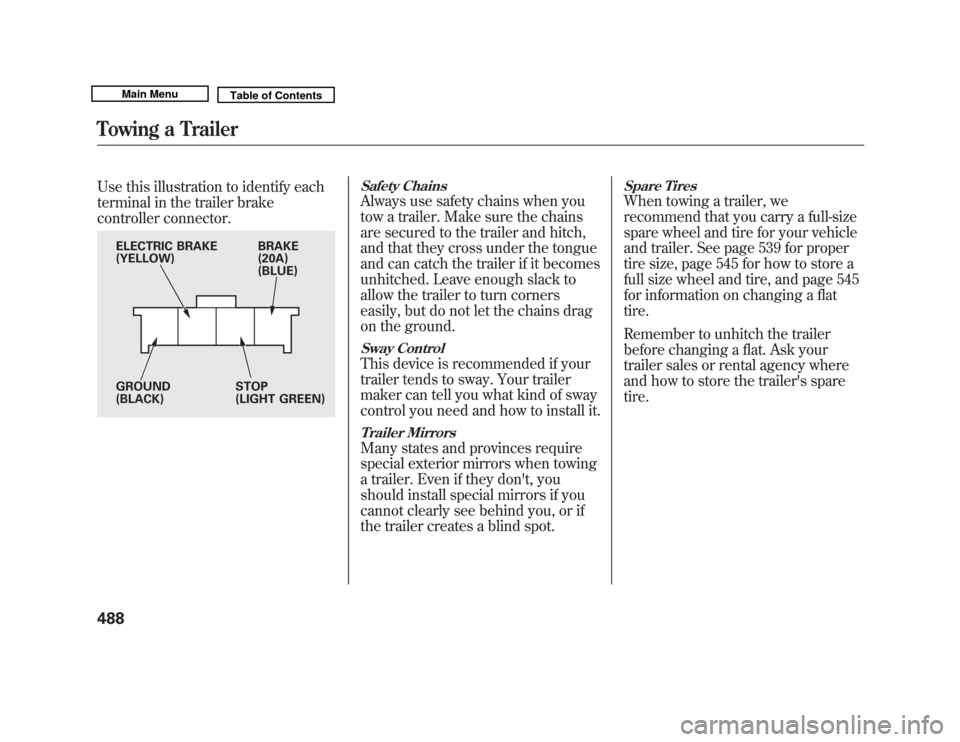
Use this illustration to identify each
terminal in the trailer brake
controller connector.
Safety ChainsAlways use safety chains when you
tow a trailer. Make sure the chains
are secured to the trailer and hitch,
and that they cross under the tongue
and can catch the trailer if it becomes
unhitched. Leave enough slack to
allow the trailer to turn corners
easily, but do not let the chains drag
on the ground.Sway ControlThis device is recommended if your
trailer tends to sway. Your trailer
maker can tell you what kind of sway
control you need and how to install it.Trailer MirrorsMany states and provinces require
special exterior mirrors when towing
a trailer. Even if they don't, you
should install special mirrors if you
cannot clearly see behind you, or if
the trailer creates a blind spot.
Spare TiresWhen towing a trailer, we
recommend that you carry a full-size
spare wheel and tire for your vehicle
and trailer. See page 539 for proper
tire size, page 545 for how to store a
full size wheel and tire, and page 545
for information on changing a flat
tire.
Remember to unhitch the trailer
before changing a flat. Ask your
trailer sales or rental agency where
and how to store the trailer's spare
tire.
BRAKE
(20A)
(BLUE)
ELECTRIC BRAKE
(YELLOW)
GROUND
(BLACK)
STOP
(LIGHT GREEN)
Towing a Trailer48810/06/29 11:59:04 11 ACURA MDX MMC North America Owner's M 50 31STX640 enu
Page 497 of 609
Handling Crosswinds and BuffetingCrosswinds and air turbulence
caused by passing trucks can disrupt
your steering and cause the trailer to
sway. When being passed by a large
vehicle, keep a constant speed, and
steer straight ahead. Do not try to
make quick steering or braking
corrections.Backing UpAlways drive slowly and have
someone guide you when backing
up. Grip the
bottom
of the steering
wheel, then turn the wheel to the left
to get the trailer to move to the left.
Turn the wheel to the right to move
the trailer to the right.
ParkingFollow all normal precautions when
parking, including putting the
transmission in Park and firmly
setting the parking brake. Also, place
wheel chocks at each of the trailer's
tires.
Retrieving a BoatIf the vehicle tires slip when
retrieving a boat from the water,
keep the transmission in the D
position and do not use the
sequential sport shift mode. This
prevents the transmission damage.
Towing Your Vehicle
Your vehicle is not designed to be
towed behind a motor home. If your
vehicle needs to be towed in an
emergency, see page 566. Trailer Stability Assist
Your vehicle is equipped with trailer
stability assist function. This function
works on the same sensors as the
vehicle stability assist (VSA) system.
This function helps to stabilize the
vehicle/trailer combination when the
trailer severely sways or oscillates.
For more information on the VSA
system, see page 467.
If the function detects vehicle/trailer
instability, it checks if the swaying is
caused by the trailer, and if the
trailer swaying or oscillation is
increasing.
The vehicle/trailer combination is
more affected by crosswinds,
buffeting, and improper tongue load.
These conditions can make the
trailer unstable, and cause it to sway.
Towing a Trailer, Trailer Stability Assist49210/06/29 11:59:04 11 ACURA MDX MMC North America Owner's M 50 31STX640 enu
Page 499 of 609
In this case, your vehicle still has the
VSA traction and stability
enhancement, but it will not have the
trailer stability assist function.
If there is a problem with the VSA
system, the system and trailer
stability assist shuts off. The VSA
system indicator also come on (see
page 467).
The ABS indicator and the brake
system indicator may also come on
along with the VSA system indicator.
If you see these warning indicators,
have your vehicle checked at your
dealer as soon as possible.If you turn off the VSA, the trailer
stability assist function also shuts off.
Press and hold the VSA off switch
until you hear a beep (see page 468).
The VSA off indicator comes on as a
reminder. Press and hold the switch
again to turn the system on.
The function turns on every time you
start the engine along with the VSA,
even if you turned it off the last time
you drove the vehicle.
Off-Highway Driving Guidelines
General Information
Your vehicle has been designed
primarily for use on pavement. But
its higher ground clearance and
super handling-all wheel drive
(SH-AWD) system allow you to
occasionally travel on unpaved roads,
to campgrounds, picnic sites, and
similar locations. It is not designed
for trailblazing, mountain climbing,
or other challenging off-road
activities.
If you decide to drive on unpaved
roads, you will find that it requires
somewhat different driving skills.
Your vehicle will also handle
somewhat differently than it does on
pavement. Be sure to pay extra
attention to the precautions and tips
in this section, and get acquainted
with your vehicle before leaving the
pavement.Trailer Stability Assist, Off-Highway Driving Guidelines49410/06/29 11:59:04 11 ACURA MDX MMC North America Owner's M 50 31STX640 enu
Page 501 of 609
Accelerating and Braking
For better traction on all surfaces,
accelerate slowly and gradually build
up speed. If you try to start too fast
on wet soil, mud, snow, or ice, you
might not have enough traction to
get underway, and you may dig
yourself a hole. Starting with the shift
lever in the D position will help you
have a smoother start on snow or ice.
Keep in mind that you will usually
need more time and distance to
brake to a stop on unpaved surfaces.
Avoid hard braking. Do not‘‘pump ’’
the brakes; let the anti-lock braking
system pump them for you.
Avoiding Obstacles
Debris in the road can damage your
suspension or other components.
Because your vehicle has a high
center of gravity, driving over a large
obstacle, or allowing a wheel to drop
into a deep hole can cause your
vehicle to tip or roll over. Driving on Slopes
If you can't clearly see all conditions
or obstacles on a slope, walk the
slope before you drive on it. If you
have any doubt whether or not you
can safely drive on the slope, don't
do it. Find another route.
If you are driving up a hill and find
that you cannot continue,
do not try to
turn around.
Your vehicle could roll
over. Slowly back down the hill,
following the same route you took up
the hill.
Crossing a Stream
Before driving through water, stop,
get out if necessary, and make sure
that:
●
The water is not deep enough to
cover your wheel hubs, axles, or
exhaust pipe. You could stall and
not be able to restart your engine.
The water can also damage
important vehicle components.
●
The banks are sloped so you can
drive out.
●
The water is not flowing too fast.
Deep rushing water can sweep you
downstream. Even very shallow
rushing water can wash the
ground from under your tires and
cause you to lose traction and
possibly roll over.
●
The banks and surface under the
water provide good traction. The
water may hide hazards such as
rocks, holes, or mud.
If you decide it is safe to drive
through water, choose a suitable
speed, and proceed without shifting,
changing speeds, stopping, or
shutting off the engine.
After driving through water, test your
brakes. If they got wet, gently
‘‘ pump ’’them while driving slowly
until they operate normally.
Off-Highway Driving Guidelines49610/06/29 11:59:04 11 ACURA MDX MMC North America Owner's M 50 31STX640 enu
Page 502 of 609

If the water is deeper than the wheel
hubs, some additional service may be
required. This service is not covered
by your warranties.
If You Get Stuck
If you get stuck, carefully try to go in
the direction (forward or reverse)
that you think will get you unstuck.
Do not spin the tires at high speeds.
It will not help you get out and may
cause damage to the transmission or
SH-AWD system.
If you are still unable to free yourself,
your vehicle is equipped with front
and rear tow hooks designed for this
purpose.
Use a nylon strap to attach the MDX
to the recovery vehicle and carefully
take out the slack in the strap. Once
the strap is tight, the recovery
vehicle should apply force.
Remember that the recovery vehicle
needs good traction to avoid
becoming stuck, too.You should never use a jack to try to
get unstuck. Your vehicle could
easily slip off the jack and hurt you or
someone else.
Towing a Trailer Off-Road
You may be able to safely tow a
lightweight trailer (such as a
motorcycle or small tent trailer) off-
road if you follow these guidelines:
●
Do not exceed 1,000 lbs (450 kg)
or a tongue weight of 100 lbs (45
kg).
●
Stay on smooth, level dirt roads,
and avoid driving in hilly terrain.
●
Allow extra room for starting,
stopping, and turning.
●
Slow down if you encounter bumps
or other obstacles.
Off-Highway Driving Guidelines
497
Driving
10/06/29 11:59:04 11 ACURA MDX MMC North America Owner's M 50 31STX640 enu
Page 506 of 609
One of the most convenient and
important features of the multi-
information display on your vehicle is
the Maintenance Minder™.
Based on engine operating
conditions and accumulated engine
revolutions, the onboard computer in
your vehicle calculates the remaining
engine oil life.
The system also displays the code for
other scheduled maintenance items
needing service. Engine Oil Life
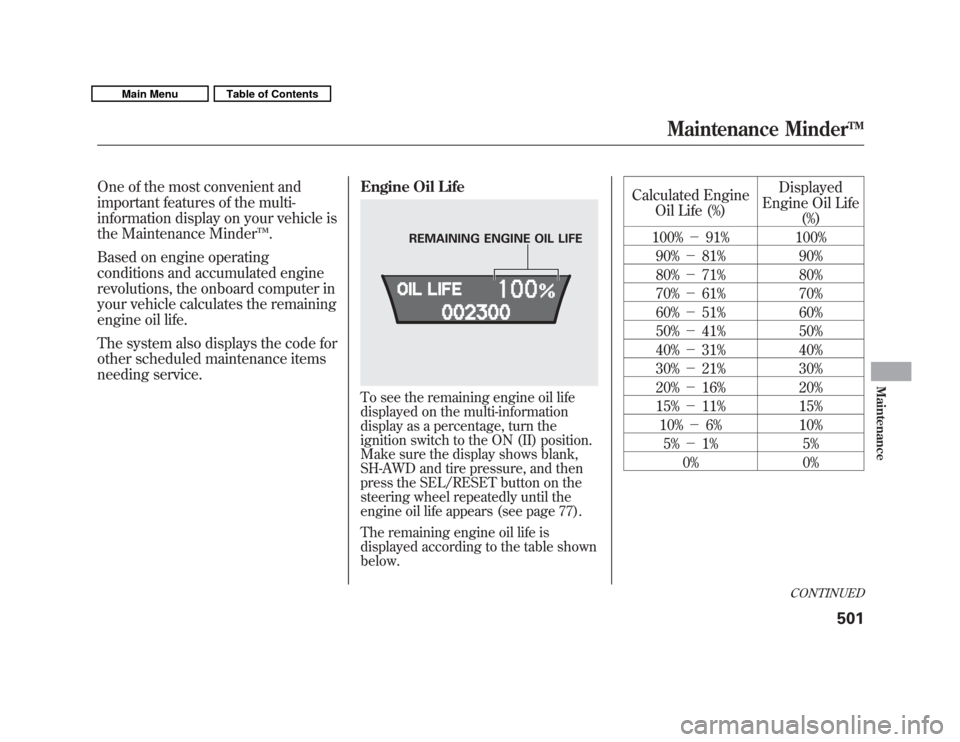
To see the remaining engine oil life
displayed on the multi-information
display as a percentage, turn the
ignition switch to the ON (II) position.
Make sure the display shows blank,
SH-AWD and tire pressure, and then
press the SEL/RESET button on the
steering wheel repeatedly until the
engine oil life appears (see page 77).
The remaining engine oil life is
displayed according to the table shown
below.
Calculated Engine
Oil Life (%) Displayed
Engine Oil Life (%)
100% -91% 100%
90% -81% 90%
80% -71% 80%
70% -61% 70%
60% -51% 60%
50% -41% 50%
40% -31% 40%
30% -21% 30%
20% -16% 20%
15% -11% 15%
10% -6% 10%
5% -1% 5%
0% 0%
REMAINING ENGINE OIL LIFE
CONTINUED
Maintenance Minder
TM501
Maintenance
10/06/29 11:59:04 11 ACURA MDX MMC North America Owner's M 50 31STX640 enu
Page 507 of 609
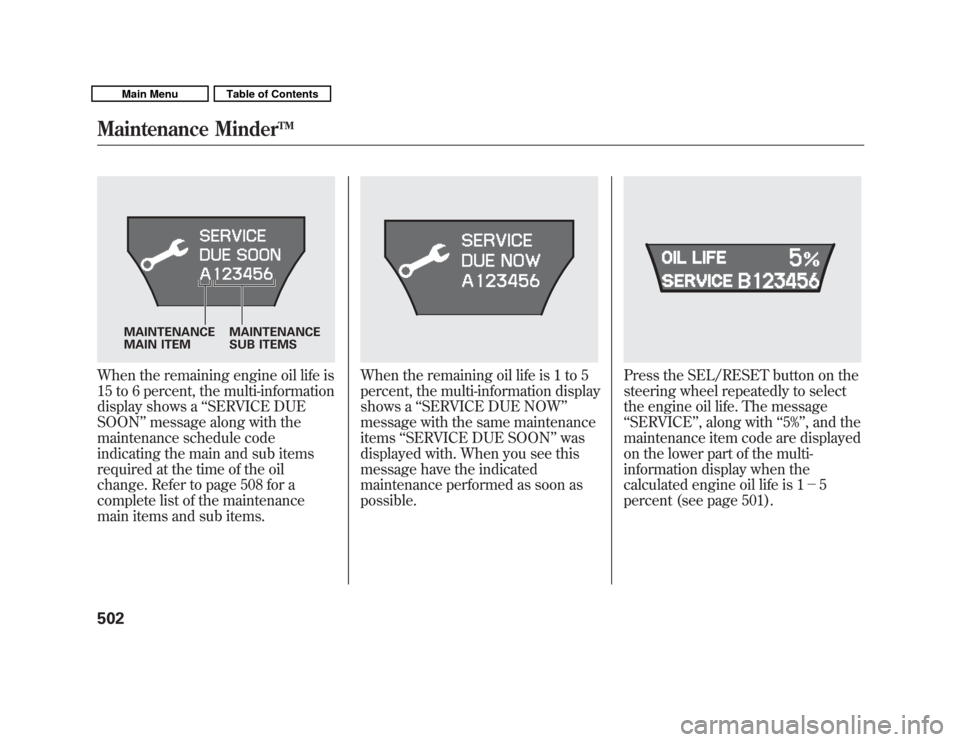
When the remaining engine oil life is
15 to 6 percent, the multi-information
display shows a‘‘SERVICE DUE
SOON ’’message along with the
maintenance schedule code
indicating the main and sub items
required at the time of the oil
change. Refer to page 508 for a
complete list of the maintenance
main items and sub items.
When the remaining oil life is 1 to 5
percent, the multi-information display
shows a ‘‘SERVICE DUE NOW ’’
message with the same maintenance
items ‘‘SERVICE DUE SOON ’’was
displayed with. When you see this
message have the indicated
maintenance performed as soon as
possible.
Press the SEL/RESET button on the
steering wheel repeatedly to select
the engine oil life. The message
‘‘ SERVICE ’’, along with ‘‘5% ’’, and the
maintenance item code are displayed
on the lower part of the multi-
information display when the
calculated engine oil life is 1- 5
percent (see page 501).
MAINTENANCE
MAIN ITEM MAINTENANCE
SUB ITEMS
Maintenance Minder
TM
50210/06/29 11:59:04 11 ACURA MDX MMC North America Owner's M 50 31STX640 enu