wheel Acura MDX 2011 Service Manual
[x] Cancel search | Manufacturer: ACURA, Model Year: 2011, Model line: MDX, Model: Acura MDX 2011Pages: 609, PDF Size: 12.7 MB
Page 439 of 609
Your vehicle has higher ground
clearance that allows you to travel
over bumps, obstacles, and rough
terrain. It also provides good
visibility so you can anticipate
problems earlier.
Because your vehicle rides higher off
the ground, it has a high center of
gravity that can cause it to roll over if
you make abrupt turns. Utility
vehicles have a significantly higher
roll over rate than other types of
vehicles.To prevent rollovers or loss of
control:
●
Take corners at slower speeds
than you would with a passenger
vehicle.
●
Avoid sharp turns and abrupt
maneuvers whenever possible.
●
Do not modify your vehicle in any
way that would raise the center of
gravity.
●
Do not carry heavy cargo on the
roof.Your vehicle is equipped with a super
handling-all wheel drive (SH-AWD)
system. When the system senses a
loss of one or more wheel traction, it
automatically transfers some power
to the other wheels. This gives you
better traction and mobility.
You still need to exercise the same
care when accelerating, steering, and
braking that you would in a two-
wheel drive vehicle.
See page 494 for off-highway driving
guidelines.
Driving Guidelines43410/06/29 11:59:04 11 ACURA MDX MMC North America Owner's M 50 31STX640 enu
Page 440 of 609

You should do the following checks
and adjustments before you drive
your vehicle.1. Make sure all windows, mirrors, and outside lights are clean and
unobstructed. Remove frost, snow,
or ice.
2. Check that the hood is fully closed.
3. Visually check the tires. If a tire looks low, use a gauge to check its
pressure.
4. Check that any items you may be carrying are stored properly or
fastened down securely.
5. Check the seat adjustment (see page 148). 6. Check the adjustment of the inside
and outside mirrors (see page
163).
7. Check the steering wheel adjustment (see page 133).
8. Make sure the doors and tailgate are securely closed and locked.
9. Fasten your seat belt. Check that your passengers have fastened
their seat belts (see page 16). 10. When you start the engine, check
the gauges and indicators in the
instrument panel, and the
messages on the multi-information
display (see pages 65, 76 and 86).
Preparing to Drive
435
Driving
10/06/29 11:59:04 11 ACURA MDX MMC North America Owner's M 50 31STX640 enu
Page 447 of 609

To shift up or down, use the+
(right) or -(left) paddle shifter on
either side of the steering wheel.
Each time you pull +(right), the
transmission shifts to a higher gear.
Pull -(left) to downshift. You will
see the selected gear number on the
instrument panel.When you pull either paddle shifter,
the gear position indicator shows you
the selected gear number. The transmission control system
monitors the accelerator pedal use
and your driving conditions. When
you press the accelerator pedal as in
normal driving, the system judges
that you are driving at a constant
cruising speed without using the
paddle shifters. Under these
conditions, D-paddle shift mode is
canceled, and the transmission
automatically returns to drive mode
(D).
Hold the
+(right) paddle shifter for
2 seconds to return to drive mode
(D).
When the transmission returns to
drive mode (D), the displayed gear
number goes out.
The transmission remains in the
selected gear if you do not
accelerate. Each time you pull either paddle
shifter, the transmission shifts one
gear up or down. If you want to shift
up or down more than two gears, pull
the paddle shifter twice, pause, and
then pull it again.
The automatic transmission will not
allow you to shift up or down if:
●
You downshift before the engine
speed reaches the highest
threshold of the lower gear.
If you try to do this, the gear
position indicator will flash the
number of the lower gear several
times, then return to a higher gear.
●
You upshift before the engine
speed reaches the lowest
threshold of the higher gear.
●
You press both paddle shifters at
the same time.
GEAR POSITION INDICATOR
Driving with the Paddle Shifters44210/06/29 11:59:04 11 ACURA MDX MMC North America Owner's M 50 31STX640 enu
Page 450 of 609
Starting in Second GearWhen you are in sequential shift
mode, and the vehicle is stopped,
pull the+(right) paddle shifter to
shift to second gear. You will see ‘‘2’’
in the display. Starting in second
gear helps to reduce wheelspin in
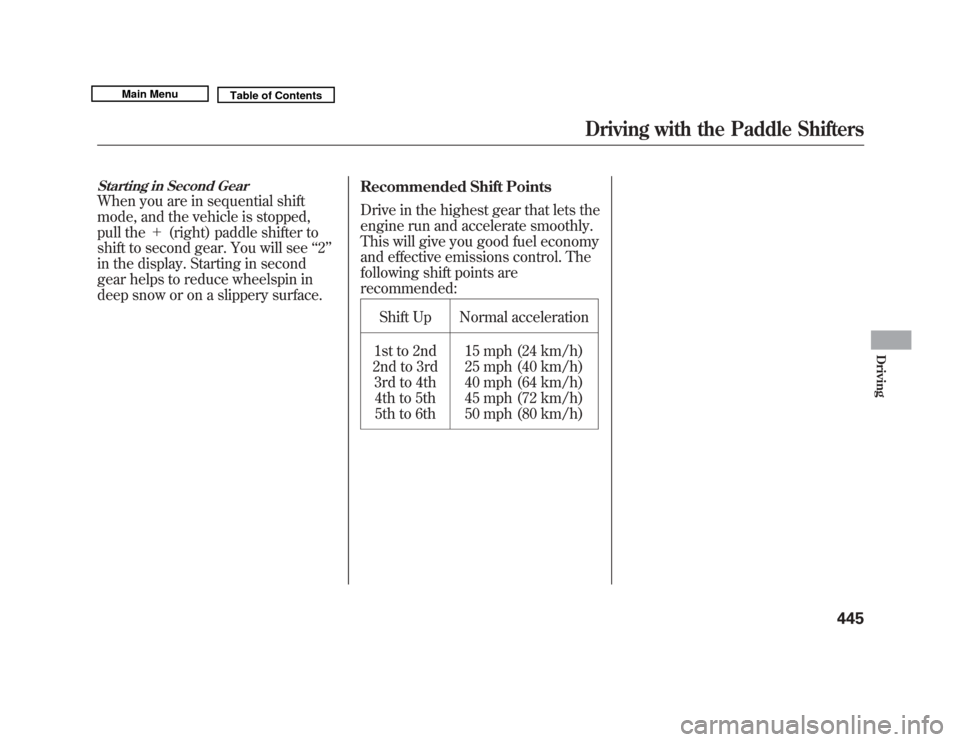
deep snow or on a slippery surface. Recommended Shift Points
Drive in the highest gear that lets the
engine run and accelerate smoothly.
This will give you good fuel economy
and effective emissions control. The
following shift points are
recommended:
Shift Up Normal acceleration
1st to 2nd
2nd to 3rd
3rd to 4th4th to 5th
5th to 6th 15 mph (24 km/h)
25 mph (40 km/h)
40 mph (64 km/h)
45 mph (72 km/h)
50 mph (80 km/h)
Driving with the Paddle Shifters
445
Driving
10/06/29 11:59:04 11 ACURA MDX MMC North America Owner's M 50 31STX640 enu
Page 451 of 609
The super handling-all wheel drive
(SH-AWD) system is a full time all-
wheel-drive system that
automatically controls and transfers
varying amounts of engine torque to
all wheels independently, according
to the driving conditions.
While the SH-AWD system helps to
enhance the vehicle's driving
stability in all situations, it is still
your responsibility to drive and
corner at reasonable speeds and to
leave a sufficient margin of safety.SH-AWD Torque Distribution
Monitor
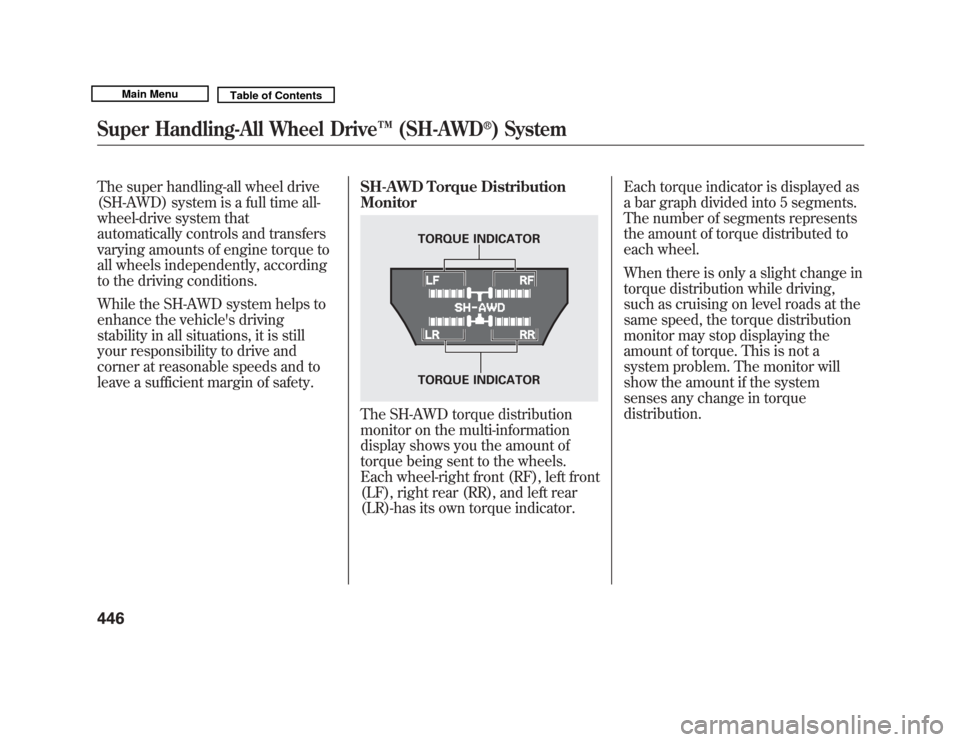
The SH-AWD torque distribution
monitor on the multi-information
display shows you the amount of
torque being sent to the wheels.
Each wheel-right front (RF), left front
(LF), right rear (RR), and left rear
(LR)-has its own torque indicator.Each torque indicator is displayed as
a bar graph divided into 5 segments.
The number of segments represents
the amount of torque distributed to
each wheel.
When there is only a slight change in
torque distribution while driving,
such as cruising on level roads at the
same speed, the torque distribution
monitor may stop displaying the
amount of torque. This is not a
system problem. The monitor will
show the amount if the system
senses any change in torque
distribution.
TORQUE INDICATOR
TORQUE INDICATOR
Super Handling-All Wheel Drive
™(SH-AWD
®) System
44610/06/29 11:59:04 11 ACURA MDX MMC North America Owner's M 50 31STX640 enu
Page 452 of 609
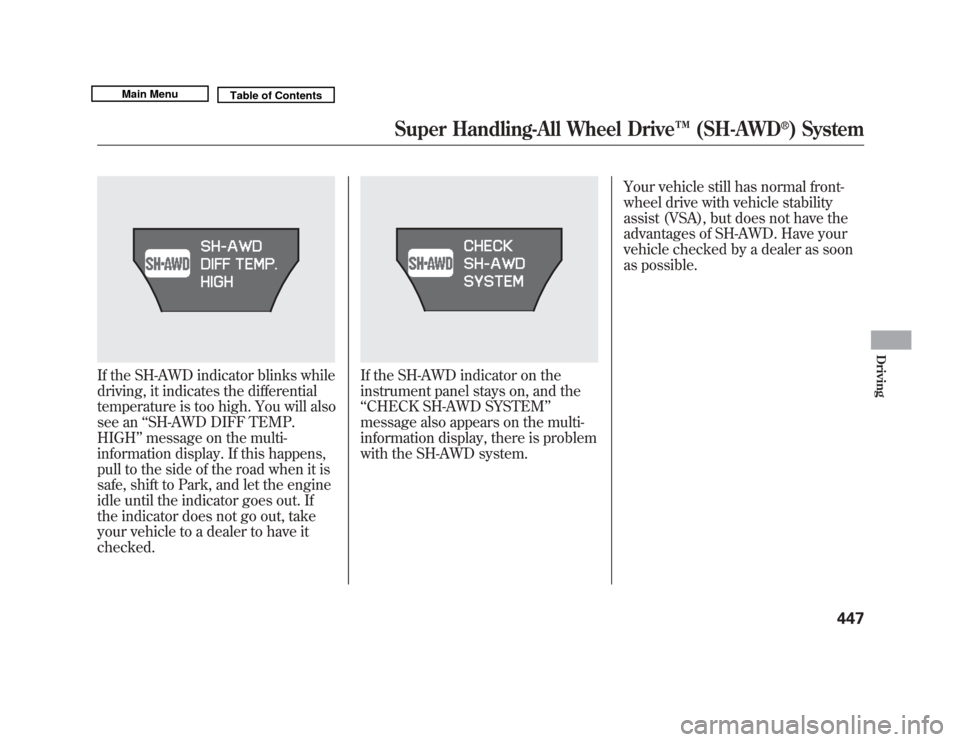
If the SH-AWD indicator blinks while
driving, it indicates the differential
temperature is too high. You will also
see an‘‘SH-AWD DIFF TEMP.
HIGH ’’message on the multi-
information display. If this happens,
pull to the side of the road when it is
safe, shift to Park, and let the engine
idle until the indicator goes out. If
the indicator does not go out, take
your vehicle to a dealer to have it
checked.
If the SH-AWD indicator on the
instrument panel stays on, and the
‘‘ CHECK SH-AWD SYSTEM ’’
message also appears on the multi-
information display, there is problem
with the SH-AWD system. Your vehicle still has normal front-
wheel drive with vehicle stability
assist (VSA), but does not have the
advantages of SH-AWD. Have your
vehicle checked by a dealer as soon
as possible.
Super Handling-All Wheel Drive
™(SH-AWD
®) System
447
Driving
10/06/29 11:59:04 11 ACURA MDX MMC North America Owner's M 50 31STX640 enu
Page 453 of 609
Always use the parking brake when
you park your vehicle. Make sure the
parking brake is set firmly, or your
vehicle may roll if it is parked on an
incline.
Set the parking brake before you put
the transmission in Park. This keeps
the vehicle from moving and putting
pressure on the parking mechanism
in the transmission.Parking Tips
●
Make sure the moonroof and the
windows are closed.
●
Turn off the lights.
●
Place any packages, valuables, etc.
in the cargo area or take them with
you.
●
Lock the doors and the tailgate.
●
Never park over dry leaves, tall
grass, or other flammable
materials. The hot three way
catalytic converter could cause
these materials to catch on fire.
●
If the vehicle is facing uphill, turn
the front wheels away from the
curb.
●
If the vehicle is facing downhill,
turn the front wheels toward the
curb.
●
Check the indicator on the
instrument panel to verify that the
security system is set.
●
Make sure the parking brake is
fully released before driving away.
Driving with the parking brake
partially set can overheat or
damage the rear brakes.
Parking44810/06/29 11:59:04 11 ACURA MDX MMC North America Owner's M 50 31STX640 enu
Page 458 of 609
If the low tire pressure/TPMS
indicator comes on, or the multi-
information display shows a‘‘CHECK
TPMS SYSTEM ’’message, the VSA
system automatically turns on even
when the VSA system is turned off
by pressing the VSA OFF switch
(see page 468). If this happens, you
cannot turn the VSA system off by
pressing the VSA OFF switch again.
When you restart the vehicle with
the compact spare tire, the TPMS
system message will also be
displayed on the multi-information
display after several miles
(kilometers) driving.
Changing a Tire with TPMS
If you have a flat tire, the low tire
pressure/TPMS and tire monitor
indicators will come on. Replace the
indicated flat tire with the compact
spare tire (see page 545). After the flat tire is replaced with the
spare tire, the low tire pressure/
TPMS indicator stays on while
driving. After several miles
(kilometers) driving, this indicator
begins to flash, then stays on again.
You will also see a
‘‘CHECK TPMS
SYSTEM ’’message on the multi-
information display. This is normal;
the system cannot monitor the spare
tire pressure. Manually check the
spare tire pressure to be sure it is
correct. This indicator and the warning
message on the multi-information
display will go off, after several miles
(kilometers) driving, when the spare
tire is replaced with the specified
regular tire equipped with the tire
pressure monitor sensor.
Each wheel is equipped with a tire
pressure sensor. You must use
TPMS specific wheels. It is
recommended that you always have
your tires serviced by your dealer or
a qualified technician.
Never use a puncture-repairing agent
in a flat tire. If used, you will have to
replace the tire pressure sensor.
Have the flat tire repaired by your
dealer as soon as possible.
CONTINUED
Tire Pressure Monitoring System (TPMS)
453
Driving
10/06/29 11:59:04 11 ACURA MDX MMC North America Owner's M 50 31STX640 enu
Page 459 of 609
As required by the FCC:This device complies with Part 15 of theFCC rules. Operation is subject to the
following two conditions: (1) This devicemay not cause harmful interference, and(2) this device must accept any
interference received, includinginterference that may cause undesiredoperation.
Changes or modifications not expresslyapproved by the party responsible forcompliance could void the user's
authority to operate the equipment.This device complies with IndustryCanada Standard RSS-210.
Operation is subject to the following twoconditions: (1) this device may not cause
interference, and (2) this device mustaccept any interference that may causeundesired operation of the device.
Braking System
Your vehicle is equipped with disc
brakes at all four wheels. A power
assist helps reduce the effort needed
on the brake pedal. The emergency
brake assist system increases the
stopping force when you depress the
brake pedal hard in an emergency
situation. The anti-lock brake system
(ABS) helps you retain steering
control when braking very hard.
Resting your foot on the pedal keeps
the brakes applied lightly, builds up
heat, and reduces their effectiveness
and reduces brake pad life. In
addition, fuel economy can be
reduced. It also keeps your brake
lights on all the time, confusing
drivers behind you. Constant application of the brakes
when going down a long hill builds
up heat and reduces their
effectiveness. Use the engine to
assist the brakes by taking your foot
off the accelerator and downshifting
to a lower gear.
Check the brakes after driving
through deep water. Apply the
brakes moderately to see if they feel
normal. If not, apply them gently and
frequently until they do. Be extra
cautious in your driving.
Tire Pressure Monitoring System (TPMS), Braking System45410/06/29 11:59:04 11 ACURA MDX MMC North America Owner's M 50 31STX640 enu
Page 460 of 609
Braking System Design
The hydraulic system that operates
the brakes has two separate circuits.
Each circuit works diagonally across
the vehicle (the left-front brake is
connected with the right-rear brake,
etc.). If one circuit should develop a
problem, you will still have braking
at two wheels.
Brake Wear Indicators
All four brakes have audible brake
wear indicators.
If the brake pads need replacing, you
will hear a distinctive, metallic
screeching sound when you apply
the brake pedal. If you do not have
the brake pads replaced, they will
screech all the time. It is normal for
the brakes to occasionally squeal or
squeak when you apply them.Anti-lock Brakes (ABS)
The anti-lock brake system (ABS)
helps prevent the wheels from
locking up, and helps you retain
steering control by pumping the
brakes rapidly, much faster than a
person can do it.
The electronic brake distribution
(EBD) system, which is part of the
ABS, also balances the front-to-rear
braking distribution according to
vehicle loading.
You should never pump the brake pedal.Let the ABS work for you by always
keeping firm, steady pressure on the
brake pedal. This is sometimes
referred to as
‘‘stomp and steer. ’’You will feel a pulsation in the brake
pedal when the ABS activates, and
may hear some noise. This is normal:
it is the ABS rapidly pumping the
brakes. On dry pavement, you will
need to press on the brake pedal
very hard before the ABS activates.
However, you may feel the ABS
activate immediately if you are trying
to stop on snow or ice.
CONTINUED
Braking System, Anti-lock Brakes (ABS)
455
Driving
10/06/29 11:59:04 11 ACURA MDX MMC North America Owner's M 50 31STX640 enu