Seat Acura MDX 2011 Manual PDF
[x] Cancel search | Manufacturer: ACURA, Model Year: 2011, Model line: MDX, Model: Acura MDX 2011Pages: 609, PDF Size: 12.7 MB
Page 156 of 609

Active Head RestraintsThe driver's and front passenger's
seats have active head restraints. If
the vehicle is struck severely from
the rear, the occupant properly
secured with the seat belt will be
pushed against the seat-back and the
head restraint will automatically
move forward.This reduces the distance between
the restraint and the occupant's
head. It also helps protect the
occupants against the likelihood of
whiplash and injuries to the neck and
upper spine.
After a collision, the activated
restraint should return to its normal
position.
If the restraints do not return to their
normal position, or in the event of a
severe collision, have the vehicle
inspected by an Acura dealer.
For a head restraint system to work
properly:
●
Do not hang any items on the head
restraints, or from the restraint
legs.
●
Do not place any object between
an occupant and the seat-back.
●
Install each restraint in its proper
location.
●
Only use genuine Acura
replacement head restraints.
CONTINUED
Seats
151
Instruments and Controls
10/06/29 11:59:04 11 ACURA MDX MMC North America Owner's M 50 31STX640 enu
Page 157 of 609

Adjusting the Second Row SeatsTo change the seat-back angle of the
seats in the second row, pull up on
the handle on the outside of the seat-
back, and push the seat-back.
Overall, the seat-back has six
different positions.Folding the Second Row Seats
The left and right halves can be
folded separately.
1. To unlatch the detachable anchor
before folding the seat-back, insert
the latch plate into the slot on the
side of the anchor buckle (see
page 154) and allow the seat belt to
retract. Store the detachable
anchor and seat belt latch plates in
the retractor housing.
2. Lower the head restraints to their lowest positions.
3. Pull up the handle on the outside of the seat-back.
4. Fold the seat-back forward.
Reverse this procedure to return the
seat to the upright position. Make
sure the seat is locked securely
before driving. Make sure that the folded seat-back
does not press against the front
passenger's seat, as this could cause
the weight sensors to work
improperly.
HANDLE
Seats15210/06/29 11:59:04 11 ACURA MDX MMC North America Owner's M 50 31STX640 enu
Page 158 of 609

Third Row AccessTo get into the third row seats, pull
up the lever on the side of the
passenger's side second row seat-
back. The seat-back will tilt forward,
and then can be slid forward.
After you return the seat-back to the
upright position, push the whole seat
backwards until it latches. Make sure
the seat is fully latched before sitting
in it.Folding the Third Row Seat
1. Use the latch plate to release the
seat belt from the detachable
anchor (see page 154).
2. Lower the head restraints to their lowest positions.
NOTE: To fold the third row seat, the
second row seat-back must be folded
down or in the full up right position.
3. Unlock the seat-back by pulling the handle. Push the seat-back
forward.
Make sure the outer shoulder belts
are positioned on each hook on the
side panel whenever the third seat is
folded.
RELEASE LEVER
THIRD ROW SEAT HANDLE
CONTINUED
Seats
153
Instruments and Controls
10/06/29 11:59:04 11 ACURA MDX MMC North America Owner's M 50 31STX640 enu
Page 159 of 609

Reverse this procedure to return the
seat to the upright position. Make
sure the seat is locked securely
before driving. Reconnect the seat
belts to the detachable anchors.
Make sure all items in the cargo area
are secured. Loose items can fly
forward and cause injury if you have
to brake hard (SeeCarrying Cargo
on page 428). Detachable Anchor
The seat belts in the second row
center seat and the third row seats
are equipped with detachable
anchors.
To unlatch the detachable anchor,
insert the latch plate into the slot on
the side of the anchor buckle. Store
the detachable anchor and seat belt
latch plates in the retractor housing.When the seats are returned to the
upright position, these detachable
anchors should be latched back
properly.
Using the seat belt with the
detachable anchor unlatched
increases the chance of serious
injury or death in a crash.
Before using the seat belt,
make sure the detachable
anchor is correctly latched.
LATCH PLATE
Seats15410/06/29 11:59:04 11 ACURA MDX MMC North America Owner's M 50 31STX640 enu
Page 160 of 609

Pull out the small latch plate and the
latch plate from each holding slot in
the ceiling, and pull out the seat belt
to extend it.
Pull out the outer shoulder belts
from the hook. Both of the third-row
hooks should only be used when the
seat belt is detached.
Line up the triangle marks on the
small latch plate and anchor buckle
when reattaching the belt and
buckle.
Tug on the seat belt to verify that the
detachable anchor is securely
latched. Make sure the seat belt is
not twisted.
SECOND ROW CENTER SEATLATCH PLATE
SMALL LATCH PLATE
THIRD ROW SEATS HOOK
SMALL LATCH PLATE
ANCHOR BUCKLE TRIANGLE
MARKS
Seats
155
Instruments and Controls
10/06/29 11:59:04 11 ACURA MDX MMC North America Owner's M 50 31STX640 enu
Page 161 of 609
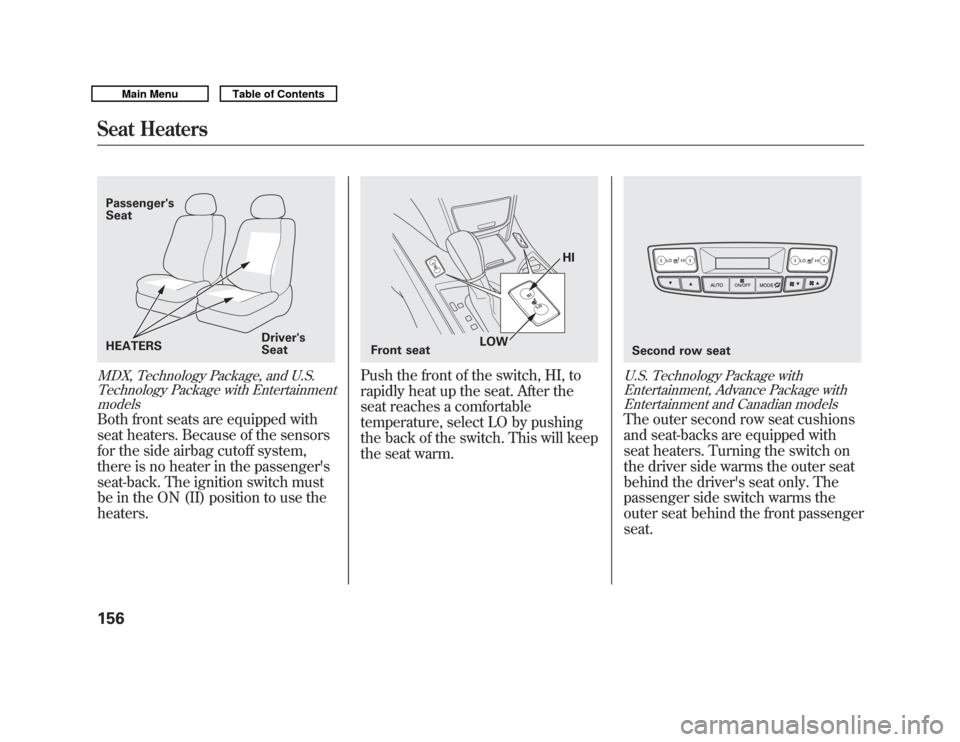
MDX, Technology Package, and U.S.Technology Package with EntertainmentmodelsBoth front seats are equipped with
seat heaters. Because of the sensors
for the side airbag cutoff system,
there is no heater in the passenger's
seat-back. The ignition switch must
be in the ON (II) position to use the
heaters.
Push the front of the switch, HI, to
rapidly heat up the seat. After the
seat reaches a comfortable
temperature, select LO by pushing
the back of the switch. This will keep
the seat warm.
U.S. Technology Package with
Entertainment, Advance Package withEntertainment and Canadian modelsThe outer second row seat cushions
and seat-backs are equipped with
seat heaters. Turning the switch on
the driver side warms the outer seat
behind the driver's seat only. The
passenger side switch warms the
outer seat behind the front passenger
seat.
Passenger's
Seat
HEATERS Driver's
Seat
Front seat HI
LOW
Second row seat
Seat Heaters15610/06/29 11:59:04 11 ACURA MDX MMC North America Owner's M 50 31STX640 enu
Page 162 of 609
In the HI setting, the heater turns off
when the seat gets warm, and turns
back on after the seat's temperature
drops.
In the LO setting, the heater runs
continuously. It does not cycle with
temperature changes.
Follow these precautions when using
the seat heaters:●
Use the HI setting only to heat the
seats quickly, because it draws
large amounts of current from the
battery.
●
If the engine is left idling for an
extended period, do not use the
seat heaters even on the LO
setting. It can weaken the battery,
causing hard starting.
A multi-information display message
may inform you when the battery
charge is getting low. See page 82 for
more information. Seat Heaters and Seat Ventilation
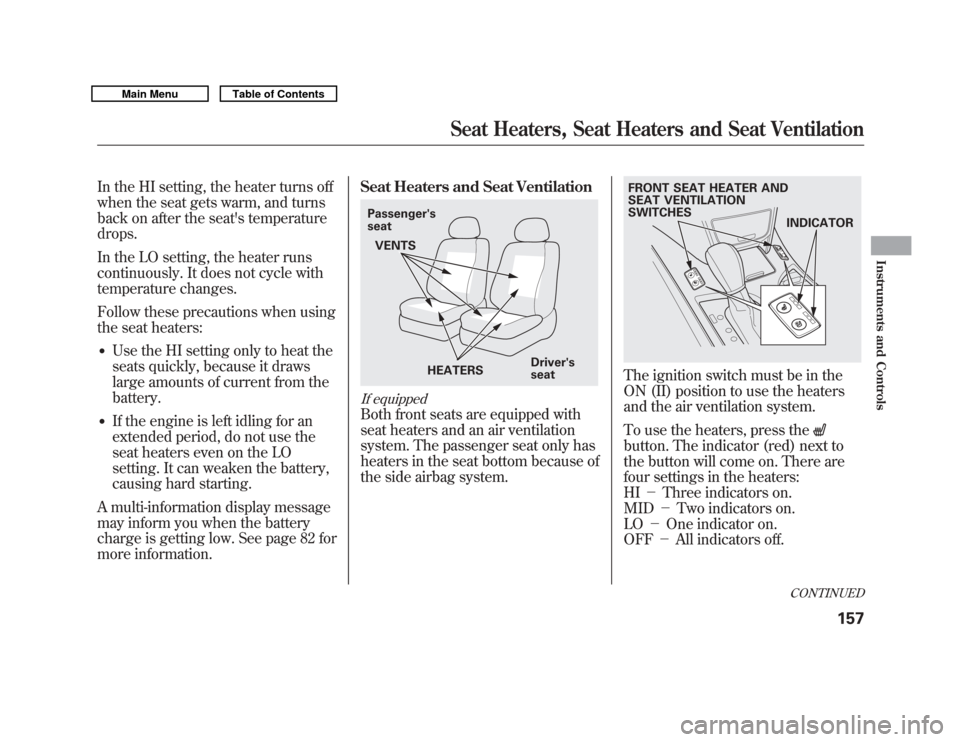
If equippedBoth front seats are equipped with
seat heaters and an air ventilation
system. The passenger seat only has
heaters in the seat bottom because of
the side airbag system.
The ignition switch must be in the
ON (II) position to use the heaters
and the air ventilation system.
To use the heaters, press thebutton. The indicator (red) next to
the button will come on. There are
four settings in the heaters:
HI
-Three indicators on.
MID -Two indicators on.
LO -One indicator on.
OFF -All indicators off.
Passenger's
seat
HEATERS Driver's
seat
VENTS
FRONT SEAT HEATER AND
SEAT VENTILATION
SWITCHES
INDICATOR
CONTINUED
Seat Heaters, Seat Heaters and Seat Ventilation
157
Instruments and Controls
10/06/29 11:59:04 11 ACURA MDX MMC North America Owner's M 50 31STX640 enu
Page 163 of 609
Pressing the
button while the
heater is running will switch the
system to the HI setting air
ventilation mode.
To ventilate the seat, press the
button. The indicator (blue) next to
the button will come on. The air
ventilation system has four settings:
HI -Three indicators on.
MID -Two indicators on.
LO -One indicator on.
OFF -All indicators off.
Pressing the
button while the air
ventilation is running will switch the
system to the HI setting heater
mode. Follow these precautions whenever
you use the seat heaters and the seat
ventilation:
•
If the engine is left idling for an
extended period, do not use the
seat heaters, even on the LO
setting. It can weaken the battery,
causing hard starting.
A multi-information display message
may inform you when the battery
charge is getting low.
See page 82 for more information. Power Windows
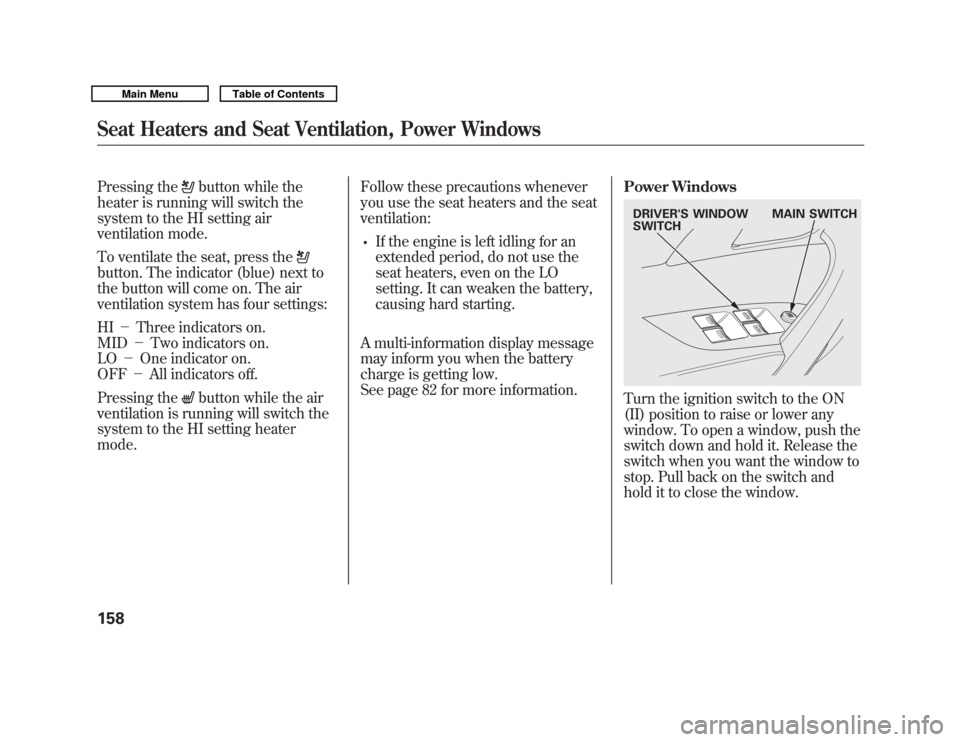
Turn the ignition switch to the ON
(II) position to raise or lower any
window. To open a window, push the
switch down and hold it. Release the
switch when you want the window to
stop. Pull back on the switch and
hold it to close the window.DRIVER'S WINDOW
SWITCH
MAIN SWITCH
Seat Heaters and Seat Ventilation, Power Windows15810/06/29 11:59:04 11 ACURA MDX MMC North America Owner's M 50 31STX640 enu
Page 171 of 609
Your vehicle has a memory feature
for the steering wheel, driver's seat,
and outside mirror positions.
Seat, except for power lumbar,
steering wheel and outside mirror
positions can be stored in separate
memories. You select a memorized
position by pushing the appropriate
button or using the appropriate
remote transmitter (Driver 1 or
Driver 2). For more information see
page 147.Storing a Driving Position in
Memory
Store a driving position only when
the vehicle is parked.
1. Turn the ignition switch to the ON
(II) position. You cannot add a new
driving position to the memory
unless the ignition switch is in the
ON (II) position. You can recall a
memorized position with the
ignition switch in any position.
2. Adjust the seat to a comfortable position (see page 148).
Adjust the steering wheel to a
comfortable position (see page
133).
Adjust the outside mirrors for best
visibility (see page 164).
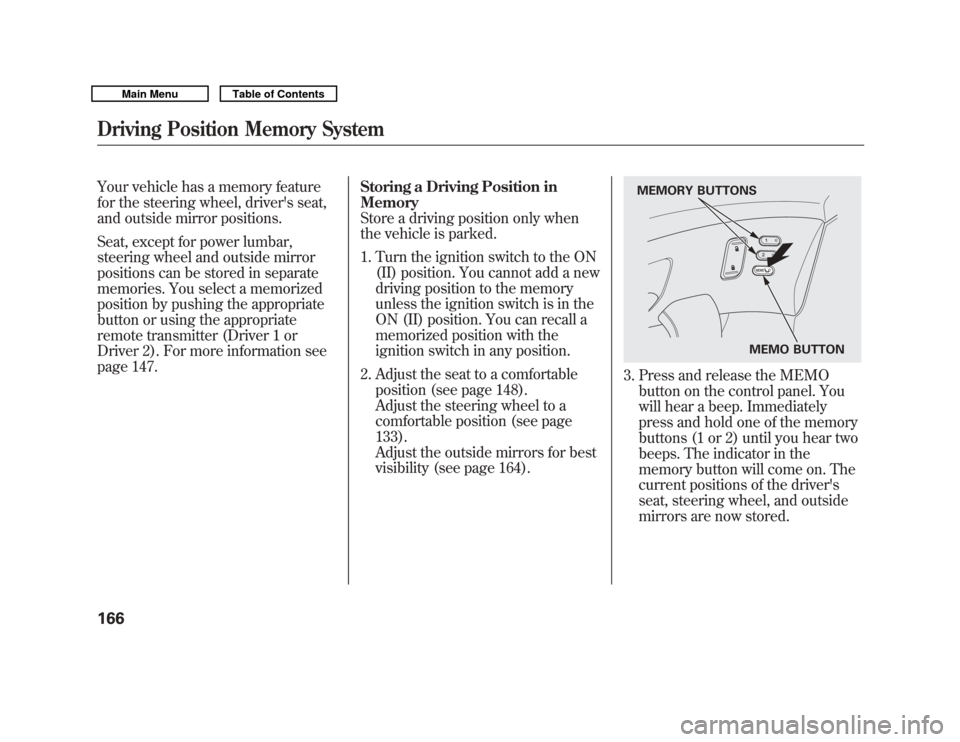
3. Press and release the MEMObutton on the control panel. You
will hear a beep. Immediately
press and hold one of the memory
buttons (1 or 2) until you hear two
beeps. The indicator in the
memory button will come on. The
current positions of the driver's
seat, steering wheel, and outside
mirrors are now stored.
MEMO BUTTON
MEMORY BUTTONS
Driving Position Memory System16610/06/29 11:59:04 11 ACURA MDX MMC North America Owner's M 50 31STX640 enu
Page 172 of 609
Doing any of the following after
pressing the MEMO button will
cancel the storing procedure.●
Not pressing a memory button
within 5 seconds.
●
Readjusting the seat position.
●
Readjusting the outside mirror
position.
Each memory button stores only one
driving position. Storing a new
position erases the previous setting
stored in that button's memory. If
you want to add a new position while
retaining the current one, use the
other memory button. Selecting a Memorized Position
To select a memorized position, do
this:
1. Make sure the vehicle is parked.
2. Press the desired memory button
(1 or 2) until you hear a beep, then
release the button.
The system will move the seat,
steering wheel, and outside mirrors
to the memorized positions. The
indicator in the selected memory
button will flash during movement.
When the adjustments are complete,
you will hear two beeps, and the
indicator will remain on.
To change the ‘‘MEMORY
POSITION LINK ’’setting, see page
107. To stop the system's automatic
adjustment, do any of these actions:
●
Press any button on the control
panel: MEMO, 1, or 2.
●
Push any of the adjustment
switches for the seat.
●
Shift out of Park.
●
Adjust the outside mirrors.
If desired, you can use the
adjustment switches to change the
positions of the seat, steering wheel
or outside mirrors after they are in
their memorized position. If you
change the memorized position, the
indicator in the memory button will
go out. To keep this driving position
for later use, you must store it in the
driving position memory.
Driving Position Memory System
167
Instruments and Controls
10/06/29 11:59:04 11 ACURA MDX MMC North America Owner's M 50 31STX640 enu