Seat Acura MDX 2011 Manual Online
[x] Cancel search | Manufacturer: ACURA, Model Year: 2011, Model line: MDX, Model: Acura MDX 2011Pages: 609, PDF Size: 12.7 MB
Page 177 of 609

Beverage Holders
Be careful when you are using the
beverage holders. A spilled liquid
that is very hot can scald you or your
passengers. Liquid can also spill
from the door pocket beverage
holders when you open or close the
doors. Use only resealable containers
in the door pockets.
Spilled liquids can damage the
upholstery, carpeting, and electrical
components in the interior.
Open the front beverage holder by
sliding the lid.
Beverage holders are also provided
in the second row seat armrest. Pivot
down the seat-back to use them.
To open the beverage holder, press
and release the front lid. To close,
press the lid again until it latches.
When you put back the armrest in
the center seat-back, make sure the
lid is closed properly.
ARMREST
FRONT LIDBEVERAGE HOLDER
Interior Convenience Items17210/06/29 11:59:04 11 ACURA MDX MMC North America Owner's M 50 31STX640 enu
Page 178 of 609

Console CompartmentYour vehicle is equipped with a front
seat armrest pad that is also a
console compartment. To open the
console compartment fully, push
both buttons at the front of the
compartment.
The console compartment has a
removable tray. Pull the tray straight
up to remove it.Storage Compartment
The storage compartment with a
sliding lid is at the left-side foot of the
front passenger seat.
For the third row, a storage
compartment is located in the
passenger side armrest. To open the
compartment, push the button and
lift the lid.
Glove Box
Open the glove box by pulling the
handle to the left. Close it with a firm
push. Lock or unlock the glove box
with the master key.
An open glove box can cause
serious injury to your passenger
in a crash, even if the
passenger is wearing the seat
belt.
Always keep the glove box
closed while driving.
BUTTONS
LIDS
LID
Interior Convenience Items
173
Instruments and Controls
10/06/29 11:59:04 11 ACURA MDX MMC North America Owner's M 50 31STX640 enu
Page 180 of 609

Vanity MirrorTo use the vanity mirror on the back
of the sun visor, pull up the cover.
The vanity mirror light will not come
on if the sun visor is slid outward.Accessory Power Sockets
Your vehicle has two or three
accessory power sockets, depending
on the model. All models have the
front accessory power socket under
the audio system and rear socket
behind the third row seat on the
driver's side.
On models without rear entertainment
systemThe accessory power socket is
located at the back of the front
console compartment.
To use an accessory power socket,
the ignition switch must be in the
ACCESSORY (I) or ON (II) position.
CONTINUED
Interior Convenience Items
175
Instruments and Controls
10/06/29 11:59:04 11 ACURA MDX MMC North America Owner's M 50 31STX640 enu
Page 312 of 609
U.S. Technology Package withEntertainment, Advance Package withEntertainment, Canadian Technology,
and Elite PackagesYour vehicle is equipped with a rear
entertainment system that includes a
DVD player for the enjoyment of the
rear passengers.
With this system, the rear
passengers can enjoy a different
entertainment source (radio, disc,
HDD, USB, iPod
®, DVD player, or
XM Radio) than the front seat
occupants. The audio is broadcast
through the supplied wireless
headphones.
The ignition switch must be in the
ACCESSORY (I) or the ON (II)
position to operate the rear
entertainment system.
This vehicle's overhead mounted video
display, if so equipped, includes
mercury-containing components. Upon
removal, please reuse, recycle, or
dispose of as hazardous waste. To Turn On the System
Press the REAR PWR button. The
overhead screen will open to the
position it was last set. The indicator
on the REAR PWR button will come
on, as well as the indicator on the
FRONT SOURCE button. The rear
seat passengers can then operate the
rear system from the control panel in
the ceiling. The rear control panel
can also be detached and used as a
remote control, by pushing the
RELEASE button, and pulling the
remote toward you.
CONTINUED
Rear Entertainment System
307
Features
10/06/29 11:59:04 11 ACURA MDX MMC North America Owner's M 50 31STX640 enu
Page 319 of 609
To Play a Disc, HDD, USB, or
iPod
®from the Rear Control Panel
Press the MENU button to display
the Audio Menu on the overhead
screen. Use the interface dial to
highlight REPEAT, RANDOM, or
SCAN on the screen. You can enter
the highlighted function by pressing
the ENTER button. These functions
have the same features as those of
the front audio system.
When TITLE/SCROLL button is
pressed, the title scrolls. When it's
pushed again, scrolling stops. To Play a DVD from the Rear
Control Panel
The video screen is for use by rear
seat passengers only. The driver and
front seat passenger should not try to
view the screen while driving.
Press the REAR PWR button in the
front panel or press the
button in
the rear control panel when REAR
PWR is on. The overhead screen will
open to the position it was last set.
You can tilt the screen at nine
different angles from 90 to 130
degrees using the tilt button in the
rear control panel. The default
setting is 100 degrees.
Press the
button when you want
to pause the DVD. Press this button
again to go back to PLAY.
Press thebutton to skip to the
beginning of the next chapter. Press
the
button to return to the
beginning of the current chapter. Press the
button again quickly to
go to the previous chapter.
To move rapidly within a chapter,
press and hold the
or
button.
The system will continue to move
through the chapter. Press the
button to move forward, or thebutton to move backward. Release
the button when the system reaches
the point you want.
To select the menu on the DVD,
press the MENU button. Use the
interface dial to turn to the desired
menu selection, then press the
ENTER button to enter your
selection.
Rear Entertainment System31410/06/29 11:59:04 11 ACURA MDX MMC North America Owner's M 50 31STX640 enu
Page 340 of 609

Wireless HeadphonesSome state and local government
agencies prohibit the use of
headphones by the driver of a motor
vehicle. Always obey applicable laws
and regulations.
The audio for the rear entertainment
system is sent to the wireless
headphones that come with the
system. When using the
headphones, make sure you wear
them correctly: L (left) and R (right)
are marked on the sides of the frame.
Wearing the headphones backwards
may affect audio reception, limiting
the sound quality and range.To use the headphones, pivot the
earpieces outward. This turns them
on. To adjust the volume, turn the
dial on the bottom of the right
earpiece. When you remove the
headphones, the earpieces
automatically pivot inward, and the
headphones turn off. When not in
use, store the headphones in the
pocket of either front seat.
VOLUME DIAL
CONTINUED
Rear Entertainment System
335
Features
10/06/29 11:59:04 11 ACURA MDX MMC North America Owner's M 50 31STX640 enu
Page 342 of 609
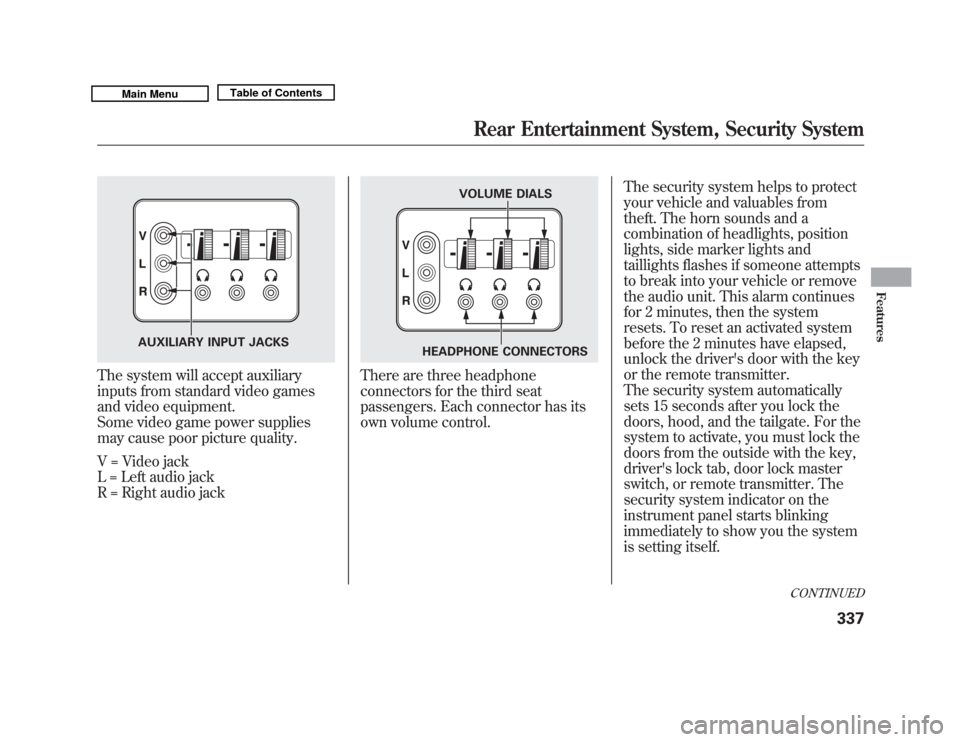
The system will accept auxiliary
inputs from standard video games
and video equipment.
Some video game power supplies
may cause poor picture quality.
V = Video jack
L = Left audio jack
R = Right audio jack
There are three headphone
connectors for the third seat
passengers. Each connector has its
own volume control.The security system helps to protect
your vehicle and valuables from
theft. The horn sounds and a
combination of headlights, position
lights, side marker lights and
taillights flashes if someone attempts
to break into your vehicle or remove
the audio unit. This alarm continues
for 2 minutes, then the system
resets. To reset an activated system
before the 2 minutes have elapsed,
unlock the driver's door with the key
or the remote transmitter.
The security system automatically
sets 15 seconds after you lock the
doors, hood, and the tailgate. For the
system to activate, you must lock the
doors from the outside with the key,
driver's lock tab, door lock master
switch, or remote transmitter. The
security system indicator on the
instrument panel starts blinking
immediately to show you the system
is setting itself.
AUXILIARY INPUT JACKS
VOLUME DIALS
HEADPHONE CONNECTORS
CONTINUED
Rear Entertainment System, Security System
337
Features
10/06/29 11:59:04 11 ACURA MDX MMC North America Owner's M 50 31STX640 enu
Page 433 of 609
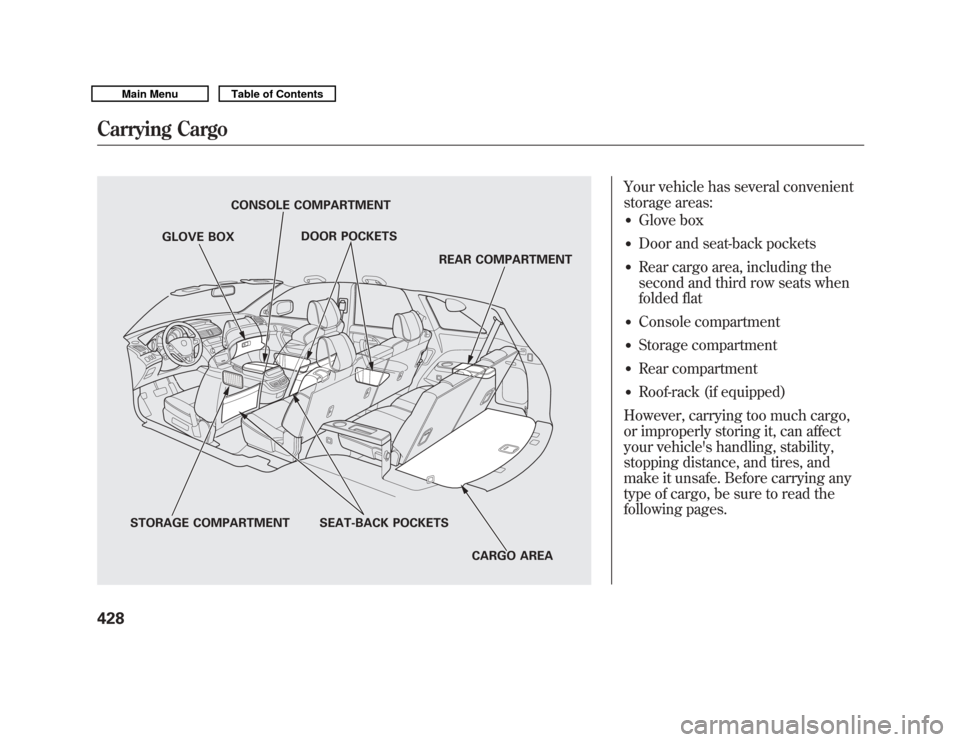
Your vehicle has several convenient
storage areas:●
Glove box
●
Door and seat-back pockets
●
Rear cargo area, including the
second and third row seats when
folded flat
●
Console compartment
●
Storage compartment
●
Rear compartment
●
Roof-rack (if equipped)
However, carrying too much cargo,
or improperly storing it, can affect
your vehicle's handling, stability,
stopping distance, and tires, and
make it unsafe. Before carrying any
type of cargo, be sure to read the
following pages.
STORAGE COMPARTMENT SEAT-BACK POCKETS
CARGO AREA
REAR COMPARTMENT
DOOR POCKETS
CONSOLE COMPARTMENT
GLOVE BOX
Carrying Cargo42810/06/29 11:59:04 11 ACURA MDX MMC North America Owner's M 50 31STX640 enu
Page 436 of 609
Carrying Cargo in the Passenger
Compartment●
Store or secure all items that could
be thrown around and hurt
someone during a crash.
●
Be sure items placed on the floor
behind the front seats cannot roll
underneath and interfere with the
proper operation of the seats, the
sensors under the seats, or the
driver's ability to operate the
pedals.
Also, keep all cargo below the
bottom of the windows. If it is
higher, it could interfere with the
proper operation of the side
curtain airbags.
●
Keep the glove box closed while
driving. If it is open, a passenger
could injure their knees during a
crash or sudden stop.Carrying Cargo in the Cargo Area
or on a Roof Rack
●
Distribute cargo evenly on the
floor of the cargo area, placing the
heaviest items on the bottom and
as far forward as possible. Tie
down items that could be thrown
about the vehicle during a crash or
sudden stop.
●
If you fold down the second or
third row seats, tie down items that
could be thrown about the vehicle
during a crash or sudden stop.
●
If you carry large items that
prevent you from closing the
tailgate, exhaust gas can enter the
passenger area. To avoid the
possibility of
carbon monoxide
poisoning, follow the instructions
on page 60.
●
If you carry any items on a roof
rack, be sure the total weight of
the rack and the items does not
exceed 165 lbs (75 kg).
CONTINUED
Carrying Cargo
431
Before Driving
10/06/29 11:59:04 11 ACURA MDX MMC North America Owner's M 50 31STX640 enu
Page 437 of 609
Optional Separation Net
The separation net can be used to
hold back soft, lightweight items
stored in the cargo area. Heavy items
should be tied down, as the net may
not prevent them from being thrown
about the vehicle in a crash or a
sudden stop.
Optional Cargo Cover
The cargo cover can be used to cover
the cargo area behind the third row
seats. When the third row seats are
folded down, the cargo cover can be
extended over the larger area. Do not
install the cover over the larger area
if the third row seats are not folded
down.Cargo Hooks
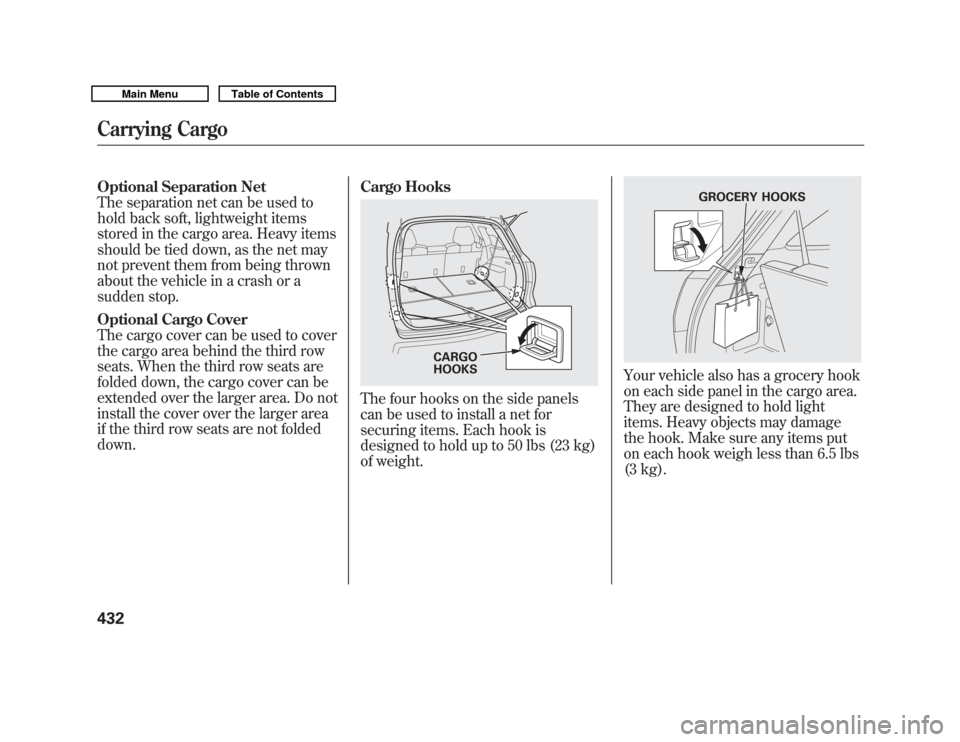
The four hooks on the side panels
can be used to install a net for
securing items. Each hook is
designed to hold up to 50 lbs (23 kg)
of weight.
Your vehicle also has a grocery hook
on each side panel in the cargo area.
They are designed to hold light
items. Heavy objects may damage
the hook. Make sure any items put
on each hook weigh less than 6.5 lbs
(3 kg).
CARGO
HOOKS
GROCERY HOOKS
Carrying Cargo43210/06/29 11:59:04 11 ACURA MDX MMC North America Owner's M 50 31STX640 enu