ad blue Acura MDX 2012 User Guide
[x] Cancel search | Manufacturer: ACURA, Model Year: 2012, Model line: MDX, Model: Acura MDX 2012Pages: 621, PDF Size: 11.15 MB
Page 306 of 621
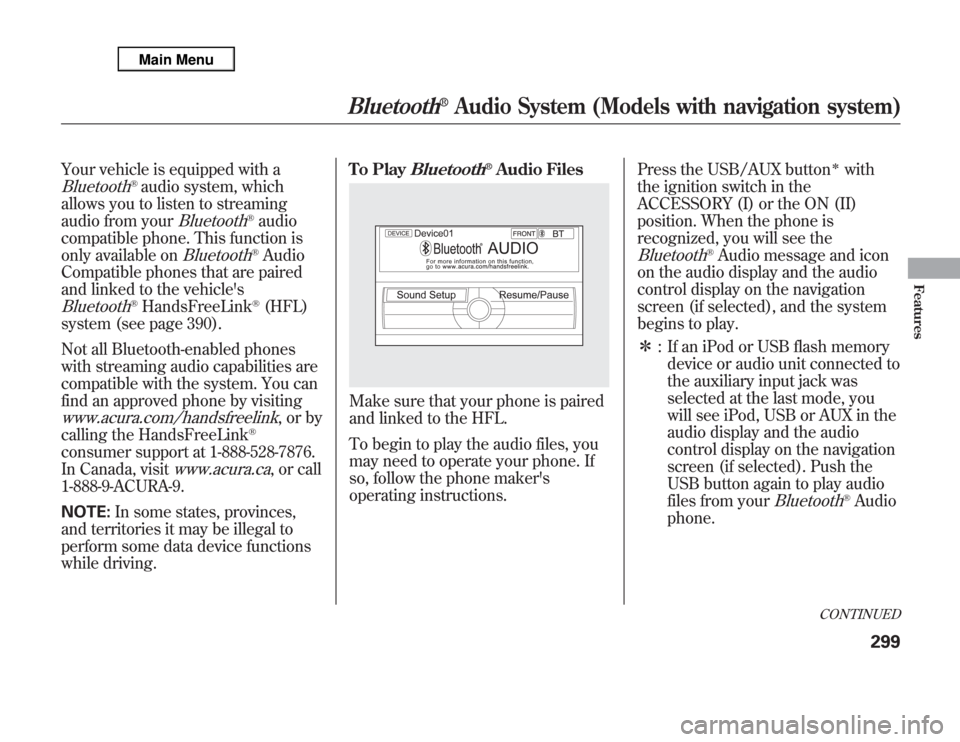
Your vehicle is equipped with aBluetooth
®audio system, which
allows you to listen to streaming
audio from your
Bluetooth
®audio
compatible phone. This function is
only available on
Bluetooth
®Audio
Compatible phones that are paired
and linked to the vehicle's
Bluetooth
®HandsFreeLink
®(HFL)
system (see page 390).
Not all Bluetooth-enabled phones
with streaming audio capabilities are
compatible with the system. You can
find an approved phone by visiting
www.acura.com/handsfreelink
,orby
calling the HandsFreeLink
®
consumer support at 1-888-528-7876.
In Canada, visit
www.acura.ca
, or call
1-888-9-ACURA-9.
NOTE:In some states, provinces,
and territories it may be illegal to
perform some data device functions
while driving.To Play
Bluetooth
®Audio Files
Make sure that your phone is paired
and linked to the HFL.
To begin to play the audio files, you
may need to operate your phone. If
so, follow the phone maker's
operating instructions.Press the USB/AUX button
ᤳ
with
the ignition switch in the
ACCESSORY (I) or the ON (II)
position. When the phone is
recognized, you will see the
Bluetooth
®Audio message and icon
on the audio display and the audio
control display on the navigation
screen (if selected), and the system
begins to play.
ᤳ: If an iPod or USB flash memory
device or audio unit connected to
the auxiliary input jack was
selected at the last mode, you
will see iPod, USB or AUX in the
audio display and the audio
control display on the navigation
screen (if selected). Push the
USB button again to play audio
files from your
Bluetooth
®Audio
phone.
CONTINUED
Bluetooth
®
Audio System (Models with navigation system)
299
Features
Page 307 of 621
Once a device is linked, the name of
the device will appear on the screen.
Pressing the TITLE button switches
the audio display between theBluetooth
®Audio and the device
name.
If more than one phone is paired to
the HFL system, there will be delay
before the system begins to play.In the following conditions, the
display shows‘‘NO CONNECT’’
message after pressing the TITLE
button.
●
The phone is not linked to HFL.
●
The phone is not turned on.
●
The phone is not in the vehicle.
●
Another HFL compatible phone,
which is not compatible forBluetooth
®Audio, is already
connected.If your
Bluetooth
®Audio compatible
phone does not operate as described,
make sure it is an Acura approved
phone. To find out if your phone is
approved, go to
www.acura.com/
handsfreelink(in Canada,
www.
acura.ca
), or call the
HandsFreeLink
®consumer support
at 1-888-528-7876.
Voice Control SystemYou can select the AUX mode by
using the voice control buttons, but
cannot operate the play mode
functions.To skip a filePress the side
of the SKIP
button to skip forward to the next
file, and press the
side to skip
backward to the beginning of the
current file. Push the
side again
to skip to the previous file.
Bluetooth
®
Audio System (Models with navigation system)
300
Page 308 of 621
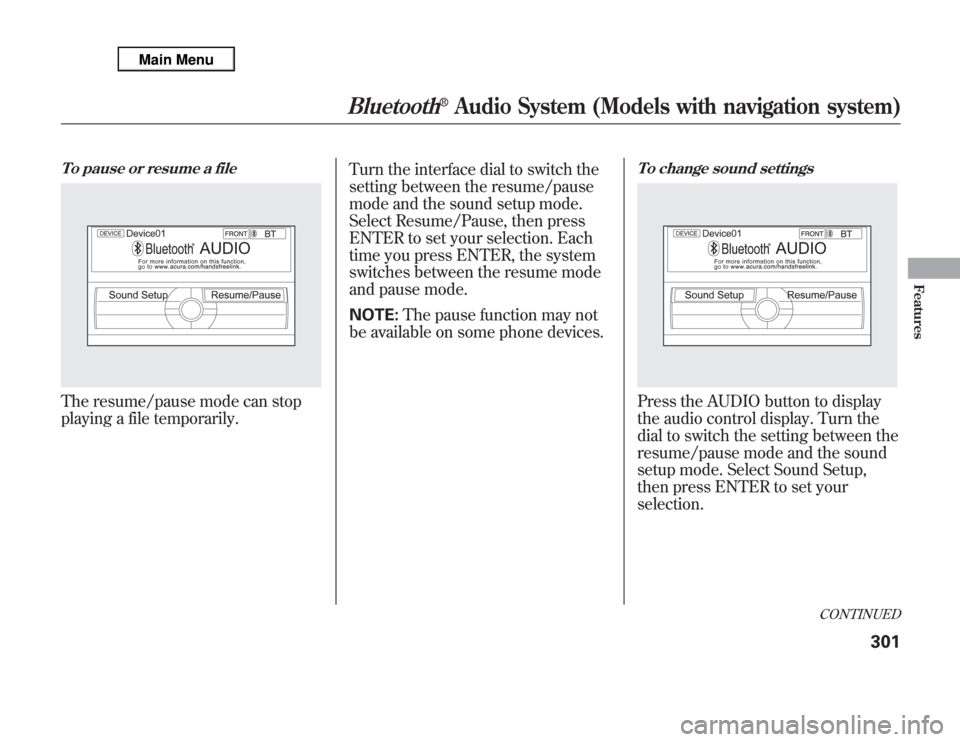
To pause or resume a fileThe resume/pause mode can stop
playing a file temporarily.Turn the interface dial to switch the
setting between the resume/pause
mode and the sound setup mode.
Select Resume/Pause, then press
ENTER to set your selection. Each
time you press ENTER, the system
switches between the resume mode
and pause mode.
NOTE:The pause function may not
be available on some phone devices.
To change sound settingsPress the AUDIO button to display
the audio control display. Turn the
dial to switch the setting between the
resume/pause mode and the sound
setup mode. Select Sound Setup,
then press ENTER to set your
selection.
CONTINUED
Bluetooth
®
Audio System (Models with navigation system)
301
Features
Page 309 of 621
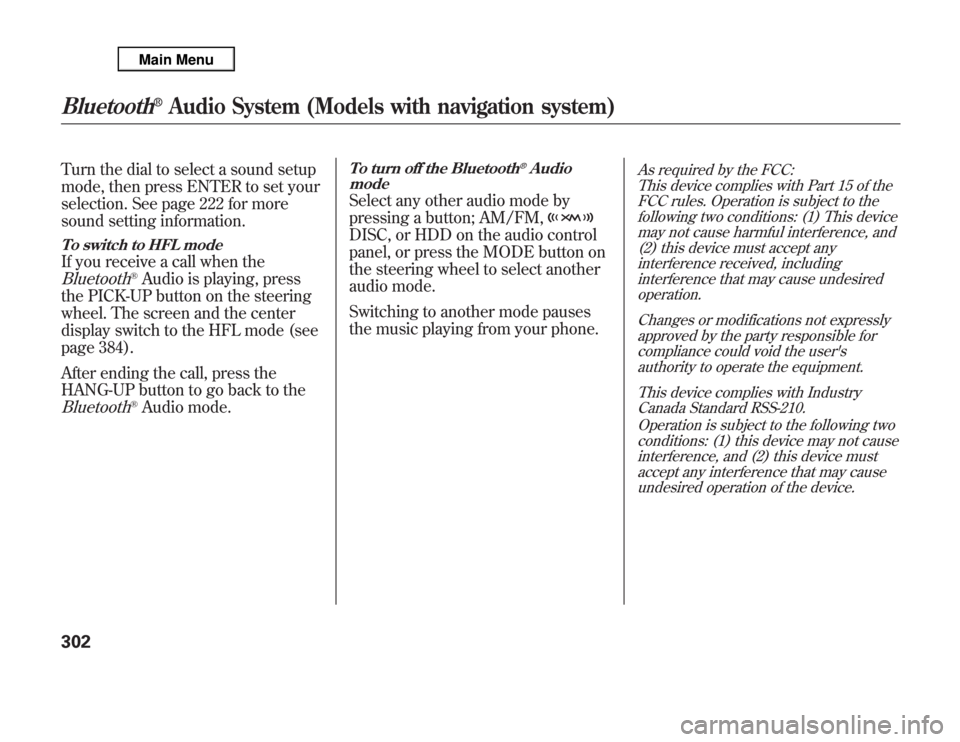
Turn the dial to select a sound setup
mode, then press ENTER to set your
selection. See page 222 for more
sound setting information.To switch to HFL modeIf you receive a call when theBluetooth
®Audio is playing, press
the PICK-UP button on the steering
wheel. The screen and the center
display switch to the HFL mode (see
page 384).
After ending the call, press the
HANG-UP button to go back to the
Bluetooth
®Audio mode.
To turn off the Bluetooth
®Audio
mode
Select any other audio mode by
pressing a button; AM/FM,DISC, or HDD on the audio control
panel, or press the MODE button on
the steering wheel to select another
audio mode.
Switching to another mode pauses
the music playing from your phone.
As required by the FCC:
This device complies with Part 15 of the
FCC rules. Operation is subject to the
following two conditions: (1) This device
may not cause harmful interference, and
(2) this device must accept any
interference received, including
interference that may cause undesired
operation.
Changes or modifications not expressly
approved by the party responsible for
compliance could void the user's
authority to operate the equipment.
This device complies with Industry
Canada Standard RSS-210.
Operation is subject to the following two
conditions: (1) this device may not cause
interference, and (2) this device must
accept any interference that may cause
undesired operation of the device.
Bluetooth
®
Audio System (Models with navigation system)
302
Page 312 of 621
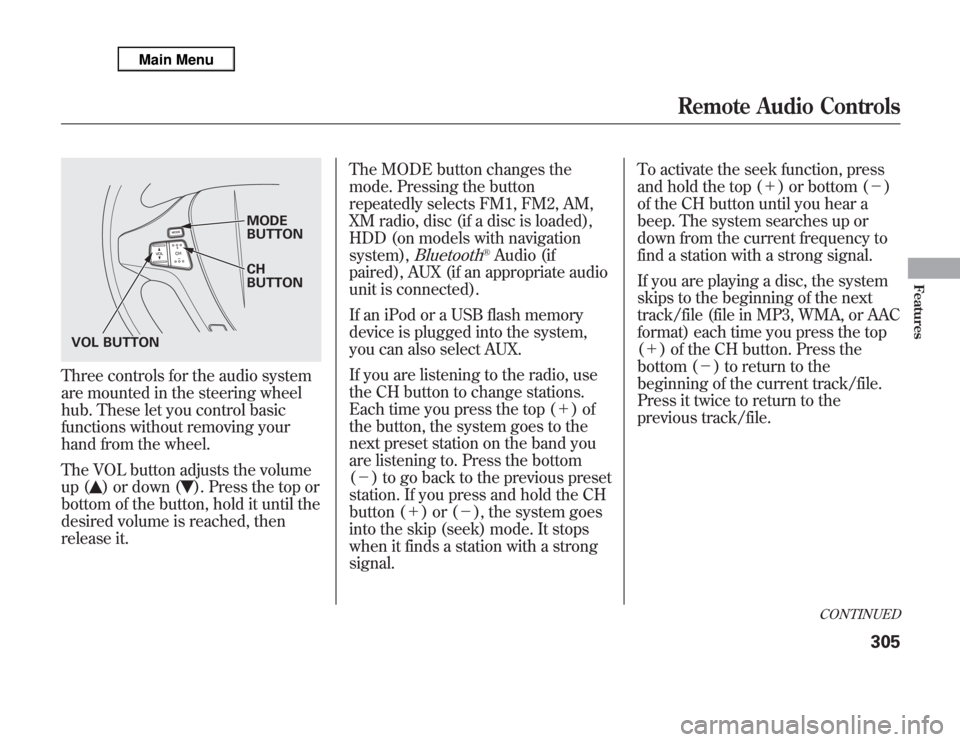
Three controls for the audio system
are mounted in the steering wheel
hub. These let you control basic
functions without removing your
hand from the wheel.
The VOL button adjusts the volume
up (
) or down (
). Press the top or
bottom of the button, hold it until the
desired volume is reached, then
release it.The MODE button changes the
mode. Pressing the button
repeatedly selects FM1, FM2, AM,
XM radio, disc (if a disc is loaded),
HDD (on models with navigation
system),
Bluetooth
®Audio (if
paired), AUX (if an appropriate audio
unit is connected).
If an iPod or a USB flash memory
device is plugged into the system,
you can also select AUX.
If you are listening to the radio, use
the CH button to change stations.
Each time you press the top (+)of
the button, the system goes to the
next preset station on the band you
are listening to. Press the bottom
(-) to go back to the previous preset
station. If you press and hold the CH
button (+)or(-), the system goes
into the skip (seek) mode. It stops
when it finds a station with a strong
signal.To activate the seek function, press
and hold the top (+) or bottom (-)
of the CH button until you hear a
beep. The system searches up or
down from the current frequency to
find a station with a strong signal.
If you are playing a disc, the system
skips to the beginning of the next
track/file (file in MP3, WMA, or AAC
format) each time you press the top
(+) of the CH button. Press the
bottom (-) to return to the
beginning of the current track/file.
Press it twice to return to the
previous track/file.
MODE
BUTTON
CH
BUTTON
VOL BUTTON
CONTINUED
Remote Audio Controls
305
Features
Page 331 of 621

The display changes as shown above.
Select‘‘Yes,’’and press the ENTER
button. You will see the message
‘‘Default display settings applied’’on
the display for 5 seconds.
Aspect RatioYou can set the screen mode to these
settings:●
Normal
●
Wide
●
Zoom
●
Full
Select the‘‘Aspect Ratio’’by turning
the interface dial, then press the
ENTER button. The selectable
setting menu is displayed, and the
current setting is highlighted in blue.
Select the desired setting by turning
the interface dial, then press the
ENTER button.
The selected setting will be
highlighted in blue for one second,
and the screen returns to the play
mode in the selected setting.
Rear Entertainment System324
Page 333 of 621
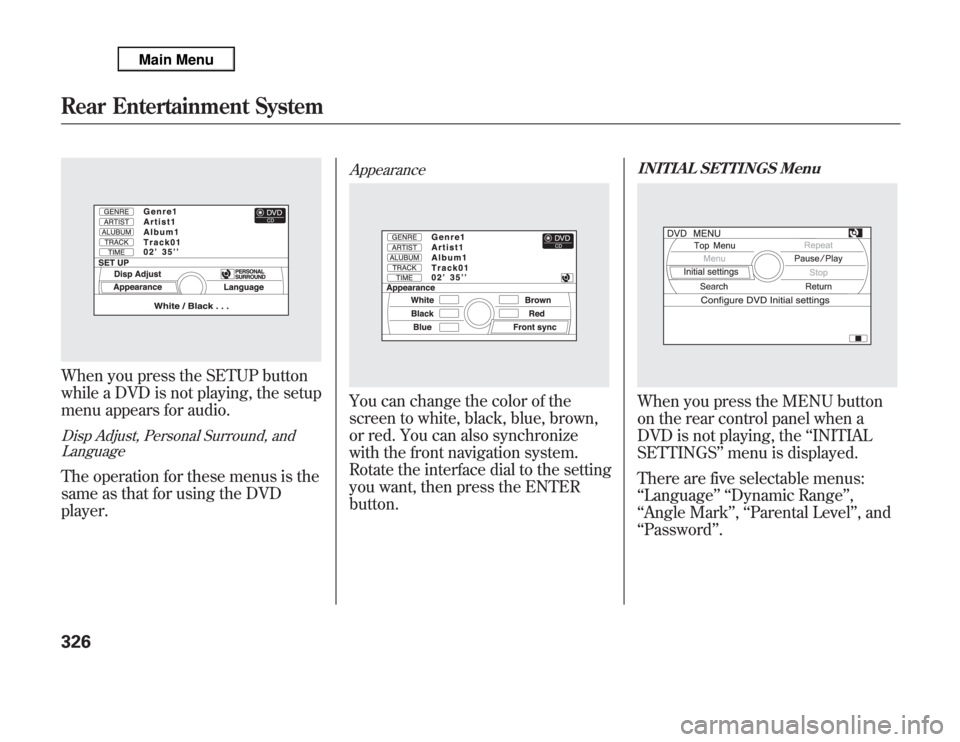
When you press the SETUP button
while a DVD is not playing, the setup
menu appears for audio.Disp Adjust, Personal Surround, and
LanguageThe operation for these menus is the
same as that for using the DVD
player.
AppearanceYou can change the color of the
screen to white, black, blue, brown,
or red. You can also synchronize
with the front navigation system.
Rotate the interface dial to the setting
you want, then press the ENTER
button.
INITIAL SETTINGS MenuWhen you press the MENU button
on the rear control panel when a
DVD is not playing, the‘‘INITIAL
SETTINGS’’menu is displayed.
There are five selectable menus:
‘‘Language’’ ‘‘Dynamic Range’’,
‘‘Angle Mark’’,‘‘Parental Level’’, and
‘‘Password’’.
Rear Entertainment System326
Page 372 of 621

HomeLink
®is a registered trademark
of Johnson Controls, Inc.
As required by the FCC:
This device complies with Part 15 of the
FCC rules. Operation is subject to the
following two conditions: (1) This device
may not cause harmful interference, and
(2) this device must accept any
interference received, including
interference that may cause undesired
operation.
Changes or modifications not expressly
approved by the party responsible for
compliance could void the user's
authority to operate the equipment.
This device complies with Industry
Canada Standard RSS-210.
Operation is subject to the following two
conditions: (1) this device may not cause
interference, and (2) this device must
accept any interference that may cause
undesired operation of the device.
Bluetooth
®HandsFreeLink
®
(Models without navigation
system)Bluetooth
®HandsFreeLink
®(HFL)
allows you to place and receive
phone calls using voice commands,
without handling your cell phone.
To use HFL, you need a Bluetooth-
compatible cell phone. For a list of
compatible phones, pairing
procedures, and special feature
capabilities:
In the U.S., visit
www.acura.com/
handsfreelink
, or call (888) 528-7876.
In Canada, visit
www.handsfreelink.
ca
, or call (888) 528-7876.
CONTINUED
HomeLink
®
Universal Transceiver,
Bluetooth
®
HandsFreeLink
®
(Models without navigation system)
365
Features
Page 373 of 621

Using HFLHFL ButtonsHFL Talk button-Press and
release to give a command or answer
a call.
HFL Back button-Press and
release to end a call, go back to the
previous command, or cancel the
command.
Voice Control Tips●
Air or wind noise from the
dashboard and side vents and all
windows may interfere with the
microphone. Adjust or close them
as necessary.
●
Press and release the HFL Talk
button each time you want to make
a command. After the beep, speak
in a clear, natural tone.
●
Try to reduce all background
noise. If the microphone picks up
voices other than yours,
commands may be misinterpreted.
●
Many commands can be spoken
together. For example, you can say
‘‘Call 123-456-7890’’or‘‘Dial Peter.’’
HFL TALK BUTTON
HFL BACK BUTTON
MICROPHONE
Bluetooth
®
HandsFreeLink
®
(Models without navigation system)
366
Page 374 of 621

●
To change the volume level of
HFL, use the audio system volume
knob or the steering wheel volume
controls.
Help Features●
To hear general HFL information,
including help on pairing a phone
or setting up the system, say
‘‘Tutorial.’’
●
For help at any time, including a
list of available commands, say
‘‘Hands free help.’’
Information DisplayAs an incoming call notification, you
will see the following display:SIGNAL
STRENGTHHFL
MODEBATTERY
LEVEL STATUS
PHONE DIALING ROAM STATUS
CONTINUED
Bluetooth
®
HandsFreeLink
®
(Models without navigation system)
367
Features