navigation system Acura MDX 2014 Navigation Manual
[x] Cancel search | Manufacturer: ACURA, Model Year: 2014, Model line: MDX, Model: Acura MDX 2014Pages: 343, PDF Size: 15.72 MB
Page 198 of 343
197
Playing Internet Radio
Aha
TM Radio Menu
Audio
Aha
TM
Radio Menu
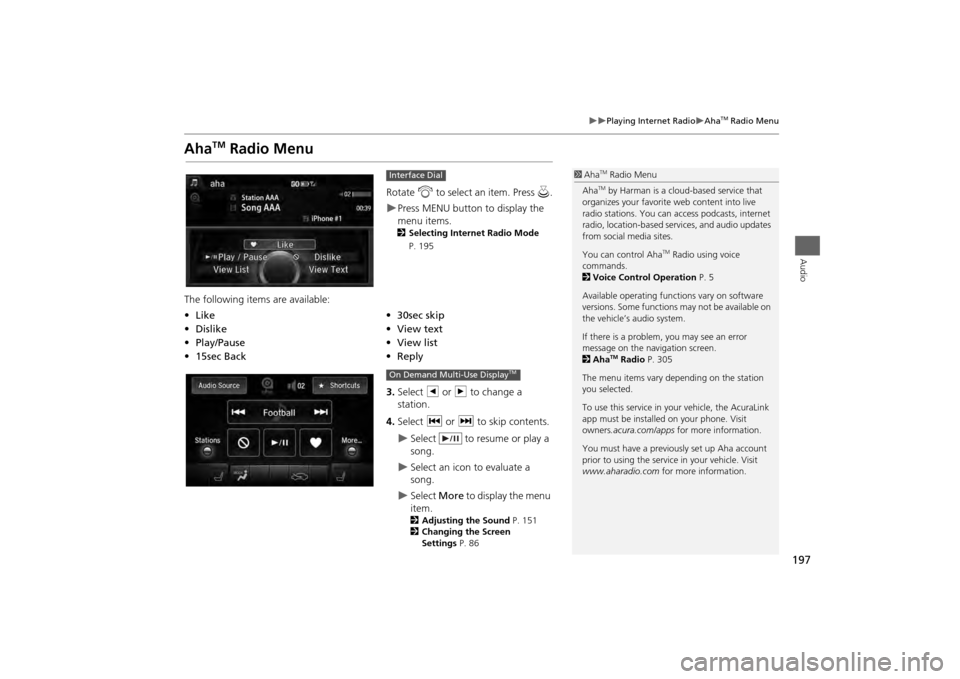
Rotate i to select an item. Press u.Press MENU button to display the
menu items. 2 Selecting Internet Radio Mode
P. 195
The following items are available:
3.Select b or n to change a
station.
4. Select c or x to skip contents.
Select to resume or play a
song.
Select an icon to evaluate a
song.
Select More to display the menu
item.2 Adjusting the Sound P. 151
2 Changing the Screen
Settings P. 86
Interface Dial
•Like
•30sec skip
• Dislike
•View text
• Play/Pause •View list
• 15sec Back •Reply
1Aha
TM Radio Menu
AhaTM by Harman is a cloud-based service that
organizes your favorite web content into live
radio stations. You can access podcasts, internet
radio, location-based se rvices, and audio updates
from social media sites.
You can control Aha
TM Radio using voice
commands.
2 Voice Control Operation P. 5
Available operating functi ons vary on software
versions. Some functions may not be available on
the vehicle’s audio system.
If there is a problem, you may see an error
message on the navigation screen.
2 Aha
TM Radio P. 305
The menu items vary depending on the station
you selected.
To use this service in your vehicle, the AcuraLink
app must be installed on your phone. Visit
owners .acura.com/apps for more information.
You must have a previously set up Aha account
prior to using the service in your vehicle. Visit
www.aharadio.com for more information.
On Demand Multi-Use Display
TM
Page 201 of 343

200
Playing a USB Flash Drive
Selecting USB Mode
Audio
Selecting USB Mode1.Connect the USB flash drive to the USB port in the console compartment.
2. Press the MENU button. (in AUDIO mode)
3. Rotate i to select Change Source . Press u.
4. Rotate i to select USB. Press u .
2. Select Audio Source .
3. Select the iPod icon.
1Playing a USB Flash Drive
You can control a USB flash drive using voice
commands.
2 Voice Control Operation P. 5
Files in WMA/ACC format protected by digital
rights management (DRM) cannot be played.
The audio system displays Unplayable File, and
then skips to the next file.
If there is a problem, you may see an error
message on the navigation screen.
2 iPod®/USB Flash Drive P. 303
Interface DialOn Demand Multi-Use Display
TM
Page 202 of 343

201
Playing a USB Flash Drive
Audio Screen Control
Audio
Audio Screen ControlControl the audio system through the navigation screen and On Demand Multi-Use
Display
TM.1.Rotate i or press u to display
the song list. .
2. Rotate i, move w or y to
select a song from the list. Press
u .
Press MENU button to display
the menu items2 Audio Menu P. 155
1.Select b to skip to the next folder,
and n to skip to the beginning of
the previous folder.
2. Select c or x to change files.
Select and hold to move rapidly
within a file.
Select More to display the menu
item.2 Audio Menu P. 155
Interface DialOn Demand Multi-Use Display
TM
Page 207 of 343

206
Playing Bluetooth ® Audio
Audio Screen Control
Audio
Audio Screen ControlControl the audio system through the navigation screen and On Demand Multi-Use
Display
TM.
1.Press MENU button. (in BT mode) .
2. Rotate i select an item. Press
u .
The following item s are available:
• Play: Plays a song.
• Pause: Pauses a song.
• Change Source: Changes the audio source mode.
2
Selecting Disc Mode
P. 164
• Music Search: Selects a song from the Music Search list.
1Audio Screen Control
To play the audio files, you may need to operate
your phone. If so, follow the phone maker’s
operating instructions.
The pause function and Music Search may not be
available on some phones.
Switching to another mode pauses the music
playing from your phone. This function may not
be available on some phones.
Interface Dial
Page 211 of 343
210Bluetooth® HandsFreeLink®
Bluetooth® HandsFreeLink®Bluetooth® HandsFreeLink® (HFL) allows you to place and receive phone calls using
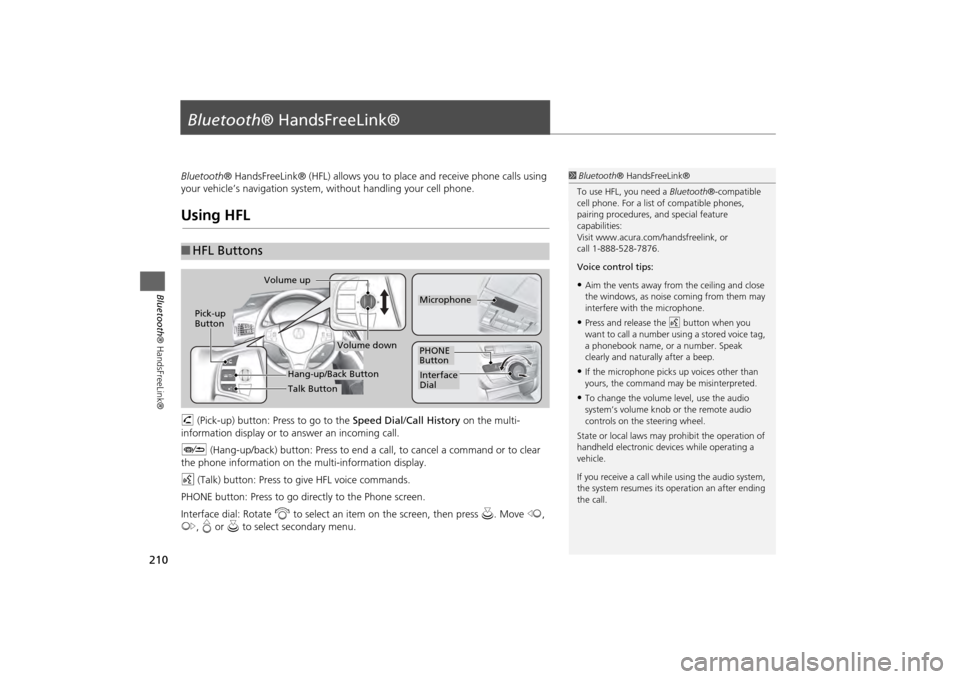
your vehicle’s navigation system, without handling your cell phone.Using HFLh (Pick-up) button: Press to go to the Speed Dial/Call History on the multi-
information display or to answer an incoming call.
J (Hang-up/back) button: Press to end a call, to cancel a command or to clear
the phone information on th e multi-information display.
d (Talk) button: Press to give HFL voice commands.
PHONE button: Press to go dire ctly to the Phone screen.
Interface dial: Rotate i to select an item on the screen, then press u. Move w,
y , e or u to select secondary menu.■HFL Buttons
1 Bluetooth ® HandsFreeLink®
To use HFL, you need a Bluetooth®-compatible
cell phone. For a list of compatible phones,
pairing procedures, and special feature
capabilities:
Visit www.acura.com/ handsfreelink, or
call 1-888-528-7876.
Voice control tips:•Aim the vents away from the ceiling and close
the windows, as noise coming from them may
interfere with the microphone.•Press and release the d button when you
want to call a number using a stored voice tag,
a phonebook name, or a number. Speak
clearly and naturally after a beep.•If the microphone picks up voices other than
yours, the command may be misinterpreted.•To change the volume level, use the audio
system’s volume knob or the remote audio
controls on the steering wheel.
State or local laws may pr ohibit the operation of
handheld electronic devices while operating a
vehicle.
If you receive a call whil e using the audio system,
the system resumes its operation an after ending
the call.
Volume down
Volume up
Pick-up
Button
PHONE
ButtonInterface
DialMicrophone
Hang-up/Back ButtonTalk Button
Page 212 of 343
211
Bluetooth® HandsFreeLink®
Using HFL
Bluetooth ® HandsFreeLink®
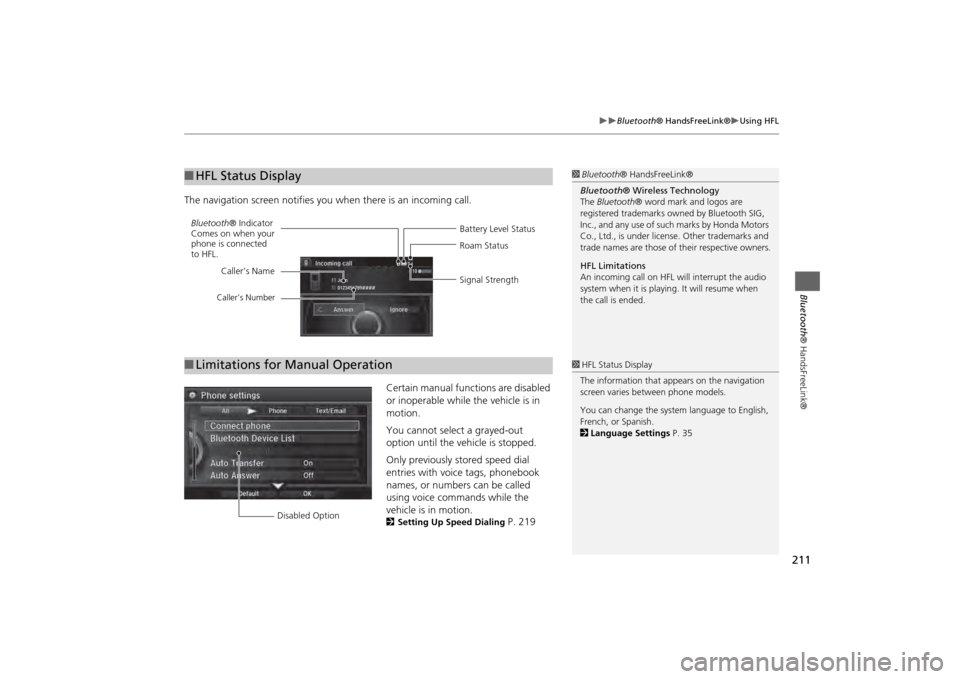
The navigation screen notifies you when there is an incoming call.
Certain manual functions are disabled
or inoperable while the vehicle is in
motion.
You cannot select a grayed-out
option until the vehicle is stopped.
Only previously stored speed dial
entries with voice tags, phonebook
names, or numbers can be called
using voice commands while the
vehicle is in motion.
2Setting Up Speed Dialing
P. 219
■HFL Status Display
1 Bluetooth ® HandsFreeLink®
Bluetooth ® Wireless Technology
The Bluetooth ® word mark and logos are
registered trademarks ow ned by Bluetooth SIG,
Inc., and any use of such marks by Honda Motors
Co., Ltd., is under license. Other trademarks and
trade names are those of their respective owners.
HFL Limitations
An incoming call on HFL will interrupt the audio
system when it is playing. It will resume when
the call is ended.
Battery Level Status
Bluetooth
® Indicator
Comes on when your
phone is connected
to HFL. Roam Status
Signal Strength
Caller’s Name
Caller’s Number
■
Limitations for Manual Operation
1 HFL Status Display
The information that a ppears on the navigation
screen varies between phone models.
You can change the system language to English,
French, or Spanish.
2 Language Settings P. 35
Disabled Option
Page 286 of 343
285
Other Features
This section describes the useful functions incorporated into the
navigation system to help make your journey easier and more enjoyable.
Trip Computer....................................... 286
Calendar ................................................ 287
Information Functions .......................... 288
System Device Information ................... 288
Map Data Update ................................ 288
Info Screen Preference ......................... 289
Multi-view Rear Camera ....................... 290
About Your Multi-Vi ew Rear Camera ... 290
Page 289 of 343
288Other Features
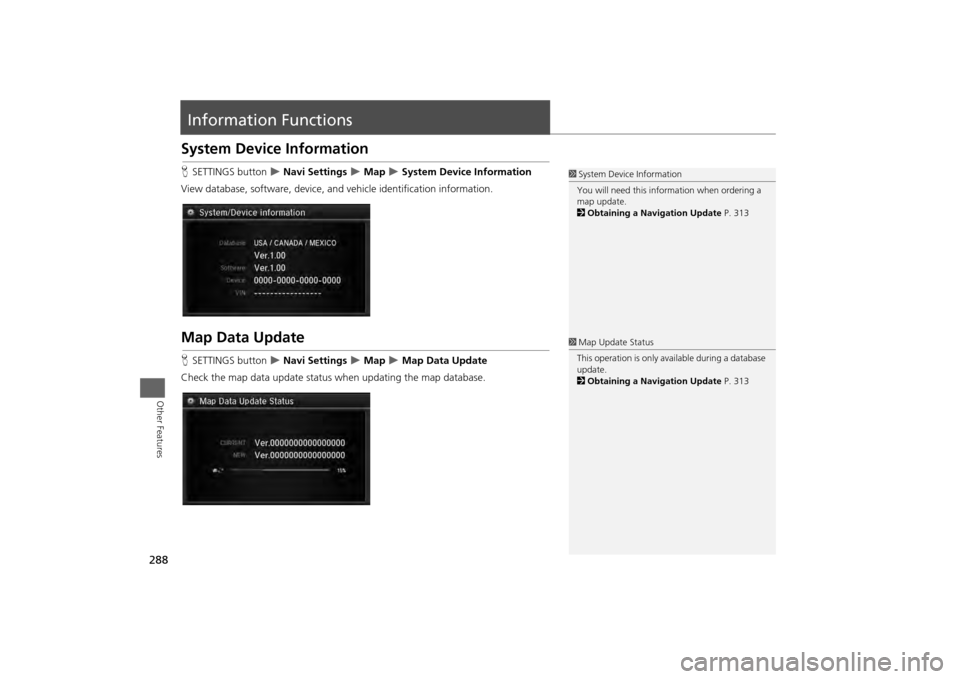
Information FunctionsSystem Device InformationHSETTINGS button
Navi Settings
Map
System Device Information
View database, software, device, an d vehicle identification information.
Map Data UpdateHSETTINGS button
Navi Settings
Map
Map Data Update
Check the map data update status when updating the map database.
1 System Device Information
You will need this info rmation when ordering a
map update.
2 Obtaining a Navigation Update P. 3131Map Update Status
This operation is only avai lable during a database
update.
2 Obtaining a Navigation Update P. 313
Page 294 of 343
293
Troubleshooting
Troubleshooting................................... 294
Map, Voice, Entering Destinations ........ 294
Traffic .................................................. 296
Guidance, Routing ............................... 297
Update, Coverage, Map Errors ............. 299
Display, Accessories.............................. 299
Miscellaneous Questions ...................... 299
Error Messages ...................................... 300
Navigation System ................................ 300
CD Player ............................................. 301
Hard Disc Drive (HDD) Audio ................ 302
iPod®/USB Flash Drive .......................... 303
Pandora® ............................................ 304
Aha
TM Radio ......................................... 305
Page 295 of 343
294Troubleshooting
TroubleshootingMap, Voice, Entering Destinations
Problem
Solution
The Startup Confirmation screen is displayed every
time I start the car.
This is normal. The Startup Confirmation screen reminds you and your guest drivers to
always operate the navigation system in a safe manner. The Startup Confirmation
screen goes off after a certain period of time and the top screen of the last mode is
displayed.
The navigation system reboots by itself (returns to the
opening screen).
A reboot can be caused by extreme temper atures or shock from bumpy roads, and
does not necessarily indicate a problem. If this happens frequently, please see a dealer.
How do I specify a destination when an entered city or
street could not be found?
• Try entering the street first. Some cities are lumped in with a major metro area. In
rural “unverified” areas or new subdivisions, streets may be missing or only partially
numbered.
• Try selecting the destinati on directly from the map. 2Map Input
P. 111
Why do some letters become grayed out when I enter
an address?
As you enter each letter in an address or a place/landmark, the navigation system
looks in the database to see what letters are possible and grays out letters that do not
apply.
How do I delete Personal Addresses, Previous
Destinations, or the Home Address?
1. Press the SETTINGS button. Select Navi Settings > Personal Info to display the
types of information.
2. Select the type of address to delete.
3. Select Delete .
I cannot hear the navigation system voice.
1.Press the SETTINGS button. Select System Settings and check that Volume is not
set to 0 .
2. Select Voice Rec. and set Voice Prompt to On.
The voice control system is having difficulty
recognizing my voice commands.
• Check that the vents are not blowing air onto the microphone on the ceiling, the
vehicle is as quiet as possible, and you are using the correct command when
speaking. 2 Voice Recognition
P. 25
•Say d “Voice Help” on any screen to see a list of the applicable voice commands.
I cannot give voice commands.
Make sure you selected OK at the Startup Confirmation screen.2Start-up
P. 22