light Acura MDX 2014 Workshop Manual
[x] Cancel search | Manufacturer: ACURA, Model Year: 2014, Model line: MDX, Model: Acura MDX 2014Pages: 500, PDF Size: 11.72 MB
Page 183 of 500

uuInterior Lights/Interior Convenience ItemsuInterior Convenience Items
182Controls
If the power mode is in ON:
Seat heater - The HI setting heats the seats
faster than the LO setting.
Seat ventilation
* - The HI setting ventilates
the seats faster than the LO setting.
1.Select .
2.Change the setting with one of the
following:
The Heat/Cool* level indicators: Select your
desired level setting. The left is for a LO
setting, the center is for a MID setting, and
to the right for a HI setting.
(+/(-: To go up or down one level at a
time.
AUTO*: The system automatically selects
the setting most suitable to the ambient
environment.
OFF: Turn off the system.
When a comfortable temperature is reached
while using the seat heaters in HI, select MID
or LO to keep the seat warm.
■Front Seat Heaters and Seat Ventilation
*
1Front Seat Heaters and Seat Ventilation
*
Do not use the seat heaters and the seat ventilation
even in LO when the engine is off. Under such
conditions, the battery may be weakened, making
the engine difficult to start.
3
WARNING
Heat induced burns are possible when
using seat heaters.
Persons with a diminished ability to sense
temperature (e.g., persons with diabetes,
lower-limb nerve damage, or paralysis) or
with sensitive skin should not use seat
heaters.
Models with seat ventilationModels without seat ventilation* Not available on all models
Page 184 of 500

Continued
183
uuInterior Lights/Interior Convenience ItemsuInterior Convenience Items
Controls
The power mode must be in ON to use the
seat heaters. The HI setting heats the seats
faster than the LO setting.
Press the seat heater button:
Once - The HI setting (three indicators on)
Twice - The MID setting (two indicators on)
Three times - The LO setting
Four times - The OFF setting (no indicators on)
■Second Row Outer Seat Heaters
*
1Second Row Outer Seat Heaters
*
Do not use the seat heaters even in LO when the
engine is off. Under such conditions, the battery may
be weakened, making the engine difficult to start.
3
WARNING
Heat induced burns are possible when
using seat heaters.
Persons with a diminished ability to sense
temperature (e.g., persons with diabetes,
lower-limb nerve damage, or paralysis) or
with sensitive skin should not use seat
heaters.
* Not available on all models
Page 185 of 500

uuInterior Lights/Interior Convenience ItemsuInterior Convenience Items
184Controls
Pull the tab and roll up the sunshade all the
way. Use the hooks to hang it.
■Integrated Sunshades
*
1Integrated Sunshades
*
Use the sunshades only when the windows are fully
closed. Using the shade while a window is open can
unhook and blow off the shade, hitting and hurting
anyone sitting near the window.
Tab
Hook
* Not available on all models
Page 189 of 500

uuClimate Control SystemuUsing Automatic Climate Control
188Controls
■Switching the vent mode
Select a desired vent mode icon, or Front
Mode Auto: The system automatically selects
the vent mode most suitable to the ambient
environment.
Vent mode
: Dashboard vents
: Dashboard and floor vents
: Floor vents
: Floor and defroster vents■A/C on and off
1.Select A/C.
2.Select ON or OFF.
1Switching the vent mode
While the climate control system is in AUTO, Front
Mode Auto is highlighted.
Page 190 of 500
Continued
189
uuClimate Control SystemuUsing Automatic Climate Control
Controls
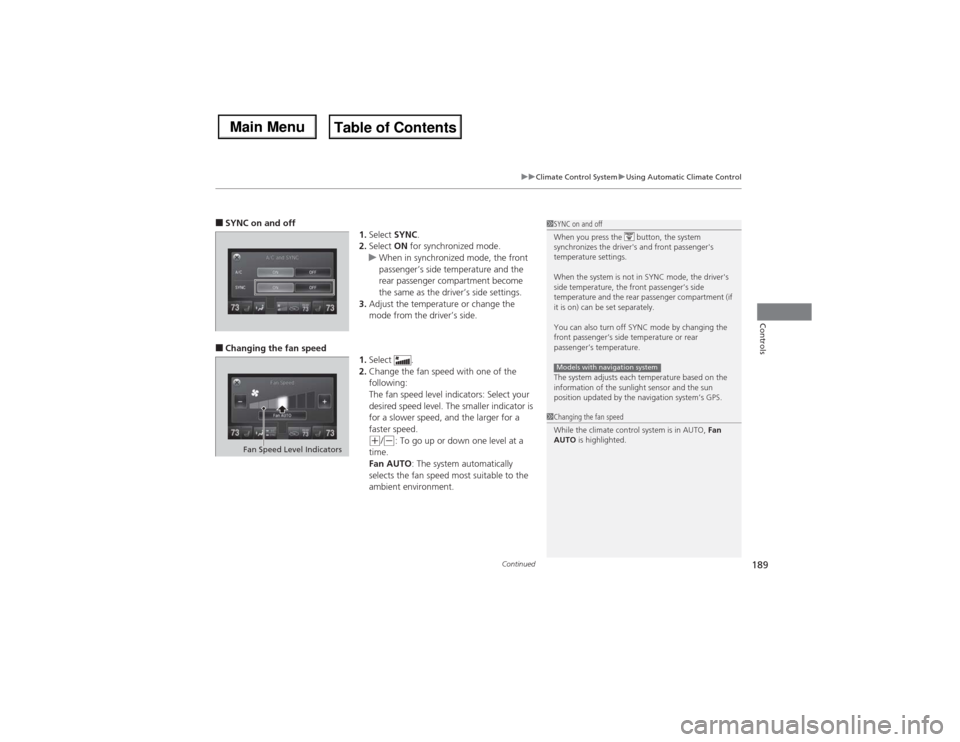
■SYNC on and off
1.Select SYNC.
2.Select ON for synchronized mode.
uWhen in synchronized mode, the front
passenger’s side temperature and the
rear passenger compartment become
the same as the driver’s side settings.
3.Adjust the temperature or change the
mode from the driver’s side.■Changing the fan speed
1.Select .
2.Change the fan speed with one of the
following:
The fan speed level indicators: Select your
desired speed level. The smaller indicator is
for a slower speed, and the larger for a
faster speed.
(+/(-: To go up or down one level at a
time.
Fan AUTO: The system automatically
selects the fan speed most suitable to the
ambient environment.
1SYNC on and off
When you press the button, the system
synchronizes the driver's and front passenger's
temperature settings.
When the system is not in SYNC mode, the driver's
side temperature, the front passenger’s side
temperature and the rear passenger compartment (if
it is on) can be set separately.
You can also turn off SYNC mode by changing the
front passenger’s side temperature or rear
passenger’s temperature.
The system adjusts each temperature based on the
information of the sunlight sensor and the sun
position updated by the navigation system’s GPS.Models with navigation system1Changing the fan speed
While the climate control system is in AUTO, Fan
AUTO is highlighted.
Fan Speed Level Indicators
Page 200 of 500
199
uuAudio SystemuUSB Port
Features
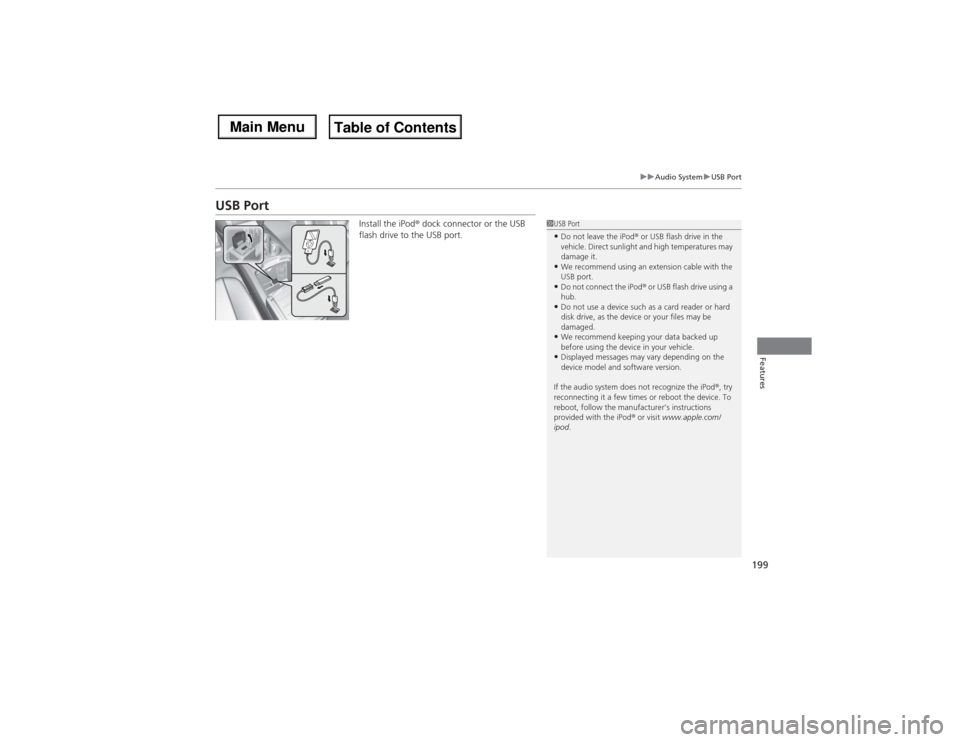
USB Port
Install the iPod® dock connector or the USB
flash drive to the USB port.
1USB Port•Do not leave the iPod® or USB flash drive in the
vehicle. Direct sunlight and high temperatures may
damage it.•We recommend using an extension cable with the
USB port.•Do not connect the iPod® or USB flash drive using a
hub.•Do not use a device such as a card reader or hard
disk drive, as the device or your files may be
damaged.•We recommend keeping your data backed up
before using the device in your vehicle.•Displayed messages may vary depending on the
device model and software version.
If the audio system does not recognize the iPod®, try
reconnecting it a few times or reboot the device. To
reboot, follow the manufacturer’s instructions
provided with the iPod® or visit www.apple.com/
ipod.
Page 247 of 500

uuGeneral Information on the Audio SystemuRecommended CDs
246Features
■Protecting CDs
Follow these precautions when handling or storing CDs:
•Store a CD in its case when it is not being played.
•When wiping a CD, use a soft clean cloth from the center to the outside edge.
•Handle a CD by its edge. Never touch either surface.
•Never insert foreign objects into the CD player.
•Keep CDs out of direct sunlight and extreme heat.
•Do not place stabilizer rings or labels on the CD.
•Avoid fingerprints, liquids, and felt-tip pens on the CD.
1Protecting CDsNOTICEDo not insert a damaged CD. It may be stuck inside
and damage the audio unit.Examples:●Damaged CDsBubbled/
WrinkledWith Label/
StickerUsing
Printer Label
Kit
Sealed With Plastic Ring
●Poor quality
CDs
Chipped/
CrackedWarped Burrs
●Small CDs
3-inch
(8-cm)
CD●Bubbled, wrinkled, labeled, and
excessively thick CDs
Page 251 of 500
250
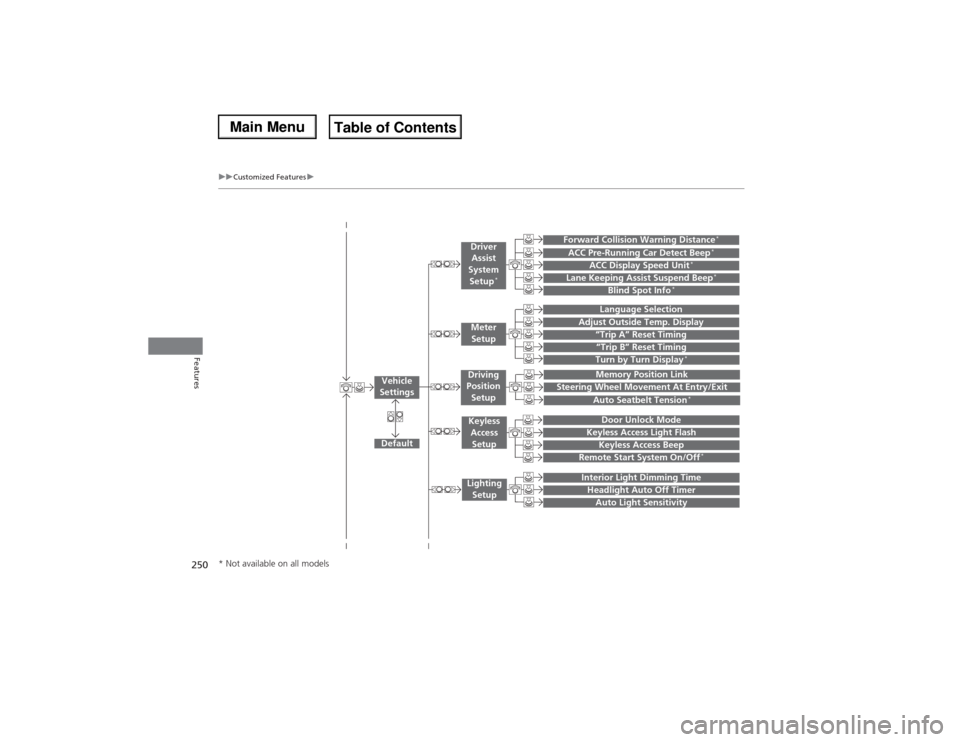
uuCustomized Featuresu
Features
“Trip B” Reset TimingTurn by Turn Display
*
Adjust Outside Temp. Display
“Trip A” Reset Timing
Default
Memory Position Link
Keyless Access Light Flash
Keyless Access Beep
Interior Light Dimming TimeHeadlight Auto Off TimerAuto Light Sensitivity
Vehicle
Settings
Meter
SetupKeyless
Access
SetupLighting
Setup
Remote Start System On/Off
*
Steering Wheel Movement At Entry/Exit
Driving
Position
Setup
Door Unlock Mode
Lane Keeping Assist Suspend Beep
*
Blind Spot Info
*
ACC Pre-Running Car Detect Beep
*
ACC Display Speed Unit
*
Driver
Assist
System
Setup
*
Forward Collision Warning Distance
*
Language SelectionAuto Seatbelt Tension
*
* Not available on all models
Page 258 of 500
257
uuCustomized Featuresu
Continued
Features
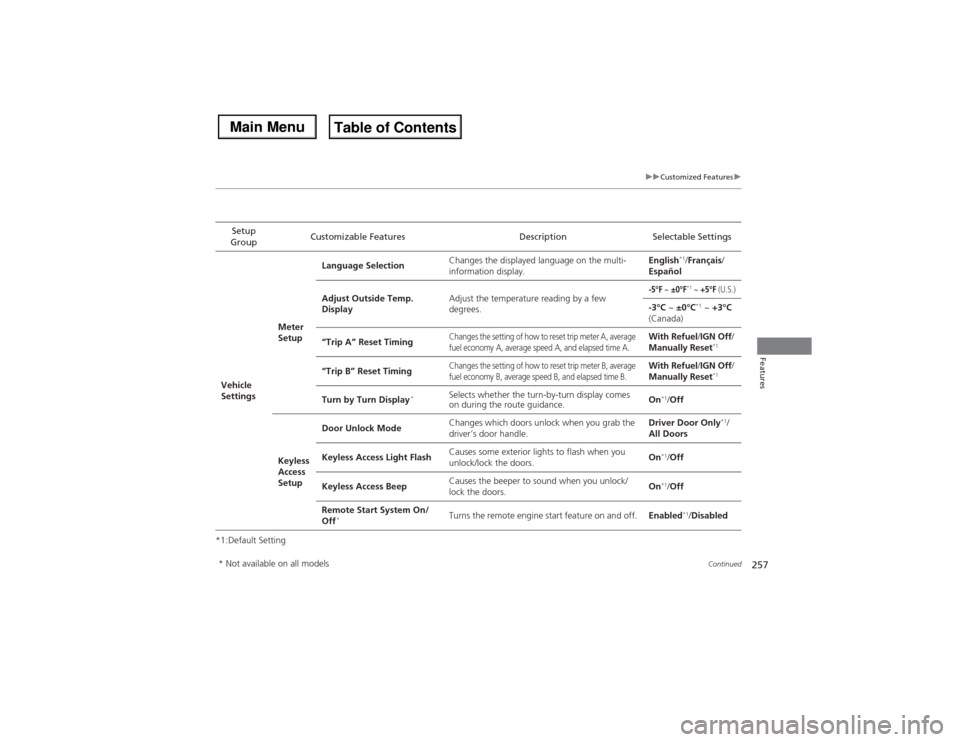
*1:Default SettingSetup
GroupCustomizable Features Description Selectable SettingsVehicle
SettingsMeter
SetupLanguage SelectionChanges the displayed language on the multi-
information display.English
*1/Français/
Español
Adjust Outside Temp.
DisplayAdjust the temperature reading by a few
degrees.
-5°F
~ ±0°F
*1 ~ +5°F
(U.S.)
-3°C ~ ±0°C
*1 ~ +3°C
(Canada)
“Trip A” Reset Timing
Changes the setting of how to reset trip meter A, average
fuel economy A, average speed A, and elapsed time A.
With Refuel/IGN Off/
Manually Reset
*1
“Trip B” Reset Timing
Changes the setting of how to reset trip meter B, average
fuel economy B, average speed B, and elapsed time B.
With Refuel/IGN Off/
Manually Reset
*1
Turn by Turn Display
*
Selects whether the turn-by-turn display comes
on during the route guidance.On
*1/Off
Keyless
Access
SetupDoor Unlock ModeChanges which doors unlock when you grab the
driver’s door handle.Driver Door Only
*1/
All Doors
Keyless Access Light FlashCauses some exterior lights to flash when you
unlock/lock the doors.On
*1/Off
Keyless Access BeepCauses the beeper to sound when you unlock/
lock the doors.On*1/Off
Remote Start System On/
Off
*
Turns the remote engine start feature on and off.Enabled
*1/Disabled
* Not available on all models
Page 259 of 500
258
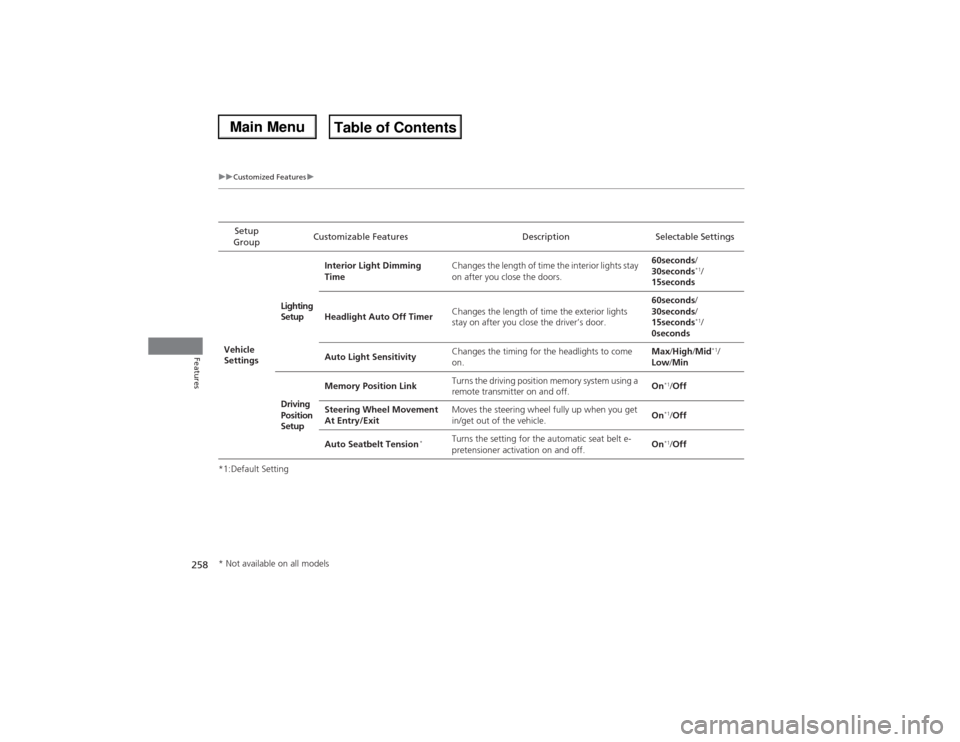
uuCustomized Featuresu
Features
*1:Default SettingSetup
GroupCustomizable Features Description Selectable Settings
Vehicle
SettingsLighting
SetupInterior Light Dimming
TimeChanges the length of time the interior lights stay
on after you close the doors.60seconds/
30seconds
*1/
15seconds
Headlight Auto Off TimerChanges the length of time the exterior lights
stay on after you close the driver’s door.60seconds/
30seconds/
15seconds*1/
0seconds
Auto Light SensitivityChanges the timing for the headlights to come
on.Max/High/Mid*1/
Low/Min
Driving
Position
SetupMemory Position LinkTurns the driving position memory system using a
remote transmitter on and off.On
*1/Off
Steering Wheel Movement
At Entry/ExitMoves the steering wheel fully up when you get
in/get out of the vehicle.On*1/Off
Auto Seatbelt Tension
*
Turns the setting for the automatic seat belt e-
pretensioner activation on and off.On
*1/Off
* Not available on all models