parking brake Acura MDX 2014 Owner's Manual
[x] Cancel search | Manufacturer: ACURA, Model Year: 2014, Model line: MDX, Model: Acura MDX 2014Pages: 500, PDF Size: 11.72 MB
Page 5 of 500
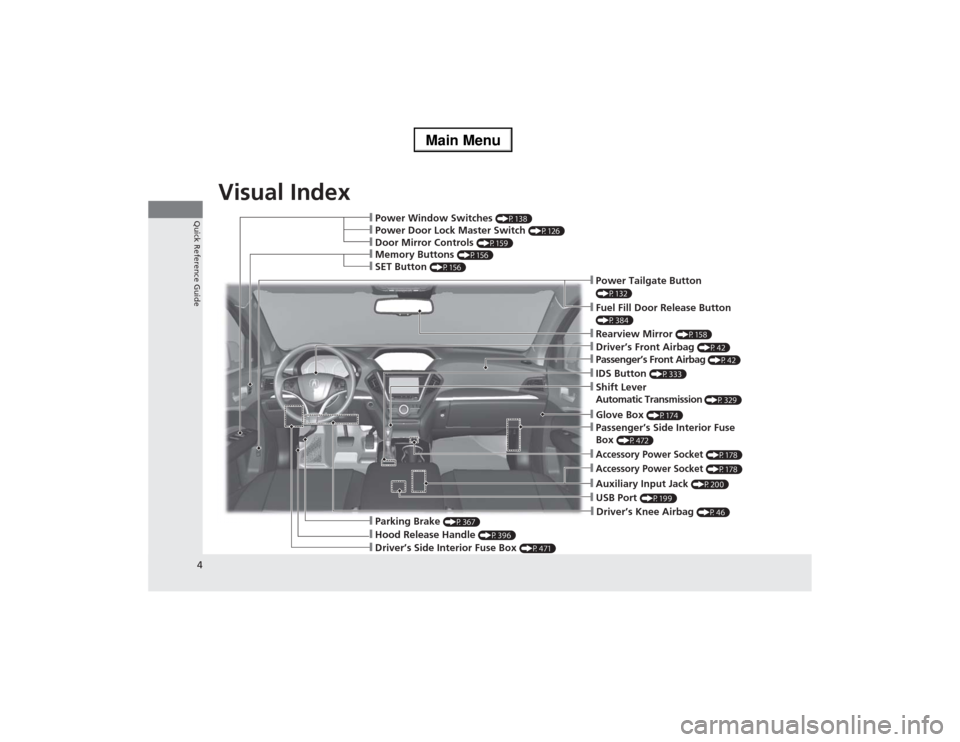
Visual Index
4Quick Reference Guide
❙Power Window Switches
(P138)
❙Hood Release Handle
(P396)
❙Driver’s Side Interior Fuse Box
(P471)
❙Driver’s Knee Airbag
(P46)
❙Door Mirror Controls
(P159)
❙Power Door Lock Master Switch
(P126)
❙Memory Buttons
(P156)
❙SET Button
(P156)
❙Passenger’s Front Airbag
(P42)
❙Shift Lever
Automatic Transmission
(P329)
❙USB Port
(P199)
❙Rearview Mirror
(P158)
❙IDS Button
(P333)
❙Driver’s Front Airbag
(P42)
❙Parking Brake
(P367)
❙Auxiliary Input Jack
(P200)
❙Accessory Power Socket
(P178)
❙Accessory Power Socket
(P178)
❙Passenger’s Side Interior Fuse
Box
(P472)
❙Glove Box
(P174)
❙Power Tailgate Button (P132)❙Fuel Fill Door Release Button (P384)
Page 7 of 500
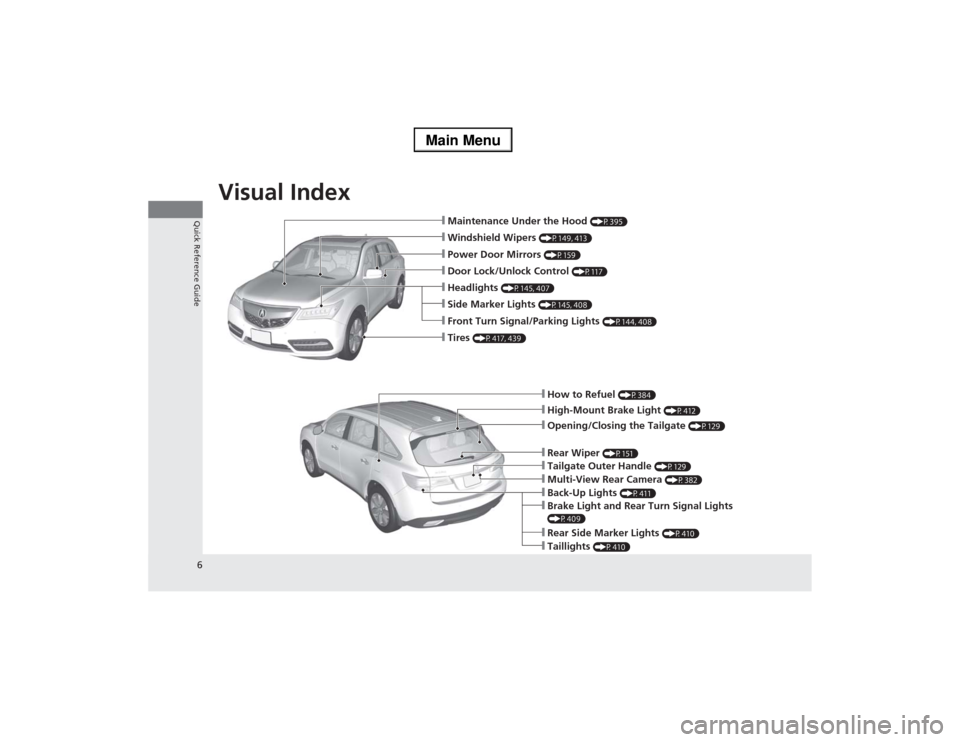
Visual Index
6Quick Reference Guide
❙How to Refuel
(P384)
❙High-Mount Brake Light
(P412)
❙Opening/Closing the Tailgate
(P129)
❙Back-Up Lights
(P411)
❙Multi-View Rear Camera
(P382)
❙Tailgate Outer Handle
(P129)
❙Rear Side Marker Lights
(P410)
❙Taillights
(P410)
❙Brake Light and Rear Turn Signal Lights (P409)❙Rear Wiper
(P151)
❙Maintenance Under the Hood
(P395)
❙Windshield Wipers
(P149, 413)
❙Tires
(P417, 439)
❙Door Lock/Unlock Control
(P117)
❙Power Door Mirrors
(P159)
❙Headlights
(P145, 407)
❙Side Marker Lights
(P145, 408)
❙Front Turn Signal/Parking Lights
(P144, 408)
Page 9 of 500
8Quick Reference Guide
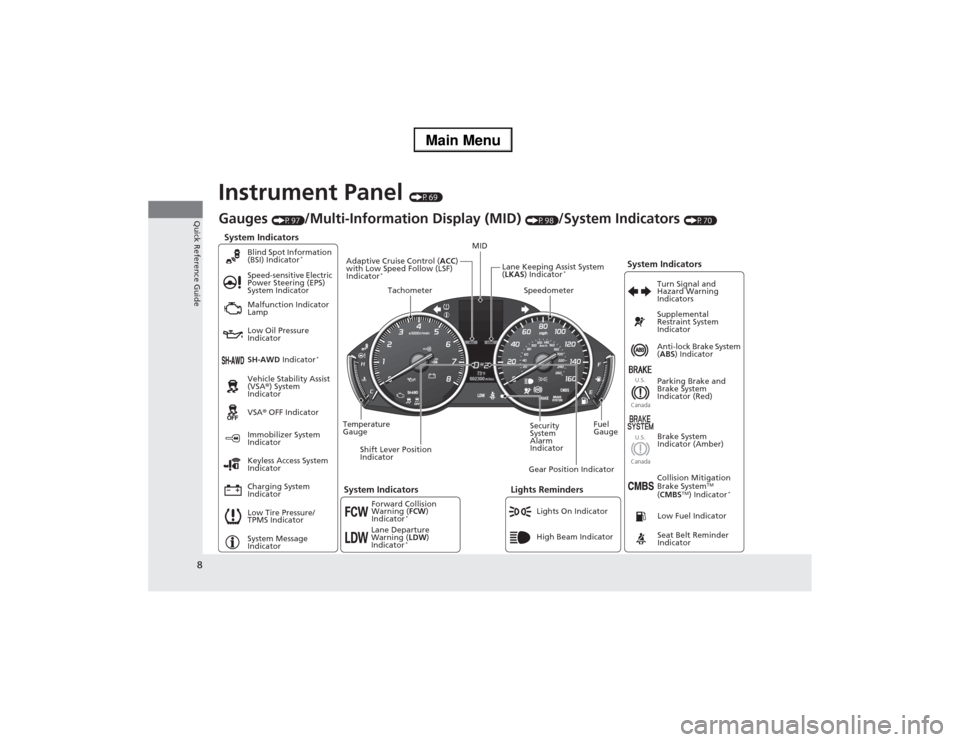
Instrument Panel
(P69)
System Indicators
Malfunction Indicator
Lamp
Low Oil Pressure
Indicator
Charging System
IndicatorAnti-lock Brake System
(ABS) Indicator
Vehicle Stability Assist
(VSA®) System
Indicator
VSA® OFF Indicator Speed-sensitive Electric
Power Steering (EPS)
System Indicator
Lights Reminders
Lights On Indicator
High Beam Indicator Immobilizer System
Indicator
Seat Belt Reminder
Indicator
System Indicators
System Message
IndicatorParking Brake and
Brake System
Indicator (Red) Supplemental
Restraint System
Indicator
Low Fuel Indicator
Gauges
(P97)
/Multi-Information Display (MID)
(P98)
/System Indicators
(P70)
Low Tire Pressure/
TPMS IndicatorTurn Signal and
Hazard Warning
Indicators
Keyless Access System
Indicator
Temperature
GaugeSecurity
System
Alarm
IndicatorFuel
Gauge
Tachometer
MID
Speedometer
Shift Lever Position
IndicatorGear Position IndicatorBrake System
Indicator (Amber)
SH-AWD Indicator
*
Blind Spot Information
(BSI) Indicator
*
System Indicators
Collision Mitigation
Brake System
TM
(CMBS
TM) Indicator
*
Forward Collision
Warning (FCW)
Indicator
*
Lane Departure
Warning (LDW)
Indicator
*
Lane Keeping Assist System
(LKAS) Indicator
*
Adaptive Cruise Control (ACC)
with Low Speed Follow (LSF)
Indicator
*
U.S.
CanadaU.S.
Canada
Page 21 of 500
20Quick Reference Guide
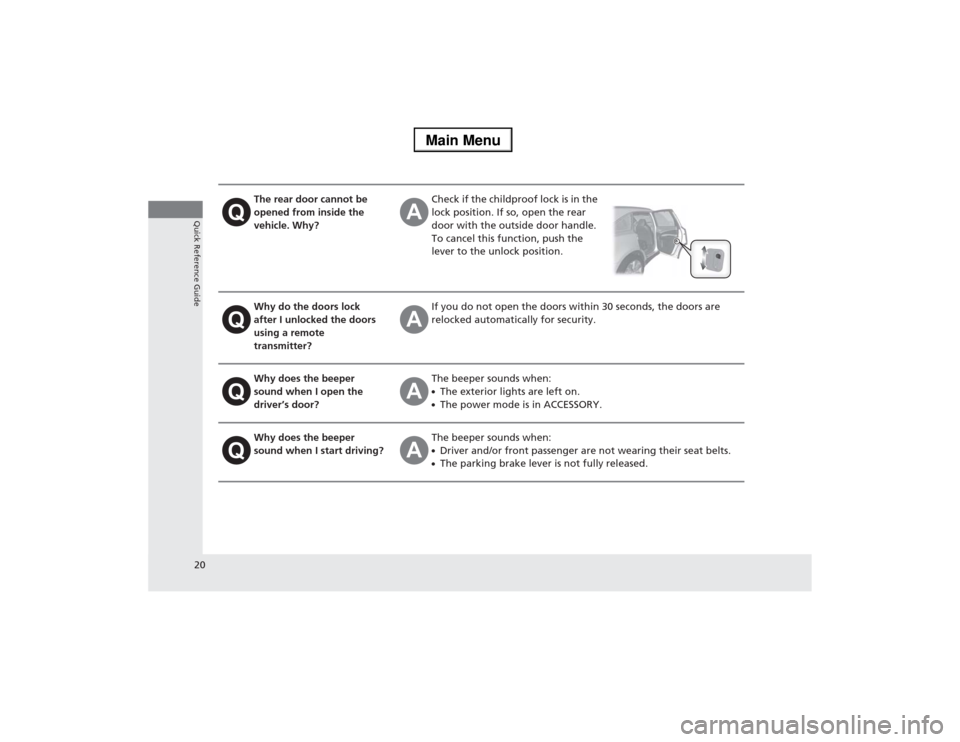
The rear door cannot be
opened from inside the
vehicle. Why?
Check if the childproof lock is in the
lock position. If so, open the rear
door with the outside door handle.
To cancel this function, push the
lever to the unlock position.
Why do the doors lock
after I unlocked the doors
using a remote
transmitter?
If you do not open the doors within 30 seconds, the doors are
relocked automatically for security.
Why does the beeper
sound when I open the
driver’s door?
The beeper sounds when:●The exterior lights are left on.●The power mode is in ACCESSORY.
Why does the beeper
sound when I start driving?
The beeper sounds when:●Driver and/or front passenger are not wearing their seat belts.●The parking brake lever is not fully released.
Page 71 of 500

70Instrument Panel
IndicatorsIndicator
Name
On/Blinking
Explanation
Message
Parking Brake
and Brake
System Indicator
(Red)
●Comes on for a few seconds when
you set the power mode to ON,
then goes off.●Comes on when the parking brake
is applied, and goes off when it is
released.●Comes on when the brake fluid
level is low.●Comes on if there is a problem with
the brake system.●The beeper sounds and the
indicator comes on if you drive with
the parking brake not fully released.
●Comes on while driving - Make sure the
parking brake is released. Check the brake
fluid level.
2Wh at to d o w hen t he in di cat o r co mes
on while driving P. 467
●Comes on along with the ABS indicator
- Have your vehicle checked by a dealer.
2If the Brake System Indicator (Red)
Comes On P. 467
Brake System
Indicator
(Amber)
●Comes on for a few seconds when
you set the power mode to ON,
then goes off.●Comes on if there is a problem with
a system related to braking other
than the conventional brake
system.
●Comes on while driving - Have your
vehicle checked by a dealer.●With this indicator on, your vehicle still has
normal braking ability.
U.S.Canada(Red)U.S.Canada(Amber)
U.S.Canada
Page 94 of 500
93
uuIndicatorsuMulti-Information Display (MID) Warning and Information Messages
Continued
Instrument Panel
Message
Condition
Explanation
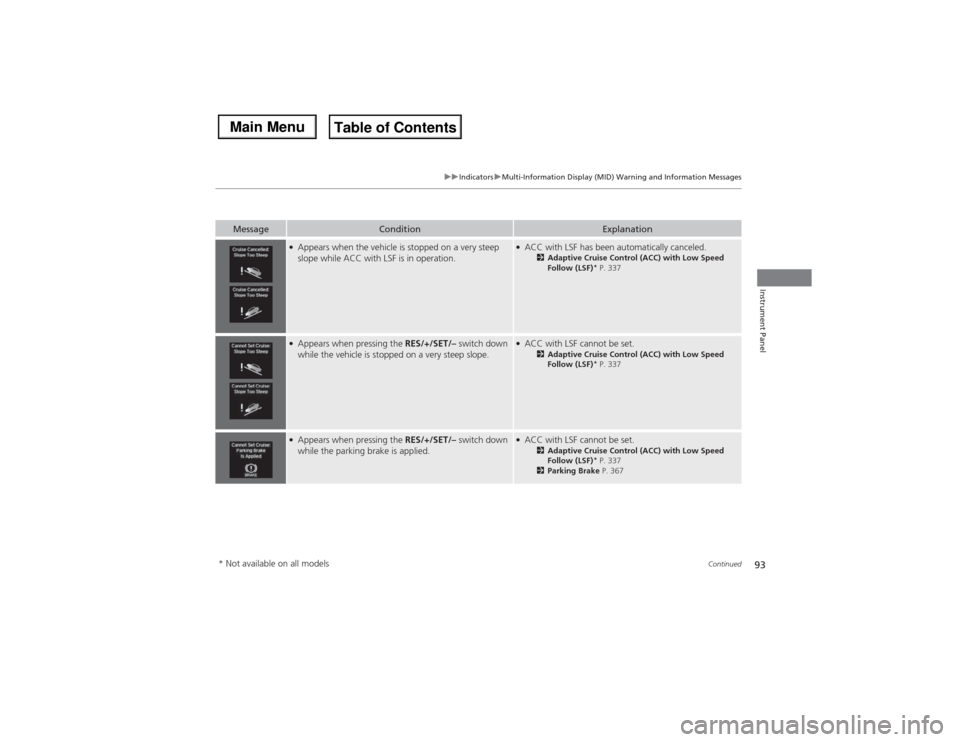
●Appears when the vehicle is stopped on a very steep
slope while ACC with LSF is in operation.
●ACC with LSF has been automatically canceled.
2Adaptive Cruise Control (ACC) with Low Speed
Follow (LSF)
* P. 337
●Appears when pressing the RES/+/SET/– switch down
while the vehicle is stopped on a very steep slope.
●ACC with LSF cannot be set.
2Adaptive Cruise Control (ACC) with Low Speed
Follow (LSF)
* P. 337
●Appears when pressing the RES/+/SET/– switch down
while the parking brake is applied.
●ACC with LSF cannot be set.
2Adaptive Cruise Control (ACC) with Low Speed
Follow (LSF)
* P. 337
2Parking Brake P. 367
* Not available on all models
Page 146 of 500

145
uuOperating the Switches Around the Steering WheeluLight Switches
Continued
Controls
Light Switches
Rotating the light switch turns the lights on
and off, regardless of the power mode
setting.■High beams
Push the lever forward until you hear a click.■Low beams
When in high beams, pull the lever back to
return to low beams.■Flashing the high beams
Pull the lever back, and release it.■Lights off
Turn the lever to OFF either when:
•The shift lever is in
(P.
•The parking brake is applied.
To turn the lights on again, turn the lever to
OFF to cancel the lights off mode. Even if you
do not cancel the lights off mode, the lights
come on automatically when:
•The shift lever is moved out of
(P and the
parking brake is released.
•The vehicle starts to move.
■Manual Operation
1Light Switches
If you leave the power mode in VEHICLE OFF (LOCK)
with the lights on, a light on reminder chime sounds
when you open the driver’s door.
Do not leave the lights on when the engine is off
because it will cause the battery to discharge.
Your vehicle is equipped with the automatic
headlight adjusting system that automatically adjusts
the vertical angle of the high/low beam headlights. If
you find a significant change in the vertical angle of
the headlights, there may be a problem with the
system. Have your vehicle checked by a dealer.Canadian models with rear entertainment system
High Beams
Flashing the high beams
Low Beams
Turns on parking, side marker,
tail, and rear license plate lights
Turns on headlights, parking,
side marker, tail, and rear
license plate lights
Page 149 of 500

148
uuOperating the Switches Around the Steering WheeluDaytime Running Lights
Controls
Daytime Running LightsThe daytime running lights come on when the following conditions have been met:
•The power mode is in ON.
•The headlight switch is AUTO, or in .
•The parking brake is released.
The daytime running lights are off once the headlight switch is turned on, or when
the head light switch is in AUTO and it is getting darker outside.
Page 157 of 500
uuOperating the Switches Around the Steering WheeluDriving Position Memory System
156Controls
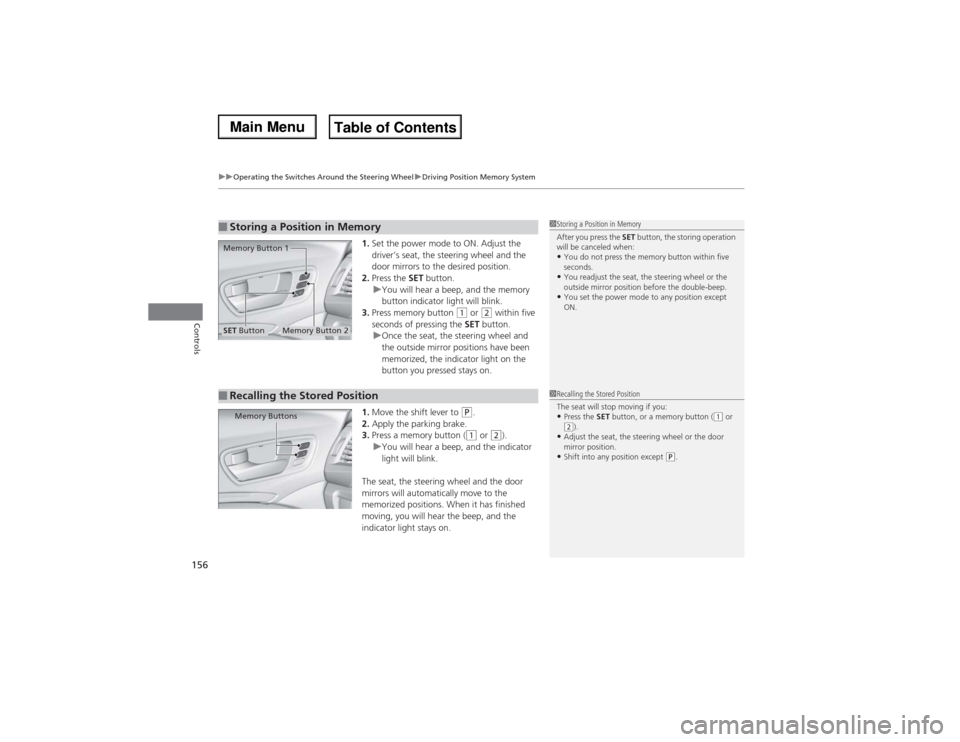
1.Set the power mode to ON. Adjust the
driver’s seat, the steering wheel and the
door mirrors to the desired position.
2.Press the SET button.
uYou will hear a beep, and the memory
button indicator light will blink.
3.Press memory button
(1 or
(2 within five
seconds of pressing the SET button.
uOnce the seat, the steering wheel and
the outside mirror positions have been
memorized, the indicator light on the
button you pressed stays on.
1.Move the shift lever to
(P.
2.Apply the parking brake.
3.Press a memory button ((1 or
(2).
uYou will hear a beep, and the indicator
light will blink.
The seat, the steering wheel and the door
mirrors will automatically move to the
memorized positions. When it has finished
moving, you will hear the beep, and the
indicator light stays on.
■Storing a Position in Memory
1Storing a Position in Memory
After you press the SET button, the storing operation
will be canceled when: •You do not press the memory button within five
seconds.•You readjust the seat, the steering wheel or the
outside mirror position before the double-beep.•You set the power mode to any position except
ON.
Memory Button 1
Memory Button 2
SET Button■Recalling the Stored Position
1Recalling the Stored Position
The seat will stop moving if you:•Press the SET button, or a memory button (
(1 or
(2).
•Adjust the seat, the steering wheel or the door
mirror position.•Shift into any position except
(P.
Memory Buttons
Page 304 of 500

303
Driving
This chapter discusses driving, refueling, and information on items such as accessories.
Before Driving
Driving Preparation .......................... 304
Maximum Load Limit........................ 307
Towing a Trailer................................ 309
Off-Highway Driving Guidelines..... 320
When Driving
Starting the Engine .......................... 322
Precautions While Driving................. 327
Automatic Transmission ................... 328
Shifting ............................................ 329
Integrated Dynamics System (IDS)..... 333
Cruise Control ................................. 334
Adaptive Cruise Control (ACC) with Low
Speed Follow (LSF)
*......................... 337Forward Collision Warning (FCW)
*.. 346
Lane Departure Warning (LDW)
*..... 350
Lane Keeping Assist System (LKAS)*.. 353
VSA® (Vehicle Stability Assist), aka ESC
(Electronic Stability Control), System .. 358Agile Handling Assist System............ 360
Blind Spot Information (BSI) System
*... 361
Super Handling-All Wheel DriveTM (SH-
AWD®)
*......................................... 363
Tire Pressure Monitoring System (TPMS) ... 363Tire Pressure Monitoring System (TPMS) -
Required Federal Explanation ......... 365
Braking
Brake System ................................... 367Anti-lock Brake System (ABS) ........... 369
Brake Assist System ......................... 370
Collision Mitigation Braking System
TM
(CMBS
TM)*..................................... 371
Parking Your Vehicle
When Stopped ................................ 377
Parking Sensor System
*................... 378
Multi-View Rear Camera*................ 382
Refueling
Fuel Information .............................. 383
How to Refuel ................................. 384
Fuel Economy.................................... 385
Accessories and Modifications........ 386
* Not available on all models