seats Acura MDX 2015 User Guide
[x] Cancel search | Manufacturer: ACURA, Model Year: 2015, Model line: MDX, Model: Acura MDX 2015Pages: 79, PDF Size: 16.44 MB
Page 26 of 79
44 || 45
veHICLe CoNTroLS
veHICLe CoNTroLS
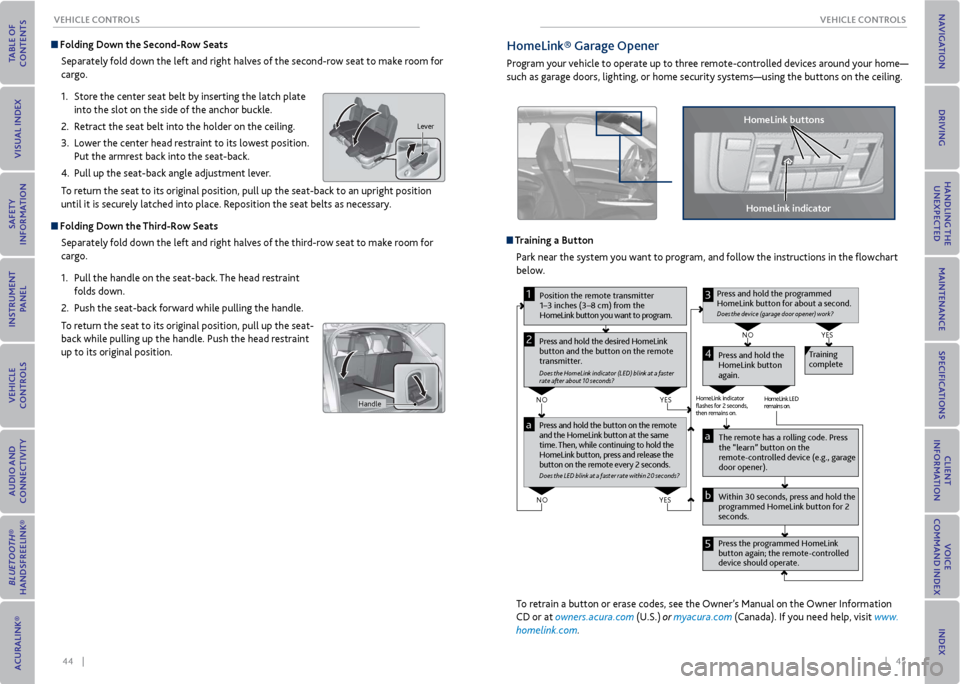
Folding Down the Second-row Seats
Separately fold down the left and right halves of the second-row seat to make room for
cargo.
1. Store the center seat belt by inserting the latch plate
into the slot on the side of the anchor buckle.
2. Retract the seat belt into the holder on the ceiling.
3. Lower the center head restraint to its lowest position.
Put the armrest back into the seat-back.
4. Pull up the seat-back angle adjustment lever.
To return the seat to its original position, pull up the seat-back to an upright position
until it is securely latched into place. Reposition the seat belts as necessary.
Folding Down the Third-row Seats
Separately fold down the left and right halves of the third-row seat to make room for
cargo.
1. Pull the handle on the seat-back. The head restraint
folds down.
2. Push the seat-back forward while pulling the handle.
To return the seat to its original position, pull up the seat-
back while pulling up the handle. Push the head restraint
up to its original position.
Lever
Handle
HomeLink® Garage opener
Program your vehicle to operate up to three remote-controlled devices around your home—
such as garage doors, lighting, or home security systems—using the buttons on the ceiling.
Training a Button Park near the system you want to program, and follow the instructions in the flowchart
below.
Pr ess and hold the button on the r emote
and the HomeLink button at the same
time. Then, while continuing to hold the
HomeLink button, pr ess and release the
button on the r emote every 2 seconds.
Does the LED blink at a fa ster ra te within 20 seconds ?
Press and hold the
HomeLink button
again. T
raining
complete
YES
NO
HomeLink indicator
ashes for 2 seconds,
then rem ains on. HomeLink LED
r
emains on.YES
NO
YES
NO
P osition the remote transmitter
1–3 inches (3–8 cm) from the
HomeLink button you want to program.1
Press and hold the desir ed HomeLink
button and the button on the r emote
transmitter .
Does the HomeLink indicat or (LED) blink at a f ast er
rate after about 10 seconds ?
2
a
The remote has a ro lling code. Press
the “learn” button on the
r emote-contr olled device (e.g., garage
door opener).
Pr ess the pr ogrammed HomeLink
button again; the remote-contr olled
device should operate.
Within 30 seconds, pr
ess and hold the
pr ogrammed HomeLink button for 2
seconds.a
Pr ess and hold the programmed
HomeLink button for about a second.
Does the devic e (garage door opener) work?
3
b
4
5
To retrain a button or erase codes, see the Owner’s Manual on the Owner Information
CD or at owners.acura.com (U.S.) or myacura.com (Canada). If you need help, visit www.
homelink.com.
HomeLink indicator
HomeLink buttons
Page 28 of 79
48 || 49
veHICLe CoNTroLS
veHICLe CoNTroLS
Heated Steering Wheel*
Heat the steering wheel to a comfortable temperature
when the vehicle is on.
Press the heated steering wheel button. Press the button
again to turn it off.
Heated steering wheel button
Heated Windshield Button*Turn the vehicle on. Press the heated windshield button
to de-ice the windshield.
The heated windshield may automatically activate when
the outside temperature is below 4° C, and deactivate
when the temperature reaches 6° C.
Heated windshield
button
*if equipped (Canadian models)
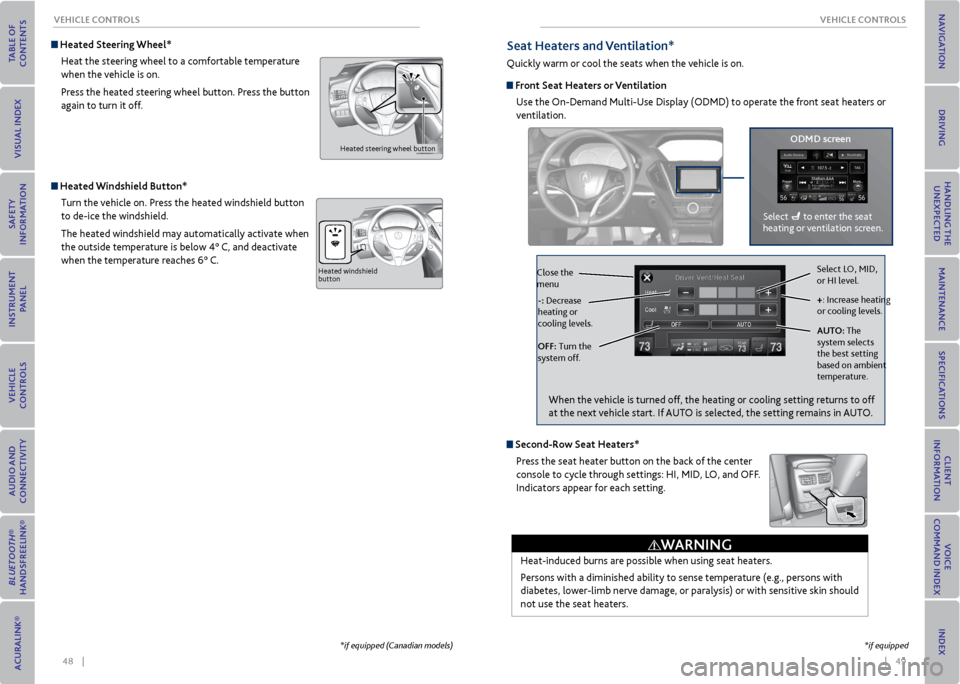
Seat Heaters and ventilation*
Quickly warm or cool the seats when the vehicle is on.
Front Seat Heaters or ventilation
Use the On-Demand Multi-Use Display (ODMD) to operate the front seat heaters or
ventilation.
Select LO, MID,
or HI level.
+: Increase heating
or cooling levels.
AUT o: The
system selects
the best setting
based on ambient
temperature.
oFF: Turn the
system off. -: Decrease
heating or
cooling levels.
Close the
menu
oDmD screen
Select to enter the seat
heating or ventilation screen.
*if equipped
Second-r ow Seat Heaters*
Press the seat heater button on the back of the center
console to cycle through settings: HI, MID, LO, and OFF.
Indicators appear for each setting.
Heat-induced burns are possible when using seat heaters.
Persons with a diminished ability to sense temperature (e.g., persons with
diabetes, lower-limb nerve damage, or paralysis) or with sensitive skin should
not use the seat heaters.
WArNING
When the vehicle is turned off, the heating or cooling setting returns to off
at the next vehicle start. If AUTO is selected, the setting remains in AUTO.
Page 45 of 79
82 || 83
DrIvING
NA vIGATIoN
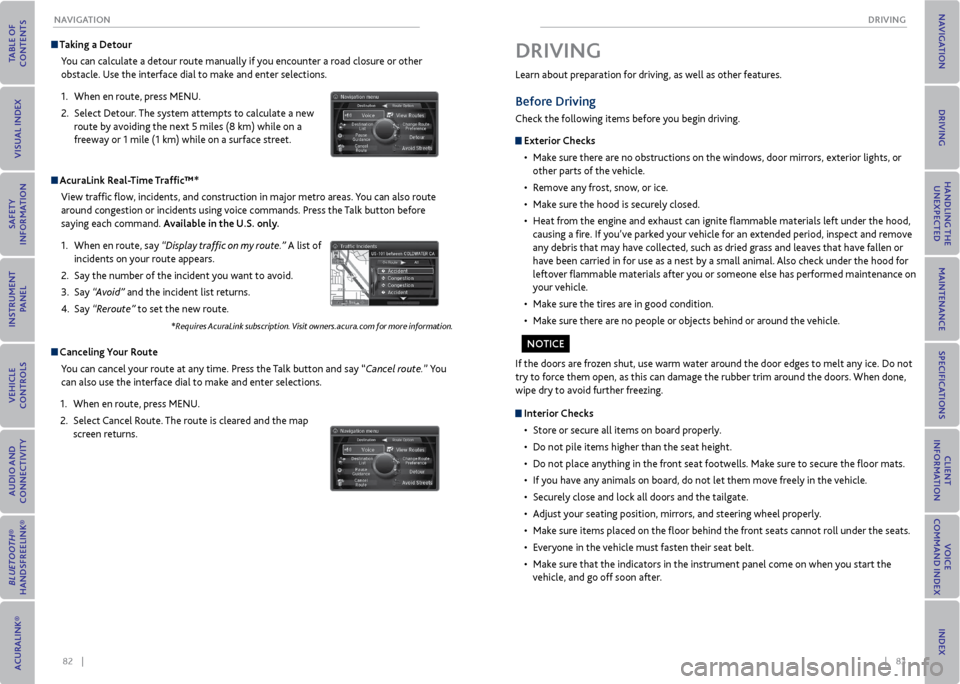
Taking a Detour
You can calculate a detour route manually if you encounter a road closure or other
obstacle. Use the interface dial to make and enter selections.
1. When en route, press MENU.
2. Select Detour. The system attempts to calculate a new
route by avoiding the next 5 miles (8 km) while on a
freeway or 1 mile (1 km) while on a surface street.
AcuraLink r eal-Time Traffic™*
View traffic flow, incidents, and construction in major metro areas. You can also route
around congestion or incidents using voice commands. Press the Talk button before
saying each command. Available in the U.S. only.
1. When en route, say “Display traffic on my route.” A list of
incidents on your route appears.
2. Say the number of the incident you want to avoid.
3. Say “Avoid” and the incident list returns.
4. Say “Reroute” to set the new route.
*Requires AcuraLink subscription. Visit owners.acura.com for more information.
Canceling y our route
You can cancel your route at any time. Press the Talk button and say “Cancel route.” You
can also use the interface dial to make and enter selections.
1. When en route, press MENU.
2. Select Cancel Route. The route is cleared and the map
screen returns.
Learn about preparation for driving, as well as other features.
Before Driving
Check the following items before you begin driving.
exterior Checks
• Make sure there are no obstructions on the windows, door mirrors, exterior lights, or
other parts of the vehicle.
• Remove any frost, snow, or ice.
• Make sure the hood is securely closed.
• Heat from the engine and exhaust can ignite flammable materials left under the hood,
causing a fire. If you’ve parked your vehicle for an extended period, inspect and remove
any debris that may have collected, such as dried grass and leaves that have fallen or
have been carried in for use as a nest by a small animal. Also check under the hood for
leftover flammable materials after you or someone else has performed maintenance on
your vehicle.
• Make sure the tires are in good condition.
• Make sure there are no people or objects behind or around the vehicle.
DrIvING
If the doors are frozen shut, use warm water around the door edges to melt any ice. Do not
try to force them open, as this can damage the rubber trim around the doors. When done,
wipe dry to avoid further freezing.
Interior Checks
• Store or secure all items on board properly.
• Do not pile items higher than the seat height.
• Do not place anything in the front seat footwells. Make sure to secure the floor mats.
• If you have any animals on board, do not let them move freely in the vehicle.
• Securely close and lock all doors and the tailgate.
• Adjust your seating position, mirrors, and steering wheel properly.
• Make sure items placed on the floor behind the front seats cannot roll under the seats.
• Everyone in the vehicle must fasten their seat belt.
• Make sure that the indicators in the instrument panel come on when you start the
vehicle, and go off soon after.
No TICe
Page 47 of 79
86 || 87
DrIvING
DrIvING
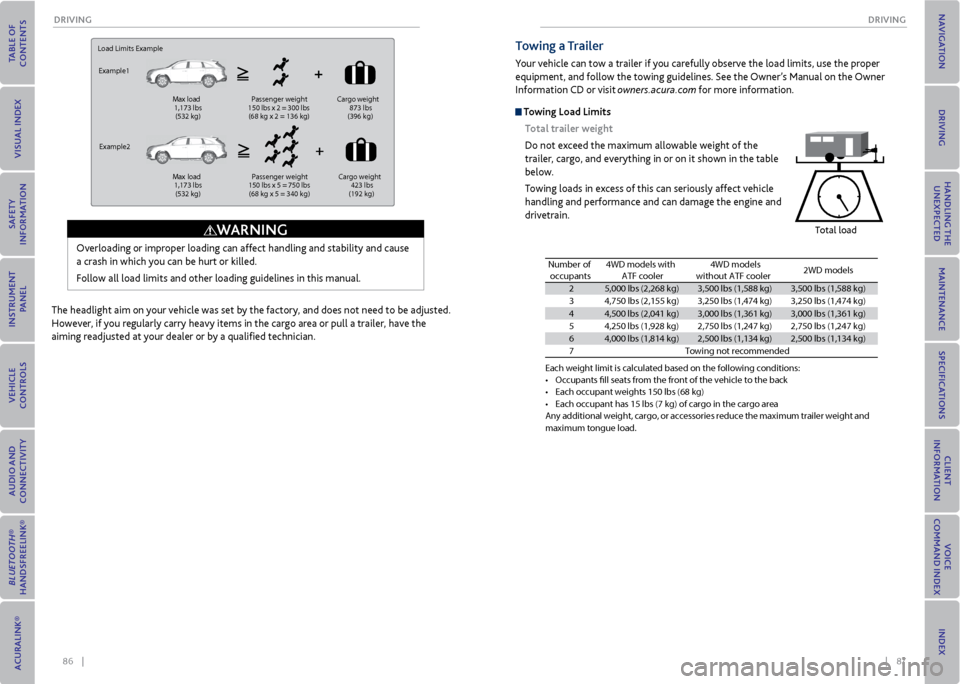
Load Limits Example
Example1
Max load
1,173 lbs
(532 kg ) Passenger weight
150 lbs x 2 = 300 lbs
(68 kg x 2 = 136 kg )Cargo
weight
873 lbs
(396 kg )
Example2 Max load
1,173 lbs
(532 kg ) Passenger weight
150 lbs x 5 = 750 lbs
(68 kg x 5 = 340 kg )Cargo
weight
423 lbs
(192 kg )
Overloading or improper loading can affect handling and stability and cause
a crash in which you can be hurt or killed.
Follow all load limits and other loading guidelines in this manual.
WArNING
The headlight aim on your vehicle was set by the factory, and does not need to be adjusted.
However, if you regularly carry heavy items in the cargo area or pull a trailer, have the
aiming readjusted at your dealer or by a qualified technician.
Towing a Trailer
Your vehicle can tow a trailer if you carefully observe the load limits, use the proper
equipment, and follow the towing guidelines. See the Owner’s Manual on the Owner
Information CD or visit owners.acura.com for more information.
Towing Load Limits
Total trailer weight
Do not exceed the maximum allowable weight of the
trailer, cargo, and everything in or on it shown in the table
below.
Towing loads in excess of this can seriously affect vehicle
handling and performance and can damage the engine and
drivetrain.
Total load
Each weight limit \fis calculated base\fd on the following \fconditions\f•Occupants fll seats\f f\bom the f\bont of th\fe vehicle to the b\fac k•Each occupant weigh\fts 150 lbs (68 kg)•Each occupant has 1\f5 lbs (7 kg) of ca\b\fgo in the ca\bgo a\be\faAny additional weight, ca\bgo, o\b accesso\bies \beduce the maximum t\baile\b weight and maximum tongue loa\fd.
Number of
occupant s4WD models with
ATF cooler4WD models
without ATF cooler2WD models
25,000 lbs (2,268 kg\f)3,500 lbs (1,588 kg)\f3,500 lbs (1,588 kg)\f
34,750 lbs (2,155 k\fg )3,250 lbs (1,474 k\fg)3,250 lbs (1,474 k\fg)
44,500 lbs (2,041 k\fg)3,000 lbs (1,361 k\fg)3,000 lbs (1,361 k\fg)
54,250 lbs (1,928 kg\f)2,750 lbs (1,247 k\fg)2,750 lbs (1,247 k\fg)
64,000 lbs (1,814 kg\f)2,500 lbs (1,134 k\fg)2,500 lbs (1,134 k\fg)
7Towing not \becommen\fded
Page 79 of 79
150 || 151
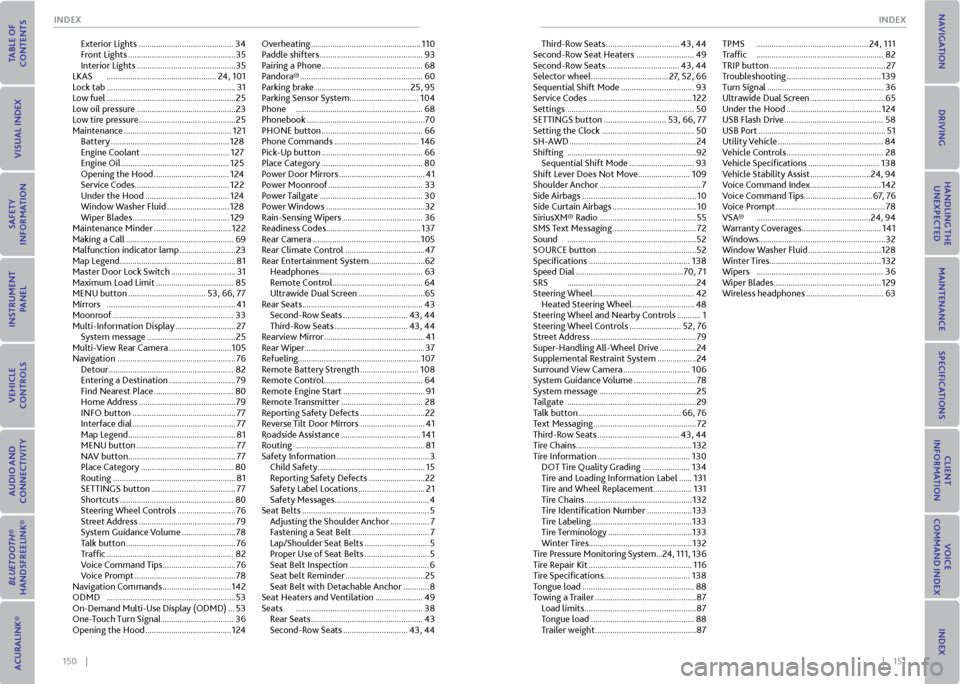
INDex
INDex
Exterior Lights ............................................ 34
Front Lights .................................................. 35
Interior Lights .............................................. 35
LKAS ................................................... 24, 101
Lock tab ............................................................ 31
Low fuel ............................................................ 25
Low oil pressure .............................................. 23
Low tire pressure ............................................. 25
Maintenance .................................................. 121
Battery ....................................................... 128
Engine Coolant ......................................... 127
Engine Oil .................................................. 125
Opening the Hood ................................... 124
Service Codes ............................................ 122
Under the Hood ....................................... 124
Window Washer Fluid ............................. 128
Wiper Blades ............................................. 129
Maintenance Minder .................................... 122
Making a Call .................................................. 69
Malfunction indicator lamp .......................... 23
Map Legend ...................................................... 81
Master Door Lock Switch .............................. 31
Maximum Load Limit .................................... 85
MENU button .................................... 53, 66, 77
Mirrors ............................................................ 41
Moonroof ........................................................ 33
Multi-Information Display ............................ 27
System message ......................................... 25
Multi-View Rear Camera ............................. 105
Navigation ....................................................... 76
Detour .......................................................... 82
Entering a Destination ............................... 79
Find Nearest Place ..................................... 80
Home Address ............................................. 79
INFO button ................................................ 77
Interface dial ................................................ 77
Map Legend .................................................. 81
MENU button .............................................. 77
NAV button .................................................. 77
Place Category ........................................... 80
Routing ......................................................... 81
SETTINGS button ....................................... 77
Shortcuts ..................................................... 80
Steering Wheel Controls ........................... 76
Street Address ............................................. 79
System Guidance Volume ......................... 78
Talk button ................................................... 76
Traffic ........................................................... 82
Voice Command Tips .................................. 76
Voice Prompt ............................................... 78
Navigation Commands ................................ 142
ODMD ............................................................ 53
On-Demand Multi-Use Display (ODMD) ... 53
One-Touch Turn Signal ................................. 36
Opening the Hood ........................................ 124Overheating ...................................................
110
Paddle shifters ................................................ 93
Pairing a Phone ............................................... 68
Pandora® ......................................................... 60
Parking brake ............................................ 25, 95
Parking Sensor System ................................ 104
Phone ........................................................... 68
Phonebook ....................................................... 70
PHONE button ............................................... 66
Phone Commands ....................................... 146
Pick-Up button ............................................... 66
Place Category ............................................... 80
Power Door Mirrors ........................................ 41
Power Moonroof ............................................ 33
Power Tailgate ................................................ 30
Power Windows .............................................. 32
Rain-Sensing Wipers ..................................... 36
Readiness Codes ............................................ 137
Rear Camera .................................................. 105
Rear Climate Control ..................................... 47
Rear Entertainment System .......................... 62
Headphones ................................................ 63
Remote Control .......................................... 64
Ultrawide Dual Screen ............................... 65
Rear Seats ........................................................ 43
Second-Row Seats .............................. 43, 44
Third-Row Seats .................................. 43, 44
Rearview Mirror ............................................... 41
Rear Wiper ........................................................ 37
Refueling ......................................................... 107
Remote Battery Strength ........................... 108
Remote Control .............................................. 64
Remote Engine Start ...................................... 91
Remote Transmitter ...................................... 28
Reporting Safety Defects .............................. 22
Reverse Tilt Door Mirrors .............................. 41
Roadside Assistance ..................................... 141
Routing ............................................................ 81
Safety Information ........................................... 3
Child Safety .................................................. 15
Reporting Safety Defects .......................... 22
Safety Label Locations ............................... 21
Safety Messages ............................................ 4
Seat Belts ........................................................... 5
Adjusting the Shoulder Anchor .................. 7
Fastening a Seat Belt .................................... 7
Lap/Shoulder Seat Belts .............................. 5
Proper Use of Seat Belts .............................. 5
Seat Belt Inspection ..................................... 6
Seat belt Reminder ..................................... 25
Seat Belt with Detachable Anchor ............ 8
Seat Heaters and Ventilation ...................... 49
Seats ........................................................... 38
Rear Seats .................................................... 43
Second-Row Seats .............................. 43, 44Third-Row Seats ..................................
43, 44
Second-Row Seat Heaters ........................... 49
Second-Row Seats .................................. 43, 44
Selector wheel .................................... 27, 52, 66
Sequential Shift Mode .................................. 93
Service Codes ................................................ 122
Settings ........................................................... 50
SETTINGS button ............................. 53, 66, 77
Setting the Clock ........................................... 50
SH-AWD ........................................................... 24
Shifting ............................................................ 92
Sequential Shift Mode .............................. 93
Shift Lever Does Not Move ........................ 109
Shoulder Anchor ............................................... 7
Side Airbags ..................................................... 10
Side Curtain Airbags ....................................... 10
SiriusXM® Radio ............................................. 55
SMS Text Messaging ....................................... 72
Sound ............................................................ 52
SOURCE button .............................................. 52
Specifications ............................................... 138
Speed Dial .................................................. 70, 71
SRS ............................................................ 24
Steering Wheel
............................................... 42
Heated Steering Wheel ............................. 48
Steering Wheel and Nearby Controls ........... 1
Steering Wheel Controls ........................ 52, 76
Street Address ................................................. 79
Super-Handling All-Wheel Drive ................. 24
Supplemental Restraint System .................. 24
Surround View Camera ............................... 106
System Guidance Volume ............................. 78
System message ............................................. 25
Tailgate ............................................................ 29
Talk button ................................................ 66, 76
Text Messaging ................................................ 72
Third-Row Seats ...................................... 43, 44
Tire Chains ...................................................... 132
Tire Information ........................................... 130
DOT Tire Quality Grading ...................... 134
Tire and Loading Information Label ...... 131
Tire and Wheel Replacement.................. 131
Tire Chains .................................................. 132
Tire Identification Number ..................... 133
Tire Labeling ............................................... 133
Tire Terminology ....................................... 133
Winter Tires ................................................ 132
Tire Pressure Monitoring System ...24, 111, 136
Tire Repair Kit ................................................ 116
Tire Specifications ........................................ 138
Tongue load .................................................... 88
Towing a Trailer ............................................... 87
Load limits .................................................... 87
Tongue load ................................................ 88
Trailer weight ............................................... 87TPMS
.................................................... 24, 111
Traffic ........................................................... 82
TRIP button ...................................................... 27
Troubleshooting ............................................ 139
Turn Signal ...................................................... 36
Ultrawide Dual Screen ................................... 65
Under the Hood ............................................ 124
USB Flash Drive .............................................. 58
USB Port ........................................................... 51
Utility Vehicle ................................................. 84
Vehicle Controls ............................................. 28
Vehicle Specifications ................................. 138
Vehicle Stability Assist ............................ 24, 94
Voice Command Index ................................. 142
Voice Command Tips ................................67, 76
Voice Prompt ................................................... 78
VSA® ..................................................... 24, 94
Warranty Coverages ..................................... 141
Windows ........................................................... 32
Window Washer Fluid .................................. 128
Winter Tires .................................................... 132
Wipers ........................................................... 36
Wiper Blades .................................................. 129
Wireless headphones .................................... 63