lock Acura MDX 2015 Repair Manual
[x] Cancel search | Manufacturer: ACURA, Model Year: 2015, Model line: MDX, Model: Acura MDX 2015Pages: 505, PDF Size: 18.62 MB
Page 148 of 505

147
uuOperating the Switches Around the Steering Wheel uLight Switches
Controls
The headlights automatically come on when the wipers are used several ti\
mes within
a certain number of intervals with the headlight switch in AUTO.
The headlights automatically go off a few minutes later if the wipers are stopped.
The headlights, all other exterior lights, and the instrument panel lights turn off 15
seconds after you set the power mode to VEHICLE OFF (LOCK), take the remote with
you, and close the driver’s door.
If you set the power mode to VEHICLE OFF (LOCK) with the headlight switch on, but
do not open the door, the lights turn off after 10 minutes (three minutes, if the
switch is in the AUTO position).
The lights turn on again when you unlock or open the driver’s door. If you unlock
the door, but do not open it within 15 seconds, the lights go off. If you open the
driver’s door, you will hear a lights on reminder chime.■
Headlight Integration with Wiper
■
Automatic Lighting Off Feature
1 Automatic Lighting Control
Adjust the auto light sensitivity as follows:
Setting
The exterior lights come on
when the ambient light is at
MaxHighMidLowMin
Bright
Dark
1 Headlight Integration with Wiper
This feature activates during the headlights are off in
AUTO .
The instrument panel brightness does not change
when the headlights come on.
When the ambient light is dark, the automatic
lighting control feature overrides, and the headlights
come on with or without the wipers sweeping more
than several times.1 Automatic Lighting Off Feature
You can change the headlight auto off timer setting.
2 Customized Features P. 104, 249
Page 152 of 505

Continued
151
uuOperating the Switches Around the Steering Wheel uWipers and Washers
Controls
The rear wiper and washer can be used when
the power mode is in ON.■Wiper switch (OFF, INT, ON)
Change the wiper switch setting according to
the amount of rain.■Washer ( )
Sprays while you rotate the switch to this
position.
Hold it to activate the wiper and to spray the
washer. Once released, it stops operating
after a few more sweeps.
■Operating in reverse
When you shift the transmission to
(R
with the front wiper activated, the rear wiper
operates automatically as follows even if its switch is off.
■
Rear Wiper/Washer
1 Wipers and Washers
If the wiper stops operating due to any obstacle such
as the build-up of snow, park the vehicle in a safe
place.
Rotate the wiper switch to OFF, and set the power
mode to ACCESSORY or VEHICLE OFF (LOCK), then
remove the obstacle.
INT: Intermittent
OFF ON : Continuous wipe
Washer
Front Wiper Position Rear Wiper OperationINT (Intermittent)
Intermittent
LO (Low speed wipe)
HI (High speed wipe) Continuous
Page 156 of 505

155
uuOperating the Switches Around the Steering Wheel uDriving Position Memory System
Continued
Controls
Driving Position Memory SystemYou can store two driver’s seat (except for power lumbar), steering wheel and door
mirror positions with the driving position memory system.
When you unlock and open the driver’s door with a remote transmitter, or keyless
access system, the seat and door mirrors adjust automatically to one of the two
preset positions.
The steering wheel will move to the stored position when you set the power mode
to ACCESSORY.
The MID shows you which remote transmitter you used to unlock the vehicle when
you enter.
• DRIVER 1 transmitter is linked to memory button 1.
• DRIVER 2 transmitter is linked to memory button 2.
1Driving Position Memory System
Using the audio/information screen or MID, you can
disable the automatic seat, steering wheel and door
mirrors adjustment function.
2 Customized Features P. 104, 249
DRIVER 1 DRIVER 2
Page 163 of 505

uuAdjusting the Seats uAdjusting the Seat Positions
162Controls
■Adjusting the second row manual seats
1Adjusting the second row manual seats
Once a seat is adjusted correctly, rock it back and
forth to make sure it is locked in position.
Seat-back Angle
AdjustmentPull up the lever to change
the angle.
Horizontal Position
AdjustmentPull up the bar to move the
seat, then release the bar.
Page 166 of 505

Continued
165
uuAdjusting the Seats uAdjusting the Seat Positions
Controls
A passenger sitting in the second row center
seating position should adjust the height of
their head restraint to an appropriate position
before the vehicle begins moving.
To raise the head restraint:
Pull it upward.
To lower the head restraint:
Push it down while pressing the release
button.
Head restraints can be removed for cleaning or repair.
To remove a head restraint:
Pull the restraint up as far as it will go. Then push the release button, and pull the
restraint up and out.
To reinstall a head restraint:
Insert the legs back in place, then adjust the head restraint to an appropriate height
while pressing the release button. Pull up on the restraint to make sure it is locked
in position.
■
Changing the Second Row Center Seat Head Restraint
Position
■
Removing and Reinstalling the Head Restraints
1 Removing and Reinstalling the Head Restraints
3
WARNING
Failure to reinstall, or correctly reinstall, the
head restraints can result in severe injury
during a crash.
Always replace the head restraints before
driving.
Front and second row head restraints
Page 170 of 505

Continued
169
uuAdjusting the Seats uRear Seats
Controls
Separately fold down the left and right halves of the second row seat to make room
for cargo.
1. Store the center seat belt first. Insert the latch plate into the slot on the side of the
anchor buckle.
2. Retract the seat belt into the holder on the ceiling.
2 Seat Belt with Detachable Anchor P. 36
3.Lower the center head restraint to its lowest position. Put the armrest back into
the seat-back.
4.Pull up on the seat-back angle adjustment
lever.
To return the seat to the original position, pull
up the seat-back in the upright position.■
Folding Down the Second Row Seat
1 Folding Down the Second Row Seat
Make sure that the folded seat-back does not press
against the front passenger seat, as this can cause the
weight sensors in the front passenger seat to work
improperly.
2 Passenger Airbag Off Indicator P. 52
The front seats must be far enough forward so they
do not interfere with the second row seats as they
fold down.
To lock the seat-back upright, push it backwards until
it locks.
Make sure the seat-back, head restraints and seat
cushion are securely latched back into place before
driving. Also, make sure all rear shoulder belts are
positioned in front of the seat-back, and the center
shoulder belt is re-positioned in the holding slot.
Lever
Page 173 of 505

172Controls
Interior Lights/Interior Convenience ItemsInterior Lights
■ON
The interior lights come on regardless of
whether the doors are open or closed.■Door activated
The interior lights come on in the following
situations:
• When any doors are opened.
• You unlock the driver’s door.
• When the power mode is set to VEHICLE
OFF (LOCK).■OFF
The interior lights remain off regardless of
whether the tailgate or the doors are open or
closed.
■
Interior Light Switches
1 Interior Light Switches
In the door activated position, the interior lights fade
out and go off about 30 seconds after the doors are
closed.
The lights go off after 30 seconds in the following
situations:•When you unlock the driver’s door but do not open
it.•When you set the power mode to VEHICLE OFF
(LOCK) but do not open a door.
You can change the interior lights dimming time. 2 Customized Features P. 104, 249
The interior lights go off immediately in the following
situations:•When you lock the driver’s door.•When you close the driver’s door in ACCESSORY
mode.•When you set the power mode to ON.
If you leave any doors open in VEHICLE OFF (LOCK)
mode, the interior lights go off after about 15
minutes.
When the interior light switch is in ON, if you close
the tailgate and all doors in VEHICLE OFF (LOCK)
mode, the interior lights go off after about 30
minutes.
However, when the batter y is weaken, the interior
lights go off after about 30 minutes if any door is
open.
Door Activated Position
Off
On
Page 175 of 505

174
uuInterior Lights/Interior Convenience Items uInterior Convenience Items
Controls
Interior Convenience Items
Press the button to open the glove box. You
can lock the glove box with the built-in key.■Removable shelf
The shelf in the glove box is detachable. To
remove it, disengage the tabs.
The removed shelf can be stored upside down
in the glove box.
■
Glove Box
1 Glove Box
3
WARNING
An open glove box can cause serious injury
to your passenger in a crash, even if the
passenger is wearing the seat belt.
Always keep the glove box closed while
driving.
Glove Box
To Lock
Shelf
Tab
Page 180 of 505

Continued
179
uuInterior Lights/Interior Convenience Items uInterior Convenience Items
Controls
■Accessory power socket (cargo area)
Open the cover to use it.
The AC power outlet can be used when the engine is running. Open the cover to use it. Plug in the appliance
slightly, turn it 90° clockwise, then push it all
the way.
■
AC Power Outlet
*
1AC Power Outlet
*
NOTICEDo not use the AC power outlet for electric
appliances that require high initial peak wattage,
such as cathode-ray tube type televisions,
refrigerators, electric pumps, et c. It is not suitable for
devices that process precise data, such as medical
equipment, and that require an extremely stable
power supply, such as microcomputer-controlled
electric blankets, touch sensor lamps, etc.
The AC power outlet is designed to supply power for
up to 115 volt appliances that are rated 150 watts or
less.
Continued use of any electric appliance/device
exceeding these rati ngs may result in damage to the
appliance/device.
* Not available on all models
Page 186 of 505
185
Continued
Controls
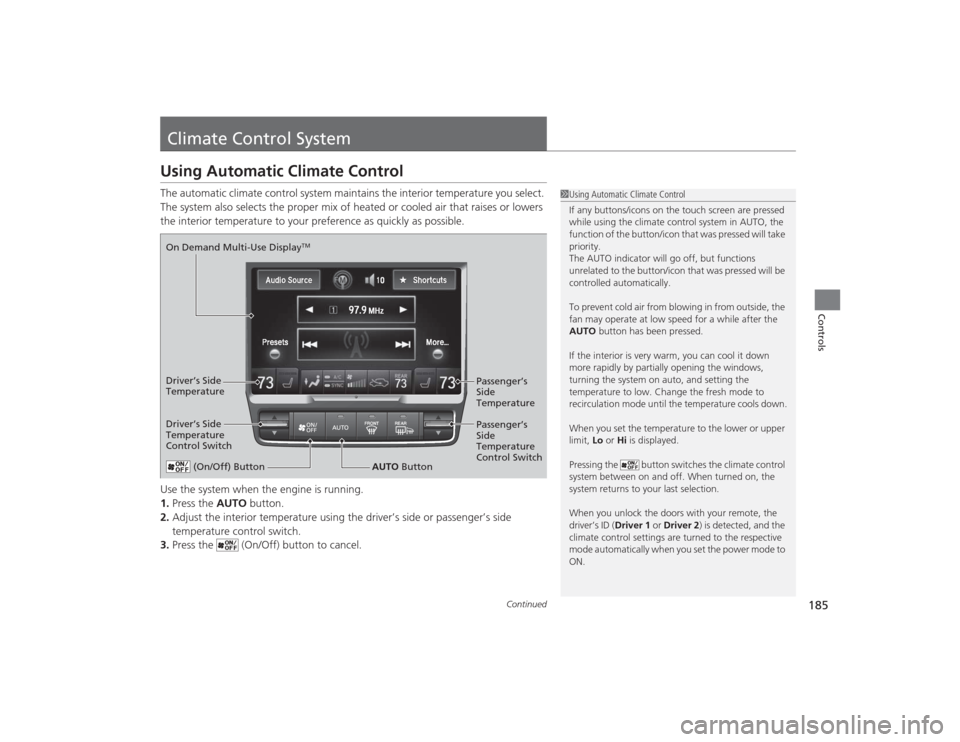
Climate Control SystemUsing Automatic Climate ControlThe automatic climate control system maintains the interior temperature you select.
The system also selects the proper mix of heated or cooled air that raises or lowers
the interior temperature to your preference as quickly as possible.
Use the system when the engine is running.
1.Press the AUTO button.
2. Adjust the interior temperature using the driver’s side or passenger’s side
temperature control switch.
3. Press the (On/Off) button to cancel.
1Using Automatic Climate Control
If any buttons/icons on the touch screen are pressed
while using the climate control system in AUTO, the
function of the button/icon that was pressed will take
priority.
The AUTO indicator will go off, but functions
unrelated to the button/icon that was pressed will be
controlled automatically.
To prevent cold air from blowing in from outside, the
fan may operate at low speed for a while after the
AUTO button has been pressed.
If the interior is very warm, you can cool it down
more rapidly by partially opening the windows,
turning the system on auto, and setting the
temperature to low. Change the fresh mode to
recirculation mode until the temperature cools down.
When you set the temperature to the lower or upper
limit, Lo or Hi is displayed.
Pressing the button switches the climate control
system between on and off. When turned on, the
system returns to your last selection.
When you unlock the doors with your remote, the
driver’s ID ( Driver 1 or Driver 2) is detected, and the
climate control settings are turned to the respective
mode automatically when you set the power mode to
ON.
(On/Off) Button
AUTO Button
On Demand Multi-Use Display
TM
Driver’s Side
Temperature
Control Switch
Passenger’s
Side
Temperature
Control Switch Passenger’s
Side
Temperature
Driver’s Side
Temperature