Ds mode Acura MDX 2016 User Guide
[x] Cancel search | Manufacturer: ACURA, Model Year: 2016, Model line: MDX, Model: Acura MDX 2016Pages: 557, PDF Size: 31.09 MB
Page 16 of 557
15
Quick Reference Guide
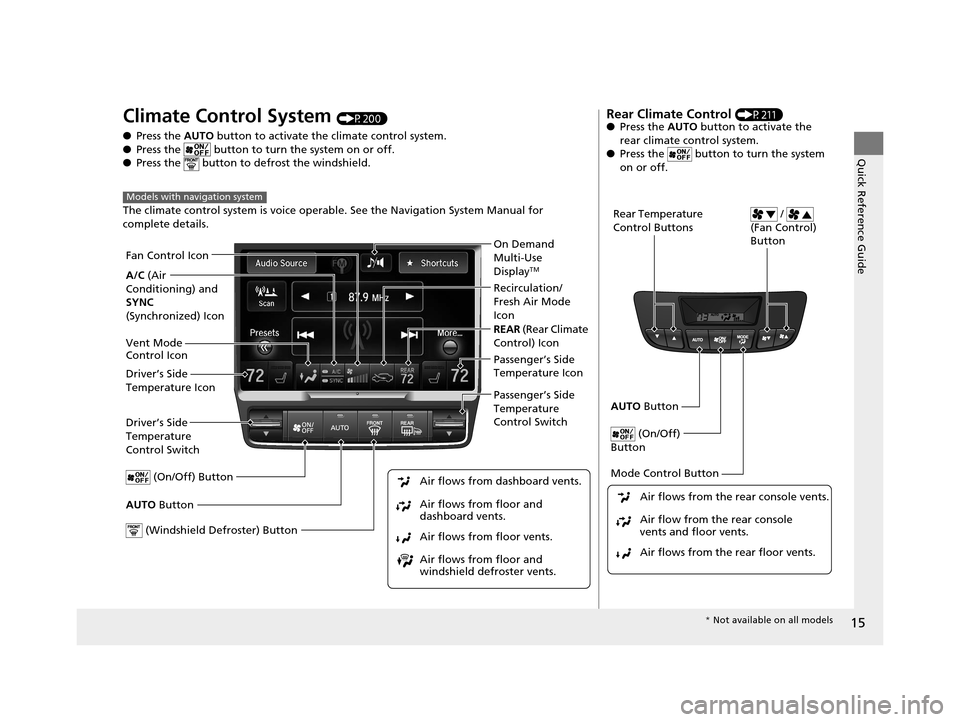
Climate Control System (P200)
● Press the AUTO button to activate th e climate control system.
● Press the button to turn the system on or off.
● Press the button to de frost the windshield.
The climate control system is voice operabl e. See the Navigation System Manual for
complete details.
Models with navigation system
Driver’s Side
Temperature
Control Switch
Air flows from floor and
windshield defroster vents. Air flows from floor vents. Air flows from floor and
dashboard vents. Air flows from dashboard vents.
AUTO Button Passenger’s Side
Temperature
Control Switch
(On/Off) Button
Driver’s Side
Temperature Icon Passenger’s Side
Temperature Icon On Demand
Multi-Use
Display
TM
(Windshield Defroster) Button
A/C
(Air
Conditioning) and
SYNC
(Synchronized) Icon Recirculation/
Fresh Air Mode
Icon
Fan Control Icon
REAR
(Rear Climate
Control) Icon
Vent Mode
Control Icon
Rear Climate Control (P211)
● Press the AUTO button to activate the
rear climate control system.
● Press the button to turn the system
on or off.
Rear Temperature
Control Buttons /
(Fan Control)
Button
AUTO Button
(On/Off)
Button
Mode Control Button
Air flows from the rear floor vents. Air flow from the rear console
vents and floor vents. Air flows from the rear console vents.
* Not available on all models
16 ACURA MDX-31TZ56200.book 15 ページ 2015年3月4日 水曜日 午後2時59分
Page 17 of 557
16
Quick Reference Guide
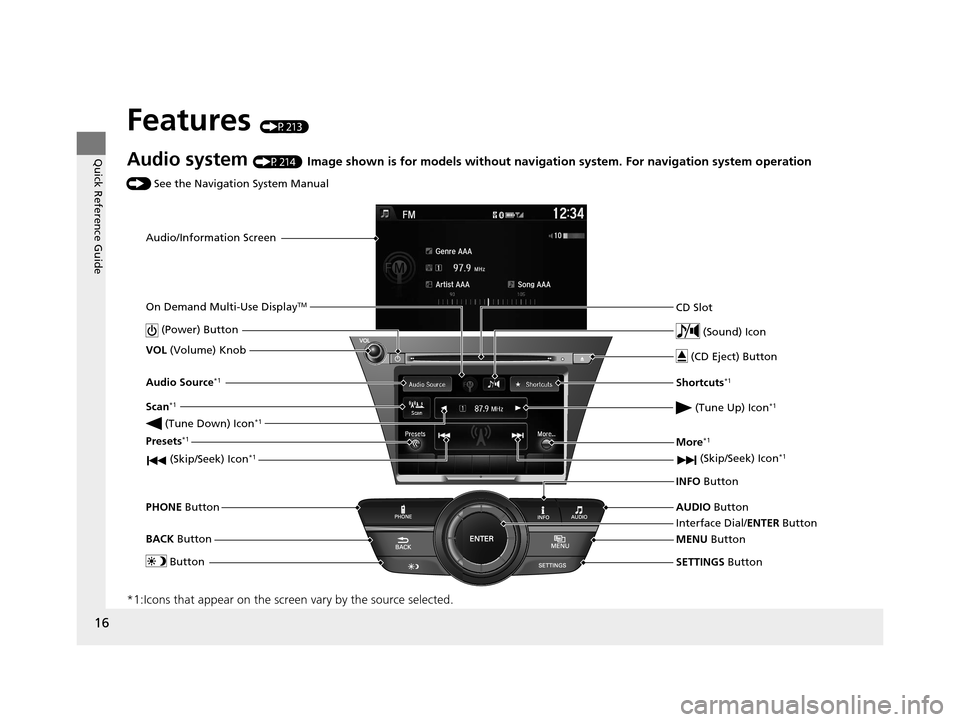
Features (P213)
Audio system (P214) Image shown is for models without navigation system. For navigation system operation
() See the Navigation System Manual
*1:Icons that appear on the screen vary by the source selected.
Audio/Information Screen
Interface Dial/ENTER Button
(Power) Button
CD Slot
(CD Eject) Button
SETTINGS Button
VOL
(Volume) Knob
BACK Button
MENU Button
AUDIO
Button
INFO
Button
On Demand Multi-Use Display
TM
PHONE
Button
(Tune Down) Icon
*1
(Skip/Seek) Icon*1
Audio Source*1
(Skip/Seek) Icon*1
Presets*1
(Tune Up) Icon*1
More*1
Button
Shortcuts*1
(Sound) Icon
Scan*1
16 ACURA MDX-31TZ56200.book 16 ページ 2015年3月4日 水曜日 午後2時59分
Page 18 of 557
17
Quick Reference Guide
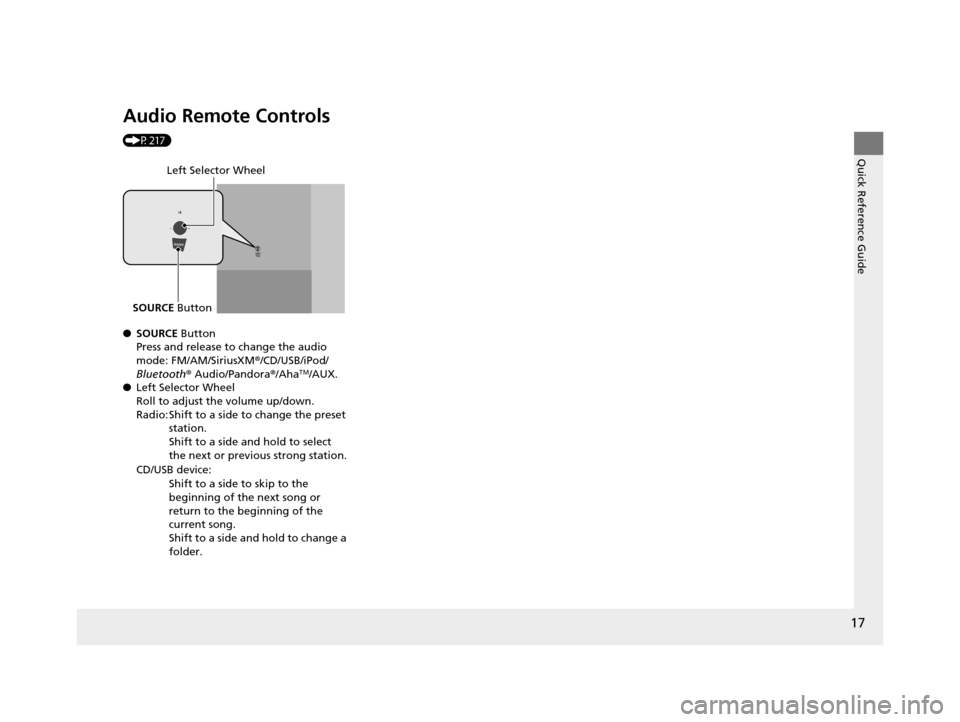
Audio Remote Controls
(P217)
●SOURCE Button
Press and release to change the audio
mode: FM/AM/SiriusXM ®/CD/USB/iPod/
Bluetooth ® Audio/Pandora ®/Aha
TM/AUX.
● Left Selector Wheel
Roll to adjust the volume up/down.
Radio: Shift to a side to change the preset
station.
Shift to a side and hold to select
the next or previous strong station.
CD/USB device: Shift to a side to skip to the
beginning of the next song or
return to the beginning of the
current song.
Shift to a side and hold to change a
folder.
Left Selector Wheel
SOURCE Button
16 ACURA MDX-31TZ56200.book 17 ページ 2015年3月4日 水曜日 午後2時59分
Page 19 of 557
18
Quick Reference Guide
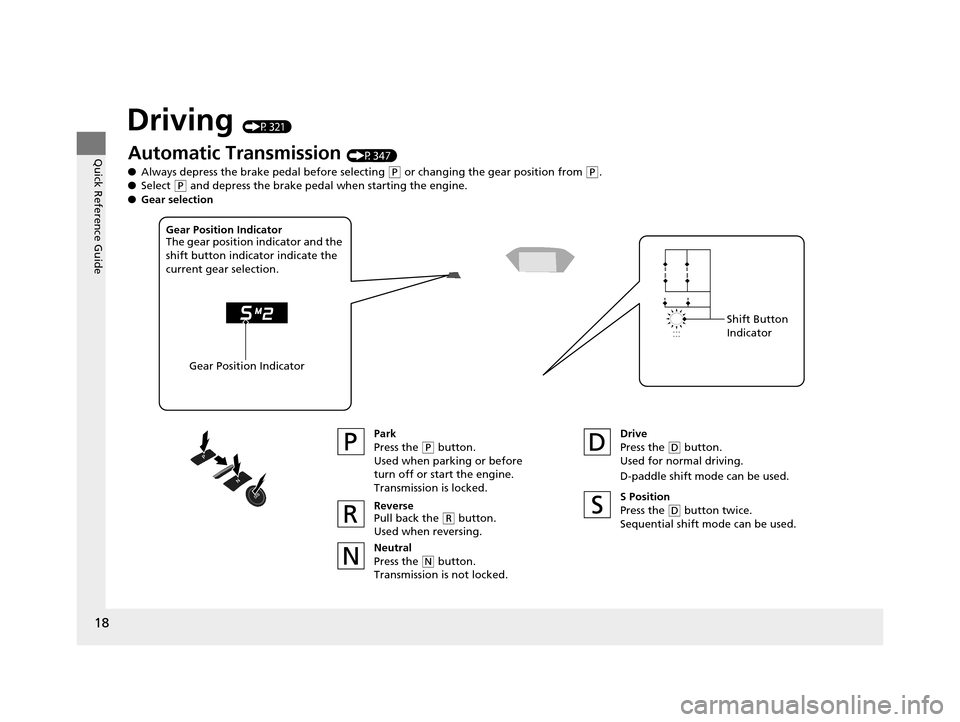
Driving (P321)
Automatic Transmission (P347)
● Always depress the brake pedal before selecting
(P or changing the gear position from (P.
● Select
(P and depress the brake pedal when starting the engine.
Park
Press the
(P button.
Used when parking or before
turn off or start the engine.
Transmission is locked.
Reverse
Pull back the
( R button.
Used when reversing.
Neutral
Press the
( N button.
Transmission is not locked. Drive
Press the
(
D button.
Used for normal driving.
D-paddle shift mode can be used.
Gear Position Indicator
The gear position indicator and the
shift button indicator indicate the
current gear selection.
Gear Position Indicator Shift Button
Indicator
●
Gear selection
S Position
Press the (D button twice.
Sequential shift mode can be used.
16 ACURA MDX-31TZ56200.book 18 ページ 2015年3月4日 水曜日 午後2時59分
Page 20 of 557
19
Quick Reference Guide
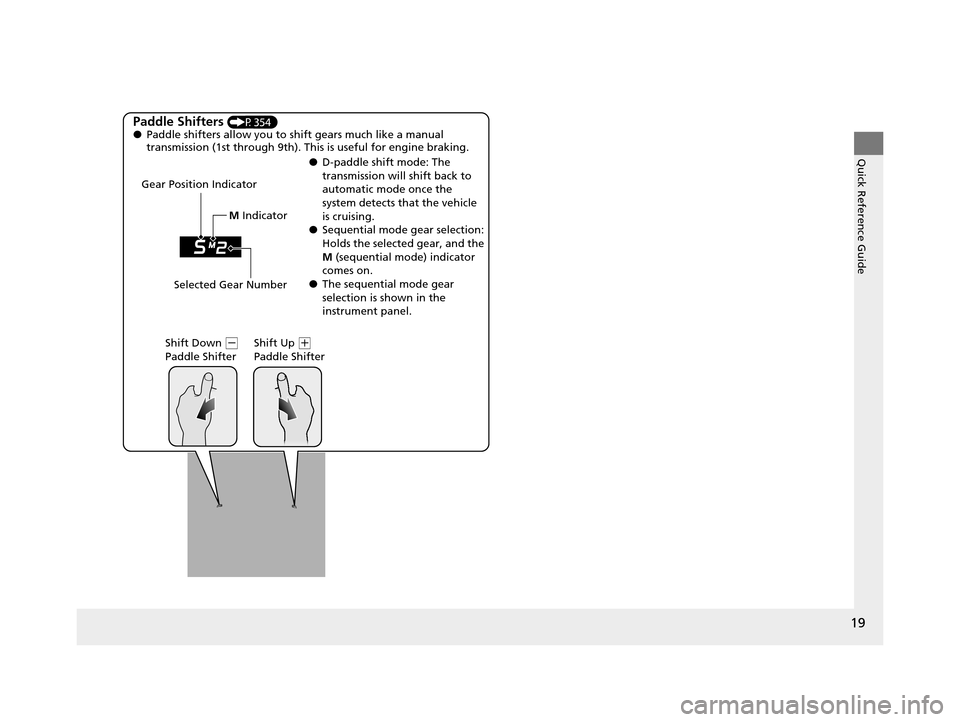
Paddle Shifters (P354)
● Paddle shifters allow you to shift gears much like a manual
transmission (1st through 9th). This is useful for engine braking.
● D-paddle shift mode: The
transmission will shift back to
automatic mode once the
system detects that the vehicle
is cruising.
● Sequential mode gear selection:
Holds the selected gear, and the
M (sequential mode) indicator
comes on.
● The sequential mode gear
selection is shown in the
instrument panel.
Gear Position Indicator
Shift Down
(-
Paddle Shifter Shift Up (
+
Paddle Shifter
Selected Gear Number M
Indicator
16 ACURA MDX-31TZ56200.book 19 ページ 2015年3月4日 水曜日 午後2時59分
Page 22 of 557
21
Quick Reference Guide
Maintenance (P439)
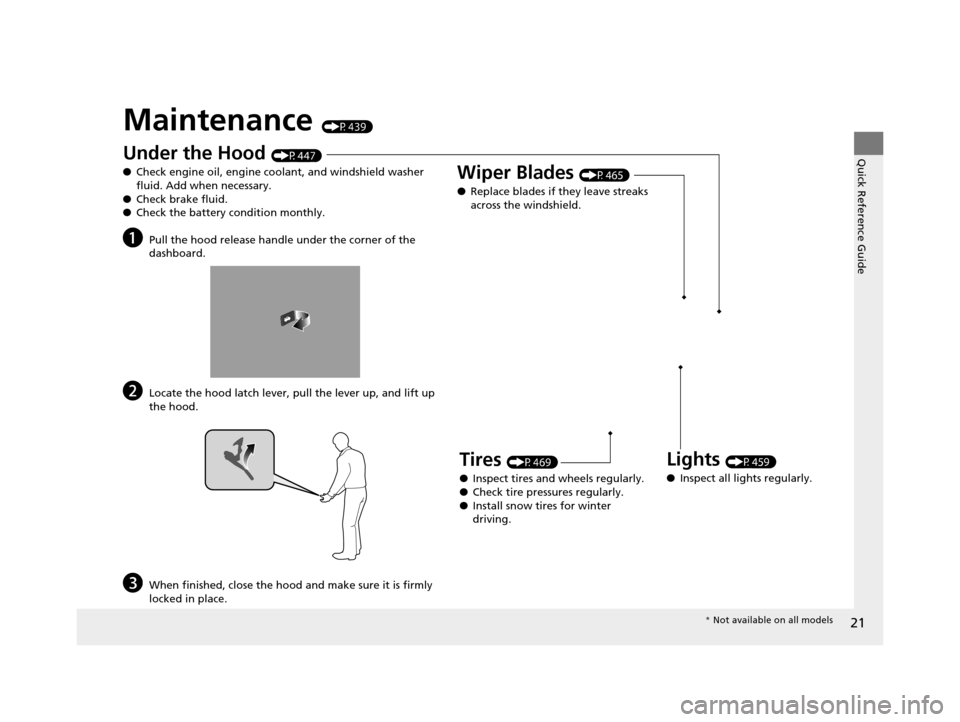
Under the Hood (P447)
● Check engine oil, engine coolant, and windshield washer
fluid. Add when necessary.
● Check brake fluid.
● Check the battery condition monthly.
aPull the hood release handle under the corner of the
dashboard.
bLocate the hood latch lever, pull the lever up, and lift up
the hood.
cWhen finished, close the hood and make sure it is firmly
locked in place.
Lights (P459)
● Inspect all lights regularly.
Wiper Blades (P465)
● Replace blades if they leave streaks
across the windshield.
Tires (P469)
● Inspect tires and wheels regularly.
● Check tire pressures regularly.
● Install snow tires for winter
driving.
* Not available on all models
16 ACURA MDX-31TZ56200.book 21 ページ 2015年3月4日 水曜日 午後2時59分
Page 24 of 557
23
Quick Reference Guide
What to Do If
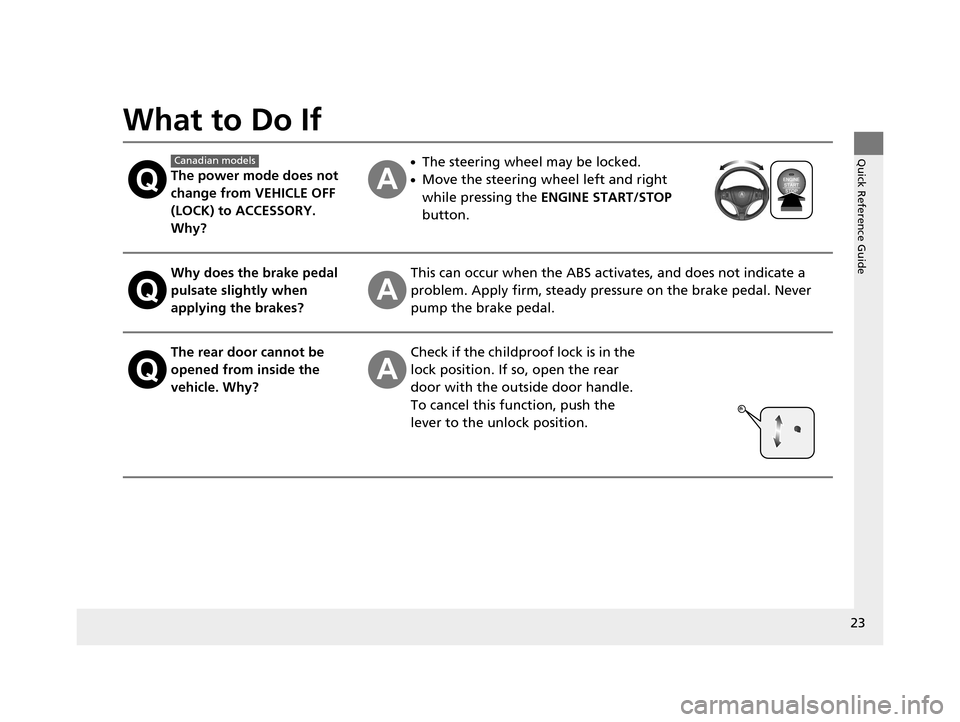
The power mode does not
change from VEHICLE OFF
(LOCK) to ACCESSORY.
Why?
●The steering wheel may be locked.
●Move the steering wheel left and right
while pressing the ENGINE START/STOP
button.
Why does the brake pedal
pulsate slightly when
applying the brakes?This can occur when the ABS activates, and does not indicate a
problem. Apply firm, steady pressure on the brake pedal. Never
pump the brake pedal.
The rear door cannot be
opened from inside the
vehicle. Why?Check if the childproof lock is in the
lock position. If so, open the rear
door with the outside door handle.
To cancel this function, push the
lever to the unlock position.
Canadian models
16 ACURA MDX-31TZ56200.book 23 ページ 2015年3月4日 水曜日 午後2時59分
Page 25 of 557
24
Quick Reference Guide
Why do the doors lock
after I unlocked the doors
using a remote
transmitter?If you do not open the doors within 30 seconds, the doors are
relocked automatically for security.
Why does the beeper
sound when I open the
driver’s door?The beeper sounds when:
●The exterior lights are left on.
●The power mode is in ACCESSORY.
●Auto Idle Stop* is in operation.
Why does the beeper
sound when I start driving?The beeper sounds when:
●Driver and/or front passenger are not wearing their seat belts.
●The parking brake lever is not fully released.
Why does the beeper
sound when I turn the
engine off?The beeper sounds when you turn off the engine with the
driver’s door open.
16 ACURA MDX-31TZ56200.book 24 ページ 2015年3月4日 水曜日 午後2時59分
Page 26 of 557
25
Quick Reference Guide
Why do I hear a screeching
sound when I apply the
brake pedal?The brake pads may need to be replaced. Have your vehicle
inspected by a dealer.
Why does the gear position
automatically change to
(P
when I open the driver’s
door to check for parking
space lines when
reversing?
●Fasten the driver’s seat belt.
●Close the driver’s door and manually change the gear
position. u
When turning o ff the power mode (P350)
Unleaded gasoline with a
Pump Octane Number
(PON) of 91 or higher is
recommended.
Is it possible to use
unleaded gasoline with a
Pump Octane Number
(PON) of 87 or higher on
this vehicle?Unleaded gasoline with a Pump Octane Number (PON) of 91 or
higher is recommended.
Use of lower octane gasoline can cause occasional metallic
knocking noise in the engine and will result in decreased engine
performance.
Use of gasoline with a pump octane less than 87 can lead to
engine damage.
* Not available on all models
16 ACURA MDX-31TZ56200.book 25 ページ 2015年3月4日 水曜日 午後2時59分
Page 32 of 557
31
uuFor Safe Driving uYour Vehicle’s Safety Features
Continued
Safe Driving
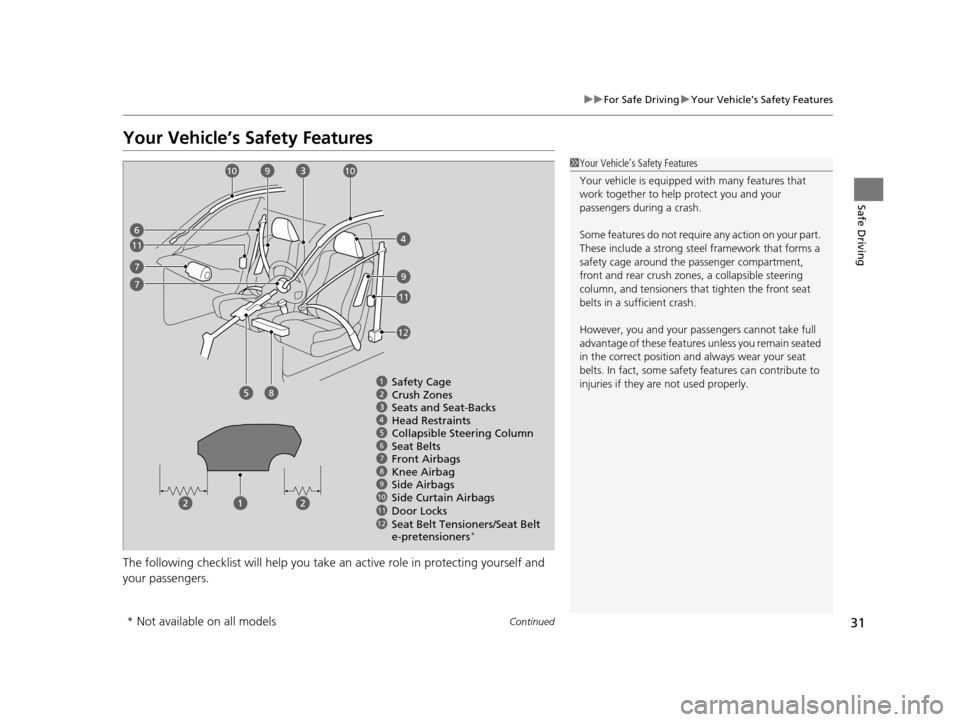
Your Vehicle’s Safety Features
The following checklist will help you take an active role in protecting yourself and
your passengers.
1Your Vehicle’s Safety Features
Your vehicle is equipped wi th many features that
work together to help protect you and your
passengers during a crash.
Some features do not require any action on your part.
These include a strong steel framework that forms a
safety cage around the passenger compartment,
front and rear crush zone s, a collapsible steering
column, and tensioners that tighten the front seat
belts in a sufficient crash.
However, you and your passe ngers cannot take full
advantage of these features unless you remain seated
in the correct position and always wear your seat
belts. In fact, some safety features can contribute to
injuries if they are not used properly.
678910
12
Safety Cage
Crush Zones
Seats and Seat-Backs
Head Restraints
Collapsible Steering Column
Seat Belts
Front Airbags
Side Curtain Airbags
Door Locks Side Airbags
11
Seat Belt Tensioners/Seat Belt
e-pretensioners*
6
7
8
9
9
10
11
11
12
7
Knee Airbag
10
* Not available on all models
16 ACURA MDX-31TZ56200.book 31 ページ 2015年3月4日 水曜日 午後2時59分