rear Acura MDX 2016 Owner's Guide
[x] Cancel search | Manufacturer: ACURA, Model Year: 2016, Model line: MDX, Model: Acura MDX 2016Pages: 557, PDF Size: 31.09 MB
Page 139 of 557

138
uuLocking and Unlocking the Doors uLocking/Unlocking the Doors from the Inside
Controls
Locking/Unlocking the Doors from the Inside
■Locking a door
Push the lock tab forward.
■Unlocking a door
Pull the lock tab rearward.
■Using the Lock Tab1 Using the Lock Tab
When you lock the door using the lock tab on the
driver’s door, all the other d oors and tailgate lock at
the same time.
When you unlock the door using the lock tab on the
driver’s door, only the driv er’s door will unlock.
To Unlock
Lock TabTo Lock
16 ACURA MDX-31TZ56200.book 138 ページ 2015年3月4日 水曜日 午後2時59分
Page 140 of 557

Continued139
uuLocking and Unlocking the Doors uLocking/Unlocking the Doors from the Inside
Controls
Pull the front door inner handle.
u The door unlocks and opens in one
motion.
Unlocking and opening the driver’s door from the inner handle unlocks all the other
doors.
To avoid all the doors to be unlocked, use the lock tab on the driver’s door to unlock,
then lock again before opening the door. u This setting works for one time only. If you do not want all the doors to be
unlocked all the time, customize the Auto Door Unlock setting to Off using
the MID or audio/information screen.
■Unlocking Using the Front Door Inner Handle1 Unlocking Using the Front Door Inner Handle
The front door inne r handles are designed to allow
front seat occupants to open the door in one motion.
However this feature requires that front seat
occupants never pull a front door inner handle while
the vehicle is in motion.
Children should always ride in a rear seat where
childproof door locks are provided.
2 Childproof Door Locks P. 140
Inner Handle
16 ACURA MDX-31TZ56200.book 139 ページ 2015年3月4日 水曜日 午後2時59分
Page 141 of 557

uuLocking and Unlocking the Doors uChildproof Door Locks
140
Controls
Press the master door lock switch in as shown
to lock or unlock all doors and the tailgate.
Childproof Door Locks
The childproof door locks prevent the rear doors from being opened from the inside
regardless of the position of the lock tab.
Slide the lever in the rear door to the lock
position, and close the door.
■When opening the door
Open the door using the outside door handle.
■Using the Master Door Lock Switch1 Using the Master Door Lock Switch
When you lock/unlock eith er front door using the
master door lock switch , all the other doors and
tailgate lock/unlock at the same time.
To Unlock
Master Door Lock Switch
To Lock
■Setting the Childproof Door Locks
1Childproof Door Locks
To open the door from the inside when the
childproof door lock is on, put the lock tab in the
unlock position, lower the rear window, put your
hand out of the window, and pull the outside door
handle.
Lock Unlock
16 ACURA MDX-31TZ56200.book 140 ページ 2015年3月4日 水曜日 午後2時59分
Page 153 of 557
152
Controls
Opening and Closing the Windows
Opening/Closing the Power Windows
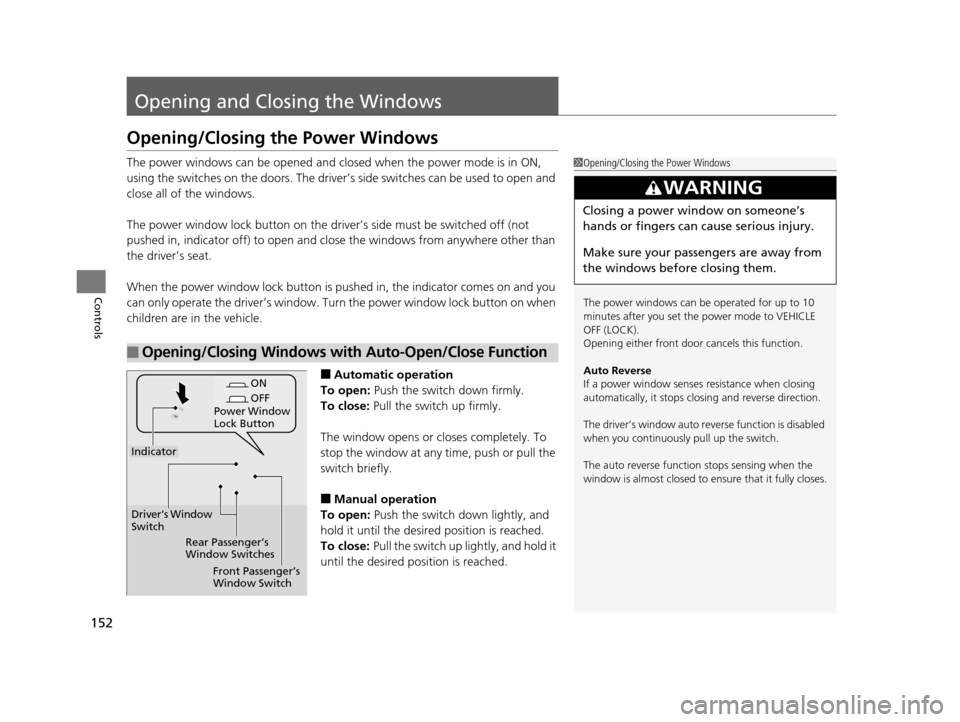
The power windows can be opened and closed when the power mode is in ON,
using the switches on the doors. The driver’s side switches can be used to open and
close all of the windows.
The power window lock button on the driver’s side must be switched off (not
pushed in, indicator off) to open and close the windows from anywhere other than
the driver’s seat.
When the power window lock button is pu shed in, the indicator comes on and you
can only operate the driver’s window. Turn the power window lock button on when
children are in the vehicle.
■Automatic operation
To open: Push the switch down firmly.
To close: Pull the switch up firmly.
The window opens or cl oses completely. To
stop the window at any time, push or pull the
switch briefly.
■Manual operation
To open: Push the switch down lightly, and
hold it until the desired position is reached.
To close: Pull the switch up lightly, and hold it
until the desired position is reached.
■Opening/Closing Windows with Auto-Open/Close Function
1 Opening/Closing the Power Windows
The power windows can be operated for up to 10
minutes after you set the power mode to VEHICLE
OFF (LOCK).
Opening either front door cancels this function.
Auto Reverse
If a power window senses resistance when closing
automatically, it stops clos ing and reverse direction.
The driver’s window auto re verse function is disabled
when you continuously pull up the switch.
The auto reverse function stops sensing when the
window is almost closed to en sure that it fully closes.
3WARNING
Closing a power window on someone’s
hands or fingers can cause serious injury.
Make sure your passengers are away from
the windows before closing them.
ON
OFF
Power Window
Lock Button
Rear Passenger’s
Window Switches
Front Passenger’s
Window Switch
Driver’s Window
Switch
Indicator
16 ACURA MDX-31TZ56200.book 152 ページ 2015年3月4日 水曜日 午後2時59分
Page 160 of 557
159
uuOperating the Switches Around the Steering Wheel uLight Switches
Continued
Controls
Light Switches
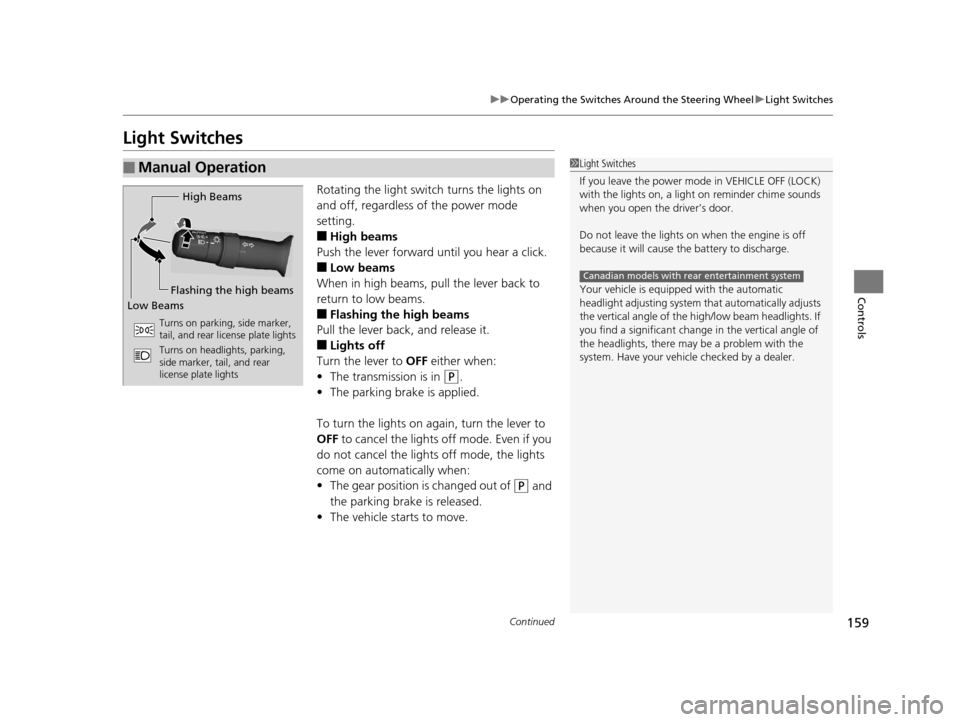
Rotating the light switch turns the lights on
and off, regardless of the power mode
setting.
■High beams
Push the lever forward until you hear a click.
■Low beams
When in high beams, pull the lever back to
return to low beams.
■Flashing the high beams
Pull the lever back, and release it.
■Lights off
Turn the lever to OFF either when:
• The transmission is in
(P.
• The parking brake is applied.
To turn the light s on again, turn the lever to
OFF to cancel the lights off mode. Even if you
do not cancel the lights off mode, the lights
come on automatically when:
• The gear position is changed out of
(P and
the parking brake is released.
• The vehicle starts to move.
■Manual Operation1Light Switches
If you leave the power mode in VEHICLE OFF (LOCK)
with the lights on, a light on reminder chime sounds
when you open the driver’s door.
Do not leave the lights on when the engine is off
because it will cause the battery to discharge.
Your vehicle is equipped with the automatic
headlight adjusting system that automatically adjusts
the vertical angle of the high/low beam headlights. If
you find a significant change in the vertical angle of
the headlights, there may be a problem with the
system. Have your vehicle checked by a dealer.
Canadian models with rear entertainment system
High Beams
Flashing the high beams
Low Beams
Turns on parking, side marker,
tail, and rear license plate lights
Turns on headlights, parking,
side marker, tail, and rear
license plate lights
16 ACURA MDX-31TZ56200.book 159 ページ 2015年3月4日 水曜日 午後2時59分
Page 166 of 557

Continued165
uuOperating the Switches Around the Steering Wheel uWipers and Washers
Controls
The rear wiper and washer can be used when
the power mode is in ON.
■Wiper switch (OFF, INT, ON)
Change the wiper switch setting according to
the amount of rain.
■Washer ( )
Sprays while you rotate the switch to this
position.
Hold it to activate th e wiper and to spray the
washer. Once released, it stops operating
after a few more sweeps.
■Operating in reverse
When you select the transmission to
(R with the front wiper activated, the rear
wiper operates automati cally as follows even if its switch is off.
■Rear Wiper/Washer1Wipers and Washers
If the wiper stops operating due to any obstacle such
as the build-up of snow, pa rk the vehicle in a safe
place.
Rotate the wipe r switch to OFF, and set the power
mode to ACCESSORY or VEHICLE OFF (LOCK), then
remove the obstacle.
INT: Intermittent
OFF ON : Continuous wipe
Washer
Front Wiper Operation Rear Wiper Operation
IntermittentIntermittent
Low speed wipe
High speed wipe Continuous
16 ACURA MDX-31TZ56200.book 165 ページ 2015年3月4日 水曜日 午後2時59分
Page 169 of 557
168
uuOperating the Switches Around the Steering Wheel uDefogger/Heated Door Mirror
Controls
Defogger/Heated Door Mirror
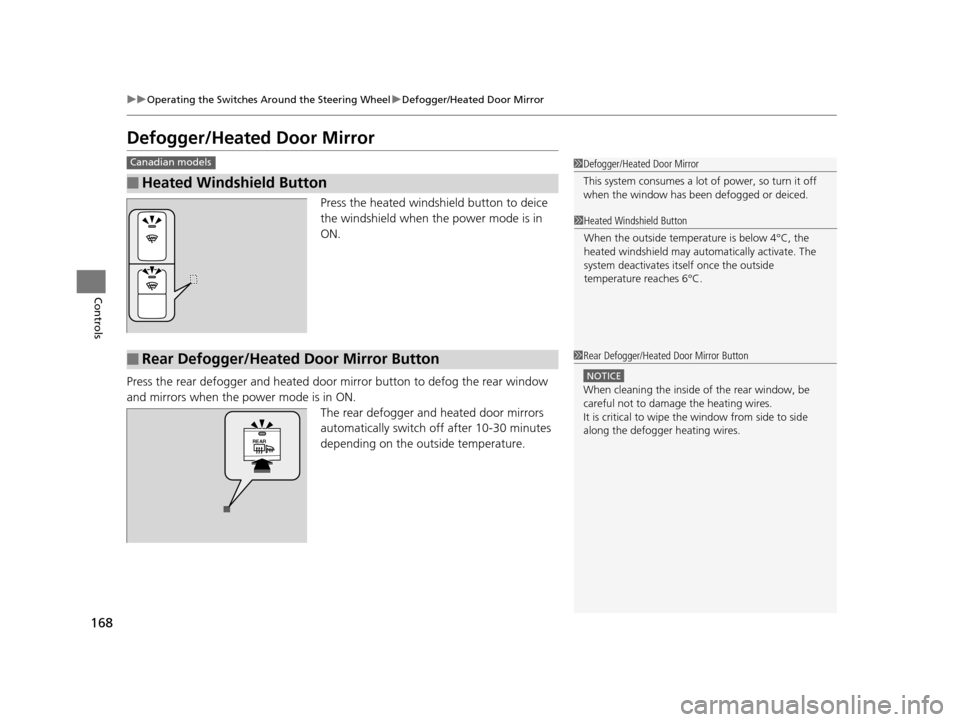
Press the heated windshield button to deice
the windshield when the power mode is in
ON.
Press the rear defogger and heated door mirror button to defog the rear window
and mirrors when the power mode is in ON. The rear defogger and heated door mirrors
automatically switch off after 10-30 minutes
depending on the outside temperature.
■Heated Windshield Button
Canadian models1Defogger/Heated Door Mirror
This system consumes a lot of power, so turn it off
when the window has been defogged or deiced.
1 Heated Windshield Button
When the outside temperature is below 4°C, the
heated windshield may auto matically activate. The
system deactivates itself once the outside
temperature reaches 6°C.
■Rear Defogger/Heated Door Mirror Button1 Rear Defogger/Heated Door Mirror Button
NOTICE
When cleaning the inside of the rear window, be
careful not to damage the heating wires.
It is critical to wipe the window from side to side
along the defogger heating wires.
16 ACURA MDX-31TZ56200.book 168 ページ 2015年3月4日 水曜日 午後2時59分
Page 170 of 557
169
uuOperating the Switches Around the Steering Wheel uDriving Position Memory System
Continued
Controls
Driving Position Memory System
You can store two driver’s seat (except for power lumbar), steering wheel and door
mirror positions with the driv ing position memory system.
When you unlock and open the driver’s door with a remote transmitter, or keyless
access system, the seat and door mirrors adjust automatically to one of the two
preset positions.
The steering wheel will move to the stored position when you set the power mode
to ACCESSORY.
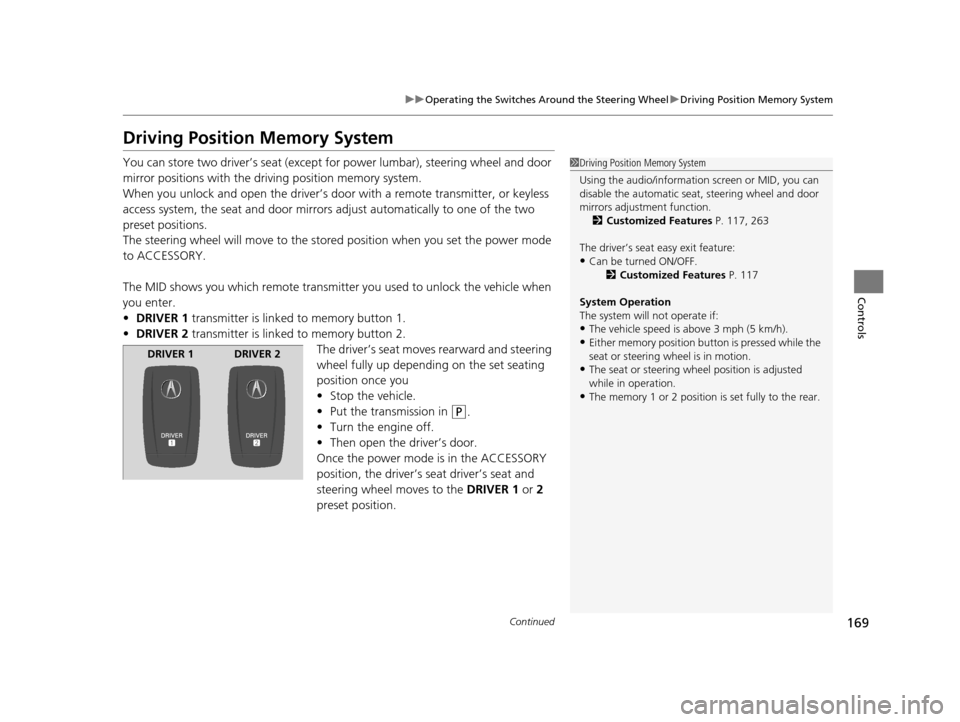
The MID shows you which remote transmitter you used to unlock the vehicle when
you enter.
• DRIVER 1 transmitter is linked to memory button 1.
• DRIVER 2 transmitter is linked to memory button 2.
The driver’s seat moves rearward and steering
wheel fully up depending on the set seating
position once you
•Stop the vehicle.
• Put the transmission in
(P.
• Turn the engine off.
• Then open the driver’s door.
Once the power mode is in the ACCESSORY
position, the driver’s s eat driver’s seat and
steering wheel moves to the DRIVER 1 or 2
preset position.
1 Driving Position Memory System
Using the audio/information screen or MID, you can
disable the automatic seat, steering wheel and door
mirrors adjustment function. 2 Customized Features P. 117, 263
The driver’s seat easy exit feature:
•Can be turned ON/OFF. 2Customized Features P. 117
System Operation
The system will not operate if:
•The vehicle speed is above 3 mph (5 km/h).•Either memory position button is pressed while the
seat or steering wheel is in motion.
•The seat or steering wheel position is adjusted
while in operation.
•The memory 1 or 2 position is set fully to the rear.
DRIVER 1 DRIVER 2
16 ACURA MDX-31TZ56200.book 169 ページ 2015年3月4日 水曜日 午後2時59分
Page 173 of 557
172
Controls
Adjusting the Mirrors
Interior Rearview Mirror
Adjust the angle of the rearview mirror when you are sitting in the correct driving
position.
When driving after dark, the automatic
dimming rearview mirror and power door
mirrors
* reduce the glare from headlights
behind you.
■Automatic Dimming Rearview Mirror and Power Door
Mirrors
*
1 Adjusting the Mirrors
Keep the inside and out side mirrors clean and
adjusted for best visibility.
Adjust the mirrors befo re you start driving.
2 Adjusting the Seat Positions P. 175
1Automatic Dimming Rearview Mirror and Power Door Mirrors*
The auto dimming function cancels when the
transmission is in
(R.
* Not available on all models
16 ACURA MDX-31TZ56200.book 172 ページ 2015年3月4日 水曜日 午後2時59分
Page 179 of 557
uuAdjusting the Seats uAdjusting the Seat Positions
178
Controls
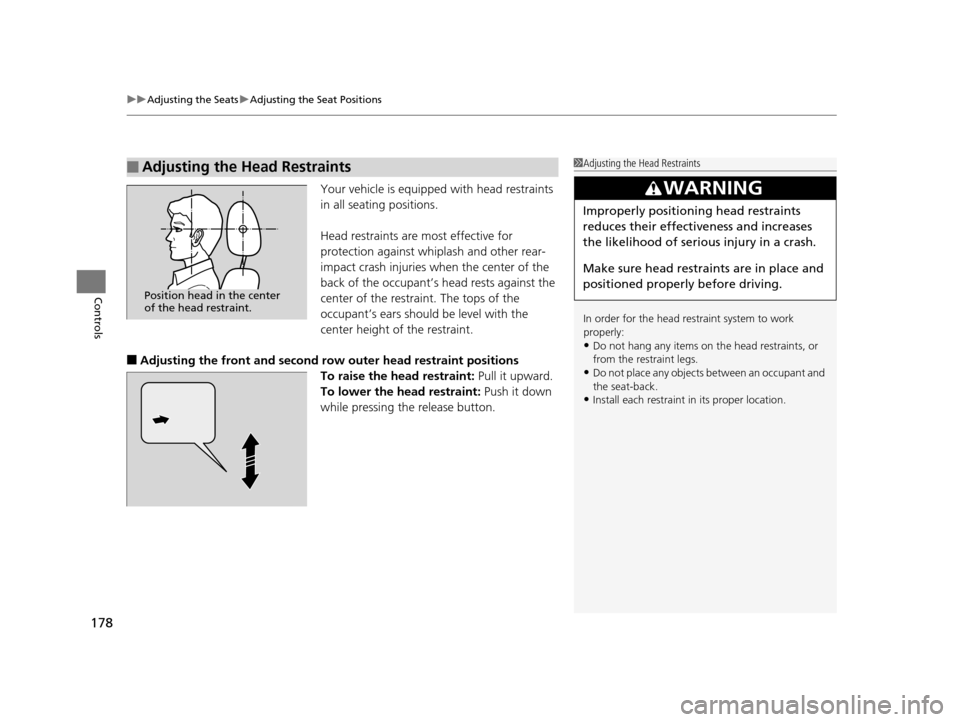
Your vehicle is equipped with head restraints
in all seating positions.
Head restraints are most effective for
protection against whiplash and other rear-
impact crash injuries when the center of the
back of the occupant’s head rests against the
center of the restraint. The tops of the
occupant’s ears should be level with the
center height of the restraint.
■Adjusting the front and second row outer head rest raint positions
To raise the head restraint: Pull it upward.
To lower the head restraint: Push it down
while pressing the release button.
■Adjusting the Head Restraints1 Adjusting the Head Restraints
In order for the head restraint system to work
properly:
•Do not hang any items on the head restraints, or
from the restraint legs.
•Do not place any objects between an occupant and
the seat-back.
•Install each restraint in its proper location.
3WARNING
Improperly positioning head restraints
reduces their effectiveness and increases
the likelihood of serious injury in a crash.
Make sure head restraints are in place and
positioned properly before driving.
Position head in the center
of the head restraint.
16 ACURA MDX-31TZ56200.book 178 ページ 2015年3月4日 水曜日 午後2時59分