rear Acura MDX 2016 Workshop Manual
[x] Cancel search | Manufacturer: ACURA, Model Year: 2016, Model line: MDX, Model: Acura MDX 2016Pages: 557, PDF Size: 31.09 MB
Page 209 of 557
208
uuClimate Control System uRear Climate Control System
Controls
Rear Climate Control System
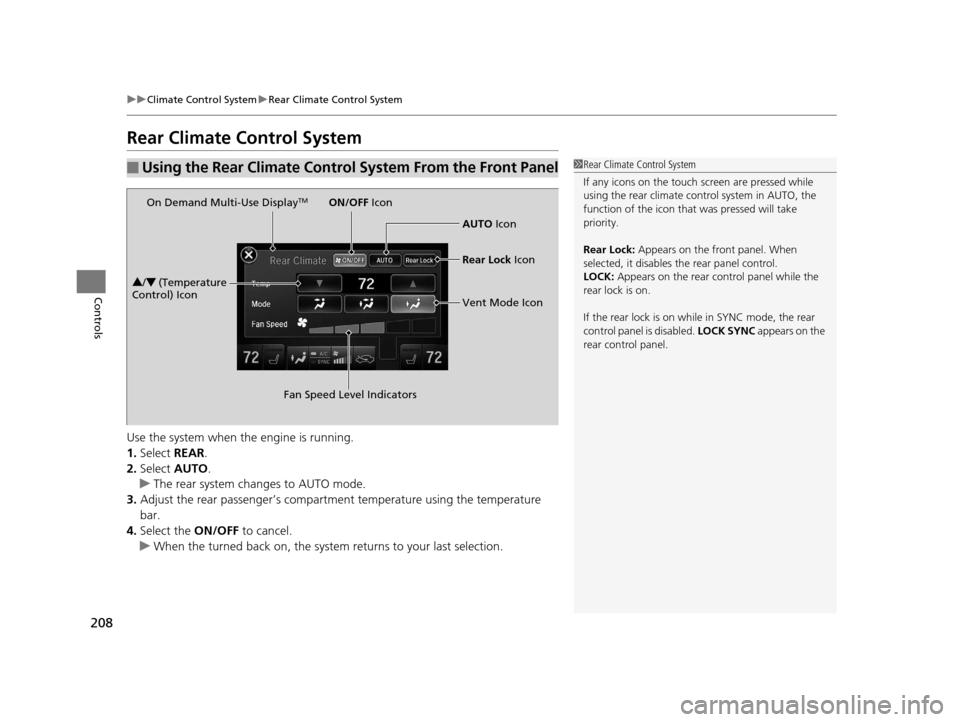
Use the system when the engine is running.
1. Select REAR.
2. Select AUTO.
u The rear system changes to AUTO mode.
3. Adjust the rear passenger’s compartment temperature using the temperature
bar.
4. Select the ON/OFF to cancel.
u When the turned back on, the system returns to your last selection.
■Using the Rear Climate Control System From the Front Panel1Rear Climate Control System
If any icons on the touch screen are pressed while
using the rear climate control system in AUTO, the
function of the icon that was pressed will take
priority.
Rear Lock: Appears on the front panel. When
selected, it disables the rear panel control.
LOCK: Appears on the rear c ontrol panel while the
rear lock is on.
If the rear lock is on while in SYNC mode, the rear
control panel is disabled. LOCK SYNC appears on the
rear control panel.
On Demand Multi-Use DisplayTM
3 /4 (Temperature
Control) Icon
Fan Speed Level IndicatorsON/OFF
Icon
AUTO Icon
Rear Lock Icon
Vent Mode Icon
16 ACURA MDX-31TZ56200.book 208 ページ 2015年3月4日 水曜日 午後2時59分
Page 210 of 557
Continued209
uuClimate Control System uRear Climate Control System
Controls
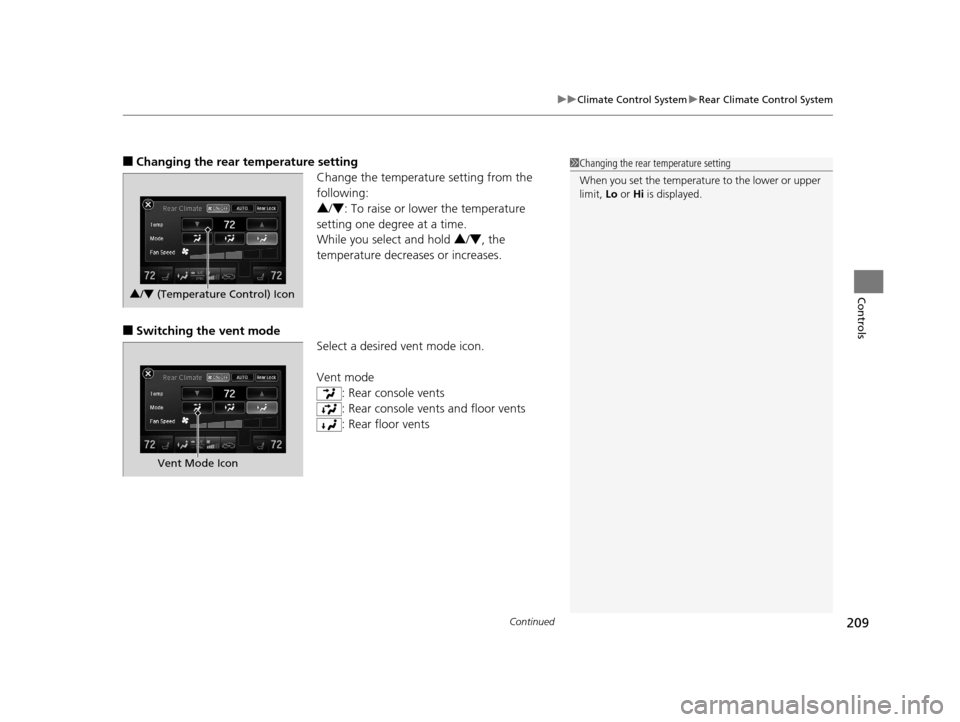
■Changing the rear temperature setting
Change the temperature setting from the
following:
3/4 : To raise or lower the temperature
setting one degree at a time.
While you select and hold 3 /4 , the
temperature decreases or increases.
■Switching the vent mode Select a desired vent mode icon.
Vent mode: Rear console vents
: Rear console vents and floor vents
: Rear floor vents
1Changing the rear temperature setting
When you set the temperature to the lower or upper
limit, Lo or Hi is displayed.
3/4 (Temperature Control) Icon
Vent Mode Icon
16 ACURA MDX-31TZ56200.book 209 ページ 2015年3月4日 水曜日 午後2時59分
Page 211 of 557
210
uuClimate Control System uRear Climate Control System
Controls
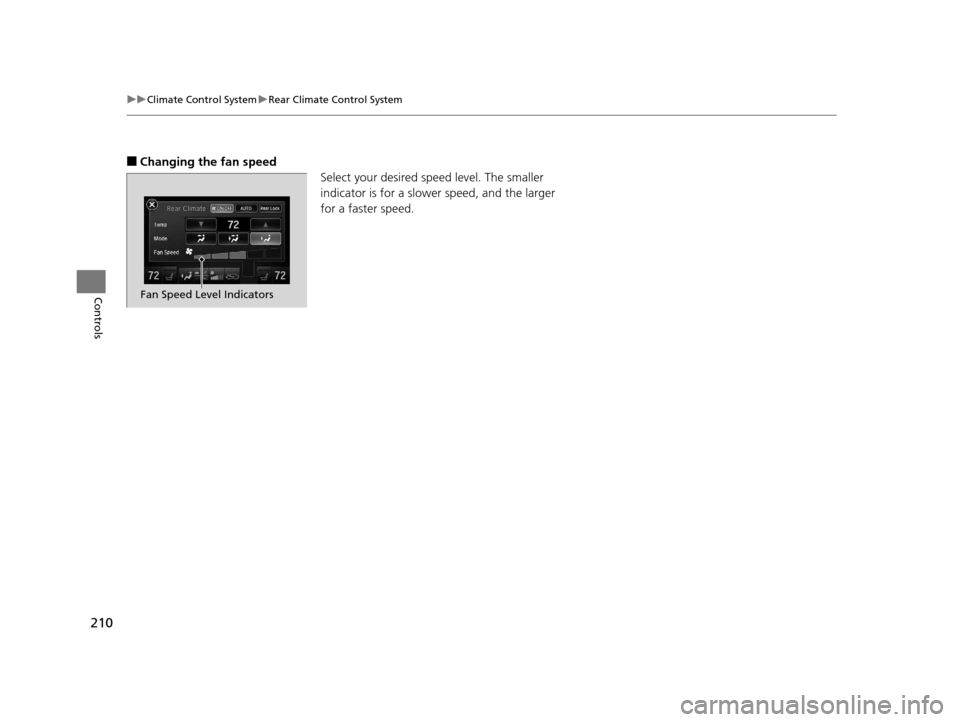
■Changing the fan speed
Select your desired speed level. The smaller
indicator is for a slower speed, and the larger
for a faster speed.
Fan Speed Level Indicators
16 ACURA MDX-31TZ56200.book 210 ページ 2015年3月4日 水曜日 午後2時59分
Page 212 of 557
211
uuClimate Control System uRear Climate Control System
Controls
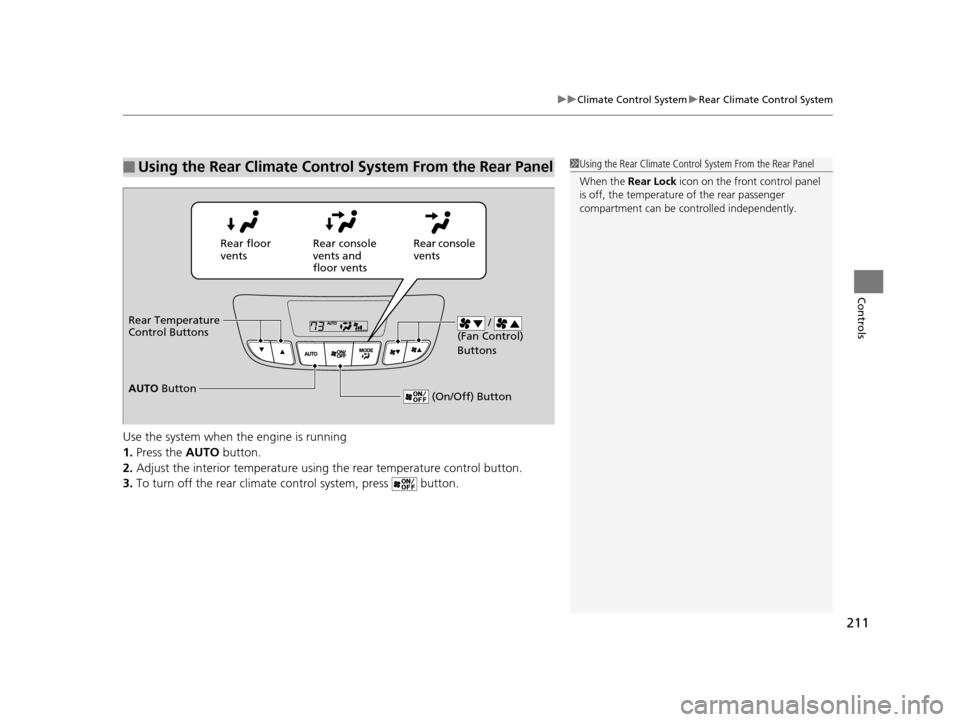
Use the system when the engine is running
1. Press the AUTO button.
2. Adjust the interior temperature usi ng the rear temperature control button.
3. To turn off the rear climate control system, press button.
■Using the Rear Climate Control System From the Rear Panel1Using the Rear Climate Control System From the Rear Panel
When the Rear Lock icon on the front control panel
is off, the temperature of the rear passenger
compartment can be cont rolled independently.
Rear floor
ventsRear console
vents and
floor vents Rear console
vents
/
(Fan Control)
Buttons
(On/Off) Button
Rear Temperature
Control Buttons
AUTO Button
16 ACURA MDX-31TZ56200.book 211 ページ 2015年3月4日 水曜日 午後2時59分
Page 215 of 557
214
Features
Audio System
About Your Audio System
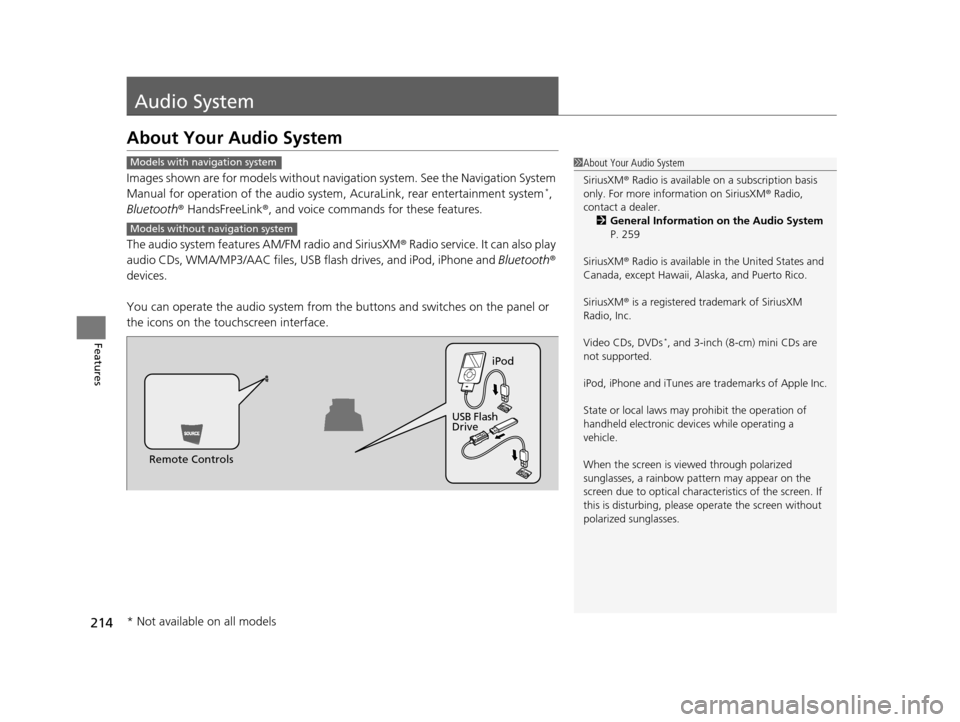
Images shown are for models without navigation system. See the Navigation System
Manual for operation of the audio system , AcuraLink, rear entertainment system*,
Bluetooth ® HandsFreeLink ®, and voice commands for these features.
The audio system features AM/FM radio and SiriusXM ® Radio service. It can also play
audio CDs, WMA/MP3/AAC files, USB flash drives, and iPod, iPhone and Bluetooth®
devices.
You can operate the audio system from the buttons and switches on the panel or
the icons on the touchscreen interface.
1 About Your Audio System
SiriusXM ® Radio is available on a subscription basis
only. For more information on SiriusXM ® Radio,
contact a dealer.
2 General Information on the Audio System
P. 259
SiriusXM ® Radio is available in the United States and
Canada, except Ha waii, Alaska, and Puerto Rico.
SiriusXM ® is a registered trademark of SiriusXM
Radio, Inc.
Video CDs, DVDs
*, and 3-inch (8-cm) mini CDs are
not supported.
iPod, iPhone and iTunes are trademarks of Apple Inc.
State or local laws may pr ohibit the operation of
handheld electronic devi ces while operating a
vehicle.
When the screen is vi ewed through polarized
sunglasses, a rainbow pa ttern may appear on the
screen due to optical characteristics of the screen. If
this is disturbing, please operate the screen without
polarized sunglasses.
Models with navigation system
Models without navigation system
Remote Controls iPod
USB Flash
Drive
* Not available on all models
16 ACURA MDX-31TZ56200.book 214 ページ 2015年3月4日 水曜日 午後2時59分
Page 275 of 557
274
uuCustomized Features u
Features
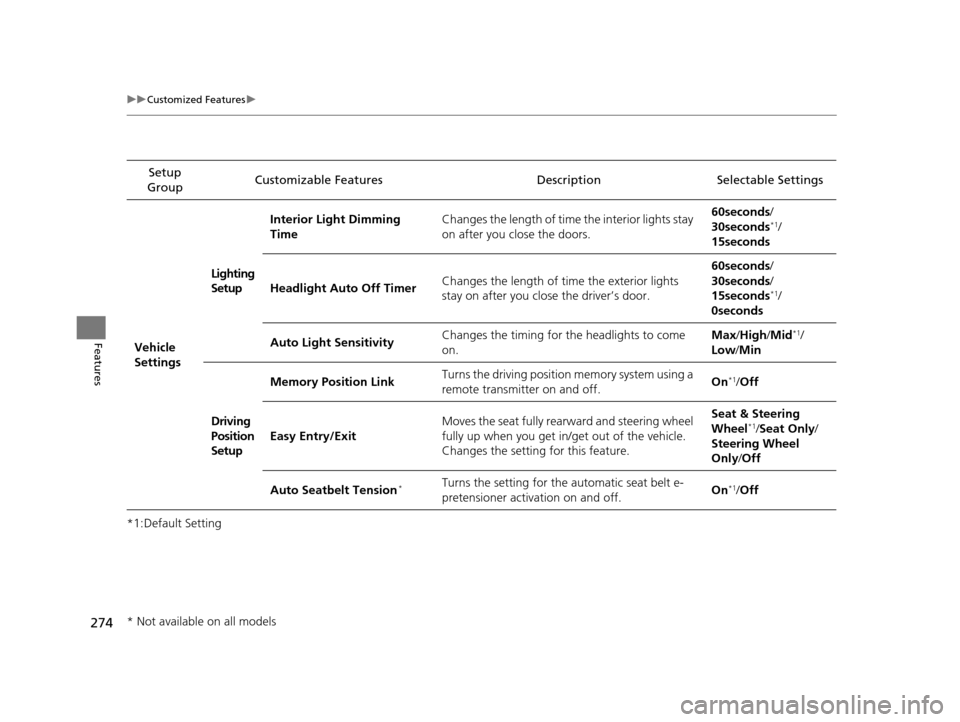
*1:Default SettingSetup
Group Customizable Features Descri
ption Selectable Settings
Vehicle
Settings Lighting
Setup
Interior Light Dimming
Time
Changes the length of time the interior lights stay
on after you close the doors. 60seconds/
30seconds
*1/
15seconds
Headlight Auto Off Timer Changes the length of time the exterior lights
stay on after you close the driver’s door. 60seconds/
30seconds/
15seconds
*1/
0seconds
Auto Light Sensitivity Changes the timing for the headlights to come
on. Max
/High /Mid
*1/
Low /Min
Driving
Position
Setup Memory Position Link
Turns the driving position
m e m o r y s y s t e m u s i n g a
remote transmitter on and off. On
*1/
Off
Easy Entry/Exit Moves the seat fully rearward and steering wheel
fully up when you get in/get out of the vehicle.
Changes the setting for this feature. Seat & Steering
Wheel
*1/
Seat Only /
Steering Wheel
Only /Off
Auto Seatbelt Tension
*Turns the setting for the automatic seat belt e-
pretensioner activation on and off. On*1/
Off
* Not available on all models
16 ACURA MDX-31TZ56200.book 274 ページ 2015年3月4日 水曜日 午後2時59分
Page 277 of 557
276
uuCustomized Features u
Features
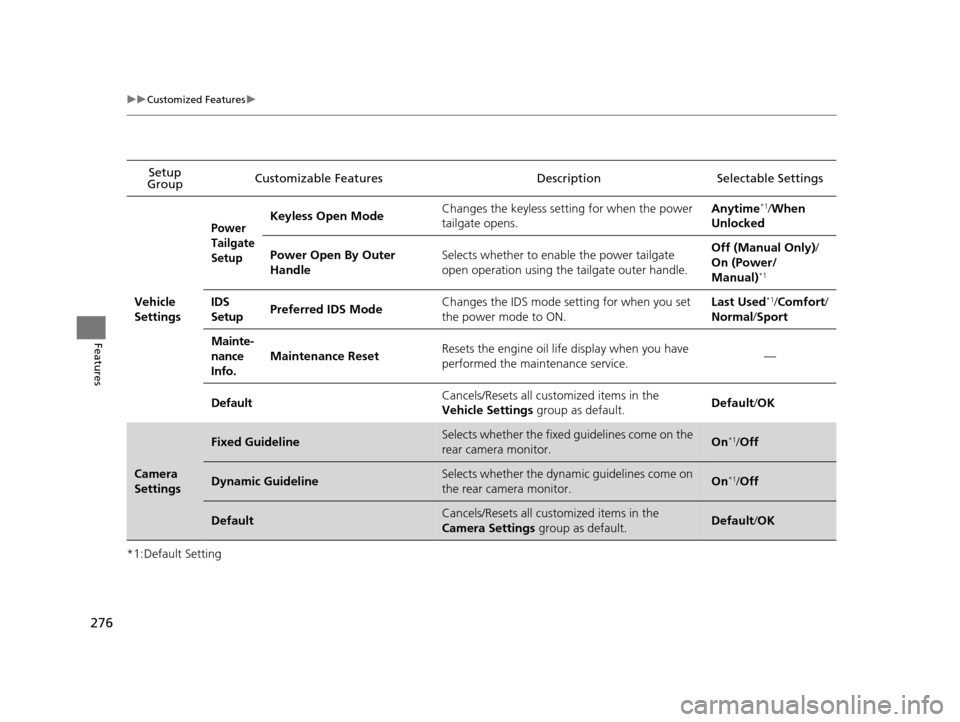
*1:Default SettingSetup
Group Customizable Features Descri
ption Selectable Settings
Vehicle
Settings
Power
Tailgate
SetupKeyless Open Mode Changes the keyless setting for when the power
tailgate opens. Anytime*1/
When
Unlocked
Power Open By Outer
Handle Selects whether to enable the power tailgate
open operation using the tailgate outer handle. Off (Manual Only)
/
On (Power/
Manual)
*1
IDS
Setup Preferred IDS Mode Changes the IDS mode setting for when you set
the power mode to ON. Last Used*1/
Comfort/
Normal /Sport
Mainte-
nance
Info. Maintenance Reset
Resets the engine oil life display when you have
performed the maintenance service.
—
Default Cancels/Resets all cust
omized items in the
Vehicle Settings group as default. Default
/OK
Camera
Settings
Fixed GuidelineSelects whether the fixed guidelines come on the
rear camera monitor.On*1/ Off
Dynamic GuidelineSelects whether the dynamic guidelines come on
the rear camera monitor.On*1/Off
DefaultCancels/Resets all cust omized items in the
Camera Settings group as default.Default/OK
16 ACURA MDX-31TZ56200.book 276 ページ 2015年3月4日 水曜日 午後2時59分
Page 322 of 557
321
Driving
This chapter discusses driving, refueling, and information on items such as accessories.
Before Driving................................... 322
Towing a Trailer ................................ 327
Off-Highway Driving Guidelines ..... 338
When Driving Starting the Engine .......................... 340
Automatic Transmission ................... 346
Shifting ............................................ 347
Auto Idle Stop
*................................ 355
Integrated Dynamics System (IDS)..... 359
Cruise Control
*................................ 360
Front Sensor Camera*...................... 363Adaptive Cruise Control (ACC) with Low
Speed Follow (LSF)*............................ 365Forward Collision Warning (FCW) with Pedestrian Detection*.................... 379 Lane Departure Warning (LDW)
*..... 385Road Departure Mitigation (RDM)
System*..................................... 389Lane Keeping Assist System (LKAS)*.. 394Vehicle Stability Assist (VSA ®), aka Electronic
Stability Control (ESC), System ............. 402
Agile Handling Assist System............ 404
Blind Spot Information (BSI) System*... 405
Super Handling-All Wheel DriveTM (SH-
AWD® )*......................................... 407Tire Pressure Monitoring System (TPMS) ... 408Tire Pressure Monitoring System (TPMS) -
Required Federal Explanation ......... 410
Braking Brake System ................................... 412 Anti-lock Brake System (ABS) ........... 414
Brake Assist System ......................... 415
Collision Mitigation Braking System
TM
(CMBSTM)*..................................... 416
Parking Your Vehicle When Stopped ................................ 425
Parking Sensor System
*................... 426
Cross Traffic Monitor*..................... 430
Multi-View Rear Camera*................ 434
Refueling Fuel Information .............................. 435
How to Refuel ................................. 436
Fuel Economy .................................... 437
Accessories and Modifications ........ 438
* Not available on all models
16 ACURA MDX-31TZ56200.book 321 ページ 2015年3月4日 水曜日 午後2時59分
Page 331 of 557

uuTowing a Trailer uTowing Preparation
330
Driving
■How to weigh the trailer loads using the public scale
Check each weight in the order indicated as shown.
Refer to the table on the right for each we ight’s limit except for the tongue load.
2Tongue load P. 328
•If you cannot weigh the rear axle, subtract 1 from 2.
• The maximum gross combined weight (4) decreases by 2% for every 1,000 feet
(305 meters) of elevation.
• To calculate the tongue load, subtract 5 from 6.
• Refer to the trailer owner’s manu al for additional information.
1How to weigh the trailer loads using the public scale
Fully load the vehicle and trailer. An attendant who
watches the scale is needed as all occupants should
stay in the vehicle.
If a public scale is not available, add the estimated
weight of your cargo load to the weight of your
trailer (as quoted by the manufacturer), and then
measure the tongue load with an appropriate scale or
tongue gauge or estima te it based on cargo
distribution. Weight limit for 2WD models 4WD models
Front gross axle2,811 lbs
(1,275 kg)2,910 lbs
(1,320 kg)
Gross vehicle 5,368 lbs
(2,435 kg) 5,677 lbs
(2,575 kg)
Rear gross axle2,734 lbs
(1,240 kg)2,965 lbs
(1,345 kg)
Gross combined 8,036 lbs
(3,645 kg) 9,833 lbs
(4,460 kg)
1. Front gross axle weight.
2. Gross vehicle weight.4. Gross combined weight.
3. Rear gross axle weight. 5. Hitched trailer weight.
6. Unhitched trailer weight.
16 ACURA MDX-31TZ56200.book 330 ページ 2015年3月4日 水曜日 午後2時59分
Page 340 of 557

339
uuOff-Highway Driving Guidelines uAvoiding Trouble
Driving
Avoiding Trouble
• Check Out Your Vehicle before you leave the pavement and make sure that all
scheduled maintenance has been completed. Pay special attention to the
condition of the tires, and check the tire pressures.
• Remember the route you choose presents limi ts (too steep or bumpy), you have
limits (driving skill and comfort), and your ve hicle has limits (traction, stability, and
power). Failing to recognize these limits will likely put you and your passengers in
a hazardous situation.
• Accelerating and Braking should be done slowly and gradually. Trying to start
or stop too fast can cause a loss of traction and you could lose control.
• Avoiding Obstacles and Debris in the road reduces the likelihood of a rollover
or damage to your suspension or other components.
• Driving on Slopes increases your risk of a rollover, particularly if you attempt to
drive across a slope that is too steep. Goin g straight up or down a slope is usually
the safest. If you can’t clearly see all cond itions or obstacles on a slope, walk it
before you drive it. If there is any doubt whether you can safely pass, don’t try it.
Find another route. If you get stuck when climbing, do not try to turn around.
Back down slowly following the same route you took up the hill.
• Crossing a Stream - Avoid driving through deep water. If you encounter water
in your route (a small stream or large pu ddle, for example), evaluate it carefully
before going ahead. Make sure it is shallow, flowing slowly, and has firm ground
underneath. If you are not sure of the depth or the ground, turn around and find
another route. Driving thro ugh deep water can also damage your vehicle. The
water can get into the transmission and di fferential, diluting the lubricant and
causing an eventual failure. It can also wash the grease out of the wheel bearings.
• If You Get Stuck , carefully go in the direction that you think will get you
unstuck. Do not spin the tires as this will only make things worse and could
damage the transmission. If you are unable to free yourself, your vehicle will need
to be towed. Front and rear tow ho oks are provided for this purpose.
16 ACURA MDX-31TZ56200.book 339 ページ 2015年3月4日 水曜日 午後2時59分