Acc Acura MDX 2018 Owners Manual
[x] Cancel search | Manufacturer: ACURA, Model Year: 2018, Model line: MDX, Model: Acura MDX 2018Pages: 697, PDF Size: 38.45 MB
Page 338 of 697
337
uuRear Entertainment System (RES)*uHDMITM Port
Features
HDMITM Port
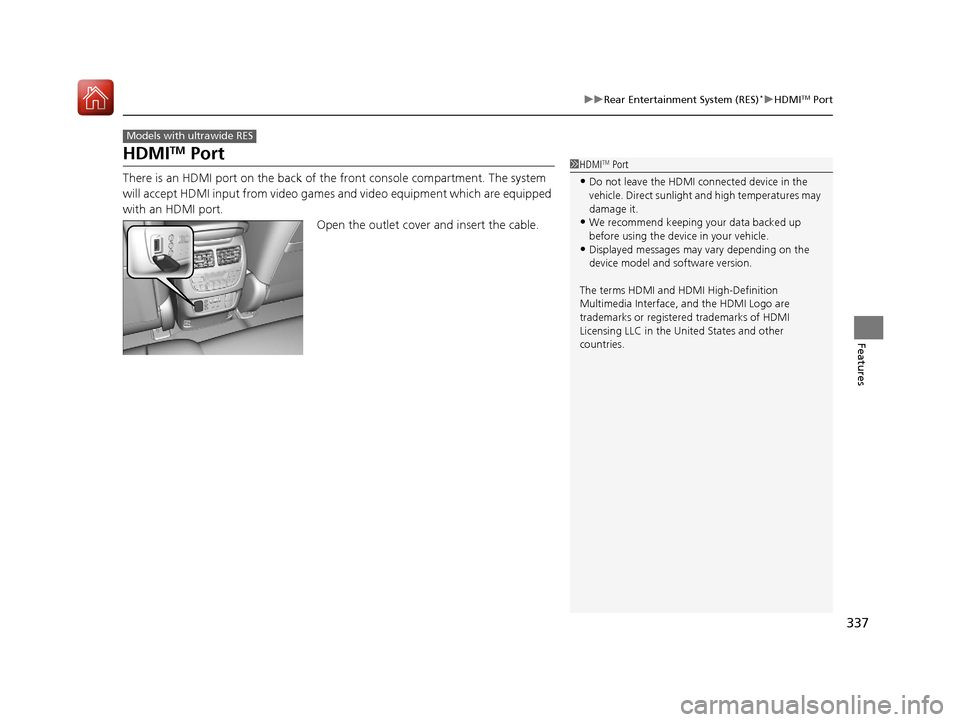
There is an HDMI port on the back of th e front console compartment. The system
will accept HDMI input from video games and video equipment which are equipped
with an HDMI port.
Open the outlet cover and insert the cable.
Models with ultrawide RES
1HDMITM Port
•Do not leave the HDMI connected device in the
vehicle. Direct sunlight and high temperatures may
damage it.
•We recommend keeping y our data backed up
before using the device in your vehicle.
•Displayed messages may vary depending on the
device model and software version.
The terms HDMI and HDMI High-Definition
Multimedia Interface, and the HDMI Logo are
trademarks or registered trademarks of HDMI
Licensing LLC in the United States and other
countries.
18 ACURA MDX-31TZ56400.book 337 ページ 2017年8月23日 水曜日 午後4時1分
Page 340 of 697

339
uuRear Entertainment System (RES)*uOperating the System
Features
Operating the System
To operate the system, set the power mode to ON or ACCESSORY. Press the REAR
(power) button to turn on the system.
REAR (Power) Button
18 ACURA MDX-31TZ56400.book 339 ページ 2017年8月23日 水曜日 午後4時1分
Page 360 of 697
359
uuCustomized Features u
Continued
Features
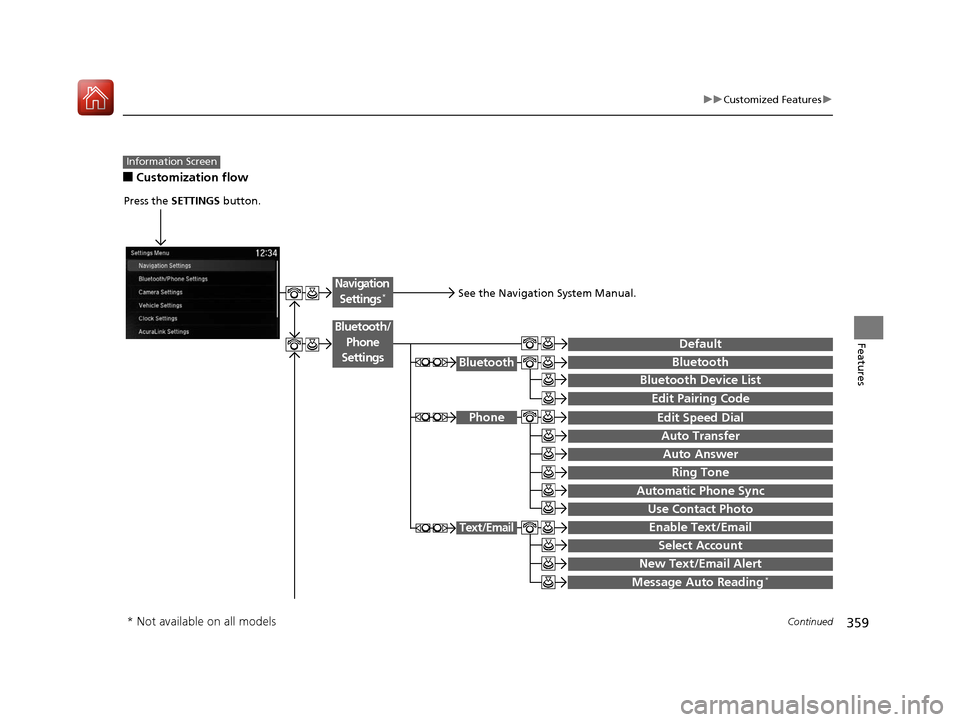
■Customization flow
Information Screen
Press the SETTINGS button.
BluetoothBluetooth
Bluetooth Device List
Edit Speed Dial
Auto Transfer
Auto Answer
Ring Tone
Automatic Phone Sync
Use Contact Photo
Enable Text/Email
Select Account
New Text/Email Alert
Text/Email
Message Auto Reading*
Default
Edit Pairing Code
Phone
Bluetooth/
Phone
Settings
See the Navigation System Manual.
Navigation Settings*
* Not available on all models
18 ACURA MDX-31TZ56400.book 359 ページ 2017年8月23日 水曜日 午後4時1分
Page 362 of 697

361
uuCustomized Features u
Continued
Features
“Trip A” Reset Timing
“Trip B” Reset Timing
Language Selection
Adjust Outside Temp. Display
Forward Collision Warning Distance
ACC Forward Vehicle Detect Beep
Turn by Turn Display*
Default
Meter
Driver
Assist
Lane Keeping Assist Suspend Beep
Blind Spot Info*
Driving
Position
Road Departure Mi tigation Setting
ACC Display Speed Unit
Memory Position Link
Auto Engine Idle Stop Guidance Screens*
Easy Entry/Exit
Reverse Alert Tone
Vehicle
Settings
* Not available on all models
18 ACURA MDX-31TZ56400.book 361 ページ 2017年8月23日 水曜日 午後4時1分
Page 363 of 697
362
uuCustomized Features u
Features
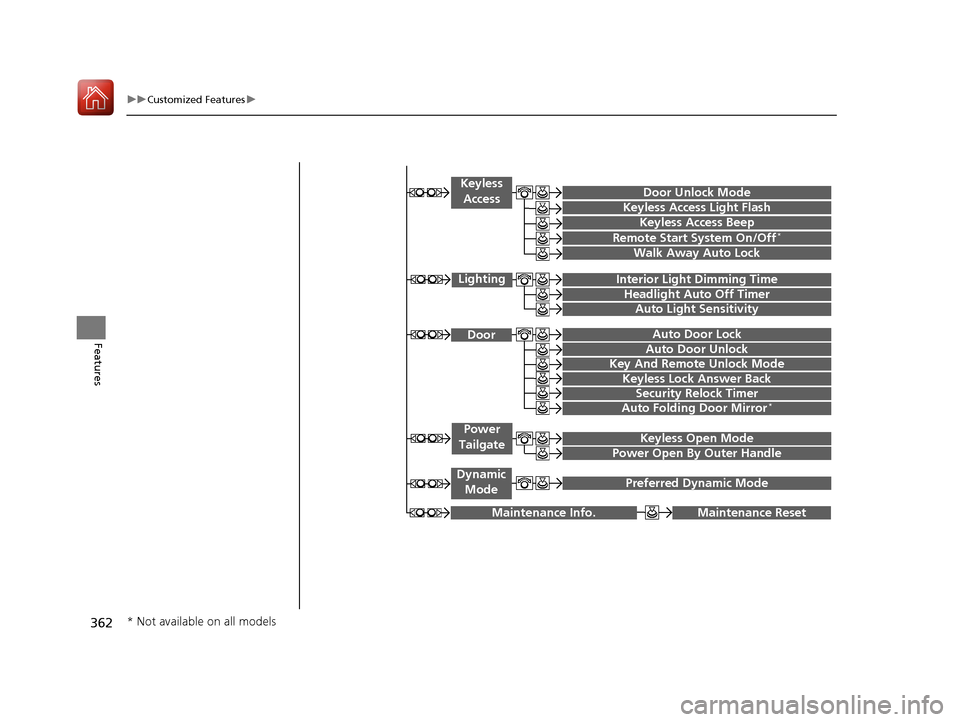
Maintenance ResetMaintenance Info.
Preferred Dynamic ModeDynamic
Mode
Key And Remote Unlock Mode
Keyless Lock Answer Back
Security Relock Timer
Auto Door Lock
Auto Door Unlock Door
Auto Folding Door Mirror*
Door Unlock Mode
Keyless Access Beep
Interior Light Dimming Time
Headlight Auto Off Timer
Auto Light Sensitivity
Remote Start System On/Off*
Walk Away Auto Lock
Lighting
Keyless
Access
Keyless Access Light Flash
Keyless Open Mode
Power Open By Outer Handle
Power
Tailgate
* Not available on all models
18 ACURA MDX-31TZ56400.book 362 ページ 2017年8月23日 水曜日 午後4時1分
Page 367 of 697
366
uuCustomized Features u
Features
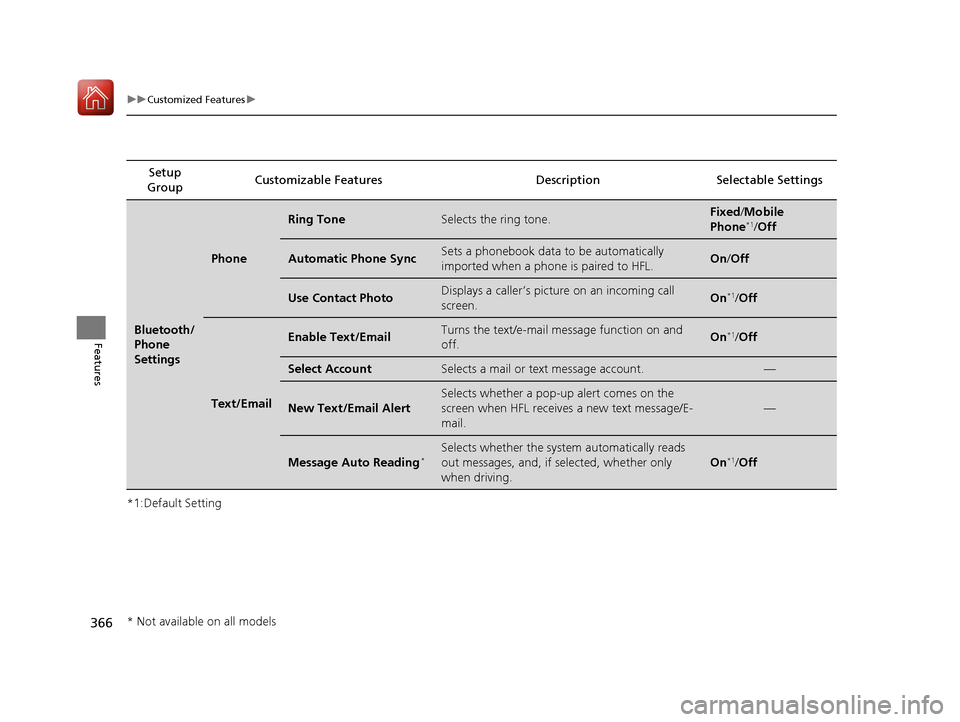
*1:Default SettingSetup
Group Customizable Features Descri
ption Selectable Settings
Bluetooth/
Phone
Settings
Phone
Ring ToneSelects the ring tone.Fixed/Mobile
Phone*1/ Off
Automatic Phone SyncSets a phonebook data to be automatically
imported when a phon e is paired to HFL.On/Off
Use Contact PhotoDisplays a caller’s picture on an incoming call
screen.On*1/Off
Text/Email
Enable Text/EmailTurns the text/e-mail message function on and
off.On*1/Off
Select AccountSelects a mail or text message account.—
New Text/Email Alert
Selects whether a pop-up alert comes on the
screen when HFL receives a new text message/E-
mail.
—
Message Auto Reading*Selects whether the system automatically reads
out messages, and, if selected, whether only
when driving.
On*1/Off
* Not available on all models
18 ACURA MDX-31TZ56400.book 366 ページ 2017年8月23日 水曜日 午後4時1分
Page 371 of 697

370
uuCustomized Features u
Features
*1:Default SettingSetup
Group Customizable Features Descri
ption Selectable Settings
Vehicle
Settings
DefaultCancels/Resets all customized items in the
Vehicle Settings group as default.Yes/No
Driver
Assist
Forward Collision
Warning DistanceChanges at which distance CMBSTM alerts.Long /Normal*1/ Short
ACC Forward Vehicle
Detect BeepCauses the system to beep when the system
detects a vehicle, or when the vehicle goes out of
the ACC with LSF range.
On /Off*1
ACC Display Speed UnitChanges the speed unit for ACC with LSF on the
MID.mph*1/km/h (U.S.)
mph /km/h*1 (Canada)
Road Departure
Mitigation SettingChanges the setting for the road departure
mitigation system.Normal*1/Wide /
Warning Only
Lane Keeping Assist
Suspend BeepCauses the system to b eep when the LKAS is
suspended.On /Off*1
Blind Spot Info*Changes the setting for the blind spot
information.Audible And Visual
Alert*1/Visual Alert /
Off
* Not available on all models
18 ACURA MDX-31TZ56400.book 370 ページ 2017年8月23日 水曜日 午後4時1分
Page 373 of 697

372
uuCustomized Features u
Features
*1:Default SettingSetup
Group Customizable Features Descri
ption Selectable Settings
Vehicle
Settings
Driving
Position
Memory Position LinkTurns the driving position memory system on and
off.On*1/Off
Easy Entry/Exit
Moves the seat fully rearward and steering wheel
fully up when you get in/get out of the vehicle.
Changes the setting for this feature.Seat & Steering
Wheel*1/Seat Only /
Steering Wheel
Only /Off
Keyless
Access
Door Unlock ModeChanges which doors unlock when you grab the
driver’s door handle.Driver’s Door or
Tailgate Only*1/All
Doors
Keyless Access Light
FlashCauses some exterior lights to flash when you
unlock/lock the doors.On*1/ Off
Keyless Access BeepCauses the beeper to sound when you unlock/
lock the doors.On*1/Off
Remote Start System
On/Off*Turns the remote engine start feature on and off.On*1/Off
Walk Away Auto Lock
Changes the settings for the automatic locking
the doors when you walk away from the vehicle
while carrying the keyless access remote.
On /Off*1
* Not available on all models
18 ACURA MDX-31TZ56400.book 372 ページ 2017年8月23日 水曜日 午後4時1分
Page 397 of 697

396
uuBluetooth ® HandsFreeLink ®u HFL Menus
Features
HFL Menus
The power mode must be in ACCESSORY or ON to use HFL.
■Bluetooth/Phone Settings screen
1.Press the SETTINGS button.
2. Rotate to select Bluetooth/Phone
Settings , then press .
1HFL Menus
To use HFL, you must first pair your Bluetooth-
compatible cell phone to th e system while the vehicle
is parked.
Some functions are limited while driving. A message
appears on the screen when the vehicle is moving
and the operation is canceled.
Bluetooth
Replace This Device
Turns the Bluetooth ® on and off.Bluetooth
Edit PIN Create a security PIN for a paired phone.
Replace a previously paired phone with a
new phone.
Delete This DeviceDelete a previously paired phone.
Connect to AudioConnect a phone to use the Bluetooth®
audio and smartphone function.
Connect to PhoneConnect a phone to use the HFL.
Disconnect Disconnect a paired phone from the
system.
Connect Both Connect the device to use the all
functions of Bluetooth® connection.
Cancel/Reset all customized items in the
Bluetooth/Phone Settings group as default.
Default
(Existing
entry list)
Bluetooth
Device List Edit Device Name*Edit the user name of a paired phone.
* Not available on all models
18 ACURA MDX-31TZ56400.book 396 ページ 2017年8月23日 水曜日 午後4時1分
Page 399 of 697

398
uuBluetooth ® HandsFreeLink ®u HFL Menus
Features
Select a mail or text message account.Text/Email*1
*1: Appears only when a pho ne is connected to HFL.
Select Account
Enable Text/EmailTurn the text/e-mail message function on and off.
New Text/Email AlertSelect whether a pop-up alert comes on the screen when HFL receives a new
text/e-mail message.
Message Auto Reading*Selects whether the system automatically reads out messages, and, if selected,
whether only when driving.
* Not available on all models
18 ACURA MDX-31TZ56400.book 398 ページ 2017年8月23日 水曜日 午後4時1分