Acc Acura MDX 2018 Owner's Manual
[x] Cancel search | Manufacturer: ACURA, Model Year: 2018, Model line: MDX, Model: Acura MDX 2018Pages: 697, PDF Size: 38.45 MB
Page 401 of 697
400
uuBluetooth ® HandsFreeLink ®u HFL Menus
Features
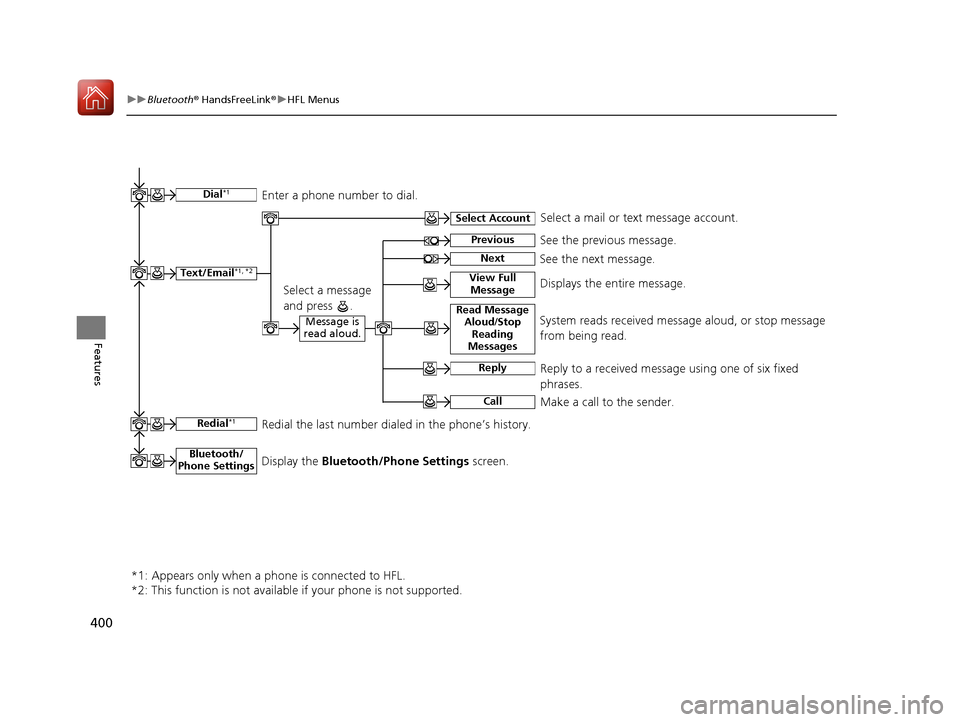
Text/Email*1, *2
Message is
read aloud.Read Message Aloud /Stop
Reading
MessagesSystem reads received message aloud, or stop message
from being read.
Reply
Call
Reply to a received message using one of six fixed
phrases.
Make a call to the sender.
Select Account
Select a message
and press .
Select a mail or text message account.
Redial*1Redial the last number dialed in the phone’s history.
*1: Appears only when a ph one is connected to HFL.
*2: This function is not available if your phone is not supported.
See the previous message.Previous
NextSee the next message.
View Full MessageDisplays the entire message.
Bluetooth/
Phone SettingsDisplay the Bluetooth/Phone Settings screen.
Dial*1Enter a phone number to dial.
18 ACURA MDX-31TZ56400.book 400 ページ 2017年8月23日 水曜日 午後4時1分
Page 430 of 697

Continued429
uuBluetooth ® HandsFreeLink ®u HFL Menus
Features
If a paired phone has text message or mail accounts, you can select one of them to
be active and receive notifications. 1.Press the SETTINGS button.
2. Rotate to select Bluetooth/Phone
Settings , then press .
u Repeat the procedure to select Select
Account .
3. Rotate to select Text Messages or an
e-mail account you want, then press .
■Selecting a Mail Account1 Selecting a Mail Account
You can also select a mail account from the folder list
screen or the message list screen.
Rotate to select Select Account, then press .
You can only receive notif ications from one text
message or mail a ccount at a time.
18 ACURA MDX-31TZ56400.book 429 ページ 2017年8月23日 水曜日 午後4時1分
Page 431 of 697

uuBluetooth ® HandsFreeLink ®u HFL Menus
430
Features
■Displaying text messages
1. Press the PHONE button.
2. Rotate to select Text/Email, then press
.
u Select account if necessary.
3. Rotate to select a message, then press
.
u The text message is displayed. The
system automatically starts reading the
message aloud.
4. Rotate to select View Full Message .
5. Press to displays the full text of the
message.
■Displaying Messages1Displaying Messages
The icon appears next to an unread message.
If you delete a message on the phone, the message
will also be dele ted from the system. If you send a
message from the system, the message goes to your
phone’s outbox.
To see the previous or ne xt message, move or
on the text message screen.
Message List
Text Message
18 ACURA MDX-31TZ56400.book 430 ページ 2017年8月23日 水曜日 午後4時1分
Page 437 of 697
uuAcuraLink ®*u
436
Features
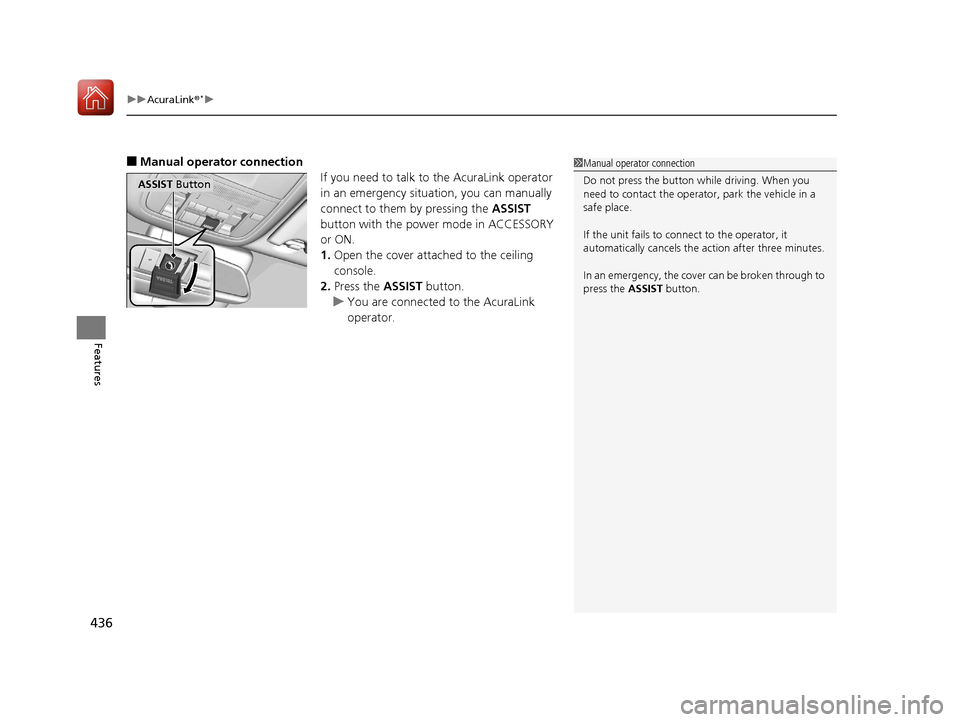
■Manual operator connection
If you need to talk to the AcuraLink operator
in an emergency situation, you can manually
connect to them by pressing the ASSIST
button with the power mode in ACCESSORY
or ON.
1. Open the cover attached to the ceiling
console.
2. Press the ASSIST button.
u You are connected to the AcuraLink
operator.1Manual operator connection
Do not press the button while driving. When you
need to contact the operato r, park the vehicle in a
safe place.
If the unit fails to connect to the operator, it
automatically cancels the action after three minutes.
In an emergency, the cover can be broken through to
press the ASSIST button.
ASSIST Button
18 ACURA MDX-31TZ56400.book 436 ページ 2017年8月23日 水曜日 午後4時1分
Page 438 of 697

Continued437
uuAcuraLink ®*u
Features
Your subscribed telematics service prov ider can track your vehicle’s location,
remotely lock or unlock doors, and help you find your vehicle.
To use these features, you n eed your user ID and personal identification number
(PIN).
■Stolen vehicle tracking
This feature searches and tracks down your vehicle position even if it is on the move.
If you believe that your vehicle has been stolen, contact the police as well as the
provider.
■Remote door lock/unlock
The provider can remotely lock or unlock doors upon your request.
■Vehicle finder
This feature is convenient to use when trying to locate your vehicle in large areas,
such as a crowded parking lot. If you cannot locate your vehicle after using the
remote transmitter’s answerback function, you can contact the provider which can
then flash your vehicle’s exterior lights and sound the horn.
■Security ala rm notification
If the security system in your vehicle detects an abnormal condition, such as
someone tampering with the lock on your vehicle, the provider notifies you by your
preferred method.
■Security Features1 Security Features
The contact information of your provider, your user
ID and PIN will be given when you subscribe to
AcuraLink. If you forget any of the above, contact a
dealer, or visit owners.acura.com (U.S.) or
www.acura.ca/owners/acuralink (Canada).
You can also activate the remote door lock/unlock
and vehicle finder features from the Internet or using
your smartphone app. As k a dealer, or visit
owners.acura.com (U.S.) or www.acura.ca/owners/
acuralink (Canada) for details.
1Vehicle finder
The lights will stop flas hing and horn will stop
sounding under the foll owing conditions:
•When 30 seconds have elapsed.
•You unlock the doors using the remote transmitter.•You unlock the doors using the keyless access
system.
•You unlock the doors using the built-in key.
•The power mode is set to ACCESSORY or ON.
18 ACURA MDX-31TZ56400.book 437 ページ 2017年8月23日 水曜日 午後4時1分
Page 440 of 697
Continued439
uuAcuraLink ®*u
Features
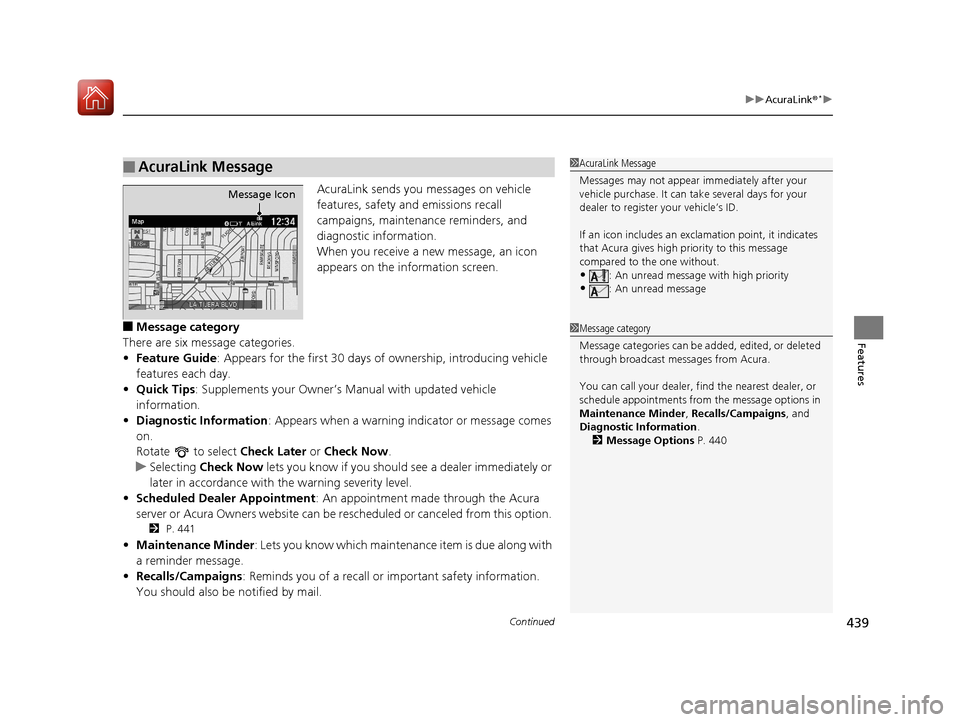
AcuraLink sends you messages on vehicle
features, safety and emissions recall
campaigns, maintenance reminders, and
diagnostic information.
When you receive a new message, an icon
appears on the information screen.
■Message category
There are six message categories.
• Feature Guide : Appears for the first 30 days of ownership, introducing vehicle
features each day.
• Quick Tips : Supplements your Owner’s Manual with updated vehicle
information.
• Diagnostic Information : Appears when a warning in dicator or message comes
on.
Rotate to select Check Later or Check Now .
u Selecting Check Now lets you know if you should see a dealer immediately or
later in accordance with the warning severity level.
• Scheduled Dealer Appointment : An appointment made through the Acura
server or Acura Owners website can be re scheduled or canceled from this option.
2 P. 441
•Maintenance Minder : Lets you know which maintenance item is due along with
a reminder message.
• Recalls/Campaigns : Reminds you of a recall or important safety information.
You should also be notified by mail.
■AcuraLink Message1 AcuraLink Message
Messages may not appear immediately after your
vehicle purchase. It can ta ke several days for your
dealer to register your vehicle’s ID.
If an icon includes an excl amation point, it indicates
that Acura gives high priority to this message
compared to the one without.
•: An unread message with high priority
•: An unread message
Message Icon
1 Message category
Message categories can be added, edited, or deleted
through broadcast me ssages from Acura.
You can call your dealer, find the nearest dealer, or
schedule appointments from the message options in
Maintenance Minder , Recalls/Campaigns, and
Diagnostic Information .
2 Message Options P. 440
18 ACURA MDX-31TZ56400.book 439 ページ 2017年8月23日 水曜日 午後4時1分
Page 442 of 697
Continued441
uuAcuraLink ®*u
Features
■Dealer Appointments
You can confirm the scheduled appointment date when you receive a
Maintenance Minder , Recalls/Campaigns , or Diagnostic Information
message, or reschedule an y existing appointments.
1. Select a Maintenance Minder , Recalls/Campaigns, Diagnostic Information ,
or Scheduled Dealer Appointment message.
2. Rotate to select Schedule Dealer Appoi… or Reschedule Appoint…
(depending on the screen). Press .
u A suggested time and date are displayed.
3. Rotate to select Confirm Appointment . Press to accept the time and
date.
4. Press to select OK.1Dealer Appointments
To set up an automated de aler appointment when a
regular maintenance is due , visit the Acura Owners
website at owners.acura.com (U.S.) or
www.acura.ca/owners/acuralink (Canada), and set
the required option. A remi nder message will be sent
as the date for the dealer appointment approaches. A
reminder message will also be sent if you schedule an
appointment online using Schedule Service
Appointment function.
If you are not satisfied with the proposed
appointment date and time, ca ll your dealer directly.
To cancel the scheduled appointment, select Cancel
Appointment when a message is displayed.
18 ACURA MDX-31TZ56400.book 441 ページ 2017年8月23日 水曜日 午後4時1分
Page 444 of 697

443
Features
Compass*
When you set the power mode to ON, the compass self-calibrates, and the compass
display appears.
Compass Calibration
If the compass indicates the wrong direction, or the CAL indicator blinks, you need
to manually calibrate the system.
1. Set the power mode to ON.
2. On the top screen of any source, press and hold for five seconds.
u The display switches to the Compass Settings screen.
3. Rotate to select Calibration, then press .
4. When the display changes to Calibration Start, press .
5. Drive the vehicle slowly in two circles.
u The compass starts to show a di rection after the calibration. The CAL indicator
goes off.
1 Compass*
Compass operation can be affected under the
following conditions:
•Driving near power lines or stations•Crossing a bridge
•Passing a large vehicle, or driving near a large
object that can cause a magnetic disturbance
•When accessories such as antennas and roof racks
are mounted by magnets
1 Compass Calibration
Calibrate the compass in an open area.
While setting the compass, press the BACK button to
cancel the setting mode a nd return to the previous
screen.
Models with navigation self -calibrate using GPS. The
compass in the MID and the direction arrow on the
map screen (when Heading-Up view selected) may
not be in sync when firs t starting the vehicle, but
should correct themselves as you drive.
If the compass in the MID continues to indicate an
incorrect direction, please see your Acura dealer.
Models with navigation system
* Not available on all models
18 ACURA MDX-31TZ56400.book 443 ページ 2017年8月23日 水曜日 午後4時1分
Page 446 of 697
445
Driving
This chapter discusses driving and refueling.
Before Driving................................... 446
Towing a Trailer ................................ 452
Off-Highway Driving Guidelines ..... 463
When Driving Starting the Engine .......................... 465
Automatic Transmission ................... 471
Shifting ............................................ 472
Auto Idle Stop
*................................ 480
Integrated Dynamics System............. 486
Front Sensor Camera ....................... 487
Adaptive Cruise Control (ACC) with Low
Speed Follow (LSF) ............................. 489
Road Departure Mi tigation (RDM)
System ........................................ 504
Lane Keeping Assist System (LKAS) .. 509Vehicle Stability Assist (VSA ®), aka Electronic
Stability Control (ESC), System ............. 517
Agile Handling Assist ....................... 519
Blind spot inform ation (BSI) System*.... 520
Super Handling-All Wheel DriveTM (SH-
AWD® )*......................................... 523
Tire Pressure Monitoring System (TPMS)
with Tire Fill Assist .......................... 524
Tire Pressure Monitoring System (TPMS) - Required Federal Explanation ......... 526
Braking Brake System ................................... 528
Anti-lock Brake System (ABS) ........... 534 Brake Assist System ......................... 535
Collision Mitigation Braking System
TM
(CMBSTM) ....................................... 536
Parking Your Vehicle When Stopped ................................ 545
Parking Sensor System
*................... 547
Cross Traffic Monitor*..................... 551
Multi-View Rear Camera*................ 556
Surround View Camera System*..... 558
Refueling Fuel Information .............................. 568
How to Refuel ................................. 569
Fuel Economy and CO
2 Emissions .... 571
* Not available on all models
18 ACURA MDX-31TZ56400.book 445 ページ 2017年8月23日 水曜日 午後4時1分
Page 448 of 697
Continued447
uuBefore Driving uDriving Preparation
Driving
• Store or secure all items on board properly.
u Carrying too much cargo, or improperly storing it, can affect your vehicle’s
handling, stability, sto pping distance, and tires, and make it unsafe.
2Maximum Load Limit P. 449
•Do not pile items higher than the seat height.
u They can block your view and may be thrown forward in the event of sudden
braking.
• Do not place anything in the front seat footwells. Make sure to secure the floor
mat.
u An object or unsecured floor mat can in terfere with your brake and accelerator
pedal operation while driving.
• If you have any animals on board, do not let them move around in the vehicle.
u They may interfere with driv ing and a crash could occur.
• Securely close and lock al l doors and the tailgate.
2Locking/Unlocking the Doors from the Inside P. 151
•Adjust your seating position properly.
u Adjust the head restraint, too.
2Adjusting the Seats P. 192
2 Adjusting the Front and Second Row Outer Head Restraint Positions P. 198
•Adjust the mirrors and steering wh eel properly for your driving.
u Adjust them while sitting in the proper driving position.
2 Adjusting the Steering Wheel P. 188
2 Adjusting the Mirrors P. 189
■Interior Checks1Interior Checks
The headlight aim is set by the factory, and does not
need to be adjusted. Howeve r, if you regularly carry
heavy items in the cargo area or tow a trailer, have
the aiming readjusted at a dealer or by a qualified
technician.
18 ACURA MDX-31TZ56400.book 447 ページ 2017年8月23日 水曜日 午後4時1分