ADS Acura MDX 2019 User Guide
[x] Cancel search | Manufacturer: ACURA, Model Year: 2019, Model line: MDX, Model: Acura MDX 2019Pages: 701, PDF Size: 38.75 MB
Page 403 of 701

402
uuBluetooth ® HandsFreeLink ®u HFL Menus
Features
Text/Email*1, *2
Message is
read aloud.Read Message Aloud /Stop
Reading
MessagesSystem reads received message aloud, or stop message
from being read.
Reply
Call
Reply to a received message using one of six fixed
phrases.
Make a call to the sender.
Select Account
Select a message
and press .
Select a mail or text message account.
Redial*1Redial the last number dialed in the phone’s history.
*1: Appears only when a ph one is connected to HFL.
*2: This function is not available if your phone is not supported.
See the previous message.Previous
NextSee the next message.
View Full MessageDisplays the entire message.
Bluetooth/
Phone SettingsDisplay the Bluetooth/Phone Settings screen.
Dial*1Enter a phone number to dial.
19 ACURA MDX-31TZ56510.book 402 ページ 2018年12月11日 火曜日 午後4時47分
Page 437 of 701
uuBluetooth ® HandsFreeLink ®u HFL Menus
436
Features
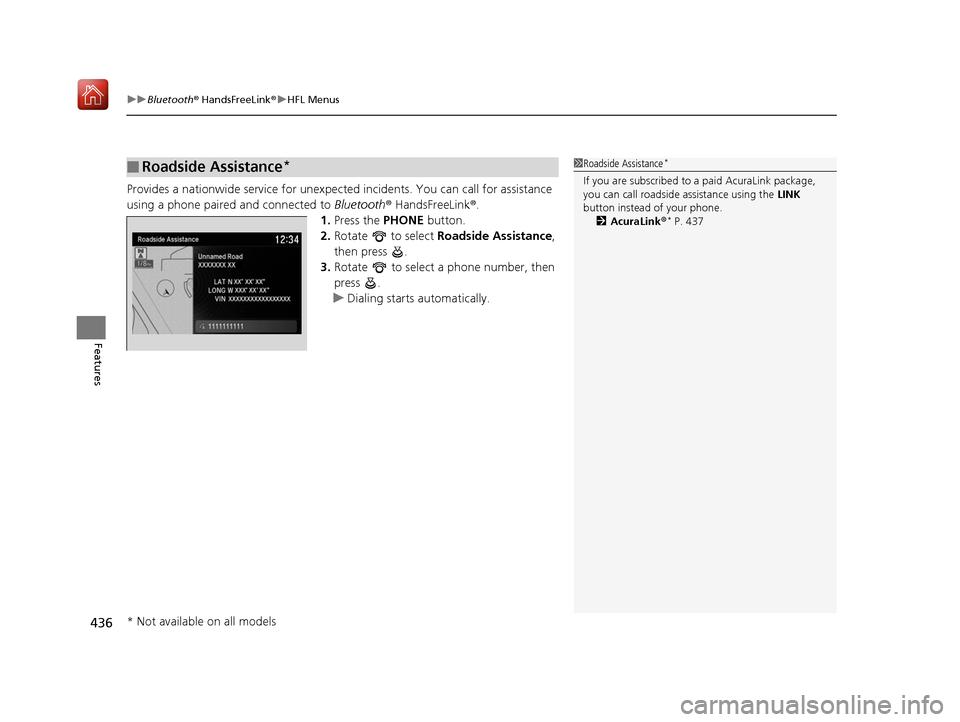
Provides a nationwide service for unexpecte d incidents. You can call for assistance
using a phone paired and connected to Bluetooth® HandsFreeLink ®.
1. Press the PHONE button.
2. Rotate to select Roadside Assistance ,
then press .
3. Rotate to select a phone number, then
press .
u Dialing starts automatically.
■Roadside Assistance*1Roadside Assistance*
If you are subscribed to a paid AcuraLink package,
you can call roadside assistance using the LINK
button instead of your phone. 2 AcuraLink ®
* P. 437
* Not available on all models
19 ACURA MDX-31TZ56510.book 436 ページ 2018年12月11日 火曜日 午後4時47分
Page 441 of 701
uuAcuraLink ®*u
440
Features
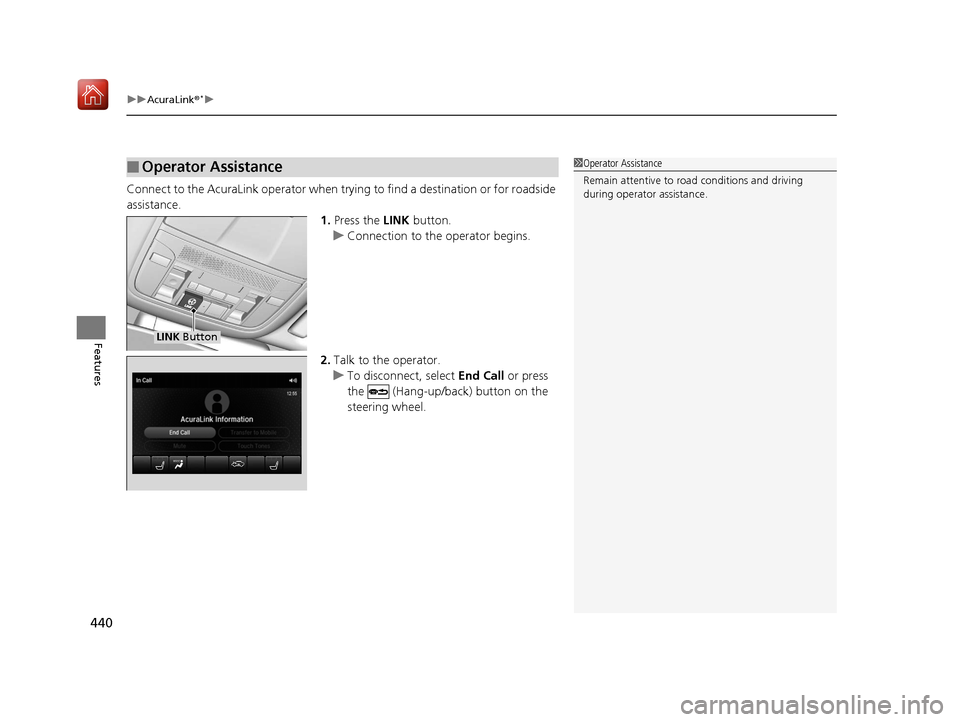
Connect to the AcuraLink opera tor when trying to find a destination or for roadside
assistance. 1.Press the LINK button.
u Connection to the operator begins.
2. Talk to the operator.
u To disconnect, select End Call or press
the (Hang-up/back) button on the
steering wheel.
■Operator Assistance1 Operator Assistance
Remain attentive to road conditions and driving
during operator assistance.
LINK Button
19 ACURA MDX-31TZ56510.book 440 ページ 2018年12月11日 火曜日 午後4時47分
Page 443 of 701

uuAcuraLink ®*u
442
Features
■Reading a message
1.Press the INFO button or press , follow
the message on the information screen.
2. Rotate to select AcuraLink/Messages ,
then press .
u AcuraLink messages appears.
3. Rotate to select a category, then press
.
u If there are unread messages in a
category, a message icon appears next to
that category.
4. Rotate to select a message you want to
read, then press .
■Message Options
While a message is displayed, you can use options to take immediate action to the
message.
Available options are:
• Read Messages Aloud : Reads the message aloud. Select Stop Reading
Messages to cancel it.
• View Full Message : Displays the entire message.
• Phone number : Dials a number displaye d in the message via HFL.
• Delete: Deletes the displayed message.
• Call Your Dealer : Calls your Acura dealer using HFL.
• Find Acura Dealer : Searches for the nearest Acura dealer.
• Roadside Assistance : Makes a call to the number for the Roadside Assistance
service.
• Schedule Dealer Appoi…: Automatically sets an appointment date at your
dealer.
1Reading a message
If there is no message listed on the menu, each
category items are gray ed out and cannot be
selected.
The message icon disappears once you read the
message.
However, the exclamation mark that indicates that
the message has a high priority remains.
•: A read message with high priority.
1 Message Options
The available options vary by message category.
You can delete all message s in a category at once.
2 Customized Features P. 360
19 ACURA MDX-31TZ56510.book 442 ページ 2018年12月11日 火曜日 午後4時47分
Page 455 of 701
454
Driving
Towing a Trailer
Towing Preparation
Your vehicle can tow a trailer if you carefully observe the load limits, use the proper
equipment, and follow the towing guidelin es. Check the load limits before driving.
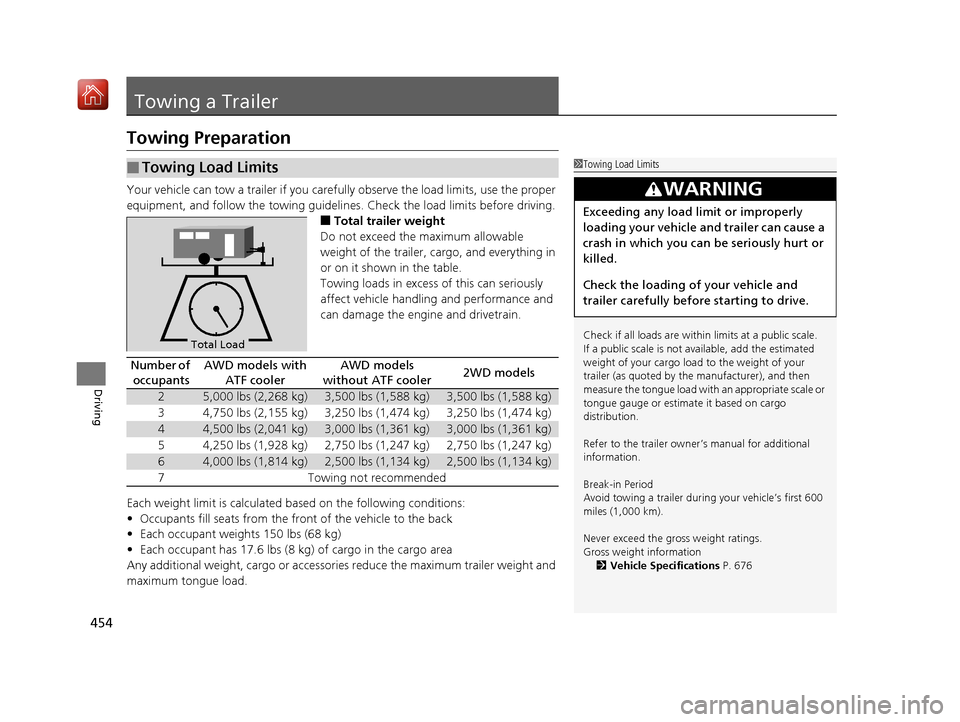
■Total trailer weight
Do not exceed the maximum allowable
weight of the trailer, cargo, and everything in
or on it shown in the table.
Towing loads in excess of this can seriously
affect vehicle handling and performance and
can damage the engine and drivetrain.
Each weight limit is calculated based on the following conditions:
• Occupants fill seats from the front of the vehicle to the back
• Each occupant weights 150 lbs (68 kg)
• Each occupant has 17.6 lbs (8 kg) of cargo in the cargo area
Any additional weight, cargo or accessori es reduce the maximum trailer weight and
maximum tongue load.
■Towing Load Limits1 Towing Load Limits
Check if all loads are within limits at a public scale.
If a public scale is not available, add the estimated
weight of your cargo load to the weight of your
trailer (as quoted by the manufacturer), and then
measure the tongue load with an appropriate scale or
tongue gauge or estima te it based on cargo
distribution.
Refer to the trailer owner’s manual for additional
information.
Break-in Period
Avoid towing a trailer duri ng your vehicle’s first 600
miles (1,000 km).
Never exceed the gross weight ratings.
Gross weight information 2 Vehicle Specifications P. 676
3WARNING
Exceeding any load limit or improperly
loading your vehicle and trailer can cause a
crash in which you can be seriously hurt or
killed.
Check the loading of your vehicle and
trailer carefully before starting to drive.
Total Load
Number of
occupantsAWD models with ATF coolerAWD models
without ATF cooler2WD models
25,000 lbs (2,268 kg)3,500 lbs (1,588 kg)3,500 lbs (1,588 kg)
34,750 lbs (2,155 kg)3,250 lbs (1,474 kg)3,250 lbs (1,474 kg)
44,500 lbs (2,041 kg)3,000 lbs (1,361 kg)3,000 lbs (1,361 kg)
54,250 lbs (1,928 kg)2,750 lbs (1,247 kg)2,750 lbs (1,247 kg)
64,000 lbs (1,814 kg)2,500 lbs (1,134 kg)2,500 lbs (1,134 kg)
7Towing not recommended
19 ACURA MDX-31TZ56510.book 454 ページ 2018年12月11日 火曜日 午後4時47分
Page 458 of 701
Continued457
uuTowing a Trailer uTowing Preparation
Driving
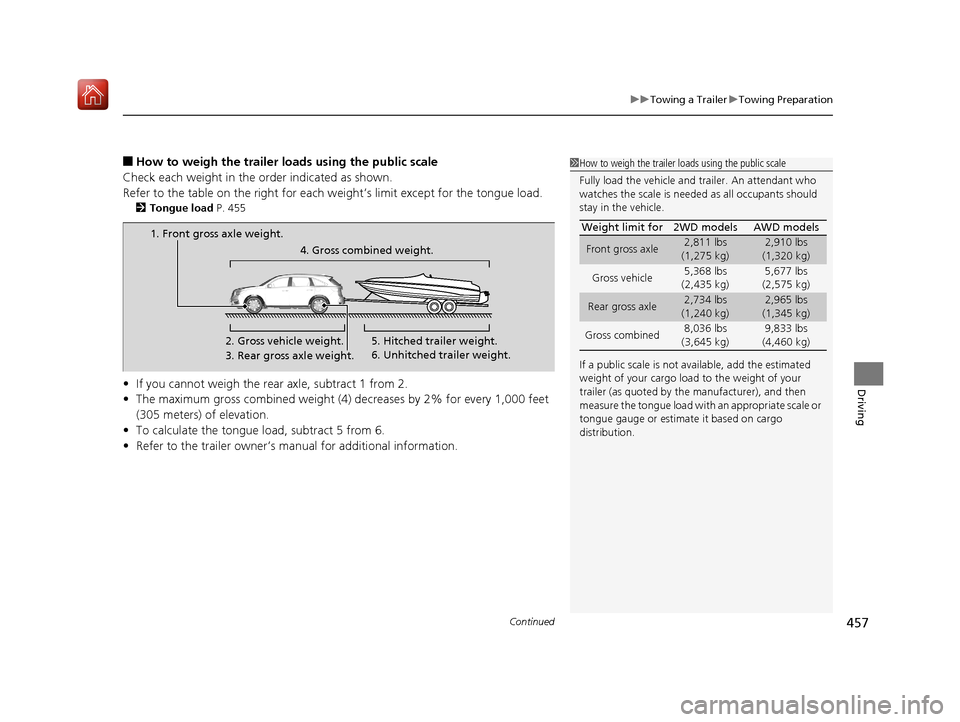
■How to weigh the trailer load s using the public scale
Check each weight in the order indicated as shown.
Refer to the table on the right for each we ight’s limit except for the tongue load.
2Tongue load P. 455
•If you cannot weigh the rear axle, subtract 1 from 2.
• The maximum gross combined weight (4) decreases by 2% for every 1,000 feet
(305 meters) of elevation.
• To calculate the tongue load, subtract 5 from 6.
• Refer to the trailer owner’s ma nual for additional information.
1How to weigh the trailer loads using the public scale
Fully load the vehicle and trailer. An attendant who
watches the scale is needed as all occupants should
stay in the vehicle.
If a public scale is not available, add the estimated
weight of your cargo load to the weight of your
trailer (as quoted by the manufacturer), and then
measure the tongue load with an appropriate scale or
tongue gauge or estima te it based on cargo
distribution. Weight limit for 2WD models AWD models
Front gross axle2,811 lbs
(1,275 kg)2,910 lbs
(1,320 kg)
Gross vehicle 5,368 lbs
(2,435 kg) 5,677 lbs
(2,575 kg)
Rear gross axle2,734 lbs
(1,240 kg)2,965 lbs
(1,345 kg)
Gross combined 8,036 lbs
(3,645 kg) 9,833 lbs
(4,460 kg)
1. Front gross axle weight.
2. Gross vehicle weight.4. Gross combined weight.
3. Rear gross axle weight. 5. Hitched trailer weight.
6. Unhitched trailer weight.
19 ACURA MDX-31TZ56510.book 457 ページ 2018年12月11日 火曜日 午後4時47分
Page 464 of 701
463
uuTowing a Trailer uDriving Safely with a Trailer
Continued
Driving
Driving Safely with a Trailer
• Have the trailer properly servic ed and keep it in good condition.
• Make sure that all the weights and load in the vehicle and trailer are within limits.
2Towing Load Limits P. 454
•When towing more than 3,500 lbs (1,590 kg), use of gasoline with a pump
octane number of 91 or higher is recommended.
u Towing performance can be affected by high altitude, high temperature, or
steep uphill.
• Securely attach the hitch, safety chains, and other necessary parts to the trailer.
• Securely store all the items in and on the tra iler so that they do not shift while
driving.
• Check if the lights and brakes on the trailer are working properly.
• Check the pressures of the traile r tires, including the spare.
• Turn off Auto Idle Stop sy stem using Auto Idle Stop OFF button. The trailer
weight can affect your vehicle’s brake effectiveness if Auto Idle Stop is activated
on a hill while towing a trailer.
• Drive slower than normal.
• Obey posted speed limits fo r vehicles with trailers.
• Use the
(D position when towing a trailer on level roads.
■Things You Need To Know Before Towing a Trailer
■Towing Speeds and Gears
1Driving Safely with a Trailer
Parking
In addition to the normal precautions, place wheel
chocks at each of the trailer’s tires.
1Towing Speeds and Gears
When towing a fixed-sided trailer (e.g., camper), do
not exceed 55 mph (88 km/h).
At higher speeds, the trai ler may sway or affect
vehicle handling.
19 ACURA MDX-31TZ56510.book 463 ページ 2018年12月11日 火曜日 午後4時47分
Page 466 of 701
465
Driving
Off-Highway Driving Guidelines
General Information
Your vehicle has been designed primarily for use on pavement, however, its higher
ground clearance allows you to occasionally travel on unpaved roads. It is not
designed for trail-blazing, or other challenging off-highway activities.
If you decide to drive on unpaved roads, you will find that it requires somewhat
different driving skills and that your vehicl e will handle somewhat differently than it
does on pavement. Pay attention to the precau tions and tips in this section, and get
acquainted with your vehicle before leaving the pavement.
Important Safety Precautions
To avoid loss of control or rollover, be sure to follow all precautions and
recommendations:
• Be sure to store cargo properly and do not exceed your cargo load limits.
2 Maximum Load Limit P. 451
•Whenever you drive, make su re you and your passengers always wear seat belts.
• Keep your speed low, and never go faster than the conditions allow.
• It’s up to you to continually assess the situation and drive within the limits.
1Off-Highway Driving Guidelines
Failure to operate your vehi cle correctly might result
in a crash or a rollover. 2 Important Handling Information P. 30
2 Precautions While Driving P. 473
Spinning the tires can al so damage the SH-AWD ®
system.
3WARNING
Improperly operating this vehicle on or off
pavement can cause a crash or rollover in
which you and your passengers could be
seriously injured or killed.
• Follow all instructions and guidelines in
this owner’s manual.
• Keep your speed low, and don’t drive
faster than conditions permit.
19 ACURA MDX-31TZ56510.book 465 ページ 2018年12月11日 火曜日 午後4時47分
Page 474 of 701
473
uuWhen Driving uPrecautions While Driving
Driving
Precautions While Driving
Utility vehicles have a significantly higher rollover rate than other types of vehicles.
To prevent rollovers or loss of control:
• Take corners at slower speeds than yo u would with a passenger vehicle.
• Avoid sharp turns and abrupt maneuvers whenever possible.
• Do not modify your vehicle in any way th at you would raise the center of gravity.
• Do not carry heavy cargo on the roof.
Never carry more than 165 lbs (75 kg) of ca rgo on the roof rack (Acura accessory).
Avoid driving in deep water and on flooded roads. This can damage the engine or
driveline, or cause electrical component failure.
If there is a strong impact with something under the vehicle, stop in a safe location.
Check the underside of the vehicle for damage or any fluid leaks.
■Driving Guidelines for Your Utility Vehicle
■In Rain
■Other Precautions
1 Precautions While Driving
NOTICE
Do not change the gear position while pressing the
accelerator pedal. You could damage the
transmission.
NOTICE
If you repeatedly turn the steering wheel at an
extremely low speed, or hold the steering wheel in
the full left or right position for a while, the system
heats up. The system goes into a protective mode,
and limits its performa nce. The steering wheel
becomes harder and harder to operate. Once the
system cools down, the EPS system is restored.
Repeated operation under these conditions can
eventually damage the system.
If the power mode is set to ACCESSORY while
driving, the engine will shut down and all steering
and brake power assist functi ons will stop, making it
difficult to control the vehicle.
Do not change the gear position to
( N, as you will
lose engine braking (and acceleration) performance.
During the first 600 miles (1,000 km) of operation,
avoid sudden acceleration or full throttle operation so
as not to damage the engine or powertrain.
Avoid hard braking for the first 200 miles (300 km).
You should also follow this when the brake pads are
replaced.
19 ACURA MDX-31TZ56510.book 473 ページ 2018年12月11日 火曜日 午後4時47分
Page 475 of 701
474
uuWhen Driving uAutomatic Transmission
Driving
Automatic Transmission
The engine runs at a higher id le speed and creeping increases.
Keep the brake pedal firmly depressed when stopped.
Quickly depressing the accelerator pedal while driving uphill may cause the
transmission to drop to a lower gear, unex pectedly increasing vehicle speed. Depress
the accelerator pedal carefully, especi ally on slippery roads and curves.
■Creeping
■Kickdown
1Driving Guidelines for Your Utility Vehicle
Failure to operate your vehicle correctly might result
in a crash or a rollover. 2 Important Handling Information P. 30
2 Precautions While Driving P. 473
19 ACURA MDX-31TZ56510.book 474 ページ 2018年12月11日 火曜日 午後4時47分