ADS Acura MDX 2019 Owner's Guide
[x] Cancel search | Manufacturer: ACURA, Model Year: 2019, Model line: MDX, Model: Acura MDX 2019Pages: 701, PDF Size: 38.75 MB
Page 494 of 701
Continued493
uuWhen Driving uAdaptive Cruise Control (ACC) with Low Speed Follow (LSF)
Driving
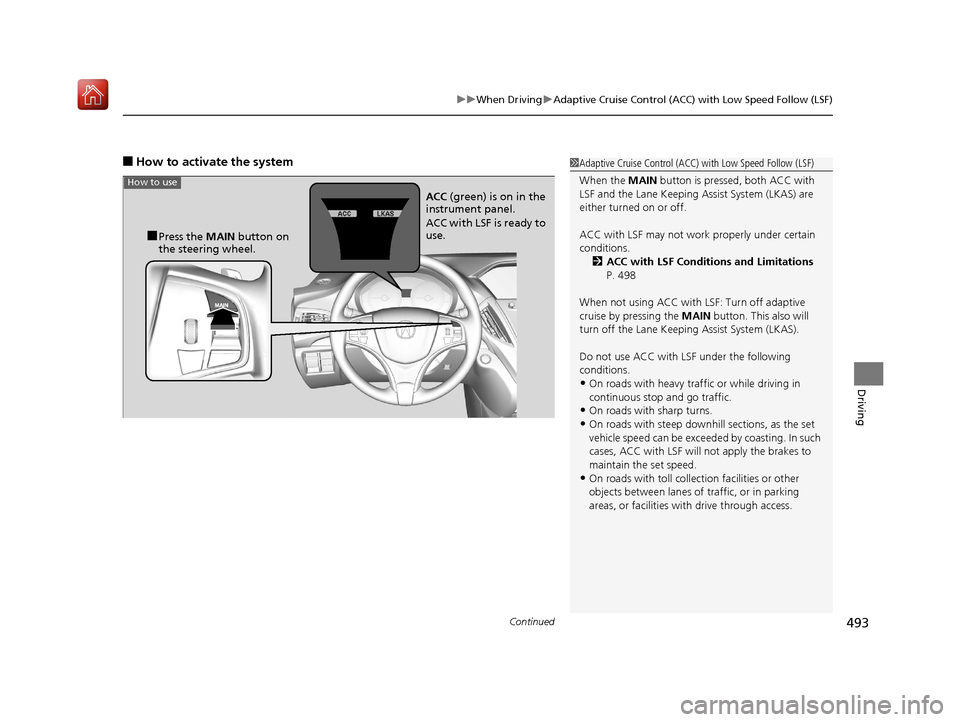
■How to activate the system1Adaptive Cruise Control (ACC) with Low Speed Follow (LSF)
When the MAIN button is pressed, both ACC with
LSF and the Lane Keeping Assist System (LKAS) are
either turned on or off.
ACC with LSF may not work properly under certain
conditions. 2 ACC with LSF Conditions and Limitations
P. 498
When not using ACC with LSF: Turn off adaptive
cruise by pressing the MAIN button. This also will
turn off the Lane Keeping Assist System (LKAS).
Do not use ACC with LSF under the following
conditions.
•On roads with heavy traf fic or while driving in
continuous stop and go traffic.
•On roads with sharp turns.
•On roads with steep downhill sections, as the set
vehicle speed can be exceeded by coasting. In such
cases, ACC with LSF will not apply the brakes to
maintain the set speed.
•On roads with toll collection facilities or other
objects between lanes of traffic, or in parking
areas, or faci lities with driv e through access.
■Press the MAIN button on
the steering wheel. ACC
(green) is on in the
instrument panel.
ACC with LSF is ready to
use.
How to use
19 ACURA MDX-31TZ56510.book 493 ページ 2018年12月11日 火曜日 午後4時47分
Page 512 of 701
511
uuWhen Driving uRoad Departure Mitigation (RDM) System
Driving
■Roadway conditions
• Driving on a snowy or wet roadway (obs cured lane marking, vehicle tracks,
reflected lights, road spray, high contrast).
• Driving on a road with temporary lane markings.
• Faint, multiple, or varied lane markings are visible on the roadway due to road
repairs or old lane markings.
• The roadway has merging, split, or crossing lines (e.g., such as at an intersection
or crosswalk).
• The lane markings are extremel y narrow, wide, or changing.
• The vehicle in front of you is driving near the lane lines.
• The road is hilly or the vehicle is approaching the crest of a hill.
• Driving on rough or unpaved roads, or over bumpy surfaces.
• When objects on the road (curb, guard rail, pylons, etc.) are recognized as white
lines (or yellow lines).
• Driving on roads with double lines.
■Vehicle conditions
• Headlight lenses are dirty or the h eadlights are not properly adjusted.
• The outside of the windshield is streaked or blocked by dirt, mud, leaves, wet
snow, etc.
• The inside of the windshield is fogged.
• The camera temperature gets too high.
• An abnormal tire or wheel condition (wro ng sized, varied size or construction,
improperly inflated, compact spare tire
*, etc.).
• The vehicle is tilted due to a heavy load or suspension modifications.
• When tire chains are installed.
• The vehicle is towing a trailer.
* Not available on all models
19 ACURA MDX-31TZ56510.book 511 ページ 2018年12月11日 火曜日 午後4時47分
Page 513 of 701
512
uuWhen Driving uLane Keeping Assist System (LKAS)
Driving
Lane Keeping Assist System (LKAS)
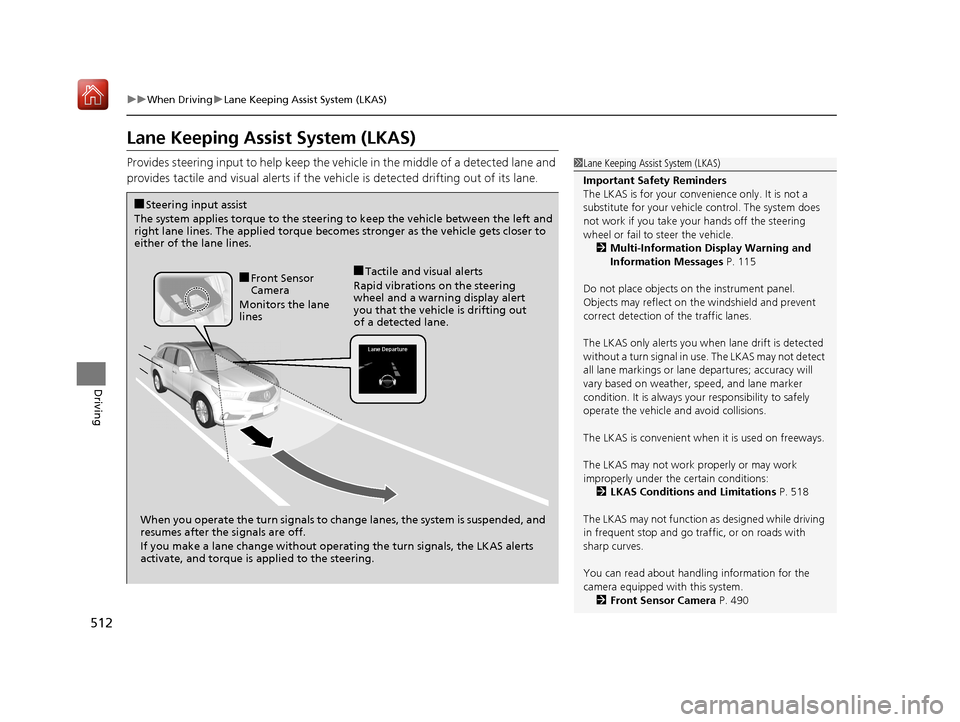
Provides steering input to help keep the vehicle in the middle of a detected lane and
provides tactile and visual alerts if the ve hicle is detected drifting out of its lane.1Lane Keeping Assist System (LKAS)
Important Safety Reminders
The LKAS is for your convenience only. It is not a
substitute for your vehicl e control. The system does
not work if you take y our hands off the steering
wheel or fail to steer the vehicle.
2 Multi-Information Display Warning and
Information Messages P. 115
Do not place objects on the instrument panel.
Objects may reflect on th e windshield and prevent
correct detection of the traffic lanes.
The LKAS only alerts you when lane drift is detected
without a turn signal in us e. The LKAS may not detect
all lane markings or lane departures; accuracy will
vary based on weather, speed, and lane marker
condition. It is always your responsibility to safely
operate the vehicle an d avoid collisions.
The LKAS is convenient when it is used on freeways.
The LKAS may not work properly or may work
improperly under the certain conditions: 2 LKAS Conditions and Limitations P. 518
The LKAS may not function as designed while driving
in frequent stop and go traf fic, or on roads with
sharp curves.
You can read about handling information for the
camera equipped with this system. 2 Front Sensor Camera P. 490
When you operate the turn signals to chan ge lanes, the system is suspended, and
resumes after the signals are off.
If you make a lane change without operat ing the turn signals, the LKAS alerts
activate, and torque is applied to the steering.
■Front Sensor
Camera
Monitors the lane
lines■Tactile and visual alerts
Rapid vibrations on the steering
wheel and a warning display alert
you that the vehicle is drifting out
of a detected lane.
■Steering input assist
The system applies torque to the steering to keep the vehicle between the left and
right lane lines. The applied torque becomes stronger as the vehicle gets closer to
either of the lane lines.
19 ACURA MDX-31TZ56510.book 512 ページ 2018年12月11日 火曜日 午後4時47分
Page 520 of 701
519
uuWhen Driving uLane Keeping Assist System (LKAS)
Driving
■Roadway conditions
• Driving on a snowy or wet roadway (obs cured lane marking, vehicle tracks,
reflected lights, road spray, high contrast).
• Driving on a road with temporary lane markings.
• Faint, multiple, or varied lane markings are visible on the roadway due to road
repairs or old lane markings.
• The roadway has merging, split, or crossing lines (e.g., such as at an intersection
or crosswalk).
• The lane markings are extremel y narrow, wide, or changing.
• The vehicle in front of you is driving near the lane lines.
• The road is hilly or the vehicle is approaching the crest of a hill.
• Driving on rough or unpaved roads, or over bumpy surfaces.
• When objects on the road (curb, guard rail, pylons, etc.) are recognized as white
lines (or yellow lines).
• Driving on roads with double lines.
■Vehicle conditions
• Headlight lenses are dirty or the h eadlights are not properly adjusted.
• The outside of the windshield is streaked or blocked by dirt, mud, leaves, wet
snow, etc.
• The inside of the windshield is fogged.
• The camera temperature gets too high.
• An abnormal tire or wheel condition (wro ng sized, varied size or construction,
improperly inflated, compact spare tire
*, etc.).
• The vehicle is tilted due to a heavy load or suspension modifications.
• The vehicle is towing a trailer.
* Not available on all models
19 ACURA MDX-31TZ56510.book 519 ページ 2018年12月11日 火曜日 午後4時47分
Page 535 of 701
uuBraking uBrake System
534
Driving
Your vehicle is equipped with disc brakes at all four wheels. A vacuum power assist
helps reduce the effort needed on the brake pedal. The brake assist system increases
the stopping force when you depress th e brake pedal hard in an emergency
situation. The anti-lock brake system (ABS ) helps you retain steering control when
braking very hard.
2 Brake Assist System P. 538
2 Anti-lock Brake System (ABS) P. 537
■Foot Brake1Foot Brake
Check the brakes after driving through deep water,
or if there is a buildup of road surface water. If
necessary, dry the brakes by lightly depressing the
pedal several times.
If you hear a continuous me tallic friction sound when
applying the brakes, this is caused by the brake wear
indicator rubbing on the brake rotor and indicates
that the brake pads need to be replaced. Have the
vehicle checked by a deal er. If you hear only an
occasional squeak or squeal when you initially apply
the brake pedal, this may be normal and caused by
high frequency vibration of the brake pads against
the rotating brake disc.
Constantly using the brak e pedal while going down a
long hill builds up heat, which reduces the brake
effectiveness. Apply engine braking by taking your
foot off the accelerator pe dal and downshifting to a
lower gear.
Do not rest your foot on the brake pedal while
driving, as it will lightly apply the brakes and cause
them to lose effectiveness over time and reduce pad
life. It will also conf use drivers behind you.
19 ACURA MDX-31TZ56510.book 534 ページ 2018年12月11日 火曜日 午後4時47分
Page 536 of 701
Continued535
uuBraking uBrake System
Driving
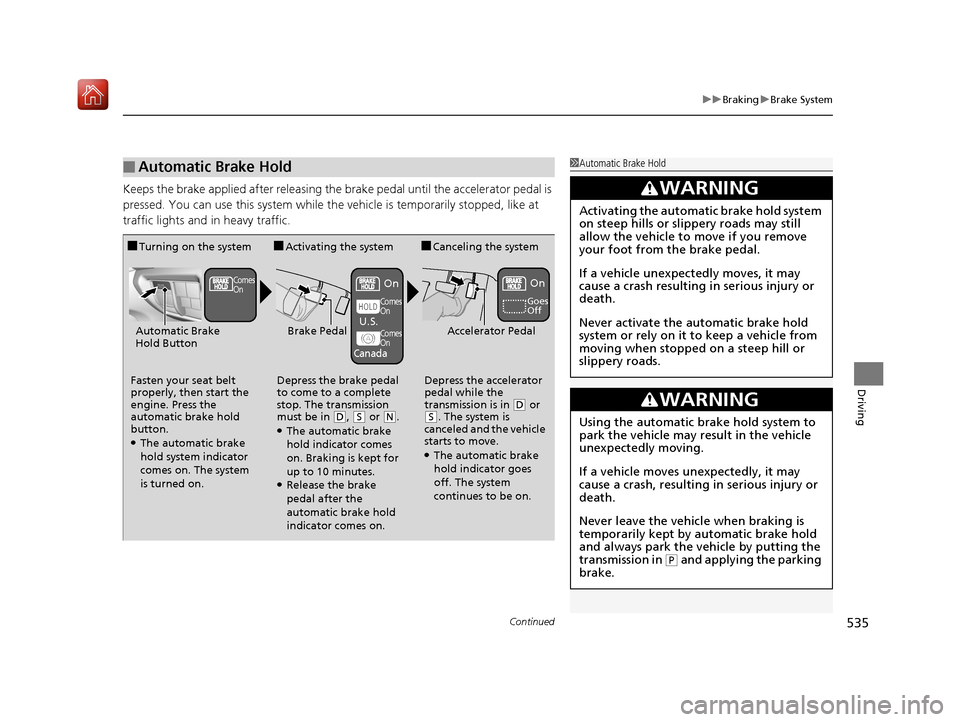
Keeps the brake applied after releasing the brake pedal until the accelerator pedal is
pressed. You can use this system while th e vehicle is temporarily stopped, like at
traffic lights and in heavy traffic.
■Automatic Brake Hold1 Automatic Brake Hold
3WARNING
Activating the automatic brake hold system
on steep hills or slippery roads may still
allow the vehicle to move if you remove
your foot from the brake pedal.
If a vehicle unexpectedly moves, it may
cause a crash resulting in serious injury or
death.
Never activate the automatic brake hold
system or rely on it to keep a vehicle from
moving when stopped on a steep hill or
slippery roads.
3WARNING
Using the automatic brake hold system to
park the vehicle may result in the vehicle
unexpectedly moving.
If a vehicle moves unexpectedly, it may
cause a crash, resulting in serious injury or
death.
Never leave the vehicle when braking is
temporarily kept by automatic brake hold
and always park the vehicle by putting the
transmission in
( P and applying the parking
brake.
■Turning on the system
Fasten your seat belt
properly, then start the
engine. Press the
automatic brake hold
button.
●The automatic brake
hold system indicator
comes on. The system
is turned on.
■Activating the system
Depress the brake pedal
to come to a complete
stop. The transmission
must be in
( D, (S or (N.●The automatic brake
hold indicator comes
on. Braking is kept for
up to 10 minutes.
●Release the brake
pedal after the
automatic brake hold
indicator comes on.
■Canceling the system
Depress the accelerator
pedal while the
transmission is in
( D or (S. The system is
canceled and the vehicle
starts to move.
●The automatic brake
hold indicator goes
off. The system
continues to be on.
Accelerator PedalBrake PedalAutomatic Brake
Hold Button
Goes
Off
Comes
OnOn On
Comes
On
Comes
On
U.S.
Canada
19 ACURA MDX-31TZ56510.book 535 ページ 2018年12月11日 火曜日 午後4時47分
Page 538 of 701
537
uuBraking uAnti-lock Brake System (ABS)
Driving
Anti-lock Brake System (ABS)
Helps prevent the wheels from locking up, and helps you retain steering control by
pumping the brakes rapidly, much faster than you.
The electronic brake distribu tion (EBD) system, which is part of the ABS, also
balances the front-to-rear braking distribution according to vehicle loading.
You should never pu mp the brake pedal. Let the ABS work for you by always
keeping firm, steady pressure on the brake pe dal. This is sometimes referred to as
“stomp and steer.”
■ABS operation
The brake pedal may pulsate slightly when the ABS is working. Depress the brake
pedal and keep holding the pedal firmly do wn. On dry pavement, you will need to
press on the brake pedal very hard before th e ABS activates. However, you may feel
the ABS activate immediately if you are trying to stop on snow or ice.
ABS may activate when you depres s the brake pedal when driving on:
• Wet or snow covered roads.
• Roads paved with stone.
• Roads with uneven surf aces, such as potholes, cracks, manholes, etc.
When the vehicle speed goes unde r 6 mph (10 km/h), the ABS stops.
■ABS1Anti-lock Brake System (ABS)
NOTICE
The ABS may not function correc tly if you use a tire of
the wrong size or type.
If the ABS indicator comes on while driving, there
may be a problem with the system.
While normal braking will not be affected, there is a
possibility that the ABS wi ll not be operating. Have
your vehicle checked by a dealer immediately.
The ABS is not designed for the purpose of reducing
the time or distance it takes for a vehicle to stop: It is
designed to limit brake lockup which can lead to
skidding and loss of steering control.
In the following cases, yo ur vehicle may need more
distance to stop than a vehicle without the ABS:
•You are driving on rough or uneven road surfaces,
such as gravel or snow.
•The tires are equipped with tire chains.
The following may be observed with the ABS system:
•Motor sounds coming from the engine
compartment when the brakes are applied, or
when system checks are being performed after the
engine has been started and while the vehicle
accelerates.
•Brake pedal and/or the ve hicle body vibration when
ABS activates.
These vibrations and sou nds are normal to ABS
systems and are no cause for concern.
19 ACURA MDX-31TZ56510.book 537 ページ 2018年12月11日 火曜日 午後4時47分
Page 544 of 701

Continued543
uuBraking uCollision Mitigation Braking SystemTM (CMBSTM)
Driving
The system may automatically shut off and the CMBSTM indicator will come on under
certain conditions. Some examples of thes e conditions are listed below. Other
conditions may reduce some of the CMBS
TM functions.
2 Front Sensor Camera P. 490
■Environmental conditions
• Driving in bad weather (rain, fog, snow, etc.).
• Sudden changes between light and dark, such as an entrance or exit of a tunnel.
• There is little contrast between objects and the background.
• Driving into low sunlight (e.g., at dawn or dusk).
• Strong light is reflec ted onto the roadway.
• Driving in the shadows of trees, buildings, etc.
• Roadway objects or structures are misinterpreted as vehicles and pedestrians.
• Reflections on the interi or of the windshield.
• Driving at night or in a dark condition such as a tunnel.
■Roadway conditions
• Driving on a snowy or wet roadway (obs cured lane marking, vehicle tracks,
reflected lights, road spray, high contrast).
• The road is hilly or the vehicle is approaching the crest of a hill.
• Driving on curvy, winding, or undulating roads.
■CMBSTM Conditions and Limitations1CMBSTM Conditions and Limitations
Do not paint, or apply any coverings or paint to radar
sensor area. This can impact CMBS
TM operation.
Have your vehicle checked by a dealer if you find any
unusual behavior of the system (e.g., the warning
message appears too frequently).
If the front of the vehicle is impacted in any of the
following situations, the ra dar sensor may not work
properly. Have your vehi cle checked by a dealer:
•The vehicle mounted onto a bump, curb, chock,
embankment, etc.
•You drive the vehicle where the water is deep.•Your vehicle has a frontal collision.
If you need the radar sensor to be repaired, or
removed, or the radar se nsor cover is strongly
impacted, turn off the system by pressing the
CMBS
TM off button and take your vehicle to a dealer.
19 ACURA MDX-31TZ56510.book 543 ページ 2018年12月11日 火曜日 午後4時47分
Page 548 of 701

547
uuBraking uCollision Mitigation Braking SystemTM (CMBSTM)
Driving
The CMBSTM may activate even when you are aware of a vehicle ahead of you, or
when there is no vehicle ahead. Some examples of this are:
■When Passing
Your vehicle approaches another vehicle ah ead of you and you change lanes to pass.
■At an intersection
Your vehicle approaches or passes another ve hicle that is making a left or right turn.
■On a curve
When driving through curves, your vehicle comes to a point where an oncoming
vehicle is right in front of you.
■Through a low bridge at high speed
You drive under a low or na rrow bridge at high speed.
■Speed bumps, road work sites, train tracks, roadside objects, etc.
You drive over speed bumps, steel road plates, etc., or yo ur vehicle approaches train
tracks or roadside objects [such as a traffi c sign and guard rail] on a curve or, when
parking, stationary vehicles and walls.
■With Little Chance of a Collision1 Collision Mitigation Braking SystemTM (CMBSTM)
For the CMBS
TM to work properly:
Always keep the radar sensor cover clean.
Never use chemical solvents or polishing powder for
cleaning the sensor cover. Clean it with water or a
mild detergent.
Do not put a sticker on the radar sensor cover or
replace the radar sensor cover.
19 ACURA MDX-31TZ56510.book 547 ページ 2018年12月11日 火曜日 午後4時47分
Page 595 of 701
594
uuMaintenance Under the Hood uBrake Fluid
Maintenance
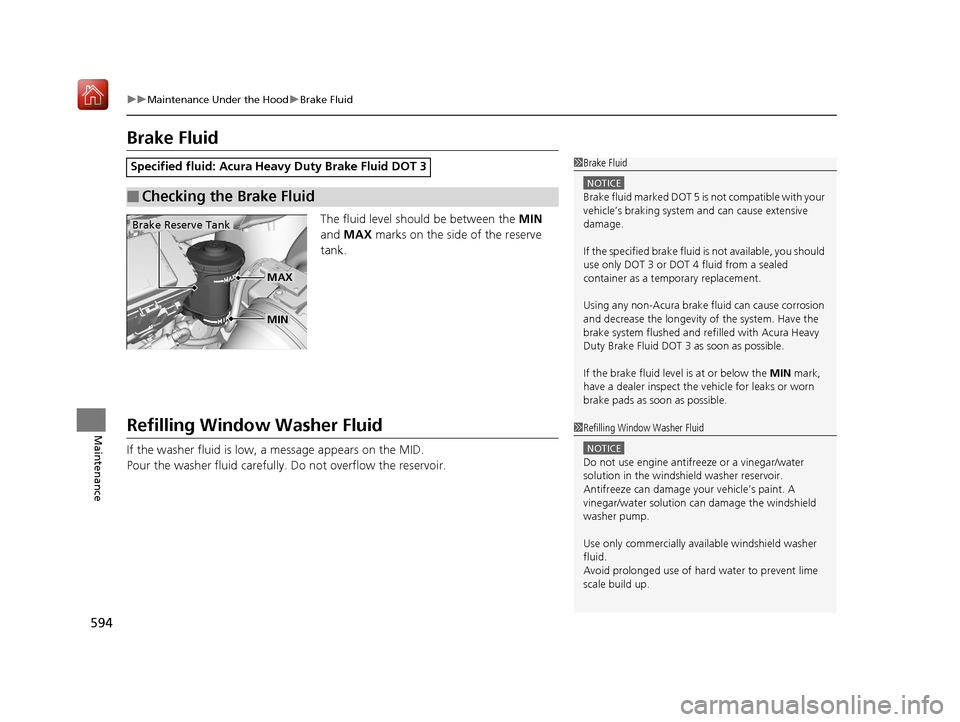
Brake Fluid
The fluid level should be between the MIN
and MAX marks on the side of the reserve
tank.
Refilling Window Washer Fluid
If the washer fluid is low, a message appears on the MID.
Pour the washer fluid carefully. Do not overflow the reservoir.
Specified fluid: Acura Heavy Duty Brake Fluid DOT 3
■Checking the Brake Fluid
1Brake Fluid
NOTICE
Brake fluid marked DOT 5 is not compatible with your
vehicle’s braking system and can cause extensive
damage.
If the specified brake fluid is not available, you should
use only DOT 3 or DOT 4 fluid from a sealed
container as a temporary replacement.
Using any non-Acura brake fl uid can cause corrosion
and decrease the longevity of the system. Have the
brake system flushed and re filled with Acura Heavy
Duty Brake Fluid DOT 3 as soon as possible.
If the brake fluid level is at or below the MIN mark,
have a dealer inspect the vehicle for leaks or worn
brake pads as soon as possible.
Brake Reserve Tank
MIN
MAX
1 Refilling Window Washer Fluid
NOTICE
Do not use engine antifreeze or a vinegar/water
solution in the windshield washer reservoir.
Antifreeze can damage y our vehicle’s paint. A
vinegar/water solution ca n damage the windshield
washer pump.
Use only commercially avai lable windshield washer
fluid.
Avoid prolonged use of hard water to prevent lime
scale build up.
19 ACURA MDX-31TZ56510.book 594 ページ 2018年12月11日 火曜日 午後4時47分