ADS Acura MDX 2019 Owner's Guide
[x] Cancel search | Manufacturer: ACURA, Model Year: 2019, Model line: MDX, Model: Acura MDX 2019Pages: 701, PDF Size: 38.75 MB
Page 610 of 701
609
uuChecking and Maintaining Tires uWear Indicators
Maintenance
Wear Indicators
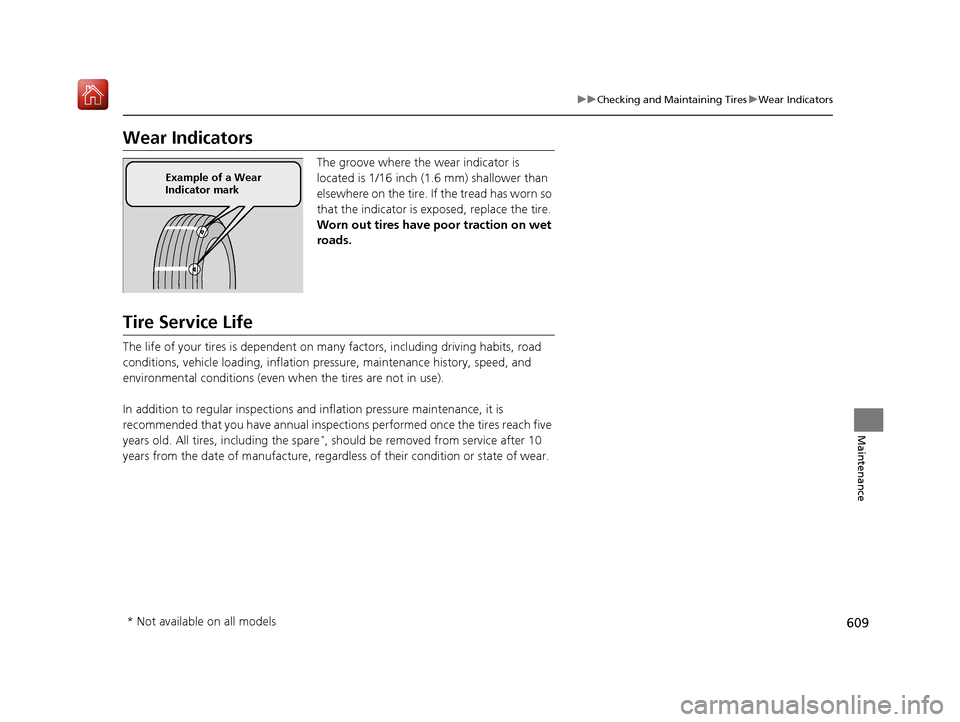
The groove where the wear indicator is
located is 1/16 inch (1.6 mm) shallower than
elsewhere on the tire. If the tread has worn so
that the indicator is ex posed, replace the tire.
Worn out tires have po or traction on wet
roads.
Tire Service Life
The life of your tires is dependent on many factors, including driving habits, road
conditions, vehicle loading, inflation pressure, maintenance history, speed, and
environmental conditions (even wh en the tires are not in use).
In addition to regular inspections and inflation pressure maintenance, it is
recommended that you have annual inspections performed once the tires reach five
years old. All tires, including the spare
*, should be removed from service after 10
years from the date of manufacture, regardle ss of their condition or state of wear.
Example of a Wear
Indicator mark
* Not available on all models
19 ACURA MDX-31TZ56510.book 609 ページ 2018年12月11日 火曜日 午後4時47分
Page 613 of 701
612
uuChecking and Maintaining Tires uWinter Tires
Maintenance
Winter Tires
If driving on snowy or frozen roads, mount all season marked M+S tires, snow tires,
or tire chains; reduce speed; and maintain sufficient distance be tween vehicles when
driving.
Be particularly careful when operating the steering wheel or brakes to prevent
skidding.
Use tire chains, snow tires, or all season ti res when necessary or according to the law.
When mounting, refer to the following points.
For winter tires:
• Select the size and load ranges that are the same as the original tires.
• Mount the tires to all four wheels.
For tire chains:
• Install them on the front tires only.
• Because your vehicle has limited tire clearance, we strongly recommend using the
chains listed below:
• Follow the chain manufacturer’s instruction when installing. Mount them as
tightly as you can.
• Check that the chains do not to uch the brake lines or suspension.
• Drive slowly.
Cable-type: SCC Cable Ch ain Super Z LT - ZT735
Cable-type: SCC Cable Chain Super Z6 - SZ435
1Winter Tires
NOTICE
Traction devices that are th e wrong size or improperly
installed can damage your vehicle’s brake lines,
suspension, body, and wheels. Stop driving if they are
hitting any part of the vehicle.
When tire chains are mounted, follow the chain
manufacturer’s instructi ons regarding vehicle
operational limits.
If your vehicle is equipped with summer tires, be
aware that these tires are not designed for winter
driving conditions. For more information, contact a
dealer.
3WARNING
Using the wrong chains, or not properly
installing chains, can damage the brake
lines and cause a crash in which you can be
seriously injured or killed.
Follow all instruction s in this owner’s
manual regarding the selection and use of
tire chains.
Models with 245/60R18 105H tires
Models with 245/50R20 102H tires
Models with 265/45R20 104H tires
Models with 265/45R20 104V tires
19 ACURA MDX-31TZ56510.book 612 ページ 2018年12月11日 火曜日 午後4時47分
Page 623 of 701
622
uuCleaning uExterior Care
Maintenance
Exterior Care
Dust off the vehicle body after you drive.
Regularly inspect your vehi cle for scratches on painted surfaces. A scratch on a
painted surface can result in body rust. If you find a scratch, promptly repair it.
Wash the vehicle regularly. Wash more frequently when driving in the following
conditions:
• If driving on roads with road salt.
• If driving in coastal areas.
• If tar, soot, bird droppings, insects, or tree sap are stuck to painted surfaces.
• Make sure to follow the instructions indicated on the automated car wash.
• Fold in the door mirrors.
• For models equipped with automatic inte rmittent wipers, turn the wipers off.
■Washing the Vehicle
■Using an Automated Car Wash
1Washing the Vehicle
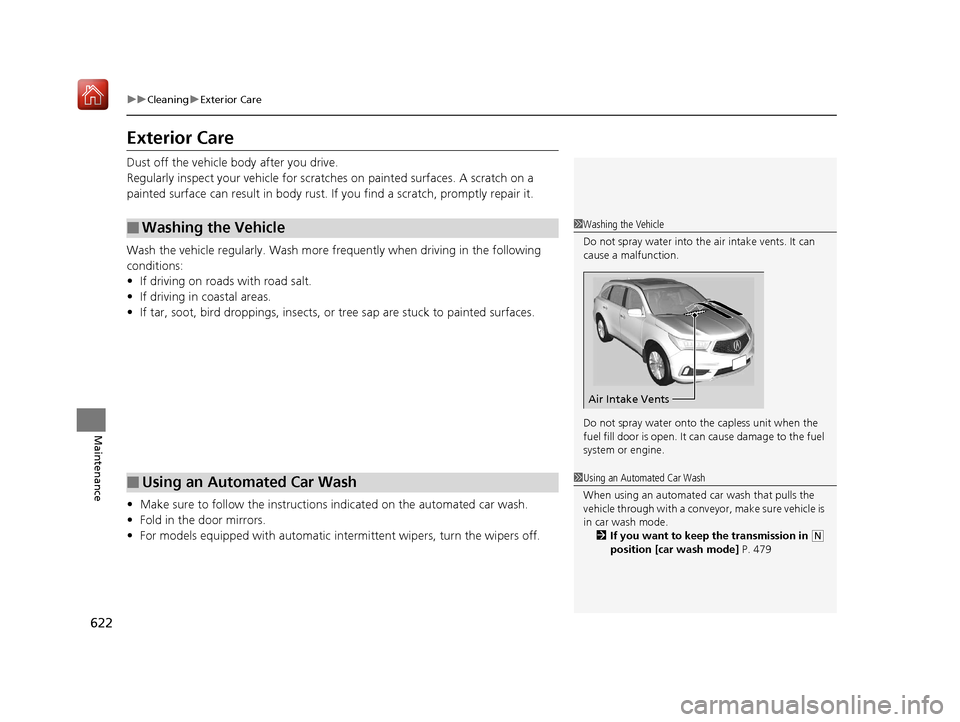
Do not spray water into the air intake vents. It can
cause a malfunction.
Do not spray water onto the capless unit when the
fuel fill door is open. It ca n cause damage to the fuel
system or engine.
Air Intake Vents
1 Using an Automated Car Wash
When using an automated car wash that pulls the
vehicle through with a conveyor, make sure vehicle is
in car wash mode. 2 If you want to keep the transmission in
(N
position [car wash mode] P. 479
19 ACURA MDX-31TZ56510.book 622 ページ 2018年12月11日 火曜日 午後4時47分
Page 637 of 701
636
uuIf a Tire Goes Flat uTemporarily Repairing a Flat Tire*
Handling the Unexpected
Temporarily Repairing a Flat Tire*
If the tire has a large cut or is otherwise se verely damaged, you will need to have the
vehicle towed. If the tire only has a smal l puncture, from a nail for instance, you can
use the temporary tire repair kit so that you can drive to the nearest service station
for a more permanent repair.
If a tire goes flat while driving, grasp the steering wheel firmly, and brake gradually
to reduce speed. Then stop in a safe place.
1. Park the vehicle on a firm, level, and non-slippery surface and apply the parking
brake.
2. Change the gear position to
(P.
3. Turn on the hazard warning lights an d set the power mode to VEHICLE OFF
(LOCK).
1 Temporarily Repairing a Flat Tire*
The kit should not be used in the following situations.
Instead, contact a dealer or roadside assistance to
have the vehicle towed.
•The tire sealant has expired.
•More than one tire is punctured.•The puncture or cut is larger than 3/16 inch (4mm).
•The tire side wall is da maged or the puncture is
outside the contact area.
•Damage has been caused by driving with the tire
extremely under inflated.
•The tire bead is no longer seated.
•The rim is damaged.
Do not remove a nail or screw that punctured the
tire. If you remove it from the tire, you may not be
able to repair the puncture using the kit.
NOTICE
Do not use a puncture-repairing agent other than the
one provided in the kit that came with your vehicle. If
a different agent is used, you may permanently
damage the tire pressure sensor.
When the puncture is:Kit Use
Smaller than 3/16 inch (4 mm)Yes
Larger than 3/16 inch (4 mm)No
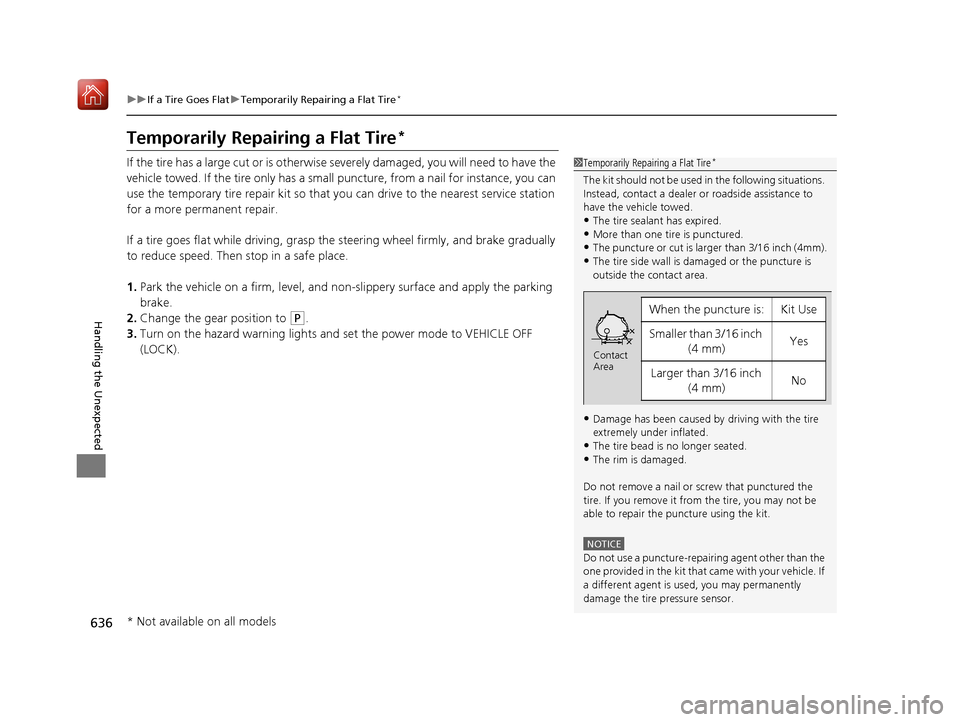
Contact
Area
* Not available on all models
19 ACURA MDX-31TZ56510.book 636 ページ 2018年12月11日 火曜日 午後4時47分
Page 671 of 701
670
Handling the Unexpected
Emergency Towing
Call a professional towing service if you need to tow your vehicle.
■Flat bed equipment
The operator loads your vehicle on the back of a truck.
This is the best way to transport your vehicle.
■Wheel lift equipment
The tow truck uses two pivoti ng arms that go under the front tires and lift them off
the ground. The rear tires remain on the ground. This is an acceptable way to
tow your vehicle.
1 Emergency Towing
NOTICE
Trying to lift or tow your vehicle by the bumpers will
cause serious damage. The bumpers are not designed
to support the vehicle’s weight.
NOTICE
Improper towing such as towing behind a
motorhome or other motor vehicle can damage the
transmission.
Never tow your vehicle with just a rope or chain.
It is very dangerous, since ropes or chains may shift
from side to side or break.
All models
2WD models
19 ACURA MDX-31TZ56510.book 670 ページ 2018年12月11日 火曜日 午後4時47分
Page 681 of 701
680
Information
Reporting Safety Defects
In the U.S.
If you believe that your vehicle has a defect which could cause a crash or could cause injury or death, you
should immediately inform the Nati onal Highway Traffic Safety Administration (NHTSA) in addition to
notifying American Honda Motor Co., Inc.
If NHTSA receives similar complaints, it may open an inve stigation, and if it finds that a safety defect exists
in a group of vehicles, it may order a recall and remedy campaign. However, NHTSA cannot become involved
in individual problems between you, your dealer, or American Honda Motor Co., Inc.
To contact NHTSA, you may call the Vehicle Safety Ho tline toll-free at 1-888-327-4236 (TTY: 1-800-424-
9153); go to http://www.safercar.gov ; or write to: Administrator, NHTSA , 1200 New Jersey Avenue, SE.,
Washington, DC 20590. You can also obtain othe r information about motor vehicle safety from http://
www.safercar.gov .
In Canada
If you believe that your vehicle has a defect which c ould cause a crash or could cause injury or death, you
should immediately inform Honda Canada Inc. and you may also inform Transport Canada.
If Transport Canada receives similar complaints, it may open an investigation, and if it finds that a safety
defect exists in a group of vehicles, it may lead to a recall and remedy campaign. However, Transport Canada
cannot become involved in individual problems between you, your dealer, or Honda Canada Inc.
To contact Transport Canada’s Defect Investigations and Recalls Division, you may call 1-800-333-0510. For
more information on reporting safety defects or about motor vehicle safety, go to http://www.tc.gc.ca/
roadsafety .
19 ACURA MDX-31TZ56510.book 680 ページ 2018年12月11日 火曜日 午後4時47分
Page 688 of 701

687
uuClient Service Information u
Continued
Information
Music recognition technology and related
data are provided by Gracenote ®.
Gracenote is the indus try standard in music
recognition technology and related content
delivery.
For more information, visit
www.gracenote.com.
When music is recorded to the HDD from a
CD, information such as the recording artist
and track name are retrieved from the
Gracenote Database and displayed (when
available).
Gracenote may not contain information for
all albums.
Gracenote is an in ternet-based music
recognition service that allows artist, album,
and track information from CDs to display
on the HDD.
Gracenote users are allowed 4 free updates
a year. More information about Gracenote,
its features, and downloads are available at
■Gracenote Music Recognition
Service (CDDB)
*
www.acura.com (in U.S.) or www.acura.ca
(in Canada).
CD and music-related data from Gracenote,
Inc., copyright © 2000 to present
Gracenote. Gracenote Software, copyright
© 2000 to present Gracenote.
One or more patents owned by Gracenote
apply to this produc t and service. See the
Gracenote website for a non-exhaustive list
of applicable Gracenote patents.
Gracenote, CDDB, MusicID, MediaVOCS,
the Gracenote logo and logotype, and the
“Powered by Gracenote” logo are either
registered trademarks or trademarks of
Gracenote in the United States and/or other
countries.
This application or device contains software
from Gracenote, Inc. of Emeryville,
California (“Grace note”). The software
from Gracenote (the “Gracenote
Software”) enables this application to
perform disc and/or f ile identification and
obtain music- related information, including
name, artist, track, and title information
(“Gracenote Data”) from online servers or
■Gracenote ® END USER LICENSE
AGREEMENT
*
embedded databases (collectively,
“Gracenote Servers”) and to perform other
functions. You may use Gracenote Data
only by means of th e intended End-User
functions or this application or device.
You agree that you will use Gracenote Data,
the Gracenote Software, and Gracenote
Servers for your own personal non-
commercial use only.
You agree not to assign, copy, transfer, or
transmit the Gracenote Software or any
Gracenote Data to any third party.
YOU AGREE NOT TO USE OR EXPLOIT
GRACENOTE DATA, THE GRACENOTE
SOFTWARE, OR GRACENOTE SERVERS,
EXCEPT AS EXPRESSLY PERMITTED HEREIN.
You agree that your no n-exclusive license to
use the Gracenote Data, the Gracenote
Software, and Gracenote Servers will
terminate if you violate these restrictions. If
your license terminates , you agree to cease
any and all use of the Gracenote Data, the
Gracenote Software, and Gracenote
Servers.
* Not available on all models
19 ACURA MDX-31TZ56510.book 687 ページ 2018年12月11日 火曜日 午後4時47分
Page 694 of 701
693
Index
Flat Tire............................................. 629, 636
Floor Mats ................................................ 621
Fluids Automatic Transmission .......................... 593
Brake ...................................................... 594
Engine Coolant ....................................... 591
Windshield Washer ................................. 594
Fog Lights ................................................. 176
Folding Down the Second Row Seat ...... 198
Folding Down the Third Row Seat .......... 204
Foot Brake ................................................ 534
Front Airbags (SRS) .................................... 44
Front Seats ................................................ 192
Adjusting ................................................ 192
Front Sensor Camera ............................... 490
Fuel ..................................................... 20, 571
Fuel Economy and CO
2 Emissions ............ 574
Gauge .................................................... 119
Instant Fuel Economy .............................. 123
Low Fuel Indicator..................................... 85
Range ..................................................... 123
Recommendation.................................... 571
Refueling ................................................ 571
Fuel Economy and CO
2 Emissions ............ 574
Fuel Fill Cap ................................................ 20
Fuel Fill Door ...................................... 20, 572
Unable to Unlock .................................... 671
Fuses ......................................................... 662
Inspecting and Changing ........................ 669
Locations ........................ 662, 665, 667, 668
G
Gasoline (Fuel) Economy ................................................. 574
Gauge ..................................................... 119
Information ............................................. 571
Low Fuel Indicator ..................................... 85
Refueling ................................................. 571
Gauges ...................................................... 119
Gear Position Indicator ...................... 83, 477
Gear Shift Positions Automatic Transmission ........................... 475
Glass (care) ................................................ 623
Glove Box .................................................. 209
H
Handling the Unexpected ........................ 627
HandsFreeLink ® (HFL) ............................... 395
Auto Answer ........................................... 412
Automatic Import of Cellular Phonebook
and Call History ..................................... 414
Automatic Transferring ............................ 412
Displaying Messages ................................ 432
HFL Buttons ............................................. 395
HFL Menus .............................................. 398
HFL Status Display ................................... 396
Limitations for Manua l Operation ............ 397
Making a Call .......................................... 423
Options During a Call .............................. 429
Phone Setup ............................................ 403
Phonebook Phonetic M odification ........... 418 Receiving a Call ....................................... 428
Receiving a Text/E-mail Message.............. 430
Ring Tone................................................ 413
Roadside Assistance ................................ 436
Selecting a Mail Account ......................... 431
Speed Dial ............................................... 415
To Create a Security PIN .......................... 410
To Set Up a Text/E-mail Message
Option................................................... 408
Use Contact Photo .................................. 413
Hard Disk Drive (HDD) Audio .................. 273
Hazard Warning Button .............................. 4
HDMI
TM Port .............................................. 339
Head Restraints ........................ 199, 201, 202
Headlight Washers ................................... 183
Headlights ................................................. 173
Aiming .................................................... 595
Auto High-Beam System.......................... 177
Automatic Operation............................... 174
Dimming ......................................... 173, 176
Operating................................................ 173
Heated Door Mirrors ................................ 185
Heated Steering Wheel ............................ 217
Heated Windshield ................................... 185
Heater (Steering Wheel) .......................... 217
Heaters (Seat) ................................... 218, 219
HFL (HandsFreeLink ®)............................... 395
High Beam Indicator .................................. 88
Hill Start Assist System ............................. 472
HomeLink ® Universal Transceiver ............ 392
Honda App License Agreement .............. 321
19 ACURA MDX-31TZ56510.book 693 ページ 2018年12月11日 火曜日 午後4時47分